In this article:
- What Senior Management Actually Wants in the First 90 Seconds
- The Four-Slide Opening That Earns Attention Fast
- Sequencing Data So Senior Leaders Do Not Skip Ahead
- Handling Interruptions from Senior Executives
- Closing with a Decision Ask, Not a Summary
- Common Mistakes That Lose Senior Management Fast
- Frequently Asked Questions
Kenji Watanabe had been promoted to Director of Commercial Strategy six months earlier, and the new role meant he was presenting to senior management every fortnight instead of twice a year. He knew how to build a deck. He had been praised for his analysis throughout his career as a manager. What he had not prepared for was how differently senior executives listened.
The presentation that shifted his understanding was a quarterly commercial review to the executive committee. Kenji had prepared 22 slides covering market context, competitor moves, pricing dynamics, segment performance, and his three-part recommendation. Two minutes in, on slide 2, the COO cut across him: “Kenji, stop. What are you asking us to decide?”
He was not ready for the question. He had planned to build to the recommendation across the full 22 slides, the way he had been trained to present to his previous manager. The next 90 seconds were painful. He fumbled through an explanation, flipped forward to slide 18, and watched the CFO glance at her phone. The meeting moved on to the next agenda item after eleven minutes, with his recommendation noted but not approved.
What Kenji changed for his next executive committee presentation was the order, not the content. He opened with one sentence — “I am recommending we exit the SMB segment in Southern Europe and redirect the £4.2 million investment into enterprise accounts in DACH.” The rest of the deck became support for that recommendation. The decision was approved in 18 minutes. The CFO asked two sharp questions. The COO said, at the end, “That was a useful paper.” Kenji did not present better. He presented in the sequence senior management listens in.
If you are now presenting to senior management regularly and want a structured template library for executive-level presentations, the Executive Slide System provides scenario playbooks and slide frameworks designed for exactly this audience.
What Senior Management Actually Wants in the First 90 Seconds
Senior management does not listen the way middle management listens. A department head or functional manager will typically follow a conventional narrative arc — context, problem, analysis, recommendation. They have the time and the domain familiarity to absorb the story as it unfolds. Senior executives have neither. By the time material reaches the executive committee or the leadership team, the audience is optimising for three things: what decision is needed, what the recommendation is, and whether the reasoning stands up to scrutiny.
This is why the first 90 seconds are disproportionately important when you present to senior management. During that window, the room is deciding how much of the remaining meeting they need to pay attention to. If you open with background context, they will start scanning the deck for the conclusion. If you open with your recommendation, they will listen to every slide that follows because they are now testing your logic rather than searching for it. The same psychology underpins the advice in our broader guide on presenting to executives — senior audiences reward clarity at the start, not clarity at the end.
Three specific questions are running in every senior manager’s head as you open: “What is this really about?”, “What do you want from me?”, and “Do I trust your judgement on this?” Your opening 90 seconds should answer all three. The decision at stake, the recommendation you are making, and a single sentence of credibility — typically the data point or evidence base that makes your recommendation defensible. Anything else in the first 90 seconds is delaying the moment the room starts listening properly.
There is a deeper reason this matters. Senior managers absorb information under time pressure and attentional fragmentation. They may have read two board papers before your meeting and will read three more after it. They are not being rude when they skip ahead — they are pattern-matching your material against dozens of other inputs competing for the same mental bandwidth. Your job is to make the pattern obvious in the first 90 seconds so they can commit to engaging with the detail.
Stop Building Senior Management Decks from a Blank Slide
The Executive Slide System includes 26 templates, 93 AI prompts, and 16 scenario playbooks — covering executive committee briefings, senior leadership reviews, and decision-ask presentations. Templates for the exact scenarios where you need to earn attention fast.
£39 — instant access. Designed for high-performers now presenting to senior management regularly.
The Four-Slide Opening That Earns Attention Fast
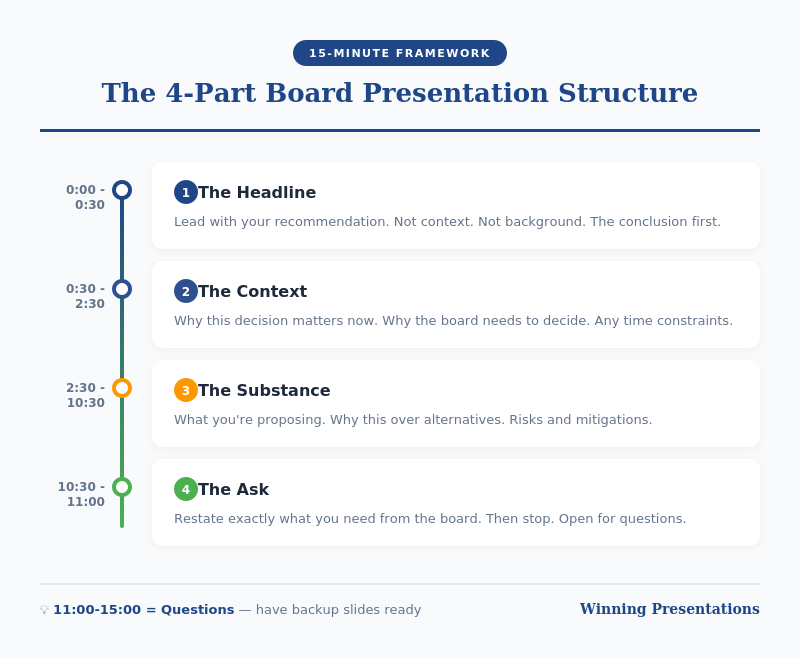
The structure that consistently works for senior management is a four-slide opening that front-loads the answer and earns the right to present the supporting detail. Each slide serves a specific purpose, and the sequence is non-negotiable.
Slide 1: The decision slide. One sentence at the top identifying the decision you are asking senior management to make. Underneath, three bullets: your recommendation, the expected outcome if approved, and the risk if the decision is deferred. Nothing else. This slide is a contract with the room — it tells them what you need from the meeting and what will happen if they give it to you. If your first slide is a title slide or an agenda, you have already lost the first 30 seconds of attention.
Slide 2: The one-number case. A single metric or financial figure that captures why this decision matters now. Revenue impact, margin opportunity, cost exposure, regulatory deadline — whatever quantifies the stakes. Senior managers do not need three numbers to understand materiality; they need one number that they believe. Support it with a short sentence explaining the basis of the figure and the confidence level.
Slide 3: What is changing. Senior executives care disproportionately about change, not steady state. Why is this decision needed now rather than six months ago or six months from now? Market shift, competitor move, regulatory window, internal capability gap — whatever the triggering context is. This slide answers the unspoken question “why is this on the agenda?” and demonstrates that you have thought about timing, not just substance.
Slide 4: The alternatives considered. Before you defend your recommendation, briefly show the two or three realistic alternatives you evaluated and why you rejected them. This is the slide that earns you credibility. It signals that you have done the work of thinking about the problem properly, not just advocated for your preferred answer. Senior managers are far more willing to approve a recommendation when they can see that the alternatives have been considered than when they feel they are being pushed down a single path.
This four-slide opening typically takes four to six minutes to present. By the end of slide 4, the senior management audience knows what you are asking, why it matters, why now, and that you have done the analytical work. Every slide that follows is support for a conclusion they have already heard — which is exactly how senior executives prefer to process material. For a deeper treatment of the opening itself, see our guide on the executive presentation opening.

Sequencing Data So Senior Leaders Do Not Skip Ahead
The body of your presentation — the slides that follow the four-slide opening — needs to sequence data in the order senior leaders actually consume it. This is the opposite of how most analysts are trained to build decks. Analytical training teaches inductive structure: data, analysis, synthesis, conclusion. Senior management wants deductive structure: conclusion, supporting logic, supporting data, caveats.
For each major claim in your recommendation, follow a consistent three-layer pattern. Lead with the claim as a full sentence at the top of the slide. Follow with the two or three supporting points that make the claim defensible. Finish with the specific data or evidence underneath. This pattern respects the reading habits of senior managers who skim the slide before listening — they read the top-of-slide claim, form a hypothesis, and then use your verbal explanation to confirm or challenge it.
Avoid the common mistake of embedding your actual conclusion in a chart legend or a table footnote. If the key insight on a slide is that margin compression is accelerating in one segment, that sentence should be the slide title, not a callout box on a busy chart. Senior managers will miss it if it is not at the top. This is part of developing a senior leader presentation style that translates analytical depth into executive-ready communication.
Data density is the other sequencing trap. A slide with four charts, two tables, and six callouts will be ignored — not because the audience is incapable of absorbing detail, but because they will not invest effort in decoding material that the presenter has not prioritised. One primary chart per slide, with secondary data either on a follow-up slide or in an appendix, consistently performs better in senior-level meetings.
What order should you present data in when briefing senior management? Conclusion first, supporting logic second, detailed data third. Never build from data to conclusion in a senior-level meeting. Executives will either skip ahead to find the conclusion or disengage by the time you reach it.
If this structure feels different from what you were taught, you are not alone. Most analytical training optimises for accuracy and completeness. Presenting to senior management optimises for decision velocity. Both matter. The Executive Slide System includes templates that make the conclusion-first structure the path of least resistance when you are building under time pressure.
Handling Interruptions from Senior Executives
Senior executives interrupt. It is not rudeness, and it is not a signal that your presentation is failing. It is how they process material under time pressure. A CFO who stops you on slide 3 to ask about the working capital assumption is engaging with your recommendation, not rejecting it. The mistake most mid-level presenters make is treating interruptions as disruptions to their planned flow. The adjustment is treating them as the flow.
Three techniques help. First, answer the question directly and briefly — one or two sentences — rather than launching into the slide you had prepared on that topic. If the executive wants more, they will ask. If they do not, you have saved three minutes and maintained the room’s pace. Second, signal clearly that the question is addressed before returning to your sequence: “To your point on working capital, the assumption is three months stretched from current terms. That is built into slide 7 if we want more detail. Returning to the segmentation…”
Third, welcome interruptions verbally. A simple phrase at the start of your presentation — “Please stop me wherever it is useful” — lowers the interpersonal cost of interrupting and creates a dialogue rather than a monologue. Senior managers are more engaged in discussions they shape than in presentations they receive.
The interruption you most need to prepare for is the early one — the “what are you asking us to decide?” question that hits in the first two minutes when the audience is impatient with context. If your four-slide opening is disciplined, this question rarely arrives, because you have already answered it. If it does arrive, respond with the one-sentence version of your recommendation and then continue from where you were. Do not apologise. Do not restart. Senior executives respect presenters who absorb interruptions without losing composure.
There is also a subtler form of interruption to handle — the sidebar conversation between two executives while you are mid-slide. This is usually a sign that your material has triggered a discussion they need to have. Pause briefly, let them finish, and resume without comment. Fighting for the floor when senior executives are deliberating among themselves damages your standing faster than almost any other behaviour.

The Slide Templates Senior Management Actually Respects
The Executive Slide System gives you 26 templates, 93 AI prompts, and 16 scenario playbooks — built around the conclusion-first, decision-led structure senior leaders expect. Stop guessing at the right format for executive audiences.
£39 — instant access.
Closing with a Decision Ask, Not a Summary
The closing slide of a presentation to senior management should not summarise what you just said. Senior executives were in the room; they do not need a recap. The closing slide should crystallise the decision the meeting has been building towards and make it easy to say yes, no, or modify.
An effective closing slide has three elements. First, the recommendation restated as a single sentence — the same sentence that opened slide 1. Repetition at the end anchors the ask in the room’s memory as the meeting concludes. Second, the specific decision required with explicit options. Not “we recommend proceeding” but “we are asking the executive committee to approve Option A, with a review point in Q3.” Third, the next step that follows approval — what will happen in the 30 days after the decision is made. This signals operational readiness and reduces the risk of the committee deferring because implementation feels uncertain.
Avoid the closing slide that says “Thank you — questions?” It wastes the most strategically important slide in your deck. The room will ask questions regardless; you do not need to invite them. Use that final slide to make the decision ask impossible to miss.
A well-constructed decision ask also forces clarity on you as the presenter. If you cannot articulate the decision as a binary or three-option choice, you probably do not have a presentation-ready recommendation yet. The act of writing the closing slide first — before building the rest of the deck — is a diagnostic for whether the thinking behind the presentation has matured sufficiently to warrant senior management time.
Common Mistakes That Lose Senior Management Fast
Four patterns recur in presentations to senior management that fail to land. Recognising them in your own material before the meeting is the fastest way to improve how you present at this level.
Context-first openings. Any opening that begins with market context, historical background, or a recap of the project to date is delaying the signal the room is waiting for. Move all context to a later slide or into the appendix. If context is genuinely essential before the recommendation makes sense, limit it to one slide and no more than 60 seconds.
Passive recommendations. Phrases like “we could consider” or “one option might be” tell senior management that you have not made a recommendation. Say what you are recommending, as a full sentence, with conviction. Senior managers will push back if they disagree; they will not respect hedging.
Excessive appendix reliance. Referring to slides 24, 31, and 47 during a live presentation signals that the main deck is not self-contained. A main deck for senior management should stand on its own at 10 to 15 slides. Use the appendix for material you expect to be asked about, not for content you could not fit in.
Reading the slides. Senior managers can read faster than you can speak. If you narrate what is on the screen, you insult their processing speed. Use the verbal channel to add interpretation, emphasis, or caveats that are not visible on the slide — and let the slide itself carry the facts.
The common thread across all four mistakes is a mismatch between the presenter’s preparation habits and the audience’s consumption habits. Senior management is a specific audience with specific expectations. Presenting to them well is a skill built deliberately, not an extension of presenting to peers or direct reports.
Frequently Asked Questions
What do senior executives actually want in a presentation?
Senior executives want three things in a presentation: a clear decision ask, a well-reasoned recommendation, and confidence that the alternatives have been properly considered. They are not looking for comprehensive coverage of the topic — they are looking for professional judgement applied to a specific question. The strongest signal you can send in the first two minutes is that you know what you are recommending and why. Context, analysis, and data are supporting material, not the main event.
How long should a senior management presentation be?
For a standalone senior management presentation, aim for 10 to 15 slides and 15 to 20 minutes of presentation time, with the rest of the allocated meeting slot reserved for discussion and decision. If you are one agenda item in a longer executive committee meeting, you may have as little as 10 minutes, in which case 6 to 8 slides is more realistic. In both cases, your presentation should never fill the entire time slot — leaving room for questions and deliberation is how decisions actually get made.
How do you open a presentation to senior management?
Open with the decision you are asking them to make, followed by your recommendation, the expected outcome, and the risk of deferring. This “decision slide” opening replaces the conventional agenda or context slide and earns attention within the first 30 seconds. Senior management listens differently from middle management — they want the conclusion first, not the build-up. An opening that withholds the recommendation in favour of context will lose the room before your evidence arrives.
How do you handle being cut off by a senior executive mid-presentation?
Answer the question directly and briefly, signal clearly that you are returning to your sequence, and continue from where you were without apologising or restarting. Do not treat the interruption as a failure of your presentation — it is almost always a sign of engagement, not rejection. The best presenters to senior audiences welcome interruptions at the start (“please stop me wherever it is useful”) and absorb them without losing pace. A composed response to an early interruption often builds more credibility than the rest of the deck combined.
Join The Winning Edge
Free weekly newsletter for high-performers now presenting to senior management. Practical frameworks, executive audience strategies, and slide structure guidance — delivered every Thursday.
Not ready for the full system? Start here instead: download the free Executive Presentation Checklist — a quick-reference guide for structuring any high-stakes senior management or board presentation.
Read next: If you are being promoted into roles where executive influence is as important as execution, see Executive Influence Training Online: How to Build the Skill Deliberately for a complementary framework on building influence with senior audiences.
Mary Beth Hazeldine is the Owner & Managing Director of Winning Presentations. With 25 years of corporate banking experience at JPMorgan Chase, PwC, Royal Bank of Scotland, and Commerzbank, she advises executives across financial services, healthcare, technology, and government on structuring presentations for high-stakes scenarios.