Tag: boardroom presentation

24 Apr 2026

Boardroom Presentation Skills: The Structured System for Executive Credibility

Quick Answer

Boardroom presentation skills are not about charisma or natural confidence. They are a structured set of competencies covering how you organise information for senior decision-makers, how you design slides that support rather than replace your argument, and how you handle questions from people who are paid to challenge your thinking. These skills can be learned systematically, and the executives who present most effectively in boardrooms are typically the ones who have invested in structured preparation — not the ones who rely on instinct.

Emeka had been presenting project updates to his line manager for three years with no issues. Then he was asked to present a strategic recommendation to the executive committee.

He built the same kind of deck he always built: detailed, thorough, twenty-eight slides covering every aspect of the proposal. He rehearsed the content until he could deliver it without notes. He arrived early, tested the projector, and felt reasonably prepared.

The CEO stopped him on slide five. “What are you asking us to decide?” Emeka paused. He knew the answer — it was on slide twenty-two. But the question exposed something he hadn’t considered: his deck was built to explain, not to persuade. In a boardroom, the audience doesn’t wait for the explanation to finish before they start making judgements. They are evaluating your recommendation from the moment you open your mouth. And if they have to wait twenty-two slides to find out what you’re recommending, you have already lost them.

That meeting changed how Emeka approached every subsequent board presentation. Not by learning to be more confident, but by learning to structure his content for the way board-level audiences actually process information.

Preparing for a boardroom presentation?

The Executive Slide System gives you the templates and frameworks designed specifically for board-level audiences — so your content is structured for how executives actually make decisions.

Explore the Executive Slide System →

What the Boardroom Requires That Other Settings Do Not

The boardroom is not simply a higher-stakes version of a team meeting. It operates under a different set of rules, and presenters who treat it as a scaled-up project update consistently underperform.

Board members and executive committees have three characteristics that distinguish them from other audiences. First, they are time-constrained. A board meeting covers multiple agenda items in a fixed window. Your slot is shorter than you think, and the expectation is that you will use it efficiently. A presentation that takes forty minutes when you were allocated twenty signals that you do not understand the audience you are presenting to.

Second, they are decision-oriented. Every item on a board agenda exists because a decision is required. If your presentation does not contain a clear recommendation and a specific ask, the board will wonder why it was on the agenda at all. Information for its own sake is not valued at this level — information that supports a decision is.

Third, they are adversarial by design. Board members are paid to challenge, question, and stress-test proposals. This is not personal. It is governance. A presenter who interprets board questions as criticism rather than due diligence will become defensive — and defensive presenters lose boardrooms. The ability to receive challenge calmly and respond with evidence is the single most important boardroom presentation skill.

Understanding board presentation best practices starts with accepting these three realities and building your presentation around them — not around what you want to communicate.

The Three Core Competencies of Boardroom Presenters

Effective boardroom presenters are not born. They are developed through deliberate practice in three specific areas.

Competency 1: Executive framing

Executive framing means structuring your content so that the recommendation comes first, the evidence comes second, and the detail comes only when requested. This is the inverse of how most professionals are trained to communicate — in academic and technical settings, you build the case before presenting the conclusion. In a boardroom, the conclusion is the starting point. Everything else is evidence the audience evaluates against the conclusion you have already stated.

The practical test: if a board member walked in five minutes late and heard only your opening three sentences, would they know what you are recommending? If not, your framing needs to change.

Competency 2: Visual discipline

Board slides serve a fundamentally different purpose from team slides. A team slide can carry detailed data, complex charts, and supporting text because the audience will spend time with it. A board slide needs to communicate one idea per slide — clearly, visually, and without requiring the audience to read paragraph-length text while you’re speaking. The best board decks are visually spare: headline, supporting visual or data point, and nothing else. Everything else goes in the appendix.

The executive presentation structure that works at board level follows this principle: fewer slides, each carrying a single clear message, arranged in the order the board needs to receive them — not the order you created them.

Competency 3: Composure under challenge

This is the competency that separates good boardroom presenters from adequate ones. When a board member challenges your numbers, questions your methodology, or pushes back on your recommendation, how you respond matters more than what you say. Composure signals preparation. Defensiveness signals insecurity. The response framework is simple: acknowledge the point, address it with specific evidence, and move on. If you don’t have the answer, say “I’ll confirm that and come back to you by end of day” — not “That’s a good question” followed by improvisation.

Build Boardroom-Ready Decks in Half the Time

The Executive Slide System — £39, instant access — gives you the templates, frameworks, and AI prompt cards designed specifically for board-level audiences:

  • 22 PowerPoint templates designed for executive and board presentations
  • 51 AI prompt cards to build board-ready slides quickly
  • Executive summary and strategic recommendation frameworks
  • 6 checklists covering board, investor, sales, and executive scenarios

Get the Executive Slide System →

Designed for professionals preparing to present at board and executive level.

Slide Design Principles for Board-Level Audiences

Board slides fail when they try to do too much. The most effective board presentations follow four design principles that keep the audience focused on the decision rather than the data.

One message per slide. If a slide communicates two ideas, split it into two slides. Board members process information in units. A slide that contains both a financial forecast and an implementation timeline forces the audience to switch context mid-slide — and most won’t. They will focus on one and miss the other.

Headlines that state conclusions, not topics. A slide titled “Q3 Financial Results” tells the audience what the slide is about. A slide titled “Q3 Revenue Exceeded Forecast by 12%” tells the audience what to think about it. The second approach saves time, reduces ambiguity, and lets the audience evaluate the evidence against a stated conclusion rather than trying to derive the conclusion from the evidence.

Data in context, not isolation. A chart showing revenue at £4.2 million means nothing without a reference point. Revenue at £4.2 million against a forecast of £3.8 million tells a story. Revenue at £4.2 million against a forecast of £3.8 million and a prior year of £5.1 million tells a different story entirely. Every data point on a board slide needs context: versus budget, versus prior period, versus target.

Appendix for depth. The main deck should be ten to fifteen slides. The appendix can be fifty. This structure lets you present a concise narrative while having detailed evidence available if a board member wants to go deeper on a specific point. Saying “That’s covered on appendix slide 34 — I can walk through the detail if helpful” is one of the most effective boardroom moves. It signals both preparation and respect for the board’s time.

The opening lines of a board presentation set the tone for everything that follows. Get the first slide right — clear headline, specific recommendation, confident framing — and the rest of the presentation flows from a position of strength.

If you need templates for these slide formats, the Executive Slide System includes board-ready PowerPoint templates with headline-first layouts and executive summary frameworks built for these exact scenarios.

Delivery Under Pressure: Pacing, Tone, and Presence

Boardroom delivery is not about performance. It is about clarity under pressure. The executives in the room are evaluating your competence through how you communicate — not just what you communicate.

Pacing. Most presenters accelerate under pressure. In a boardroom, this reads as nervousness. The deliberate counter-move is to speak slightly slower than feels natural. A presenter who pauses after key points and lets the room absorb them signals confidence. A presenter who rushes through thirty slides signals that they are afraid of being stopped — which, ironically, makes the board more likely to stop them.

Tone. Boardroom tone is conversational, not performative. You are not giving a keynote. You are briefing a group of senior colleagues on a matter that requires their input. The register should be the same as if you were explaining the proposal to a respected peer over coffee — informed, measured, direct. Avoid the presentation voice that many people adopt when they stand at the front of a room: higher pitch, faster pace, more filler words. If you notice yourself shifting into performance mode, pause, take a breath, and resume at conversational pace.

Presence. Presence in a boardroom is largely a function of preparation and composure, not personality. A quiet presenter who knows their material and handles questions with specificity will always outperform a confident presenter who improvises answers and glosses over gaps. The board is assessing whether you can be trusted with the decision you are recommending. That trust comes from demonstrating that you have thought about the problem more deeply than they have — not from demonstrating that you are comfortable in the spotlight.

Q&A at Board Level: How to Handle Challenge Without Losing Control

The Q&A is where boardroom presentations are won or lost. A strong deck can be undermined by weak question handling, and a competent Q&A performance can rescue a deck that was only adequate.

Anticipate the top five questions. Before every board presentation, write down the five most likely questions you will be asked. For each one, prepare a specific, evidence-based answer — not a general deflection. Board members ask questions they already know the answer to; they are testing whether you know it too.

Answer the question that was asked. Under pressure, presenters often answer the question they wish had been asked rather than the one that was. If a board member asks “What is the worst-case scenario?”, do not redirect to the expected scenario. Answer the specific question directly, then add context. The pattern is: direct answer, supporting evidence, context. In that order.

Own what you don’t know. “I don’t have that figure to hand, but I’ll confirm it and circulate to the board by end of day” is a perfectly acceptable boardroom answer. What is not acceptable is improvising a number, hedging with qualifiers, or visibly floundering. Board members have seen hundreds of presenters. They can tell the difference between a genuine knowledge gap and a competence gap. Owning the gap quickly and specifically is how you keep their confidence.

Do not argue with the chair. If the board chair redirects the conversation, closes a line of questioning, or asks you to move on, do so immediately. The chair controls the room. A presenter who pushes back against the chair’s direction — even politely — signals that they do not understand the governance dynamic. Save the additional point for a follow-up email.

See also how today’s related articles tackle adjacent challenges: structuring a budget overrun presentation for executive committees, adapting presentations for cross-cultural audiences, and the career cost of avoiding presentations at work.

Stop Building Board Decks From Scratch

The Executive Slide System — £39, instant access — includes 22 board-ready templates and 51 AI prompt cards that build your deck in half the time. No more starting from a blank slide.

Get the Executive Slide System →

Designed for professionals who present to boards and executive committees.

Frequently Asked Questions

How many slides should a boardroom presentation have?

Ten to fifteen in the main deck, with an appendix of as many as needed for supporting detail. The main deck should cover the executive summary, the recommendation, the key evidence, the risk assessment, and the ask — nothing more. Every additional slide dilutes the narrative and reduces the time available for Q&A, which is where the real decision-making happens.

What is the most important boardroom presentation skill?

Composure under challenge. The ability to receive a direct, sometimes sharp question from a senior executive and respond with specific evidence rather than defensive improvisation is the single most distinguishing skill of effective boardroom presenters. This is a learnable skill, not a personality trait — it comes from thorough preparation and rehearsed responses to the most likely challenges.

How do you prepare for a board presentation when you have never presented to one before?

Three steps. First, ask someone who has presented to this specific board what they expect — every board has its own culture, pace, and level of detail appetite. Second, build a modular deck: short core presentation with a comprehensive appendix. This lets you flex based on how the meeting evolves. Third, rehearse the Q&A more than the presentation itself. Write down the five hardest questions you might be asked and prepare specific, evidence-based answers for each. The presentation is the vehicle; the Q&A is the test.

Can boardroom presentation skills be learned or are they innate?

They are entirely learnable. The executives who appear most natural in boardrooms are almost always the ones who have invested the most in structured preparation, feedback, and deliberate practice. What looks like innate confidence is typically the result of repeated exposure, well-designed slide frameworks, and a systematic approach to Q&A preparation. Nobody is born knowing how to structure a board deck or handle a challenge from a non-executive director — these are acquired skills that improve with practice.

The Winning Edge — Weekly Presentation Intelligence

Every Thursday, I share one framework, one real-world example, and one practical technique drawn from 24 years of presenting in boardrooms across three continents. Join The Winning Edge newsletter →

Not ready for the full system? Start here instead: download the free Executive Presentation Checklist — a one-page reference covering the structure, opening, and critical elements every boardroom presentation needs before you walk in.

About the Author

Mary Beth Hazeldine is the Owner & Managing Director of Winning Presentations. With 24 years of corporate banking experience at JPMorgan Chase, PwC, Royal Bank of Scotland, and Commerzbank, she advises executives across financial services, healthcare, technology, and government on structuring presentations for high-stakes funding rounds and approvals.

Book a discovery call | View services

19 Mar 2026
Executive standing confidently in a modern boardroom presenting without any slides or screen behind them, speaking directly to a small group of senior leaders with full eye contact, navy and gold corporate aesthetic

Presenting Without Slides: When PowerPoint Hurts More Than It Helps

Quick Answer: Presenting without slides works best when your argument is simple, your audience is senior, and your credibility is already established. The format that replaces decks: a verbal three-part structure (context–recommendation–evidence) that forces sharper thinking and stronger eye contact. Most executives who try it never go back for certain meeting types.

Diagnostic — Should You Skip Slides for This Meeting? If your audience is five people or fewer, your recommendation fits in one sentence, and the meeting is under 20 minutes, slides are likely slowing you down. But if you’re presenting data, comparisons, or anything that requires visual evidence, you still need structure. The question isn’t “slides or no slides” — it’s “what format serves this specific room?”

See the decision framework for slide-free vs structured decks →

The Deck That Wasn’t There

A biotech company had a 47-slide investor deck. They’d spent three weeks refining it. Every data point was accurate. Every chart was clean. The lead scientist could walk through it backwards.

The investors gave them 12 minutes.

Twelve minutes for 47 slides. The team scrambled to cut content. They made it to slide 19 before the lead investor raised a hand and said: “Stop. What are you actually asking for, and why should we care?”

They came back the following week. No slides. The CEO stood up and said three sentences: “We’ve developed a diagnostic that catches pancreatic cancer 18 months earlier than current screening. We need £4.2 million to complete Phase II trials. If we succeed, the addressable market is £2.8 billion.” Silence. Then questions. Then a term sheet.

The slides hadn’t failed because they were badly designed. They’d failed because the room didn’t need visual evidence — it needed verbal clarity. That’s the distinction most executives miss when deciding on their presenting without slides format.

When Slides Actually Hurt Your Credibility

Slides create a psychological contract with your audience. The moment a deck appears on screen, the room shifts from “I’m listening to a person” to “I’m reading a document someone is narrating.” That shift is often exactly what you want — data needs visual support, comparisons need side-by-side displays, complex processes need diagrams.

But there are situations where that psychological shift works against you.

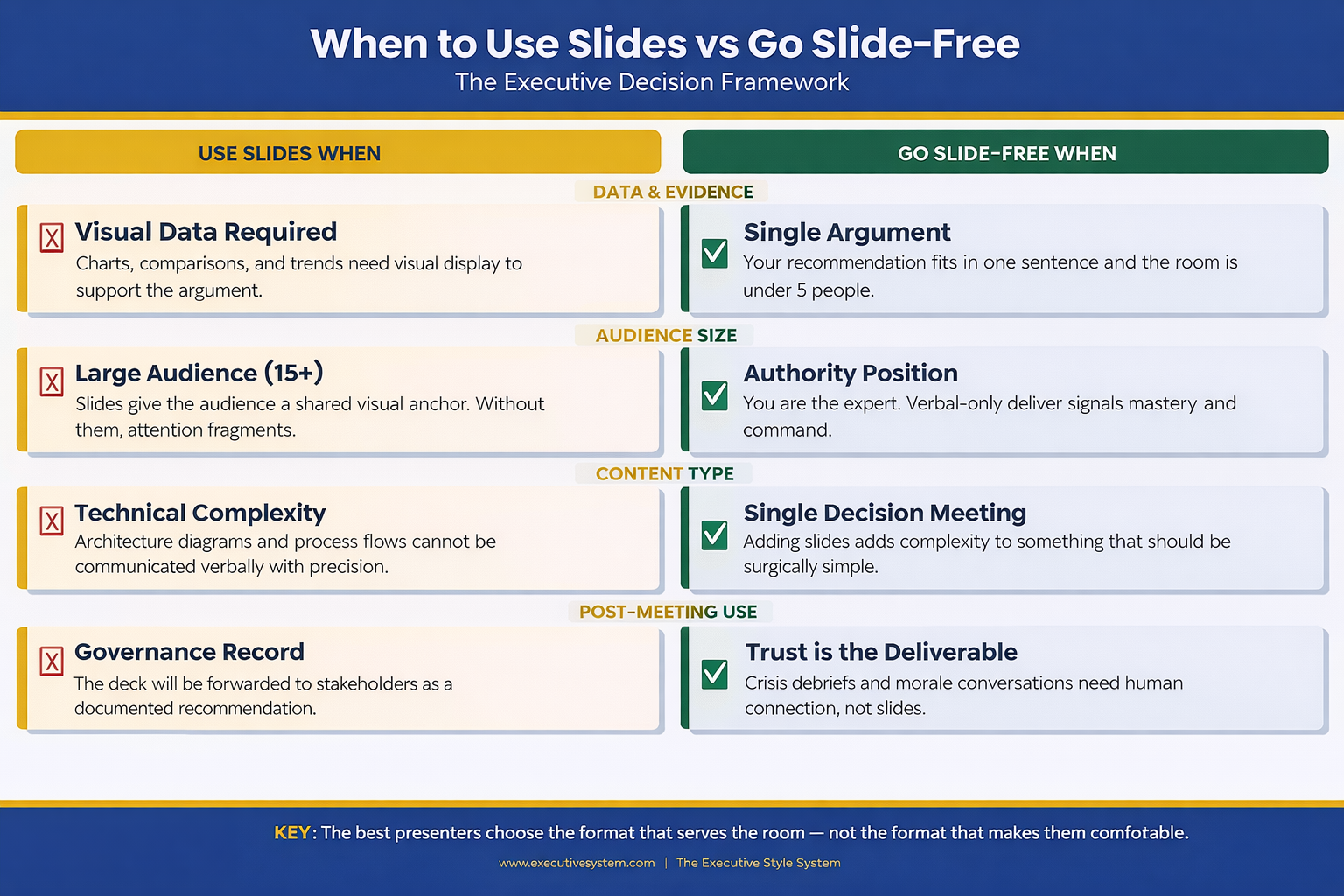
When you’re the authority in the room. If you’re the CFO updating the board on financial performance, a deck says “I’ve prepared evidence for your review.” Standing and speaking without one says “I know this material so well I don’t need a crutch.” The second posture communicates command. Senior executives intuitively respect the verbal-only approach because it signals mastery.

When the meeting is about a single decision. Slides encourage comprehensiveness. They make you want to show the full picture. But a decision meeting needs focus: here’s the recommendation, here’s why, here’s what happens if we don’t. Three verbal points. Done. Adding slides adds complexity to something that should be surgically simple.

When trust is the deliverable. Post-crisis updates, team morale conversations, stakeholder concerns — these are moments where human connection matters more than information density. Slides create distance. Your voice, your eye contact, your pauses create proximity.

 Decision framework infographic showing four categories where slides help versus four categories where going slide-free is more effective for executive presentations including data evidence audience size content type and post-meeting use

The Verbal Structure That Replaces a Deck

Going slide-free doesn’t mean going structure-free. The executives who do this well use a verbal architecture that’s actually more disciplined than most decks.

It’s called the Context–Recommendation–Evidence framework, and it works like this:

Context (30 seconds): Name the situation. Not a history lesson. Not background. One sentence that frames why everyone is in this room right now. “We have three weeks until the regulatory deadline and we’re behind on two of the four compliance workstreams.”

Recommendation (15 seconds): State what you think should happen. Don’t build to it. Don’t warm up. Say it. “I recommend we pause the product launch by two weeks and redirect the dev team to compliance.”

Evidence (2–4 minutes): Now support it. This is where most people want to put slides. Instead, use verbal signposting: “Three reasons. First…” Give each reason a number. Give each reason a name. “First, the regulatory risk. If we miss the deadline, the fine is estimated at £1.2 million.” Numbers spoken aloud land harder than numbers on a slide because the audience has to process them actively, not passively read them.

Then stop. Ask for questions. The entire presentation takes under five minutes. Most executive decisions are made in the first 90 seconds of a presentation — the remaining time is evidence and challenge. This structure front-loads the decision and respects the room’s time.

This verbal structure also solves a problem many people don’t notice until it’s too late: when you present with slides, your audience reads ahead. They’re on slide 7 while you’re explaining slide 4. Without slides, you control the pace. Every word lands in sequence. Nothing gets skipped.

The Slide-Free Structure for Executive Meetings

The Executive Slide System includes the Context–Recommendation–Evidence framework as a verbal playbook — plus the decision tree for when to use slides and when to ditch them. You’ll know before you walk in whether this meeting needs a deck or a conversation.

  • The verbal architecture template: Context–Recommendation–Evidence with timing for each section
  • Decision matrix: slides vs no-slides for 12 common meeting types (board, QBR, budget, strategy, client pitch, all-hands)
  • The one-slide hybrid format for meetings that need a visual anchor without a full deck
  • Verbal signposting script — how to replace slide transitions with spoken structure

Get the Executive Slide System → £39

Built from 24 years of corporate banking presentations at JPMorgan Chase, PwC, Royal Bank of Scotland, and Commerzbank — where many of the highest-stakes decisions happened without a single slide.

Five Scenarios Where No Slides Wins

Not every meeting deserves a deck. Here are five where you’re better off without one — and the verbal approach that works for each.

1. The executive update (under 10 minutes). You’re updating the leadership team on project status, budget burn, or timeline. The room already has context. They don’t need slides — they need a concise verbal summary and your recommendation on any open decisions. Use the CRE framework. Three minutes, maximum.

2. The one-on-one with your manager. You’re asking for headcount, budget, or a project pivot. Slides make this feel like a pitch instead of a conversation. Sit across the table. Make your case verbally. Let the discussion flow. You’ll get better engagement and faster answers.

3. The crisis debrief. Something went wrong. The team needs to hear from leadership. Opening a laptop and displaying slides signals “I’ve prepared a narrative” when what the room wants is “I’m here, I understand what happened, and here’s what we’re doing about it.” Speak from notes if you must, but keep the screen dark.

Speaking of difficult moments — if you’ve ever walked out of a room feeling the weight of a presentation that didn’t land, the shame spiral after a bad presentation is a real phenomenon, and it has nothing to do with your slides.

4. The team alignment meeting. You’re aligning three departments on priorities for the quarter. This is a facilitation exercise, not a presentation. Slides turn it into a lecture. Instead, write three questions on a whiteboard (physical or virtual) and facilitate discussion. You’ll leave with genuine alignment instead of passive head-nodding.

5. The board check-in (informal). Not the formal board meeting — the informal check-in between meetings where the chair wants a candid update. Slides here feel over-prepared. The chair wants your judgement, not your formatting skills. Speak to three priorities. Answer questions. Leave.

Know exactly when to skip the deck and when to build one?

Get the Decision Framework → £39

When You Still Need Slides (Don’t Kid Yourself)

The slide-free approach has real limits. Ignoring them will cost you credibility just as fast as overusing slides.

You need slides when data tells the story. Financial comparisons, trend lines, market analysis, competitive positioning — these are visual arguments. Describing a chart verbally is like describing a painting over the phone. The audience needs to see it. If your presentation relies on numbers, graphs, or comparisons, build the deck.

You need slides when the audience is large. More than 15 people in the room? Slides give the audience a shared visual anchor. Without them, attention fragments. People hear different things. The deck provides a single source of truth that everyone references.

You need slides when the content is technical. Architecture diagrams, process flows, system dependencies — these cannot be communicated verbally with the precision they require. If someone needs to reference what you said after the meeting, slides create that artefact.

You need slides when the decision requires sign-off. Formal approvals often require a documented recommendation. The deck becomes the record. It gets forwarded to stakeholders who weren’t in the room. It gets attached to the board minutes. In these cases, the slides aren’t a presentation aid — they’re a governance document.

The key distinction: slides serve the audience, not the presenter. If you’re using slides because they make you feel more prepared, that’s a confidence issue, not a communication strategy. If you’re using slides because the audience genuinely needs visual information to make a decision, that’s good judgement. Understanding how executive presentation structure works helps you make this call correctly every time.

People Also Ask: Can you present to a board without slides?

Yes — but only for informal check-ins, relationship updates, or verbal-only agenda items. Formal board presentations almost always require a documented deck because it serves as a governance record. The exception: if the board chair specifically requests a verbal update, honour that preference. The verbal CRE framework gives you structure without slides.

People Also Ask: How do you structure a presentation without visual aids?

Use the Context–Recommendation–Evidence framework. Open with one sentence of context. State your recommendation immediately. Then support it with three numbered evidence points. The verbal signposting (“three reasons — first, second, third”) replaces slide transitions and keeps the audience tracking your argument.

People Also Ask: Is it unprofessional to present without PowerPoint?

In many executive settings, it signals the opposite — confidence and mastery. Presenting without slides in the right context communicates that you know the material well enough to speak without support. The perception of unprofessionalism comes from being unstructured, not from being slide-free. Structure your verbal delivery and you’ll be perceived as more authoritative, not less.

Stop Building Decks That Don’t Serve the Room

The Executive Slide System teaches you when to build and when to walk in with nothing but your argument — and gives you the verbal structure to do both confidently.

  • 12-scenario decision matrix (deck vs no-deck vs hybrid)

Get the Executive Slide System → £39

Designed for executives who present weekly and need to know — instantly — whether this meeting needs a full deck, one slide, or nothing at all.

The Hybrid Approach: One Slide, Maximum Impact

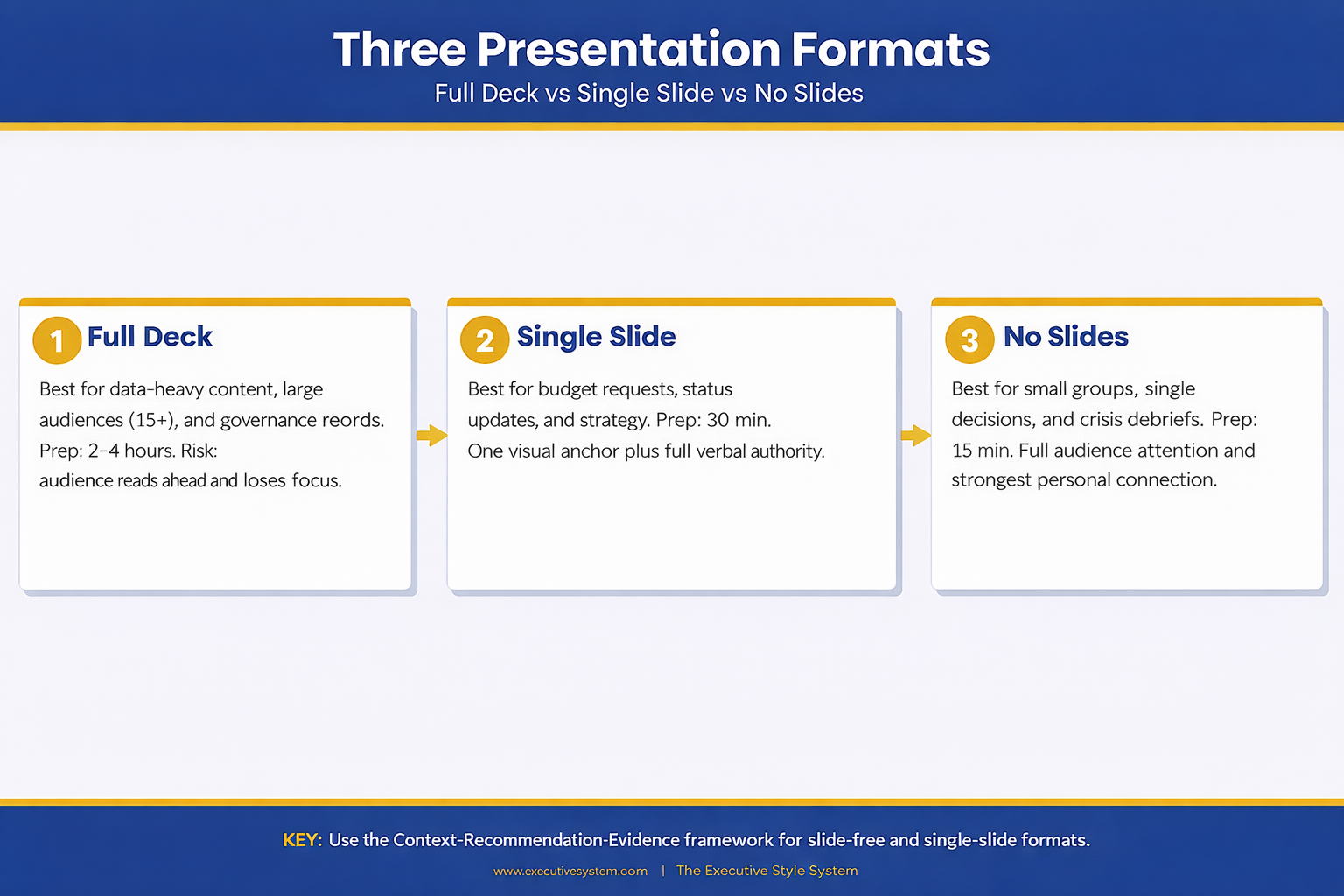
There’s a middle ground that most presenters never consider: the single-slide presentation.

One slide. Not a title slide. Not an agenda. One visual that anchors your entire argument. It might be a single chart that proves your point. A timeline that shows the critical path. A comparison table with three rows. One visual, displayed for the entire meeting, while you speak around it.

This works brilliantly for budget requests, strategic recommendations, and project status updates. The slide provides the visual evidence while your voice provides the narrative. You get the best of both approaches: the authority of speaking without support and the clarity of a visual anchor.

The single-slide approach also solves the “read-ahead” problem. There’s nowhere for the audience to skip to. Their eyes are on one visual. Their ears are on you. Full attention, no fragmentation.

One executive I worked with took this approach to every leadership meeting for a year. Same format: one slide with three numbers (revenue, burn rate, runway), spoken narrative around them. Her leadership team started calling it “the truth slide.” It became the most efficient meeting format in the company because everyone knew exactly what to expect.

Understanding how pacing and rhythm keep executives engaged is critical here — the single-slide format only works if your verbal delivery carries the weight. The Executive Slide System (£39) includes the one-slide hybrid template with delivery notes for exactly this approach.

Three-column comparison infographic showing full deck versus single slide versus no slides approach with preparation time benefits and ideal meeting types for each presentation format

Want the one-slide hybrid template?

Get the Executive Slide System → £39

Making the Call Before Your Next Meeting

The decision to present with or without slides should happen before you open PowerPoint. Once you start building, momentum takes over. You add one more chart, one more backup slide, one more appendix — and suddenly you’ve spent four hours on a deck for a 10-minute conversation.

Before your next meeting, ask three questions: Does this audience need visual evidence to make a decision? Is the room larger than 15 people? Will this presentation be forwarded to people who weren’t there? If the answer to all three is no, consider leaving the laptop closed.

The best presenters aren’t the ones with the most polished slides. They’re the ones who know when slides serve the room and when they get in the way. That judgement — knowing the right format for the right moment — is what separates executives who communicate effectively from those who just create decks. And when you do need the right format for a strategy presentation, having a proven structure saves hours.

When the stakes are high and you need to answer questions on the fly, your format choice matters even more. Evidence-first answers build trust faster than any slide ever could — whether you’re presenting with a deck or without one.

Your next presentation might not need a single slide. The Executive Slide System (£39) gives you the framework to decide — and the structure for whichever format you choose.

Is This Right For You?

✓ This is for you if:

  • You present to senior audiences weekly and suspect half your decks aren’t needed
  • You spend hours building slides for meetings that end in 10 minutes of conversation
  • You want a verbal framework that’s as structured as a deck but faster to prepare
  • You’re presenting a single recommendation and want maximum impact without visual clutter

✗ Not for you if:

  • Your presentation relies on data visualisation, comparisons, or technical diagrams — you need slides
  • Your audience is larger than 15 people and needs a shared visual anchor
  • The presentation will be forwarded as a governance record — you need a documented deck

Every Format. One System. 30 Minutes to Prepared.

The Executive Slide System covers every presentation format: full decks, single-slide hybrids, and verbal-only structures. You get the decision framework, the templates, and the delivery scripts — so you walk into every meeting knowing exactly which approach will land.

  • 22 PowerPoint templates for when you do need slides — pre-built for executive scenarios
  • The verbal CRE framework with timing, signposting scripts, and practice prompts
  • The one-slide hybrid template (the “truth slide” format)
  • 51 AI prompt cards to build any deck in under 30 minutes when a full presentation is required

Get the Executive Slide System → £39

Used by executives across banking, biotech, and professional services who present multiple times per week and need the right format every time — not just the same deck recycled.

Frequently Asked Questions

What if my manager expects slides and I show up without them?

Set expectations in advance. Send a brief message: “For Thursday’s update, I’ll walk through the three priorities verbally rather than a deck — wanted to make the most of our 15 minutes.” Most managers welcome this if the verbal delivery is structured. If your manager insists on slides, use the one-slide hybrid: one visual anchor with a verbal narrative around it.

How do I handle follow-up requests if there’s no deck to share?

Send a one-page written summary after the meeting. Three paragraphs: what was discussed, what was decided, what happens next. This takes five minutes to write and serves as a better record than a 20-slide deck that nobody will re-read. Some executives find the summary more useful than the original deck because it captures the actual conversation, not just the prepared content.

Won’t I forget my points without slides to guide me?

That’s the point. If you can’t remember your argument without visual prompts, the argument isn’t clear enough yet. The CRE framework forces clarity: one sentence of context, one recommendation, three evidence points. If you can’t hold that in your head, simplify the argument until you can. The discipline of going slide-free makes you a sharper thinker.

Does this work for virtual presentations on Zoom or Teams?

Yes, with one modification. In virtual meetings, your face replaces the slide as the visual anchor. Keep your camera on, maintain eye contact with the lens, and use verbal signposting even more deliberately (“I’m going to cover three things — first…”). Without slides to share, the screen shows your face, which is actually more engaging for audiences under 10 people.

Your Next Meeting Is the Test

You have a meeting this week where slides aren’t necessary. You already know which one it is. The question is whether you’ll trust your verbal delivery enough to walk in without a deck — and whether you have the structure to make it land.

Close the laptop. Open with context. State your recommendation. Support it with three evidence points. Stop. The room will follow you.

Stay Updated

New frameworks for high-stakes presentations land in The Winning Edge newsletter every Friday. Subscribe for frameworks you can use immediately.

🆓 Free resource: Free PDF — a free guide to strengthen your presentation preparation.

About the Author

Mary Beth Hazeldine is the Owner & Managing Director of Winning Presentations. With 24 years of corporate banking experience at JPMorgan Chase, PwC, Royal Bank of Scotland, and Commerzbank, she has delivered high-stakes presentations in boardrooms across three continents.

A qualified clinical hypnotherapist and NLP practitioner, Mary Beth combines executive communication expertise with evidence-based techniques for managing presentation anxiety. She has trained thousands of executives and supported high-stakes funding rounds and approvals.

Book a discovery call | View services