Tag: board presentation templates

06 Jun 2026
Businesswoman in a navy suit stands beside a large screen titled 'RECOMMENDATION 1,' presenting charts in a glass-walled office with a city skyline outside.

Executive Slide Deck Template Download UK: A Senior-Level System

If you are looking for an executive slide deck template that holds up in front of a UK board or senior committee — not a free PowerPoint download you have to redesign before using — The Executive Slide System is a structured set of 26 templates, 93 AI prompts, and 16 scenario playbooks designed for senior professionals. Instant download, £39.

This page explains what the system contains, who it is built for, and why a senior-level template differs from the generic decks circulating on Google. If you are evaluating options before downloading, the detail below is written to help you decide.


Senior UK executive reviewing a board-ready slide deck on a large monitor in a glass-walled boardroom, navy and gold editorial photography

Short on time? If you would rather skip the analysis and see the template system directly, view The Executive Slide System on Gumroad — instant download, single-payment, designed for senior UK professionals. The remainder of this page is for readers who want context first.

Why Generic Slide Templates Fail at Senior Level

Most slide deck templates available to download are designed for general business audiences. They open with an agenda slide, a company-overview slide, and a section divider. By slide three, a senior UK audience is already mentally checking out — because none of those slides answer the question every executive is asking: what are you actually proposing, and why should I care?

The problem is structural, not cosmetic. A generic deck assumes the audience will sit through context before getting to the recommendation. A senior UK boardroom — directors, FTSE-listed executives, finance committees — operates the other way around: the recommendation lands first, the reasoning supports it, the questions interrogate it. Free and paid templates alike optimise for slide aesthetics rather than slide architecture, and the gap is where senior presentations get rejected.

A Slide Deck Template Built for Senior Audiences

The Executive Slide System is structured around how senior audiences take in information. The templates start with the recommendation, follow with the supporting evidence, and finish with implications and next steps. The 16 scenario playbooks adapt that core structure to specific situations — board approvals, capital requests, quarterly reviews, restructuring proposals — where structure decides whether the proposal lives or dies.

It was built by Mary Beth Hazeldine, who spent 24 years in corporate banking at JPMorgan Chase, PwC, Royal Bank of Scotland, and Commerzbank before taking over Winning Presentations in 2023. The slide structures draw on the presentations she designed and advised on, not what a generic template assumes. The deliverables are practical: editable slide files, scenario-by-scenario walkthroughs, and AI prompts for ChatGPT and Microsoft Copilot to help you populate the templates with your real content quickly. It is a system, not a single deck — and that difference matters when the next presentation is a different scenario from the last. The executive slide templates overview is a useful broader reference.

What the Download Includes

  • 26 slide templates — covering recommendation slides, evidence slides, financial summaries, risk frames, and decision-asks built for senior audiences
  • 93 AI prompts — for ChatGPT and Microsoft Copilot, mapped to each template and scenario so you can populate slides with your real content fast
  • 16 scenario playbooks — board approvals, capital requests, quarterly reviews, restructuring proposals, and other situations UK senior professionals face
  • Master checklist — pre-meeting review of structure, evidence, and Q&A readiness before you walk into the room
  • Framework reference — the underlying structure principle behind the templates, so you can adapt them when a scenario does not fit a playbook exactly
  • Three-file delivery — instant download, no subscription, no recurring charge

Price: £39 — instant download, single payment.

Build a Board-Ready Deck Without Starting From a Blank Slide

The Executive Slide System gives you the senior-level structure, the scenario playbooks, and the AI prompts to turn a brief into a board-ready deck — without rebuilding from scratch every time a new presentation lands.

  • 26 templates and 16 scenario playbooks for board approvals, capital requests, and senior-level reviews
  • 93 AI prompts for ChatGPT and Microsoft Copilot, mapped to each template
  • Master checklist and framework reference so the system adapts when scenarios do not
  • £39, instant download, single payment, no subscription

Get The Executive Slide System → £39

Designed for senior UK professionals presenting to boards, executive committees, and finance panels

Why UK Senior Audiences Read Slides Differently

UK boardrooms tend to prefer understatement. Strong claims arrive without exclamation marks. Numbers are presented with caveats. Recommendations are made directly, but framed in language that acknowledges what could go wrong as well as what is expected to go right. A slide deck designed for a US-style sales audience often reads as overconfident in this room — and that hurts credibility before the substantive discussion starts.

The templates account for this. The recommendation slides state the ask clearly without overclaiming. The evidence slides include explicit caveats and risk framing. The financial summary templates separate base case from sensitivity, which is what UK audit committees and treasury functions expect to see. The professional presentation course overview covers the underlying principle.

Stop rebuilding senior decks from scratch every time.

The Executive Slide System gives you the templates, scenario playbooks, and AI prompts that compress prep time without producing the generic look senior audiences immediately recognise. £39, instant download.

See The Executive Slide System → £39

Is This the Right Template for You?

The Executive Slide System is designed for you if:

  • You present to UK boards, executive committees, finance committees, or senior steering groups
  • You want a structured system, not a single deck or a stylised PowerPoint theme
  • You face multiple scenario types — board approvals one month, capital requests the next, quarterly reviews after that — and need templates that cover the range
  • You use ChatGPT or Microsoft Copilot at work and want AI prompts mapped to specific slide tasks
  • You prefer a single-payment download to a subscription tool

It is probably not the right fit if:

  • You need an introductory presentation skills course (this is a template system, not a delivery course)
  • You are presenting to general consumer or sales audiences rather than senior decision-makers
  • You want bespoke design services rather than a structured template kit
  • Your primary need is anxiety or delivery confidence rather than slide structure

If the fit looks right and you want context on how the templates work in a specific senior scenario, the board presentation course overview walks through one of the playbook scenarios in more detail.

One payment, instant download, yours to keep.

No subscription, no recurring charge, no expiry. Download today, edit the templates, use them as long as the scenarios keep coming. The Executive Slide System — 26 templates, 93 AI prompts, 16 scenario playbooks. £39, single payment.

Download The Executive Slide System → £39

Frequently Asked Questions

Is the executive slide deck template available as an instant download in the UK?

Yes. The Executive Slide System is delivered as an instant download from Gumroad for £39, single payment. UK buyers receive the same three files as any other market — templates, AI prompts, scenario playbooks, master checklist, and framework reference. There is no UK-specific edition; the structural principles work across British, European, and international senior audiences.

What slide formats are included in the download?

The download includes 26 slide templates spanning recommendation slides, evidence slides, financial summaries, risk and sensitivity frames, and decision-ask slides. The 16 scenario playbooks then assemble these templates into complete decks for specific situations — board approvals, capital requests, quarterly reviews, restructuring proposals, and the other situations senior UK professionals face most often.

How are the AI prompts used with the templates?

There are 93 AI prompts for ChatGPT and Microsoft Copilot, mapped to specific templates and scenarios. They cover tasks like drafting recommendation language, structuring evidence, generating Q&A banks, and stress-testing arguments. You paste the prompt into your AI tool, add the relevant context from your situation, and use the output to populate the template. The prompts assume no prior AI experience — instructions are step-by-step.

Will the templates work in PowerPoint and Google Slides?

The templates are delivered in editable formats designed to work with PowerPoint and equivalent slide software. The structure is what carries the system, not the visual styling — so even if your organisation has a brand template you must use, the System gives you the slide architecture and you dress it in your house style.

Is this only for FTSE-listed or large-corporate UK presenters?

No. The structural principles apply equally to senior professionals in mid-market firms, government, professional services, healthcare, and technology. What matters is the audience: anyone presenting to a board, executive committee, or senior steering group benefits from the same architecture.

The Winning Edge — weekly newsletter for senior professionals

Short, practical essays on executive slides, boardroom communication, and AI-assisted preparation. One email a week.

Subscribe to The Winning Edge →

About the Author

Mary Beth Hazeldine is the Owner & Managing Director of Winning Presentations. With 24 years of corporate banking experience at JPMorgan Chase, PwC, Royal Bank of Scotland, and Commerzbank, she advises senior professionals across financial services, healthcare, technology, and government on structuring presentations for board approvals, executive committees, and capital requests.

13 May 2026
Featured image for Executive Slide Templates 2026: What to Download vs Build From Scratch

Executive Slide Templates 2026: What to Download vs Build From Scratch

Quick answer: Download executive slide templates when the slide structure is well-understood and the value is in the content (board updates, capital cases, status reports). Build from scratch when the structure itself is part of the argument (a new strategic narrative, a one-off pitch, a reframing slide). Most senior presenters need ~80% downloaded and ~20% custom. The mistake is thinking it has to be one or the other.

Priya runs corporate development for a UK-listed industrials business. Last quarter she was preparing a £40m capital case for the board, an internal strategy update for the executive committee, and a pitch deck for a partnership the CEO had asked her to scope. Three decks. Three audiences. Three deadlines inside ten working days. She started all three the same way: blank slide one, blinking cursor.

By day six she had finished none of them. The capital case was 40% built but felt structurally wrong. The strategy update kept losing its thread. The partnership pitch had gone through four openings, none of them right. Her CFO walked past her office and said, quietly, “you do not need to design every slide from scratch — there are templates for this.” She bought a senior-level template pack that night, finished the capital case the next morning, and used the time it freed up to do the partnership pitch properly.

She did not realise it at the time, but she had answered the most useful question a senior presenter can answer about template work: when does downloading save you, and when does building from scratch matter?

If you keep starting decks from blank slides

The Executive Slide System gives you 26 templates, 93 AI prompts, and 16 scenario playbooks built for senior-level presentation work — board updates, capital cases, strategy reviews, change proposals. Designed so you start from a structured slide that already knows what executive readers need.

Explore the Executive Slide System →

Why this question matters more in 2026 than it did three years ago

Three years ago, executive slide templates were a smaller market and a bigger compromise. The downloads available looked generic — corporate stock imagery, brittle layouts, fonts that broke in branded environments, structures that felt right for a startup pitch and wrong for a board audit committee. Senior presenters who tried them often came away with the same conclusion: faster, but the output looked lighter than the audience deserved.

That has changed. Two things shifted. First, the template market matured. Senior-level template packs now exist that were built by people who actually present at executive level — not designers reverse-engineering what they think senior decks look like. The structures inside them assume a 12-person executive committee reading 90 seconds before any spoken commentary, not a sales floor cheering at the next reveal. Second, AI changed what “templated” means. With Copilot or ChatGPT, a downloaded template can be customised in minutes for a specific industry, audience, and argument — so the trade-off between speed and fit has narrowed.

The result is that the old binary — download cheap and look junior, or build from scratch and look senior — no longer holds. Senior presenters now face a more nuanced question: which type of deck genuinely benefits from custom structure, and which type is a structural problem that has already been solved?

When downloading is the right call

Downloading is the right call when the structural problem is well-understood and the value of the deck is in the content, not the form.

Board updates. A quarterly board update is a structurally solved problem. Executive committees and boards have read hundreds of them. They know what they want: performance against plan, risks, capital, decisions required. The structure is conventional because the structure works. Building it from scratch is a kind of vanity — your audience is not reading the deck to admire the format. They are reading it for the numbers and the judgement. A downloaded board update template that follows the conventional structure lets you spend your time on the content, which is where the value sits.

Capital cases. The structure of a capital approval case is also largely solved: the ask, the rationale, the alternatives considered, the financial case, the risks and mitigations, the implementation plan. Investment committees read them in roughly that order regardless of what you put on which slide. A template that already has these sections in place removes 70% of the structural decisions and lets you focus on the analysis. The strategy directors who consistently get capital approved are not the ones with the most beautifully bespoke decks. They are the ones whose decks the committee can read in eight minutes without losing the thread.

Status reports and steering committee updates. Same principle. The audience knows what they are looking for, the structure is conventional, and your time is better spent on the substance than on reinventing the form.

Pitch decks following a known structure. A standard fundraising or partnership pitch follows a recognisable arc — problem, solution, market, traction, team, ask. The downloaded template is not lazy here; it is meeting investor expectations of how to read a deck. Senior pitches that deviate too far from the arc tend to confuse investors, who lose patience faster than entrepreneurs realise.

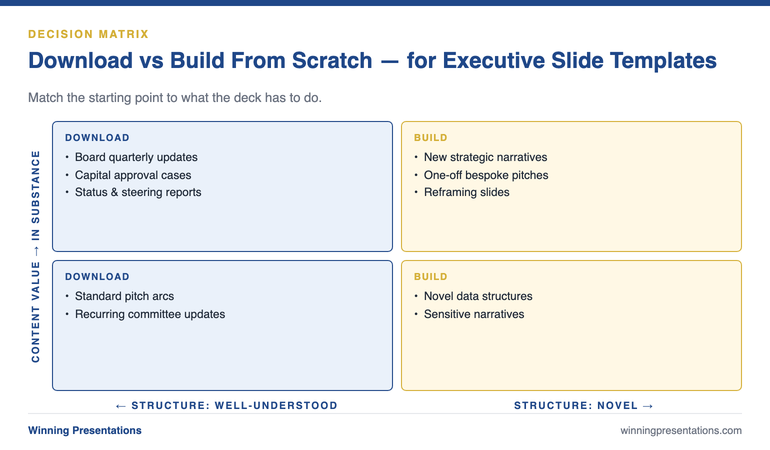
The Download vs Build Decision Matrix for Executive Slide Templates: a four-quadrant chart with Structure (well-understood vs novel) on the x-axis and Content Value (in form vs in substance) on the y-axis, showing where to download (board updates, capital cases, status reports) and where to build (new strategic narratives, one-off pitches, reframing slides).

When building from scratch is worth the time

Building from scratch is worth the time when the structure of the deck is itself part of the argument.

A new strategic narrative. When you are introducing a strategy that the audience has not heard before — a different way of framing the business, a fundamentally new direction — the structure of how you walk them through it matters. A downloaded “strategy update” template assumes the audience already understands the framing. If your job is to teach them the framing, the template will fight you. The unfolding of the argument is the work, and unfolding requires a custom slide path.

One-off high-stakes pitches. A bespoke pitch to a specific board, regulator, or partner — where you know exactly who is in the room and what their starting position is — sometimes warrants a custom build. Not always. Most of the time the standard pitch arc still works. But when you are pitching to one decision-maker whose objections you can predict in advance, structuring the deck around their specific objections rather than the generic arc can be the difference between progress and a polite “thank you.”

Reframing slides. Every senior deck has one or two slides whose job is to change how the reader sees the problem. The slide that recasts a cost discussion as an investment discussion. The slide that reframes a competitive threat as a strategic option. The slide that turns “we missed plan” into “here is what we have learned about the market.” These slides almost always need to be built from scratch because what they are doing is unconventional. A template will not have a layout for “make my reader see this differently than they did 30 seconds ago.”

Slides that carry novel data structure. If you are presenting a unique chart, a custom matrix, or a comparison framework that your audience has not seen before, the slide containing it is custom by definition. The template would just be a frame around the part you have to design yourself.

A 60-second test to apply before every deck

Before you start any executive deck, ask yourself three questions in sequence. They take less than a minute and they protect you from spending hours building something that should have been downloaded — or downloading something that needed to be built.

Question one: has my audience read a deck like this before? If yes, the structure is solved and a template is appropriate. If no, you may need to build the structural part yourself so the unfamiliar argument has a clear path through it.

Question two: is the value of this deck in its structure or in its content? If the value is in the content (the numbers, the analysis, the recommendation), use a template and put your time on the content. If the value is in how you reframe the structure itself (a new way of seeing the problem), build the structure custom.

Question three: how much time do I genuinely have? Be honest. If you have eight working days and three decks to deliver, “I will design this from scratch because it deserves it” is rarely a real option — it is wishful thinking that ends in a half-finished deck the night before. Templates exist for the times when the deck deserves to be good and your time is finite. Both of those things are usually true.

Stop starting from blank slides for the structurally solved decks

The Executive Slide System gives you a structured starting point for the 80% of executive decks where the structure is already well-understood. Use the template, free up the time, and put it where it actually changes outcomes — on the analysis and the reframing slides.

  • 26 templates covering board updates, capital cases, change proposals, strategy reviews, and pitch arcs
  • 93 AI prompts to customise each template for your industry, audience, and argument
  • 16 scenario playbooks for the difficult variants — hostile boards, sceptical CFOs, regulatory pre-reads
  • £39, instant download, lifetime access

Get the Executive Slide System — £39 →

Designed for senior professionals presenting to boards, executive committees, and investment panels.

The 80/20 hybrid most senior presenters end up using

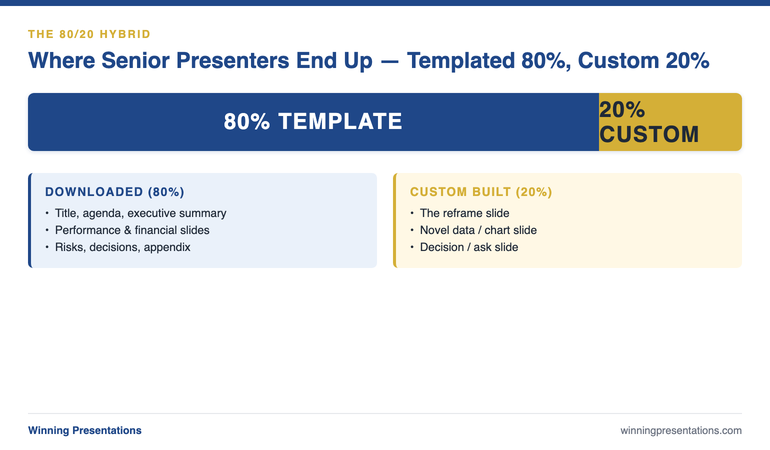
Senior presenters who have been doing this for a decade or more rarely treat the question as binary. The pattern they settle on is roughly 80% template, 20% custom — and the 20% is concentrated on the slides that carry the most decision weight.

The 80% is everything that follows convention: title slide, agenda, executive summary in pyramid form, performance overview, financial summary, risks, decisions, appendix. These are downloaded, customised lightly with branding and content, and finished quickly.

The 20% is the slides where the argument turns. The reframe slide. The chart that carries the new data point. The decision slide that makes the ask explicit. These are built from scratch because they are doing structural work that no template can do for you. A senior presenter who can identify which 20% of their deck deserves custom design — and protect their time accordingly — produces consistently better decks than one who treats every slide as either equally templated or equally bespoke.

The 80/20 Hybrid Approach for Executive Decks: a horizontal bar showing 80% downloaded templates (title, agenda, executive summary, performance, financials, risks, appendix) and 20% custom-built slides (reframe slide, novel data slide, decision/ask slide, structural pivot) — labelled as the pattern senior presenters settle on.

Three mistakes to avoid in either approach

Mistake one: downloading a template and not editing it. A template is a starting structure, not a finished deck. The Lorem Ipsum body copy, the placeholder photos, the generic chart titles — every one of them needs to be replaced before a senior audience sees the slide. The fastest way to look junior with a downloaded template is to leave any of the template’s own copy visible. Set a rule: before any executive deck goes out, scan every slide for any element that came from the template untouched. Replace them all.

Mistake two: building from scratch as a procrastination tactic. Designing slides feels productive. It looks like work, it shows progress, and it postpones the harder problem of deciding what the deck is actually arguing. If you find yourself spending three hours on a single slide’s design when you have not finalised the recommendation, the design work is procrastination. Stop. Pick a template. Force yourself back to the structural and analytical decisions that actually drive whether the deck succeeds.

Mistake three: mixing template visual languages. If you download templates from three different sources to assemble a single deck — one for the title, another for the financials, a third for the appendix — the deck will read as visually inconsistent even if you do not consciously notice why. Senior audiences absolutely notice. The fix is to commit to a single template family for any given deck and live with its limitations on a few slides rather than borrowing from elsewhere. For a deeper look at the structural side of this question, see the partner article on when each approach saves or kills your board presentation.

The download-vs-build decision is one of the highest-leverage choices a senior presenter makes, and most people make it badly because they default to one approach for everything. The presenters who consistently produce good decks under time pressure have learned to ask which type of deck this is — and to spend their precious 20% of custom design on the slides that actually move decisions.

For senior presenters whose templates have to support board-level approvals, the structural side and the persuasive side both matter. The structural foundations of executive buy-in are worth reading alongside any template selection process — because the right template for the wrong argument still loses the room.

If you want a tactical starting point that already understands senior-level deck structure, the Executive Slide System (£39) includes 26 templates designed for the conventional 80% — and frees up your time to build the 20% that needs custom work.

The full system, not just the templates

The Executive Slide System pairs 26 templates with 93 AI prompts and 16 scenario playbooks. Build board-ready executive slides in 30 minutes. £39, instant download.

Get the Executive Slide System →

Built for senior professionals across financial services, technology, and consulting.

FAQ

Are downloaded executive slide templates seen as junior by senior audiences?

Only when the template is clearly visible underneath the customisation — Lorem Ipsum left in, generic stock photos, placeholder titles. A well-customised template is invisible to the audience, who reads only the content. The “junior” perception almost always traces back to insufficient editing of the template, not the use of a template in the first place. Senior strategy teams use templates routinely; the difference is they edit them properly.

How long should it take to customise a downloaded template for a board deck?

For a 12 to 15-slide board update with content already prepared, a well-designed template should take 60 to 90 minutes to customise — branding, content replacement, chart creation, and a final review. If it is taking longer, either the template is fighting your content (wrong template choice) or the content is not yet finalised (you are designing your way through unsettled thinking).

Should I build my own template library or buy one?

Both, eventually. Most senior presenters start by buying a senior-level pack to get a structured baseline, then over time add custom templates of their own for the slides they build repeatedly that are not in the pack. After two or three years, your library is a hybrid — purchased templates for the conventional 80%, your own templates for the recurring custom work in your specific role. Building from absolute zero takes longer and produces a worse result for the first year.

Do AI tools change the download-vs-build calculation?

They narrow the gap. AI assistance lets you customise a downloaded template much faster than was previously possible — the prompt-driven editing of headlines, body copy, and chart commentary cuts customisation time roughly in half. AI assistance does not, however, change the underlying decision about which slides need custom structural design. The reframe slide still needs to be built; AI just helps you write the words once you have built it.

Get The Winning Edge — weekly

One sharp, story-led idea every Thursday on executive presentation craft, slide design, and the small decisions that change how senior audiences receive you. Read by senior professionals across financial services, technology, and consulting.

Subscribe to The Winning Edge →

Not ready for the full system? Start here instead: download the free Executive Presentation Checklist — a one-page reference covering the structural moves that hold any executive deck together, templated or custom.

Pick your next deck. Run the 60-second test. Decide which 80% gets a template and which 20% gets your custom attention. Spend the saved time where it actually matters — on the slides that move the decision.


About the author. Mary Beth Hazeldine is Owner & Managing Director of Winning Presentations Ltd, founded 1990. With 24 years of corporate banking experience at JPMorgan Chase, PwC, Royal Bank of Scotland, and Commerzbank, she advises executives across financial services, healthcare, technology, and government on structuring presentations for high-stakes funding rounds and approvals.

10 Apr 2026
Executive reviewing polished presentation slides in a boardroom

Executive Slide Templates Download

If you are looking to download executive slide templates built for real high-stakes scenarios — budget proposals, board updates, project sign-off requests, and investment cases — the Executive Slide System is the most direct answer to that search. It is a downloadable set of scenario-specific slide templates designed for senior professionals who need a decision-ready structure, not a generic design theme. Available for instant download at £39. The templates are structured around the narrative logic that executive audiences actually need — conclusion first, evidence second, specific ask third — so you are not starting from a blank slide or adapting a corporate template that was never designed for a board context.

The Problem With Standard Slide Templates in Executive Contexts

Most slide templates — including the built-in options in PowerPoint and the free downloads available across the web — are designed for one thing: visual variety. They provide layouts, colour schemes, and placeholder boxes. They say nothing about what content goes on each slide, in what order, or why.

For a general business presentation, that is adequate. You can work out the structure from first principles, fill in the slides, and deliver something coherent. But for executive approval presentations — where a board committee, an investment panel, or a senior leadership team is deciding whether to allocate significant budget, approve a strategic initiative, or sign off a project — a generic template actively works against you.

Here is why. Executive decision-making audiences process information differently from general presentation audiences. They are time-constrained, they are evaluating multiple competing proposals, and they are looking for the decision signal — what are we being asked to approve, why does it make sense, what are the risks, and what happens if we say yes — within the first few minutes. A template that gives you a title slide, an agenda slide, and a series of content placeholders does not help you answer those questions in the right order.

The result is a presentation that covers all the right material but loses the committee before the recommendation slide. Executives who have experienced this — a well-prepared deck that somehow does not generate the approval they expected — are often told they need to “work on their communication.” What they actually need is a different starting structure. The architecture of a board agenda presentation is specific, and a template that reflects that architecture changes the starting point entirely.

The Executive Slide System: Templates Built for Decision-Making Contexts

The Executive Slide System is a downloadable resource designed specifically for the executive presentation scenarios that matter most. It is not a general slide theme. It is a structured toolkit built around the narrative logic that works for senior decision-making audiences — and it includes the specific slide types, sequencing guidance, and preparation tools that a generic template library does not provide.

The system covers the executive presentation scenarios that senior professionals return to repeatedly: budget proposals (including resubmissions), board updates and governance reporting, project sign-off requests, strategic initiative presentations, and investment cases. Each scenario has its own template set, because the structure that works for a budget proposal is not the same as the structure that works for a board update — and using the wrong starting point for the wrong context is a common and correctable error.

The templates are built on a decision-first principle: the committee sees what they are being asked to decide within the opening slides, not at the end of a long build-up. This reflects how senior audiences actually process approval requests — they want the conclusion before the evidence, the ask before the justification, and the risk before the recommendation. Templates that follow this logic create a materially different experience for the reader than templates that follow a standard chronological or effort-based sequence.

Each template also includes AI prompt cards — structured prompts designed for tools like Microsoft Copilot and ChatGPT — that help you populate the slides efficiently. Rather than generating generic output from an open-ended prompt, the cards give you scenario-specific instructions that align with the template’s narrative structure. The specific structure required for a budget resubmission is different from an initial proposal, and the prompt cards reflect that difference.

What You Get — Executive Slide System Contents

  • Scenario-specific slide templates — structured PowerPoint files for budget proposals, board updates, project sign-offs, strategic initiatives, and investment cases. Each template follows decision-first narrative logic, not a generic slide sequence.
  • AI prompt cards — scenario-matched prompts for Microsoft Copilot, ChatGPT, and similar tools. Each card is tied to a specific template section and designed to generate draft content that fits the slide’s narrative purpose.
  • Framework guides — written explanations of the structural logic behind each template, so you understand why each slide appears in a particular position and what the committee expects to find there.
  • Narrative structure guides — the sequencing principles that underpin decision-first executive presentations, applicable across scenario types and adaptable to your specific organisational context.
  • Instant download — available immediately after purchase, no subscription, no login required after the initial download.

Price: £39 — instant access, no subscription.

Stop Rebuilding Executive Slides From Scratch Every Time

The Executive Slide System gives you a decision-ready starting point for every high-stakes scenario — budget proposals, board updates, project sign-offs, and investment cases. Templates, AI prompt cards, and framework guides in one download. £39, instant access.

Get the Executive Slide System → £39

Instant download. Works in PowerPoint and Google Slides. No subscription.

Is This Right for You?

The Executive Slide System is built for senior professionals who prepare their own presentations — or who oversee the preparation of presentations that go to board, committee, or executive leadership audiences.

It is well-suited to you if: you regularly prepare budget proposals, board updates, project sign-off requests, or investment cases and find yourself rebuilding the structure from scratch each time; you are a director, head of department, or senior manager whose presentations are scrutinised by decision-makers with limited time and high expectations; or you are a chief of staff, executive assistant, or business analyst who builds executive-facing decks on behalf of senior leaders.

It is less suited to you if: you are primarily preparing internal team updates, training materials, or client-facing sales presentations without a specific approval decision at stake. The templates are optimised for decision-making contexts where narrative structure and clear framing of the ask are the primary success factors — not for general communication or visual storytelling. Understanding what makes a high-stakes decision slide work is the underlying logic the system is built on — if that is the context you are preparing for, this is designed for you.

If you are unsure whether the system fits your specific scenario, the FAQ section below covers the most common questions about use cases, format compatibility, and what is included.

Frequently Asked Questions

Are these PowerPoint or Google Slides templates?

The Executive Slide System templates are delivered as PowerPoint files (.pptx), which work in Microsoft PowerPoint on both Windows and Mac. They can also be imported into Google Slides if you prefer working in that environment, though formatting is optimised for PowerPoint. All templates are fully editable — you can adjust colours, fonts, and content to match your organisation’s branding.

What executive scenarios do the templates cover?

The system includes scenario-specific templates for the presentation types senior professionals use most: budget proposals, board updates, project sign-off requests, strategic initiative presentations, and investment cases. Each template is structured around the narrative logic that decision-making audiences expect — conclusion first, evidence second, decision required third — rather than a generic slide sequence.

How is this different from free PowerPoint templates?

Free PowerPoint templates provide empty slide layouts with no guidance on what content goes where or why. The Executive Slide System templates are built around the specific narrative structure that works for board-level and committee audiences — including slide sequencing, decision-summary structure, and the placement of risk and recommendation content. They also include AI prompt cards and framework guides that explain the structural logic and help you populate each slide efficiently. A free template gives you a canvas. This gives you a starting structure designed for the specific context you are presenting in.

Do I need design skills to use these templates?

No. The templates are fully formatted and ready to use — you fill in the content, not the design. Each template includes guidance on what goes on each slide and why. The AI prompt cards take this further, giving you specific prompts to use with tools like Microsoft Copilot or ChatGPT to generate draft content for each section. Design experience is not required; the structure and visual logic are already built in.

Can I use these templates for presentations to my own clients?

Yes. Once purchased, you can use the templates for your own presentations — internal and external — without restriction. They are designed for individual professional use. The templates are not for resale or redistribution as standalone products, but using them to build client-facing executive presentations is within the intended use.

The Winning Edge

Weekly insights on executive presentations, slide strategy, and boardroom communication — direct to your inbox.

Subscribe Free

About the author

Mary Beth Hazeldine, Owner & Managing Director, Winning Presentations. With 25 years of corporate banking experience at JPMorgan Chase, PwC, Royal Bank of Scotland, and Commerzbank, she now trains executives across financial services, healthcare, technology, and government on structuring presentations for high-stakes approval, investment, and board-level contexts.