
What Senior Executives Do in the First Ninety Seconds of a Zoom Presentation
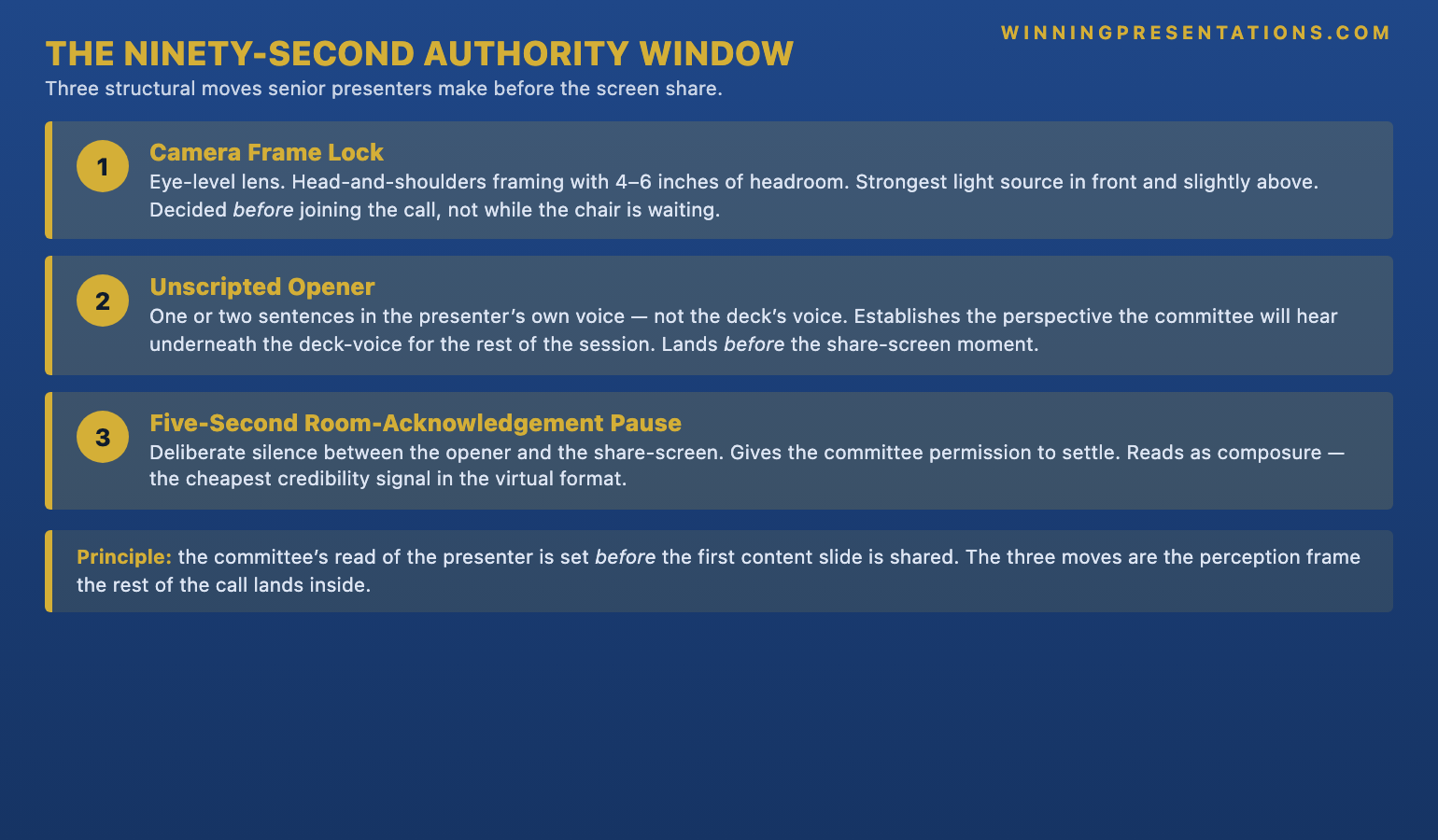
Quick answer: The virtual presentation skills executives consistently apply in the first ninety seconds of a Zoom presentation are not communication skills, slide skills, or speaking skills — they are three structural moves the camera reads as authority before the content lands. Senior presenters lock the camera frame before joining, open with one unscripted observation in their own voice rather than the scripted first line on slide one, and acknowledge the room with a five-second pause that gives the committee permission to settle. Junior presenters skip the camera frame, lead with the scripted line, and rush into slide one before the room has registered who is speaking. The ninety-second authority window is decided before the deck is ever shared. The rest of the call lands inside the perception established by those three moves.
JUMP TO:
- Why the ninety-second window decides the rest of the Zoom presentation
- The camera frame senior presenters lock before joining the call
- The unscripted opener that lands before slide one
- The five-second room-acknowledgement pause
- The ninety-second diagnostic to run before the next call
- One thing to do before the next Zoom presentation
- Frequently asked questions
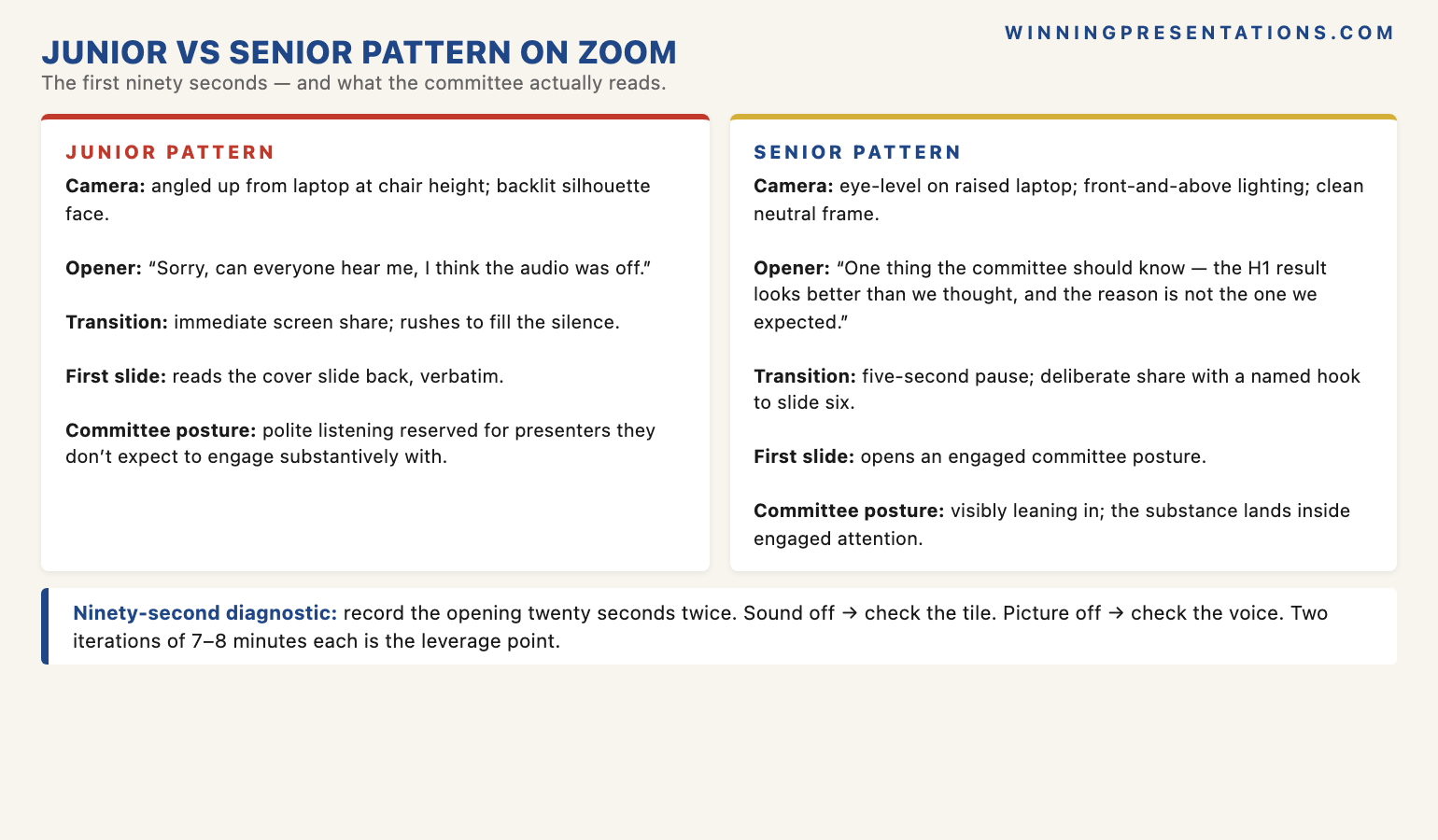
In November 2021 I was invited to sit in as an observer on a Zoom-based quarterly review at the European arm of a large insurance group. The session was the third quarterly review the institution had run remotely since the pandemic-era shift, and the committee — a group CEO, two regional heads, a CRO, a CFO, and a chief of staff — had largely settled into the new format. The first presenter that morning was the managing director of one of the larger business lines. He joined the call from a glass-walled meeting room at the regional office in Milan; behind him the morning light through the window blew his face out into silhouette, the camera was angled up from his laptop at the chair height, and his first words after the host admitted him were “Sorry, can everyone hear me, I think the audio was off.” The CEO replied politely. The MD then shared his screen and went straight into slide one, which was a cover with the business line’s name and the quarter, and the MD’s scripted first sentence read aloud verbatim what the slide already showed. He had spoken for about ninety seconds. He had said nothing in his own voice. The committee’s engagement for the next forty minutes never recovered the ground lost in those first ninety seconds.
(This article was created with AI assistance; all stories and insights are based on 35 years of real client work.)
This piece walks through the three structural moves senior presenters make in the first ninety seconds of a Zoom presentation that the camera reads as authority, and that junior presenters consistently miss. The ninety-second window is not about content; it is the perception window the committee uses to calibrate whether the presenter is worth attending to for the next thirty or forty minutes. The committee’s read of the presenter is set before the first content slide is shared. The three moves — camera-frame lock, unscripted opener in the presenter’s own voice, and a five-second room-acknowledgement pause — are mechanical, learnable, and absent from most virtual presentation training. They are also the difference between a Zoom presentation the committee leans into and a Zoom presentation the committee tolerates while waiting for the agenda to advance.
Before your next Zoom presentation, a two-minute structural check is worth running.
The Virtual Presentation Quick-Start Checklist walks through the camera frame, the opening seconds, and the room-acknowledgement pause — the three structural moves senior presenters set before joining the call. Free download, no email gate.
Why the ninety-second window decides the rest of the Zoom presentation
The ninety-second window matters more on Zoom than it does in a physical boardroom because the committee has fewer signals to read. In a room, the committee watches the presenter walk in, sets up their notes, takes a seat, exchanges a brief greeting with the chair, makes eye contact with the people they know — a dozen small calibrating signals before the presentation begins. On Zoom, the presenter materialises in a tile, framed by whatever the camera and lighting happened to produce, and the calibrating signals are compressed into the first thirty to ninety seconds before the screen is shared. The committee’s read of the presenter is forced into that compressed window because that is the only window where they can see the presenter as a person rather than as a voiceover to a deck.
The compression is not neutral. The camera flattens authority signals that work in the room — standing posture, the way a senior presenter holds the floor while waiting for the room to settle, the chair’s nod toward them to begin — into a static tile that needs to do all of that work in two-dimensional pixels. The lighting either supports the presenter’s authority or undercuts it. The framing either centres the presenter at eye-level with the camera or angles up into the under-jaw shot that reads, on the committee’s screen, as a presenter caught off-balance. The opening words either anchor the presenter as someone with a perspective worth listening to or fill ninety seconds with audio-check chatter that the committee absorbs as low-status. None of this is what the presenter intended. The committee is reading what the camera is showing them, not what the presenter is thinking. The ninety-second window is where the gap between intention and reception is most expensive to leave unmanaged.
The Milan insurance review in 2021 was a textbook compression failure. The MD was a competent senior operator with a strong quarter to report. The committee already knew him; they were not making a first-time judgement on his capability. But the ninety seconds at the top of the Zoom call — backlit face, low camera angle, audio-check opener, scripted first sentence reading the cover slide back — gave the committee a perceptual frame that did not match the substance of the quarter he was about to present. The CEO and the CFO settled into the polite listening posture they reserved for presenters they were not expecting to engage substantively with. The MD spent the next forty minutes presenting a strong set of numbers into the listening posture he had inherited from his own ninety seconds. He left the call believing the review had gone well. The follow-up email from the chief of staff three days later asked him to re-present two of the channel pages at a follow-up session in two weeks — a polite signal that the committee had not actually engaged with them the first time. The energy signal a Zoom camera transmits covers the perception physics behind why this happens with senior committees specifically.
The camera frame senior presenters lock before joining the call
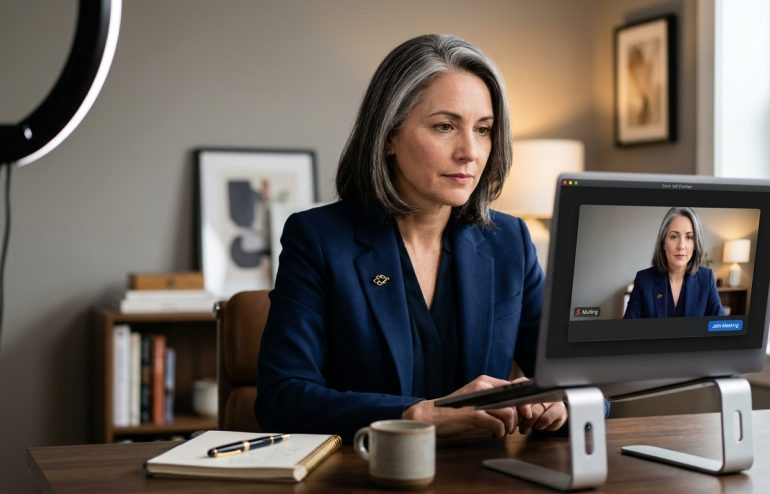
The first move senior presenters consistently make — and that junior presenters consistently skip — is locking the camera frame before joining the call rather than negotiating it once the committee is already watching. The camera frame is three things together: the lens height (the camera at or just above eye level, not below), the framing (the presenter centred horizontally, head-and-shoulders, with about four to six inches of headroom above the crown of the head, not the under-jaw shot that opens up from a low laptop lens), and the lighting (the strongest light source in front of the presenter and slightly above, not behind them from a window and not below from a desk lamp). All three are decided before the call starts, in the ninety seconds the presenter spends in the meeting-room preview screen, not after the committee has joined and the presenter is trying to adjust the laptop angle while the chair is asking if everyone can hear.
The frame matters because the camera tile is the only visual signal the committee has of the presenter. In a room, a slightly awkward chair angle is invisible against the broader presence of the presenter standing at the head of the table. On Zoom, the same awkwardness becomes the dominant visual signal, framed in a 250-pixel tile against the other tiles of people whose frames are locked. A backlit silhouette next to seven well-framed senior faces reads as the lowest-status person on the call regardless of who that person actually is. The committee’s engagement budget is set in part by the visual frames of the people on the call; the presenter who joins with a misframed camera is competing against their own tile for the rest of the session.
The frame lock takes about ninety seconds to set the first time and about fifteen seconds for every subsequent call from the same physical location. The presenter raises the laptop on a stack of books, a stand, or a dedicated riser until the camera lens is at eye level. The presenter positions themselves so the head fills the upper two-thirds of the tile with the headroom above. The presenter looks at the dominant light source and either moves the laptop, closes the blind behind them, or angles the desk lamp in front. The check is a single self-preview in the call platform: does the tile show a face that reads as someone the committee would expect to listen to. The check is binary. If the answer is uncertain, the frame needs another thirty seconds of work. If the answer is yes, the presenter joins the call.
The unscripted opener that lands before slide one
The second move senior presenters consistently make is opening the call with one unscripted observation in their own voice, before the screen share, before the first slide, before the scripted opening line. The observation is short — one or two sentences — and it is genuinely conversational. It might reference the half-year context, the last committee session, the substance of the quarter, or even the weather in the region the presenter is calling from. What matters is that the observation is in the presenter’s voice rather than the deck’s voice, and that it lands before the screen-share moment that converts the presenter into a voiceover to slides.
I watched the same pattern reverse in early 2022, six months after the Milan review, when a different MD at the same insurance group ran the quarterly review for the property and casualty line. The MD joined the call from a home office with the camera at eye level, took a half-second pause after the chair invited her to begin, and said: “Before I share the screen — one thing the committee should know going into this is that the H1 result we’re about to walk through looks better than we thought it would in March, and the reason is not the one we expected.” She paused for two seconds, gave a small smile, and then said: “I’ll come back to that on slide six. Let me share the screen.” The committee leaned in. The CEO, who had spent the Milan session at his neutral listening posture, was visibly reading the MD’s tile in those ten seconds. The substance of what she was about to present landed inside a committee posture that was already engaged. The first hand on the camera before the share, the unscripted observation in her own voice, and the named hook for slide six did the work that the next forty minutes of analytical content was then free to support.
The unscripted opener works for a structural reason that has little to do with the content of the opener itself. The opener is the only moment in the call where the committee sees the presenter as a person with a perspective rather than as the channel through which the deck will be delivered. The screen share collapses that perception into the deck-voice almost immediately afterwards. The presenter who gives the committee thirty seconds of person-voice before the screen share is establishing the perspective the committee will hear underneath the deck-voice for the rest of the session. The presenter who skips it is asking the committee to engage with deck-voice from second one, and committees engage with deck-voice the way they engage with any document: scanned for the headlines, archived for later, not engaged with in the moment. The camera-angle decision senior leaders make before joining the board call covers the same dynamic at the board-meeting level, where the unscripted opener carries even higher weight against the committee’s defaults.
The unscripted opener works only when the deck behind it is built to support a senior-presenter voice.
The Executive Slide System is the slide library senior professionals use to build decks that read clearly through the camera and that support a person-voice opener rather than competing with it — layouts engineered for the Zoom rendering pass, with the visual weight that the camera tile can carry. Built on 24 years in corporate banking and 16 years coaching senior professionals across financial services, insurance, consulting, and technology.
- 26 Executive Templates — including title slides, named-hook openers, and section dividers that hold up at the Zoom-share scale
- 93 AI Prompts — rewrite the first three slides so the slide content supports the unscripted opener rather than reading it back
- 16 Scenario Playbooks — including the quarterly review on Zoom, the half-year remote committee, and the hybrid board update
- 7 Checklists — the camera-frame check, the opening-seconds rehearsal, and the post-share recovery routine
- Instant download, lifetime access — usable across every virtual presentation cycle, not just the one in front of you now — £39
The five-second room-acknowledgement pause
The third move senior presenters consistently make is the five-second room-acknowledgement pause — a deliberate, mid-tile silence between the unscripted opener and the screen share that gives the committee permission to settle into the call before the visual changes. Junior presenters experience the pause as dead air and rush to fill it. Senior presenters experience the pause as the moment the room reorients toward them and use it deliberately. The pause is not awkward; the pause is what makes the next forty minutes feel chaired by the presenter rather than chased by the agenda.
The pause has a structural function the presenter rarely thinks about: it allows the committee to register the presenter’s tile, settle their own posture, decide whether to take notes by hand or on screen, and stop the side-channel work they were doing before the agenda item turned. Without the pause, the committee starts the substantive content while still half-distracted by the previous agenda item, and the first few slides land in a half-attentive committee posture that takes another ten minutes to fully reset. With the pause, the committee transitions cleanly: the previous agenda item closes, the new presenter is registered, the committee re-centres on the new content. The five seconds the pause costs the presenter at the front of the call is recovered three or four times over in the engagement the rest of the call lands inside.
The pause is also a competence signal in its own right. Senior committees have spent enough hours in Zoom calls to know that the presenters who can hold a five-second silence are the presenters who are not rattled by the format. Rattled presenters fill the silence with audio-check chatter, slide-progression mechanics, or apologetic acknowledgements of the screen share. Confident presenters hold the moment and let it work for them. The committee reads the difference inside the first thirty seconds of the call. The pause is the cheapest credibility signal available in the virtual format, and almost nobody uses it deliberately. The recovery routine for senior leaders who default to filling silence on camera walks through the practice version of building the pause back in.
If the virtual presentation is the warm-up to a contested approval decision, the structural method matters.
The Executive Buy-In Presentation System is the self-paced programme senior professionals use when the virtual quarterly or half-year review is the prelude to a buy-in decision the committee is going to make in the same session — budget reallocations, channel shifts, headcount asks, strategic pivots. 7 modules, no deadlines, no mandatory session attendance. Optional live Q&A calls, fully recorded. Self-paced with monthly cohort enrolment. Lifetime access to materials. £499.
The ninety-second diagnostic to run before the next call
The ninety-second diagnostic takes ten minutes and is the closest available proxy for how the committee will read the presenter when the actual call opens. The procedure is mechanical. Open the calendar invite for the next Zoom presentation. Join the meeting room twenty minutes early, alone. Turn the camera on. Look at the self-preview tile and answer four questions in order. Is the camera lens at or just above eye level. Is the head-and-shoulders frame centred with four to six inches of headroom. Is the strongest light source in front of the presenter and not behind them. Does the tile show a face that reads as someone the committee would expect to listen to. If any answer is no, the frame is not yet right; adjust the laptop height, the seating position, or the light source and re-check. If all four are yes, the camera frame is locked.
Then rehearse the opening twenty seconds. Record the platform self-recording or use the phone camera as a backup. The recording captures three things in order: the half-second pause after the chair would invite the presenter to begin, the unscripted observation in the presenter’s own voice (one or two sentences, conversational, not reading slide one), and the five-second room-acknowledgement pause before the screen share. Play the recording back with the sound off. Watch the camera tile only. Does the tile show a presenter who looks like they are chairing the moment rather than reacting to it. Then play the recording back with the picture off and the sound on. Does the voice sound like a senior operator with a perspective, or like someone reading a script in front of a webcam. If either answer is no, the opening is not yet right. Two iterations of the recording typically takes seven or eight minutes and is the difference between a Zoom presentation the committee leans into and a Zoom presentation the committee tolerates. The diagnostic is mechanical for the same reason the verdict-first diagnostic on a board paper is mechanical: the presenter is too close to their own delivery to read it as the committee will read it; the recording is the closest available external perspective.
Why the structural moves matter more for senior presenters than for junior ones
The structural moves matter more at senior level for a counterintuitive reason. Junior presenters are forgiven the misframed camera, the audio-check opener, and the scripted first line because the committee’s expectation of a junior presenter is calibrated downwards. The committee reads the misframing as inexperience, makes a generous allowance, and engages with the substance anyway. Senior presenters are not forgiven the same patterns because the committee’s expectation is calibrated to seniority. A backlit MD reads as an MD who has not bothered to set up the camera; an MD who opens with audio-check chatter reads as an MD who has not prepared; an MD who reads slide one back reads as an MD who is not bringing a personal perspective. The same moves that are forgiven in a junior presenter are perceived as evasive or under-prepared in a senior one.
The compounding effect is that senior presenters who skip the three moves are paying a higher reputational cost per Zoom presentation than they realise. The committee’s read of their tile in the first ninety seconds is the read that calibrates the rest of the call, and the read travels with them into the next session, the corridor conversation afterwards, the chief of staff’s follow-up email, the chair’s briefing to the CEO about who handled their part well. Three or four quarters of compounded perception cost is the difference between a senior MD whose H1 reviews are approved on the day and a senior MD whose H1 reviews are politely deferred to a follow-up session. The committee will never name the ninety-second window as the reason. They will name the substance, the deck quality, the analytical depth. The actual driver is the perception frame the presenter set in the first ninety seconds and then competed against for the rest of the session.
The structural moves are easier to apply when the deck is designed for the camera in the first place.
Designed for senior professionals who present virtually to executive committees, investment committees, and remote boards — the Executive Slide System gives you the slide structures, opening hooks, and section dividers that hold up at the Zoom-share scale and let the camera-frame, unscripted opener, and five-second pause carry their full weight. Built on 24 years in corporate banking and 16 years coaching senior professionals across financial services, insurance, consulting, and technology. 26 templates, 93 AI prompts, 16 scenario playbooks, 7 checklists. £39, instant download, lifetime access.
One thing to do before the next Zoom presentation
Twenty minutes before the next Zoom presentation, join the meeting room alone. Spend two minutes on the camera frame — eye-level lens, head-and-shoulders centring, light source in front. Spend three minutes drafting the unscripted opener — one or two sentences in your own voice, with a named hook to a later slide, that you will say before the screen share. Spend five minutes recording the opening twenty seconds twice and playing it back — once with sound off to check the tile, once with picture off to check the voice. The full ten minutes pays back over the next forty in the committee posture you walk into rather than chase. Then join the call when the chair admits you, and hold the five-second pause after your opener before sharing the screen. The room will settle. The deck will land into an engaged committee. The rest of the session will be the version where your substance gets the attention it deserves.
Frequently asked questions
Isn’t the ninety-second window just camera-quality theatre — the substance is what matters?
The substance is what matters in the room. On Zoom the substance is delivered through the visual and audio frame the committee has of the presenter, and the frame is set in the first ninety seconds. If the frame is wrong, the committee’s engagement posture for the substance is wrong, and the substance lands inside a posture that will not engage with it fully no matter how strong it is. This is not a Zoom artefact; the same dynamic operates in physical rooms, just with more parallel signals (presence, posture, the way the room defers when the presenter walks in). On Zoom those signals are compressed into the tile and the first thirty to ninety seconds, so the cost of getting them wrong is much higher per second. Senior presenters who treat the ninety-second window as theatre lose engagement they will then spend the rest of the session trying to recover.
What if I’m joining from a hotel room or a regional office where I can’t control the lighting or the camera setup?
Most virtual presentations on the road can still get the camera at eye level with a laptop riser made from two books and a hardcover folder. Most hotel rooms have one or two light sources that can be moved or angled to sit in front of the presenter rather than behind. The five minutes spent rearranging the desk and finding a wall to face that is not a window is the cheapest investment in the call. The frame does not need to be studio-quality; it needs to clear the bar of not actively undercutting the presenter’s authority. The bar is low. Backlit silhouette, under-jaw angle, and visible clutter behind the presenter all fail the bar; a centred face at eye level against a neutral wall with front-and-above lighting clears it. Hotel rooms can usually meet the bar in under five minutes if the presenter is willing to move the desk.
How does this work in a recurring Zoom meeting where I know the committee well — do I still need the unscripted opener every time?
Yes, and the unscripted opener matters more, not less, in recurring sessions. The committee’s default in a recurring call is to skim through the standing agenda item rather than re-engage with each presenter. The unscripted opener is what re-recruits the committee’s attention against that default. The content of the opener can be lighter in a recurring session — a one-sentence framing of how the quarter has gone, or a single observation that signals what to listen for in the substance — but the move itself is what breaks the default. Skipping it means the substance lands inside the skim posture the committee defaulted to. Doing it consistently across four or five recurring sessions builds the committee’s expectation that the presenter will frame the agenda item rather than just deliver it, and the engagement posture compounds in the presenter’s favour.
What does the five-second pause look like in practice without feeling forced or staged?
The pause works because it has a job. The presenter delivers the unscripted opener, looks briefly at the camera or at the committee tiles, and then quietly says “Let me share the screen” while reaching for the share button. The five seconds is the time it takes to find the right window, click share, and confirm the deck has appeared at the right slide. The pause is not silent staring at the camera; it is the natural rhythm of a competent presenter moving between segments of the opening without rushing the transition. The committee reads it as composure because that is what it is. Junior presenters compress the same moment into one second by clicking share before they finish the opener or by talking through the transition. Senior presenters let the moment breathe because they know the committee uses it to settle.
The Winning Edge — weekly newsletter
The Winning Edge is a weekly (Thursday) newsletter for senior professionals who present at the executive level. One short email a week, focused on the structural moves that separate the virtual presentations committees engage with from the virtual presentations committees tolerate. Subscribe to The Winning Edge →
For the broader picture across slides, storytelling, confidence, and delivery, the seven-product Complete Presenter library is the bundle most senior professionals find useful as a single resource — £99 for everything, lifetime access.
About the author
Mary Beth Hazeldine is Owner & Managing Director of Winning Presentations Ltd. With 24 years of corporate banking experience at JPMorgan Chase, PwC, Royal Bank of Scotland, and Commerzbank, she advises senior professionals across financial services, insurance, consulting, and technology on the structural moves that separate the virtual quarterly reviews committees engage with from the ones they politely tolerate.