

‘This Deck Feels AI-Generated’ — How to Respond When an Executive Calls It Out
Quick Answer
When an executive says your deck feels AI-generated, the four-step response is: acknowledge briefly, name the workflow factually, redirect to authorship of the recommendation, invite the underlying concern. The wrong responses — defending too vigorously, denying AI involvement, or apologising — all signal that the speaker is rattled. The right response treats the comment as a process question, answers it in 25 seconds, and returns the room to the decision being asked.
On this page
It is November, end-of-year planning season, and Olufemi — the chief operating officer — is reviewing your divisional plan. He is twenty minutes in. He pauses on slide 14, looks up, and says: “I have to be honest. This deck feels AI-generated. Can you walk me through how you actually built this?”
The room goes quiet. The other six members of the leadership team look at you. Olufemi’s tone is not aggressive. It is something closer to curious-but-sceptical. The next ninety seconds will decide whether the deck recovers or the rest of the meeting is spent defending the workflow rather than discussing the recommendation.
“This deck feels AI-generated” is now one of the most common challenges senior leaders receive in 2026. It is a Q&A scenario that did not exist three years ago. The response pattern is well-rehearsed in the small group of senior professionals who have already handled it; for everyone else, the first time it lands the instinct is to over-explain, defend, or apologise — all of which lose the room.
If you want a tested response framework before you face this question
The 4-step response below is the same shape used for any process challenge — acknowledge, name, redirect, invite. The Executive Q&A Handling System covers this and 14 other process-challenge scenarios with full bridge-statement scripts.
What the executive is actually asking
The literal sentence — “this deck feels AI-generated” — is rarely the underlying concern. Executives who flag the AI feel of a deck are usually probing for one of three things underneath. The right response depends on which.
“Did you actually do the thinking?” The most common underlying concern. The executive is not opposed to AI in principle. They are checking whether the recommendation came from your judgement or from a model’s average. Their tolerance for AI in the workflow is high; their tolerance for unowned recommendations is zero.
“Are these numbers verified?” The second concern, more common in finance, risk, and audit functions. AI tools have produced enough confidently-wrong outputs in the last 24 months for senior leaders to read polished decks with elevated provenance suspicion. The executive wants to know whether you can source the numbers in real time.
“Is this an organisational pattern I need to address?” The third concern, more common when the executive is several levels above you. They are not really asking about your deck. They are pattern-matching on the rise of AI-drafted material across the organisation and using your deck as a moment to surface a broader question. The response addresses your deck and acknowledges the broader pattern without trying to solve it in the meeting.
The 4-step response works for all three because it answers the underlying concern in each case — by treating the comment as a process question and returning the room to the recommendation rather than the workflow.
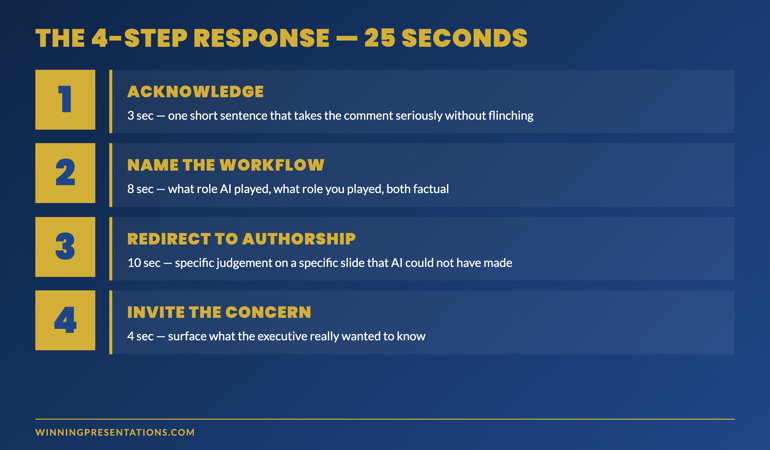
The 4-step response, in 25 seconds
The full response takes about 25 seconds — long enough to be substantive, short enough to keep the room from settling into a discussion of AI rather than the recommendation. Each step has a specific job; missing any one undermines the others.
Step 1 — Acknowledge briefly (3 seconds)
One short sentence that takes the comment seriously without flinching. The phrasing matters: it should land as confident, not defensive.
Sample language: “That’s a fair observation, and I want to address it directly.”
What this does: it takes the question off the floor as something to be defended and reframes it as something to be answered. The brevity matters. A long acknowledgement reads as throat-clearing; the room registers it as nervousness.
Step 2 — Name the workflow factually (8 seconds)
State, in plain language, what role AI played and what role you played. Do not minimise. Do not over-disclose. Aim for a one-sentence description of each.
Sample language: “I used Copilot to extract the data from our quarterly files and ChatGPT to draft a structural skeleton. The recommendation, the four data points selected, and the risk framing are mine.”
What this does: it removes the executive’s incentive to keep probing. The factual disclosure pre-empts the “did you write this” follow-up. It also positions AI as a tool used, not a hidden assistant — which is the position senior audiences are increasingly comfortable with.
Two cautions. First, do not minimise — saying “I just used AI for spell-check” is a lie if you used it for more, and the executive can usually feel the lie. Second, do not over-disclose: a 90-second technical breakdown of your prompts loses the room.
Step 3 — Redirect to authorship (10 seconds)
This is the load-bearing step. Pick a specific element of the deck — usually the recommendation or a key data point — and walk briefly through the judgement behind it. The goal is to demonstrate authorship in the moment, not just claim it.
Sample language: “Let me show you what that means on the recommendation slide. The reason we are recommending option two over option three is the customer concentration figure on slide nine — at 38%, option three exposes us to a single-customer risk that the audit committee would flag inside the first quarter. That call is mine. The model would not have made it.”
What this does: it answers the underlying concern — “did you actually do the thinking” — with evidence. The executive sees you reach into the deck and produce a piece of judgement that is unmistakably human. The room shifts from probing the workflow to engaging with the recommendation.
The redirect should land on a specific slide and a specific number, not a general claim. “I owned the recommendation” is weaker than “the call between option two and option three came from the customer concentration figure, and that call is mine.” Specificity reads as authorship; generality reads as defensiveness.
Step 4 — Invite the underlying concern (4 seconds)
Close with a question that surfaces what the executive really wanted to know.
Sample language: “Is there a specific element you want me to walk through in more depth?”
What this does: it returns control to the room without conceding ground. If the executive’s concern was “did you do the thinking,” the response above has answered it and the offer goes unused. If the concern was “are these numbers verified,” the executive will name a slide and the conversation moves to a productive place. Either way, the meeting returns to the recommendation rather than the workflow.
Tough questions, calm authority, decision-safe answers in 45 seconds
The Executive Q&A Handling System
- Bridge-statement scripts for 15 of the most common executive Q&A scenarios — including the AI-deck challenge above
- Defer-versus-dodge framework — when to answer, when to redirect, when to take it offline without losing credibility
- The 45-second response template — long enough to be substantive, short enough to keep the room moving
- Recovery moves for hostile, sceptical, and process-challenging questions
Executive Q&A Handling System — £39, instant access, lifetime use.
Get the Executive Q&A Handling System →
Designed for senior professionals presenting to boards, investment committees, and executive sponsors.
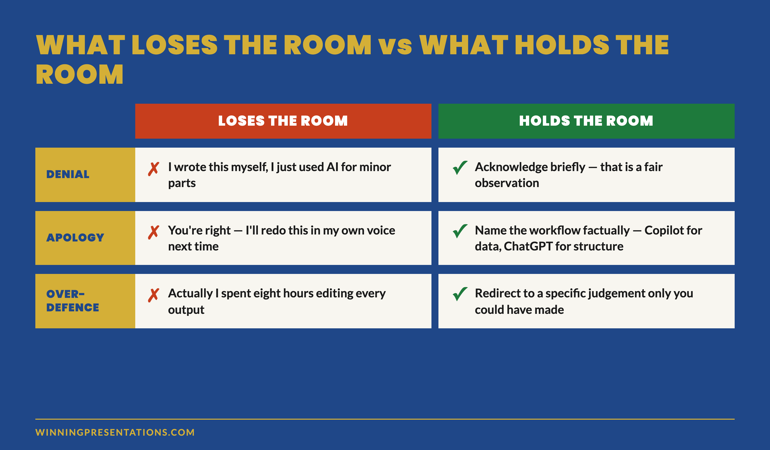
Three responses that lose the room
The wrong responses to “this deck feels AI-generated” are well-documented. Each one signals something the executive is alert to.
Response 1 — Denial
“I wrote this myself, I just used AI for some minor parts.”
Denial fails because senior audiences increasingly recognise AI’s tonal signature in 2026. The denial does not erase what they noticed; it adds dishonesty to the original observation. The credibility cost is permanent for the rest of that meeting and often longer. The first concern was about authorship; the new concern is about candour.
Response 2 — Apology
“You’re right, I’m sorry — I’ll redo this in my own voice for next time.”
Apology fails because it concedes the deck is bad without addressing whether the recommendation is sound. The room shifts from “should we approve this” to “should we look at this again later” — and “later” is where good recommendations go to die. Apology also signals that the speaker does not stand behind their own work, which is the deeper credibility issue.
Response 3 — Over-defence
“Actually, I spent eight hours editing the AI output, and I want to walk you through every change I made…”
Over-defence fails because it confirms the executive’s suspicion. A presenter who is comfortable with their work does not need to defend the volume of editing time. The over-explanation tells the room the speaker felt caught. The deck rarely recovers, even if the editing genuinely was substantial.
Preventing the question in the next deck
The best Q&A handling is the question that does not arrive. Three moves in the deck-building stage reduce the likelihood of the AI-generated challenge.
Open with a sentence in your own voice. AI-drafted decks default to a neutral opening — “the purpose of this deck is” or “this paper presents.” Replace the first sentence of the deck with one a colleague would recognise as how you talk. The room calibrates on the opening; if it sounds human there, it will be read as human throughout.
Add a process disclosure on the cover or the closing slide. A short footnote — “Drafted with AI assistance, edited by [your name]” — pre-empts the question. The disclosure works because it positions you as someone who treats the workflow as a tool, not a hidden assistant. Most senior audiences read a disclosure as confidence.
Include one hand-drafted recommendation. Pick the most important slide in the deck — usually the recommendation — and rewrite it from scratch without the AI tool open. The slide will read in your voice. Senior audiences register the shift in tone instinctively; the rest of the deck reads as authored even if it was AI-drafted.
Frequently asked questions
What if the executive presses for more workflow detail after the 4-step response?
Answer the next question briefly, then steer back to the recommendation. “Yes, I used Copilot inside our 365 environment for the data extraction — and the call I want to walk you through is the option-two-versus-option-three call on slide nine, which I made on the customer concentration figure.” Two further redirects is usually the limit before the room itself starts pulling the conversation back. If a third redirect is needed, take it offline: “I am happy to walk through the full prompt sequence with you after the meeting if that would be useful — for now, can I ask you to land on whether the recommendation itself works?”
Should I disclose AI use proactively, even when no one asks?
Increasingly, yes. The trend in senior environments in 2026 is towards quiet disclosure on the cover slide or in the footnote — “Drafted with AI assistance, edited by [name].” Disclosure pre-empts the challenge and positions you as someone comfortable with the tool. The boards and committees that have institutionalised this approach report fewer challenge questions and faster decisions on AI-assisted material.
What if the executive flagging the deck is hostile rather than curious?
The 4-step response still works, but the redirect step needs more weight. With a hostile questioner, the redirect should land on the strongest piece of judgement in the deck — not just any data point. The aim is to make it impossible for the questioner to maintain that you did not do the thinking, by giving them a specific judgement they can engage with on its merits. Hostile questioners often soften when they see the redirect lands on something they have to take seriously.
How do I know the response is working in real time?
Two signals. First, the room’s body language — once the redirect lands, other meeting participants stop watching the questioner and start watching the slide you redirected to. Second, the questioner’s follow-up — if the next question is about the recommendation rather than the workflow, the response has worked. If the questioner stays on the workflow, the redirect was too general; tighten it to a specific number or specific judgement and try again.
The Winning Edge — weekly newsletter for senior presenters
One framework, one micro-story, one slide pattern — every Thursday morning, ten minutes’ read. For senior professionals who want my best material before it appears anywhere else.
Not ready for the full Q&A system? Start here: download the free Executive Presentation Checklist — a one-page reference for the structural questions every executive deck must answer before the meeting.
For the matched workflow article that prevents this question in the first place, see the 2-tool ChatGPT and Copilot workflow for executive decks.
Mary Beth Hazeldine — Owner & Managing Director, Winning Presentations Ltd. With 24 years of corporate banking experience at JPMorgan Chase, PwC, Royal Bank of Scotland, and Commerzbank, she advises senior professionals on Q&A handling under pressure across financial services, healthcare, and technology.