

Q&A for Virtual Presentations: Why the Format Changes Everything
Quick Answer: Virtual presentation Q&A operates entirely differently from in-person formats. You cannot read body language, manage chat overlaps, control the timing of interruptions, or employ standard panel management techniques. Executives who master this specific format gain a measurable advantage in digital engagement and approval-stage decisions.
Jump to Section
A Virtual Q&A Turned the Deal Around
Henrik managed a funding presentation for a 200-person digital security firm. The slide deck was flawless, the narrative tight, the numbers compelling. When the live Q&A session began on Zoom, three things happened simultaneously: a question appeared in chat, another participant unmuted and spoke over him, and the host accidentally muted Henrik mid-answer. In thirty seconds, he lost control of the room. What could have derailed the outcome became, instead, a demonstration of composure and clarity. Henrik recovered by naming each question type, answering the chat query first, then addressing the unmuted interrupt, then asking to be unmuted by the host. By the end of the Q&A, the investors commented not on the disruptions but on his handling of them. The deal moved forward. The difference: he’d prepared specifically for virtual Q&A dynamics, not generic Q&A technique.
If virtual Q&A feels chaotic, it’s not lack of confidence. It’s lack of format-specific strategy. In-person Q&A and virtual Q&A are fundamentally different channels. They require different preparation, different timing, different interruption management, and different audience reading. This article teaches you the specific moves that work in the virtual environment.
Handling Chat Questions: The Visible Backlog Problem
In-person Q&A gives you a queue you control. Raise your hand. Wait for the host. Answer. Next. Virtual presentation Q&A gives you a visible backlog. Participants type questions simultaneously. Everyone watching can see unanswered questions stacking up. This creates psychological pressure: the longer your answer, the longer the unanswered queue grows, and the audience perceives you as slow or evasive.
The format-specific solution: acknowledge the backlog explicitly. Early in your Q&A, say: “I can see several questions here—I’m going to answer the top three in full, then circle back to the others after.” This move does three things. It signals you’ve seen the questions (addressing the visible-backlog anxiety). It sets boundaries on your time without appearing rushed. It gives you permission to move quickly without appearing dismissive.
Second, distinguish between chat questions and spoken questions. Many executives answer both the same way. Chat questions often signal something else: the participant wasn’t confident enough to unmute, or they wanted a record of the answer. Answer chat questions directly, briefly, and on-record. Spoken questions often signal something else: the participant wanted to be heard in real time, or they’re testing your composure. These typically require more engagement. Treating them differently changes your entire Q&A dynamic.
Master Virtual Q&A Handling in 6 Modules
The Executive Q&A Handling System £39 teaches you exactly how to prepare for—and dominate—virtual presentation Q&A. Learn format-specific timing, interruption recovery, chat management, and the psychological moves that keep approval-stage executives engaged.
£39 · Lifetime Access · 6 Training Modules
Managing Unmuted Interruptions: The Real-Time Override
In-person Q&A, you see the hand raise. You invite the question. The interruption is structured. Virtual Q&A, someone unmutes and speaks. You’re mid-answer. The interruption is real-time and uncontrolled. This is the single most destabilising element of virtual presentation Q&A because it happens in live time and you must respond instantly.
The format-specific response: acknowledge the interruption without stopping. Do not finish your answer as if the interruption didn’t happen. Instead, pause, say the person’s name if you know it (or say “I hear you”), and ask if they can wait thirty seconds. Most will. You finish your answer, then directly address their point. This does three critical things: it signals you’re not avoiding them, it keeps your answer intact, and it demonstrates you can prioritise multiple speakers without losing your thread.
If the interruption is a genuine clarification question—something that makes your current answer irrelevant—stop mid-answer and say: “That’s a useful question. Let me address that first, then I’ll come back to my original point.” This signals flexibility and real-time listening, not rigidity. By contrast, ignoring the interruption makes you look either unprepared or dismissive, neither of which serves your credibility.
The distinction matters enormously: if you cannot distinguish between a clarifying interrupt and a derailing interrupt in real time, you cannot manage virtual Q&A effectively.
Navigating Delayed Responses: The Technology Gap
In-person Q&A, you answer immediately. Virtual Q&A, there are four potential delays: your microphone lag, the participant’s audio lag, the platform processing lag, and the internet bandwidth lag. These delays compound. You finish answering, genuinely believing the other person heard you, only to discover they’re still waiting for a response. Or you begin speaking at exactly the moment they start speaking, creating a collision. Or the host mutes you accidentally mid-answer because the platform glitched.
The format-specific preparation: before the Q&A begins, ask the host to confirm audio setup, agree on a silent signal if you need unmuting (usually a raised hand or typed message), and confirm whether questions will come from the floor or from the host reading them. Second, assume 2–3 seconds of processing delay. This means pausing after you finish an answer for 2–3 seconds before moving to the next question. It means speaking slightly more slowly than in-person, not because of intelligence but because of technology. It means repeating critical numbers and dates, because participants may have missed them due to the delay.
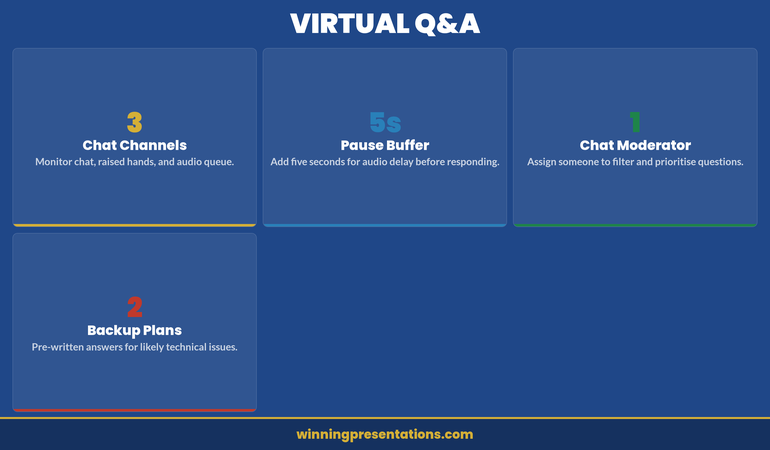
The four pillars of virtual Q&A infrastructure: monitor three channels, buffer five seconds, assign a moderator, prepare backup plans.
The framework above identifies the four elements that separate controlled virtual Q&A from chaotic improvisation. Chat Channels — monitoring chat, raised hands, and audio queue simultaneously — is the first structural challenge. In-person, you have one input channel: someone raises a hand. Virtually, you have at least three. Without deliberate attention management, you’ll answer the loudest channel (audio) and ignore the others, which the audience sees as selective engagement. The fix: announce at the start which channels you’ll prioritise and in what order.
Pause Buffer — adding five seconds for audio delay before responding — prevents the collision problem Henrik experienced. Five seconds feels uncomfortably long when you’re the presenter, but the audience doesn’t experience it that way. They experience it as thoughtfulness. Without the buffer, you begin answering before the questioner has finished (because of lag), creating a pattern of talking over people that erodes trust rapidly in a virtual environment.
Chat Moderator — assigning someone to filter and prioritise questions — removes the cognitive load of managing both content and logistics simultaneously. In-person, a host can do this naturally. Virtually, the presenter is often expected to manage the platform and answer the questions, which splits attention in ways that visibly degrade performance. Even a junior colleague reading chat and flagging the three most substantive questions changes the dynamic entirely.
Backup Plans — pre-written answers for likely technical issues — address the reality that virtual Q&A includes a category of disruption that doesn’t exist in-person: platform failure. If your audio drops, if screen-share freezes, if the host accidentally ends the meeting, you need a pre-agreed recovery protocol. “I’ll rejoin within 60 seconds. If the meeting closes, [colleague name] will restart it.” That single sentence, agreed before the call, prevents the panic spiral that technical failures trigger mid-Q&A.
The psychological impact is significant: if you appear rushed or impatient during a delayed-response moment, the audience perceives it as lack of composure. If you build in deliberate pauses, the audience perceives it as confidence and control. The technology is the same; the interpretation is entirely different.
Want a step-by-step checklist for virtual Q&A timing? The Executive Q&A Handling System includes a detailed preparation guide for every platform—Zoom, Teams, WebEx—with exact timing protocols for each.
Strategic Q&A Preparation: The Three-Layer Model
Generic Q&A preparation teaches you to anticipate questions and prepare answers. Format-specific Q&A preparation teaches you to anticipate question types, interruption patterns, and timing scenarios unique to the virtual environment.
Layer One: Question Anticipation. Identify the 8–12 questions most likely to arise based on your presentation content, your audience, and your approval stage. This is standard. Where it becomes format-specific: for each question, prepare two versions—a full answer (60–90 seconds) and a cliff-note answer (15–20 seconds). Why? Because if a question appears in chat, you answer briefly. If someone unmutes and asks it, you have permission to answer fully. If the host reads it, you can calibrate based on time remaining. One question, three delivery modes, two answer lengths.
Layer Two: Interruption Scenario Mapping. Write out five scenarios: (1) you’re interrupted mid-answer by chat question, (2) you’re interrupted mid-answer by unmuted speaker, (3) you’re muted accidentally, (4) you experience audio lag and miss what was asked, (5) two people ask questions simultaneously. For each, write out your exact response in advance. This sounds mechanical, but in live pressure, you default to what you’ve already practised. Without this layer, you improvise, and improvisation under pressure typically looks like evasion.
Layer Three: Timing Architecture. Assign time budgets to each question type based on your Q&A length. If you have 30 minutes, you might allocate 3 minutes per substantive question, 1 minute per clarification, 30 seconds per chat question. Build in a 2-minute buffer. During the Q&A, manage to this architecture. This prevents you from spending eight minutes on the first question and leaving substantive questions unanswered—a common pattern that damages credibility in approval-stage scenarios.
The Format That Changes Everything
Virtual Q&A isn’t a minor variation of in-person Q&A. It’s a fundamentally different format requiring fundamentally different preparation. The Executive Q&A Handling System (£39) walks you through all three layers with real scenarios, timing models, and recovery techniques.
The shift from generic to format-specific preparation is where most executives go wrong. They prepare answers. They don’t prepare for the virtual Q&A environment itself. This means when a real interruption happens, or when they experience audio lag, or when the chat backlog grows, they respond as if they’re in an in-person Q&A, which doesn’t work. The executives who dominate virtual Q&A are those who’ve practised the format itself, not just the content.
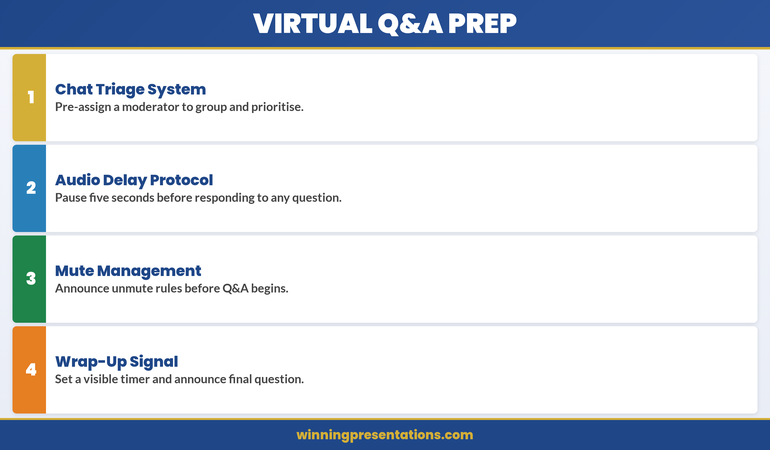
The four-step virtual Q&A preparation protocol: triage, delay, mute rules, and wrap-up.
The preparation framework above translates the three-layer model into four actionable steps you complete before the Q&A begins. Chat Triage System means pre-assigning a moderator to group and prioritise incoming chat questions into three categories: decision-critical (answer immediately), clarification (answer briefly), and off-topic (acknowledge and defer). Without triage, you’re performing real-time sorting while also formulating answers, which is the cognitive equivalent of reading email while driving.
Audio Delay Protocol — pausing five seconds before responding to any question — is the single most impactful preparation step. It accounts for the platform lag that creates talking-over-each-other collisions, and it gives you processing time that in-person Q&A provides naturally through the physical act of someone standing or raising a hand. Announce this protocol at the start: “I’m going to pause briefly before each answer to ensure I’ve heard the full question.” The audience interprets this as professionalism, not hesitation.
Mute Management means announcing unmute rules before Q&A begins. “Please stay muted until I call on you. If you’d like to ask a question, use the raised hand feature or type it in chat.” This removes the ambiguity that creates unmuted interruptions. Without explicit rules, some participants will unmute spontaneously, others will type in chat, and the resulting overlap makes you look like you’re losing control of the room — when in reality, the room never had rules to begin with.
Wrap-Up Signal — setting a visible timer and announcing the final question — prevents the awkward fade-out that plagues virtual Q&A sessions. “We have time for one more question” is the verbal equivalent of a closing bell. Without it, sessions drift, participants leave silently, and the Q&A ends with a whimper rather than a controlled close. The signal also creates urgency: participants with important questions will ask them rather than assuming there’s unlimited time.
Frequently Asked Questions
Should I answer every question in chat, or can I select which ones to address? You can select, but you must signal this clearly at the start: “I’m going to prioritise questions that affect the core decision, and I’ll circle back to secondary questions in writing.” This is different from appearing to ignore questions. Transparency about your selection criteria actually increases credibility rather than diminishing it.
What do I do if someone asks a question I genuinely cannot answer in the moment? Say so directly: “That’s a specific question I want to answer accurately—I’ll follow up with you in writing within 24 hours.” Then do it. This is stronger than guessing or stalling, both of which signal uncertainty. A commitment to follow-up in writing actually increases trust, particularly in approval-stage scenarios where precision matters more than speed.
How do I prevent the Q&A from running over time and cutting into my presentation close? Build the timing architecture I described above, and announce it upfront: “We have 25 minutes for Q&A, which gives us time for roughly eight substantive questions. I want to make sure we cover the approval-critical items, so I’ll be managing our time to that target.” This gives you permission to move through questions efficiently without appearing rushed. You’re managing the format, not dodging engagement.
Get Weekly Insights on Executive Presentations
Join The Winning Edge for actionable strategies on structuring presentations for high-stakes approvals, managing Q&A in real time, and building executive credibility. Every Thursday, direct to your inbox.
The Format Changes Everything
Virtual presentation Q&A is not in-person Q&A delivered over Zoom. It’s a distinct format with its own rules, timing patterns, interruption dynamics, and psychological pressures. Executives who master it gain a measurable edge in approval-stage decisions, funding conversations, and board-level presentations. The difference is not confidence or intelligence—it’s preparation specific to the virtual environment.
Related Reading:
- All-Hands Q&A: Handling the Ambush in a Large Audience
- Panel Q&A with Multiple Presenters: Who Answers What
- Q&A Preparation Checklist for Executives
Today’s other articles: Succession Planning Presentations | Department Update Presentations | Presentation Anxiety Relapse
About the Author
Mary Beth Hazeldine is Owner & Managing Director of Winning Presentations. With 24 years of corporate banking experience at JPMorgan Chase, PwC, Royal Bank of Scotland, and Commerzbank, she advises executives across financial services, healthcare, technology, and government on structuring presentations for high-stakes funding rounds and approvals.