

I Stopped Preparing Slides First. My Approval Rate Doubled.
I used to spend six hours on a presentation and still get rejected.
Beautiful slides. Careful animations. Colour-coordinated charts. The CFO would look at it for three minutes and say, “This isn’t what we need. Can you redo it?”
I thought I had a slides problem. I didn’t. I had a preparation order problem.
The moment I stopped opening PowerPoint first, everything changed. Same amount of time. Same audiences. Dramatically different results.
Here’s what I learned: the order you prepare a presentation determines whether it succeeds or fails. Most professionals get it backwards—and wonder why their approval rates are so low.
Quick answer: The optimal presentation preparation order is: (1) Decision—what do you need from this audience? (2) Audience—what do they care about and what’s blocking them? (3) Structure—what’s the logical flow that leads to your ask? (4) Slides—only now do you open PowerPoint. Most people start at step 4 and wonder why they keep getting sent back to the drawing board. This article explains each step and why the order matters more than the time you spend.
⚡ Presenting Tomorrow? The 12-Minute Reset
If you’re presenting soon and don’t have time for the full process, do this now:
- Write one sentence: “I need [audience] to approve [specific thing].” (2 min)
- List their top concern: What’s the #1 reason they might say no? (3 min)
- Check slide 1: Does it state your recommendation? If not, rewrite it. (5 min)
- Delete 20%: Cut any slide that doesn’t address their concern or your ask. (2 min)
This won’t fix everything, but it will dramatically improve your odds. For the complete framework, keep reading.
Why Most Preparation Is Backwards
Watch how most professionals prepare a presentation:
- Open PowerPoint
- Pick a template
- Start typing content onto slides
- Rearrange slides until it “flows”
- Add charts and formatting
- Hope it works
This approach feels productive. You can see progress—slides appearing, content filling in, a deck taking shape. But it’s an illusion.
Here’s the problem: you’re making structural decisions while distracted by visual decisions. You’re asking “what should slide 7 say?” before you’ve answered “what does my audience actually need to hear?”
The result is predictable: a presentation that looks complete but doesn’t accomplish anything. You’ve built a house without a blueprint—and now you’re surprised when the client says it’s not what they wanted.
I made this mistake for years. I’d spend hours perfecting slides, then watch executives flip through them in 90 seconds and ask questions my deck didn’t answer. The slides were fine. The thinking behind them was absent.
For more on why structurally sound presentations still get rejected, see my article on why good presentations get rejected.
The Four-Step Preparation Order
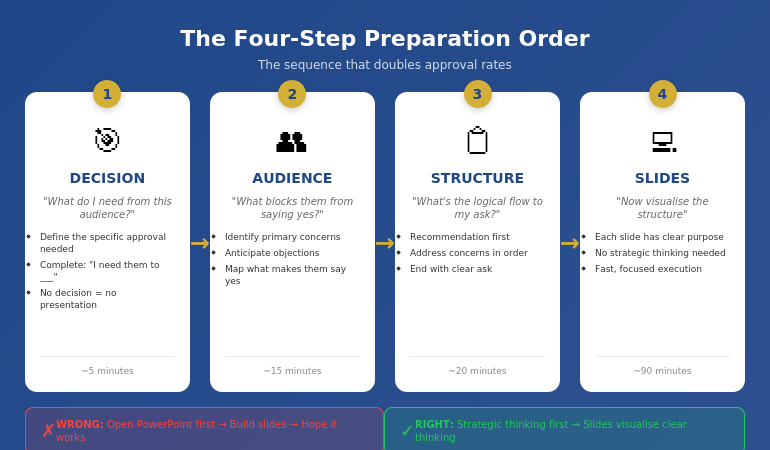
After years of trial and error—and training thousands of executives—I’ve identified the preparation order that consistently gets results:
- Decision — What do you need from this audience?
- Audience — What do they care about? What’s blocking them?
- Structure — What’s the logical flow that leads to your ask?
- Slides — Only now do you open PowerPoint
Notice what’s missing from steps 1-3: any mention of slides, templates, or visuals. That’s intentional. The first 60-70% of effective preparation happens before you touch presentation software.
This feels counterintuitive. Slides are the deliverable, so shouldn’t you start there? No—for the same reason architects don’t start by choosing paint colours. The visible output is the last step, not the first.
Step 1: Decision First
Before anything else, answer one question: What decision do I need from this audience?
Not “what do I want to tell them?” Not “what information should I share?” What decision do you need?
Examples:
- “I need approval to hire two additional engineers”
- “I need the board to greenlight the expansion budget”
- “I need the client to sign the contract today”
- “I need leadership to prioritise this project over Project X”
If you can’t complete the sentence “I need them to _____,” you’re not ready to prepare a presentation. You’re ready to prepare a document—which is a different thing entirely.
Why this matters: Every element of your presentation should move toward this decision. If a slide doesn’t advance the decision, it doesn’t belong. But you can’t make that judgment until you know what you’re deciding.
Most presentations fail because the presenter never clarified what they wanted. They shared information. They presented data. They “updated” stakeholders. But they never asked for anything—so they didn’t get anything.
📊 Structure Your Presentation for Decisions
The Executive Slide System gives you decision-first templates built around the preparation order that actually works. Stop guessing what goes where—use structures proven to get executive approval.
Inside:
- The 10-slide decision framework
- Recommendation-first templates
- Executive summary formats that work
- Before/after examples from real approvals
Get the Executive Slide System → £39
Used by professionals who need approvals, not just presentations.
Step 2: Audience Second
With your decision clear, the next question is: What does this specific audience care about, and what might block them from saying yes?
This isn’t general audience analysis. It’s decision-focused analysis. You’re not asking “who are they?” You’re asking “what stands between them and approving this?”
For each key stakeholder, consider:
- What’s their primary concern? (Risk? Cost? Timeline? Reputation?)
- What would make them say no? (Insufficient data? Wrong timing? Political issues?)
- What would make them say yes? (ROI proof? Risk mitigation? Alignment with their goals?)
- What questions will they definitely ask?
If you’re presenting to a CFO, the blocking concern is probably financial risk or unclear ROI. If you’re presenting to a board, it might be strategic alignment or competitive positioning. If you’re presenting to a client, it might be trust or implementation complexity.
The key insight: your presentation should answer their concerns, not your talking points. Most presenters build decks around what they want to say. Effective presenters build decks around what the audience needs to hear to say yes.
This step typically takes 10-15 minutes but saves hours of revision later. When you understand the audience’s blocking concerns, you build a presentation that addresses them. When you don’t, you build a presentation that gets sent back with “good start, but can you add…”
📋 Want templates built around executive concerns? The Executive Slide System (£39) includes decision-first structures that anticipate what leadership actually wants to see.
Step 3: Structure Third
Now—and only now—do you think about structure. But not slide structure. Argument structure.
The question is: What’s the logical flow that leads from where my audience is now to the decision I need?
For most executive presentations, the structure is simpler than people think:
- Recommendation — Here’s what I’m asking for
- Why it matters — Here’s the problem/opportunity this addresses
- How it works — Here’s the approach (briefly)
- What could go wrong — Here are the risks and how we’ll mitigate them
- What it costs — Here’s the investment required
- The ask — Here’s specifically what I need you to approve
Notice this structure is recommendation-first, not background-first. You don’t build up to your point—you start with it. Executives have limited time and attention. Respect that by leading with the answer.
At this stage, I write the structure as bullet points on paper or in a notes app. No slides. No formatting. Just the logical flow.
For example:
- Recommendation: Approve £200K for customer portal upgrade
- Why: Current portal causing 23% support ticket increase, costing £15K/month
- Approach: Phase 1 (self-service), Phase 2 (AI chat), Phase 3 (integration)
- Risks: Integration complexity—mitigated by phased approach
- Cost: £200K over 6 months, ROI positive by month 9
- Ask: Approve budget and project start date of March 1
That’s the entire presentation in six bullet points. Everything else is supporting detail.
For more on executive-ready structures, see my guide to executive presentation structure.
📊 Structures That Get Yes
The Executive Slide System includes proven structures for board presentations, budget requests, project approvals, and strategic recommendations. Each template follows the decision-first order that executives actually respond to.
Get the Executive Slide System → £39
Templates + examples + the exact slide order that works.
Step 4: Slides Last
Only now do you open PowerPoint.
But here’s the difference: you’re not figuring out what to say anymore. You already know what to say. You’re just visualising it.
This changes everything about slide creation:
- Each slide has a clear purpose (it maps to your structure)
- You know what belongs and what doesn’t (does it advance the decision?)
- You can work faster (no strategic thinking mixed with visual thinking)
- You make better visual choices (because you understand the point each slide needs to make)
The slide creation process becomes almost mechanical. Structure point 1 becomes slides 1-2. Structure point 2 becomes slides 3-4. And so on.
For the example above, the slide deck might be:
- Executive Summary: Approve £200K portal upgrade (ROI positive month 9)
- The Problem: Support tickets up 23%, costing £15K/month
- Root Cause: Current portal lacks self-service capabilities
- Solution Overview: Three-phase portal modernisation
- Phase Details: Timeline and deliverables
- Risk Mitigation: Phased approach reduces integration risk
- Investment: £200K over 6 months
- ROI Analysis: Break-even month 9, £180K annual savings
- Ask: Approve budget and March 1 start date
- Appendix: Technical details (if asked)
Ten slides. Clear logic. Decision-focused. And it took less time than the “start with slides” approach because there was no backtracking, no restructuring, no “wait, what’s my point again?”
For guidance on what makes an effective executive summary slide, see how to write the executive summary slide.
How This Actually Saves Time
The objection I hear most often: “I don’t have time for a four-step process. I just need to get the deck done.”
I understand. But consider the true time cost of the “just start with slides” approach:
- Hours building slides → Presentation rejected → Hours rebuilding
- Deck looks done → Stakeholder asks unexpected question → Scramble to add slides
- Send for review → “This doesn’t address the real issue” → Start over
The four-step process typically takes the same total time—or less—because you eliminate rework. Thirty minutes of strategic thinking before slides prevents three hours of revision after slides.
Typical time breakdown:
- Step 1 (Decision): 5 minutes
- Step 2 (Audience): 15 minutes
- Step 3 (Structure): 20 minutes
- Step 4 (Slides): 60-90 minutes
Total: About 2 hours for a solid executive presentation. Compare that to 4-6 hours of meandering slide creation followed by revision cycles.
The professionals who “don’t have time” for strategic preparation are the same ones working weekends to fix presentations that should have been right the first time.
What order should you prepare a presentation?
The optimal order is: Decision (what do you need?), Audience (what blocks them?), Structure (what’s the logical flow?), then Slides (visualise the structure). Most people start with slides and work backwards, which is why most presentations get rejected or require extensive revision. Starting with the decision ensures every element of your presentation serves a purpose.
Should you write your presentation before making slides?
Yes—but not word-for-word scripts. You should clarify your decision, understand your audience’s concerns, and outline your logical structure before touching slide software. This typically means 30-45 minutes of thinking and notes before opening PowerPoint. The slides then become a visualisation of clear thinking rather than a substitute for it.
Why do most presentations fail to get approval?
Most presentations fail because they’re built around what the presenter wants to say rather than what the audience needs to hear to say yes. When you start with slides, you naturally focus on your content. When you start with the decision, you naturally focus on what moves the audience toward that decision. The preparation order determines the outcome.
📊 Skip the Guesswork
The Executive Slide System gives you decision-first templates so you never start from a blank screen. Each structure is built around the preparation order that gets approvals—not just presentations.
You’ll get:
- 10-slide decision frameworks for every scenario
- Executive summary templates that lead with the ask
- Before/after examples showing the transformation
- The exact slide order executives expect
Get the Executive Slide System → £39
For professionals who need approvals, not just slide decks.
Frequently Asked Questions
How long should presentation preparation take?
For a standard executive presentation (10-15 slides), allow 2-3 hours total: 30-45 minutes for strategic thinking (steps 1-3) and 90-120 minutes for slide creation (step 4). This assumes you’re working from templates rather than starting from scratch. Complex presentations or unfamiliar topics may require more time, but the ratio should stay similar—about 30% strategy, 70% execution.
Should I use a presentation template or start from scratch?
Use a template—but choose one that matches your strategic structure, not just your visual preferences. A template saves time only if it’s built around decision-first logic. A beautiful template with the wrong structure will still get rejected. The best approach is using templates designed for your specific presentation type (board update, budget request, project approval) rather than generic “professional” templates.
What if I’m given a slide deck to present that someone else created?
Run through steps 1-3 anyway. Clarify the decision you need, identify audience concerns, and check whether the existing structure addresses them. Often, inherited decks need restructuring—they contain good content in the wrong order. Taking 20 minutes to validate (or adjust) the structure before presenting will dramatically improve your results compared to just “learning the slides.”
Does this process work for short presentations too?
Yes—and it’s arguably more important. When you only have 5 minutes or 5 slides, every element must earn its place. The four-step process ensures you’re putting the right content in limited space. For very short presentations, steps 1-3 might take just 10 minutes total, but skipping them is how people end up with 5 slides that don’t accomplish anything.
📧 The Winning Edge Newsletter
Weekly insights on executive presentations, approval strategies, and what actually works in corporate boardrooms.
📋 Free: Executive Presentation Checklist
A one-page checklist covering all four preparation steps. Use it before your next presentation to ensure you’re not skipping the strategic work.
About the Author
Mary Beth Hazeldine is the Owner & Managing Director of Winning Presentations. With 24 years of corporate banking experience at JPMorgan Chase, PwC, Royal Bank of Scotland, and Commerzbank, she has delivered high-stakes presentations in boardrooms across three continents.
A qualified clinical hypnotherapist and NLP practitioner, Mary Beth combines executive communication expertise with evidence-based techniques for managing presentation anxiety. She has trained thousands of executives and supported high-stakes funding rounds and executive approvals.
Your Next Step
The next time you need to create a presentation, resist the urge to open PowerPoint immediately. Instead, take 30 minutes to work through steps 1-3:
- What decision do I need?
- What concerns might block my audience?
- What’s the logical flow that addresses those concerns and leads to my ask?
Then—and only then—build your slides.
It feels slower. It isn’t. And the results will show you why preparation order matters more than preparation time.
If presentation anxiety is part of what’s holding you back, see today’s companion article on why therapy doesn’t always fix presentation fear.