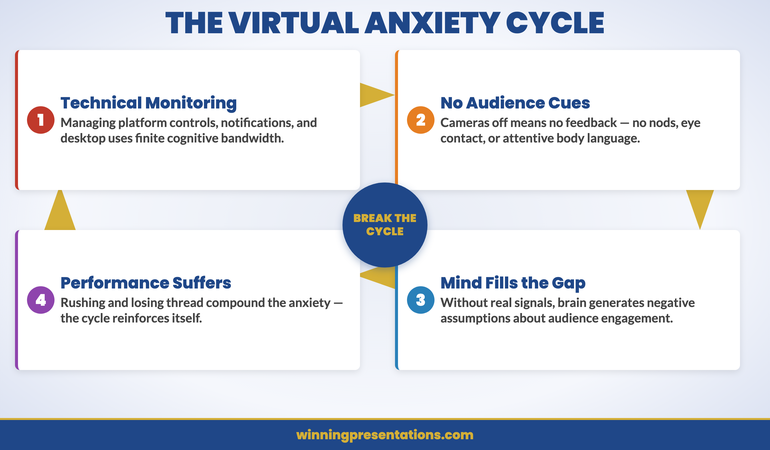
Quick answer: Camera anxiety is a genuinely new flavour of presentation anxiety that has emerged since 2020 — distinct from in-person stage fright in its triggers and its physiology. It affects senior professionals who never struggled in person, because the technology stack creates conditions the human nervous system did not evolve for: a live mirror of one’s own face mid-sentence, audience tiles that read the speaker more sharply than the speaker can read them, muted silence that removes the social feedback the speaker is unconsciously calibrating against, and packet lag that registers as awkward pauses the speaker did not produce. The structural fixes are specific: hide self-view, scripted first sentence, pre-camera physiological routine, post-meeting decompression to prevent accumulation. The work is technology-specific, not character-specific.
JUMP TO:
- Why this anxiety is genuinely new — and physiological
- The self-mirror feedback loop: the trigger that didn’t exist before
- The structural fixes: hide self-view, scripted opening, pre-camera routine
- In-meeting recovery: the moves when anxiety spikes mid-presentation
- When camera anxiety masks older underlying anxiety
- When to escalate beyond self-management
- Frequently asked questions
Henrik, a finance director at a Stockholm-headquartered industrials group, presented to in-person boards and investor groups for twenty-two years without anything more than ordinary pre-meeting nerves. Two years after his organisation moved its quarterly executive reviews to a permanently virtual format, he found himself developing a physical sense of dread the evening before each session. His heart rate climbed an hour before camera-on. During the meeting his hand shook holding the mouse — something he had never experienced in a physical room. Afterwards, he felt unable to do email or sustained thinking for the remainder of the working day. His clinical health was unchanged and his preparation was the same as ever. Something else was producing the reaction.
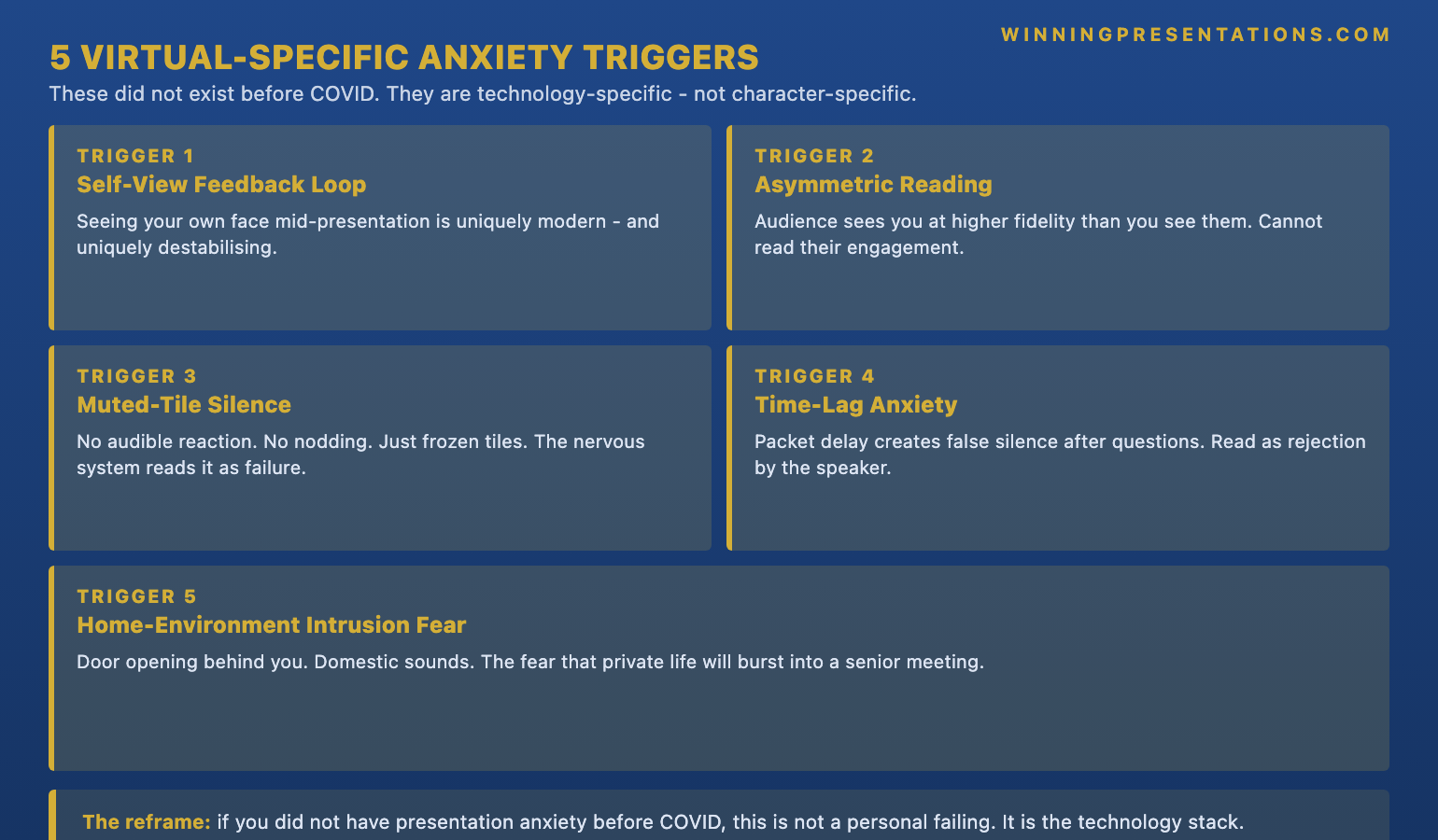
What Henrik is describing is a recognisable pattern in senior professionals since approximately 2021: an anxiety that attaches specifically to camera-based presentation and does not appear in any other professional context. It is not a recurrence of an older fear of public speaking, which Henrik never had. It is a technology-specific anxiety produced by a combination of conditions — live self-view, asymmetric audience reading, muted-tile silence, packet-lag pauses, home-environment intrusion — that did not coexist in any presentation format before 2020. The nervous system did not evolve for the configuration; it is now being asked to do executive-level work under conditions it has never been trained on.
This piece walks through why this anxiety is genuinely new, the self-mirror feedback loop that produces the most reliable trigger, the structural fixes that reduce the physiological spike, the in-meeting recovery moves for when the spike hits mid-presentation, when camera anxiety is masking an older anxiety that needs different work, and the threshold at which self-management stops being enough. The aim is not to make camera anxiety disappear; it is to give senior professionals a structural understanding of what is happening and a small number of specific moves that reduce the cost.
Before the next on-camera meeting, a one-page structural check is worth a look.
The Virtual Presentation Quick-Start Checklist is a free one-page structural audit of the moves that reduce camera-anxiety triggers — designed to be run through in the fifteen minutes before camera-on. Free download.
Why this anxiety is genuinely new — and physiological
The common dismissal of camera anxiety is that it is “just” public-speaking anxiety in a new costume. The pattern in senior professionals who developed it after 2020 contradicts that reading. Many of these professionals presented comfortably in person for decades; they developed the anxiety in their forties and fifties, after the format changed. When the same people return to in-person rooms, the anxiety often does not transfer. That asymmetry — anxious on camera, calm in person — is the signature of a technology-specific stress response rather than a general fear.
The physiology supports the same reading. The autonomic nervous system is calibrated to read social feedback during speech: nods, posture shifts, eye contact, micro-expressions, the audible breath of a room. In an in-person setting the speaker’s nervous system is continuously receiving these signals at the resolution it evolved to process. In a gallery-view video call, the same speaker is receiving feedback at far lower resolution — tiles the size of a postcard, half of them muted, several with cameras off, all of them at a refresh rate and lag that disrupts the micro-timing the nervous system uses for calibration. The speaker is presenting into a feedback environment the nervous system has no template for, and the result is heightened sympathetic activation: elevated heart rate, shallow breath, narrowing of attention, the small physical signals (shaking hand, dry mouth, throat tightness) that Henrik noticed.
The exhaustion afterwards is the other diagnostic signal. In-person presentation produces tiredness; on-camera presentation, for people with camera anxiety, produces depletion that lasts hours. The nervous system has been working overtime to extract feedback from a low-resolution channel, and the cognitive cost compounds across a full day of back-to-back virtual meetings. For the closely connected piece on how to structure on-camera energy and pacing so the depletion does not compound, see our companion article on virtual presentation energy for executives.
The self-mirror feedback loop: the trigger that didn’t exist before
Of the five triggers shown in the infographic below, the most reliable producer of camera anxiety in senior professionals is the first: the self-view tile. Pre-2020, no presentation format placed a live, high-resolution mirror of the speaker’s own face in their field of view while they were speaking. Television presenters had teleprompters and floor monitors but did not see themselves; conference speakers had nothing of the kind. The virtual meeting is the first format in human history where the speaker is required to address an audience while simultaneously watching their own face do the speaking. The nervous system did not evolve for the configuration, and for many senior professionals the configuration becomes the single biggest source of the anxiety spike.
The self-mirror feedback loop runs like this. The speaker begins a sentence. They glance at their own tile — almost involuntarily, because the human eye is drawn to faces and the brain treats one’s own face as a high-priority signal. They notice a micro-expression they do not like: a slight tension around the mouth, the eyes looking down at notes, a brow furrow during a hard sentence. The noticing triggers a small spike of self-consciousness. The self-consciousness disrupts the sentence in progress. The disrupted sentence produces a real expression of awkwardness, which they then see in the self-view tile, which produces another spike. Within twenty seconds the loop has compounded from a small initial wobble to a noticeable presentation cost. The speaker did not have the loop before 2020 because the configuration that produces it did not exist.
Aisha, a managing director at a Dubai-based asset manager, described the experience in almost exactly these terms. She said she could feel her face “going wrong” during the opening minute of investor calls, that she could see it happening in her own tile, and that the seeing of it accelerated whatever was producing it. Aisha had presented to two-hundred-person conferences in person for fifteen years without difficulty. The trigger was specifically the tile, and the structural fix that worked was the removal of the tile from her view. Hiding self-view is not avoidance; it is removal of the configuration the nervous system cannot process. The audience continues to see the speaker unchanged.
The structural fixes: hide self-view, scripted opening, pre-camera routine
The first structural fix is the hardest to accept and the most effective. In Zoom, the option is “Hide Self View” in the right-click menu on the speaker’s own tile. In Microsoft Teams, it is “Hide for me” under the three-dot menu on the user’s own video. In Google Meet, the self-view can be minimised and moved to a corner; it cannot be fully hidden in every layout, so the workaround is to drag it to the edge of the screen and resize it to its smallest available state. The audience continues to see the speaker unchanged. The speaker stops seeing themselves and the self-mirror feedback loop is broken at the configuration level. Many senior professionals report that this single move, made permanent across every meeting, reduces baseline camera anxiety by a noticeable margin within a fortnight.
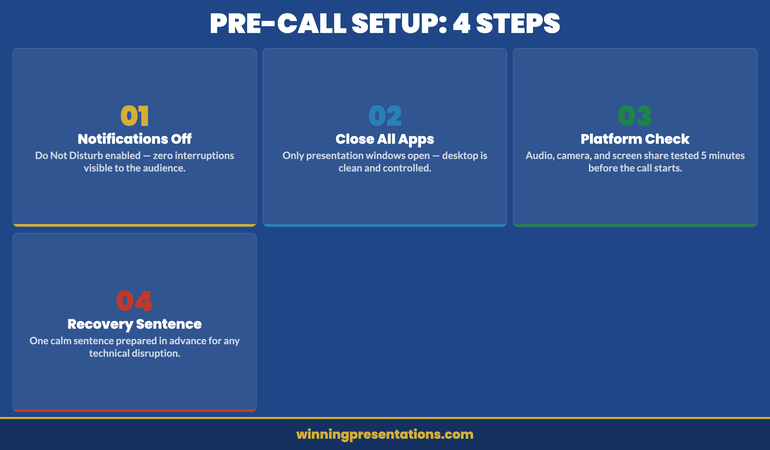
The second structural fix is a deliberately scripted first sentence. The opening sixty seconds of an on-camera meeting are where the anxiety spike is highest and where the unscripted pause is most costly. The structural alternative is a fully written-out first sentence — not a bullet, a complete sentence — that the speaker has rehearsed three times before camera-on. The sentence does not need to be memorised; it can sit on a sticky note attached to the bezel of the monitor, immediately above the camera. The function of the sentence is to give the nervous system a confident starting move that does not require improvisation in the most exposed sixty seconds. After the first sentence the speaker is in the flow of the meeting and the spike is past.
The third structural fix is a pre-camera routine. Ninety seconds, no longer, and run identically before every on-camera meeting. Step one: stand up and move for sixty seconds (any movement — a corridor walk, a window-to-desk pace, a stretch). Step two: four slow breaths with a four-second exhale (the longer exhale activates the parasympathetic nervous system in a way the inhale alone does not). Step three: sip room-temperature water (cold water tightens the throat; hot water can disturb voice) and check the scripted first sentence one final time. The routine takes ninety seconds and works because it is the same every time — the consistency is what produces the calming signal, not the specifics of the moves. Improvising the routine each meeting defeats the purpose; standardising it is the work.
The structured course for senior professionals whose presentation anxiety has outlasted the seniority that was supposed to dissolve it.
Conquer Your Fear of Public Speaking is a structured course for senior professionals navigating speaking anxiety that has persisted into their senior years. Mary Beth built this course from her own five-year recovery from severe speaking fear during 25 years in corporate banking — credit committees, client meetings, internal pitches where her voice would tremble despite the substance being right. The course covers the cognitive structure, the physiological reset patterns, and the in-meeting recovery moves that rebuild credibility under pressure. Camera anxiety is one expression of a deeper pattern — the structural work behind it transfers to all presentation contexts.
- The cognitive structure — naming the spike, identifying the triggers, reframing the physiology
- The physiological reset patterns — breath, body, voice, focus
- The in-meeting recovery moves — the structural pause, the verbal reset, the return to flow
- The longer-term rebuild — what to practise between meetings to lower baseline anxiety over weeks
- £39, instant download, lifetime access
In-meeting recovery: the moves when anxiety spikes mid-presentation
The structural fixes above reduce the probability of a spike; they do not eliminate it. Most senior professionals with camera anxiety will still experience the occasional mid-meeting moment when the heart rate climbs, the hand shakes, the breath becomes shallow, and the next sentence becomes harder to construct. The work in this moment is not to suppress the physiology — the physiology is doing what the nervous system is wired to do — but to apply a small structural sequence that buys back composure inside thirty seconds. The sequence has three moves, and they run in order.
Move one: a deliberate pause. Two seconds, three at most. The pause feels much longer to the speaker than to the audience because the speaker’s time perception is distorted by the spike. To the audience, two seconds reads as deliberate thinking. The pause has two functions: it interrupts the cognitive escalation that compounds the anxiety, and it gives the speaker a moment to do move two. Move two: one slow exhale, longer than the inhale that preceded it. The longer exhale activates the parasympathetic response in real time; the heart rate drops measurably within five to ten seconds. The exhale is silent and invisible to the audience; it is the speaker’s private reset. Move three: a structural verbal sentence that returns the speaker to the recommendation at the level of structure rather than detail — “Let me step back to the point the meeting is being asked to consider.” The structural sentence rebuilds the speaker’s authority over the flow of the meeting in a single line.
The other in-meeting move worth knowing is the post-question recovery, which is where many camera-anxious senior professionals lose ground. A hard question lands. The speaker feels the spike. The instinct is to start answering immediately to demonstrate that the spike has not happened. The instinct is wrong. The structural move is the same two-second pause, the same single exhale, and a re-framing sentence: “Let me take that in two parts — first the figure you asked about, then the underlying assumption.” The sentence buys composure and signals preparation simultaneously. The audience reads it as an answer being structured rather than as anxiety being managed.
If the in-meeting reset moves above are the work that resonates:
Calm Under Pressure is the focused workbook covering the immediate physiological reset techniques — breath patterns, body resets, voice steadying — for the sixty seconds before a high-stakes meeting begins and the thirty seconds during one when the spike hits. Designed to live on the desk, not on a shelf. £19.99, instant download.
When camera anxiety masks older underlying anxiety
For some senior professionals, what presents as camera anxiety is genuinely new — an honest response to a new configuration, and the structural fixes above are sufficient. For others, the camera is exposing an underlying anxiety that was present all along but that the in-person format had been quietly managing. The senior leader who could rely on physical room presence, on early eye contact with a friendly face, on the breath-rhythm of a room they had calibrated against for thirty years, finds those calibrators absent on camera. The underlying anxiety, which had always been there but had been compensated for, surfaces with no compensation available. The camera does not cause the anxiety; it removes the support that was concealing it.
The diagnostic question is whether the anxiety existed in any form pre-2020. If a senior professional had occasional pre-meeting nerves but never anything more, and the camera anxiety arrived as a genuinely new sensation in 2021 or 2022, the work is technology-specific: the structural fixes above, applied consistently for six to twelve weeks, will usually bring baseline anxiety back down to a manageable level. If, by contrast, the senior professional had a quiet but persistent anxiety throughout their career — early-morning dread before big meetings, voice-tightness on important sentences, the sense that they were “getting away with it” each time — and the camera removed the compensations and surfaced the underlying pattern, the work is different. The structural fixes will help, but the underlying anxiety needs its own attention. For the deeper structural piece on rebuilding confidence in senior professionals whose anxiety has persisted into their senior years, see our companion article on conquering the fear of public speaking for senior professionals.
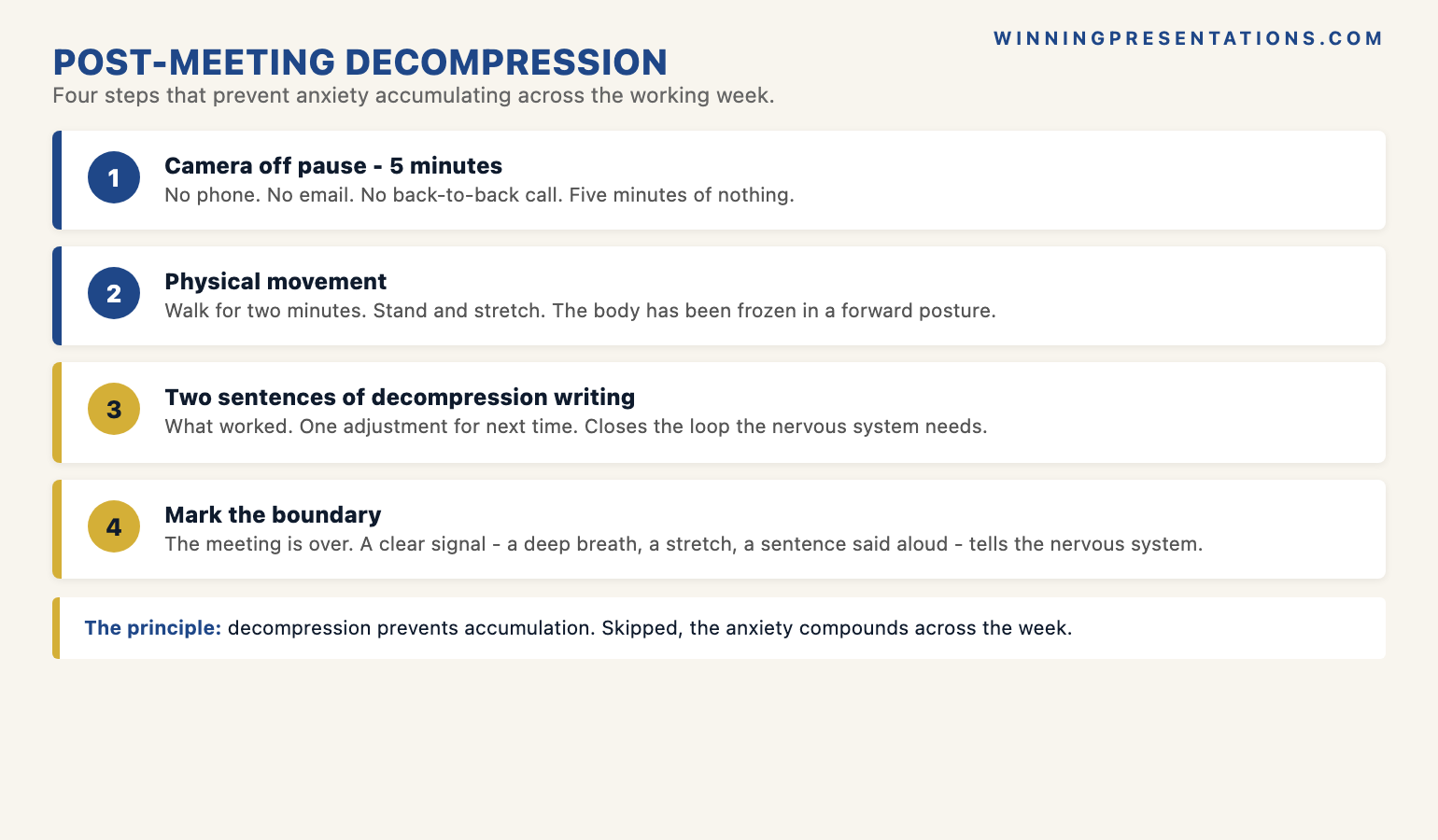
Lorenzo, a chief commercial officer at a Milan-based consumer goods business, told me he had assumed he was “just bad on Zoom” until a coach pointed out that the anxiety he was describing during virtual meetings had also been present, in much milder form, during the largest in-person meetings of his earlier career — he had simply attributed it to the stakes and moved on. The camera had made the pattern visible because it removed the structural supports — the room, the physical presence, the audience he could read — that had been quietly carrying him for twenty years. The work he ended up doing was the deeper structural work the camera had surfaced. The post-meeting decompression structure below was the move that contained the cost while the deeper work was happening.
When to escalate beyond self-management
Self-management — the structural fixes, the pre-camera routine, the in-meeting recovery moves, the post-meeting decompression — is sufficient for most senior professionals with camera anxiety. There is, however, a threshold beyond which self-management stops being enough and a structured external intervention becomes the right move. The threshold is not a moral failing; it is a recognition that the configuration of the anxiety has moved past what individual moves can hold. The signals that the threshold has been crossed are reasonably consistent across the senior professionals who have eventually escalated. Recognising them early is itself a structural move.
The first signal is anticipatory anxiety extending beyond the day of the meeting. Ordinary pre-meeting nerves arrive the morning of or the night before. Camera anxiety that has crossed into a clinical range tends to start two to three days ahead, disrupts sleep on the preceding nights, and produces somatic symptoms (chest tightness, gastrointestinal disturbance) independent of the meeting. The second signal is anxiety that does not lift after the meeting ends — when the meeting “stays in the body” for a day or longer despite decompression. The third signal is avoidance: declining meetings, deferring presentations to colleagues, or starting to plan a career move primarily to escape the virtual format. Avoidance is the clearest signal that self-management is no longer holding the cost.
The escalation options, in increasing order of intensity, are: a structured programme for senior presentation anxiety (which addresses the cognitive and physiological work without medicalising the experience); a course of cognitive behavioural therapy with a practitioner experienced in performance anxiety (typically six to twelve sessions, often available through corporate employee assistance programmes); short-term medication such as beta-blockers (which act on the physiological symptoms rather than the underlying anxiety, prescribed by a GP, often used as a bridge during the highest-stakes period rather than long-term); and, in cases of severe and persisting anxiety, a longer therapeutic engagement. Treating escalation as a structural option rather than as a personal failure is itself part of the work.
Frequently asked questions
Why do I have camera anxiety now when I was fine presenting in person for years?
Because the on-camera meeting is a genuinely new presentation format with configuration elements — live self-view, low-resolution audience feedback, muted tiles, packet lag, home-environment intrusion — that did not coexist in any pre-2020 format. The nervous system that handled in-person meetings comfortably is now being asked to operate without the social-feedback signals it was calibrated against. The anxiety is not a recurrence of an older fear; it is an honest response to a configuration the system has not been trained on. Many senior professionals who have been in person for thirty years experience the same pattern, and the structural fixes — hide self-view, scripted first sentence, pre-camera routine, post-meeting decompression — reduce the cost within six to twelve weeks of consistent use. The work is technology-specific, not character-specific.
Will hiding self-view actually help, or is that just avoiding the issue?
It helps, and it is not avoidance. The self-view tile is not part of the meeting; the audience does not see whether the speaker has it open or hidden. Hiding it removes one specific configuration element — the live mirror of the speaker’s face during speech — that the human nervous system did not evolve to handle and that produces the self-mirror feedback loop described above. The audience continues to see the speaker at the same resolution; only the speaker stops seeing themselves. The senior professionals who hide self-view permanently across every meeting tend to report a noticeable reduction in baseline anxiety within a fortnight. There is no presentational benefit to keeping self-view on for most speakers; the rare exception is for very deliberate framing or lighting checks at the start of a meeting, after which the self-view can be hidden again.
How long does it take for camera anxiety to ease with practice?
For most senior professionals applying the structural fixes consistently — hide self-view permanently, scripted first sentence for every meeting, the ninety-second pre-camera routine, the post-meeting decompression — baseline anxiety usually starts to ease within two to three weeks and reaches a stable, manageable level within six to twelve weeks. The trajectory is not linear; there will be meetings that go worse than the trend would suggest, and the post-meeting decompression matters most on those days because it prevents a single hard meeting from re-priming the system for the next one. If, after twelve weeks of consistent application, the baseline anxiety has not noticeably shifted, that is a signal to consider the escalation options in the previous section — particularly the structured-programme option or a course of CBT — rather than continuing the same self-management for longer.
When should I consider professional support rather than self-management?
Three signals indicate that the threshold has been crossed. First, anticipatory anxiety that starts two or more days before the meeting, disrupts sleep on the preceding nights, and produces somatic symptoms (chest tightness, gastrointestinal disturbance) independent of the meeting itself. Second, anxiety that does not lift in the hours after the meeting ends — when the meeting “stays in the body” for a day or longer despite decompression. Third, avoidance behaviours: declining meetings, deferring presentations to colleagues, scheduling around camera-on time, or contemplating career moves primarily to escape the format. Any one of these signals warrants a conversation with a GP or a performance-anxiety specialist; two or three together warrant a structured intervention. The options range from a structured programme to a short course of CBT to short-term beta-blocker support for the highest-stakes meetings. Escalation is a structural option, not a personal failure.
The Winning Edge — weekly newsletter
The Winning Edge is a weekly newsletter for senior professionals who present at the executive level. One short email a week, focused on the structural moves that separate decks committees back from decks they defer. Subscribe to The Winning Edge →
Not ready for the full course? Start here instead: download the free Virtual Presentation Quick-Start Checklist — the one-page structural audit to run before any on-camera meeting.
About the author
Mary Beth Hazeldine is Owner & Managing Director of Winning Presentations Ltd. With 25 years of corporate banking experience at JPMorgan Chase, PwC, Royal Bank of Scotland, and Commerzbank, and 16 years training senior professionals on high-stakes presentation, she advises executives across financial services, healthcare, technology, and government on structuring presentations for board approvals, investor briefings, and executive-sponsor decisions. Her work on presentation anxiety draws on her own structural recovery from severe speaking fear during her banking career.