

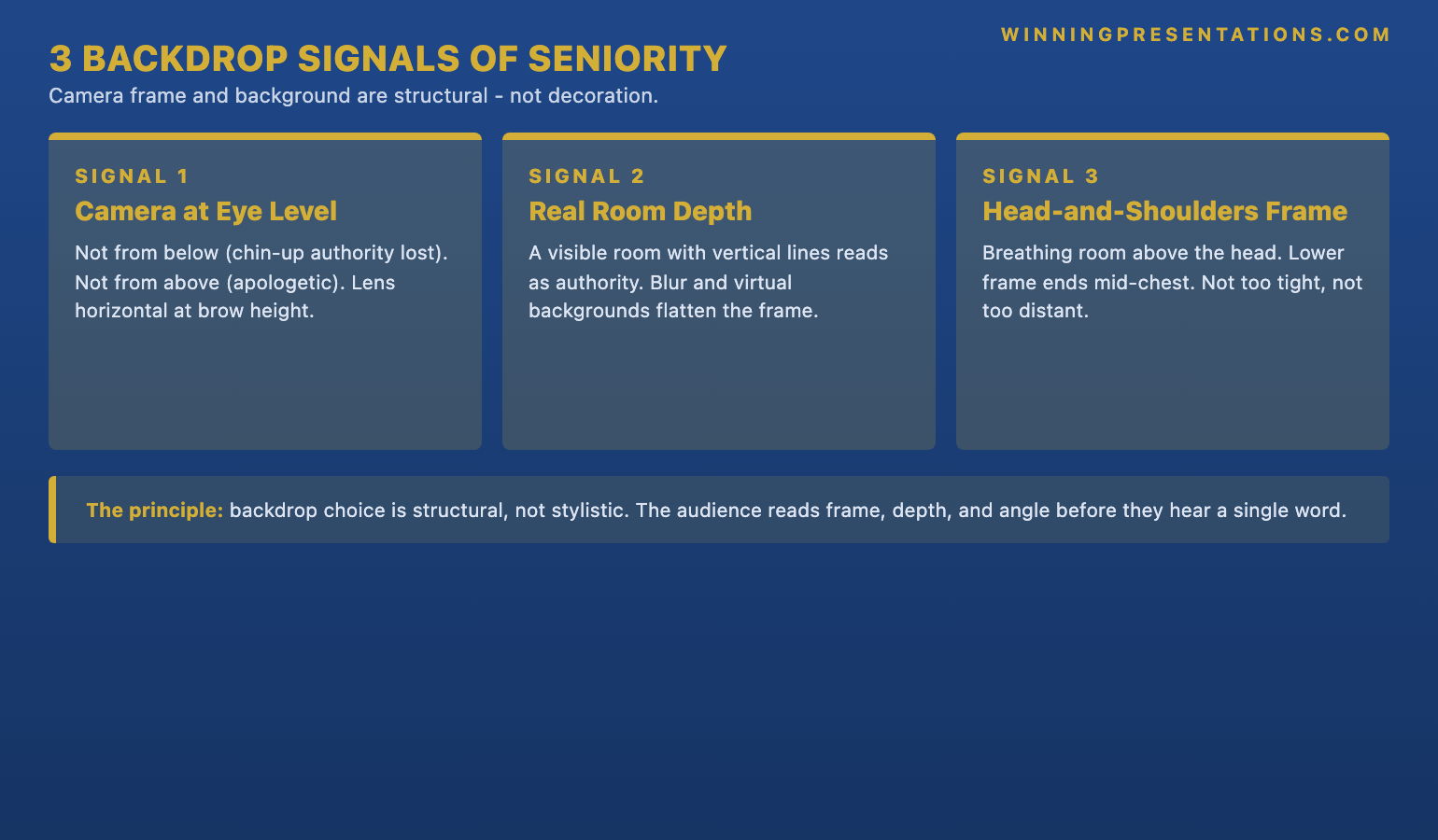
Quick answer: For senior virtual presentations, the backdrop is a structural signal, not a decorative one, and three specific moves carry most of the load: the camera placed at eye level rather than above or below the speaker; a real room visible behind the speaker with some depth and one or two vertical lines such as a panelled wall or a bookshelf; and a head-and-shoulders frame with breathing room above the head and the lower edge ending mid-chest. Virtual backgrounds and aggressive blurs usually reduce authority rather than enhance it. The setup does not require a studio — a corner of a home office, a hotel desk, or a quiet meeting room can be made to read as senior with three or four structural adjustments made in the five minutes before the meeting starts.
JUMP TO:
- Why the backdrop matters at senior level
- The three structural rules: camera, depth, frame
- Virtual backgrounds: when they destroy authority
- The lighting-backdrop interaction
- Practical setups for home, hotel, and shared spaces
- The in-meeting test: what to check five minutes before
- Frequently asked questions
Saskia, a chief financial officer at a Geneva-headquartered private bank, sat down for a virtual board meeting last spring with the camera tilted slightly upward from her laptop on the desk, a softly blurred background hiding the room behind her, and her face filling roughly seventy per cent of the frame. The deck was strong, the numbers defensible, and the recommendation — a £180m capital reallocation — had been pre-walked with the chair. Forty minutes in, a non-executive director, a former chief executive of a Swiss insurer, asked her bluntly whether she had taken the meeting from her bedroom. She had not. She had taken it from a quiet corner of her home office. But the camera angle, the blur, and the tight frame had together produced a reading the room had not been able to shake: this is not a person speaking from the seat of authority.
The diagnosis is not that any single element of Saskia’s setup was technically wrong. The laptop camera was a good one; the room had decent natural light; the blur removed visual noise. The problem is that the setup, taken together, produced a sequence of small signals that read against her — the upward camera angle making her appear to look up at the room rather than across it; the blur that removed the contextual depth a senior audience uses to read confidence; the tight frame compressing her into a head-only presence. None of these signals was loud. Together, they were enough to plant a question about whether the speaker was operating from authority or improvisation.
This piece walks through why the backdrop and camera frame matter disproportionately at senior level for virtual presentations, the three structural rules — camera height, background depth, framing — that carry most of the signal load, when virtual backgrounds actively destroy authority, how lighting interacts with backdrop choice, practical setups for the rooms most senior leaders actually work from, and the five-minute pre-meeting check that catches the failures most likely to read against the speaker. The aim is not a studio build. It is a structural correction that takes ten minutes the first time and thirty seconds every time after.
Before the next senior virtual meeting, a one-page setup check is worth a look.
The Virtual Presentation Quick-Start Checklist is the free setup, delivery, and rescue checklist for high-stakes virtual presentations — including the camera, lighting, and backdrop checks that matter before a senior meeting. Free download.
Why the backdrop matters at senior level
A virtual board meeting strips out most of the contextual signals an in-person meeting provides. The audience cannot read the speaker’s full body language, cannot register the room they are walking into, cannot pick up the small cues — handshake, eye-contact pattern, where the speaker chooses to sit — that they would normally use to calibrate seniority within the first two minutes. What remains is a rectangle on a screen, perhaps fifteen centimetres wide on the average laptop, containing the speaker’s face, a slice of their upper body, and whatever the camera happens to pick up behind them. That rectangle has to carry the entire load of the speaker’s presence.
At junior or mid-level the reading is forgiving. The same setup from a divisional managing director presenting to a group board reads differently. The audience is matching the picture against a mental template — what does a person at this seniority, presenting on this topic, with this level of authority usually look like — and a casually framed rectangle with no contextual depth breaks the template. The break is small. It does not get articulated. But it sits underneath the meeting as a faint question about whether the speaker is operating from authority.
The asymmetry is not about wealth or studio production values. Some of the most credible virtual presenters I have worked with have been senior leaders calling in from a corner of a spare room, with a single bookshelf behind them and a desk lamp angled correctly. What they have done — usually after one or two meetings that did not go as well as they should have — is treat the rectangle the audience sees as a piece of the presentation itself, designed deliberately rather than left to whatever the laptop happens to show. The deliberateness is the signal. The studio is not.
The three structural rules: camera, depth, frame
The first rule is camera height. The laptop sat on the desk puts the camera roughly twenty centimetres below the speaker’s eye level, which produces an upward tilt the audience reads as the speaker looking up at the room. The reading is consistent across cultures and sectors: an upward angle reduces perceived authority. The opposite — the camera placed too high, looking down at the speaker — reads as either physical discomfort or as a slumped posture. The structural fix is to raise the laptop or external camera until the lens sits at the same height as the speaker’s eyes in their normal working posture. A stack of three or four hardback books under a laptop is usually enough; an external webcam at the top of an external monitor is the permanent solution. The check is that the speaker is looking across at the camera, not down at it. For the broader companion piece on running the meeting itself, see our work on running a virtual board meeting presentation.
The second rule is background depth. A real room visible behind the speaker — with some depth between the speaker and the back wall, and ideally one or two vertical lines such as the edge of a bookshelf, a panelled wall, or a door frame — signals more authority than either a blurred background or a virtual one. Depth gives the audience a contextual frame. They can read that the speaker is in a real space, that the space has a deliberate composition behind them, and that the speaker has chosen where to sit within it. A blurred background removes that contextual information and replaces it with visual ambiguity, which the audience reads as either improvised or hidden. The vertical lines matter because the brain reads vertical lines behind a person as structural support for the figure in front of them.
The third rule is framing. The senior virtual frame is head-and-shoulders, with breathing space above the head — roughly half the speaker’s forehead — and the lower edge cutting across mid-chest rather than at the chin or waist. A tight frame that fills the rectangle with face reads as confrontational and compressed; the audience cannot see the shoulders or gesturing arms, which removes most of the body-language signal. A frame too wide — full upper body or further — reads as informal or not yet set up; the audience feels they are looking at the speaker from across a room rather than across a table. The mid-chest cut with a thumb’s-width of breathing space above the head is the frame the audience reads as a senior person presenting from their seat at the table.
Virtual backgrounds: when they destroy authority
The virtual background — the digitally inserted image that replaces the speaker’s real room — is the most over-used setting in senior virtual meetings, and in the majority of cases it costs the speaker more authority than it adds. The technology is still imperfect. The edges of the speaker’s head flicker as they move; ears and hair occasionally dissolve into the background; arms gesturing forward pass briefly behind the inserted image. The audience does not consciously catalogue these glitches, but they read them. The reading is consistent: this is a person who has put a digital wall in front of their actual room. The question that follows — what is being hidden? — is one the speaker has not given themselves a way to answer.
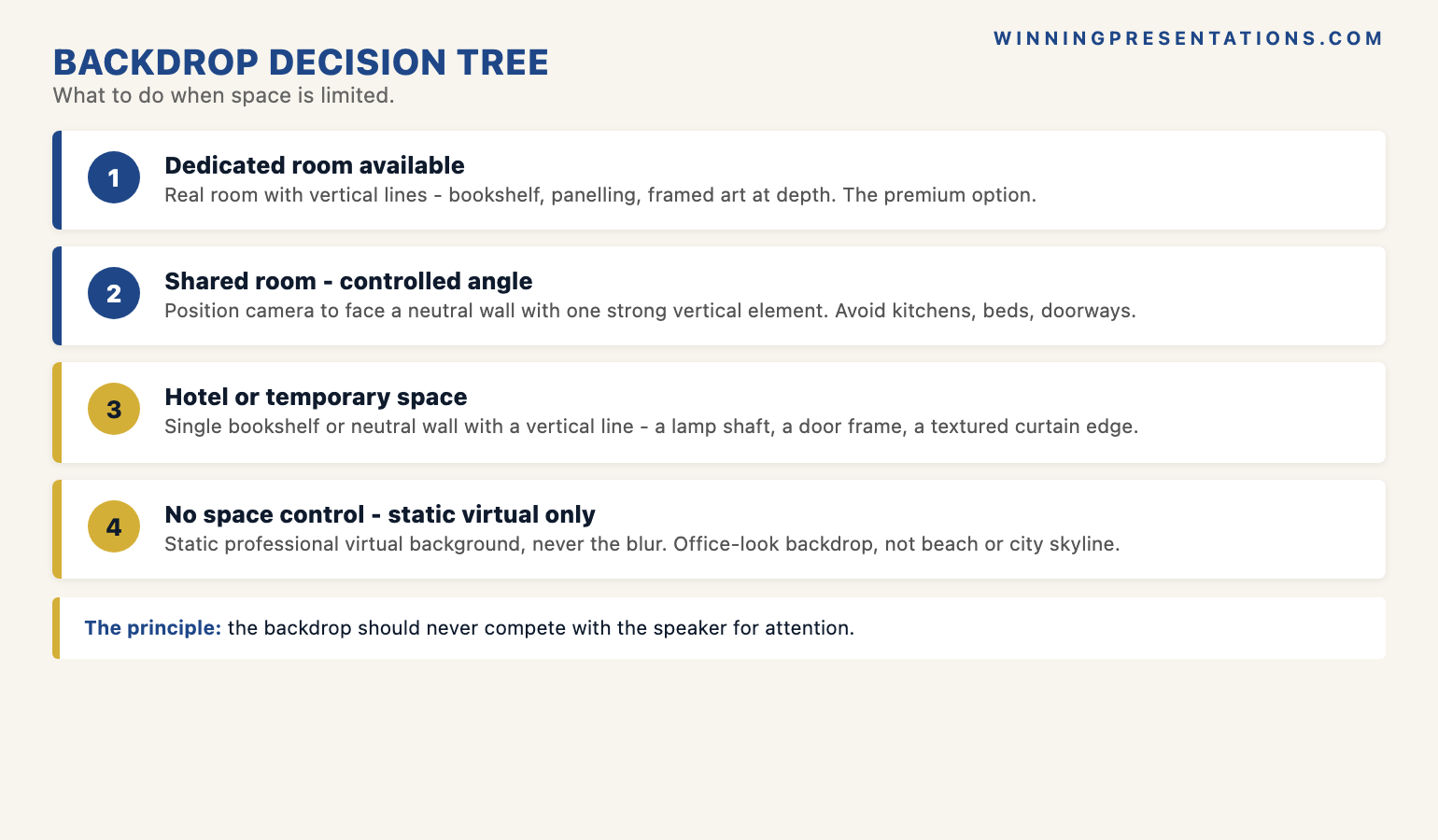
There are narrow conditions under which a virtual background works. A static, professionally produced corporate background, used consistently by everyone in an organisation as a standard, reads as policy rather than concealment; the audience registers it as a uniform and looks past it. A neutral, low-contrast image works better than a bright or busy one. And a virtual background used in a meeting where the speaker has no control over their surroundings — calling in from a hotel lobby with people walking behind them — reads as the reasonable choice. The condition is that the alternative is worse, and the speaker has communicated, by their composure and the rest of the setup, that the virtual background is a managed choice rather than a default.
The aggressive blur sits in roughly the same category, with one difference: it is read less suspiciously, because most audiences know that blur is what the platform does to a real room at one click. The cost is that the blur still removes the contextual depth the audience uses to read confidence, and it produces a subtle softness around the speaker’s edges that registers as low-resolution. A light blur is usually preferable to a heavy blur or a virtual background. But the strongest move at senior level is a real room, framed and lit deliberately, with no digital intervention at all. For the related discipline of when to keep the camera on and when to switch it off, see our piece on camera on or off in virtual presentations.
The deck on screen matters more than the room behind you — make sure both signal seniority.
The Executive Slide System is a structured library of 26 executive templates, 93 AI prompts, and 16 scenario playbooks for building board-ready slides in 30 minutes — including the decision-first opening structures, executive summary patterns, and risk-and-mitigation slides that carry most of the load in a senior virtual presentation. Lifetime access, instant download, lifetime updates.
- 26 executive slide templates — decision-first openings, executive summaries, recommendation slides, risk-and-mitigation, assumption pages, financial summaries, milestone plans
- 93 AI prompts — for generating, sharpening, and stress-testing slide content in 30 minutes rather than three hours
- 16 scenario playbooks — board approval, capital request, strategic review, transformation update, and other high-stakes meetings
- Instant download — work with it tonight, use it in tomorrow’s meeting
- Lifetime access, lifetime updates — £39
The lighting-backdrop interaction
Lighting and backdrop are usually treated as separate setup questions, but they are read by the audience as a single composition. A well-lit speaker in front of a poorly chosen backdrop reads as a person trying too hard with the wrong materials; a poorly lit speaker in front of a strong backdrop reads as a person who has not thought through the basics. The two have to be solved together. The structural rule is that the light should fall on the speaker’s face from in front and slightly above — a window at one o’clock or eleven o’clock, or a desk lamp pointed at the speaker rather than the camera, with a soft shade to diffuse the beam. The backdrop should be lit less brightly than the speaker, so the audience’s eye settles on the face rather than competing with the room.
The common failure is the backlit speaker — light coming from a window or lamp behind them, putting the speaker’s face in shadow and the backdrop in full brightness. The audience reads this as the speaker disappearing into silhouette while their bookshelf or wall takes centre stage. The fix is to close the curtain behind the speaker and add a front-facing light, or to turn the desk around so the window is in front rather than behind. A second common failure is the overhead-only light — a ceiling fixture directly above the speaker, which casts heavy shadows in the eye sockets and under the chin and produces a reading the audience tends to label vaguely as “tired” or “stressed”. A small front-facing light solves this in roughly thirty seconds.
The lighting decision interacts with the backdrop in one specific way: a darker backdrop tolerates lower front-light levels, while a lighter backdrop demands stronger front-light to keep the speaker from looking dim by comparison. A speaker in front of a dark wood bookshelf or navy panelled wall can get away with a single soft desk lamp; the same speaker in front of a white wall needs a brighter front-light source to avoid being washed into the wall. The simplest rule is to choose the backdrop first, then match the light level to it.
If the camera and backdrop work above is useful, the five-minute pre-meeting check is the next step.
The Virtual Presentation Quick-Start Checklist is the free setup, delivery, and rescue checklist for high-stakes virtual presentations — including the camera, lighting, and backdrop checks that matter before a senior meeting. One page, printable, designed to be run in the five minutes before the call starts. Free download.
Download the Virtual Presentation Quick-Start Checklist (free) →
Practical setups for home, hotel, and shared spaces
Senior leaders most often present from one of four physical contexts: a dedicated home office, a shared home space, a hotel room on the road, or a borrowed office in someone else’s building. The structural rules above are the same in all four; what changes is how they are applied. In a dedicated home office, the work is one-time: choose the wall that will sit behind the camera, ensure it has at least one vertical line, add a bookshelf or piece of panelling if needed, set the camera at eye level on a fixed mount, and standardise the lighting with a front-facing soft light. After that setup, every meeting takes thirty seconds of checking rather than ten minutes of arranging.
In a shared home space the work is per-meeting. The structural moves are the same — camera at eye level, real-room depth, head-and-shoulders frame, light from the front — but the speaker has to make them work in a space that is also being used for life. The practical answer is to choose a corner of the room with a relatively uncluttered wall and at least one vertical line, position the laptop or external camera at a fixed point so the angle stays consistent across meetings, and accept that some pre-meeting work — moving a chair, closing a door, clearing a worktop in shot — will be needed every time. The discipline is to do it before the meeting starts, not in the first thirty seconds while other participants are arriving. Carlos, a divisional managing director at a Manchester-based industrial group, took to setting a fifteen-minute earlier reminder for senior virtual meetings on days he was presenting from the kitchen table; the discipline made the difference between an improvised setup and a deliberate one.
In a hotel room or temporary space, the structural rules narrow. The speaker rarely has a bookshelf or panelled wall to work with; the lighting is usually wrong; the desk is often the wrong height. Find any wall in the room with a single vertical line — the edge of a wardrobe, a door frame, the side of a curtain — and position the camera to include it. Raise the laptop on a stack of hardbacks or the room safe to bring the camera to eye level, and use a single hotel desk lamp as a front-facing light by angling it toward the face rather than the ceiling. Avoid the generic hotel headboard backdrop, which reads to senior audiences as exactly what it is. The borrowed-office case is similar: single vertical line, camera raised, front-light managed, busy parts of the room kept out of frame. For the deeper work on the slide content the meeting will run on — which sits underneath the backdrop work and matters more — see our executive slide system piece.
The in-meeting test: what to check five minutes before
The five-minute pre-meeting check is the most under-used discipline in senior virtual presentation, and the one that catches roughly nine out of ten of the backdrop and camera failures that read against the speaker. Open the platform, join a test call with the camera on, and look at the rectangle the audience will see. Run it against five questions. Is the camera at eye level — or am I looking down at it? Is there at least one vertical line behind me? Is the lower edge of the frame cutting across mid-chest, with breathing room above the head? Is the light falling on my face from in front, or am I in shadow? Is anything in the visible room going to distract — a pile of laundry, an open cupboard, a child’s drawing taped to the wall behind me?
The check takes ninety seconds the first time it is run on a known setup and thirty seconds every time after. It is the difference between walking into a senior meeting having seen what the audience will see and walking into one having assumed it. The most useful refinement is to take a screenshot of the camera view during the check and look at it for two seconds as a still image rather than a live feed. The audience is reading the speaker as a near-still image for most of the meeting; checking it as a still is closer to what they will actually be looking at, and it catches framing and shadow problems the live feed disguises.
The second discipline in the five-minute window is the audio check, which interacts with the camera setup in one specific way: an external microphone on a boom sometimes intrudes into the upper edge of the camera frame, which the audience reads as a podcast-style setup that does not suit a senior business meeting. The fix is to drop the boom below the lower edge of the frame, switch to a lapel microphone, or rely on a good-quality desk microphone placed in front of the laptop where it does not appear in shot. The structural rule is that the camera frame contains the speaker and the room — and nothing else. Anything in frame that is not contributing to the read of seniority is, by definition, costing it.
Frequently asked questions
Does the backdrop really matter or is this overthinking it?
It matters more in virtual senior meetings than in any other format, because the rectangle on the screen is carrying the entire load of the speaker’s presence. In person the audience has dozens of contextual signals — the room, the seating, the handshake — that they use to calibrate seniority. In a virtual meeting they have the rectangle and almost nothing else. A camera angle that reads as deferent, a backdrop that reads as improvised, or a frame that reads as compressed will not by itself sink a recommendation. But each one shaves a small amount off the speaker’s perceived authority, and the shaved amount accumulates across a forty-minute meeting in a way that affects the room’s appetite for the decision. The work is not vanity; it is structural.
Are virtual backgrounds ever appropriate for senior presentations?
In narrow cases, yes. A static, professionally produced corporate background used as an organisational standard reads as policy rather than concealment. A neutral, low-contrast image used where the speaker has no control over their surroundings (hotel lobby, airport lounge, shared workspace with traffic behind them) is usually preferable to the alternative. The conditions are: the alternative real room is worse, the chosen virtual image is static and low-contrast, and the speaker’s overall composure reads as deliberate rather than as hiding. Outside those conditions, the virtual background almost always costs more authority than it adds. The default for a senior leader presenting from a place they can control is a real room.
What if I work from a small flat or shared space with no dedicated room?
The structural rules still apply; the implementation narrows. Find any wall in the space with at least one vertical line — door frame, edge of a wardrobe, bookshelf if you have one — and treat that wall as the backdrop. Position the laptop or external camera at a fixed point in front of that wall so the angle stays consistent across meetings. Raise the camera to eye level with whatever is to hand and use a single front-facing light source — a desk lamp pointed toward the face rather than the ceiling — to manage the lighting. Move clutter out of frame before the meeting starts. The setup will not look like a studio. It will look like a deliberately composed working space, which is the signal the audience is actually reading for.
Why does camera height matter so much — surely the content is what counts?
The content matters most, but the camera height affects how the audience reads the content. A camera below the speaker’s eye line produces an upward angle that the audience consistently reads as deference — the speaker appears to be looking up at the room rather than across at it. The reading is not conscious; the audience does not think “the camera angle is making her look junior”. They register a vague sense that the speaker is not operating from the seat of authority, and that sense gets attached to whatever the speaker is saying. A camera at eye level removes the variable. The fix is mechanical — raise the laptop, mount the webcam at eye height — and it takes five minutes once.
The Winning Edge — weekly newsletter
The Winning Edge is a weekly newsletter for senior professionals who present at the executive level. One short email a week, focused on the structural moves that separate decks committees back from decks they defer. Subscribe to The Winning Edge →
Not ready for the full system? Start here instead: download the free Virtual Presentation Quick-Start Checklist — the one-page setup, delivery, and rescue checklist to run in the five minutes before any senior virtual meeting.
About the author
Mary Beth Hazeldine is Owner & Managing Director of Winning Presentations Ltd. With 25 years of corporate banking experience at JPMorgan Chase, PwC, Royal Bank of Scotland, and Commerzbank, she advises executives across financial services, healthcare, technology, and government on structuring presentations for high-stakes funding rounds, board approvals, and strategic decisions.