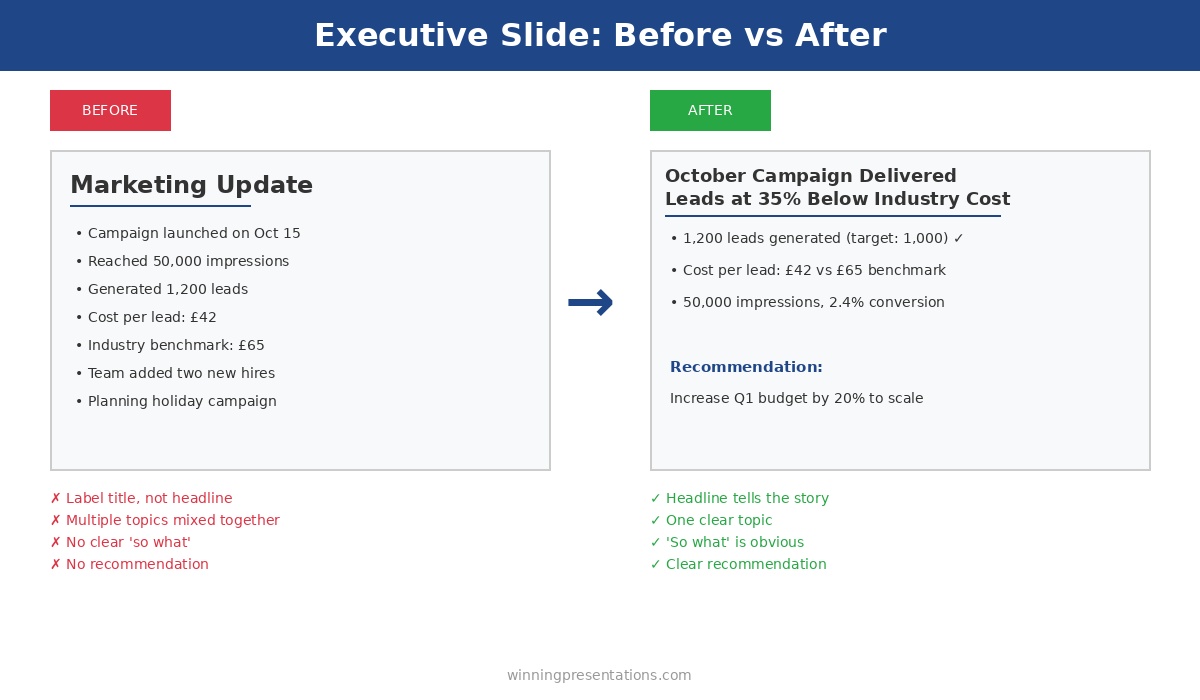
The CFO glanced at slide 1, saw “Overview,” and started checking his phone.
By slide 3, he wasn’t even pretending to pay attention. The presenter—a talented VP with a genuinely good proposal—had lost the room before she’d said a word. Her slide titles told the CFO exactly what to expect: nothing worth his full attention.
Quick answer: Generic slide titles like “Overview,” “Summary,” “Background,” and “Next Steps” are attention killers. They tell executives nothing and signal that you haven’t thought hard about your message. The fix is simple: every slide title should be a complete sentence that delivers the point of that slide. Instead of “Q3 Results,” write “Q3 Revenue Exceeded Target by 12%.” Instead of “Overview,” write “This Initiative Will Save £2.4M Annually.” Slide title best practices start with one rule: if your title could appear on anyone’s deck, it’s not doing its job.
Why “Overview” Fails Every Time
I spent 24 years in corporate banking—JPMorgan Chase, PwC, Royal Bank of Scotland, Commerzbank. I’ve sat through thousands of presentations and delivered hundreds more. And I can tell you exactly what happens when an executive sees “Overview” as a slide title: nothing.
That’s the problem. “Overview” creates zero anticipation. It makes zero promises. It gives the reader zero reason to pay attention to what comes next.
Think about it from the executive’s perspective. They’re in back-to-back meetings. They have 47 unread emails. They’re thinking about three other problems while you’re presenting. When they see “Overview,” their brain registers: I don’t need to focus yet. This is just setup.
But here’s what most presenters miss: executives don’t read slides sequentially like a novel. They scan. They jump ahead. They look for the slides that matter and skip the ones that don’t. Your slide title is the only thing that tells them whether to pay attention or check out.
“Overview” says: Skip me.
The same is true for every generic title: “Background,” “Context,” “Agenda,” “Summary,” “Next Steps,” “Recommendations.” These words have appeared on so many thousands of slides that they’ve become invisible. They’re wallpaper.
If your slide titles could be swapped into any presentation in your company without anyone noticing, they’re not doing their job.
The Psychology of Executive Reading
Here’s something I learned watching senior leaders consume information: they don’t read presentations—they interrogate them.
An executive looking at your deck is asking one question on every slide: What’s the point? They want the answer immediately. If they have to read three paragraphs of body text to find it, you’ve already lost them.
This is why slide title best practices always come back to one principle: the title IS the point.
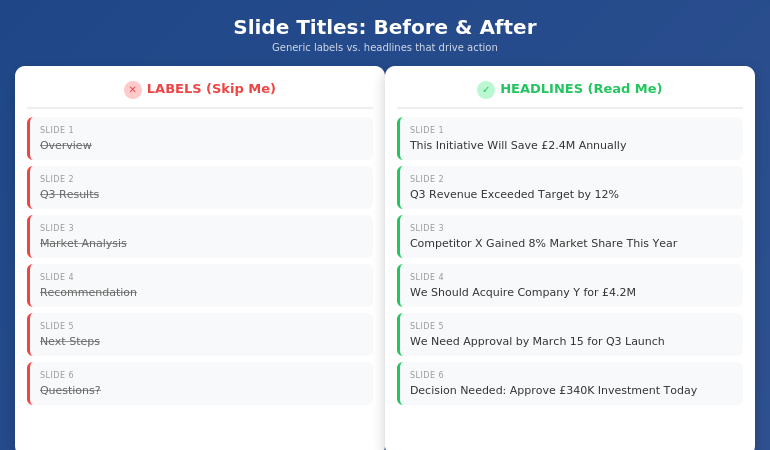
When I trained executives at UniCredit, I used to run an exercise. I’d show them a deck with all the body content removed—just the titles. Then I’d ask: “Can you understand the argument from titles alone?”
If the answer was no, the deck failed.
The best executive presentations tell a complete story through titles. You should be able to flip through the slides, read only the headlines, and understand exactly what the presenter is recommending and why. The body text, charts, and graphics are supporting evidence—not the main event.
This is why “Overview” is so damaging. It breaks the narrative. It’s a placeholder where a point should be. When an executive is scanning your deck (and they will scan), “Overview” tells them nothing. It’s a gap in your story.
And if you’re also struggling with how to stop rambling when you present, unclear slide titles are often the root cause—you haven’t clarified your point before you started speaking.
The Headline Formula That Works
The fix for generic slide titles is simple: write headlines, not labels.
A label describes what’s on the slide: “Q3 Results,” “Market Analysis,” “Team Structure.”
A headline delivers the insight: “Q3 Revenue Beat Target by 12%,” “Market Share Is Vulnerable in APAC,” “We Need Three Additional Engineers.”
Here’s the formula I teach:
Every slide title should be a complete sentence that a busy executive could read and understand without seeing the rest of the slide.
This forces you to do something most presenters avoid: commit to a point. When you write “Overview,” you’re not committing to anything. When you write “This Initiative Will Reduce Customer Churn by 23%,” you’ve made a claim. You’ve given the executive something to engage with, challenge, or approve.
The test: Read your slide title out loud. If it sounds like something you’d actually say in conversation—”We’re recommending Option B because it’s 40% cheaper”—it’s a good title. If it sounds like a filing cabinet label—”Recommendation”—rewrite it.
Some presenters worry this makes titles too long. But look at any newspaper. Headlines are complete thoughts, often 8-12 words. That’s not too long—that’s exactly right for conveying meaning at a glance.
Before and After: 10 Slide Title Transformations
Let me show you how this works in practice. I’ve taken 10 common generic titles and transformed them into headlines that actually work. For more examples, see my detailed guide on writing better slide titles with before and after examples.
1. Overview → This Proposal Will Save £2.4M Annually
The original says nothing. The revision states the entire value proposition. An executive knows immediately whether to keep reading.
2. Background → We’ve Lost 3 Key Accounts in 6 Months
Context slides often feel like wasted time. Make them urgent by leading with the problem.
3. Agenda → Three Decisions We Need Today
Agendas are almost always skipped. Tell them what’s at stake instead.
4. Q3 Results → Q3 Revenue Exceeded Target by 12%
Don’t make them hunt for the number. Put the headline in the headline.
5. Market Analysis → Competitor X Has Gained 8% Market Share This Year
Analysis is boring. Insight is interesting. Lead with the “so what.”
6. Recommendation → We Should Acquire Company Y for £4.2M
Don’t hide your recommendation behind a label. State it clearly so decision-makers can react.
7. Timeline → Full Implementation Takes 14 Months
Timeline slides usually show a Gantt chart nobody reads. Put the key number in the title.
8. Budget → This Requires £340K Investment Over 3 Years
Finance people scan for numbers. Make them impossible to miss.
9. Risks → The Main Risk Is Regulatory Delay (40% Probability)
Generic risk slides get ignored. Specific risk titles get discussed.
10. Next Steps → We Need Approval by March 15 to Hit Q3 Launch
Create urgency. Tell them exactly what you need and when you need it.
⭐ Transform Every Slide Title in Your Next Deck
The Executive Slide System gives you the headline formulas, templates, and before/after examples to make every slide command attention.
What’s included:
- The complete headline formula for executive slides
- 12 slide templates with pre-written title structures
- Before/after transformations for every common slide type
- The “title-first” workflow that saves hours
Get the Executive Slide System → £39
Built from 24 years creating executive presentations in corporate banking
The 7 Worst Slide Titles (And What to Write Instead)
Based on 24 years of reviewing executive presentations, these are the seven most common title mistakes—and how to fix each one.
1. “Overview”
The emptiest word in presentations. Replace with your core message: “This Investment Will Generate 3x ROI in 18 Months.”
2. “Summary”
At the end of a deck, executives know it’s a summary. Tell them what to remember instead: “Three Things to Approve Today.”
3. “Discussion”
This signals you don’t have a point. Replace with the question you actually want answered: “Should We Expand to Germany in Q2?”
4. “Update”
Updates are boring by definition. Lead with what changed: “Project Is Now 2 Weeks Behind Schedule.”
5. “Analysis”
Nobody wants analysis. They want insight. Write the insight: “Pricing Is Our Biggest Competitive Weakness.”
6. “Appendix”
If it’s worth including, it’s worth labeling properly: “Detailed Financial Model” or “Competitor Comparison Data.”
7. “Questions?”
The laziest closing slide. Replace with your call to action: “We Need Budget Approval by Friday” or “Next Step: Schedule Pilot with Team A.”
For a complete system on structuring your executive summary slide, including title formulas and placement strategies, see my detailed guide.
⭐ Never Write a Generic Slide Title Again
The Executive Slide System includes fill-in-the-blank headline templates for every executive slide type—from opening to recommendation to closing.
You’ll get:
- Headline templates for 12 common executive slide types
- The “assertion-evidence” structure used in consulting and boardrooms
- Word-for-word title formulas you can copy and adapt
- Examples from real executive presentations
Get the Executive Slide System → £39
Built from 24 years in corporate banking and executive presentation coaching
When to Break the Rules
Not every slide needs a sentence-headline title. Here are the exceptions:
Title slides: Your presentation title and your name. That’s it. Don’t add “Overview of Q3 Performance”—just write “Q3 Performance: On Track for Record Year.”
Section dividers: If you’re using divider slides to signal transitions in a long presentation, simple labels like “Phase 2: Implementation” work fine. But limit these to one or two in any deck.
Data-heavy slides: When showing a complex chart or table, sometimes a short label title works better than a long headline. But add a subtitle or callout that delivers the insight: “Revenue by Region” with a callout that says “APAC growth is masking European decline.”
Backup slides: Slides you don’t plan to present but include for Q&A can use simpler labels. But if you’re presenting a slide, it needs a headline.
The rule of thumb: if you’re going to say words while this slide is on screen, the title should do heavy lifting. If the slide is just a reference or transition, you have more flexibility.
What makes a good slide title for executives?
A good slide title for executives is a complete sentence that delivers the point of the slide without requiring them to read the body content. It should be specific, actionable, and impossible to swap into another presentation. Instead of “Market Analysis,” write “We’re Losing Market Share in Three Key Segments.” The test: can an executive understand your argument by reading only the slide titles? If yes, your titles are working.
How long should a slide title be?
Slide titles should be as long as necessary to convey the complete point—usually 8-15 words. Newspaper headlines routinely hit this length and remain scannable. “Q3 Revenue Exceeded Target by 12% Despite Supply Chain Disruption” is 10 words and delivers far more value than “Q3 Results.” Don’t sacrifice clarity for brevity. A specific 12-word title beats a vague 2-word label every time.
Should every slide have a different title format?
No—consistency helps executives scan faster. Use the same title structure throughout your deck: complete sentences that state the point. What should vary is the content and specificity, not the format. If your titles alternate between labels (“Overview”) and headlines (“Revenue Is Up 12%”), the deck feels disjointed. Pick headline-style titles and stick with them.
⭐ Make Every Slide Title Count
The Executive Slide System gives you everything you need to write slide titles that command attention and drive decisions.
Inside the system:
- The headline formula for executive slides
- 12 templates with pre-written title structures
- Before/after examples for every slide type
- The “title-first” method that cuts creation time in half
Get the Executive Slide System → £39
Instant download. Start using these formulas in your next presentation.
Frequently Asked Questions
What if my company has a template with short title fields?
Most corporate templates have title placeholders that look small, but they can hold more text than you think. Test it—you can usually fit 12-15 words before needing to reduce font size. If the template truly restricts you to 3-4 words, add a subtitle line below with the full headline. The point should be visible at the top of the slide, even if it takes two lines.
Won’t long titles make my slides look cluttered?
No—they make your slides look intentional. A specific headline like “We Recommend Investing £2.4M to Capture the APAC Market” fills the title space with meaning rather than leaving it occupied by a generic label. Clutter comes from too much body text, not from titles that actually say something. In fact, strong titles often let you reduce body content because the point is already clear.
How do I write good titles for data slides?
Lead with the insight, not the data type. Instead of “Revenue Chart” or “Q3 Financials,” write what the data shows: “Revenue Growth Accelerated in Q3” or “Margin Pressure Continues Despite Volume Gains.” The chart is evidence for the claim in your title. If you can’t summarize the data in a headline, you may be showing too much data on one slide.
Should I write titles first or last?
First. Write all your slide titles before you create any content. This forces you to clarify your argument upfront and ensures every slide has a clear purpose. It also makes the rest of the deck easier to build—once you know the point of each slide, the supporting content almost writes itself. The executive presentation template in my system uses this “title-first” workflow.
📧 The Winning Edge Newsletter
Weekly insights on executive presentations, slide design, and high-stakes communication. No fluff—just what works.
📋 Free: Executive Presentation Checklist
The pre-presentation checklist I use before every high-stakes meeting. Includes a slide title audit section.
Your Next Step
Open your last presentation. Read only the slide titles. Ask yourself: could a busy executive understand my argument without reading anything else?
If the answer is no—if you see “Overview,” “Summary,” “Background,” or any other generic labels—you have work to do. Replace each label with a headline that states the point. Make every title a complete sentence that delivers value on its own.
The CFO who checked his phone during “Overview” would have paid attention to “This Initiative Will Save £2.4M Annually.” Same content. Different title. Completely different outcome.
Your slides are only as good as the attention they earn. And attention starts with the title.
Related: If unclear thinking is leading to rambling when you present, see how to stop rambling when nervous—the solution often starts with clearer slide structure.