QUICK ANSWER
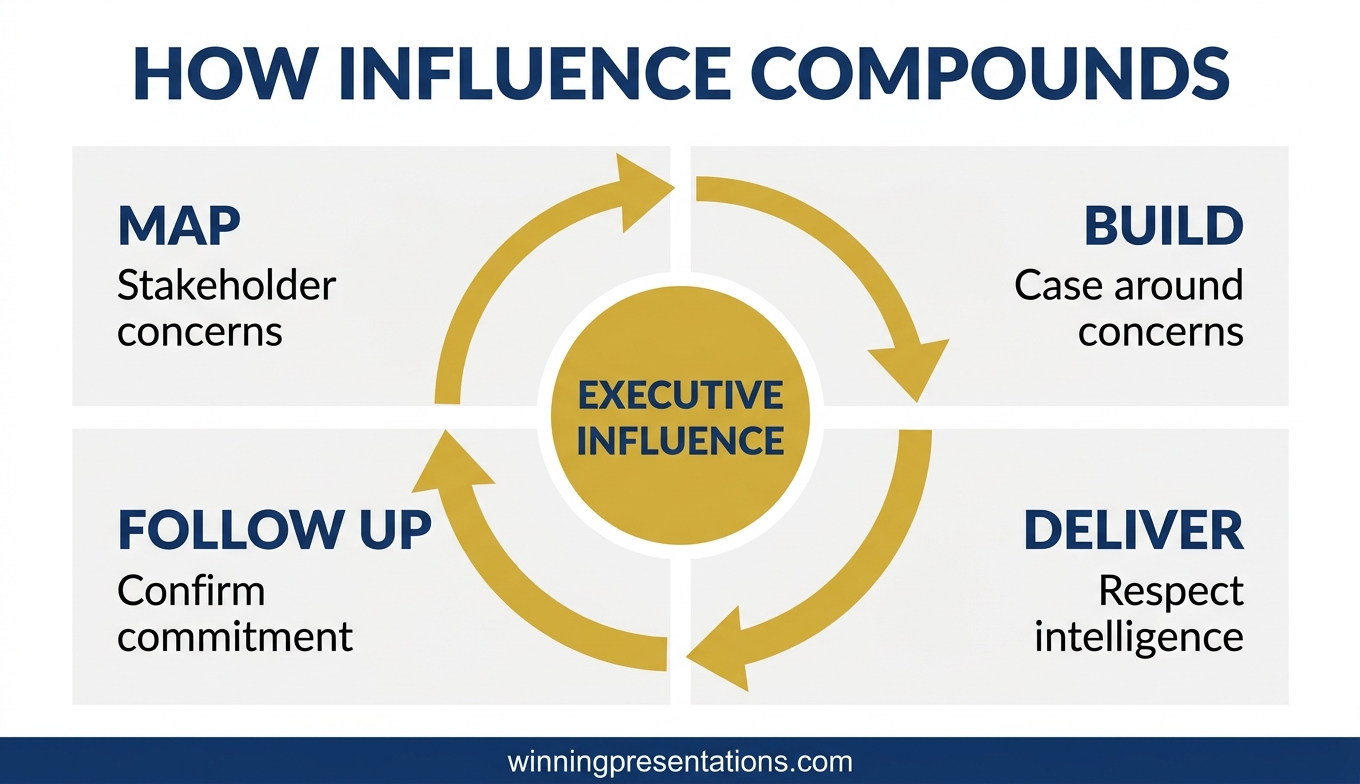
Executive influence and persuasion training for senior leaders is not about charisma, body language, or negotiation tactics. It is about a structured framework for moving decisions among people who have already heard every standard persuasion technique and see through them immediately. The framework has four parts: understanding what your stakeholders actually need to say yes, building a case that addresses their real concerns, presenting it in a way that respects their intelligence, and following up in a way that converts private agreement into public commitment.
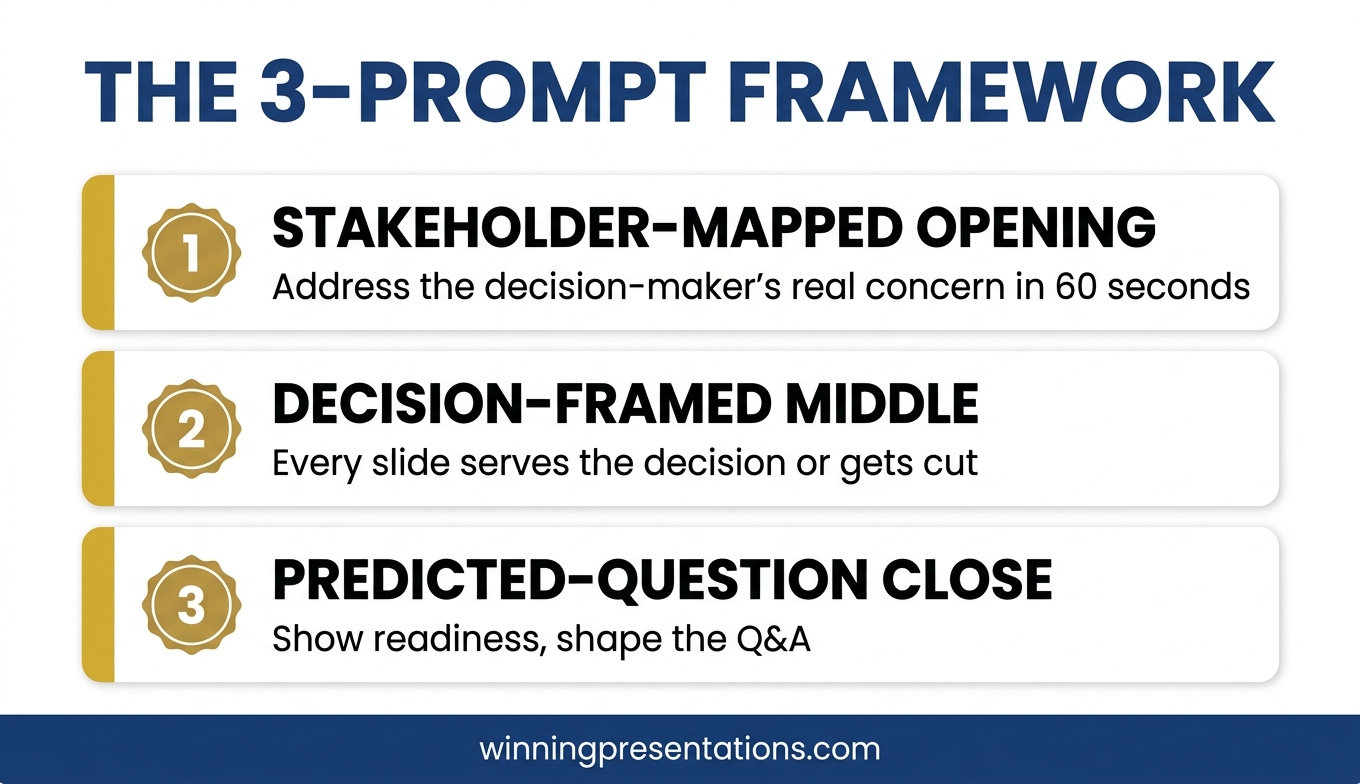
The structured framework this article describes
The Executive Buy-In Presentation System is Mary Beth’s self-paced Maven programme covering the complete framework for securing buy-in from senior stakeholders, boards, and executives.
JUMP TO
Kenji, a senior director at a global consumer-goods company, walked out of a strategy approval meeting last autumn with a decision he did not expect. His proposal — a £14m restructure of the regional operating model — had been in preparation for six months. Three previous versions had failed. This one passed unanimously. He called me two days later to ask what had actually changed.
The data had not changed. The strategy had not fundamentally shifted. The slides looked similar. What changed was how Kenji had understood the meeting. In the previous three attempts, he had gone in to persuade. This time, he had gone in to address three specific concerns he had privately mapped before the meeting, carried by three specific executives whose support he needed. He had not persuaded anyone. He had made it easy for them to say yes.
Executive influence and persuasion training at senior levels is not about becoming more persuasive. Most senior executives are immune to persuasion tactics because they have seen all of them. What they are not immune to is a well-constructed case that directly addresses the concerns they are already carrying. That is the skill senior leaders need to develop. It looks less like charisma and more like careful, structured preparation.
Why standard persuasion training fails at senior levels
Most persuasion training is designed for sales contexts or early-career leadership, and it teaches tactics: mirroring, framing, storytelling structure, emotional hooks, the use of silence, the “yes ladder”. These tactics work in some contexts. They fail consistently at senior executive level for three reasons.
The first reason is recognition. Senior audiences have seen every tactic. When the tactic is deployed, it registers. A mirrored phrase from a middle manager in an internal meeting reads as coaching. A dramatic storytelling opening in a board update reads as theatrical. The tactics do not land because the audience is fluent in them.
The second reason is asymmetry. Senior stakeholders are evaluating you as much as your proposal. They are asking whether you understand the business well enough to have a defensible view, whether you have anticipated the hard parts, whether your recommendation holds up under pressure. Persuasion tactics signal that you are trying to influence them, which raises their defences rather than lowering them.
The third reason is stakes. Senior decisions are not binary. They carry precedent, political cost, and reputational risk for the people approving them. A persuasive case without a structured answer to those dimensions will not succeed regardless of how well it is delivered. The training needs to address the structure, not just the delivery.
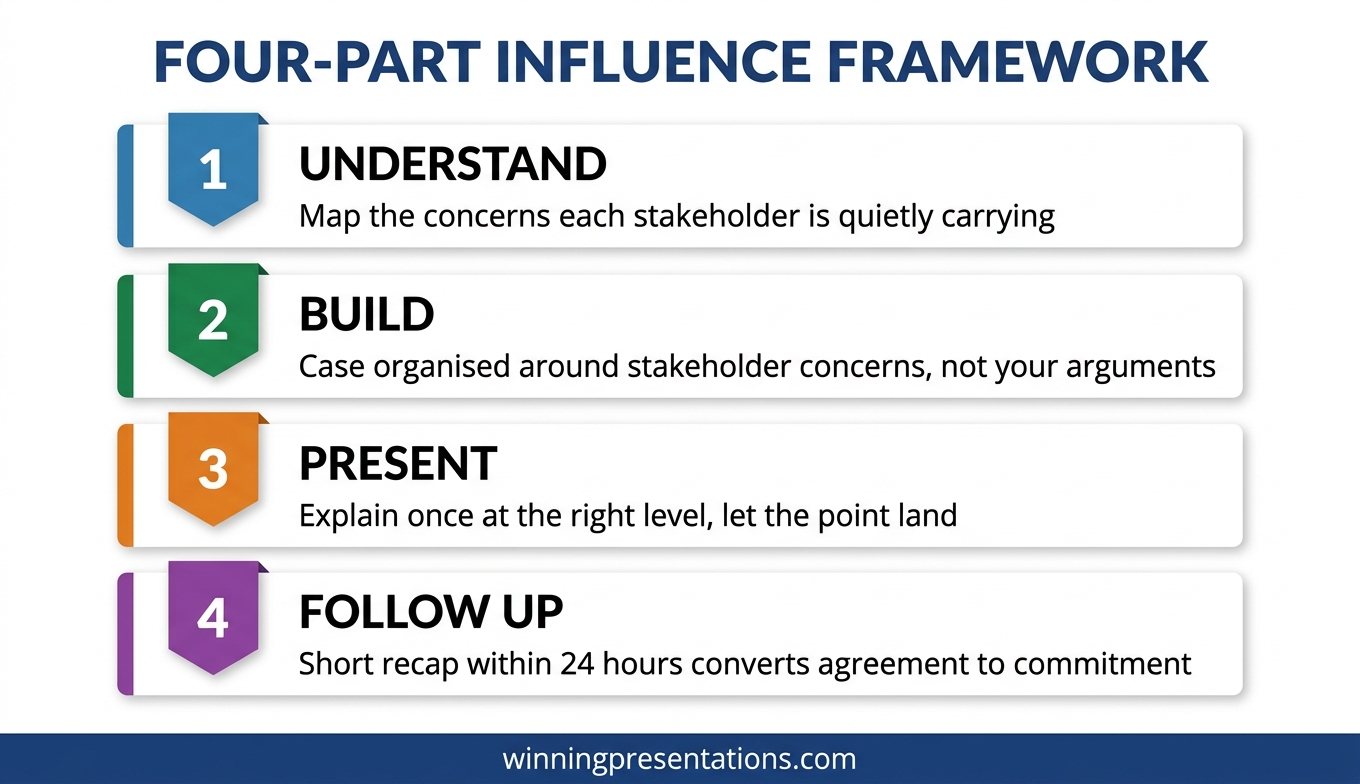
THE STRUCTURED FRAMEWORK FOR EXECUTIVE INFLUENCE
Build the case your stakeholders cannot dismiss
The Executive Buy-In Presentation System is a self-paced Maven programme — 7 modules walking senior professionals through the structure, psychology, and delivery that get executive approval. Bonus Q&A calls (optional, recorded). Monthly cohort enrolment; lifetime access to materials.
- 7 modules on stakeholder analysis, case construction, and delivery
- Self-paced — no deadlines, no mandatory live attendance
- Optional Q&A / coaching calls (fully recorded, watch back anytime)
- Monthly cohort enrolment — enrol any time
- Lifetime access to all course materials
£499, lifetime access to all course materials.
Explore the Executive Buy-In Presentation System →
Designed for senior professionals who present decisions to boards, investment committees, and executive sponsors.
Part 1: Understand what stakeholders actually need to say yes
Every senior decision has a set of concerns that live beneath the surface arguments. The surface arguments are the ones people say out loud — budget, timing, strategic fit. The underlying concerns are the ones people do not say out loud because they are political, personal, or uncertain. Senior leaders who influence successfully have learned to map the underlying concerns before the meeting.
The mapping exercise is not complicated. For each stakeholder whose approval you need, write down three things: what the surface argument against your proposal would be if they chose to make one, what the underlying concern probably is (reputation, precedent, control, fear of being seen to change direction), and what specific evidence would make that underlying concern less sharp.
In Kenji’s case, one senior executive had consistently pushed back on previous proposals. On the surface, the pushback was about cost. Underneath, the concern was that the restructure would reduce his remit, which was a status issue rather than a financial one. Kenji spent half a slide on the restructure’s effect on that executive’s remit — not defensively, but transparently. The executive’s objection evaporated because it had been anticipated.
This is the move that standard persuasion training does not teach. It is not about arguing better. It is about understanding what the other person is carrying into the room and addressing it explicitly. For more on the mapping approach, see stakeholder buy-in training.
Part 2: Build a case that addresses real concerns
Once the concerns are mapped, the case has to be built around them, not around the presenter’s own favourite arguments. Most proposals fail because they are organised around what the presenter finds most compelling, which is usually a mixture of the data that supports their view and the strategic logic they have internalised.
A case built around stakeholder concerns is organised differently. It leads with the concern that is most important to the most influential stakeholder, and it addresses that concern with evidence the stakeholder will actually find reassuring — not evidence the presenter finds reassuring. These are often different.
A second move is to surface the strongest counter-argument before the stakeholders do. Naming the strongest argument against your proposal — and then explaining why you have judged it not decisive — is one of the highest-credibility moves in executive communication. It signals that you have thought this through rather than avoiding the hard parts, and it takes the counter-argument off the table in a way a defensive response cannot.
For the slide-structure side of this, the executive presentations buy-in approach maps out how to sequence the case visually so the concerns get addressed in the right order.
Part 3: Present in a way that respects intelligence
Senior audiences do not want to be persuaded. They want to be informed enough to make a good decision. The difference is subtle but it changes every part of delivery.
Presenters who are trying to persuade usually over-explain, over-emphasise, and under-pause. They repeat their key points. They use adjectives like “robust”, “comprehensive”, and “aligned” that signal effort rather than substance. They fill silences. Each of these habits signals anxiety and effort to senior audiences, which reduces credibility.
Presenters who respect the intelligence of the room do the opposite. They explain once, at the right level of detail, and let the point land. They use pauses deliberately. They make their recommendation explicit, defend it in one sentence, and stop. They answer questions directly rather than taking the chance to repeat their case. They let the audience arrive at the conclusion rather than dragging them to it.
This is a delivery style that takes practice to develop because it runs counter to most presentation training. It also requires confidence in the material — if you are uncertain about your own recommendation, the under-explanation will read as evasion rather than authority. The getting executive buy-in presentations framework covers the specific delivery habits that make this tone work.
For the slide structure that carries the case
The Executive Slide System provides 26 templates, 93 AI prompts, and 16 scenario playbooks designed for senior-level presentation work — including buy-in scenarios. £39, instant download.
Part 4: Follow up to convert agreement to commitment
Private agreement in a meeting room is not the same as public commitment. Senior executives will often nod during a presentation and then quietly disengage afterward, especially if the proposal touches something they find politically uncomfortable. The influence work is not finished when the meeting ends.
The follow-up move that converts agreement to commitment is a short, structured recap sent within 24 hours. Not a long document. A three-paragraph note confirming the decision reached, the immediate next step, and the specific commitment you need from each stakeholder to move forward. The note makes the agreement visible to the group, which makes quiet disengagement harder.
A second move is to identify one stakeholder whose support is strongest and ask them to be the visible sponsor of the next step. Sponsorship moves the proposal from the presenter’s proposal to a shared proposal, which changes the politics of any subsequent pushback. This is not manipulative. It is how senior decisions actually move forward in complex organisations.
The influence work is cumulative. Each meeting either strengthens or weakens the overall case, and the follow-up is where most of the cumulative work happens. Senior leaders who treat the meeting as the event and the follow-up as admin usually find their proposals losing momentum between meetings.
Frequently asked questions
How is this different from negotiation training?
Negotiation training assumes an adversarial or bargaining context — you and the other party are trying to reach agreement on terms. Executive influence and persuasion is usually not a negotiation. It is a presentation to decision-makers who have the authority to say yes or no. The skills overlap in some places, but the structure of the conversation is fundamentally different.
Can this be learned through a self-paced course, or do I need in-person coaching?
Most of the structural work — stakeholder mapping, case construction, delivery discipline — can be learned through a self-paced programme and practised in real meetings. The Executive Buy-In Presentation System is designed as a self-paced course with 7 modules, optional recorded Q&A calls, and monthly cohort enrolment. In-person coaching adds value for specific high-stakes moments but is not necessary for building the underlying skill.
How long does it take to see results from this kind of training?
The structural techniques (stakeholder mapping, case building, follow-up) can be applied to the next meeting on your calendar and typically produce a noticeable difference in audience engagement. The delivery discipline takes longer — usually three to four presentations to feel natural. Most senior professionals who work through the full framework see a meaningful shift in their approval rates within two to three months.
Does this work for influencing peers, not just senior stakeholders?
Partly. The stakeholder mapping and case construction translate cleanly to peer influence. The delivery work is slightly different because peer audiences often respond to more conversational framing rather than the formal presentation style that works in board contexts. The core framework still applies.
Is there a risk that this approach comes across as too calculated?
Only if the stakeholder mapping is used manipulatively. Used well, addressing people’s real concerns openly and respectfully reads as thoughtful rather than calculated. The signal you are giving is that you have thought about what they are carrying into the room, which most senior people quietly appreciate. The risk comes from pretending you have not done the work — which reads as false — not from having done it.
The Winning Edge
Weekly thinking for senior professionals on executive influence, stakeholder work, slide structure, and the judgement calls that frameworks do not cover.
Not ready for the full programme? Start here instead: download the free Pyramid Principle Template — the structural scaffold that most persuasive executive cases quietly rely on.
Next step: pick one proposal you have coming up in the next 30 days. Do the stakeholder mapping exercise before you build the deck. Notice how differently the case comes together when the map is done first.
For the AI-assisted side of preparing these cases, see Copilot PowerPoint for board presentations.
About the author
Mary Beth Hazeldine is Owner & Managing Director of Winning Presentations Ltd, a UK company founded in 1990. With 24 years of corporate banking experience at JPMorgan Chase, PwC, Royal Bank of Scotland, and Commerzbank, she advises senior professionals on structuring presentations for board approvals, investment committees, and stakeholder-critical decisions.