

Quick answer: Most virtual presentation skills training online is calibrated for junior-level audiences and teaches Zoom platform mechanics — camera angles, microphone tips, slide-share shortcuts. Senior professionals need something different: stakeholder structure for virtual decision meetings, AI-assisted preparation, in-meeting recovery from technical disruption, and post-meeting follow-up architecture. Evaluate any course against five criteria: self-paced format with optional live calls (not mandatory attendance), recorded materials with lifetime access (not real-time-only), structural curriculum covering preparation through follow-up (not platform tips), verifiable instructor credibility at senior level, and downloadable retention materials (not just video). Any course that fails one of these criteria is built for a different audience. Any course that does not cover AI-assisted preparation is now twelve months behind the work senior leaders are actually doing.
JUMP TO:
- What virtual presentation training needs to cover at senior level
- The five evaluation criteria for a senior-level course
- Why most Zoom training courses fail senior professionals
- The AI-integration question and why it matters now
- The five red flags to avoid in course selection
- A worked example: evaluating a course against the five criteria
- Frequently asked questions
Ngozi is a divisional managing director at a UK-headquartered insurance group. She runs a team of three hundred across two countries and has not stood at a physical lectern in two years. Every meeting she now considers high-stakes — quarterly results, strategic reviews, board updates, regulatory briefings — happens through a webcam. Last quarter she asked her L&D partner the question senior leaders are increasingly asking. Was there a course she could take that would sharpen the virtual presentation work to the standard she needed it to be at? She was sent four options. Three were calibrated for early-career professionals being introduced to Zoom. One was a thirty-hour live cohort programme she could not attend. None were calibrated for the work she actually had to do, which was carry an executive committee through a contested strategic recommendation without the structural cues she had spent twenty-five years building inside conference rooms.
This is the position most senior leaders evaluating virtual presentation skills training online find themselves in. The market is large, the courses are abundant, and the calibration is almost universally wrong. Most courses on the market were built between 2020 and 2022 for a workforce learning to use video conferencing for the first time. They teach the platform, not the presentation — the mechanics of being on camera, not the structural discipline of carrying a senior audience through a high-stakes decision via a webcam. They were the right courses for the right audience in 2020. They are now twelve to eighteen months behind what senior professionals actually need.
This piece is a buying guide for senior professionals evaluating virtual presentation training. It walks through what such a course should actually cover at senior level, the five evaluation criteria that distinguish a senior-level programme from a Zoom-mechanics one, why most courses fail senior professionals, the AI-integration question that has emerged as the new dividing line, the red flags to spot before paying, and a worked example of evaluating a course against the criteria. The framework is designed to hold up whether you choose our programme, a competitor’s, or none at all.
Before evaluating any course, run the pre-meeting basics for your next virtual presentation.
The Virtual Presentation Quick-Start Checklist is the free pre-meeting checklist — the camera, lighting, audio, and structural checks to run before a high-stakes virtual presentation. Free download.
What virtual presentation training needs to cover at senior level
The work a senior leader is actually doing in a virtual presentation is structurally different from the work a junior professional is doing. A senior leader is not delivering information; they are carrying a room through a decision. The mechanics of being on camera matter only as much as they support the structural work. A course calibrated for senior professionals has to start from this distinction. Most do not. Most start from the assumption that the limiting factor is comfort with the platform, which it has not been for senior professionals for at least three years.
The four content areas a senior-level course must cover. First, stakeholder structure for virtual decision meetings — who is in the room, who is the actual decision-maker, how the chat function changes the politics of dissent, how the pre-meeting one-to-one conversations sequence into the formal meeting, and how the decision gets confirmed or deferred in the post-meeting follow-up. None of this is platform-specific. All of it has to be learned afresh for virtual settings because the cues that supported it in person — body language, side conversations at the coffee break, the chair’s micro-expressions when something lands hard — have largely disappeared.
Second, AI-assisted preparation. The senior leaders doing the best virtual presentation work in 2026 are using AI (Copilot, ChatGPT, Claude, Gemini) as a preparation partner — for stakeholder mapping, objection pre-emption, slide structure critique, and hostile-question rehearsal. A course that does not cover this is teaching a discipline that has already moved on. Third, in-meeting recovery from technical and structural disruption — what to do when the screen-share fails halfway through, when a hostile question lands before the recommendation is fully on the table, when the committee chair derails the agenda. Fourth, post-meeting follow-up architecture — the written artefacts, the one-to-one calls, the timing of the confirmation note. The work continues for forty-eight hours after the meeting ends, and most courses stop at the meeting itself.
The five evaluation criteria for a senior-level course
Five criteria distinguish a senior-level course from a Zoom-mechanics one. Apply them in order; if a course fails any one of them, it is built for a different audience.
One. Self-paced format with optional live calls — not mandatory attendance. Senior calendars are not predictable enough for a live cohort that requires attendance at six fixed sessions over four weeks. The drop-off rate among the people most likely to benefit from the course is meaningful. A senior-level course respects the senior calendar by being self-paced as the primary format, with live coaching sessions as optional add-ons (and fully recorded so missing one carries no cost). Any course whose primary delivery is live cohort with mandatory attendance has been calibrated for a different audience — typically mid-career professionals on a development programme.
Two. Recorded materials with lifetime access — not real-time-only delivery. Senior professionals re-use training material against specific situations as those situations arise. A board presentation in three months will not benefit from a course consumed once eighteen months ago and not retrievable. Lifetime access to recorded modules is the difference between a course that is a one-time event and a course that becomes a working reference. Any programme that withdraws access after a fixed period has been built for an audience that consumes once and does not return.
Three. Structural curriculum covering preparation through delivery and follow-up — not platform tips. This is the most important criterion and the one most often failed. The curriculum should be organised around the work a senior leader is actually doing, which is preparing for, delivering, and following up on high-stakes virtual presentations. It should not be organised around the platform — “How to use Zoom”, “How to use Teams”, “How to set up your camera”. The platform-tip courses are not wrong; they are calibrated for a different audience. For the structural counterpart to the criteria above, see our piece on the virtual board meeting presentation structure, which covers the architecture this kind of course should be teaching.
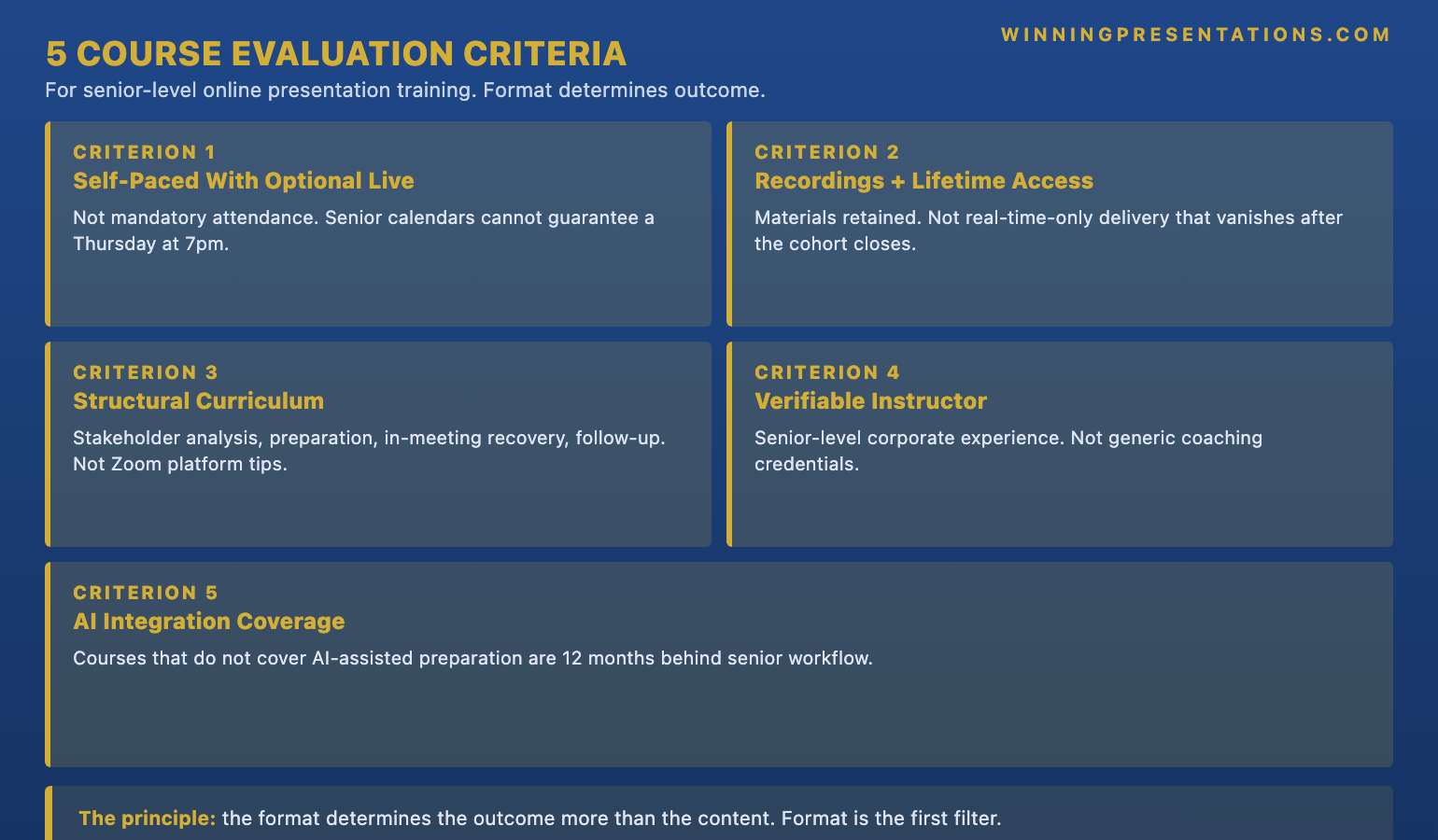
Four. Verifiable instructor credibility at senior level. The instructor should have direct experience of the rooms the course is preparing you for. A trainer whose career has been entirely inside training organisations can teach the frameworks but may not have presented to an actual executive committee under pressure. The verifiable signal is a public corporate background — operational roles, consulting at senior level, investment banking, executive coaching with named senior clients — that can be checked. A course whose instructor’s credentials are vague or whose biography reads as a list of certifications rather than corporate experience has been built for an audience that does not check.
Five. Materials retention — downloadable templates, scripts, and checklists, not just video. The most useful material from any course is the kind that can be opened and applied in the forty-five minutes before the next senior meeting. Templates for stakeholder maps. Scripts for hostile-question handling. Pre-meeting checklists. Post-meeting follow-up note templates. A course that delivers only video, with no downloadable artefacts, is asking the learner to remember everything. Senior professionals do not have the spare attention to remember everything. The course needs to leave something behind that gets used.
Why most Zoom training courses fail senior professionals
The structural reason most virtual presentation training fails senior professionals is that it was designed for a different problem. In 2020 and 2021, the limiting factor on virtual presentation quality was platform unfamiliarity. People did not know where the mute button was, did not understand how screen-share worked, were anxious about being on camera. The courses built in that period solved that problem — they taught the platform, the camera-and-lighting basics, the etiquette of muting and unmuting. They were calibrated correctly for the time.
The limiting factor has moved. By 2024 most senior professionals had thousands of hours of webcam experience. The platform mechanics were no longer the bottleneck. What had emerged as the new bottleneck was structural: how to carry a senior committee through a decision without the in-person cues, how to manage the chat function during a hostile moment, how to pace a forty-five-minute virtual presentation when the audience’s attention span has compressed, how to integrate AI-assisted preparation into the work without losing the executive voice. Most courses did not update. They are still teaching the 2020 problem to an audience that solved it three years ago.
The secondary reason is audience calibration. Most virtual presentation courses are priced and marketed to corporate L&D budgets that buy in bulk for early-career professionals. A senior leader feels the mismatch immediately — the examples are about team status updates rather than executive committee meetings, the language is about “audience engagement” rather than “earning approval from a board that defaults to no”, the curriculum spends two hours on slide design basics that a senior leader mastered fifteen years ago. The course is not bad. It is calibrated for a different reader. The remedy is not to find a more advanced version of the same course; it is to find a course built specifically for senior audiences from the ground up.
If the course you are evaluating does not cover AI-assisted preparation, you are twelve months behind.
The AI-Enhanced Presentation Mastery course is a self-paced programme for senior professionals using AI (including Copilot) to build executive-grade virtual presentations. 8 modules, 83 lessons covering the prompt and workflow framework that turns AI from a drafting tool into a presentation partner. 2 optional live coaching sessions with Mary Beth — both fully recorded so you can watch back anytime. Monthly cohort enrolment — enrol whenever suits you. The programme is built around the AI integration that most generic Zoom-skills courses do not yet teach.
- 8 modules, 83 lessons — self-paced, work through at your own pace
- Prompt and workflow framework for AI-assisted senior presentation preparation
- Stakeholder analysis, slide structure, and objection pre-emption with AI integration
- 2 optional live coaching sessions with Mary Beth — fully recorded
- Monthly cohort enrolment — enrol whenever suits you, no fixed start date
- £499, lifetime access to materials
Explore the AI-Enhanced Presentation Mastery course (£499) →
Self-paced. Lifetime access to materials.
The AI-integration question and why it matters now
The AI-integration question has become the new dividing line in virtual presentation training, and most courses on the market have not yet crossed it. The senior leaders doing the best work in 2026 are using AI tools — Copilot embedded in Microsoft 365, ChatGPT, Claude, Gemini — across the whole preparation arc. For stakeholder mapping. For first-draft slide structure, which the leader then edits down to executive-grade. For objection pre-emption — running the recommendation through an adversarial prompt to surface every hostile angle before the committee does. For hostile-question rehearsal against an AI that pushes back with realistic senior committee dynamics.
None of this work delegates the judgement to AI. The judgement remains with the senior leader; that is the part AI cannot do. What AI does is collapse the preparation time for the structural work — the parts that previously took fifteen hours of solo thinking now take three hours of guided thinking with the AI partner. The senior leader’s experience is what calibrates the AI’s outputs and produces the final presentation. Without that experience, the outputs are not useful. With it, they accelerate the work meaningfully.
Yana, a chief financial officer at a Berlin-headquartered industrial group, started using Copilot for board preparation eighteen months ago. Her board cycle is six-weekly. Her preparation time has dropped from forty hours per cycle to around eighteen, with the savings concentrated in stakeholder analysis and objection pre-emption — exactly the structural parts that are hardest to do well solo. Her approval rates have not changed; what has changed is the load on her calendar in the two weeks before each board. A course that teaches the framework Yana arrived at by trial and error is, in 2026, more valuable to a senior leader than a course that teaches camera angles.
For the pre-meeting basics that should be run before any virtual presentation:
The Virtual Presentation Quick-Start Checklist is the free pre-meeting checklist — the camera, lighting, audio, and structural checks to run before a high-stakes virtual presentation. Free download.
The five red flags to avoid in course selection
The five red flags below are the most common signals that a course has been calibrated for a different audience or is structurally weaker than its landing page suggests. None of them on its own is a deal-breaker; two or more together almost always are.
Red flag one. Mandatory live attendance with no recordings. A course whose value depends on attending fixed sessions has been calibrated for a population whose calendars are predictable enough to commit. Senior calendars rarely are. Boards get rescheduled at thirty-six hours’ notice, executive committees are moved to accommodate the CEO’s travel, regulatory enquiries colonise an entire week with no warning. A course that punishes a missed session by withholding the content has built a barrier that the most senior potential customers will hit first. Recordings are not a nice-to-have; they are the load-bearing element of senior accessibility. The closely related discipline behind the broader executive-presence work is covered in our piece on executive presence for senior leaders.
Red flag two. Generic Zoom platform tips rather than senior structure. The give-away is the curriculum table of contents. If the modules read as “Setting up your camera”, “Using the chat function”, “Sharing your screen effectively” — the course is calibrated for someone learning the platform for the first time. Senior leaders solved that problem in 2020. The modules of a senior-level course should read as “Stakeholder structure for virtual decision meetings”, “AI-assisted preparation”, “Hostile-question handling in committee settings”, “Post-meeting follow-up architecture”. The lexicon of the curriculum tells you the audience.
Red flag three. No AI integration coverage. A 2026 virtual presentation course that does not address AI-assisted preparation is teaching a discipline that has moved on without it. This is not a future-proofing issue; it is a current-state issue. Senior leaders are already using AI across the preparation arc. A course that ignores this is leaving the most valuable productivity gain of the last three years out of its scope. Red flag four. No downloadable materials, only video. A course that asks the senior leader to remember everything has not respected what senior calendars actually have spare attention for. Templates, scripts, and checklists are what get re-used; video does not.
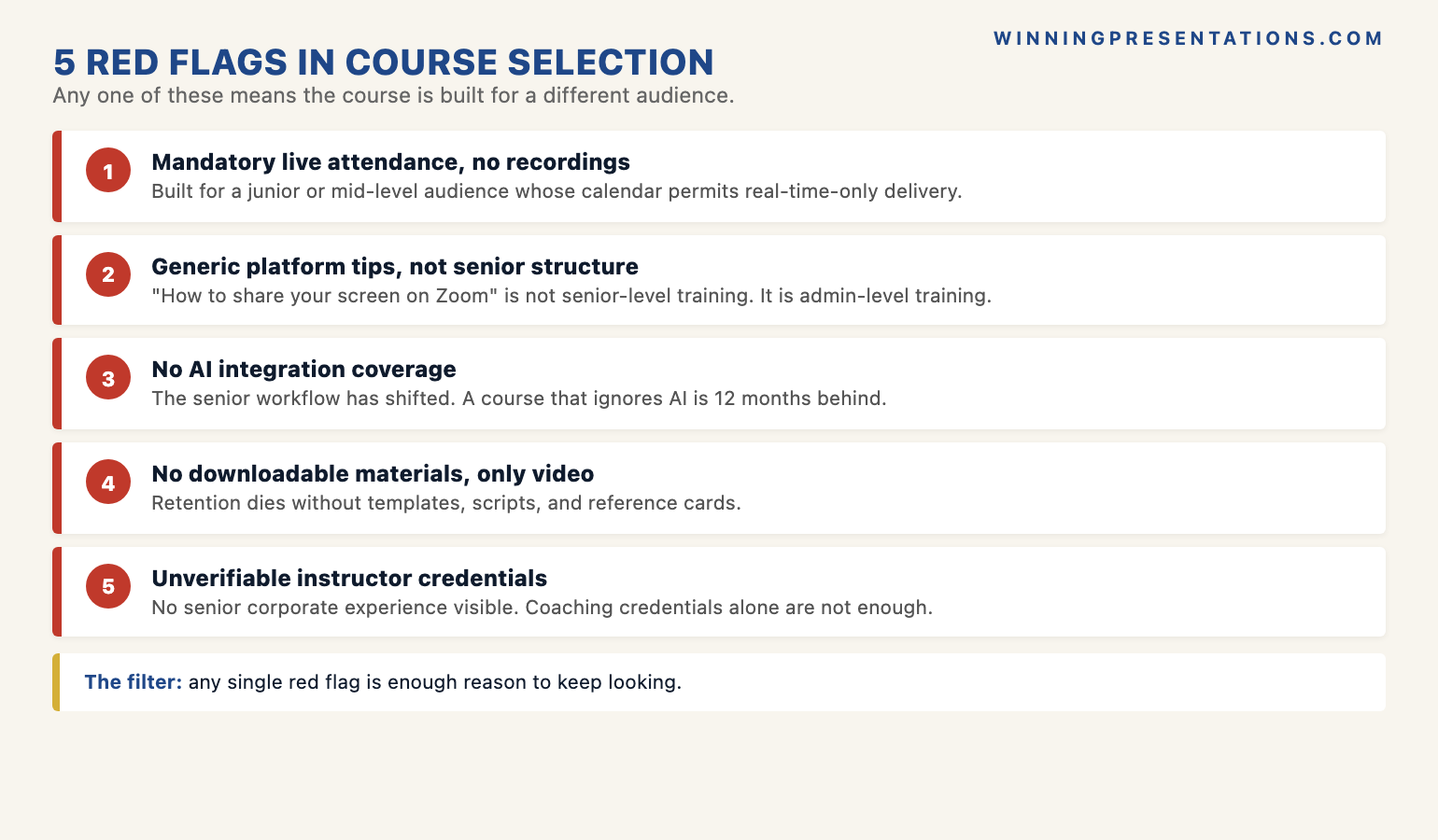
Red flag five. Unverifiable instructor credentials or no senior corporate experience. The instructor’s biography should be checkable — named former employers at senior level, specific client engagements that can be triangulated against LinkedIn or public coverage, a history of teaching senior audiences specifically rather than “leaders at all levels”. When the credentials read as a list of certifications and personal-development qualifications rather than corporate operational experience, the course is being taught by someone who has learned the frameworks but may not have applied them under the kind of pressure the course is supposed to prepare you for. The frameworks themselves may still be good; the calibration to senior pressure usually is not. For the energy-and-stamina dimension that supports the structural work, see our piece on virtual presentation energy.
A worked example: evaluating a course against the five criteria
Imagine you are evaluating a virtual presentation course found via a LinkedIn ad. The landing page describes it as “Executive Virtual Presentation Mastery”, priced at £750, delivered as a four-week live cohort with weekly two-hour sessions on Tuesdays at 4pm. The instructor’s bio describes her as “an internationally recognised presentation coach with twenty years of training experience”. The curriculum lists modules on camera presence, audience engagement on Zoom, slide design fundamentals, and Q&A handling. The page has testimonials but no specific outcomes.
Apply the five criteria. Criterion one (self-paced with optional live calls): fails — it is a mandatory live cohort with fixed Tuesday sessions. Criterion two (recorded materials with lifetime access): the page does not say explicitly, but the language (“the cohort experience”, “interactive sessions”) suggests live-attendance-primary; the absence of an explicit lifetime-access commitment is itself a yellow flag. Criterion three (structural curriculum): fails. The modules read as platform mechanics and slide-design basics, not the senior structural work. Criterion four (verifiable instructor credibility at senior level): cannot be confirmed from the bio. “Internationally recognised” and “twenty years of training” tell you the trainer is established, but not whether she has presented under senior corporate pressure. Triangulate against LinkedIn before paying. Criterion five (materials retention): no mention of downloadable templates or scripts. Possibly there are some; possibly not.
Net assessment: not a bad course, but calibrated for mid-career professionals on a development programme, not for senior leaders. The £750 price tier is the band where senior-specific material starts to appear but where calibration still varies widely. The smart move is to look for a course that names its audience as director-and-above, is self-paced as the primary format, includes AI integration coverage, and has a publicly triangulable instructor background. The five-criteria framework applied honestly will save you that mistake more often than not.
Frequently asked questions
How long should a senior-level virtual presentation course be?
Most senior-level self-paced programmes deliver eight to fifteen hours of core content, broken into short modules of fifteen to thirty minutes each. The reason for short modules is the senior calendar — the typical consumption pattern is a thirty-minute block on a Tuesday morning or a Sunday evening, not a multi-hour deep dive. A course structured as four ninety-minute sessions is calibrated for a different consumption pattern and will sit unused for senior buyers. Look for granular modules and the ability to dip in for a specific topic — “stakeholder mapping for virtual board meetings”, say, or “hostile-question recovery on camera” — without having to consume the whole course linearly.
Is self-paced or live cohort better for a senior professional?
Self-paced is structurally better for most senior professionals, with optional live coaching as a useful add-on if it is genuinely optional and recorded. The reason is calendar predictability. A live cohort that requires attendance at six fixed sessions over four weeks has a meaningful drop-off rate among senior buyers — boards get rescheduled, regulatory matters consume entire weeks, executive committees move to accommodate CEO travel. The peer-learning dimension is real but does not justify the calendar tax for most senior professionals. Any course whose primary delivery is mandatory-live with no recordings has been calibrated for a different audience.
Do these courses qualify for L&D budget reimbursement?
Most senior-level virtual presentation training in the £200–£800 range qualifies comfortably for L&D budget under normal corporate policy. The case is usually easier when the course is positioned against a specific business outcome — an upcoming board presentation, a strategic review, a major recommendation requiring committee approval — rather than as general professional development. Many senior professionals have L&D allowances they have not fully used; courses in this band typically fit inside annual personal-development budgets without special approval. For courses above £1,500, the case is usually made by linking the course to a named upcoming high-stakes situation and showing the cost-benefit against the business outcome at stake.
What is the difference between virtual presentation training and general public speaking training?
Public speaking training is calibrated for in-person delivery — the lectern, the audience in the room, the body language and stage movement that work when you can see everyone. Virtual presentation training is calibrated for the camera — the structural work that has to substitute for the in-person cues, the pacing differences that webcam attention spans demand, the architecture of meetings that happen across video conferencing rather than around a table. They overlap in the underlying discipline but differ meaningfully in the techniques. A senior professional who already presents well in person still has work to do for virtual; the cues and pacing that worked at the lectern do not transfer cleanly to the webcam. The two disciplines are siblings, not the same skill.
The Winning Edge — weekly newsletter
The Winning Edge is a weekly newsletter for senior professionals who present at the executive level. One short email a week on the structural moves that separate decks committees back from decks they defer. Subscribe to The Winning Edge →
Not ready for the full programme? Start here instead: download the free Virtual Presentation Quick-Start Checklist — the one-page pre-meeting checklist to run before any high-stakes virtual presentation.
About the author
Mary Beth Hazeldine is Owner & Managing Director of Winning Presentations Ltd. With 25 years of corporate banking experience at JPMorgan Chase, PwC, Royal Bank of Scotland, and Commerzbank, she advises executives across financial services, healthcare, technology, and government on structuring presentations for high-stakes funding rounds, board approvals, and strategic decisions.