Tag: QBR presentation

30 Apr 2026
Quarterly Review Presentation: CFO-Ready Structure for Executive Reviews

Quarterly Review Presentation: CFO-Ready Structure for Executive Reviews

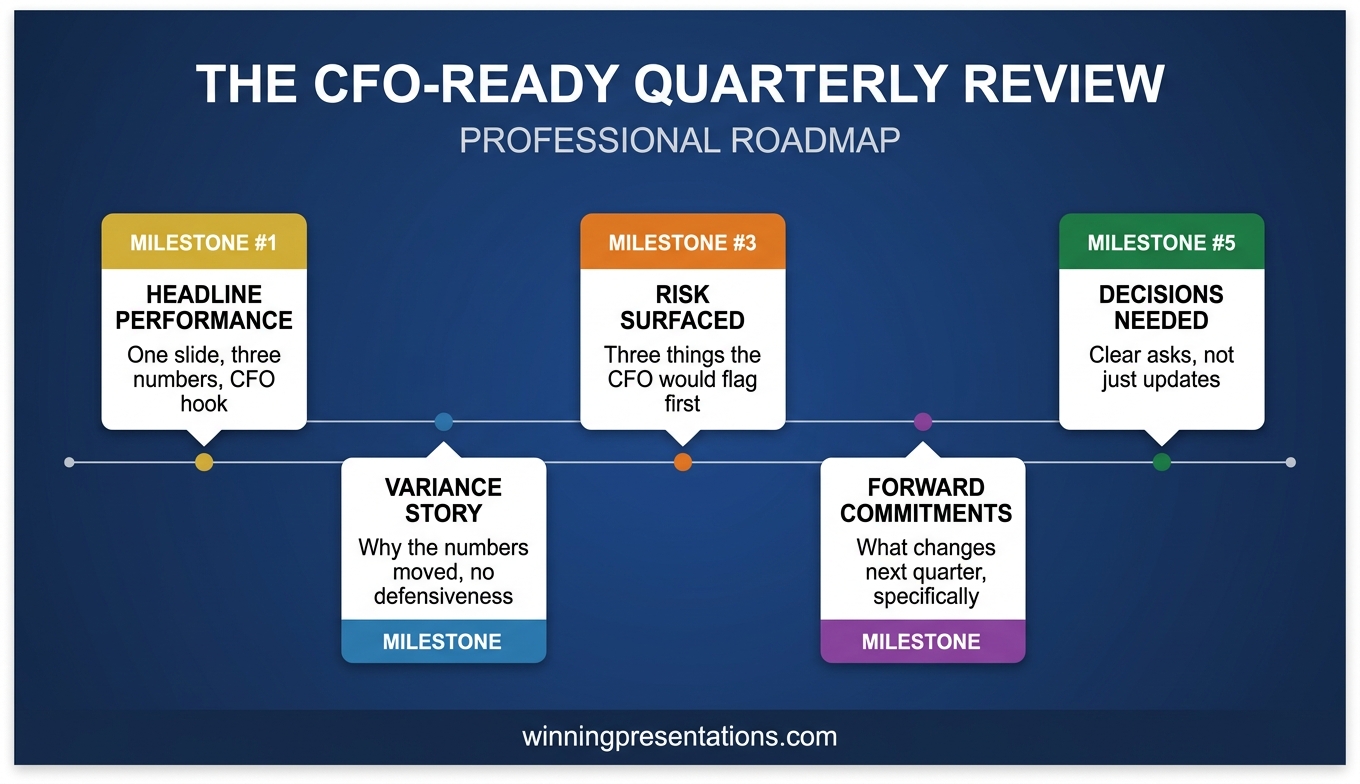
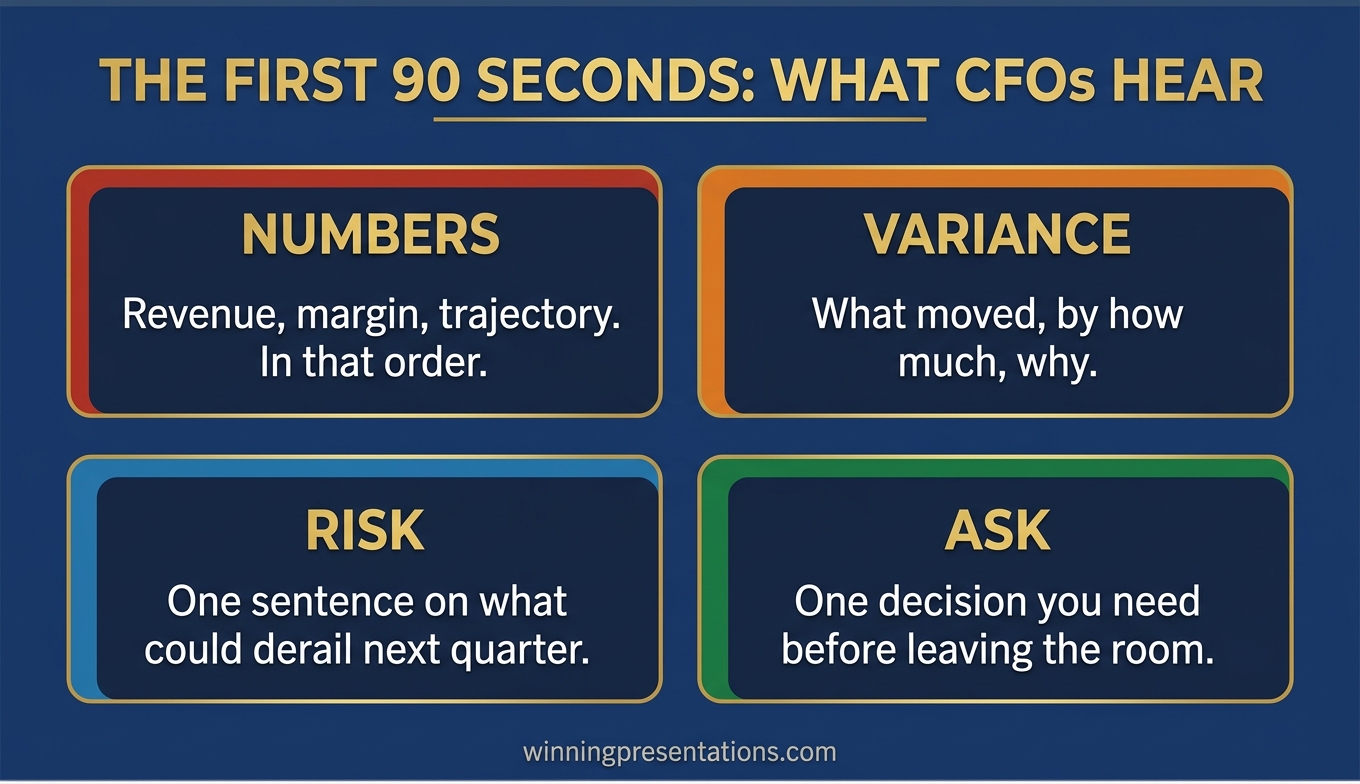
Quick answer: A quarterly review presentation survives CFO pushback when it opens with a two-sentence performance headline, names the three most material variances before the CFO asks, frames forward commitments in CFO-aligned language (cash, margin, risk, timing), and reserves the closing slide for the decisions or support being requested. Divisional storytelling belongs in the appendix. The main deck exists to answer the financial leader’s first four questions before they are asked.

Mateus Oliveira had run the industrial coatings division of a FTSE 250 manufacturer for two years. The previous October, he was on slide three of his quarterly review, walking through divisional highlights, when the CFO lifted a hand and said, “Mateus, I’m going to stop you. I have no idea where we stand on gross margin. Can we come back when you can tell me?”

The meeting ended nine minutes after it started. Mateus walked out carrying a deck he had spent eleven hours building and a clear sense that his review structure had nothing to do with what finance leadership actually wanted to hear. His operations narrative had been thorough. His customer wins had been genuine. But he had buried the number the CFO cared about most under three slides of divisional context, and that was the only thing anyone remembered afterwards.

Two weeks before the January review, Mateus rebuilt the deck with a single question taped to his monitor: “What would the CFO ask in the first four minutes?” The answer reorganised everything. Slide one became a performance headline with revenue, margin, and cash conversion. Slide two became a variance summary naming the three biggest deltas before anyone could raise them. Slide three became forward commitments framed in quarters, not activities.

The January review ran for eighteen minutes. The CFO asked three follow-up questions — all anticipated and answered without hesitation. Sign-off was unanimous. What had changed was not Mateus’s performance, nor his analytical depth. It was the sequence in which he released information, and whose mental model that sequence served.

If you want a structured approach to CFO-facing quarterly reviews, the Executive Slide System provides templates and frameworks built for executive review scenarios where financial leadership will scrutinise every number.

Explore the Executive Slide System →

Why CFOs Derail Quarterly Reviews at Slide Three

The most common structural mistake in a quarterly review presentation is front-loading operational narrative before financial headlines. Division heads and operations leaders typically build their decks in the order they experienced the quarter — customer wins, team progress, projects delivered — and place the financial summary somewhere in the middle. From the presenter’s perspective, this feels like good storytelling. From the CFO’s perspective, it feels like withholding.

The CFO arrives with a specific mental model. They have pre-read the numbers. They know your revenue landed two points below plan and your gross margin slipped sixty basis points. What they do not know is whether you know, whether you understand why, and whether your forward plan addresses it. When you open with operational context, the CFO reads that as a presenter who either has not grasped the financial reality or is hoping the narrative will soften the numbers.

This is structurally identical to the challenge explored in quarterly business review structure, where the temptation to tell the story chronologically consistently loses against the discipline of telling it financially first. The executive audience wants the conclusion in the first minute and the evidence afterwards — not the other way around. When a CFO interrupts at slide three, it is rarely because the slide is wrong. It is because they have decided the deck does not respect their time. Pre-empting their questions is an act of professional courtesy that signals you understand how financial leadership reviews divisional performance.

Build a CFO-Ready Quarterly Review Deck in One Evening

The Executive Slide System includes 26 templates, 93 AI prompts, and 16 scenario playbooks — covering quarterly reviews, variance presentations, and board-level performance briefings. Stop rebuilding your review structure from scratch every quarter.

£39 — instant access. Designed for executives who present to CFOs and executive committees.

Get the Executive Slide System →

The Opening Summary That Pre-Empts the CFO’s First Question

The first slide of a quarterly review presentation is not an agenda, a team photo, or a customer quote. It is a two-sentence performance headline followed by three numbers and a verdict.

Sentence one states the quarter’s headline in plain financial language: “The division delivered revenue of £84.2m against a plan of £86.5m, gross margin of 37.4% against 38.0%, and cash conversion of 92% against 95%.” Sentence two states your verdict: “This is a below-plan quarter driven primarily by timing of two strategic customer contracts that have since closed.” No softening language. The CFO’s first question is now answered before it is asked.

Three financial metrics is the right number for this opening. Fewer, and the CFO will ask for the ones you left out. More, and you dilute the headline. Revenue, margin, and a third metric that reflects operational quality — cash conversion, working capital, customer retention, backlog coverage — will cover most quarterly review scenarios. The third metric is where you signal what you consider the true health indicator for your division, and that signalling is watched closely.

The verdict sentence is where presenters retreat into hedge language. Resist it. “Mixed quarter” and “progress against a challenging backdrop” communicate that you are not prepared to name reality. A clear verdict earns credibility that buys the room’s attention. A disciplined CFO presentation language pattern reinforces that across every slide.


Quarterly review presentation opening slide framework showing two-sentence performance headline, three financial metrics, and executive verdict statement with example language

A Variance Framework That Removes Defensiveness

Once the opening summary has pre-empted the first question, the second slide must address the second: “why?” This is where most quarterly reviews lose control of the room, because variance explanation done badly reads as excuse-making. Done well, it reads as professional judgement. A CFO-ready variance slide uses three categories, in this order:

Timing variances. Revenue or cost movements that shifted between quarters but remain within the financial year. “£1.8m of revenue slipped from Q3 to Q4 as the Henderson contract moved its go-live date by six weeks. The contract has since signed.” Timing variances are least threatening because they imply the underlying business is intact.

Structural variances. Movements that reflect a real change in the underlying business — a lost customer, margin pressure, an expanded cost base. “Gross margin slipped 60 bps due to a 4% raw materials increase not fully passed through in contracts signed before the price review.” Name these clearly. Hiding them in aggregated categories triggers the CFO’s “what aren’t you telling me?” instinct.

Investment variances. Deliberate spending decisions that widen variance against plan in the short term but serve strategic objectives the executive committee has already approved. “Sales headcount is three positions above plan following the board’s October decision to accelerate European expansion. The incremental cost is £180k this quarter.” Investment variances should never be a surprise to the CFO.

This three-category structure mirrors how a financial leader already thinks about variance. When your slide uses their mental model, the conversation that follows is collaborative rather than adversarial. The discipline of executive variance explanation — naming timing, structural, and investment movements separately — is what converts a defensive Q&A into a governance conversation.

If you want a ready-made template for this variance slide — including language patterns and example framings — the Executive Slide System includes templates designed for quarterly review and CFO-facing scenarios.

Forward-Looking Commitments That Survive Scrutiny

After variance, the next question on the CFO’s mind is “what are you going to do about it?” This is where executive presenters most often make commitments they cannot keep, because the pressure of the room pushes them toward optimism. A deck that survives scrutiny builds forward commitments the presenter can defend twelve weeks later. Three principles make forward commitments durable:

Quantify or stay silent. Every forward commitment must have a number and a date attached. “We will recover the margin gap by Q2” is not a commitment. “We will recover 40 basis points of the 60 bps margin gap by end Q2 through the contract price review completing in March” is. If you cannot quantify something, do not commit to it — put it on a watchlist.

Name the dependencies. Every financial commitment rests on conditions that may not hold. State them explicitly. “Assuming the Henderson contract remains on the revised March timeline and raw materials pricing holds, we expect to close £2.1m of the £2.3m shortfall.” Naming dependencies is not hedging — it gives the CFO a clear basis for confidence and a clear trigger for escalation.

Separate commitments from ambitions. A CFO-ready deck uses two distinct labels: “we will” for commitments, “we aim to” for ambitions. Commitments are what the CFO can hold you to at the next review. Mixing them creates accountability problems that surface two quarters later when a stretch target has been quietly reinterpreted as a firm forecast.


Three-principle framework for forward commitments in quarterly review presentations showing quantification, dependencies, and commitment-versus-ambition labelling with CFO-aligned example language

Quarterly Reviews That Earn Credibility Instead of Eroding It

The Executive Slide System gives you 16 scenario playbooks and 93 AI prompts to structure quarterly reviews, variance presentations, and CFO briefings that drive decisions instead of triggering interruptions. Templates for executive review decks and divisional performance reporting.

£39 — instant access.

Get the Executive Slide System →

Handling the “What’s Changed Since Last Quarter?” Question

Every experienced CFO asks some version of this question, and the quality of your answer determines the trajectory of the meeting. It is a credibility test: do you have a live mental model of your division, or did you simply refresh last quarter’s deck with new numbers? The best answer has three components, delivered in under ninety seconds:

What we said we would do last quarter, and what actually happened. Pull three specific commitments from the previous review and report on each one. “Last quarter we committed to signing the Henderson contract by January; it signed on 8 February. We committed to holding gross margin at 38%; we delivered 37.4%. We committed to closing two sales vacancies; both are now filled.” Directors who see a presenter report against prior commitments — including the missed ones — conclude that the next commitments are worth trusting.

What we now know that we did not know last quarter. Name one or two material insights from the past twelve weeks — a competitor move, a customer behaviour shift, a regulatory signal. This tells the CFO you are running the division with open eyes.

What we are doing differently as a result. Close the loop. “Because the Henderson go-live pattern reflects a broader procurement slowdown in the sector, we have adjusted Q2 pipeline conversion assumptions downwards by 8%.” Responding to new information with specific adjustments is the behaviour CFOs reward most consistently. Prepare this ninety-second answer in writing before every quarterly review — delivering it fluently transforms the rest of the conversation.

CFO-Aligned Language Patterns for Every Slide

The final discipline that separates a quarterly review that survives scrutiny from one that stalls is word choice. CFOs operate in a narrow vocabulary: cash, margin, risk, timing, dependencies, assumptions, variance. When your slide language matches that vocabulary, the conversation stays strategic. When it drifts into operational or aspirational language, the CFO starts translating and losing patience. Three language shifts make the largest difference:

Replace activity verbs with outcome verbs. “We launched a new training programme” is an activity. “Sales productivity improved 11% following the May training programme” is an outcome. CFOs listen for outcome verbs because activities cost money and outcomes justify it.

Attach numbers to every significant claim. “Strong pipeline progression” means nothing. “Pipeline coverage of 2.8x against the 2.5x threshold” means something. If you cannot attach a number to a claim, consider whether the claim belongs in an executive review at all.

Lead with risk and dependency before certainty. “We expect to deliver the Q2 revenue target, though this depends on two renewals closing by end March and raw materials pricing holding” earns more trust than “We will deliver the Q2 revenue target” — even though the second sentence sounds more confident. CFOs have been burned by confident sentences without dependencies.

Frequently Asked Questions

How long should a quarterly review presentation be?

Aim for 8 to 12 slides in the core deck, presented in 15 to 20 minutes, with the full divisional appendix available for questions. Most executive review slots allocate 30 to 45 minutes in total, and your presentation should consume no more than half of that — the remainder is for the CFO and executive committee to challenge, probe, and confirm commitments.

What should the first slide of a quarterly review presentation show?

The first slide should show a two-sentence performance headline, three financial metrics (typically revenue, margin, and a third operational quality metric such as cash conversion), each with plan and actual, and a clear verdict on whether the quarter was above plan, below plan, or mixed. Avoid opening with an agenda, a team photo, or customer logos. The CFO has already pre-read the numbers, and opening with anything other than the financial headline reads as delay.

How do you explain variance in a quarterly review without sounding defensive?

Separate variance into three named categories: timing variances that will reverse within the financial year, structural variances that reflect underlying business changes, and investment variances that are deliberate and already approved. Name each variance with a specific amount, cause, and recovery expectation. The professional signal is specific, categorised variance with named causes and dependencies.

Should you show divisional wins in a quarterly review presentation?

Yes, but only after the financial summary, variance, and forward commitments. Divisional wins belong in a short context section after the CFO-facing core, or in the appendix. Leading with wins reads as an attempt to soften the numbers. Putting wins after the numbers allows them to be appreciated on their own merits rather than discounted as spin.

Join The Winning Edge

Free weekly newsletter for executives who present to CFOs and executive committees. Practical frameworks, variance-explanation strategies, and slide structures that survive scrutiny — delivered every Thursday.

Subscribe Free →

Not ready for the full system? Start here instead: download the free Executive Presentation Checklist — a quick-reference guide for structuring any high-stakes executive review or board presentation.

Read next: If your quarterly review is being delivered to a multinational executive committee, see Cross-Cultural Virtual Presentation: How to Structure a Deck That Lands in Every Region for a complementary framework on presenting to distributed executive audiences.

Mary Beth Hazeldine is the Owner & Managing Director of Winning Presentations. With 25 years of corporate banking experience at JPMorgan Chase, PwC, Royal Bank of Scotland, and Commerzbank, she advises executives across financial services, healthcare, technology, and government on structuring presentations for high-stakes scenarios.

10 Dec 2025
QBR presentation template 2026 - 8-slide structure for quarterly business reviews that drive action with the So What framework

QBR Presentation Template: How to Run Quarterly Business Reviews That Drive Action [2026]

📅 Last Updated: January 2026 — Includes AI prompts to build your QBR deck in 30 minutes

Last quarter, a VP of Operations walked into her QBR expecting the usual: present the numbers, answer a few questions, leave. Instead, she walked out with a £200K budget increase she hadn’t even planned to ask for.

The difference? She stopped presenting data and started presenting insight.

I’ve delivered hundreds of quarterly business reviews across 25 years in corporate banking — at JPMorgan Chase, PwC, Royal Bank of Scotland, and Commerzbank. I’ve watched executives tune out within three slides. And I’ve seen the same executives lean forward, engaged, asking how they can help.

The difference is never the data. It’s always the structure.

This is the QBR presentation template that turns quarterly reviews into quarterly wins — the same structure my clients use to run QBRs that actually drive action.

Need a Faster Way to Build Executive Slides?

Most executives spend hours on slides that still miss the mark. The Executive Slide System gives you a structured framework for building slides that land with senior audiences — without starting from scratch every time.

Explore the System →

What You’ll Learn in This Guide

  • The 8-slide QBR template that keeps executives engaged
  • Why most quarterly business reviews bore leadership (and how to fix yours)
  • The “So What?” framework that turns data into decisions
  • How to use AI tools like Copilot to build your QBR in 30 minutes
  • Real before/after examples from client transformations

Running a QBR in the next 30 days?

The Executive Slide System includes a complete 8-slide QBR template built around the structure in this guide — plus AI prompt cards so you can customise it to your team’s numbers in under an hour.

Why Most QBR Presentations Fail

I’ve sat through hundreds of quarterly business reviews. The pattern is always the same:

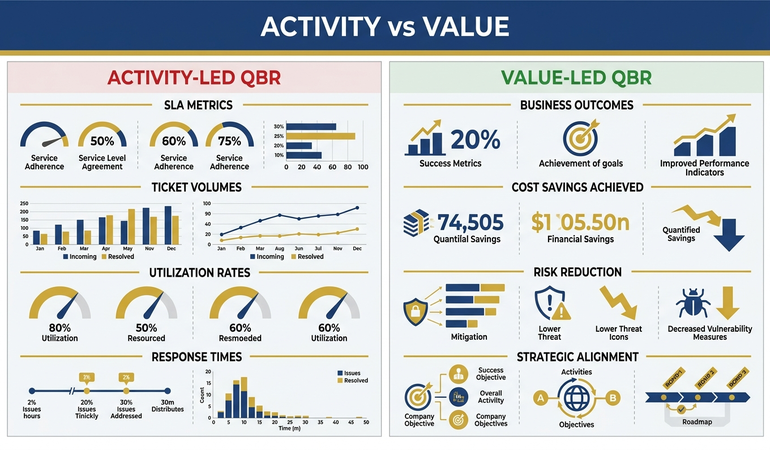
Slide after slide of metrics. Charts showing what happened. Tables comparing this quarter to last quarter. Thirty minutes of “here’s what we did” followed by executives checking their phones.

The problem isn’t the data. It’s the structure.

Most QBRs are built as status reports. But executives don’t need status reports — they have dashboards for that. What they need is insight and direction.

The question isn’t “What happened?” It’s “What does this mean, and what should we do about it?”

Related: Why Most QBR Presentations Bore Leadership (And How to Fix Yours)

Built for High-Stakes Presentations

Build a QBR Deck That Gets You Resources, Not Just Nods

The Executive Slide System (£39, instant access): includes the QBR template and 16 other executive presentation structures — each designed to drive decisions, not just inform.

Designed for executives who present quarterly business reviews to boards, leadership teams, and key stakeholders.

Get the Executive Slide System →

“Win the room. Every time.” — weekly tactics on executive presentations, Copilot for PowerPoint, and the psychology of persuasion. Free, from Mary Beth Hazeldine.

Send me the free newsletter →

The QBR Presentation Template: 8 Slides That Drive Action

8-slide QBR presentation template showing executive summary, scorecard, wins, misses, key insights, next quarter priorities, risks, and the ask

This template flips the traditional QBR on its head. Instead of starting with data, you start with insight. Instead of ending with “any questions?”, you end with a decision.

Slide 1: Executive Summary (The Only Slide That Matters)

If your executives only see one slide, this is it. Most QBRs bury the lead under 20 slides of context. Don’t.

What to include:

  • Quarter performance in one sentence (hit/miss/exceeded)
  • The single most important insight
  • Your recommendation or ask
  • What you need from leadership

Example: “Q4 exceeded target by 12% (£2.4M vs £2.1M goal). Customer acquisition cost dropped 23% due to referral programme. Recommend doubling referral budget in Q1. Need approval for £50K incremental spend.”

That’s 38 words. An executive can read it in 10 seconds and know exactly where you stand and what you need.

Slide 2: Scorecard — Goals vs. Actuals

One slide. One table. No narrative yet — just the numbers.

Format:

  • Metric | Target | Actual | Variance | Status (🟢🟡🔴)
  • Keep to 5-7 key metrics maximum
  • Use colour coding ruthlessly (green/yellow/red)

This slide answers: “Did we hit our numbers?” Nothing more.

Pro tip: Resist the urge to explain variances here. That comes next. The scorecard should be scannable in 5 seconds.

Slide 3: What Worked (Green Items Deep Dive)

Pick your biggest win and explain why it happened. Not what happened — why.

Structure:

  • The result (quantified)
  • The driver (what caused it)
  • The insight (what we learned)
  • The implication (what this means for next quarter)

Example: “Referral revenue up 47%. Driver: We simplified the referral process from 5 steps to 2. Insight: Friction was killing conversions. Implication: Apply same friction analysis to onboarding flow in Q1.”

See the difference? You’re not just reporting — you’re extracting meaning.

Slide 4: What Didn’t Work (Red Items Deep Dive)

This is where most presenters get defensive. Don’t be. Executives respect honesty more than spin.

Structure:

  • The miss (quantified)
  • Root cause (not excuses — actual cause)
  • What we’re doing about it
  • When we expect to see improvement

What NOT to do: “We missed target due to market conditions.” That’s an excuse, not an insight.

What TO do: “We missed target by 15%. Root cause: Our Q3 pipeline was 30% smaller than needed due to August hiring freeze. Action: Added 2 SDRs in October. Expect pipeline recovery by mid-Q1.”

Want the ready-made QBR slide layouts? The Executive Slide System includes the complete 8-slide QBR structure with AI prompts to customise it for your team.

Stop Building Your QBR Deck From Scratch

The Executive Slide System includes a complete 8-slide QBR template — each slide structured around the format above. Pair it with 30 AI prompt cards that generate your content in minutes.

Executive Slide System — £39, instant access.

  • 8-slide QBR template with decision-first structure built in
  • AI prompts to populate each slide from your performance data
  • Plus 9 more templates: board, budget, investor pitch, and more

Designed for VPs and directors who run quarterly reviews with senior leadership.

Slide 5: Key Insights — The “So What?” Slide

This is the slide most QBRs miss entirely. You’ve shown the data. Now tell them what it means.

Format: 3-4 bullet points, each structured as:

  • Observation: What we noticed
  • Implication: What it means for the business

Example insights:

  • “Enterprise deals are taking 40% longer to close → Need to revisit our enterprise sales process”
  • “Support tickets dropped 30% after knowledge base update → Self-service is working; invest more here”
  • “Top 10% of customers drive 60% of revenue → Concentrate retention efforts on this segment”

This slide demonstrates that you’re not just tracking numbers — you’re thinking strategically.

Slide 6: Next Quarter Priorities

Based on your insights, what are you going to do about it?

Format:

  • 3-5 priorities maximum (more than 5 means no priorities)
  • Each priority linked to an insight from the previous slide
  • Owner assigned
  • Success metric defined

Example:

  • Priority: Reduce enterprise sales cycle
  • Why: 40% longer close times killing forecast accuracy
  • Owner: Sarah (VP Sales)
  • Success metric: Reduce average cycle from 90 to 65 days

Slide 7: Risks & Dependencies

What could derail your plan? Executives appreciate foresight.

Format:

  • Risk description
  • Likelihood (High/Medium/Low)
  • Impact (High/Medium/Low)
  • Mitigation plan

Keep to 3-4 risks. More than that, and you look like you’re hedging everything.

Include dependencies on other teams or decisions: “Q1 plan assumes marketing budget approval by January 15.”

Slide 8: The Ask

End with what you need from leadership. Be specific.

Types of asks:

  • Budget approval: “Requesting £50K for expanded referral programme”
  • Headcount: “Need approval for 2 additional engineers”
  • Decision: “Need direction on whether to pursue Enterprise or SMB focus”
  • Support: “Need executive sponsor for cross-functional initiative”

If you don’t need anything, say so: “No approvals needed. Presented for visibility and alignment.”

Then stop talking. Let them respond.

The “So What?” Framework: Turning Data Into Decisions

Every executive I’ve trained learns this framework. It’s the single most powerful tool for turning quarterly business review slides into action.

The rule: Every piece of data must survive three “So what?” questions. If it can’t, cut it.

Here’s how to run a QBR using this framework:

“Revenue was £2.4M this quarter.”
So what?
“That’s 12% above target.”
So what?
“It means our new pricing strategy is working.”
So what?
“We should expand it to the enterprise segment in Q1.”

Now you have an insight worth presenting. You’ve turned a data point into a quarterly business review example that drives a decision.

If you can’t get past “so what?” after three iterations, the data point doesn’t belong in your QBR slides.

I’ve used this framework in hundreds of QBRs. It works for sales quarterly reviews, marketing QBRs, product reviews — any context where you’re presenting performance data to leadership.

QBR Presentation Mistakes to Avoid

Mistake #1: Starting with History

“Before we look at Q4, let me recap Q3…”

No. Executives don’t need a recap. They were there for Q3. Start with this quarter’s results and look forward, not backward.

Mistake #2: Too Many Metrics

If you’re showing 20 KPIs, you’re showing zero insights. Five to seven metrics that actually matter beats a dashboard dump every time.

Ask yourself: “If I could only show three numbers, which would they be?” Start there.

Mistake #3: Charts Without Context

A chart that says “Revenue by Region” with no annotation is useless. Every chart needs a headline that tells me what to notice.

Bad: “Revenue by Region Q4”
Good: “EMEA Revenue Up 34% — Driven by New Partnership”

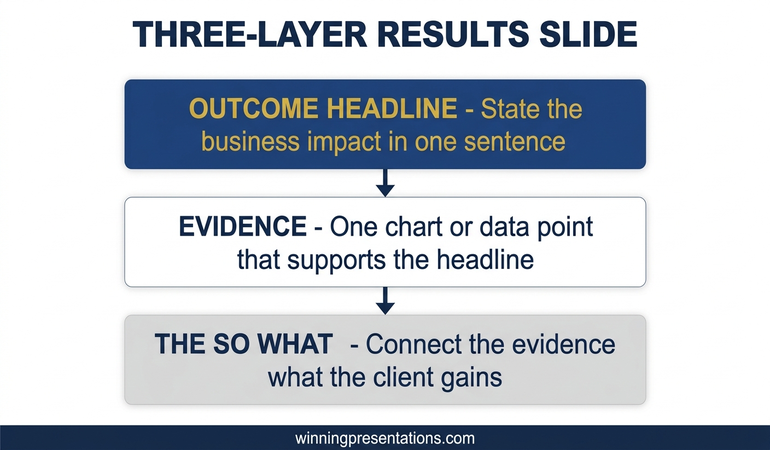
The headline does the work. The chart provides evidence.

Mistake #4: Ending with “Any Questions?”

That’s not an ending — it’s a surrender. End with your ask, your recommendation, or your key insight. Make them remember something specific.

Mistake #5: Reading the Slides

If you’re reading your slides aloud, you’ve already lost. Your slides are the evidence. Your voice provides the insight, context, and conviction.

Related: Executive Presentation Skills: How CEOs Actually Present

💡 Pro Tip: Rehearse your QBR out loud once. Time yourself. If you’re over 20 minutes of talking, you have too much content. Cut ruthlessly. Executives would rather have 15 focused minutes than 45 unfocused ones.

The executives who consistently get approvals follow a structured structure. The Executive Slide System gives you that structure with before/after examples for every slide type.

Using AI to Build Your QBR Faster

A good QBR takes 4-6 hours to build manually. With AI tools like PowerPoint Copilot, you can get a solid first draft in 30-45 minutes.

Here’s my workflow:

Step 1: Generate the Structure

“Create an 8-slide QBR presentation structure for [department/team] covering Q4 performance. Include executive summary, scorecard, wins analysis, misses analysis, key insights, next quarter priorities, risks, and asks.”

Step 2: Build the Scorecard

“Create a scorecard table with these metrics: [list your 5-7 KPIs]. Include columns for Target, Actual, Variance, and Status. Use green/yellow/red indicators.”

Step 3: Extract Insights

“Based on this data [paste your numbers], generate 3-4 strategic insights using the format: Observation + Implication. Focus on what this means for next quarter.”

Step 4: Generate Risk Assessment

“Generate 3 potential risks for [your Q1 plan] with likelihood, impact, and mitigation strategies.”

The AI handles the structure and first draft. You add the judgment, context, and conviction.

Related: Best Copilot PowerPoint Prompts That Actually Work

QBR Presentation Example: Before & After

Here’s a real transformation from a client — Sarah, VP of Customer Success at a B2B SaaS company.

Before: Sarah’s Original QBR

  • Title: “Q4 2025 Customer Success Review”
  • 14 slides of metrics: NPS, CSAT, churn rate, ticket volume, response times…
  • Every chart labelled descriptively: “NPS by Month”, “Churn by Segment”
  • No clear takeaway or recommendation
  • Ended with “Questions?”
  • Result: CEO asked “So what do you need from us?” — Sarah didn’t have an answer ready

QBR transformation case study showing Sarah VP of Customer Success going from 14-slide data dump with no decision to 8-slide template with £50K budget approved

After: The Transformed QBR

  • Title: “Q4: Churn Down 23% — Proposing £50K Knowledge Base Investment”
  • 8 slides following the template structure
  • Executive summary stated: Churn dropped because self-service support reduced friction. Recommended expanding knowledge base to cover enterprise tier.
  • Every chart had an insight headline: “Enterprise Churn Dropped 31% After Dedicated CSM Assignment”
  • Clear ask on final slide: £50K budget + 1 headcount for Q1
  • Result: Budget approved in the meeting. CEO added: “Why didn’t we do this sooner?”

The content was mostly the same data. The structure made it actionable.

Sarah now uses this template every quarter. Her QBRs finish early, and she’s been promoted twice since.

QBR Presentation Checklist

Before you present, verify:

  • ☐ Executive summary on slide 1 with clear insight and ask
  • ☐ Scorecard limited to 5-7 metrics with colour coding
  • ☐ Wins explained with “why” not just “what”
  • ☐ Misses addressed honestly with root cause and action plan
  • ☐ Every data point passes the “So What?” test
  • ☐ Next quarter priorities linked to this quarter’s insights
  • ☐ Risks identified with mitigation plans
  • ☐ Clear ask on final slide
  • ☐ Presentation under 20 minutes
  • ☐ Chart headlines tell the story (not just describe the chart)

A QBR that drives action takes 4-6 hours to build manually. With the right template, it takes an afternoon.

The Executive Slide System gives you the QBR template above as a ready-made PowerPoint file — plus AI prompts that generate your narrative, risks, and priorities in minutes.

Executive Slide System — £39, instant access.

Designed for executives who present where decisions are made.

Structure That Commands Attention

Your Next QBR, Structured in 30 Minutes

The Executive Slide System (£39) gives you the exact narrative flow for QBR presentations — plus 51 AI prompts to customise each section for your audience and context.

Get the Executive Slide System →

Want the complete toolkit?

QBR slides are one piece of the executive presentation cycle. The Complete Presenter Bundle pulls all seven products together — slides, Q&A, anxiety, storytelling, delivery, openers, cheat sheets — for £99 (save £91.97 vs buying separately). Lifetime access.

Get the Complete Presenter Bundle — £99 →

Frequently Asked Questions

How long should a QBR presentation be?

8-12 slides maximum. If your meeting is 60 minutes, aim for 15-20 minutes of presentation and 40 minutes of discussion. The discussion is where decisions get made.

What should I include in quarterly business review slides?

Every QBR deck needs these elements: executive summary with your ask, scorecard showing goals vs actuals, analysis of what worked and what didn’t, key insights, next quarter priorities, risks, and a clear ask. The 8-slide template above covers all of these.

How do I run a QBR that executives actually care about?

Start with insight, not data. Lead with your recommendation on slide 1. Use the “So What?” framework on every data point. End with a specific ask. Most importantly, make it a conversation about the future, not a report on the past.

Should I send the QBR deck in advance?

Yes. Send it 24-48 hours before. This lets executives come with informed questions rather than processing raw data in the meeting. Some will read it; some won’t. Accommodate both.

What if I have bad news to deliver?

Deliver it early, directly, and with a plan. Don’t bury bad news on slide 15. Executives respect honesty. What they don’t respect is spin or surprises.

Related: How to Present Bad News Without Killing Your Career

Do you have quarterly business review examples I can follow?

The Sarah case study above is a real example. The key transformation: she stopped presenting “what happened” and started presenting “what this means and what we should do.” Her QBR went from 14 slides of data to 8 slides of insight — and got her budget approved on the spot.

How do I handle executives who want more detail?

Build an appendix with supporting data. Say: “I have the detailed breakdown in the appendix if you’d like to review it.” Most won’t. But those who want it can access it without derailing the main presentation.

What’s the biggest QBR mistake you see?

Presenting data without insight. A QBR that’s just “here’s what happened” is a wasted opportunity. Every number should lead to an implication. Every implication should lead to an action.

How do I make my QBR more engaging?

Start with a story or a surprise. “We expected Q4 to be our weakest quarter. Instead, it was our strongest. Here’s why.” That’s more engaging than “Let me walk you through Q4 results.”

📧 The Winning Edge Newsletter

Weekly insights on executive presentations, QBR strategies, and what’s actually working in boardrooms right now.

Subscribe Free →

QBR Templates for Different Contexts

The 8-slide structure adapts to different types of quarterly reviews:

Sales QBR: Focus on pipeline, win rates, deal velocity, and forecast accuracy. Your “ask” is usually headcount or budget.

Marketing QBR: Focus on lead generation, CAC, attribution, and campaign performance. Link everything to revenue impact.

Product QBR: Focus on feature delivery, user adoption, NPS, and roadmap progress. Your “ask” is usually resources or priority decisions.

Operations QBR: Focus on efficiency metrics, SLAs, cost per transaction, and process improvements. Link to customer satisfaction and margin.

The structure stays the same. The metrics change.

Related Resources

🎁 Free: Executive Presentation Checklist

The 12-point checklist I use before every executive presentation. One page. Covers structure, timing, and the mistakes that get decks rejected.

Download Free Checklist →

No email required. Instant download.

About the Author

Mary Beth Hazeldine spent 25 years in corporate banking at JPMorgan Chase, PwC, Royal Bank of Scotland, and Commerzbank. She’s delivered hundreds of QBRs and now teaches executives to run quarterly reviews that drive decisions and secure resources. She now runs Winning Presentations, training executives to communicate with impact — and helping them use AI tools like Copilot to create better presentations in less time.

01 Dec 2025
QBR presentation template - quarterly business review slide with metrics, wins, challenges, and next steps

Why Most QBR Presentations Bore Leadership (And How to Fix Yours)

Your QBR presentation is either building your career or stalling it.

There’s no middle ground. After 25 years presenting quarterly business reviews at JPMorgan Chase, PwC, Royal Bank of Scotland, and Commerzbank — and 16 years training executives on presentations — I’ve seen how quickly leadership forms opinions based on how you present your numbers.

A good QBR presentation demonstrates strategic thinking. A bad one makes leadership question whether you understand your own business.

Most QBR presentations are bad. Here’s why — and how to fix yours before the next quarter.

QBR presentation template - quarterly business review slide with metrics, wins, challenges, and next steps
A QBR presentation structure that keeps executives engaged

Preparing a QBR right now?

The Executive Slide System includes QBR and board-ready slide templates that translate your performance data into the narrative structure leadership actually wants to see.

Explore the Executive Slide System →

Why Most QBR Presentations Fail

The fundamental problem with most QBR presentations is that they report what happened instead of what it means.

Leadership doesn’t need you to read numbers off a slide. They can see the numbers. They need you to interpret them — to explain causation, context, and consequence.

“Revenue was £4.2M” is a data point.

“Revenue was £4.2M — 12% above target — driven by the Enterprise expansion we launched in July” is insight.

One informs. The other demonstrates that you understand your business. That’s the difference between a forgettable QBR presentation and one that builds your reputation.

The Three QBR Presentation Mistakes

Mistake 1: Leading with data instead of narrative. Sometimes the bigger problem is that the decision was already made before you walked in — and your QBR format made it worse. Sometimes the bigger issue is that the decision was already made before you presented.

When your first slide is a wall of numbers, you’re signalling that the next 30 minutes will be a data dump. Executives immediately disengage because they know they’ll hear the same information they already saw in the pre-read.

Your QBR presentation should lead with the story. What happened this quarter? Was it good or bad? Why? Then use data to support the narrative — not replace it.

Mistake 2: Hiding bad news (or burying it on slide 18).

Executives can smell spin from a mile away. When you lead with wins and bury challenges at the end of your QBR presentation, you lose credibility. They start wondering what else you’re hiding.

Worse: if they discover a problem you glossed over, they’ll never fully trust your quarterly reviews again.

Be direct. “We missed our customer retention target. Here’s why, and here’s what we’re doing about it.” That earns respect.

Mistake 3: No clear ask.

A QBR presentation isn’t just a report — it’s an opportunity. What do you need from leadership? Budget approval? Headcount? A decision on strategy?

If you walk out of a quarterly business review without having asked for something, you’ve wasted 30 minutes of executive time on a meeting that could have been an email.

The QBR Presentation Structure That Works

Here’s the quarterly business review structure I’ve used and taught for over two decades. It consistently keeps leadership engaged:

1. Headline Metrics (30 seconds)

Open your QBR presentation with 4-6 key numbers. Not 12. Not 20. The metrics that matter most.

The Executive Slide System includes a QBR template that follows this exact structure — so you can build your next review in under an hour.

Each metric should have three elements:

  • The number itself
  • The target or benchmark (so they know if it’s good or bad)
  • A visual indicator (green/amber/red, arrow up/down)

This takes one slide. Executives can see the health of the business in 10 seconds. That’s the point.

Example QBR headline metrics:

Metric Actual Target Status
Revenue £4.2M £3.8M 🟢
Gross Margin 42% 45% 🟡
New Customers 127 100 🟢
Customer Churn 8.3% 5% 🔴

Four numbers. Instant understanding. Now they’re ready to hear the story.

2. Performance Narrative (2-3 minutes)

This is where most QBR presentations fail — and where great ones shine.

Don’t explain what the numbers are. Explain why they are what they are.

“Revenue was up 12%” is reporting.

“Revenue was up 12%, driven by three factors: the Enterprise deal we closed in July contributed £400K; our pricing adjustment in August increased average deal size by 8%; and the marketing campaign generated 40% more qualified leads than Q2” is analysis.

The second version shows you understand causation. That’s what leadership wants to see in a QBR presentation.

Structure your narrative as:

  • Overall: Was it a good quarter or a bad quarter? Say it plainly.
  • What drove the results: 2-3 primary factors, with specifics.
  • What surprised you: Anything unexpected — good or bad.

3. Wins (2 minutes)

Specific achievements with impact quantified.

Not “We had some great wins this quarter.” That’s meaningless in a QBR presentation.

Instead:

  • “Closed £1.2M Enterprise deal with [Company] — largest in company history”
  • “Reduced customer onboarding time from 6 weeks to 2 weeks”
  • “Launched mobile app — 15,000 downloads in first month”

Each win should have a number attached. Numbers make wins credible. Without numbers, wins feel like spin.

Limit to 3-4 wins. More than that dilutes impact. Pick the ones that matter most to the business strategy.

4. Challenges (2 minutes)

This is where you build trust in your QBR presentation — or destroy it.

Be direct about what didn’t work. Then immediately pivot to what you’re doing about it.

Structure for each challenge:

  • The challenge (specific and honest)
  • Root cause (show you understand why it happened)
  • Mitigation (what you’re doing to fix it)
  • Timeline (when you expect improvement)

Example:

“Customer churn hit 8.3% this quarter — above our 5% target. Root cause: we identified that 60% of churned customers cited slow support response times. We’ve already hired two additional support staff, implemented a new ticketing system, and expect to see churn return to target by end of Q1.”

That’s accountability. Executives respect it.

What NOT to do in a QBR presentation:

  • “Churn was a bit elevated due to market conditions” — vague, externalises blame
  • “We’re looking into the churn issue” — no action, no timeline
  • Skip challenges entirely — destroys credibility

5. Next Quarter Focus (2 minutes)

Three priorities. Not seven. Three.

Each priority in your QBR presentation should have:

  • A specific outcome (not an activity)
  • A measurable target
  • An owner

Weak: “Continue to focus on customer retention”

Strong: “Reduce churn to 5% by end of Q1. Owner: Sarah. Key actions: New onboarding programme launches Jan 15, support SLA reduced to 4 hours.”

The strong version tells leadership exactly what you’ll deliver and who’s responsible. It gives them something concrete to check next quarter.

Want a ready-made QBR presentation template with this structure? The Executive Slide System — £39, instant access — includes the QBR template and 9 more executive presentation frameworks.

The QBR template is one of 10 executive presentations in The Executive Slide System, complete with AI prompts to generate your content in minutes. Structured for executives who need to turn data into strategic conversations at quarterly reviews.

The QBR Presentation Narrative Arc

Notice the structure follows a story:

  1. Setup: Here’s where we are (headline metrics)
  2. Context: Here’s how we got here (performance narrative)
  3. Highs: Here’s what went well (wins)
  4. Lows: Here’s what didn’t (challenges)
  5. Resolution: Here’s where we’re going (next quarter focus)

This is a story. Stories are engaging. Data dumps are not.

Executives stay engaged with your QBR presentation because they’re following a narrative, not watching you read numbers off slides.

10 executive presentation templates - QBR, budget request, board meeting, investor pitch, strategic recommendation slides
The QBR is one of 10 executive presentation types — each requires a different structure

Timing Your QBR Presentation

If you have 30 minutes:

  • Headline metrics: 2 minutes
  • Performance narrative: 5 minutes
  • Wins: 4 minutes
  • Challenges: 5 minutes
  • Next quarter focus: 4 minutes
  • Discussion/Q&A: 10 minutes

Notice: only 20 minutes of presentation. The rest is discussion.

If your QBR is being presented in a hybrid room with remote and in-person stakeholders, the hybrid presentation guide covers the structural adjustments that keep both audiences engaged.

That’s intentional. Executives want to ask questions, probe challenges, and discuss strategy. If you talk for 28 minutes and leave 2 minutes for questions, you’ve delivered a lecture, not a business review.

The 60/40 rule for QBR presentations: 60% presentation, 40% discussion. If you’re not hitting that ratio, you’re talking too much.

How to Handle Hard Questions in Your QBR

Good QBR presentations invite tough questions. Here’s how to handle them: If your QBR involves a risk committee, see our guide on preparing for the questions that expose blind spots. If your QBR involves a risk committee, see our guide on preparing for the questions that expose blind spots.

“Why did we miss the target?”

Don’t get defensive. Acknowledge the miss, explain root cause, describe what you’re doing about it. “You’re right, we missed by 15%. The primary driver was [X]. We’ve already started [Y] and expect to recover by [Z].”

“What would you do differently?”

This is a test. They want to see if you’ve reflected. Have an answer ready. “In hindsight, we should have [X] earlier. We’ve built that into our Q1 planning.”

“Is this team capable of delivering?”

Don’t take it personally. Answer with evidence. “We delivered [X] and [Y] this quarter despite [challenge]. I’m confident in the team, and I’m adding [resource] to address the gap in [area].”

“What’s the risk we miss again?”

Be honest. “There’s risk in [specific area]. We’re mitigating it by [action]. If [trigger] happens, we’ll [contingency].” Executives respect risk awareness more than false confidence.

QBR Presentation Checklist

Run through these questions before you present your quarterly business review:

QBR Pre-Flight Checklist

  1. ☐ Can leadership see overall business health in the first 30 seconds?
  2. ☐ Does every number have a target/benchmark for comparison?
  3. ☐ Have I explained why results happened, not just what happened?
  4. ☐ Are my wins specific and quantified?
  5. ☐ Have I been honest about challenges — with mitigation plans?
  6. ☐ Are next quarter priorities specific, measurable, and owned?
  7. ☐ Have I left time for discussion (at least 30% of the meeting)?
  8. ☐ Do I have an ask for leadership?

If you answer “no” to any of these, fix it before presenting your QBR.

The QBR Presentation That Changed My Perspective

Early in my career at JPMorgan, I watched a division head present a brutal quarter. Revenue down 20%. Major client lost. Two key hires had quit.

I expected him to spin it. He didn’t.

He opened with: “This was a bad quarter. We underperformed, and I’m accountable.” Then he spent 20 minutes explaining exactly what went wrong, why, and what he was doing to fix it. He ended with a specific ask for headcount to rebuild the team.

The CEO’s response? “Thank you for the honest assessment. Let’s get you those resources.”

That’s when I learned: QBR presentations aren’t about making yourself look good. They’re about giving leadership the information they need to make good decisions. Sometimes that means delivering bad news well.

Executives can handle bad quarters. What they can’t handle is being surprised — or worse, discovering you hid something.

FAQs About QBR Presentations

How long should a QBR presentation be?

For a 30-minute meeting, keep your QBR presentation to 8-12 slides. You want 60% presenting, 40% discussion. More slides means less time for the strategic conversation that makes quarterly reviews valuable.

Should I send my QBR presentation as a pre-read?

Yes, but send a condensed version. Include headline metrics and the performance narrative. Save wins, challenges, and next steps for the live discussion — that’s where you demonstrate strategic thinking.

What if my quarter was genuinely bad?

Lead with honesty. “This was a difficult quarter” followed by clear analysis of why and what you’re doing about it. Executives respect accountability. What destroys trust is discovering you minimised problems.

How do I handle a QBR when I’m new to the role?

Acknowledge it: “This is my first QBR in this role. I’ve spent [X weeks] understanding the business. Here’s what I’ve found.” Then present your analysis. Being new doesn’t excuse you from having a point of view.

What metrics should I include in my QBR presentation?

Include the 4-6 metrics leadership actually uses to evaluate business health. If you’re unsure, ask your manager before the QBR: “What numbers do you look at first?” Those are your headline metrics.

The Winning Edge — Free Weekly Newsletter

Every Thursday, one executive communication tactic you can use immediately. No fluff. No theory. Just what works in real boardrooms.

Subscribe Free

Transform Your Next QBR Presentation

Your next quarterly business review is an opportunity:

  • To demonstrate strategic thinking
  • To build trust through transparency
  • To secure resources for next quarter
  • To show leadership you understand your business

Don’t waste it on a data dump.

Lead with insight. Be honest about challenges. Ask for what you need.

That’s how QBR presentations become career accelerators instead of calendar fillers.

The Executive Slide System complete package - 10 PowerPoint templates, 30 AI prompts, and quick start guide for executive presentations

Get the QBR Template (Plus 9 More Executive Presentations)

Stop building quarterly business reviews from scratch. Get the QBR structure above as a ready-made PowerPoint template, plus AI prompts that generate your content in minutes.

The same frameworks my clients use to present at board level. Designed for directors and VPs preparing for high-stakes quarterly business reviews

GET INSTANT ACCESS →

The Executive Slide System — £39, instant access. 10 templates • 30 AI prompts • Instant download • 30-day guarantee


Related: How to Create Executive Presentations That Get Approved in 2025 — the complete guide covering all 10 executive presentation types, including the QBR structure with AI prompts.