

I asked ChatGPT to write an executive summary for a £3 million infrastructure proposal. It gave me something that read like a university essay.
Same tool. Same data. But the output was unusable in any boardroom I’ve ever sat in.
The problem wasn’t AI. It was how I was prompting it — one instruction, one shot, hope for the best. Most professionals do exactly this, and most get exactly this result: technically correct, strategically useless.
Then I discovered prompt layering. Not a single clever instruction, but a sequence of four prompts that build on each other — each one refining the output until it reads like something a senior leader actually wrote.
That single shift changed how I teach AI presentation prompts to executives. And it’s the technique that separates “AI-assisted” slides from “AI-generated” ones.
Quick answer: Prompt layering is a technique where you build AI presentation output through four sequential prompts — Role, Context, Task, Constraints — instead of cramming everything into one instruction. Each layer refines the previous output, producing executive-quality slides that sound like you wrote them. Senior leaders who use this approach report cutting revision time from hours to minutes while getting output their audience actually respects.
🎯 Presenting tomorrow? Copy these 4 prompts in order:
Prompt 1 (Role): “You are a senior strategy consultant who has written executive presentations for FTSE 100 boards. Your writing is concise, direct, and recommendation-led.”
Prompt 2 (Context): “I’m presenting to [AUDIENCE] about [TOPIC]. They care about [KEY CONCERN]. The decision I need is [SPECIFIC ASK]. Here’s my background data: [PASTE DATA].”
Prompt 3 (Task): “Create a [NUMBER]-slide executive presentation. Lead with the recommendation. Each slide should have one main message as the title. No bullet points longer than 8 words.”
Prompt 4 (Constraints): “Rewrite the output using these rules: no jargon, no passive voice, every slide answers ‘so what?’, and the entire deck could be understood by reading only the slide titles.”
Fill in the brackets. Run them in sequence (not all at once). Each prompt builds on the last.
In this article:
A client — VP of Operations at a logistics company — showed me his “AI presentation workflow.” He’d type a paragraph-long prompt, get a full deck back, then spend three hours rewriting every slide.
“It’s faster than starting from scratch,” he said. He was right. But only barely.
I showed him the layering technique. Same AI tool, same topic, but four prompts instead of one. The first set the voice. The second loaded the context. The third defined the structure. The fourth applied the constraints.
His next board presentation took 40 minutes to build. Not 40 minutes of editing AI output — 40 minutes total, from blank screen to finished deck. His exact words afterwards: “It actually sounds like me now.”
That’s what prompt layering does. It doesn’t make AI smarter. It gives AI enough information to produce something you’d actually present.
Why Single-Prompt AI Fails at Executive Level
The standard approach to AI presentations looks like this: write one detailed prompt, hit enter, get a deck. Every tutorial teaches it. Every professional tries it. And almost everyone gets the same result — slides that are technically complete but strategically empty.
Here’s why. When you give AI one prompt, you’re asking it to simultaneously figure out your voice, understand your audience, structure your argument, and apply formatting constraints. That’s four cognitive tasks compressed into one instruction. Even experienced professionals can’t do all four at once. AI certainly can’t.
The output reveals the problem. Slide titles become generic (“Overview,” “Key Findings,” “Next Steps”). Content reads like a report, not a presentation. The recommendation — if there is one — gets buried on slide 9 instead of leading on slide 1.
I’ve seen this pattern across hundreds of executive presentations. The executives who get the worst AI output are often the ones who write the longest, most detailed single prompts. More instructions in one shot doesn’t mean better output. It means more confusion.
Prompt layering solves this by separating those four tasks into four sequential prompts. Each one does one job. And each one builds on the output of the last.
The 4-Layer Prompt Stacking Technique
The technique works because it mirrors how senior leaders actually think through a presentation — not all at once, but in layers. Role first. Context second. Structure third. Polish fourth.
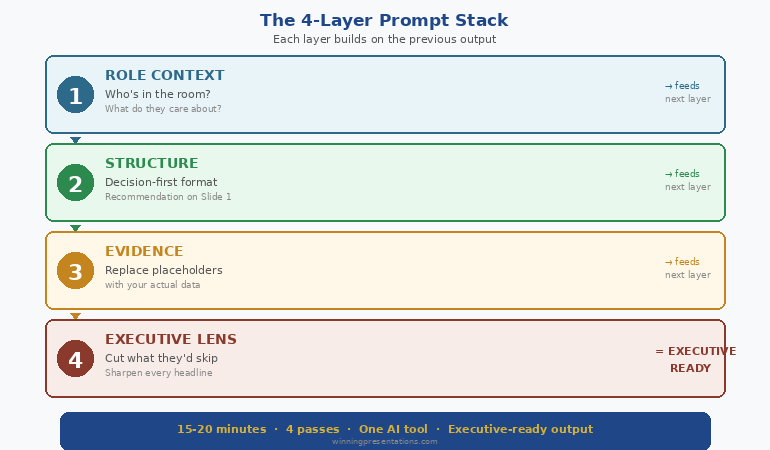
Layer 1: Role (Set the Voice)
Before you ask AI to create anything, tell it who it is. This isn’t a gimmick. Role-setting changes the vocabulary, sentence length, and level of assumption in every output that follows.
Weak role: “You are a helpful assistant.”
Strong role: “You are a senior strategy consultant who has written board-level presentations for FTSE 100 companies. Your writing style is direct, recommendation-led, and assumes the reader is time-poor and sceptical.”
The difference in output is immediate. With the strong role, AI stops explaining basics, drops the hedging language, and leads with conclusions instead of background.
Layer 2: Context (Load the Intelligence)
This is where most professionals fail. They give AI the topic but not the situation. A board presentation about Q3 performance is completely different depending on whether results exceeded targets or missed them by 15%.
The context layer includes: who you’re presenting to, what they care about, what decision you need, what resistance you expect, and the raw data or talking points they need to see.
Paste your data here. Meeting notes, spreadsheet summaries, previous feedback — give AI the same briefing you’d give a junior analyst preparing your slides.
Layer 3: Task (Define the Structure)
Now — and only now — do you tell AI what to build. The task layer specifies slide count, format requirements, what goes on each slide, and how the argument flows.
Because AI already has the voice (Layer 1) and the intelligence (Layer 2), the structural output is dramatically better. Slide titles become specific. Content maps to what your audience actually needs to decide. Recommendations lead rather than follow.
Layer 4: Constraints (Apply the Polish)
The final layer is a rewrite instruction. You take the output from Layer 3 and run it through quality filters: no jargon, no passive voice, every slide answers “so what?”, slide titles tell the full story when read in sequence.
This layer is where generic becomes executive. It’s the equivalent of a senior partner reviewing a junior associate’s slides and saying “tighter, sharper, more direct.”
Four prompts. Four minutes. Output that used to require three hours of manual rewriting.
The Complete AI Presentation System
Prompt layering is one module inside AI-Enhanced Presentation Mastery — the self-study programme that teaches the full executive AI workflow. Modules release weekly. Live Q&A calls included. Join anytime and get everything released so far.
Join AI-Enhanced Presentation Mastery (See Dates & Pricing) →
Self-study modules + live Q&A calls. All sessions recorded.
The course is live now, with new modules releasing through April 2026. Join today and get instant access to everything released so far — plus every module as it drops.
Before and After: Real Executive Output
Theory is useful. Seeing the difference is convincing. Here’s what prompt layering actually produces compared to the standard single-prompt approach — using the same AI tool, same topic, same data.
Scenario: Q3 Board Update (Results Below Target)
Single prompt output — Slide 1 title: “Q3 2025 Performance Overview and Key Metrics Summary”
Layered prompt output — Slide 1 title: “Q3 Revenue Missed Target by 8%. Here’s the Recovery Plan.”
The first tells the board they’re about to see data. The second tells them exactly what happened and what you’re doing about it. One wastes their first 30 seconds. The other earns their attention immediately.
Scenario: Budget Request Presentation
Single prompt output — Closing slide: “Summary and Recommendations for Consideration”
Layered prompt output — Closing slide: “Approve £450K Q1 Investment. Payback by Month 9. Here’s Why Delay Costs More.”
The difference isn’t AI capability. It’s prompt architecture. The layered approach forces AI to write like a decision-maker rather than a report-generator.
The 3 Layering Mistakes That Ruin Executive Output
Prompt layering isn’t foolproof. I’ve watched senior professionals adopt the technique and still get mediocre output because of three specific errors.
Mistake 1: Combining Layers
The temptation is efficiency — why send four prompts when you can send two? Because combining layers defeats the purpose. When you merge Role and Context into one prompt, AI gives equal weight to voice and data. The voice gets diluted. The context gets summarised instead of absorbed.
Four separate prompts. Every time. The two minutes you “save” by combining costs you twenty minutes in rewrites.
Mistake 2: Skipping the Constraints Layer
Layers 1-3 produce good output. Layer 4 produces executive output. The constraints prompt is what removes jargon, tightens language, forces the “so what?” test, and ensures slide titles tell a complete story. Skipping it is like submitting a first draft to the board.
Mistake 3: Restarting Instead of Building
If Layer 3 output isn’t right, the instinct is to start over with a new prompt. Don’t. Instead, add a corrective instruction that builds on what’s already there: “Keep the structure but make the recommendation on slide 1 instead of slide 8.” AI retains context from previous layers. Starting over throws that context away.
Going deeper: The complete layering protocol — including audience-specific role templates and the editing loop that catches what Layer 4 misses — is covered in the AI-Enhanced Presentation Mastery programme. Join anytime — get instant access to all modules released so far, plus new ones dropping through April 2026.
When to Use Prompt Layering (And When Not To)
Prompt layering is the right technique for any presentation where the audience is senior, the stakes are real, and “good enough” isn’t good enough. Board updates. Budget requests. Client pitches. Investor decks. Steering committee presentations.
For internal team updates, training materials, or quick status slides, a single well-written prompt is perfectly fine. The 4-layer technique adds four minutes to your process. That investment pays off when the audience is a CFO. It’s overkill when the audience is your own team.
The decision framework I use: if the presentation could affect a decision, a budget, or your reputation, layer your prompts. If it’s informational, don’t.
Also worth noting: prompt layering fits inside a broader AI presentation workflow that includes research, structure, and rehearsal phases. The prompts are one part of a larger system.
And if the presentation you’re preparing also involves getting the format right for a CEO audience, the role layer becomes especially critical — the voice you set in Layer 1 needs to match the expectations of the room.
People Also Ask
What are the best AI prompts for executive presentations?
The best AI prompts for executive presentations use a layered approach — setting role, loading context, defining structure, then applying constraints in four separate prompts. This produces recommendation-led, jargon-free output that mirrors how senior leaders actually communicate. Single-prompt approaches consistently produce generic, report-style slides.
How do you make AI-generated slides look professional?
Professional AI slides come from professional prompting. The constraints layer — applied after structure is set — forces AI to remove jargon, eliminate passive voice, and ensure every slide answers “so what?” Most professionals skip this step and spend hours manually fixing what one additional prompt would solve.
Can AI replace presentation designers for executives?
AI replaces the content creation and structuring work, not the visual design. Executive AI workflows focus on argument architecture, slide messaging, and narrative flow — the strategic work that determines whether a presentation succeeds or fails. Visual polish is a separate step.
Learn the Full Executive AI Workflow
Prompt layering is one technique inside a complete system. AI-Enhanced Presentation Mastery covers the full workflow — from research to rehearsal — in self-study modules with live Q&A support. The programme is already in progress. Join anytime and access everything released so far, plus all future modules.
Join AI-Enhanced Presentation Mastery (See Dates & Pricing) →
Self-study. Weekly modules. Live Q&A calls recorded. Study at your own pace.
Join anytime — get instant access to all modules released so far, plus new ones dropping through April 2026
Frequently Asked Questions
Does prompt layering work with any AI tool or just ChatGPT?
The 4-layer technique works with any large language model — ChatGPT, Claude, Gemini, Copilot. The principle is universal: separating role, context, task, and constraints into sequential prompts produces better output regardless of which tool you use. The specific prompt wording may vary slightly between tools, but the layering structure remains the same.
How long does prompt layering add to my workflow?
Approximately four minutes for the prompting phase. Most professionals report saving 60-90 minutes on the back end because the output requires far less manual rewriting. The net time saving is significant — particularly for board presentations and budget requests where revision cycles typically consume hours.
I’ve tried detailed prompts before and the output was still generic. How is this different?
Detailed single prompts overload the AI with competing instructions. Layering separates each instruction type so AI can focus fully on one task at a time. The key difference is sequence: you’re building output in stages rather than asking for everything simultaneously. The constraints layer alone — applied to already-structured content — typically transforms generic output into something presentation-ready.
Can I use prompt layering for presentations I need to give tomorrow?
Yes. The four-prompt sequence takes under five minutes. The copy-paste prompts at the top of this article are designed for exactly that scenario. Fill in the brackets, run them in order, and you’ll have a structured draft in minutes. For high-stakes presentations, allow an additional 15-20 minutes for your own review and refinement.
📬 The Winning Edge Newsletter
Weekly AI presentation techniques, executive communication strategies, and frameworks for senior professionals. No fluff. Practical every time.
Quick win: Start with my free prompt pack — 10 tested prompts for executive presentations, including a role-setting template you can use immediately.
Related today: If the presentation you’re building needs the format your CEO actually wants, the role layer in prompt layering is where you set that expectation. And if nerves are the bigger issue, here’s what to do when you freeze mid-presentation.
Your Next Step
Open your AI tool. Don’t type a prompt yet.
Instead, write the role first. Who should this AI be when it writes for you? A senior strategy consultant? A CFO who’s reviewed a thousand budget presentations? A board secretary who knows what directors actually read?
Set that role. Then load your context. Then define the task. Then constrain the output.
Four prompts. Four minutes. Executive-quality output that sounds like you — not like a machine.
If you want the complete system — role templates for every audience type, the editing loop, the workflow senior leaders actually use, and the refinement protocol that catches what the constraints layer misses — explore AI-Enhanced Presentation Mastery.
Stop writing one prompt and hoping. Start layering — and watch your AI output become something you’d actually present.
About the Author
Mary Beth Hazeldine is the Owner & Managing Director of Winning Presentations. With 24 years of corporate banking experience at JPMorgan Chase, PwC, Royal Bank of Scotland, and Commerzbank, she has created hundreds of executive presentations — first manually, now with AI assistance.
A qualified clinical hypnotherapist and NLP practitioner, Mary Beth combines executive communication expertise with evidence-based techniques. She has helped senior professionals and teams create presentations that secure funding, approvals, and high-stakes decisions across three continents.