Tag: presentation training

19 Dec 2025
Presentation skills training comparison - traditional vs psychology and AI approach for lasting confidence

Presentation Skills Training: Why Most Programs Fail (And What Actually Works)

A hypnotherapist and ex-banker reveals why traditional presentation training doesn’t stick — and the psychology + AI approach that does

You’ve probably been through presentation skills training before. A one-day workshop. A corporate programme. Maybe even executive coaching.

And yet here you are, still searching for answers.

That’s not your fault. It’s a fundamental problem with how presentation training is designed. After 24 years presenting in corporate banking and treating hundreds of anxiety clients as a clinical hypnotherapist, I’ve seen exactly why most programmes fail — and what actually creates lasting change.

🎁 Free Download: Get my Executive Presentation Checklist — the pre-presentation routine I use before every high-stakes talk. A taste of what proper training includes.

Why Traditional Presentation Skills Training Doesn’t Work

Most presentation training focuses on the wrong things:

Problem #1: They teach techniques without addressing psychology.

“Make eye contact.” “Use gestures.” “Vary your tone.” These are surface-level tips that don’t help when your nervous system is in fight-or-flight mode. In my hypnotherapy practice, I saw this constantly — people who knew exactly what they should do but couldn’t do it when anxiety hit.

You can’t perform techniques when your hands are shaking and your mind is blank.

Problem #2: One-day workshops don’t create lasting change.

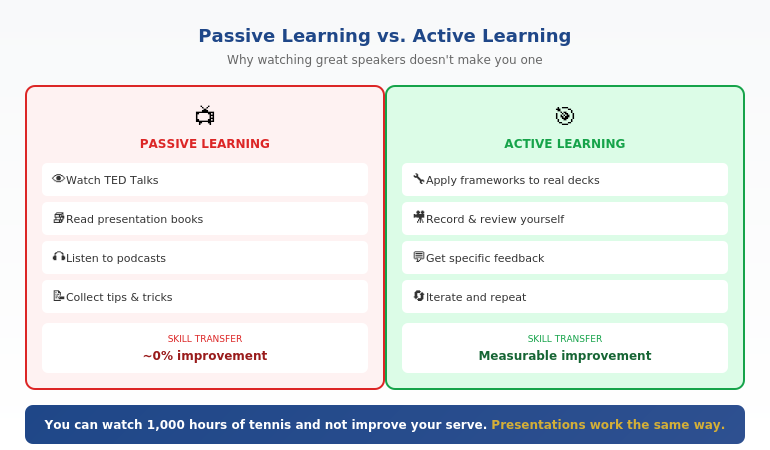
Research on skill acquisition is clear: lasting change requires spaced practice over time, not a single intensive session. Yet most corporate presentation training is a one-day event that’s forgotten within weeks.

Problem #3: They ignore the preparation bottleneck.

Most presentation anxiety comes from inadequate preparation — not lack of delivery skills. When you’re rushing to finish slides the night before, of course you’ll be nervous. But traditional training focuses almost entirely on delivery, not on how to prepare effectively.

Problem #4: They don’t adapt to how work has changed.

AI has transformed how we create content. Professionals who learn to use these tools effectively can prepare presentations in a fraction of the time — reducing anxiety and improving quality. Yet most presentation training ignores this entirely.

Related: Why Most Presentation Training Fails (And What Actually Works)

What Effective Presentation Skills Training Actually Looks Like

After training over 5,000 executives and treating hundreds of anxiety clients, I’ve identified what actually works:

1. Address the Psychology First

Before you can improve delivery, you need to manage your nervous system. This means learning techniques that work at the physiological level — breathing patterns that activate the parasympathetic response, anchoring techniques that access confident states on demand, and reframing methods that change how your brain interprets arousal.

This isn’t “mindset” fluff. It’s applied psychology from clinical practice.

Related: Public Speaking Tips: 15 Techniques That Actually Work

2. Fix the Preparation Problem

The executives I train who are most confident aren’t naturally gifted speakers — they’re exceptionally well-prepared. They have systems for structuring their message, creating compelling visuals, and rehearsing effectively.

Modern AI tools have made this dramatically easier. What used to take 6+ hours can now be done in 90 minutes — if you know how to use the tools correctly. That extra preparation time translates directly to confidence.

Related: AI Presentation Workflow: How I Cut Creation Time from 6 Hours to 90 Minutes

3. Space Learning Over Time

Skill development requires practice, feedback, and iteration. A single workshop can’t provide that. Effective training happens over weeks, with opportunities to apply techniques, get feedback, and refine your approach.

4. Combine AI Efficiency with Human Connection

AI can help you create better content faster. But the delivery — the presence, the connection, the ability to read the room and adapt — that’s irreducibly human. The best training teaches you to leverage AI for preparation while developing the human skills that make presentations memorable.

The 3Ps Framework: How My Clients Have Raised £250M+

Over 35 years, I’ve developed a methodology called the 3Ps Framework that addresses all three elements of effective presenting:

Proposition: What you’re actually saying — the structure, the argument, the story. Most presentations fail here before anyone opens their mouth. AI tools can dramatically accelerate this phase when used correctly.

Presentation: How the content is visualised and delivered. This includes slide design, pacing, and the technical aspects of delivery. Again, AI can help — but only if you know how to prompt it effectively.

Personality: The human element — presence, confidence, connection. This is where psychology matters most. No AI can give you executive presence. But the right techniques can unlock it.

Clients using this framework have raised over £250 million in funding. Not because they became different people — but because they learned to prepare effectively, manage their psychology, and deliver with authentic confidence.

Related: The 3Ps Framework: How My Clients Have Raised £250M+ in Funding

Presentation Skills Training That Actually Works

My AI-Enhanced Presentation Mastery course combines everything that makes training effective:

  • Psychology-based confidence techniques from my hypnotherapy practice
  • AI-powered preparation systems that cut creation time by 75%
  • Spaced learning over 8 modules with 2 live coaching sessions
  • Real-world application to your actual presentations

January cohort: £249 (increases to £499 in April)

Only 60 seats. Early bird ends December 31st.

See the full curriculum →

Who This Approach Works Best For

The psychology + AI approach to presentation skills training is particularly effective for:

Executives who present to boards and investors. High stakes require both confidence and preparation. The AI tools accelerate your preparation; the psychology techniques ensure you deliver with presence.

Professionals who’ve tried training before without lasting results. If you’ve done workshops that didn’t stick, you likely need the psychology component that was missing — not more tips on gestures and eye contact.

Anyone who spends too long preparing presentations. If you’re regularly working late on slides, AI-enhanced workflows can reclaim hours of your week while actually improving quality.

People who know their material but freeze under pressure. This is a classic sign that psychology, not knowledge, is the bottleneck. Clinical techniques for managing your nervous system will help more than any delivery tip.

Related: How to Create Executive Presentations That Get Results

What to Look for in Presentation Skills Training

If you’re evaluating options for presentation skills training, here’s what to look for:

Does it address psychology, not just technique? Look for programmes that teach anxiety management, confidence building, and mindset — not just “10 tips for better slides.”

Is it spaced over time or a one-day event? Lasting change requires practice and iteration. A single workshop is entertainment, not training.

Does it include modern tools? AI has changed how presentations are created. Training that ignores this is already outdated.

Is there personalised feedback? Generic advice only gets you so far. Look for programmes with live coaching or feedback on your specific presentations.

What’s the trainer’s actual experience? Theory is easy. Look for trainers who have presented in high-stakes environments themselves — not just taught others to do it.

Frequently Asked Questions

How is this different from corporate presentation training?

Most corporate training focuses on delivery tips (eye contact, gestures, voice) without addressing the psychology that prevents you from using those tips under pressure. It’s also typically a one-day event with no follow-up. The approach I teach addresses psychology first, uses AI to solve the preparation bottleneck, and is spaced over time for lasting change.

I’ve done presentation training before and it didn’t help. Why would this be different?

If previous training didn’t work, it likely focused on surface techniques without addressing your nervous system’s response to presenting. The psychology-based techniques I teach — drawn from clinical hypnotherapy — work at the physiological level where anxiety actually lives. That’s the missing piece for most people.

Do I need to be technical to use the AI components?

Not at all. The AI tools I teach (primarily Microsoft Copilot and ChatGPT) are designed to work with natural language prompts. If you can describe what you want, you can use these tools. The course includes exact prompts you can copy and adapt.

How much time does the training require?

The AI-Enhanced Presentation Mastery course includes 8 self-paced modules (about 30-45 minutes each) plus 2 live coaching sessions (90 minutes each). Most people complete it over 4-6 weeks while applying techniques to real presentations.

What if I’m already a confident presenter?

The AI components alone can save you 4+ hours per presentation. Even confident presenters benefit from more efficient preparation and advanced techniques for reading the room, handling difficult questions, and adapting on the fly.

Is there a guarantee?

Yes. Maven offers a full refund until the halfway point of the course. If it’s not working for you, you get your money back.


Your Next Step

If you’re serious about improving your presentation skills — not just attending another workshop that doesn’t stick — here’s what I recommend:

  1. Start with the fundamentals. Read my guide to 15 Public Speaking Tips That Actually Work and try the techniques in your next presentation.
  2. Download the checklist. Get the Executive Presentation Checklist and use it before your next high-stakes talk.
  3. Consider structured training. If you want the complete system — psychology, AI tools, and live coaching — the AI-Enhanced Presentation Mastery course covers everything.

The January cohort has 60 seats at £249 (early bird pricing ends December 31st). After that, the price increases to £499.

Ready for Presentation Training That Actually Works?

AI-Enhanced Presentation Mastery

Psychology-based confidence + AI-powered preparation + Live coaching

£249 £499

Early bird ends December 31st • 60 seats • Full refund guarantee

Enrol Now →


Mary Beth Hazeldine is a qualified clinical hypnotherapist and Managing Director of Winning Presentations. She spent 24 years in corporate banking at JPMorgan, PwC, Royal Bank of Scotland, and Commerzbank, and has trained over 5,000 executives to present with impact. Her clients have raised over £250M using her frameworks.

12 Dec 2025
Why AI won't replace presentation skills - what AI handles vs what you master

Why AI Won’t Replace Presentation Skills (But Will Amplify Them) [2026]

📅 Updated: March 2026

Why AI won't replace presentation skills - what AI handles vs what you master

Why AI Won’t Replace Presentation Skills (But Will Amplify Them)

Quick Answer

AI presentation tools like Copilot and ChatGPT can generate slides in seconds — but they can’t read the room, handle tough questions, or build the trust that closes deals. The executives winning in 2026 aren’t choosing between AI and presentation skills. They’re using AI to handle the mechanics so they can focus on what matters: persuasion, presence, and human connection.

🎁 FREE DOWNLOAD

The AI + Human Presentation Checklist

What to delegate to AI vs. what only you can do. One page. No fluff.

Download Free Checklist →

No spam. Unsubscribe anytime.


Last month, I watched a biotech executive lose a £3 million funding round.

His slides were flawless. Copilot had generated a beautiful deck — clean layouts, smart charts, professional transitions. He’d spent maybe two hours on a presentation that would have taken me two days five years ago.

But when the lead investor asked, “What happens if your Phase 2 trials are delayed six months?” — he froze.

Not because he didn’t know the answer. Because he’d spent so much time perfecting slides that he’d forgotten to prepare for the conversation.

The AI did exactly what it was supposed to do. He didn’t.

Using Copilot or ChatGPT for presentations?

The executives pulling ahead aren’t using AI less — they’re using it with the right frameworks. The Executive Prompt Pack gives you 71 pre-structured prompts so AI executes your strategy, not a generic template.

Explore the Executive Prompt Pack →

The Dangerous Assumption

Here’s what I’m seeing across boardrooms, pitch meetings, and executive presentations: a dangerous assumption that better slides mean better outcomes.

They don’t.

I’ve trained executives for 16+ years. I’ve watched presentation technology evolve from overhead projectors to PowerPoint to Prezi to AI. And every single time, the same pattern repeats:

New technology makes average presenters slightly faster at being average.

The executives who were already good? They use the new tools to become exceptional. The gap widens, not narrows.

Copilot doesn’t change this equation. It accelerates it.

What AI Actually Does Well

Let me be clear: I’m not anti-AI. I use PowerPoint Copilot every day. I teach my clients to use it. It’s genuinely transformative for certain tasks.

AI excels at:

  • First drafts. Getting from blank page to working structure in minutes instead of hours.
  • Visual consistency. Layouts, formatting, brand alignment — all the mechanical work.
  • Content transformation. Turning documents into slides, data into charts, notes into talking points.
  • Iteration speed. “Make this more concise.” “Add a comparison.” “Simplify this chart.” Instant.
  • Agent Mode autonomy. Copilot’s Agent Mode (launched late 2025) can research, structure, and build complete presentations end-to-end — handling multi-step tasks without you prompting each step manually.

I used to spend 40% of my preparation time on slide mechanics. Now it’s maybe 10%. That’s a genuine productivity gain.

But here’s what I do with the time I save: I prepare for the parts AI can’t help with.

What AI Cannot Do (And Never Will)

No matter how sophisticated the technology gets, AI will never be able to:

1. Read the room in real-time

The CFO just glanced at her phone. The CEO’s arms are crossed. The technical lead is nodding enthusiastically while everyone else looks confused.

These signals tell you whether to speed up, slow down, skip ahead, or stop and ask a question. AI generates slides. You navigate the humans.

2. Handle the question that matters

The most important moment in any executive presentation isn’t on your slides. It’s the question that comes after.

“What’s your contingency if this fails?”

“Why should we fund this instead of the other three proposals?”

“What aren’t you telling us?”

Your answer — delivered with confidence, specificity, and composure — is what gets the yes or no. No AI can prepare you for that.

3. Build trust through presence

When I worked at JPMorgan, we had a saying: “People fund people, not PowerPoints.”

Trust is built through eye contact, conviction, how you handle pressure, whether you admit what you don’t know. It’s built in the pauses between slides, not on them.

A deck generated by AI is a deck that could have been generated by anyone. Your presence in the room is the differentiator.

4. Create genuine emotional connection

The most persuasive moment I ever witnessed wasn’t a clever chart or a well-designed slide.

It was a founder showing a photo of her grandmother — the person whose medical condition inspired her biotech startup — while explaining why she’d spent seven years on this problem.

AI can’t feel. It can’t share your conviction. It can’t make the room feel what’s at stake.

Related: How to Create Executive Presentations That Get Results

📄
The AI + Human Checklist

A one-page guide to what you should delegate to AI vs. what only you can do. Stop wasting time on the wrong things.

Download Free Checklist →

The Executive Who Got It Right

Compare that biotech executive with someone I worked with last quarter — a Head of Strategy at a FTSE 250 company presenting a £12 million transformation programme to the board.

She used Copilot to build her initial deck in 45 minutes. Solid structure, clean visuals, data-driven charts. Same AI tools as everyone else.

Then she spent the next two weeks on what AI couldn’t help with:

  • Anticipating the 15 most likely questions and rehearsing her answers
  • Understanding each board member’s priorities and concerns
  • Preparing three different versions of her “walk them through the numbers” section based on how much detail they wanted
  • Practicing her opening until she could deliver it while making eye contact with every person in the room
  • Building relationships with key stakeholders before the meeting so she had allies in the room

The presentation took 20 minutes. The Q&A went 40 minutes. She got full approval.

“The slides were table stakes,” she told me afterward. “The real work was everything else.”

The Prompts That Make AI Think Like an Executive

The Executive Prompt Pack (£19.99, instant access) gives you 71 tested Copilot and ChatGPT prompts designed for executive-level presentations — board updates, budget requests, investor briefs, and Q&A preparation. Each prompt embeds the strategic thinking AI skips, so the output is presentation-ready, not just formatted text.

  • 71 prompts structured around executive communication frameworks
  • Covers PowerPoint Copilot and ChatGPT for high-stakes decks
  • Instant download — use before your next board presentation

Get the Executive Prompt Pack →

Designed for executives across banking, consulting, and technology who present at board and leadership level.

The New Presentation Skills Stack

The new presentation skills stack - Layer 1 AI Fluency, Layer 2 Strategic Clarity, Layer 3 Human Performance

Here’s what I’m teaching executives in 2026. It’s not “ignore AI” or “embrace AI.” It’s a new stack of skills:

Layer 1: AI Fluency (Delegate This)

Know which tools to use for what. Master the prompts that generate useful output. Understand the limitations so you’re not surprised when AI produces garbage. Build your first draft fast.

This layer is now table stakes. Everyone will have it within two years.

Layer 2: Strategic Clarity (Own This)

What’s the one thing your audience needs to understand? What decision are you asking them to make? What’s the narrative arc that takes them from where they are to where you need them to be?

AI can’t answer these questions because they require understanding context, politics, relationships, and stakes that exist outside the presentation itself.

Layer 3: Human Performance (Master This)

How you show up in the room. Handling pressure. Building trust. Reading signals. Adapting on the fly. Answering the question behind the question.

This is where the gap between good and great has always been. AI just made it more visible.

Related: Why Presentation Templates Aren’t Enough

What 16+ Years of Presentation Training Taught Me About Technology

I started Winning Presentations in 1989. Since then, I’ve watched:

  • Overhead projectors replaced by slides
  • Slides replaced by PowerPoint
  • PowerPoint enhanced by animation, then Prezi, then beautiful templates
  • Templates supplemented by AI

Every single time, the technology got easier. Every single time, my clients asked: “Do we still need presentation training?”

And every single time, the answer was the same: The technology changes what you need to learn. It doesn’t eliminate the need to learn.

In 1995, you needed to learn how to not read from your slides. (Most people still need this.)

In 2005, you needed to learn how to not overwhelm with animation. (Death by bullet point became death by fly-in.)

In 2015, you needed to learn how to not hide behind beautiful design. (Prezi made terrible presenters look temporarily interesting.)

In 2026, you need to learn how to not let AI do the thinking for you.

The pattern is consistent: each wave of technology handles the mechanical work better, which raises the bar on the human work.

Stop Writing AI Prompts From Scratch

The Executive Prompt Pack (£19.99, instant access) — 71 prompts for every executive presentation scenario, structured so AI executes your thinking rather than replacing it.

For executives building a structured AI-powered presentation practice, the Executive Prompt Pack gives you 71 prompts designed for every executive presentation scenario — the practical complement to the skills covered in this article.

Get the Executive Prompt Pack →

Instant digital download. Works with PowerPoint Copilot and ChatGPT.

The Widening Gap

The widening gap between great and average presenters as AI tools are introduced

Here’s what concerns me about AI in presentations:

The executives who were already investing in their presentation skills are using AI to save time on mechanics and double down on mastery. They’re getting better faster.

The executives who thought “good enough” slides would carry them are now producing “good enough” slides in one-tenth the time — and they’re not investing the saved time in getting better. They’re just moving on to the next thing.

The gap is widening.

I see it in client work. The best presenters I train are light-years ahead of where they were five years ago. The mediocre ones are exactly where they were — just faster at being mediocre.

Which side of that gap do you want to be on?

Why Reading About Presentation Skills Doesn’t Work

You’ve made it this far, which tells me you understand the stakes. AI is changing the game, and the winners will be the people who master both the technology and the human skills.

But here’s what I’ve learned in 16+ years: you can’t read your way to presentation mastery.

I’ve written hundreds of articles like this one. They’re useful for awareness — understanding what matters and why. But presentation skills are performance skills. You don’t get better by reading. You get better by doing, getting feedback, and iterating.

That’s why I created a different approach.

🎓 ENROL NOW — MONTHLY COHORTS

AI-Enhanced Presentation Mastery: Persuade Faster, Influence More

A hybrid course combining 8 self-paced modules with 2 live coaching sessions — master AI-powered presentations that save time and win decisions.

What you’ll master:

  • The AVP Framework (Action-Value-Proof) — Create compelling outlines in minutes that guide audiences to yes
  • The 132 Rule — Organize information in the exact sequence your audience’s brain processes it
  • The S.E.E. Formula (Story-Evidence-Emotion) — Make your proof memorable and recommendations impossible to dismiss
  • Your Personal AI Playbook — Customised prompts that reflect your expertise and communication style

What’s included:

  • 8 self-paced modules (released January–April 2026)
  • 2 live 60-minute coaching sessions in April 2026
  • Lifetime access to all recordings and materials
  • Templates, checklists, prompt packs, and before/after examples
  • Access to next cohort at no additional cost if you can’t attend live

Investment: £499

Reserve Your Spot — £499 →

Dec 31, 2025 – May 1, 2026 • Hybrid format • All sessions recorded

Reading vs. Doing

What You Get Free Articles AI-Enhanced Mastery (£499)
Awareness of what matters
structured frameworks (AVP, 132 Rule, S.E.E.) Mentioned ✓ Deep training
8 structured learning modules ✓ Self-paced
Live coaching sessions ✓ 2 sessions in April
Templates & prompt packs Examples only ✓ Full library
Before/after transformations ✓ Real examples
Outcome Know what to do Actually do it

Not Ready for the Course?

Start with the free AI + Human Presentation Checklist — know exactly what to delegate vs. what to master.

Download Free Checklist →

The Bottom Line

AI is the most significant change to presentations since PowerPoint. But it doesn’t change the fundamental truth:

Presentations are human performance. AI is just the instrument.

A great musician with a mediocre instrument will outperform a mediocre musician with a Stradivarius. Every time.

The executives who thrive in 2026 won’t be the ones with the best AI tools. They’ll be the ones who use AI to handle the mechanics — and invest the time saved in becoming genuinely persuasive humans.

That’s the skill set that can’t be automated. That’s what I teach.

The question is: which side of the widening gap will you be on?

FAQ

Will AI eventually be able to deliver presentations for us?

AI can generate video avatars and synthetic voices, but trust is built through human presence. Even if AI could deliver slides, the Q&A, relationship-building, and real-time adaptation will remain human skills. The “delivery” is the smallest part of executive presentations.

How much time should I spend on AI vs. human skills?

For most executives, AI fluency takes 2-4 weeks to develop. Human performance skills take months to years. Invest accordingly — get competent with AI quickly, then focus your ongoing development on the human elements.

What if my company mandates AI use?

Great — use it for what it’s good at (drafts, formatting, iteration) and free up time for what matters (strategy, practice, relationship-building). Mandated AI adoption is an opportunity if you’re strategic about where you invest your saved time.

Is this relevant if I don’t use Copilot?

Yes. The principles apply regardless of which AI tools you use — ChatGPT, Gamma, Beautiful.ai, or any future tools. The human skills remain constant even as the technology evolves.

📧
The Winning Edge Newsletter

Weekly insights on AI-enhanced presentations, executive communication, and what’s actually working in boardrooms right now.

Subscribe Free →

Related Resources

About the Author

Mary Beth Hazeldine has trained executives on presentations for 16+ years. With 25 years of corporate banking experience at JPMorgan Chase, PwC, Royal Bank of Scotland, and Commerzbank, she’s helped clients enhanced presentation mastery at Winning Presentations.


01 Dec 2025
10 executive presentation templates - QBR, budget request, board meeting, investor pitch, strategic recommendation slides

Why Presentation Templates Aren’t Enough (What Actually Gets You Promoted)

Executive presentation skills are what separate people who get promoted from people who stay stuck — and you can’t learn them from a template.

I’ve sold thousands of presentation templates. They’re useful. They give you structure, save you time, and ensure you don’t miss critical elements. But I’ve watched people with perfect templates still fail in the room — because templates solve the “what” problem while executive presentation skills solve the “how” problem.

After 24 years in corporate banking at JPMorgan Chase, PwC, Royal Bank of Scotland, and Commerzbank — and helping clients raise over £250 million in funding — I’ve seen exactly what distinguishes executives who command the room from those who merely survive it. Here’s why developing real executive presentation skills might be the highest-ROI investment in your career.

10 executive presentation templates - QBR, budget request, board meeting, investor pitch, strategic recommendation slides

Templates provide structure — but executive presentation skills determine whether you succeed in the room

What Executive Presentation Skills Actually Include

When I talk about executive presentation skills, I’m not talking about generic public speaking. I’m talking about specific capabilities that matter in high-stakes business contexts:

Reading the room in real-time. Executive presentation skills include knowing when the CFO has already decided and you need to pivot. Sensing when the board is confused versus skeptical. Adjusting your pace, depth, and emphasis based on what’s actually happening — not what you planned.

Handling pushback without getting defensive. Executives will challenge your recommendations. Executive presentation skills include responding to tough questions with confidence, acknowledging valid concerns without caving, and defending your position without becoming adversarial.

Presenting with authority. The same content delivered with hesitation lands completely differently than content delivered with conviction. Executive presentation skills include vocal presence, confident body language, and the ability to own the room without arrogance.

Knowing what to cut in the moment. You prepared 15 minutes of content but the CEO just said “I have 5 minutes.” Executive presentation skills mean you can instantly restructure, hit the essential points, and still land your ask.

Building trust through how you communicate. Leadership is evaluating whether you’re ready for bigger responsibilities. Every presentation is an audition. Executive presentation skills signal “this person can handle senior stakeholders” in ways that content alone cannot.

Why Templates Can’t Teach Executive Presentation Skills

Templates are static. Executive presentation skills are dynamic.

A template tells you to put your recommendation on slide 1. It can’t tell you how to deliver that recommendation when the CEO looks skeptical, the CFO is checking email, and someone just asked a question that suggests they didn’t read the pre-read.

A template gives you a risk assessment structure. It can’t help you respond when a board member says “I don’t buy your mitigation plan” and everyone turns to watch how you handle it.

I’ve seen brilliant analysts with perfect slides get passed over for promotion because their executive presentation skills didn’t match their analytical skills. And I’ve seen people with mediocre slides advance because they commanded attention and handled pressure with grace.

One biotech founder I worked with had a technically perfect investor deck. She’d been pitching for three months with zero second meetings. The problem wasn’t her slides — it was her executive presentation skills. She presented like a scientist, building to conclusions, when investors needed the headline first. After we developed her executive presentation skills, she closed an £8M Series B within four months.

The difference isn’t the deck. It’s the skill.

This is why I created the AI-Enhanced Executive Presentation Mastery course.

It’s an 8-module programme that teaches the executive presentation skills that actually matter — not generic public speaking, but the specific capabilities that get you approved, promoted, and trusted with bigger responsibilities. Learn more about the course →

The Executive Presentation Skills Gap in Most Training

Here’s what most professionals don’t realise: executive presentation skills are rarely taught explicitly.

MBA programmes teach case analysis, not how to present to a hostile board. Corporate training covers “presentation skills” generically — how to structure slides, use visuals, maybe some tips on body language. But the specific executive presentation skills needed to succeed in senior contexts? You’re expected to figure those out through trial and error.

This is expensive learning. Every failed presentation, every deferred decision, every promotion that went to someone else — these are the costs of developing executive presentation skills through experience alone.

An investment banker I coached had been passed over for Director twice. The feedback was always vague: “not quite ready” or “needs more executive presence.” After focused work on his executive presentation skills — specifically handling pressure, stating recommendations with conviction, and managing his pace — he was promoted within eight months. Same person, same technical skills. Different executive presentation skills.

Executive Presentation Skills That Get You Promoted

Based on observing hundreds of executives across my career, here are the executive presentation skills that most strongly correlate with advancement:

1. The ability to synthesise complexity into clarity.

Leadership doesn’t have time for nuance. Executive presentation skills include distilling complex situations into clear recommendations without oversimplifying.

2. Comfort with conflict.

Disagreement is normal at senior levels. Executive presentation skills include engaging productively when people push back, finding common ground without abandoning your position.

3. Executive presence under pressure.

When things go wrong — technical failures, hostile questions, time cuts — how do you respond? Executive presentation skills include maintaining composure and authority even when your plan falls apart.

4. Strategic framing.

Presenting the same facts in different contexts requires different framing. Executive presentation skills include knowing how to position your message for a CFO versus a CEO versus a board.

5. Asking for what you need.

Many professionals present information but fail to make clear asks. Executive presentation skills include confidently requesting decisions, resources, and support — and handling “no” gracefully.

The Career ROI of Executive Presentation Skills

Consider the value at stake when you develop executive presentation skills:

A single successful board presentation could approve a £2M budget that makes your project possible. A strong investor pitch could raise funding that transforms your company. A compelling QBR could lead to the promotion conversation you’ve been waiting for.

Clients have used the executive presentation skills from my training to:

  • Raise over £250 million in combined funding
  • Get £10M board approvals in single meetings
  • Secure promotions after being passed over multiple times
  • Transform from “not ready” to “executive material”

The gap between “good enough” and “excellent” executive presentation skills might be worth hundreds of thousands of pounds over a career. A few hundred pounds invested in developing those skills is rounding error compared to what’s at stake.

FAQs About Executive Presentation Skills

Can executive presentation skills really be taught, or are they innate?

Executive presentation skills are absolutely learnable. Some people have natural advantages, but the specific skills — handling pressure, reading rooms, delivering with authority — develop through deliberate practice and feedback. I’ve watched hundreds of professionals transform their executive presentation skills through structured training.

How long does it take to improve executive presentation skills?

You can see meaningful improvement in executive presentation skills within weeks if you’re practicing deliberately with feedback. The full transformation typically happens over 2-3 months of consistent application. My course is designed to accelerate this timeline significantly.

What’s the difference between general presentation skills and executive presentation skills?

General presentation skills focus on clarity, structure, and basic delivery. Executive presentation skills add layers specific to senior contexts: handling high-pressure questions, reading sophisticated audiences, projecting authority, making confident asks, and adapting in real-time to stakeholder reactions.

Are templates useless if I need executive presentation skills?

No — templates and executive presentation skills work together. Templates ensure your structure is sound and you don’t miss critical elements. Executive presentation skills determine how effectively you deliver that content and handle what happens in the room. You need both, but skills are what differentiate good from great.

Executive presentation skills training - templates plus skills development

Develop Executive Presentation Skills That Get You Promoted

AI-Enhanced Executive Presentation Mastery is an 8-module course that teaches the executive presentation skills templates can’t — reading rooms, handling pushback, presenting with authority, and building executive presence.

Includes 2 live coaching sessions where you’ll practice with real feedback. Clients have used these executive presentation skills to raise over £250 million in funding.

ENROL NOW → £249

8 self-paced modules • 2 live sessions • Templates included • Launches January 2025


Just need templates? The Executive Slide System (£39) includes 10 PowerPoint templates and 30 AI prompts — great if you already have strong executive presentation skills and just need structure.

Related: How to Create Executive Presentations That Get Approved in 2025