Tag: presentation credibility

07 May 2026
Three professionals review charts on a conference table in a bright office with city views outside the windows.

The Executive Presentation Credibility Course for Senior Professionals

Quick answer: A credibility-focused course for executive presentations teaches four things: the slide structures that senior audiences read as serious, the language patterns that signal thought rather than fluff, the Q&A responses that hold under pressure, and the preparation routine that separates senior-grade work from intermediate work. It is not a confidence course. It is a structural skills course. Most senior professionals who “do not have a credibility problem” actually have a structure problem — and the fix is teachable.

Credibility in executive presentations is one of those phrases that sounds more specific than it is. Senior professionals know they need it. They know when it is missing. They rarely know what to do when it is. Most turn first to confidence training, which addresses the visible symptoms — the pace, the pitch, the posture — but not the underlying structure that senior audiences are actually reading.

A credibility course worth taking is a course that teaches structure. The way you frame decisions. The way you present evidence. The way you respond when pushed. These are learnable skills with specific techniques. The course should treat credibility as an outcome of those skills, not as a mysterious personal quality that certain people have and certain people do not.

This article is for senior professionals considering that kind of course. What it covers, who it is for, what to look for when choosing one, and how to tell whether you actually need structured training or whether a shorter resource would serve you better.

Looking for a structured system that builds presentation credibility?

The Executive Slide System is a self-paced resource — 26 templates, 93 AI prompts, and 16 scenario playbooks designed for senior professionals presenting to boards, investment committees, and executive sponsors.

Explore the Executive Slide System →

What credibility actually is in an executive setting

Executive audiences make a credibility assessment in the first two to three minutes of a presentation — sometimes in the first thirty seconds. That assessment is not based on whether you look confident. It is based on whether the opening signals serious preparation. The opening sentence, the opening slide, the way you name the decision at stake, the way you describe your own role in the analysis. These are the signals senior audiences read.

Consider two openings. The first: “Good morning, everyone. Thanks for making time today. I’d like to walk you through where we are on the platform initiative and some options we’ve been exploring.” Polished, pleasant, zero credibility signal. The executives have learned nothing about the work, the decision, or the presenter. The opening has cost thirty seconds of committee time.

The second: “I am here to ask for approval on £3.2m of phase-one investment for the platform consolidation, with the scope contained to a single vendor and a six-month checkpoint. I am the project owner. The recommendation is mine. I will present for six minutes and then open for questions.” Twenty-five seconds. The room now knows the decision, the scope, the ownership, and the format. Credibility is established — not because the presenter was charismatic but because the structure signalled senior-grade work.

This is the pattern that a credibility course teaches. Openings, framings, transitions, closings, and the structural moves that make the rest of the presentation land as serious. It is less glamorous than confidence training and significantly more effective.

The four things a credibility course covers

A credibility course worth the time covers four areas. Any programme that only covers one or two is incomplete. Any programme that covers six or seven is probably padding.

Area one: slide structure for senior audiences. How to build the decision slide, the options slide, the trade-off slide, and the recommendation slide. How to organise an appendix. How to write slide titles that carry meaning rather than label the slide. The structural work that supports credibility before you have said a word.

Area two: language patterns senior audiences read as serious. The specific verbs, sentence structures, and framings that signal thought. Process language over outcome language. Specific nouns over abstract ones. The avoidance of filler words that dilute authority. This is less about vocabulary and more about discipline.

Area three: Q&A response frameworks. How to handle the detailed technical question, the credibility attack, the ambiguous meta-question, and the hostile challenge. Not confidence under fire — composure under fire. These are different skills. Confidence is an internal state. Composure is a visible behaviour, with specific mechanics.

Area four: the preparation routine. What happens before a presentation — the two-page pre-read for sponsors, the objection anticipation exercise, the three-move response preparation, the rehearsal conversation. Senior-grade preparation is the differentiator between presenters who handle pressure and presenters who merely survive it.

A course that covers these four areas with genuine depth — not just a chapter each — is the kind of course that moves a senior professional from intermediate to senior-grade work.

Who actually needs this kind of course

Not every senior professional needs structured credibility training. Some have learned it through apprenticeship — exposure to a strong manager, a coach, a mentor who corrects in real time. For those who have not, three signals suggest the investment is worthwhile.

Signal one: you get interrupted earlier than peers. If you find that committee chairs cut in around slide three or four, while colleagues with similar material present for ten minutes uninterrupted, the interruption pattern is a signal. You are not boring them. You are failing to signal, in the opening, that the presentation is worth listening through.

Signal two: your proposals get parked rather than approved or rejected. Parking is the committee’s polite way of saying “we do not yet have enough to decide, but we do not want to reject this outright.” Repeated parking usually indicates the decision is not being framed cleanly enough for committees to approve on the first pass. This is a structural problem, not a content problem.

Signal three: you receive non-specific feedback after meetings. “Good session, thanks” is not feedback. “The data was useful” is not feedback. When you ask a senior person what you could do differently and they give you a non-specific answer, they often cannot name the problem — they can feel it but not articulate it. The problem is usually credibility-structural rather than content-based, and a structured course can surface what the feedback giver could not.

If one of these signals applies, structured training is likely a good investment. If none of them apply, you probably do not need a course. A shorter resource — a slide template library, a frameworks reference — may be enough.

Self-study vs live programme — the honest comparison

The executive presentation credibility market contains two kinds of offering. Self-study programmes and live cohort programmes. Both have trade-offs.

Self-study programmes are structured resources — written frameworks, video walkthroughs, template libraries — that you work through on your own timeline. The upside is flexibility. You can fit the material around your schedule, revisit it when you have a real upcoming meeting, and work through it in the order that matches your most pressing needs. The downside is that self-study requires personal discipline. Without external scheduling, some professionals never finish the material.

Live cohort programmes pair the same material with scheduled sessions — sometimes group coaching, sometimes Q&A calls, sometimes both. The upside is rhythm. Knowing a cohort convenes at 18:00 on Wednesday creates external accountability. Group sessions also surface questions you would not have asked alone. The downside is rigidity — meetings do not always fit around a senior executive’s calendar, and missing a session can disrupt the learning arc.

A third option combines both. A self-paced course structure with optional live sessions, fully recorded so you can watch them later. This removes the rigidity of fixed live attendance while preserving the rhythm and community benefits of cohort-based learning. For senior professionals whose calendars are unpredictable, this hybrid is often the right match.

The Executive Slide System — self-paced credibility tooling

The Executive Slide System is the self-paced resource for senior professionals who want the structural tooling that underpins credibility. 26 slide templates, 93 AI prompts, 16 scenario playbooks, Master Checklist, and Framework Reference. £39, instant access, lifetime download.

  • 26 slide templates including decision, options, trade-off, and recommendation layouts
  • 93 AI prompts for drafting and refining slide copy
  • 16 scenario playbooks covering common executive meeting types
  • Master Checklist and Framework Reference documents
  • Instant download, lifetime access, no subscription

Get the Executive Slide System →

Designed for senior professionals in financial services, consulting, technology, and regulated industries.

What to avoid in a credibility course

Not every programme that markets itself as a credibility course teaches credibility in the structural sense described in this article. Three signals that a programme will not deliver what a senior professional actually needs.

Signal one: heavy focus on body language and voice. Standing-up-straight and breathing-from-the-diaphragm content has its place — for beginners and for people recovering from presentation anxiety. It is not what senior credibility work looks like. A credibility course that spends more than 10 to 15 percent of its runtime on body language is targeting the wrong audience for senior needs.

Signal two: reliance on generic storytelling templates. The “hero’s journey” framework, motivational opening stories, and inspirational closing anecdotes are mismatched to senior committee settings. Senior audiences read storytelling frameworks as entertainment, not evidence. A credibility course aimed at senior professionals should teach analytical framing, not narrative framing.

Signal three: vague outcome promises. Programmes that promise “board approval,” “executive buy-in,” or “transformed influence” are promising outcomes that depend on factors outside the course — organisational politics, stakeholder dynamics, the specific decisions being presented. A credible course promises process — “the structure for framing decisions that senior audiences read as serious” — not outcome. The outcome comes from the buyer doing the work, in their specific context, with variables the course cannot control.

What to do if you only have two weeks until a major presentation

Full credibility training is a multi-week investment. If your timeline is tighter, prioritise the four highest-leverage moves. Rebuild your opening in the first 30 seconds — name the decision, the scope, your ownership, the format. Reduce your deck to four primary slides with appendix material at the back. Write the three-move response for the three most attackable numbers. Draft a two-page sponsor pre-read and send it 48 hours ahead of the meeting.

These four moves cover the largest portion of the credibility surface area and can be executed without full training. They will not make you a senior-grade presenter on every dimension. They will make the specific meeting go better. The longer skill-building work can continue afterwards.

When the topic is buy-in specifically

If the credibility issue you are trying to solve is specifically about securing approval from reluctant senior stakeholders, the Executive Buy-In Presentation System (£499, Maven) is the self-paced programme designed for that. 7 modules, monthly cohort enrolment, optional recorded Q&A sessions, lifetime access to materials.

Explore the Buy-In System →

FAQ

Is a credibility course really necessary for senior professionals, or should I learn on the job?

Learning on the job works if you have exposure to strong executive presenters, a manager who gives structural feedback, and the time to iterate across many high-stakes meetings. For senior professionals without that exposure — common in organisations that promote from technical backgrounds into executive-facing roles — structured training shortens the learning curve substantially. The on-the-job path takes years. A structured course takes weeks.

How long should a credibility course take to complete?

Serious structured training typically requires between 8 and 15 hours of engagement spread over three to six weeks. Shorter than that and the material is probably surface-level. Longer than that and the programme is probably including content that is not essential to credibility — often confidence training or generic communication skills.

What is the difference between a credibility course and an executive presence course?

Executive presence is a broader category that includes physical presence, voice, body language, and social behaviour. Credibility in presentations is a narrower, more structural category focused on how you frame and deliver content specifically to senior audiences. The two overlap but are not the same. If your concern is structural — “my slides do not land the way I want them to” — you want a credibility course. If your concern is broader — “I do not feel senior enough in executive rooms” — you want an executive presence course.

Do credibility courses work for senior professionals who speak English as a second language?

Yes — and often better than for first-language speakers, because the structural focus translates across languages cleanly. The slide structures, framing disciplines, and Q&A response frameworks work regardless of accent, idiom fluency, or native vocabulary range. What matters is the structural content of what you say, not the accent you say it in. Senior audiences in international firms are used to multilingual presenters. Structural preparation is what they are reading.

The Winning Edge — Thursday newsletter

The Winning Edge delivers one specific technique per Thursday — slide structure, executive language, Q&A handling, and the preparation disciplines that support credibility. Subscribe to The Winning Edge →

Not ready for the full system? Start here instead: download the free Executive Presentation Checklist — a single-page review of what every senior presentation should contain before the meeting.

Next step: identify which of the three signals (early interruption, repeated parking, non-specific feedback) applies to you. If one does, structured training is likely a worthwhile investment. If none do, a shorter resource may be enough.

Related reading: Why honest answers in Q&A build more credibility than clever ones.

About the author. Mary Beth Hazeldine is Owner & Managing Director of Winning Presentations Ltd, founded in 1990. With 24 years of corporate banking experience at JPMorgan Chase, PwC, Royal Bank of Scotland, and Commerzbank, she advises executives across financial services, healthcare, technology, and government on structuring presentations for high-stakes funding rounds, approvals, and board-level decisions.

25 Feb 2026
Executive pausing with raised finger during boardroom Q&A, composing a structured response to a question he wasn't expecting, presentation screen visible behind him

When You Don’t Know the Answer: The 3 Responses That Save You in Executive Q&A

Quick Answer: When you don’t know the answer in a presentation, the worst response is a rambling attempt to fill the silence. The best response is one of three scripts: the Honest Redirect (“I don’t have that number — I’ll confirm by end of day”), the Bridge (“That’s an important question — here’s what the data does show”), or the Scope Shift (“That falls outside what we analysed, but here’s what’s relevant to today’s decision”). Each takes under 15 seconds and preserves your credibility completely.

If you’ve ever hit the “don’t know the answer” presentation moment in executive Q&A, these three scripts solve it fast.

⏰ Presenting in the Next 24 Hours?

☐ Memorise the 3 response scripts below — pick one as your default

☐ Pre-write one follow-up sentence you can paste after the meeting (“Following up from today — [data point] is…”)

☐ Write “I will send by ___” on your notes so you never miss a commitment made in Q&A

At JPMorgan, I was presenting a risk assessment to the credit committee — twelve senior people, two managing directors, one question that changed how I handle Q&A forever.

“What’s the correlation between the counterparty’s default probability and the sector exposure in our current portfolio?”

I didn’t know. I had the counterparty analysis. I had the sector exposure data. But I hadn’t calculated the correlation between the two. It wasn’t in my model.

My mind went blank. Twelve faces waiting. The silence felt like it lasted a minute — it was probably four seconds.

What I wanted to say: “I don’t know.” What I almost said: a rambling attempt to sound knowledgeable that would have made everything worse.

What I actually said: “I don’t have that specific correlation calculated. I’ll run it and have it to you by end of day. What I can tell you is the sector exposure is concentrated in three counterparties representing 68% of the book — which is the more immediate risk.”

The managing director nodded. “That’s the number I actually need. Send me the correlation when you have it.”

I’d admitted I didn’t know — and answered the question they actually cared about. My credibility went up, not down.

Why Going Blank in Q&A Destroys More Credibility Than a Wrong Answer

Here’s the counterintuitive truth about Q&A: a wrong answer delivered confidently is recoverable. Going blank is not.

When you give a wrong answer, you can correct it later — “I misspoke on the margin figure; it’s 23%, not 28%.” The room accepts this. You’re human. You corrected it. Trust maintained.

When you go blank — the visible freeze, the “um,” the rambling non-answer that everyone in the room recognises as a stall — something different happens. The room doesn’t just question your knowledge of that specific topic. They question your competence. “If they didn’t know this, what else don’t they know?”

This is why the stakes of not knowing the answer in a presentation feel so disproportionate. It’s not about one question. It’s about the credibility cascade — the room’s trust in everything you’ve already said starts to erode.

But here’s the thing: it’s not the not-knowing that causes the damage. It’s the response to not knowing. The right response actually builds credibility. The wrong response destroys it.

What should you say when you don’t know the answer in a presentation?

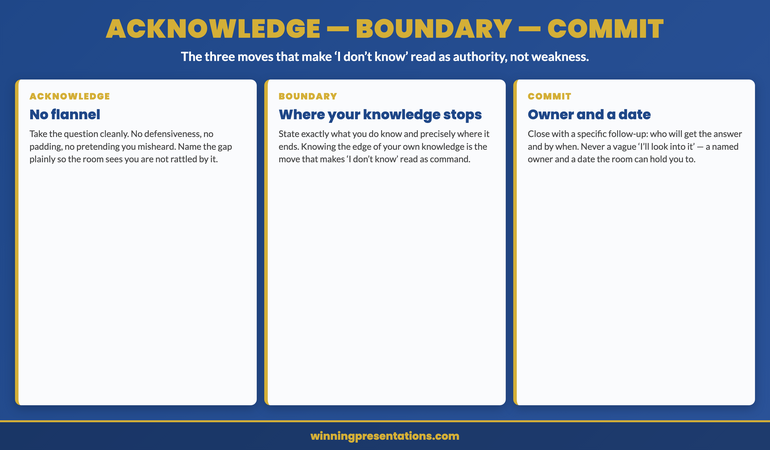
Use one of three scripts depending on the situation: the Honest Redirect (admit + commit + bridge), the Bridge (acknowledge + pivot to what you do know), or the Scope Shift (reframe the question within your presentation’s scope). Each takes under 15 seconds, each preserves credibility, and each gives the room a substantive response instead of silence. The key is having the script ready before Q&A begins — so you’re choosing a response, not searching for one.

The 3 Responses That Preserve Credibility

In 25 years of presenting in banking — and 16+ years training executives since — I’ve found that every “don’t know” moment falls into one of three categories. Each has a specific response that works. The scripts are short, specific, and designed to be memorised before you walk into the room.

For handling difficult questions in presentation Q&A, the 4-part response system (Headline → Reason → Proof → Close) works. But “don’t know” moments are a specific subset — and they need specific scripts.

Response 1: The Honest Redirect

When to use it: You genuinely don’t have the data, but you can get it.

The script: “I don’t have [specific data point] in front of me. I’ll [specific action] and have it to you by [specific time]. What I can tell you is [the related data point that IS relevant to their decision].”

Why it works: Three things happen in this response. First, you demonstrate honesty (which builds trust). Second, you commit to a specific follow-up (which demonstrates reliability). Third, you bridge to something you DO know that’s relevant (which demonstrates competence). The room gets honesty, a commitment, and a useful answer — all in under 15 seconds.

Example: “I don’t have the year-on-year comparison for Q3 specifically. I’ll pull it from the dashboard and send it to you by 3pm. What I can tell you is the Q3 absolute figure was £2.1M, which is above the threshold we set in the business case.”

Critical rule: The follow-up must happen. If you say “by end of day,” it arrives by end of day. If you say “by 3pm,” it arrives by 3pm. One missed follow-up after an “I don’t know” moment erases the credibility you preserved in the room.

⭐ Walk Into Q&A With Response Scripts Ready — Not Just Slides

The Executive Q&A Handling System gives you the complete framework for handling every type of question — including the ones you can’t answer. Pre-built response scripts, bridging phrases, and the Headline → Reason → Proof → Close structure that keeps you in control for 20-45 seconds per answer.

Your Q&A toolkit:

  • “I Don’t Know” response frameworks — three scripts for three situations, ready to memorise
  • Bridging phrases — exact language for pivoting from unknown to known
  • Question forecasting framework — predict 80% of questions before you walk in
  • 7 question type handlers — ROI, Risk, Trade-off, Timing, Capability, Evidence, Political

Get the Executive Q&A Handling System → £39

Built from 25 years of high-stakes executive Q&A. £39, instant access.

Response 2: The Bridge

When to use it: You don’t have the specific answer they asked for, but you have related information that addresses their underlying concern.

The script: “That’s an important question. The specific [metric/data/detail] isn’t in this analysis, but what the data does show is [the related finding that addresses the concern behind their question].”

Why it works: Most questions aren’t about the literal data point. They’re about the concern the data point represents. When the CFO asks “What’s the ROI timeline?” they’re really asking “Is this a safe investment?” If you don’t have the exact ROI timeline but you have the payback period, the cost savings, or the comparable benchmark — that answers the real question.

Example: “The specific ROI timeline isn’t calculated in this model. What the data does show is a payback period of 14 months at current volumes, which compares to an 18-month average for similar implementations in the sector.”

When NOT to use it: Don’t bridge when the specific data point is clearly what they need and nothing else will do. If the CFO asks “What’s the exact spend to date?” and you don’t know, that’s an Honest Redirect, not a Bridge. Bridging away from a number they genuinely need reads as evasion.

Response 3: The Scope Shift

When to use it: The question falls outside the scope of your presentation — they’re asking about something you weren’t tasked with analysing.

The script: “That falls outside the scope of this analysis — we focused specifically on [your scope]. But the relevant finding for today’s decision is [the data point that connects their question to the decision at hand].”

Why it works: It sets a boundary without sounding defensive, and it redirects to the decision the room is there to make. Not every question needs an answer — some need a scope clarification.

Example: “The competitive analysis falls outside this review — we focused on internal process efficiency. But the relevant finding is that the current process costs £380K more than our internal benchmark, regardless of what competitors are doing.”

When NOT to use it: If the question IS relevant to the decision and you simply didn’t include it. In that case, use the Honest Redirect. Scope Shifting a legitimate question reads as deflection.


Don’t want to write the recovery scripts from scratch?

The Executive Q&A Handling System includes all three response scripts — Honest Redirect, Bridge, Scope Shift — plus the bridging phrases that connect them. £39, instant download — lifetime access.

Get the Q&A Handling System →

The 4 Responses That Make It Worse

“Great question.” This is a stall tactic that every executive recognises. The moment you say “great question,” the room knows you’re buying time. It adds nothing and signals that you’re struggling.

The ramble. Talking without direction in the hope that something relevant emerges. This is the most common response to not knowing — and the most damaging. Every second of unfocused talking erodes the structured credibility your presentation built.

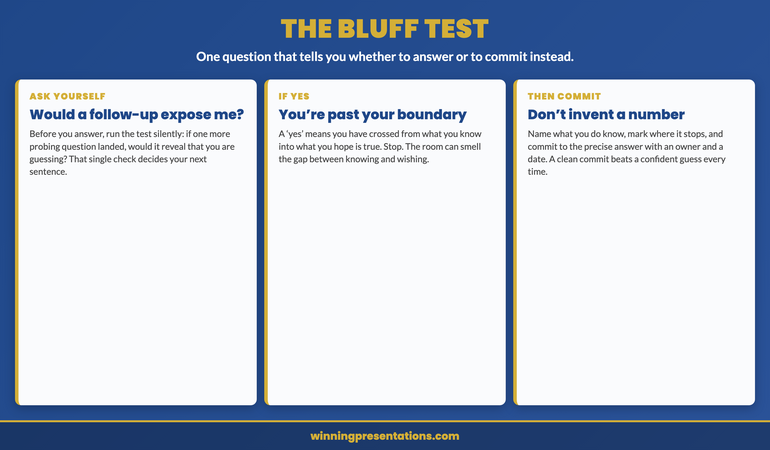
“I think…” followed by a guess. If you’re guessing, the room is guessing too — about whether everything else in your presentation was also a guess. A confident “I don’t have that number” is worth ten uncertain “I think it’s roughly…”

The deflection. “That’s really more of a question for the finance team.” Unless it genuinely is outside your scope, redirecting to another team reads as finger-pointing. If you presented the data, you own the Q&A on that data.

For a comprehensive view of the common Q&A mistakes that destroy deals, see the full breakdown of executive Q&A errors.

Three response scripts for when you don't know the answer in a presentation showing Honest Redirect, Bridge, and Scope Shift with exact language

⭐ Stop Dreading the Question You Can’t Answer

The Executive Q&A Handling System was built for the 4-second moment when your mind goes blank and twelve faces are waiting. Pre-loaded response scripts, bridging language, and the Forecast → Build → Control → Protect framework that handles every question type.

Your “I don’t know” recovery toolkit:

  • Three “don’t know” response scripts — Honest Redirect, Bridge, and Scope Shift with exact language
  • Bridging phrase library — pivoting from unknown to known without sounding evasive
  • Executive response structure — Headline → Reason → Proof → Close for every answer type
  • Decision capture sheet — tracking commitments you make during Q&A so follow-ups happen

Get the Executive Q&A Handling System → £39

Built from 25 years of high-stakes executive Q&A. £39, instant access — no subscription.

How to Reduce “Don’t Know” Moments by 80%

The three response scripts handle the moment. But the best strategy is reducing how often that moment happens.

Most “don’t know” moments are predictable — because most executive questions fall into predictable patterns. In my experience, 80% of Q&A questions fall into four categories: challenge questions (questioning your data or assumptions), clarification questions (wanting more detail), scope creep questions (asking about things beyond your presentation), and political questions (testing your alignment with someone in the room).

Before any presentation, take 20 minutes and map the four question types against each major section of your deck. For each section, ask: “What would a sceptic challenge? What would need clarification? What adjacent topic might someone raise? What political angle could this trigger?”

Write two-sentence answers for the top five predicted questions. The ones you can’t answer in two sentences — those are your “don’t know” candidates. Now you can prepare for them specifically: either get the data, or pre-load the appropriate response script (Honest Redirect, Bridge, or Scope Shift).

Is This Right For You?

✓ This is for you if:

  • You’ve experienced the “blank mind” moment in Q&A and want it never to happen again
  • You want specific language to use when you don’t know the answer — not just “be honest”
  • You present to senior leadership and the stakes of fumbling a question are career-level

✗ This is NOT for you if:

  • Your presentations don’t include Q&A (rare in executive settings, but possible)
  • You’re looking for slide templates rather than Q&A frameworks (see the Executive Slide System)

🎓 25 Years of Boardroom Q&A. One System.

The Executive Q&A Handling System is built from 25 years of corporate banking and 16 years coaching senior professionals across financial services, healthcare, technology, and government. Every framework — the three response scripts, the bridging phrases, the prediction techniques — comes from real boardroom situations where the wrong answer (or no answer) cost the deal.

Designed for senior professionals who present to boards, investment committees, and executive sponsors where every answer carries weight.

Get the Executive Q&A Handling System → £39

Instant download — lifetime access to every framework and template.

Frequently Asked Questions

Is it ever okay to say “I don’t know” in a presentation?

Yes — but never as a standalone answer. “I don’t know” followed by silence is a credibility killer. “I don’t have that specific figure — I’ll confirm by 3pm, and here’s what the data does show” is a credibility builder. The admission of not knowing isn’t the problem. The absence of a follow-up, a bridge, or a next step IS the problem. Executives respect honesty. They don’t respect uncertainty that offers nothing in return.

What if the question is deliberately hostile?

Hostile questions and “don’t know” moments require different responses. If someone is testing you or trying to expose a weakness publicly, the Bridge response works best — acknowledge the question, then pivot to the strongest data point you have. For hostile questions specifically, the Executive Q&A Handling System includes a full section on managing politically motivated questions. For a broader overview, see the guide to handling difficult questions in presentations.

How do I follow up after admitting I don’t know?

Same day, without exception. If you committed to “by end of day,” it arrives before close of business. The follow-up should be brief: “Following up from today’s presentation — the Q3 year-on-year comparison is 12.4%, in line with the trend I described. Let me know if you need any additional detail.” Short, specific, and it demonstrates that you were listening, that you committed, and that you delivered. This single follow-up repairs any credibility gap from the moment itself.

What if I genuinely have no related information to bridge to?

Use the Honest Redirect without the bridge. “I don’t have that data. I’ll get it to you by [specific time].” Then move to the next question. A clean, confident admission with a specific follow-up commitment is always better than a forced bridge to something irrelevant. The room can tell when you’re bridging to unrelated data, and it looks worse than a simple “I’ll get back to you.”

📬 The Winning Edge — Weekly Newsletter

One executive presentation insight per week. Real Q&A scenarios, real response scripts, no filler. Written for professionals who present to people who ask hard questions.

Subscribe Free →

Read next: Q&A is only half the battle. If the slides themselves need work, read The Sandwich Feedback Trap: Why It Fails When You Critique Up (And the Mirror Structure That Works).

Read next: If AI is helping you build slides but the structure isn’t landing, read AI Can Write Your Slides. It Can’t Structure Your Argument.

Your next Q&A is coming. The question you can’t answer is coming too. Get the response scripts that turn “I don’t know” from a career risk into a credibility moment.

About the Author

Mary Beth Hazeldine is the Owner & Managing Director of Winning Presentations. With 25 years of corporate banking experience at JPMorgan Chase, PwC, Royal Bank of Scotland, and Commerzbank, she has delivered high-stakes presentations in boardrooms across three continents.

A qualified clinical hypnotherapist and NLP practitioner, Mary Beth combines executive communication expertise with evidence-based techniques for managing presentation anxiety. She advises executives across financial services, healthcare, technology, and government on high-stakes Q&A and presentation structure.

Read more articles at winningpresentations.com

12 Feb 2026
Professional executive woman presenting with restraint to boardroom, holding notes with simple chart visible, corporate glass office setting

Why Over-Explaining Destroys Your Credibility (The Slide Audit That Changes Everything)

Quick answer: Over-explaining in presentations isn’t thoroughness — it’s a stress response that signals doubt. Executives interpret excessive detail as a lack of confidence in your own recommendation. The fix: audit every slide as either “safety content” (makes you feel prepared) or “decision content” (helps them decide) — then cut ruthlessly. In my experience, most decks are majority safety content that actively undermines your credibility.

A Client Had 65 Slides. I Asked One Question. She Went Quiet for 30 Seconds.

She’d spent three weeks building it. Every slide was polished. Every chart sourced and footnoted. Every possible objection anticipated with backup data.

I asked her: “Which of these slides does the audience need to make a decision — and which exist because they make you feel safe presenting?”

She went quiet. Then: “…most of these are for me, aren’t they?”

Thirty-eight slides were there to manage her anxiety. Not to help the CFO decide. Once she saw it, she couldn’t unsee it — and neither will you.

This is the pattern I’ve watched play out across 24 years in banking boardrooms at JPMorgan Chase, PwC, Royal Bank of Scotland, and Commerzbank. The highest-performing professionals sabotaging their own credibility not by saying the wrong thing, but by saying too much. Over-explaining isn’t a communication problem. It’s a stress response disguised as professionalism.

And the fix isn’t “be more concise.” The fix is understanding why you included each slide in the first place — then having a system to separate what serves you from what serves them.

That system is what I call the Credibility Audit. And once you run it on your own deck, your presentations — and how executives respond to you — will never be the same.

🎯 Stop Over-Explaining. Start Getting Decisions.

The Executive Buy-In Presentation System is a 7-module self-study programme that teaches you how decisions actually get made — and how to structure your presentation so “yes” feels safe. Includes the Credibility Release framework, Decision Definition Canvas, Pressure Response playbook, and AI-assisted workflow. Study at your own pace, with live Q&A calls for support.

Built on 24 years in banking boardrooms. Not theory — pattern recognition from thousands of high-stakes presentations.

Get the Executive Buy-In System → £199

Self-study modules + live Q&A sessions. Join anytime — all released modules available immediately.

First-cohort pricing: £199 is the launch price for this intake only. From next month, pricing moves to £499 (self-study) and £850 (live cohort).

Why Over-Explaining Feels Right But Reads Wrong

Here’s what makes this problem so persistent: the impulse to over-explain comes from a good place. You want to be thorough. You want to show you’ve done the work. You want to anticipate every question so nobody catches you off guard.

These are reasonable instincts. They also signal the opposite of what you intend.

When you present 47 slides of context, methodology, and evidence before reaching your recommendation, the audience isn’t thinking “how thorough.” They’re thinking: “If they need to explain this much, are they sure about it?”

There’s neuroscience behind this. When we’re anxious, we talk more. It’s a measurable stress response — the same mechanism that makes people over-justify when they feel insecure about a decision. Audiences detect this subconsciously. They can’t always name what feels off, but they register it as uncertainty.

The result: you’ve accidentally signalled doubt about the very recommendation you’re trying to get approved.

I watched this happen to a brilliant colleague at Commerzbank. She presented a €50M deal structure for 45 minutes. Flawless analysis. Perfect charts. The Chair’s response: “That was thorough. What did you want us to do?” Her recommendation was on slide 38. By the time she reached it, the room had already decided she wasn’t confident in it.

The seniority paradox makes this worse. Watch any boardroom carefully. The most senior person usually says the least. The CEO speaks last, and briefly. This isn’t laziness — it’s how authority is communicated. But most professionals, as they prepare for senior audiences, add more explanation. They’re signalling junior-ness to the exact people they want to see them as senior.

If your executives keep stopping you mid-presentation, the problem isn’t your content. It’s your ratio of explanation to judgement.

📋 Want the complete Credibility Release framework?

Module 3 of the Executive Buy-In System gives you the full audit tool, Apology Scan reference sheet, and restraint-as-authority techniques.

Get the Executive Buy-In System → £199

Launch pricing — moves to £499/£850 next month.

Safety Content vs Decision Content: The Distinction That Changes Everything

Every slide in your presentation falls into one of two categories. Once you learn to see this, you can never unsee it.

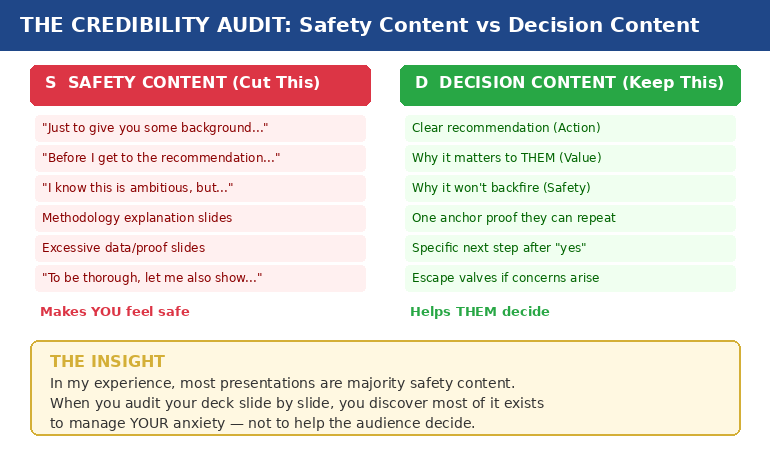
Safety content exists to make you feel prepared. It’s the background context, the methodology walkthrough, the 14 case studies, the comprehensive data analysis. It feels essential when you’re building the deck at 11pm. In the room, it signals that you’re not sure what matters.

Decision content exists to help them decide. It’s your clear recommendation, the specific value to them, the reason it won’t backfire, one piece of proof they can repeat to their peers, and a concrete next step.

In my experience, most presentations are majority safety content.

Credibility audit diagram showing safety content versus decision content with examples of each type

A consultant I worked with showed a client 14 case studies to prove their methodology worked. The client said: “But none of these are in our industry.” One relevant example would have closed the deal. Instead, fourteen irrelevant ones created doubt.

That’s safety content in action. The consultant wasn’t trying to help the client decide. She was trying to protect herself from the question “how do we know this works?” — a question the client never asked.

The three questions every decision-maker silently asks are:

  1. What happens if I say yes and it goes wrong?
  2. What happens if I say no and miss out?
  3. Can I defend this decision to my peers?

Everything that answers those three questions is decision content. Everything else — no matter how impressive — is safety content. And safety content doesn’t just waste time. It actively undermines your credibility by making you look unsure about which information actually matters.

If you’ve ever wondered why your executive presentation structure isn’t landing, start here. The structure probably isn’t wrong. The ratio is.

📊 The Credibility Release Framework: Module 3 of the Buy-In System

Five lessons that transform how you build presentations: why over-explaining destroys credibility (the neuroscience), the Credibility Audit tool for existing decks, the Apology Scan reference sheet, and the “restraint as authority” framework. Plus the Permission to Be Brief audio for cultures that expect “comprehensive” presentations.

Get the Executive Buy-In System → £199

7 modules, 36 lessons, 8 downloadable tools. Designed for busy executives who can’t commit to fixed schedules.

£199 is the first-cohort launch price. From next month: £499 self-study / £850 live cohort.

The Credibility Audit: How to Run It on Your Own Deck

This takes fifteen minutes and will change how you see every presentation you build.

Step 1: Print your deck (or open it in slide sorter view). You need to see every slide at once.

Step 2: Mark each slide with one letter. S for safety content — content that exists because it makes you feel prepared. D for decision content — content that directly helps the audience make their decision.

Be honest. The methodology slide that took you four hours to build? If removing it wouldn’t change whether they say yes or no, it’s an S.

Step 3: Count the ratio. If you’re like most professionals I work with, you’ll find the majority of your slides are S.

Step 4: For every S slide, ask one question: “If the CEO asked me to present this in half the time, would I keep this slide?” If the answer is no, it was never decision content. It was your anxiety asking for an insurance policy.

Step 5: Move the S slides to an appendix. Don’t delete them — that triggers its own anxiety. Put them in backup. If someone asks a question that one of those slides answers, you’ll have it. But you won’t volunteer information that nobody asked for.

A client brought me a 47-slide deck for a steering committee. We reduced it to 12 slides using this exact process. Same information, different structure. The committee approved in 15 minutes — a decision that had been delayed for three months.

The content wasn’t the problem. The ratio was.

🔍 Make this audit repeatable for every presentation.

The Credibility Release Checklist inside the Executive Buy-In System turns this into a systematic, page-by-page diagnostic you can run in minutes.

Get the Executive Buy-In System → £199

Launch pricing — moves to £499/£850 next month.

The Apology Scan: Hidden Phrases That Signal Doubt

Over-explaining isn’t just about slide count. It’s also about language. There are phrases that feel polite and professional but actually function as apologies for your own recommendation.

I call this the Apology Scan. Run through your presenter notes or script and look for these patterns:

“Just to give you some background…” — Translation: I’m not confident you’ll accept my recommendation without extensive justification.

“I know this is ambitious, but…” — Translation: I’m pre-apologising for what I’m about to recommend.

“You might be wondering why…” — Translation: I’m anticipating your objection and defending before you’ve attacked.

“To be thorough, let me also show…” — Translation: I’m padding my case because I’m not sure the core argument is strong enough.

“Before I get to the recommendation…” — Translation: I need you to see how much work I’ve done before you’ll trust my judgement.

Every one of these phrases feels reasonable when you write them. In the room, each one is an unintentional admission of doubt. They tell the audience: “I’m not sure you’ll trust me, so let me earn it first.”

Senior leaders don’t do this. They state what they recommend, why it matters, and what happens next. The absence of hedging is the credibility signal.

I learned this watching a partner at PwC give a 20-minute presentation to a CFO. After five minutes, the CFO interrupted: “I trust you. What do you need?” The partner said: “I need 15 more minutes.” The CFO laughed, approved everything, and left. That partner understood something it took me years to learn: the CFO wasn’t evaluating the content. She was evaluating the confidence.

Why Restraint Communicates Authority (And How to Get There)

Executives judge three things in the first two minutes — before they’ve evaluated a single slide:

  1. Do you know what you want? (Clear recommendation, not buried on slide 38)
  2. Do you believe in it? (Restrained delivery, not defensive over-explanation)
  3. Are you making this easy for me? (Decision-ready structure, not a data tour)

Restraint answers all three. Verbosity answers none.

This doesn’t mean being unprepared. It means being prepared enough to know what to leave out. Cutting content is an act of judgement — and judgement is exactly what executives are evaluating.

The “appendix strategy” solves the cultural challenge. In organisations that expect “comprehensive” presentations, you can be brief in the room while having depth available if asked. Your main deck shows 12 slides of decision content. Your appendix holds 35 slides of safety content. If someone asks “what about the methodology?” — you have it. But you didn’t volunteer it, which signals you know what matters.

This is the difference between a presenter and a decision-maker. Presenters show everything they know. Decision-makers show only what’s needed. Which one do you want to be perceived as?

There’s a reason “great presentation” is the worst feedback you can get. It means they were impressed by your delivery but didn’t feel moved to act. Restraint moves people to act.

How many slides should an executive presentation have?

There’s no magic number. The question is: how many of your slides are “decision content” (helps them decide) versus “safety content” (makes you feel prepared)? A 12-slide deck of pure decision content outperforms a 47-slide deck that’s 70% safety content. Run the Credibility Audit and let the ratio guide you.

How do you present confidently to senior executives?

Confidence in executive presentations is communicated through restraint, not through proving you’ve done the work. Lead with your recommendation, not your research. Cut safety content to an appendix. Remove apology phrases from your script. The absence of hedging is the credibility signal.

Why do executives stop presentations early?

Usually because the recommendation is buried under context. Executives scan for direction in the first 90 seconds. If they find context instead of a clear recommendation, they interrupt — not because they’re impatient, but because they can’t evaluate a proposal they haven’t heard yet.

🏆 The Complete System for Getting Executive Decisions

The Executive Buy-In Presentation System covers everything in this article and far more — from clarifying the decision before you build a single slide, to structuring your message so “yes” feels safe, to handling pressure when executives push back. Seven modules:

  • Module 1: Clarify the Decision (eliminate the ambiguity that causes over-explaining)
  • Module 2: The Executive Buy-In Structure (Action → Value → Safety → Proof → Next Step)
  • Module 3: The Credibility Release (the audit and apology scan from this article)
  • Module 4: Reassurance-First Proof (one anchor proof vs ten weak ones)
  • Module 5: AI as Execution Engine (90-minute deck creation workflow)
  • Module 6: Pressure Response (reframe pushback as risk-testing, not rejection)
  • Module 7: Your Personal Executive Playbook (custom rules for your stress patterns)

36 lessons, 8 downloadable tools, live Q&A sessions. Self-study format designed for busy executives.

Get the Executive Buy-In System → £199

Join anytime — all released modules available immediately. Study at your own pace.

⚡ £199 is the first-cohort launch price only. From next month, the self-study programme moves to £499 and the live cohort to £850. This intake locks in the launch rate.

Frequently Asked Questions

How do I know if I’m over-explaining versus being appropriately thorough?

Run the Credibility Audit: mark each slide as S (safety — makes you feel prepared) or D (decision — helps them decide). If more than 40% of your slides are S, you’re over-explaining. The acid test: if the CEO asked you to present in half the time, which slides would you cut first? Those were never decision content — they were anxiety management disguised as thoroughness.

What if my organisation expects long, comprehensive presentations?

Use the appendix strategy. Keep your main deck to decision content only (typically 10-15 slides). Move all safety content to an appendix. You’re not being unprepared — you’re being strategic about what you volunteer versus what you hold in reserve. If someone asks a detailed question, you have the slide. But you didn’t dilute your credibility by volunteering information nobody asked for. Over time, your brevity will be noticed — and rewarded.

Doesn’t cutting slides risk looking unprepared or under-researched?

The opposite is true. Knowing what to cut requires more judgement than knowing what to include. Executives recognise this instantly. A 12-slide deck that leads with a clear recommendation signals: “I know exactly what matters.” A 47-slide deck that buries the recommendation on slide 38 signals: “I’m not sure which of this information is important, so I’m showing you all of it.” The first is the presentation of someone ready for the next level. The second is the presentation of someone still proving they belong at this one.

Can the Credibility Audit work for non-slide presentations — like verbal updates or meeting contributions?

Absolutely. The same principle applies to any communication. Before your next verbal update, write down what you plan to say. Mark each point as S (makes you feel covered) or D (helps them decide or act). You’ll likely find you planned to give three minutes of context before reaching the actual point. Cut the context. Lead with the point. Watch how differently the room responds.

📬 The Winning Edge Newsletter

Weekly insights on executive presentations, decision psychology, and high-stakes communication — from 24 years in banking boardrooms. No fluff. No “10 tips” lists. Just the patterns that actually get decisions.

Subscribe Free →

📋 Free: Executive Presentation Checklist

A quick-reference checklist for structuring any executive presentation — including the safety vs decision content check. Download it before your next high-stakes meeting.

Download the Free Checklist →

Related reading: The Headcount Request That Got Yes When Everyone Said No · Why Your Nervous System Remembers That Awful Presentation From 2019

Your next step: Open your most recent presentation. Mark every slide S or D. Count the ratio. Then move every S slide to an appendix and see what’s left. That’s your real presentation — the one that communicates confidence instead of anxiety. And if you want the complete system for structuring presentations that get decisions instead of “let’s discuss further,” the Executive Buy-In Presentation System gives you the frameworks, tools, and playbooks to make it repeatable. It’s £199 at the current first-cohort launch price (moving to £499/£850 next month).

About the Author

Mary Beth Hazeldine is the Owner & Managing Director of Winning Presentations. With 24 years of corporate banking experience at JPMorgan Chase, PwC, Royal Bank of Scotland, and Commerzbank, she has delivered high-stakes presentations in boardrooms across three continents.

A qualified clinical hypnotherapist and NLP practitioner, Mary Beth combines executive communication expertise with evidence-based techniques for managing presentation anxiety. She has trained senior professionals and executive audiences over many years, and supported high-stakes funding and approval presentations across industries.

Book a discovery call | View services

07 Jan 2026
Professional woman in a blazer touches a large touchscreen displaying data dashboards in a modern office lighting.

C-Suite Presentation Mistakes: 5 Credibility Killers That Make Executives Stop Listening

Quick Answer: The five c-suite presentation mistakes that destroy credibility are: (1) burying your recommendation under context, (2) using hedge words that signal uncertainty, (3) over-explaining before asked, (4) reading slides instead of commanding them, and (5) treating Q&A as an attack rather than an opportunity. Each mistake signals to executives that you’re not ready for senior-level conversations.

She had 14 slides. The CFO gave her 90 seconds.

I watched Sarah—a senior manager at RBS—prepare for weeks. Her analysis was flawless. Her c-suite presentation mistakes, however, were textbook. She opened with methodology. She built to her recommendation. She hedged every conclusion with “I think” and “maybe.”

The CFO interrupted on slide three: “What do you need from me?”

Sarah froze. Her recommendation was on slide 11. She stumbled through an explanation of why the background mattered first.

He was checking email by the time she reached her point.

The budget request was denied. Not because the idea was wrong—but because Sarah made every c-suite presentation mistake that signals “not ready for this room.”

Here are the five credibility killers I see executives make weekly—and how to avoid them.

🏆 FLAGSHIP PROGRAMME

The Executive Buy-In Presentation System

Stop making the mistakes that get you tuned out. This comprehensive system teaches you exactly how to structure, deliver, and close presentations that win C-suite approval—every time.

What transforms: How you open, how you handle pushback, and how you get decisions made in a single meeting.

Eliminate C-Suite Presentation Mistakes →

The 5 C-Suite Presentation Mistakes That Destroy Credibility

Mistake #1: Burying Your Recommendation

The instinct is natural: build context so the recommendation makes sense. But C-suite executives don’t process information like analysts. They don’t need to understand your journey—they need your destination.

When your recommendation appears on slide 11 of 14, you’re asking executives to hold attention through 10 slides of context they didn’t request. Most won’t.

The fix: State your recommendation in the first 30 seconds. “I’m requesting £2M for platform migration. Here’s why.” Then provide context only as requested.

Mistake #2: Hedge Word Epidemic

“I think we might want to consider possibly looking at…”

Every hedge word cuts your perceived conviction in half. Senior executives notice immediately. If you’re not confident in your recommendation, why should they be?

The fix: Delete “I think,” “maybe,” “might,” “possibly,” “perhaps,” “kind of.” State positions as positions: “I recommend Option B.”

Mistake #3: Over-Explaining Before Asked

Anticipating objections seems smart. But when you address concerns nobody raised, you create doubts that didn’t exist. You’re teaching the room what to worry about.

Worse, it signals anxiety. Confident presenters trust their recommendations to withstand scrutiny.

The fix: Present your case. Stop. Let questions emerge naturally. Address them when asked—not before.

Mistake #4: Reading Your Slides

The moment you turn to read your slides, you’ve lost the room. Executives can read faster than you can speak. If you’re adding nothing beyond what’s written, you’re wasting their time.

More importantly, reading signals that you don’t know your content well enough to present it naturally.

The fix: Slides are visual aids, not scripts. Know your content cold. Glance at slides for reference, but speak to the room, not the screen.

Mistake #5: Treating Q&A as an Attack

Defensive body language. Rushed answers. Over-justification. These signals tell executives you’re not comfortable with scrutiny—and therefore not ready for senior roles.

Questions aren’t attacks. They’re engagement. An executive asking tough questions is an executive taking you seriously.

The fix: Welcome questions. Pause before answering. Respond to exactly what was asked—then stop. Treat Q&A as the opportunity to demonstrate your thinking, not a test to survive.

C-suite presentation mistakes - 5 credibility killers with fixes for each

Why C-Suite Presentation Mistakes Matter More Than Content

Here’s the uncomfortable truth: executives often don’t remember your content. They remember how you made them feel.

If you projected confidence, clarity, and command, your recommendations carry weight—even if the details blur. If you projected uncertainty, over-preparation, and anxiety, even brilliant analysis gets discounted.

C-suite presentation mistakes signal something beyond the immediate meeting. They signal whether you’re ready for larger roles, bigger decisions, and higher stakes. Every presentation is an audition.

For more on building the communication skills that command executive rooms, see my complete guide: Leadership Communication Skills: Why Executives Talk Too Much (And Persuade Too Little).

FAQ: C-Suite Presentation Mistakes

What’s the most common c-suite presentation mistake?

Over-explaining context before reaching your recommendation. Executives form opinions within 30 seconds. If you spend the first five minutes on background, you’ve lost them before your point arrives. Lead with your recommendation, then provide only the context they request.

How do I recover from a c-suite presentation mistake mid-meeting?

Stop, acknowledge, and reset. Say: “Let me cut to what matters most—” then state your core recommendation in one sentence. Executives respect people who can self-correct. Continuing down a failing path is worse than admitting you need to change direction.

Do c-suite presentation mistakes differ by industry?

The five core mistakes are universal across industries. However, tolerance levels vary. Financial services executives typically have the least patience for lengthy context. Tech executives may tolerate more detail but still expect clear recommendations. Adjust brevity based on your audience’s culture.

📧 Join 2,000+ professionals getting weekly insights on executive communication. Subscribe to The Winning Edge →

📋 Free Download: Executive Presentation Checklist

Avoid these c-suite presentation mistakes before your next high-stakes meeting. This checklist covers the credibility signals that executives notice in the first 60 seconds.

Get Your Free Checklist →


About the Author

Mary Beth Hazeldine spent 24 years at JPMorgan, PwC, RBS, and Commerzbank. She’s a clinical hypnotherapist and MD of Winning Presentations.

This article was created with AI assistance; all stories and insights are based on 35 years of real client work.