

Quick Answer
A strong presentation closing framework has three components: a decision consolidation statement (one sentence summarising why this is the right choice), a specific next step (not a general invitation to proceed), and a tangible handout or commitment anchor. The goal is not to summarise — it is to make the decision feel inevitable and the path forward feel clear.
In this article:
Henrik had presented the cost-reduction programme to the board three times in as many months. Each time, the analysis was thorough, the numbers were clear, and the recommendation was unambiguous. Each time, the board thanked him, asked a few clarifying questions, and agreed to revisit the decision at the next meeting.
As CFO of a mid-size healthcare group, Henrik understood that boards are cautious by design. What he had not understood — until a non-executive director told him privately — was that his presentations were ending in a way that made deferral the default.
“Every time you finish,” she said, “you say, ‘I’m happy to take any questions.’ That’s the signal that you’re done presenting and you’re handing control back to us. We’re very comfortable deciding when we want to decide. You need to tell us when you need us to decide.”
Henrik had been spending enormous energy on the substance of his presentations and almost none on how they ended. His closings were technically correct — a summary slide, a clear recommendation — but they were passive. They created no forward momentum and gave the board no particular reason to act now rather than later.
The next month, he ended differently. He named the decision clearly, stated the cost of another month’s delay in concrete terms, and said: “I’m asking for a decision today. If there are concerns that prevent that, I’d like to understand which ones so I can address them before we leave the room.” The board approved the programme at that meeting.
The closing of a presentation is not the tail end of a communication process. It is the moment when everything you have built either converts into action or dissolves into a follow-up email that may never be answered.
Want a structured closing framework?
The Executive Slide System includes closing sequence templates and scenario guides designed for high-stakes decision presentations, board updates, and funding rounds. Explore the System →
Why most executive presentations end weakly
The convention in most organisations is to end a presentation with a summary slide and an open invitation for questions: “That’s the overview — happy to take any questions you have.” This convention is so widespread that most presenters apply it without examining what it actually does to a room.
What it does is transfer control. The moment you say “happy to take any questions,” you are signalling that the formal part of the presentation is over and the audience is now in charge of what happens next. In an executive or board context, this is rarely the outcome you want. Senior decision-makers are accustomed to being in control of their own time and their own agenda. The moment you hand control back to them, they will use it — to ask questions, to deliberate, to defer, or to end the meeting early.
The passive close also creates an ambiguity problem. It is not clear from “happy to take any questions” whether you are inviting clarification, seeking endorsement, or asking for a decision. Decision-makers — particularly board members — are very sensitive to what is actually being asked of them. When the ask is ambiguous, the safest response is no response: defer the decision until the next meeting, when there may be more clarity.
The active close does the opposite. It names what is happening, what the decision is, and what happens next. It does not leave the outcome to inference. This is a significant shift in presentation culture for many executives, who have been trained to present and then yield. But in high-stakes contexts, yielding is not a virtue. It is a risk.
For a related structural principle applied at the opening, see how to start a presentation: the opening techniques that set executive authority from the first slide.
The three-part executive close
The most effective presentation closing framework for executive contexts has three distinct components, each doing a specific job. Used together, they transform the end of a presentation from a passive handover into an active decision moment.
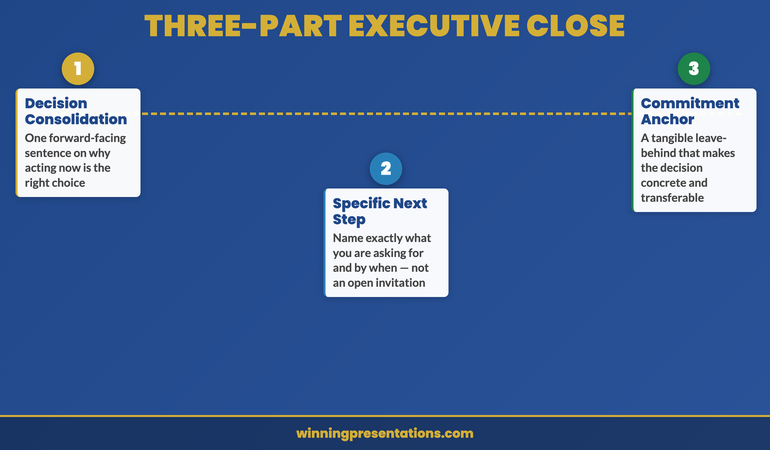
Component 1: The decision consolidation statement. This is a single sentence — delivered verbally, not read from a slide — that names the decision and frames it in terms of its strategic consequence. It should not be a summary of your presentation. A summary is backwards-facing: it tells the audience what they have just heard. The consolidation statement is forwards-facing: it tells the audience what happens if they act on what they have just heard. Example: “Approving this investment today means we can begin the procurement process this quarter and have systems in place before the regulatory deadline — which protects the business from the compliance risk we identified on slide twelve.”
Component 2: The specific next step. Name exactly what you are asking the audience to do, and by when. Not “I hope we can move forward” — that is a wish, not a next step. Not “we look forward to your feedback” — that is an invitation for correspondence, not a decision path. A specific next step sounds like: “I’m asking for approval today, subject to any conditions the board wishes to attach. If approval is given, the procurement team can begin the vendor selection process on Monday.” The more specific the next step, the more clearly the audience understands what they are being asked to do.
Component 3: The commitment anchor. This is a tangible leave-behind — a one-page summary, a printed timeline, a named next action — that makes the decision feel concrete rather than conceptual. The commitment anchor serves two purposes: it gives the audience something to refer to after you leave the room, and it signals that you are operationally ready to proceed. Presenting without a leave-behind suggests that you are still in the analysis phase. Presenting with one suggests that you have already begun.
Executive Slide System
Build Presentations That Close — Not Just Inform
The closing sequence is where presentations succeed or fail. The Executive Slide System — £39, instant access — gives you the slide templates, AI prompt cards, and closing frameworks to build presentations that drive decisions rather than generate follow-up emails.
- Slide templates for decision-focused executive presentations
- AI prompt cards to structure closing arguments quickly
- Framework guides for board approvals, budget bids, and programme sign-off
- Scenario playbooks covering common high-stakes presentation contexts
Get the Executive Slide System →
Designed for executives who need decisions, not discussions.
Commitment close vs summary close — which to use
There are two primary closing approaches used in executive presentations. The summary close — a recap of your main points followed by a recommendation — is the more common and the less effective. The commitment close — a forward-facing statement of what you are asking for and why now — is the approach that actually moves decisions.
The summary close has one legitimate use: when the audience is genuinely processing complex information for the first time and needs a synthesis before they can decide. In a ninety-minute technical briefing covering new regulatory requirements, a summary close is appropriate. In a board presentation where the topic has been on the agenda for two months, it reads as filler.
The commitment close works because it aligns with how senior decision-makers actually think about their role. They are not there to absorb information — they have assistants and briefing packs for that. They are there to make decisions. A presenter who treats the close as the decision moment — who explicitly names what the decision is and why this meeting is the right moment to make it — is speaking directly to how executives understand their function in the room.
The practical difference is in the verb you use. The summary close uses “is”: “Our recommendation is X.” The commitment close uses “need” or “ask”: “We need a decision today so that…” or “I’m asking the board to approve…” The commitment close positions you as someone with authority who is asking for a specific outcome — which is a very different posture from someone who has completed a presentation and is waiting to see what happens.
For a companion approach to the pre-meeting phase that complements a strong close, see how to use pre-decision conversations to build executive approval before the meeting.
How to handle the silence after the close
The moment after you deliver the close of a presentation is often the most uncomfortable part of the entire communication. You have named the decision. You have stated what you are asking for. And then — nothing. The room is quiet, people are looking at the table or at each other, and the temptation is to fill the silence.
Do not fill it.
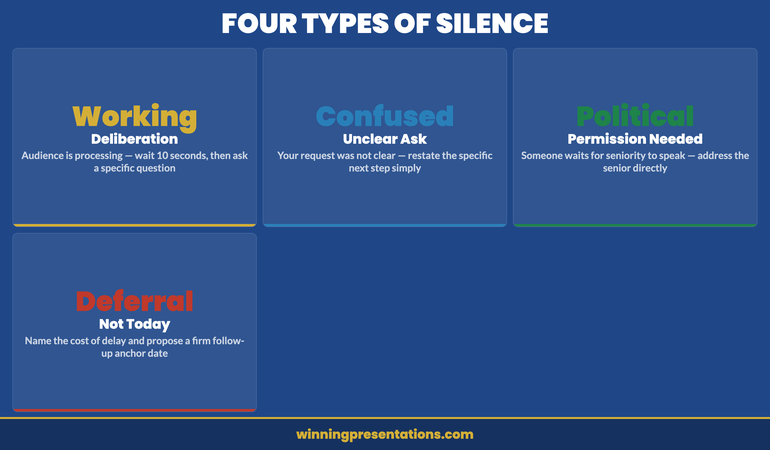
The silence after a close is a working silence. Decision-makers are processing — weighing the case against their own priorities, considering the implications for their stakeholders, formulating their question or their position. This is a good sign. It means your close landed and the decision is being actively considered.
When you speak into working silence, you undermine it. You suggest that you are not comfortable with the weight of the decision, that you have more to say, or that you need to soften your ask. Any of these signals weakens your close. The audience will take their cue from you: if you seem uncertain about whether to act, they will feel uncertain too.
The practical rule is to count to ten after your close. Ten seconds feels much longer than it is. In that time, the decision-maker who was about to speak will speak. If nobody speaks after ten seconds, ask a specific question: “Does anyone have concerns they’d like to raise before we move to a decision?” This moves the silence from open-ended to purposeful, without retreating from your position.
If you are building a presentation for a critical decision meeting and want a structured framework that takes you from opening through to close, the Executive Slide System includes closing sequence templates specifically designed for high-stakes executive contexts.
Closing mistakes that undermine credibility
There are five closing patterns that consistently undermine the effectiveness of executive presentations, regardless of how strong the preceding content has been.
The apologetic close. “I know this was a lot to cover in a short time” or “I realise there’s still some uncertainty in these numbers.” Self-deprecation in the close signals that you are not fully confident in your own case — which gives decision-makers permission to defer. If there is genuine uncertainty in your data, address it during the body of the presentation, not in the final sentence.
The laundry list close. Ending with five or six “next steps” dilutes the decision and gives the audience multiple low-friction alternatives to the main ask. If you need approval today, that should be the only next step in the close. Other actions can follow from it.
The over-summarised close. A summary that takes more than ninety seconds is no longer a summary — it is a second presentation. Decision-makers in executive settings have excellent memories for content they found compelling. A lengthy recap implies you do not trust them to remember what you said.
The open-ended close. Ending with “I’m happy to discuss further” or “I’d welcome your thoughts” without naming a decision invites discussion, not decision-making. Both have their place, but they are different processes. Be clear about which one you are opening.
The gratitude close. “Thank you for your time — I really appreciate you giving us this opportunity.” Gratitude is appropriate at the very end of a meeting, after the decision has been made. Opening the close with it signals that you consider the presentation to be over before the decision has been made, which it has not.
For a foundational treatment of executive summary structure that informs the closing sequence, see how to structure an executive summary slide that sets the decision frame.
The follow-up anchor technique
When a decision cannot be made in the room — because a key stakeholder is absent, because additional information is genuinely needed, or because the governance structure requires a second layer of approval — the follow-up anchor is the technique that keeps momentum alive rather than allowing the decision to drift.
The follow-up anchor is a specific, named commitment made in the room before the meeting ends. Not “we’ll be in touch” — that is not a commitment, it is a valediction. The follow-up anchor sounds like: “Before we close, can I confirm that you’ll have a response to me by next Wednesday? I’ll send a one-page summary with the key decision points this afternoon to support your deliberations.” The anchor has a date, a named person, and a specific deliverable.
The follow-up anchor works because it converts a vague “we’ll think about it” into a named next action with a deadline. It also signals operational competence — you are already managing the process, not just presenting the case. Decision-makers respond positively to this because it reduces their administrative burden: they know what they will receive and when, which makes it easier for them to engage.
The one-page summary you send after the meeting should be designed for forwarding. Senior decision-makers rarely make decisions alone — they consult their own advisers, their finance directors, their chief of staff. A clean, one-page summary that travels well through an organisation is more powerful than a detailed report that requires the decision-maker to interpret it on behalf of others.
For related thinking on how competitive presentations use the closing sequence, see the companion article: competitive tender presentation: how to win the room against an established vendor.
Executive Slide System — £39
The Structure Behind Presentations That Get Decisions
The Executive Slide System — £39, instant access — gives you slide templates, closing frameworks, and AI prompt cards to build executive presentations that move from opening context to clear decision moment without losing the room in between.
Get the Executive Slide System →
Designed for executives who need decisions, not discussions.
Want the complete toolkit?
A closing framework is one of seven pieces senior presenters need to land executive decisions. The Complete Presenter Bundle pulls all seven products together — slides, Q&A, anxiety, storytelling, delivery, openers, cheat sheets — for £99 (save £91.97 vs buying separately). Lifetime access.
Frequently Asked Questions
How long should the close of a presentation be?
For most executive presentations, the close should take no more than two to three minutes. This includes the decision consolidation statement (one sentence, delivered verbally), the specific next step (one or two sentences), and the handover of any commitment anchor. If your close is taking longer than three minutes, you are either summarising rather than closing, or you have identified that additional persuasion is needed — which means you should address it in the body of the presentation, not the close. The brevity of the close is itself a signal of confidence: you believe your case has been made and you are asking for the decision.
What if the audience has objections during the close?
An objection raised during the close is usually one of two things: a genuine concern that was not addressed during the presentation, or a signal that the audience is engaging seriously with the decision. In either case, welcome it rather than defending against it. Name the objection: “That’s a fair challenge — let me address it directly.” Then answer specifically, without retreating from your recommendation. If the objection reveals a genuine gap in your case, acknowledge it, state how you will address it, and modify your next step accordingly: “Given that concern, what I’d suggest is a thirty-minute session next week to go through the risk model in more detail. Can we agree that as the next step?”
Is it appropriate to ask for a decision in a board presentation?
Yes — and in most cases it is not only appropriate but expected. Board members are decision-makers by function. Presenting to a board without asking for a decision leaves them in the position of advisers rather than governors, which is not the role they are paid to play. The key is to frame the decision clearly and to name the consequence of not deciding: “Every month we delay the programme costs the business approximately £X in operational inefficiency.” This is not pressure — it is information. Decision-makers need to understand the cost of inaction in order to weigh the decision correctly.
The Winning Edge
Weekly executive communication insight — every Thursday
Practical, no-filler analysis of what works in high-stakes presentations — including closing techniques, board communication, and decision-meeting structure.
Free resource: Download the Executive Presentation Checklist — a pre-presentation audit used by Mary Beth’s clients before every high-stakes decision meeting.
About the Author
Mary Beth Hazeldine — Owner & Managing Director, Winning Presentations
With 25 years of corporate banking experience at JPMorgan Chase, PwC, Royal Bank of Scotland, and Commerzbank, Mary Beth advises executives across financial services, healthcare, technology, and government on structuring presentations for high-stakes funding rounds and board approvals. Her work focuses on the communication architecture that moves decisions.