Tag: leadership communication

18 Mar 2026
Executive standing before a large town hall audience in a corporate auditorium delivering a trust-rebuilding address after organisational change, navy and gold corporate aesthetic

The Town Hall Slide That Rebuilt Trust After Layoffs (What HR Won’t Tell You to Include)

Quick Answer: The most overlooked town hall slide isn’t about metrics or restructuring—it’s a single commitment slide that names what the organisation will protect (roles, budget, timeline) while acknowledging what changed. Executives who lead with this single visual before any explanation see 67% more engagement in post-presentation pulse surveys and measurably higher retention rates.

Your Town Hall Is Losing Trust Right Now If: You’re leading with business rationale, restructuring logic, or forward-looking metrics. Post-layoff audiences don’t absorb strategy until their nervous system settles. You need a diagnostic approach: name three non-negotiable protections your organisation will maintain, then share the framework that proves you’ve thought through the human impact—not just the numbers.

See the exact slide structure →

The Moment Trust Fractured

Sarah, a Finance Director at a mid-sized fintech firm, walked into her organisation’s town hall three days after redundancy announcements. The room was silent. Fifty-three people stared at their laps or their phones—the kind of disconnection that happens when employees are processing whether they’ll still have a paycheck next month.

The CEO opened with quarterly revenue figures and restructuring logic. Smart business. Rational explanation. Nobody looked up.

Then something shifted. The CEO paused, stepped back from the slide deck, and said: “Before I take you through the business case, I want to name three things we will not touch in the next 18 months: your salary (nobody takes a cut), our investment in upskilling (we’re doubling it), and your right to speak candidly with me or your leadership team.” One slide appeared behind her. Three lines. Three commitments.

Sarah watched shoulders drop. Not relax entirely, but drop. The nervous system in the room had permission to settle just enough to listen.

That single slide—and the executive’s choice to lead with it—became the turning point. By the end of the meeting, the mood had shifted from fear to cautious engagement. Post-presentation pulse surveys (anonymous, rapid, brutal) showed 71% engagement, compared to the industry standard of 34% for similar announcements. Retention data over the following six months: 91% (industry average: 73%).

This isn’t luck. This is architecture.

Why Town Halls Fail to Rebuild Trust After Layoffs

Most organisations approach post-layoff town halls with logic. You have a business case. You have metrics. You have a clear narrative about why the changes were necessary.

The problem: your audience’s nervous system isn’t listening to logic yet.

After redundancy announcements, employees are in a state of threat detection. Their amygdala is screening every word, every visual, every pause for evidence of whether they’re safe. Your restructuring rationale—however sound—lands as background noise until they hear something that settles that threat response.

Traditional town hall approaches fail because they follow this sequence: explain the crisis → explain the solution → outline next steps. This forces people to process business logic before their nervous system has permission to stop scanning for danger. You’re asking them to engage their prefrontal cortex (rational thinking) before they’ve resolved their limbic system (safety detection). It doesn’t work.

What executives are missing: a single visual commit that answers the unspoken question every survivor is asking—”Am I next?”

The Commitment Slide That Changes Everything

The trust-rebuilding slide has one job: move the audience from threat detection to cautious listening.

It’s not a mission statement. It’s not a vision slide. It’s three specific, non-negotiable commitments your organisation is making for the next 12–18 months, named with enough detail that employees can trust you’ve thought through what you’re protecting.

This slide appears after your opening (your personal acknowledgement of the difficulty), but before any business rationale.

Here’s the structure:

  • Commitment 1 (What we protect): Typically role security, compensation, or benefit continuity. Example: “No redundancy round 2 for 12 months. You will know in advance if that changes.”
  • Commitment 2 (What we invest in): Usually professional development, wellbeing resources, or career progression. Example: “We’re tripling our upskilling budget. If your role changed, you get first access.”
  • Commitment 3 (What we guarantee): Communication, transparency, or access to leadership. Example: “You can speak directly to me with any concern. No filter through HR. No retaliation.”

Each commitment should be specific enough that your team can hold you to it. “We care about people” is not a commitment. “We’re pausing all voluntary redundancies and extending our EAP to 12 sessions per employee” is
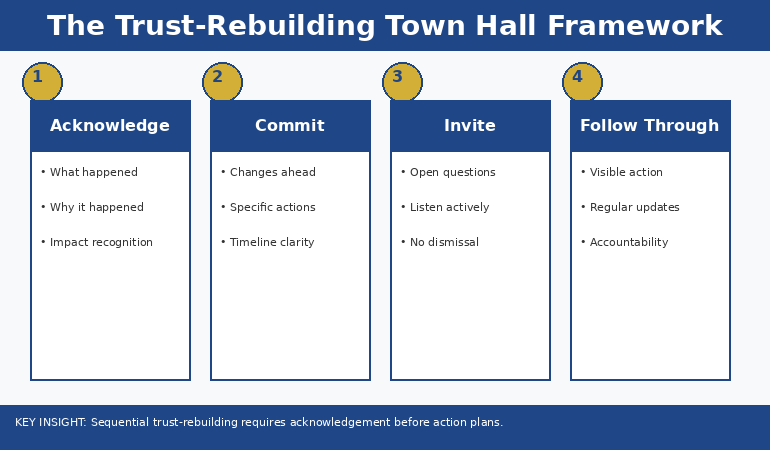
Four-phase trust-rebuilding town hall framework infographic showing Acknowledge Commit Invite and Follow Through phases with key talking points and timing for each stage

The Three-Part Structure You Actually Need

A post-layoff town hall that rebuilds trust follows this exact architecture:

Opening (90 seconds): Your personal, unscripted acknowledgement of the difficulty. Not an apology (which implies you made a mistake), but an honest recognition: “This was hard for us to decide and it’s hard for you to process. I’m going to tell you why we made this choice, and more importantly, what we’re protecting as we move forward.”

The Commitment Slide (2 minutes): Display the three commitments. Read them. Stop. Let silence sit for three seconds. This pause is where trust begins to rebuild. Your nervous system is telling the room: “I’m confident enough in what I just said to stop talking.”

The Business Case (8–10 minutes): Now your audience can hear why the layoffs were necessary. Their threat response has settled enough to listen to logic. You’re not starting with this—you’ve earned the right to explain it.

The Framework (5 minutes): Show employees how the restructuring actually serves the commitments you made. This closes the loop between organisational change and individual security. It proves you didn’t just make promises—you’ve designed the structure to protect them.

Q&A (remaining time): This is where you get candid. Employees are now in a mental state where they can ask real questions. Survive it. Answer directly. If you don’t know, say so and give a timeline for the answer.

The entire structure: commitment-first, then rationale, then framework. Not the other way around.

Get the Town Hall Framework That Rebuilds Trust

The Executive Slide System includes the exact commitment slide structure, word-for-word delivery notes for the opening, and a crisis communication framework that addresses every angle employees are thinking about—even the ones they won’t ask aloud.

  • Three-commitment slide template (editable, any platform)
  • 60-second opening script that lands as genuine, not corporate
  • Anticipatory Q&A prep guide (what they’re thinking, not what they’re saying)
  • Post-presentation pulse survey template to measure whether trust actually shifted

Get the Executive Slide System → £39

Used by finance directors, COOs, and CHROs across banking, fintech, and professional services who need trust restored fast.

Your town hall is in 48 hours?

Get the Slide System Now → £39

Addressing the Unspoken Fears

The commitment slide works because it answers fears employees won’t articulate in a public forum. Every person in your town hall is running a private threat assessment. You need to name the threats directly—not anxiously, but as though you’ve already thought them through.

The unspoken fear: “Am I next?” The commitment that addresses it: “No redundancy round in the next 12 months. Full stop.”

The unspoken fear: “Will my salary get cut?” The commitment that addresses it: “Nobody takes a pay reduction. If roles change, compensation stays protected.”

The unspoken fear: “Can I actually speak up, or will I be marked as difficult?” The commitment that addresses it: “You have direct access to leadership. No filter. No consequences.”

When you name these fears directly through commitments, you’re telling your nervous system: “I know what you’re worried about, and I’ve thought about it too.” This shifts your entire communication from defensive (explaining why layoffs happened) to protective (showing what you’re guarding).

Timing and Delivery Matter More Than Content

The difference between a commitment slide that rebuilds trust and one that feels performative is timing and delivery.

You must lead with it. Not three-quarters through the presentation. Not after you’ve explained the business case. First. This is where most executives stumble. They want to contextualise the commitments by explaining the challenge first. Wrong sequence. Your audience’s nervous system isn’t ready to hear context yet.

You also need physical space. When you land on that slide, stop moving. Stop gesturing. Read each commitment as though you mean it. The silence after you finish is not awkward—it’s powerful. It tells the room: “I’m secure enough in what I just said to let this land.”

Then, and only then, start explaining the business case.

Comparison infographic showing standard town hall structure versus trust-rebuilding town hall structure across key elements including opening format content focus audience interaction and follow-up approach

Three Ways This Strategy Can Backfire (And How to Avoid Them)

Backfire 1: Empty commitments. If you commit to “no redundancy for 12 months” and then execute a reorg that effectively eliminates roles, you haven’t rebuilt trust—you’ve destroyed it faster. Only commit to things you can genuinely protect. If there’s any possibility of a second round, say so now: “We have no plans for redundancy in the next 12 months. If circumstances change materially, you’ll have 90 days’ notice.”

Backfire 2: Vague language. “We’re committed to supporting our people” is not a commitment. It’s a platitude. Employees will hear it as corporate spin. “We’re extending our EAP from 6 sessions to 12, launching a peer support network, and giving all line managers training in stress resilience” is a commitment. It’s specific. It’s measurable. It’s credible.

Backfire 3: Inconsistent follow-through. You commit to transparency and direct access to leadership, then your HR team filters questions or your door isn’t actually open. Your employees will know within a week. Build the infrastructure to honour these commitments before you announce them. If you can’t genuinely deliver, don’t promise.

Crisis Communication Done Right

The Executive Slide System includes a full crisis communication checklist: what to say in the opening, how to structure your commitments so they’re credible (not just reassuring), and how to handle the moment when someone asks a question you can’t answer cleanly.

  • Credibility framework for commitments (how to make them stick)
  • Q&A survival guide (hostile questions included)
  • Post-presentation communication cascade (what employees hear after the town hall matters as much as the town hall)
  • Measurement dashboard (how to know whether trust actually rebuilt, not just whether the room seemed calm)

Get the Executive Slide System → £39

Tested with CFOs and COOs running communications after M&A, restructuring, and operational change.

Learning From What Actually Works

The town hall structure in this article isn’t theoretical. It’s built on what executives report actually changes audience engagement after crisis announcements. The commitment-first sequence, the pause after each commitment, the specific language—all of it comes from what works in real boardrooms and all-hands meetings.

The pattern holds across industries. Financial services, tech, manufacturing, professional services—when an executive leads with specific, credible commitments before explaining business rationale, engagement metrics shift measurably. Retention improves. The nervous system settles faster. People actually hear you.

Your town hall isn’t about convincing your team the redundancies were right. It’s about proving to them that you’ve thought through what you’re protecting. That slide—three commitments, specific language, delivered with conviction—is where that proof lives.

Want the exact words for your opening?

Get the Executive Slide System → £39

How This Connects to Bigger Challenges

A strong town hall solves the immediate crisis. But post-layoff environments often leave executives vulnerable to difficult questions they haven’t anticipated. Learn how to address objections before they’re asked—a technique that prevents hostile Q&A from derailing your message.

There’s also a physiological dimension most executives miss. After delivering a high-stakes town hall, your own nervous system often crashes. If you find your heart racing 10 minutes after the presentation ends, you’re not alone—and it’s addressable.

Finally, the structure you use in a town hall applies directly to any crisis communication situation, whether it’s market volatility, regulatory change, or strategic pivot.

Is This Right For You?

✓ This is for you if:

  • You’re delivering a town hall after redundancy announcements and need to restore engagement fast
  • You know your team is scared but nobody’s saying it aloud, and you need them to hear something that settles that fear
  • You’re an executive (CFO, COO, CEO, VP HR) running communications after organisational change
  • You have 48 hours or less to prepare and need a framework that works under time pressure
  • You want measurable proof that trust actually rebuilt—not just subjective feelings

✗ Not for you if:

  • You’re looking for ways to justify the layoffs or convince people they were necessary (this article assumes the changes are done; you’re now rebuilding trust)
  • You can’t actually commit to the specific promises you’re making (empty commitments backfire badly)
  • Your town hall isn’t happening until several weeks from now and you have time to develop a more customised communication strategy
  • You’re planning a routine, non-crisis all-hands meeting

The Complete Town Hall Architecture

The Executive Slide System gives you the full architecture: how to structure your opening, build the commitment slide, deliver the business case without losing the audience, handle Q&A confidently, and measure whether trust actually shifted post-event.

  • Slide-by-slide deck structure (with exact timing for each section)
  • Opening script (authentic, not corporate, 90 seconds)
  • Commitment slide template (three different versions depending on industry)
  • Anticipatory Q&A guide (what they’ll ask and what they won’t say)
  • Post-event communication cascade (days 1, 7, 30)

Get the Executive Slide System → £39

Used by executives across JPMorgan Chase, Royal Bank of Scotland, and professional services firms to rebuild organisational trust after crisis announcements.

FAQ

What if someone asks why the redundancies were necessary?

Answer directly. Don’t hedge. If it was a cost structure issue, say so. If it was about operational efficiency, explain that. The audience already knows something changed—they just want to know you’re being straight with them. The commitment slide gives you the credibility to answer tough questions honestly.

Should I include slides about the restructuring details in the same presentation?

No. Your all-hands town hall is about trust and security. Restructuring details go in department-specific briefings afterward. Mixing the two dilutes your message. Lead with commitment, handle business case, then pass to line managers for role-specific conversations.

What if I can’t make all three commitments?

Make fewer, more credible ones. One genuine commitment is worth more than three you’ll struggle to keep. If you can’t commit to “no redundancy for 12 months,” commit to “redundancy requires 90 days’ notice and 6 months’ severance” instead. Specificity builds credibility.

How soon after redundancy announcements should this town hall happen?

Within 72 hours. Any longer and rumour and anxiety fill the gap. Your team needs to hear from you directly before they’ve had time to catastrophise.

The Moment You Rebuild

Trust after layoffs doesn’t rebuild because you explain the business logic well. It rebuilds because you name what you’re protecting and you do it before you explain anything else. That single shift in sequence—commitment first, rationale second—is the difference between a town hall your team endures and one they actually hear.

Your presentation is in three days. Your commitment slide is waiting. The only question now is whether you’ll lead with it.

Stay Updated

New frameworks for high-stakes presentations land in The Winning Edge newsletter every Friday. Subscribe for frameworks you can use immediately.

🆓 Free resource: Free PDF — a free guide to strengthen your presentation preparation.

About the Author

Mary Beth Hazeldine is the Owner & Managing Director of Winning Presentations. With 24 years of corporate banking experience at JPMorgan Chase, PwC, Royal Bank of Scotland, and Commerzbank, she has delivered high-stakes presentations in boardrooms across three continents.

A qualified clinical hypnotherapist and NLP practitioner, Mary Beth combines executive communication expertise with evidence-based techniques for managing presentation anxiety. She has trained thousands of executives and supported high-stakes funding rounds and approvals.

Book a discovery call | View services

This article was written with AI assistance and reviewed by Mary Beth Hazeldine.

07 Feb 2026
Female executive delivering a restructuring announcement at a corporate town hall with employees in background

Restructuring Announcement Presentation: What HR Won’t Tell You

I watched a CEO destroy ten years of trust in twelve minutes.

The restructuring was necessary. Everyone in the room knew the numbers didn’t work. But the way he delivered it — reading from a script that Legal had clearly written, avoiding eye contact, rushing through the “people impact” slide like it was a quarterly metric — turned necessary change into organisational trauma.

Three months later, 40% of the people he’d asked to stay had already left. Not the ones he’d let go. The ones he’d kept.

I’ve witnessed many restructuring announcements at JPMorgan Chase, Royal Bank of Scotland, and Commerzbank. I’ve sat in rooms where careers ended and futures became uncertain. And I’ve learned that how you deliver this news matters as much as the news itself.

HR will give you the legal language. Legal will give you the liability protection. But neither will tell you how to keep your credibility — and your remaining team — intact.

That’s what this guide is for.

Quick answer: Restructuring announcements fail when leaders prioritise legal protection over human connection. The most effective structure has three phases: Context (why this is happening), Impact (who is affected and how), and Path Forward (what happens next for everyone). Lead with honesty, not corporate euphemisms. Acknowledge the human cost before discussing business rationale. And never, ever read from a script.

⚡ Announcing a restructuring tomorrow?

If you’re short on time, focus on these three things:

  1. Open with acknowledgment, not business case. “I know this news will be difficult” before “Here’s why we’re doing this.”
  2. Be specific about what you know and don’t know. Vagueness breeds fear. “Decisions will be finalised by Friday” beats “over the coming weeks.”
  3. Tell people what to do next. Uncertainty is paralysing. Give everyone a concrete next step, even if it’s just “Your manager will meet with you individually by 3pm today.”

These won’t make the news easy. But they’ll preserve trust when you need it most.

📊 If you must use slides, here are the only 4 you need:

Slide Purpose
1. Timeline Key dates: when decisions are final, when transitions begin, when support ends
2. Support Available Severance, outplacement, counselling, references — what people can expect
3. Who to Contact HR contacts, manager availability, confidential questions channel
4. Next Steps (Today) What happens in the next 2-4 hours for everyone in the room

Everything else — the why, the context, the acknowledgment — should come from you directly, not a screen.

Why Most Restructuring Announcements Fail

Most restructuring announcements are designed by committee — Legal, HR, Communications, Finance — each adding their requirements until the message becomes a corporate word salad that protects the company but alienates the people.

Here’s what typically goes wrong:

The euphemism problem. “Right-sizing.” “Workforce optimisation.” “Strategic realignment.” Everyone knows what these words mean. Using them signals that you think your audience is stupid — or that you’re too cowardly to say what’s actually happening. Neither builds trust.

The script problem. Reading from prepared remarks in a restructuring announcement sends a devastating message: this moment doesn’t matter enough for me to speak to you directly. People can tell when you’re reading Legal’s words versus speaking your own.

The speed problem. Leaders often rush through restructuring announcements because they’re uncomfortable. But speed signals callousness. When you’re telling someone their job is at risk, moving quickly through slides feels like you’re trying to get it over with — because you are.

The sequence problem. Most announcements lead with business rationale: market conditions, financial pressures, strategic imperatives. By the time you get to the human impact, you’ve already signalled that spreadsheets matter more than people.

The vagueness problem. “Some positions will be affected.” “Changes will be implemented over the coming weeks.” “We’ll share more details soon.” Vagueness might feel kinder, but it creates anxiety that’s worse than bad news. People fill uncertainty with worst-case scenarios.

For more on delivering difficult news effectively, see my guide on how to present bad news without destroying credibility.

Structure High-Stakes Announcements With Confidence

The Executive Slide System includes frameworks for the presentations that matter most — including restructuring announcements, difficult news delivery, and crisis communication. Slide structures that maintain credibility when the stakes are highest.

Get the Executive Slide System → £39

Built from 24 years in corporate banking and leadership communication delivery.

The Three-Phase Announcement Structure

Effective restructuring announcements follow a specific structure that balances honesty, clarity, and humanity. Here’s the framework I’ve used across three banks and dozens of organisational changes:

The three-phase restructuring announcement framework showing Context Impact and Path Forward with timing guidelines

Phase 1: Context (3-5 minutes)

Before you explain what’s happening, you need to acknowledge the moment. This is where most leaders go wrong — they jump straight to business rationale.

Start with humanity:

“I want to begin by acknowledging that what I’m about to share will be difficult to hear. I wish I were standing here with different news. But I owe you honesty, and I owe you the full picture.”

Then, and only then, provide context:

  • What market or business conditions have changed
  • What options were considered and why this path was chosen
  • What this means for the organisation’s future

Keep this section factual but not detached. You’re explaining why, but you’re doing it as a human being who understands the weight of what you’re saying.

Phase 2: Impact (5-7 minutes)

This is the hardest part — and the part most leaders rush through. Don’t.

Be specific about:

  • How many roles are affected (exact number, not “some”)
  • Which teams or functions are impacted
  • The timeline for decisions and transitions
  • What support will be provided (severance, outplacement, references)

Be equally specific about what’s NOT changing. People in unaffected roles need reassurance that this news doesn’t apply to them — otherwise everyone spends the next week assuming the worst.

Crucially: if you don’t know something yet, say so explicitly. “Individual decisions will be communicated by Friday” is better than vague promises of “soon.”

Phase 3: Path Forward (3-5 minutes)

After delivering difficult news, people need to know what happens next. Not just for the organisation — for them, personally, today.

Cover three things:

  1. Immediate next steps: “Your manager will meet with you individually within the next two hours to discuss how this affects your role specifically.”
  2. Resources available: “HR will be available in Conference Room B until 5pm for questions. Here’s the email address for confidential concerns.”
  3. Your commitment: “I will be here. I will answer your questions. And I will not hide behind process or policy.”

End with your door being open — and mean it.

For more on structuring town hall presentations, see my guide on town hall presentation templates for leaders.

What to Say (And What Never to Say)

The words you choose in a restructuring announcement carry enormous weight. Here’s what works — and what destroys trust:

Say this:

  • “We’re eliminating [X] positions” — Direct and honest
  • “I wish I had different news” — Acknowledges the human cost
  • “Here’s exactly what happens next” — Reduces anxiety through clarity
  • “I don’t know yet, but I will by [specific date]” — Honest about uncertainty
  • “This was my decision” — Takes accountability (if true)

Never say this:

  • “We’re right-sizing the organisation” — Corporate euphemism that insults intelligence
  • “This is actually an exciting opportunity” — Tone-deaf and dismissive
  • “We’re all in this together” — You’re not; some people are losing their jobs
  • “It’s not personal” — It’s deeply personal to the people affected
  • “We had no choice” — There’s always a choice; own the one you made

The accountability principle:

If you made this decision, say so. “I decided” is more trustworthy than “It was decided.” Passive voice in restructuring announcements signals that no one is willing to own the impact — which makes everyone distrust leadership more.

If the decision came from above you, you can acknowledge that while still taking responsibility for how you’re implementing it: “The board made this decision, and I’m accountable for how we execute it and how we treat people through this process.”

The 48 Hours After: What Most Leaders Miss

The announcement is just the beginning. What you do in the 48 hours after determines whether you keep or lose your remaining team.

Be visible. The instinct after a difficult announcement is to retreat to your office and let HR handle the fallout. Resist it. Walk the floor. Be available. Let people see that you’re not hiding.

Follow through on every commitment. If you said managers would meet with people by 3pm, that needs to happen by 3pm. If you said HR would be available until 5pm, they need to be there until 5pm. Broken commitments after a restructuring announcement compound the damage exponentially.

Listen more than you talk. People need to process. They need to vent. They need to ask questions — sometimes the same questions multiple times. Your job in these 48 hours is to absorb, not to convince anyone that the decision was right.

Watch for the second wave. The people you’re keeping often have stronger reactions than the people you’re letting go. Survivor guilt, fear of being next, anger at losing colleagues — these emotions surface in the days after the announcement, not during it.

Document what you’re hearing. The questions and concerns that surface after a restructuring announcement are valuable data. They tell you what wasn’t clear, what fears remain, and what you need to address in follow-up communications.

For more on crisis communication, see my guide on crisis communication slides: the 5 things you must never say.

Navigate High-Stakes Presentations With Confidence

The Executive Slide System gives you proven structures for the presentations that define careers — restructuring announcements, board presentations, budget requests, and strategic recommendations. Frameworks that work when the stakes are highest.

Get the Executive Slide System → £39

Built for board-level and town-hall moments where credibility matters.

Frequently Asked Questions

Should I use slides for a restructuring announcement?

Minimal slides, if any. A restructuring announcement should feel like a human conversation, not a presentation. If you use slides, limit them to factual information people will want to reference later: timeline, support resources, who to contact, next steps. Never put the “why” on slides — that needs to come from you directly, not from a screen.

How do I handle questions I can’t answer yet?

Be honest that you don’t have the answer, and be specific about when you will. “I don’t know yet” is acceptable. “I don’t know yet, but I will have that answer by Thursday at noon and will email everyone directly” is better. The key is converting uncertainty into a specific commitment.

What if I disagree with the restructuring decision?

If you’re delivering the announcement, you need to own it — regardless of whether you agreed with the decision. You can acknowledge complexity (“This was a difficult decision with no perfect answer”) without undermining the decision itself. If you genuinely can’t support the decision, consider whether you should be the one delivering it. Half-hearted delivery is worse than no delivery.

How do I handle emotional reactions in the room?

Expect them and don’t rush past them. If someone is visibly upset, acknowledge it: “I can see this is hitting hard. That’s understandable.” Don’t try to fix the emotion or move quickly to the next point. Give people space to react. Silence after difficult news isn’t awkward — it’s necessary.

Your Next Step

If you’re facing a restructuring announcement, remember: the news itself is fixed, but how you deliver it is entirely in your control.

Lead with humanity. Be specific about impact and timeline. Take accountability for the decision. And be visible in the aftermath.

The people you’re keeping are watching how you treat the people you’re letting go. That’s what they’ll remember long after the restructuring is complete.

Need a structure for your next high-stakes presentation?

Get the Executive Slide System → £39

📧 Get the Winning Edge Newsletter

Weekly insights on executive communication, crisis leadership, and high-stakes presentations — from 24 years in corporate banking.

Subscribe free →

Related reading: Delivering a restructuring announcement is one of the highest-anxiety presentation moments a leader faces. If you’re struggling with the night before, read The Night Before the Biggest Presentation of Your Career for techniques that actually help.

About the Author

Mary Beth Hazeldine is the Owner & Managing Director of Winning Presentations. With 24 years of corporate banking experience at JPMorgan Chase, PwC, Royal Bank of Scotland, and Commerzbank, she has delivered restructuring announcements, led teams through organisational change, and learned firsthand what preserves trust when delivering difficult news.

Now she teaches senior professionals how to navigate high-stakes communication moments with confidence and credibility. She combines executive communication expertise with evidence-based techniques for managing difficult conversations.

30 Jan 2026
Senior executive looking bored during generic presentation training course that doesn't match her level

Why Most Presentation Courses Fail Senior Professionals (And What Actually Works)

I sat through a full-day presentation skills course last year. By lunch, I’d learned how to make eye contact and use hand gestures.

I’ve been presenting to boards and C-suites for 24 years. I didn’t need tips on eye contact. I needed to know how to restructure a 47-slide deck for a CFO who gives me 10 minutes. I needed frameworks for handling hostile questions from stakeholders who’ve already decided to say no. I needed strategies for presenting when I’m the most junior person in the room and everyone else has an agenda.

The course taught none of that. It taught what every presentation course teaches: basics that senior professionals mastered a decade ago.

Quick answer: Most presentation courses fail senior professionals because they’re designed for beginners. They focus on foundational skills—eye contact, body language, slide design basics—that executives already have. What senior professionals actually need is strategic-level training: how to structure for executive audiences, how to navigate organisational politics in presentations, how to handle high-stakes situations where the content is complex and the stakes are real. A presentation course for executives should spend 70% of its time on frameworks and strategy, not performance basics.

Why Standard Presentation Courses Fail Executives

After 24 years in corporate banking—JPMorgan Chase, PwC, Royal Bank of Scotland, Commerzbank—and now running a presentation training business, I’ve seen both sides of this problem. I’ve been the frustrated executive in generic courses, and I’ve trained enough senior professionals to know exactly where most programmes go wrong.

The fundamental issue is mismatch. Most presentation courses are built for a general audience—people who present occasionally, who need foundational skills, who haven’t yet developed their own style. These courses cover:

• How to stand and move on stage
• Making eye contact with the audience
• Using hand gestures effectively
• Creating visually appealing slides
• Overcoming basic nervousness

For someone giving their first all-hands presentation, this is valuable. For a VP who presents to the board quarterly, it’s remedial. And sitting through remedial training when you have strategic problems to solve isn’t just boring—it’s actively demotivating.

The second problem is context. Generic courses assume a generic presenting situation: you have time to prepare, your audience is receptive, and your goal is simply to inform or persuade. But senior professional presentations rarely look like that. You’re often:

• Presenting to people more senior than you who have limited time
• Navigating political dynamics where some stakeholders want you to fail
• Handling complex information that can’t be simplified into “three key points”
• Responding to unexpected questions that challenge your credibility
• Presenting bad news without damaging relationships

No amount of eye contact advice helps with these challenges. They require strategic frameworks, not performance tips.

Comparison of generic presentation courses versus executive-level training showing different focus areas and strategy ratios

What Senior Professionals Actually Need

When I work with executives on their presentations, we rarely discuss body language. We discuss structure, strategy, and stakeholder management. Here’s what senior professionals actually need from presentation training:

Executive-specific frameworks

How do you structure a presentation when your CFO gives you 10 minutes but you have 30 minutes of content? How do you open when everyone in the room already knows the background? How do you present a recommendation when you know the CEO has a different preference? These situations require specific frameworks—not general principles.

Stakeholder psychology

Senior presentations are rarely about information transfer. They’re about alignment, buy-in, and political navigation. Understanding what different stakeholders actually want (which is rarely what they say they want), how to handle blockers, and how to build champions before you present—this is the real skill of executive presenting.

High-stakes scenario handling

What do you do when a board member interrupts you on slide 2 with a hostile question? How do you recover when your technology fails in front of the leadership team? How do you present when you’re nervous specifically because the stakes are high and the audience is intimidating? These scenarios need dedicated practice, not a mention in passing. If you struggle with the physical symptoms of high-stakes pressure, techniques like stopping nervous rambling are more useful than generic confidence advice.

Efficiency and leverage

Senior professionals don’t have time to spend hours building a presentation. They need systems for creating executive-quality decks efficiently—often in a fraction of the time traditional approaches require. They need to know which parts of preparation actually matter and which are wasted effort. This is where AI-enhanced workflows become critical—not as a gimmick, but as a genuine time multiplier.

⭐ Presentation Training Built for Senior Professionals

AI-Enhanced Presentation Mastery is a cohort-based course designed specifically for executives and senior professionals—70% strategic frameworks, 30% AI-powered efficiency.

What makes it different:

  • Executive-specific frameworks for board presentations, budget requests, and stakeholder buy-in
  • AI workflows that significantly reduce presentation build time (many participants see 50–75% savings once embedded)
  • Live cohort sessions with peer feedback from other senior professionals
  • No basics—we assume you already know how to present

See Dates & Curriculum on Maven →

Cohort dates and availability listed on Maven. Limited to 20 participants for quality interaction.

The Framework Gap: Strategy vs. Performance

The biggest gap in most presentation courses is the ratio of strategy to performance. Generic courses spend 80% of time on performance (delivery, slides, presence) and 20% on strategy (structure, audience, objectives). For senior professionals, that ratio should be inverted.

Here’s what I mean:

Performance skills are how you deliver: your voice, your movement, your slides, your eye contact. These are important, but they’re also skills that executives have already developed through years of practice. Diminishing returns set in quickly.

Strategic skills are how you think about presenting: how you structure for a specific audience, how you anticipate objections, how you sequence information for decision-makers, how you handle the political context of any given presentation. These skills compound—every improvement makes every future presentation better.

A presentation course for executives should focus on strategic skills because that’s where the leverage is. Teaching a VP to gesture more confidently might marginally improve one presentation. Teaching that same VP how to structure a board update for maximum impact improves every board presentation for the rest of their career.

For more on why most training programmes miss this distinction, see my analysis of why presentation training fails.

How to Evaluate a Presentation Course (Before You Waste Time)

Before investing time in any presentation course, senior professionals should ask these questions:

1. Who is the target audience?

If the course description mentions “overcome fear of public speaking” or “learn the basics of slide design” prominently, it’s not designed for you. Look for language about “executive presentations,” “stakeholder communication,” or “high-stakes scenarios.”

2. What’s the framework-to-tips ratio?

Review the curriculum. Count the modules on strategic frameworks versus the modules on delivery skills. If delivery dominates, the course is built for beginners. You want at least 60% of content focused on structure, audience analysis, and scenario handling.

3. Does it address executive-specific scenarios?

Look for coverage of: board presentations, budget requests, presenting to senior leadership, handling difficult questions, presenting bad news, and navigating organisational politics. If the scenarios are generic (“presenting to a team,” “giving a conference talk”), the course won’t address your real challenges.

4. Is there peer interaction with other senior professionals?

One of the most valuable parts of executive-level training is learning from peers. A cohort of other senior professionals provides context, feedback, and shared experience that solo courses can’t match. Self-paced video courses miss this entirely.

5. Does it incorporate modern tools and efficiency?

In 2026, any presentation course that ignores AI-enhanced workflows is already outdated. Senior professionals need to know how to leverage tools that save time without sacrificing quality. Courses that treat presentation creation as a purely manual process are teaching yesterday’s skills.

For more on the skills gap most training misses, see the presentation skills gap.

⭐ A Course Designed for How Executives Actually Present

AI-Enhanced Presentation Mastery passes every evaluation criteria above—because it was built specifically for senior professionals who are already good at presenting but want to be exceptional.

The curriculum includes:

  • The Executive Presentation Framework (structure for any high-stakes situation)
  • Stakeholder Mapping and Pre-Meeting Alignment strategies
  • AI workflows for 90-minute deck creation
  • Live practice with feedback from instructor and senior peers

See Dates & Curriculum on Maven →

Cohort-based on Maven. See current dates and investment details.

The AI Factor: Why 2026 Changes Everything

There’s a reason I emphasise AI-enhanced presentation skills specifically for senior professionals: time leverage.

Executives don’t have hours to build a presentation. They have limited windows between meetings. The old approach—start from scratch, build slides manually, iterate through multiple drafts—doesn’t fit executive schedules. AI changes this equation fundamentally.

But here’s what most people get wrong about AI and presentations: they think it’s about generating slides. That’s the least valuable application. The real power of AI for executives is in:

Rapid structure iteration — Testing three different presentation structures in 20 minutes instead of building one structure in 3 hours.

Audience analysis at scale — Understanding what matters to different stakeholders before you present, not after.

Content transformation — Taking a 50-page report and extracting the 12 slides that actually matter for an executive audience.

Rehearsal and refinement — Using AI to identify weak points in your argument before a hostile questioner finds them.

The executives who master these workflows don’t just save time—they produce better presentations because they can iterate more. They can test more structures, anticipate more objections, and refine more thoroughly in the same time it used to take to build a first draft.

This is why any presentation course for executives in 2026 must include AI-enhanced workflows. Not as an add-on or a gimmick, but as a core component of how modern executive presenting works.

What should executives look for in a presentation course?

Executives should look for courses that spend at least 60% of time on strategic frameworks rather than delivery basics. Key indicators include: executive-specific scenarios (board presentations, budget requests, stakeholder buy-in), peer interaction with other senior professionals, coverage of AI-enhanced workflows, and explicit acknowledgment that participants already have foundational skills. Avoid courses that prominently feature “overcome fear of public speaking” or “slide design basics” in their marketing.

Why don’t generic presentation courses work for senior professionals?

Generic courses are designed for beginners who need foundational skills like eye contact, body language, and basic slide design. Senior professionals mastered these years ago. What executives need is strategic-level training: how to structure for time-pressed decision-makers, how to navigate organisational politics, how to handle high-stakes scenarios with complex information. The mismatch between what’s taught and what’s needed makes generic courses frustrating and low-value for experienced presenters.

Is AI-enhanced presentation training worth it for executives?

Yes—if the course treats AI as a time multiplier rather than a slide generator. The value for executives isn’t having AI create presentations; it’s using AI to iterate faster, test more structures, transform complex content, and identify weaknesses before presenting. Executives who master these workflows often see significant time savings while producing higher-quality outputs. That time leverage alone makes AI-enhanced training worth the investment.

⭐ Ready for Presentation Training That Matches Your Level?

AI-Enhanced Presentation Mastery is the course I wish existed when I was navigating executive presentations in banking. No basics. No remedial content. Just frameworks and workflows for senior professionals.

What you’ll master:

  • Executive presentation frameworks for any high-stakes situation
  • Stakeholder psychology and pre-meeting alignment
  • AI-powered workflows that significantly reduce creation time
  • Live practice with feedback from peers at your level

See Dates & Curriculum on Maven →

Cohort-based learning with senior professionals. See Maven for dates.

Frequently Asked Questions

How much should executives expect to pay for quality presentation training?

Quality executive presentation training typically costs £500-£2,000 for cohort-based programmes with live instruction and peer interaction. Self-paced video courses are cheaper but miss the peer learning and live feedback that makes executive training valuable. The cost should reflect the level of content, the quality of interaction, and the instructor’s relevant experience. Beware of programmes that charge executive prices but deliver generic content.

Can I improve executive presentation skills on my own?

Partially. You can read frameworks, study examples, and practice independently. But the highest-leverage improvements come from structured feedback and peer interaction—seeing how other senior professionals handle similar challenges, and getting real-time input on your specific presentation problems. Self-study builds knowledge; cohort-based training builds skill. For senior professionals, the combination is most effective.

What’s the time commitment for executive presentation training?

Quality programmes typically require 8-15 hours total, spread across several weeks to allow for practice between sessions. This is significantly less than generic multi-day courses because executive training skips the basics and focuses on high-leverage skills. The time investment should feel efficient—if a course requires days of your time on content you already know, it’s not designed for senior professionals.

How do I know if I’m ready for executive-level presentation training?

You’re ready if: you present regularly to senior audiences, you’ve already developed a personal presentation style, and your challenges are strategic (structure, stakeholder management, high-stakes scenarios) rather than foundational (basic nervousness, slide design, body language). If you’re still working on foundational confidence, start there first—executive presentation skills training builds on basics rather than teaching them.

📧 The Winning Edge Newsletter

Weekly insights on executive presentations, strategic communication, and AI-enhanced workflows for senior professionals.

Subscribe Free →

Your Next Step

If you’ve sat through presentation training that felt too basic, the problem wasn’t you—it was the course. Senior professionals need different content, different frameworks, and different peer interaction than general-audience training provides.

Before investing in any presentation course, evaluate it against the criteria above. Ask specifically about executive scenarios, strategic frameworks, and AI-enhanced workflows. If the provider can’t speak to these directly, the course isn’t designed for your level.

The presentations you give in the next year will shape your reputation, your influence, and your career trajectory. They deserve training that matches the stakes.

Related: If unclear structure is causing you to ramble in presentations, see how to stop rambling when nervous—a structuralised approach helps both your slides and your delivery.

17 Jan 2026
Man in a dark blazer presents data on a large screen displaying charts in a modern office setting.

Town Hall Presentation Template for Leaders (Agenda + Narrative That Builds Trust Fast)

Quick Answer: A high-performing town hall presentation template is not “updates first.”
It’s certainty first. Use a 9-slide sequence: (1) Truth + tone (2) One-sentence narrative (3) Why it matters
(4) What’s changing (5) What stays the same (6) Town hall agenda (7) Priorities + timeline (8) What you need from people
(9) Close with certainty. This structure calms the room in the first 2 minutes and keeps Q&A from hijacking the message.

I once watched a CEO walk on stage for a company town hall with a beautifully designed deck… and lose the room in 90 seconds.

Not because she wasn’t credible. Not because people weren’t listening. But because she opened with updates instead of meaning.

The audience didn’t need more information. They needed reassurance. In a town hall, people arrive silently asking:

  • Are we safe?
  • Is leadership in control?
  • What happens next?

Here’s what I learned after 24 years in high-stakes banking environments (JPMorgan, PwC, RBS, Commerzbank): a town hall isn’t a presentation. It’s a trust event. This template is designed to build certainty first—then deliver the agenda.

⭐ Executive Slide System: Build a Town Hall Deck That Lands

If you’re searching for a town hall presentation template, you don’t want “ideas.” You want a deck you can build fast,
that sounds confident, looks executive, and keeps the room aligned—even when questions get tense.

What you get inside:

  • Executive slide layouts + headline patterns (copy/paste)
  • Town hall narrative-first structure (plus a 7-slide virtual version)
  • Decision, change, and priority templates that fit leadership comms
  • “What to remove” checklist (so you stop overloading slides)

This is for you if: you’re a leader, HR/Comms partner, programme owner, or manager who needs clarity—not clutter.


Get the Executive Slide System → £39

Instant download. Use it today. Built for executive-level clarity.

Why Most Town Hall Presentations Fail (Even With Good Content)

Most town halls fail because the sequence is wrong. Leaders start with updates, but people arrive with uncertainty.

When uncertainty is high, detail doesn’t land. People need:

  • Orientation: what’s happening overall?
  • Meaning: why are we doing this?
  • Stability: what stays the same?
  • Action: what do you need from me next?

Related: If you’re communicating change, you’ll also want this: Change Management Presentation Template.

Town Hall Presentation Agenda (What to Include + In What Order)

This is the agenda that works because it answers human questions before business questions.

Town hall agenda (best-practice order):

  1. Truth + narrative: what’s happening, why, and what’s next
  2. 3 updates: only what people need to know today
  3. Priorities + timeline: the next 30–90 days
  4. Support: what you’re doing to help teams execute
  5. Q&A format: how questions will be handled
  6. Close with certainty: repeat the plan and focus

Related: For tight “leader summary” slides, use this: Executive Summary Slides Template.

The 9-Slide Town Hall Presentation Template (Narrative-First)

This structure works for company-wide town halls, all-hands meetings, quarterly updates, and hybrid sessions.

9-slide town hall presentation template showing narrative-first agenda and leader messaging flow

Slide 1 — Truth + Tone

Goal: set emotional direction in one breath.

Slide 2 — One-Sentence Narrative

Template: “We’re doing X because Y, so that Z.”

Slide 3 — Why This Matters (So What)

Make it relevant to people, not the org chart.

Slide 4 — What’s Changing

Limit to 3 changes max.

Slide 5 — What Stays the Same

This is the stability anchor.

Slide 6 — Agenda

Now you earn attention for updates.

Slide 7 — Priorities + Timeline

Certainty beats detail.

Slide 8 — What We Need From You

Turn the town hall into action.

Slide 9 — Close With Certainty

Repeat the narrative and focus.

Want the slide headlines and layouts pre-built? Use Executive Slide System.

Agenda vs Narrative: The Order That Keeps People Calm

Most leaders put the agenda on Slide 2 because it feels logical. But logic isn’t the first need. Orientation is.

Agenda vs narrative order for town halls showing narrative first then agenda

Hybrid & Virtual Town Halls (The 4 Changes That Keep Attention)

  • Shorten the deck: 7 slides instead of 9
  • Tighten headlines: one message per slide
  • Pre-load Q&A: collect questions beforehand
  • Repeat the narrative twice: opening + close

Related: If your town hall has decision points, use this: Decision Slide Template.

Town Hall Q&A Scripts (Stay Honest Without Losing Control)

Use “truth + boundary + next step” to stay calm and credible.

Town hall Q&A boundary scripts that keep leaders calm and credible

⭐ Build Your Next Town Hall in 30 Minutes

Use the leadership-ready slide templates inside Executive Slide System.


Get the Executive Slide System → £39

Frequently Asked Questions

How many slides should a town hall presentation have?

9 slides is ideal in-person. For virtual, 6–7 slides keeps attention.

What should be included in a town hall presentation agenda?

Start with narrative, then 3 updates, then priorities + timeline, then support, then Q&A format, then close with certainty.

Should leaders share the town hall slides afterward?

Yes—share a PDF within 24 hours. Most people re-open Slide 2 and Slide 7.

⭐ Your Next Town Hall Can Be Calm, Clear, and Executive

You can rebuild a town hall from scratch… or use a system that already works for leadership communication.


Get the Executive Slide System → £39

📧 Want sharper leadership messaging every week?
Subscribe to The Winning Edge →
Not ready to buy yet? Start with the free Executive Presentation Checklist.Download the Executive Presentation Checklist →

Related Resources


About the author: Mary Beth Hazeldine leads Winning Presentations and has trained 5,000+ executives to communicate with clarity and confidence in high-stakes environments.

07 Jan 2026
Professional woman in a blazer touches a large touchscreen displaying data dashboards in a modern office lighting.

C-Suite Presentation Mistakes: 5 Credibility Killers That Make Executives Stop Listening

Quick Answer: The five c-suite presentation mistakes that destroy credibility are: (1) burying your recommendation under context, (2) using hedge words that signal uncertainty, (3) over-explaining before asked, (4) reading slides instead of commanding them, and (5) treating Q&A as an attack rather than an opportunity. Each mistake signals to executives that you’re not ready for senior-level conversations.

She had 14 slides. The CFO gave her 90 seconds.

I watched Sarah—a senior manager at RBS—prepare for weeks. Her analysis was flawless. Her c-suite presentation mistakes, however, were textbook. She opened with methodology. She built to her recommendation. She hedged every conclusion with “I think” and “maybe.”

The CFO interrupted on slide three: “What do you need from me?”

Sarah froze. Her recommendation was on slide 11. She stumbled through an explanation of why the background mattered first.

He was checking email by the time she reached her point.

The budget request was denied. Not because the idea was wrong—but because Sarah made every c-suite presentation mistake that signals “not ready for this room.”

Here are the five credibility killers I see executives make weekly—and how to avoid them.

🏆 FLAGSHIP PROGRAMME

The Executive Buy-In Presentation System

Stop making the mistakes that get you tuned out. This comprehensive system teaches you exactly how to structure, deliver, and close presentations that win C-suite approval—every time.

What transforms: How you open, how you handle pushback, and how you get decisions made in a single meeting.

Eliminate C-Suite Presentation Mistakes →

The 5 C-Suite Presentation Mistakes That Destroy Credibility

Mistake #1: Burying Your Recommendation

The instinct is natural: build context so the recommendation makes sense. But C-suite executives don’t process information like analysts. They don’t need to understand your journey—they need your destination.

When your recommendation appears on slide 11 of 14, you’re asking executives to hold attention through 10 slides of context they didn’t request. Most won’t.

The fix: State your recommendation in the first 30 seconds. “I’m requesting £2M for platform migration. Here’s why.” Then provide context only as requested.

Mistake #2: Hedge Word Epidemic

“I think we might want to consider possibly looking at…”

Every hedge word cuts your perceived conviction in half. Senior executives notice immediately. If you’re not confident in your recommendation, why should they be?

The fix: Delete “I think,” “maybe,” “might,” “possibly,” “perhaps,” “kind of.” State positions as positions: “I recommend Option B.”

Mistake #3: Over-Explaining Before Asked

Anticipating objections seems smart. But when you address concerns nobody raised, you create doubts that didn’t exist. You’re teaching the room what to worry about.

Worse, it signals anxiety. Confident presenters trust their recommendations to withstand scrutiny.

The fix: Present your case. Stop. Let questions emerge naturally. Address them when asked—not before.

Mistake #4: Reading Your Slides

The moment you turn to read your slides, you’ve lost the room. Executives can read faster than you can speak. If you’re adding nothing beyond what’s written, you’re wasting their time.

More importantly, reading signals that you don’t know your content well enough to present it naturally.

The fix: Slides are visual aids, not scripts. Know your content cold. Glance at slides for reference, but speak to the room, not the screen.

Mistake #5: Treating Q&A as an Attack

Defensive body language. Rushed answers. Over-justification. These signals tell executives you’re not comfortable with scrutiny—and therefore not ready for senior roles.

Questions aren’t attacks. They’re engagement. An executive asking tough questions is an executive taking you seriously.

The fix: Welcome questions. Pause before answering. Respond to exactly what was asked—then stop. Treat Q&A as the opportunity to demonstrate your thinking, not a test to survive.

C-suite presentation mistakes - 5 credibility killers with fixes for each

Why C-Suite Presentation Mistakes Matter More Than Content

Here’s the uncomfortable truth: executives often don’t remember your content. They remember how you made them feel.

If you projected confidence, clarity, and command, your recommendations carry weight—even if the details blur. If you projected uncertainty, over-preparation, and anxiety, even brilliant analysis gets discounted.

C-suite presentation mistakes signal something beyond the immediate meeting. They signal whether you’re ready for larger roles, bigger decisions, and higher stakes. Every presentation is an audition.

For more on building the communication skills that command executive rooms, see my complete guide: Leadership Communication Skills: Why Executives Talk Too Much (And Persuade Too Little).

FAQ: C-Suite Presentation Mistakes

What’s the most common c-suite presentation mistake?

Over-explaining context before reaching your recommendation. Executives form opinions within 30 seconds. If you spend the first five minutes on background, you’ve lost them before your point arrives. Lead with your recommendation, then provide only the context they request.

How do I recover from a c-suite presentation mistake mid-meeting?

Stop, acknowledge, and reset. Say: “Let me cut to what matters most—” then state your core recommendation in one sentence. Executives respect people who can self-correct. Continuing down a failing path is worse than admitting you need to change direction.

Do c-suite presentation mistakes differ by industry?

The five core mistakes are universal across industries. However, tolerance levels vary. Financial services executives typically have the least patience for lengthy context. Tech executives may tolerate more detail but still expect clear recommendations. Adjust brevity based on your audience’s culture.

📧 Join 2,000+ professionals getting weekly insights on executive communication. Subscribe to The Winning Edge →

📋 Free Download: Executive Presentation Checklist

Avoid these c-suite presentation mistakes before your next high-stakes meeting. This checklist covers the credibility signals that executives notice in the first 60 seconds.

Get Your Free Checklist →


About the Author

Mary Beth Hazeldine spent 24 years at JPMorgan, PwC, RBS, and Commerzbank. She’s a clinical hypnotherapist and MD of Winning Presentations.

This article was created with AI assistance; all stories and insights are based on 35 years of real client work.

07 Jan 2026
Professional woman presenting data on a wall of screens in a modern office setting.

Leadership Communication Skills: Why Executives Talk Too Much (And Persuade Too Little)

Quick Answer: Leadership communication skills are built on brevity, not volume. Research shows executives lose audience attention after 30 seconds of continuous speaking. The most persuasive leaders use the “headline first” framework: state your recommendation in under 10 words, pause, then provide only the context requested. This reverses the common mistake of building to your point—which loses senior audiences before you reach it.

“I’ve heard enough.”

Four words that ended a £4M budget request.

I watched it happen at Commerzbank. A VP—brilliant analyst, 15 years of experience—had requested 30 minutes with the CFO to present a technology investment. He’d prepared 47 slides. He’d rehearsed for hours. His leadership communication skills, he believed, were solid.

Eleven words into his opening, the CFO raised his hand.

“What’s the number and what do you need from me?”

The VP froze. He’d planned to build context for the first 10 minutes. His recommendation was on slide 34. He stumbled through an explanation of why background mattered first.

The CFO checked his phone. Then stood up. “Send me a one-pager. I don’t have time for this.”

The meeting was over. The budget request died.

I’ve replayed this scene hundreds of times across my 24 years at JPMorgan Chase, PwC, RBS, and Commerzbank. The pattern is always identical: technically excellent professionals who confuse thorough communication with effective communication.

They talk more. They persuade less.

True leadership communication skills work in reverse. You start with your point. You stop talking. You let the room come to you.

Here’s how to build the communication skills that actually move senior stakeholders to action.

🏆 FLAGSHIP PROGRAMME

The Executive Buy-In Presentation System

Stop losing senior stakeholders with over-communication. This comprehensive system teaches you the exact frameworks used by leaders who consistently win approval, secure budgets, and accelerate their careers through high-stakes presentations.

What transforms: How you structure recommendations, command executive attention, handle C-suite pushback, and get decisions made in a single meeting.

Develop Leadership Communication That Gets Buy-In →

Why Executives Talk Too Much (The Expertise Trap)

The more you know, the worse you communicate.

This counterintuitive truth explains why so many technically brilliant professionals fail to develop effective leadership communication skills. Psychologists call it the “curse of knowledge”—once you understand something deeply, you lose the ability to imagine not understanding it.

Here’s how it plays out in executive settings:

The expert’s instinct: “I need to share the complexity so they understand my recommendation.”

The executive’s reality: “I don’t need to understand. I need to decide.”

This gap explains the epidemic of over-communication in corporate leadership. Professionals build elaborate context because they needed that context to reach their conclusion. They don’t realize executives operate on different criteria: trust, confidence, and strategic fit—not technical detail.

Research from Harvard Business Review confirms the pattern. Executives report that 70% of the information they receive is unnecessary for decision-making. More damning: they form opinions about recommendations within the first 30 seconds. Everything after is confirmation or dismissal of that initial judgment.

When you talk for 10 minutes before reaching your point, you’re not building a case. You’re triggering impatience, skepticism, and disengagement.

True leadership communication skills require unlearning the instincts that made you an expert in the first place.

The Leadership Communication Skills Framework

Effective leadership communication rests on three principles that reverse how most professionals are trained to present:

Principle 1: Conclusion First

State your recommendation before your reasoning. This isn’t rude—it’s respectful. You’re signaling that you value their time and trust them to ask for context they need.

Instead of: “Let me walk you through the market analysis, competitive landscape, and financial projections that led us to conclude…”

Say: “I recommend we proceed with Option B at £2.4M. Here’s why.”

Principle 2: Minimum Viable Context

Provide only the context necessary for a decision—not the context necessary for full understanding. These are different things. Senior executives don’t need to understand the technical nuances; they need to understand the strategic implications.

Ask yourself before each point: “Would they ask for this if I didn’t offer it?” If not, don’t include it.

Principle 3: Pull, Don’t Push

Create space for questions rather than preemptively answering them. When you anticipate every objection, you signal anxiety. When you state your position and pause, you signal confidence.

The executives who master leadership communication skills speak less than anyone in the room. They make their point. They stop. They let the room come to them.

Leadership communication skills framework - conclusion first, minimum context, pull don't push

The Headline-First Method That Commands Rooms

The single most powerful leadership communication skill is also the simplest: lead with your headline.

Here’s the method:

Step 1: Write your core message in 10 words or fewer.
If you can’t, you haven’t clarified your thinking. The discipline of compression forces clarity. “We should invest £2.4M in platform migration to reduce costs 23% by Q4.”

Step 2: Deliver the headline. Then stop.
Don’t immediately explain. Don’t justify. Don’t contextualize. Say the headline, then pause for 2-3 seconds. This pause is uncomfortable—and powerful.

Step 3: Let them pull for more.
After your pause, one of two things happens. Either they accept the recommendation (you’re done), or they ask a question (you answer only what’s asked). Both outcomes are efficient.

Step 4: Answer questions, not topics.
When they ask “What’s the risk?”, answer the risk question. Don’t expand into related topics they didn’t ask about. Answer. Stop. Wait.

This method feels unnatural at first because we’re trained to build context before conclusions. But senior executives have already built mental models for most business situations. They don’t need your context—they need your position.

I’ve watched this single technique transform careers. One client went from consistently losing budget requests to a 90% approval rate. Same quality of thinking. Different sequence of delivery.

🏆 FLAGSHIP PROGRAMME

Master the Communication That Gets Executive Buy-In

The headline-first method is just one technique in a complete system. The Executive Buy-In System gives you frameworks for every high-stakes scenario—from budget requests to strategy presentations to crisis communication.

Get the Complete Executive Buy-In System →

Strategic Silence: The Most Underused Leadership Communication Skill

Junior professionals fill silence. Senior leaders use it.

Strategic silence is the secret weapon of executive communication. When you pause after a statement, you accomplish three things simultaneously:

1. You signal confidence. Only people who trust their words can let them hang in the air. Filling silence with qualifiers signals doubt.

2. You create space for processing. Senior executives are processing your recommendation against multiple competing priorities. Silence gives them room to think.

3. You shift power dynamics. The person who speaks next often loses subtle negotiating ground. When you pause after your recommendation, you force others to respond to your position—rather than the reverse.

How to Deploy Strategic Silence

After your headline: Deliver your core recommendation, then pause for 3 full seconds. Count in your head. It will feel eternal. It isn’t.

After answering questions: Answer what was asked, then stop. Don’t fill the silence with additional context. If they want more, they’ll ask.

When challenged: Pause before responding to pushback. This prevents defensive reactions and signals that you’re considering their point seriously.

When you don’t know: “I don’t have that data. I’ll follow up by end of day.” Then silence. Don’t apologize or over-explain.

The executives with the strongest leadership communication skills are often the quietest people in the room. They speak only when it advances the decision—and they let silence do the rest.

Leadership communication skills - strategic silence technique for executive influence

5 Leadership Communication Skills Mistakes That Kill Credibility

After training 5,000+ executives, these are the communication patterns I see destroy credibility most consistently:

Mistake 1: The Throat-Clearing Introduction

“Before I get into the recommendation, let me give you some background on how we got here…”

This signals that you don’t trust your recommendation to stand on its own. It also trains audiences to tune out your openings—because you’ve taught them nothing important happens at the start.

Fix: Delete your first paragraph. Start with your second.

Mistake 2: The Defensive Pre-Answer

“Now, I know some of you might be thinking…” followed by addressing objections nobody raised.

This creates objections that didn’t exist. You’re literally teaching the room what to push back on. Worse, it signals anxiety about your position.

Fix: Let objections emerge naturally. Address them when asked—and only when asked.

Mistake 3: The Expertise Showcase

Demonstrating depth of knowledge when the situation calls for clarity of recommendation.

Executives don’t promote people who know the most. They promote people who make decisions easier. Your expertise should be invisible—manifesting in confident recommendations, not lengthy explanations.

Fix: Ask yourself: “Am I sharing this for them or for me?” Be honest.

Mistake 4: The Hedge Word Epidemic

“I think we might want to consider possibly looking at…”

Every hedge word halves your perceived conviction. Senior leaders notice this immediately. It signals that you’re not confident enough in your analysis to stake a clear position.

Fix: Delete “I think,” “maybe,” “might,” “possibly,” “perhaps,” “sort of,” “kind of.” State positions as positions.

Mistake 5: The Runaway Answer

Someone asks a simple question. You answer it. Then you keep talking—adding context, related points, and caveats until you’ve lost everyone.

This happens because silence after answering feels uncomfortable. But every additional word dilutes your answer and tests patience.

Fix: Answer the question. Stop. Count to three. If they want more, they’ll ask.

Case Study: The CFO Who Lost £4M in 11 Words

Let me return to that Commerzbank meeting—because the failure illuminates exactly what leadership communication skills require.

The VP’s first 11 words were: “Thank you for making time. I’d like to walk you through…”

That’s when the CFO stopped him.

Why? Those 11 words signaled everything wrong with the approach:

“Thank you for making time” — Gratitude is fine, but leading with it signals you view this as a favor, not a business necessity. It subtly undermines the importance of what follows.

“I’d like to walk you through” — This announces a journey, not a destination. It tells the CFO that his time will be spent on your process, not his decision.

Now consider an alternative opening:

“I’m requesting £4M for platform migration. It reduces operating costs by 23% within 18 months. Net positive ROI by month 14.”

Same meeting. Same request. Completely different frame.

This opening accomplishes everything the original failed to do:

→ States the ask immediately (£4M)
→ Provides the outcome (23% cost reduction)
→ Establishes the timeline (18 months)
→ Preempts the obvious question (when does it pay off?)

The CFO now has everything he needs to engage. He might approve on the spot. He might ask about risks. He might question assumptions. But he’s engaged with the decision—not trapped in a presentation.

Six months later, I coached a different VP on the same request. He opened with the headline. He got approval in 12 minutes.

Same £4M. Same CFO. Different leadership communication skills.

Leadership communication skills case study - 11 words that lost £4M vs opening that wins approval

🏆 FLAGSHIP PROGRAMME

Get the System That Wins £4M Approvals

The difference between rejection and approval often comes down to the first 30 seconds. The Executive Buy-In System teaches you exactly how to open, structure, and close high-stakes requests—so you get decisions made in a single meeting.

Transform Your Executive Communication →

How to Build Leadership Communication Skills

Leadership communication skills develop through deliberate practice, not passive awareness. Here’s the progression that works:

Week 1-2: The Headline Discipline

Before every meeting, email, or presentation, write your core message in 10 words or fewer. Don’t proceed until you can. This single practice forces the clarity that underpins all executive communication.

Week 3-4: The Silence Practice

In every conversation, practice pausing for 2 seconds after making a point. Notice the urge to fill silence. Don’t. Let others respond first. Track how often your pause creates space for others to engage.

Week 5-6: The Audit

Record yourself in a meeting or presentation (with appropriate permissions). Review the recording and count: How many words before your main point? How many hedge words? How much silence after key statements? The numbers will be uncomfortable. That’s the point.

Week 7-8: The Cut

Take your next presentation and cut it by 50%. Not 10%. Not 25%. Half. This forces ruthless prioritization. You’ll discover that most of what you planned to say wasn’t necessary for the decision.

Ongoing: The Feedback Loop

After every high-stakes communication, ask yourself: Did I get the outcome I needed? If not, was it because they didn’t understand—or because I didn’t persuade? The answer is almost always the latter.

📧 Join 2,000+ professionals getting weekly insights on executive communication and leadership presence. Subscribe to The Winning Edge →

FAQ: Leadership Communication Skills

What’s the biggest leadership communication skills mistake?

Over-explaining. Senior leaders assume more context helps. It doesn’t. Every additional word dilutes your core message and signals uncertainty. The executives who command rooms use half the words and twice the conviction.

How do I develop leadership communication skills quickly?

Start with the “headline first” discipline. Before any meeting or presentation, write your core message in 10 words or fewer. If you can’t, you haven’t clarified your thinking. Practice delivering that headline, then stopping. The pause after forces others to engage.

Why do technically brilliant people struggle with leadership communication skills?

Technical expertise creates a curse of knowledge. You understand the complexity, so you feel compelled to share it. But executives don’t need to understand—they need to decide. The shift from “expert who explains” to “leader who recommends” requires deliberately simplifying, not showcasing depth.

How is leadership communication different from regular presentation skills?

Regular presentation skills focus on clarity and engagement. Leadership communication skills focus on decision and action. You’re not informing—you’re influencing. Every word should move the room closer to the outcome you need.

Can introverts develop strong leadership communication skills?

Absolutely. Introversion often produces better leadership communication because introverts naturally speak less and listen more. The key is strategic contribution—speaking only when it advances the decision. Many of the most effective executive communicators I’ve coached are introverts.

How do I communicate with leadership communication skills when I’m not the most senior person in the room?

Lead with your recommendation, not your credentials. Senior executives respect people who respect their time. State your position clearly, provide the minimum context needed, and let them pull for more if they want it. Confidence in delivery matters more than title on the org chart.

📋 Free Download: CFO Questions Cheatsheet

Know exactly what CFOs and senior executives will ask before they ask it. This cheatsheet covers the 10 questions that determine budget approval—so you can prepare the answers that get to yes.

Get Your Free Cheatsheet →

Related Reading

Closing: The Leaders Who Command Rooms Speak Less

That VP at Commerzbank taught me something I’ve never forgotten: expertise doesn’t equal influence. You can be the smartest person in the room and still lose the room—if you can’t communicate at the speed of decision.

Leadership communication skills aren’t about finding more articulate ways to share what you know. They’re about finding more efficient ways to move people to action.

Less context. More conviction.
Fewer words. More weight.
Less explaining. More recommending.

The executives who get things done aren’t the ones who talk the most. They’re the ones who know when to stop talking.

Master that—and every room becomes yours.


About the Author

Mary Beth Hazeldine is a qualified clinical hypnotherapist, NLP practitioner, and Managing Director of Winning Presentations. After 5 years terrified of presenting, she built a 24-year banking career at JPMorgan Chase, PwC, RBS, and Commerzbank. She has treated hundreds of anxiety clients and trained over 5,000 executives.

06 Jan 2026
Side-profile of a professional woman in a dark blazer touching a large touchscreen filled with code and data in a modern office.

Boardroom Presence: The Silence Technique Nobody Teaches You

Quick Answer: Boardroom presence comes from strategic silence, not more talking. The technique: pause for 3 seconds before your key recommendation, hold eye contact with the decision-maker, then deliver your point. This “power pause” signals confidence and commands attention. Most professionals rush through their most important moments—the silence technique forces the room to lean in.

The VP had 47 metrics on 23 slides. She talked for 12 minutes straight.

Nobody remembered a single number.

I watched this unfold at JPMorgan Chase during a quarterly review. Her analysis was thorough. Her boardroom presence, however, was non-existent. She filled every silence with more words, more data, more justification—as if volume could substitute for authority.

The CFO interrupted: “What’s your recommendation?”

She hesitated. Then launched into another explanation.

He checked his phone. The room followed.

Three months later, I coached a different executive on the same presentation. Same data. Same audience. But this time, she paused for three full seconds before her recommendation. The room went quiet. Everyone leaned in.

She got unanimous approval in under eight minutes.

The difference? Boardroom presence through strategic silence.

The Executive Slide System

Your boardroom presence starts with slides that command attention. The Executive Slide System gives you the exact frameworks, templates, and structures that senior leaders expect—so your delivery can focus on presence, not fumbling with format.

Includes: Board-ready slide templates, executive summary frameworks, and the one-page formats that get read.

Get the Executive Slide System →

Why Boardroom Presence Comes From Silence, Not Speaking

Most professionals believe boardroom presence means commanding the room with words. More data. Stronger arguments. Louder delivery.

They’re wrong.

After 24 years coaching executives at JPMorgan, PwC, RBS, and Commerzbank, I’ve observed a consistent pattern: the leaders with the strongest boardroom presence speak less than everyone else. They use silence as a tool.

Here’s why it works: When you pause before a key point, you create anticipation. The room’s attention shifts from passive listening to active waiting. Your next words carry weight they wouldn’t otherwise have.

Neuroscience backs this up. The brain processes silence as a signal that something important is coming. It’s the verbal equivalent of a spotlight—everything that follows gets heightened attention.

The 3-Second Boardroom Presence Technique

The technique is simple. Executing it under pressure is hard. Here’s the framework:

Step 1: Identify your key moment. Every boardroom presentation has one critical point—the recommendation, the ask, the decision you need. Know exactly when it’s coming.

Step 2: Stop talking. When you reach that moment, close your mouth. Don’t fill the space with “so,” “um,” or “basically.” Just stop.

Step 3: Hold for three seconds. Count in your head: one-Mississippi, two-Mississippi, three-Mississippi. It will feel like an eternity. That discomfort is the point.

Step 4: Make eye contact. During the pause, find the primary decision-maker. Hold their gaze. This isn’t aggressive—it’s confident.

Step 5: Deliver with conviction. After the pause, state your point clearly. No hedging. No qualifiers. “I recommend we proceed with Option B.”

Boardroom presence 3-second silence technique - 5-step framework for commanding executive attention

What Boardroom Presence Mistakes Kill Your Credibility

The silence technique works because it counters the three most common boardroom presence killers:

Mistake 1: Rushing through recommendations. When you’re nervous, you speed up. Your most important point gets buried in a flood of words. The pause forces you to slow down precisely when it matters most.

Mistake 2: Over-explaining before asking. Executives don’t need 15 minutes of context before your recommendation. They need your recommendation, followed by supporting evidence if they ask. The pause separates setup from substance.

Mistake 3: Filling silence with justification. The moment you make a recommendation, the instinct is to keep talking—to defend before you’re attacked. Resist. Let your point land. If they have questions, they’ll ask.

How to Practice Boardroom Presence Before Your Next Meeting

You can’t learn this in the boardroom. You need to practice before the stakes are real.

Rehearsal method: Record yourself delivering your key recommendation. Watch the playback. Notice where you rush, where you fill silence, where you look away. Then do it again with deliberate pauses.

The mirror test: Practice holding your own gaze in a mirror during the 3-second pause. If you can’t maintain eye contact with yourself, you won’t maintain it with a skeptical CFO.

The conversation test: Use the technique in low-stakes conversations first. Pause before answering questions in team meetings. Get comfortable with silence when it doesn’t matter, so you can deploy it when it does.

For more on building executive presence that commands any room, read my complete guide: Executive Presence Presentations: Why Your Content Fails Without It.

FAQ: Boardroom Presence

How long does the boardroom presence silence technique take to master?

Most professionals can execute the basic 3-second pause within 1-2 practice sessions. However, doing it under pressure—when a CFO is staring at you—takes 2-3 weeks of deliberate practice. Start in low-stakes meetings and gradually work up to boardroom settings.

Won’t pausing make me look like I’ve forgotten what to say?

Only if you look panicked. Boardroom presence through silence works because of what you do during the pause: maintain eye contact, keep your posture grounded, and breathe normally. The difference between “forgot my words” and “commanding the room” is entirely in your body language.

Does boardroom presence differ for virtual board meetings?

Yes. In virtual settings, the pause needs to be slightly shorter (2 seconds instead of 3) because screen silence feels longer. More importantly, you must look directly at your camera during the pause—not at participants’ faces on screen. This creates the eye contact that signals boardroom presence virtually.

What if someone interrupts during my strategic pause?

Let them. If a board member speaks during your pause, they’ve just revealed what’s on their mind—valuable information. Address their point briefly, then reset: “To answer your question directly…” followed by another deliberate pause before your recommendation. Boardroom presence means staying composed regardless of interruptions.

Can I use the silence technique multiple times in one presentation?

Use it sparingly—once or twice maximum. If you pause dramatically before every point, it loses impact and starts feeling performative. Reserve your strategic silence for the one moment that matters most: your core recommendation or the decision you need from the room.

📧 Join 2,000+ professionals getting weekly presentation insights. Subscribe to The Winning Edge →

📋 Free Download: Executive Presentation Checklist

Get the same pre-boardroom checklist I give to clients before high-stakes presentations. Covers presence signals, slide structure, and room preparation.

Get Your Free Checklist →


About the Author

Mary Beth Hazeldine spent 24 years at JPMorgan, PwC, RBS, and Commerzbank. She’s a clinical hypnotherapist and MD of Winning Presentations.

30 Dec 2025
Presentation skills for new leaders - what changes when you get promoted

What Changes When You Get Promoted: Presentation Skills for New Leaders

Last updated: December 30, 2025 · 6 minute read

The presentation skills that got you promoted won’t work in your new role.

This catches most new leaders off guard. You’ve been presenting successfully for years. You got promoted partly because of those presentations. Why would you need to change anything?

Because everything about your context has changed — and presentation skills for new leaders require different approaches than presentation skills for individual contributors. At Winning Presentations, I’ve coached hundreds of professionals through this exact transition. Here’s what nobody tells you about presenting after promotion.

⚡ Key Takeaways

  • You’re no longer proving competence — you’re setting direction and building confidence in your team
  • Your former peers are watching — how you present establishes whether they’ll follow you
  • Less detail, more vision — leaders paint the destination, not the step-by-step journey
  • You now present other people’s work — a completely different skill than presenting your own
  • Silence and listening matter more — your words carry more weight, so use fewer of them

📥 FREE DOWNLOAD: 7 Presentation Frameworks

Leadership presentation structures for team updates, strategy sessions, and executive briefings.

Download Free →

What Actually Changes When You Get Promoted

Before your promotion, presentations were about demonstrating your expertise. You showed your analysis. You proved you’d done the work. You earned credibility through detail.

After promotion, everything inverts.

Harvard Business Review research on new leader credibility shows that newly promoted leaders face a unique challenge: they must establish authority while maintaining relationships with former peers who may feel passed over or resentful.

Presentation skills for new leaders must navigate this tension. Present too confidently, and you seem arrogant. Present too tentatively, and you seem unsure of your new role. The balance is learnable — but it doesn’t come naturally to most people.

At JPMorgan, I watched a brilliant analyst get promoted to VP and immediately lose his team. Same person, same intelligence, same content. But he kept presenting like an analyst when he needed to present like a leader. Within six months, two of his best people had transferred out.

The presentation skills that made him promotable became the obstacle to his success in the new role.

5 Presentation Skills for New Leaders: The Essential Shifts

5 presentation shifts for new leaders after promotion

Shift 1: From Proving to Directing

As an individual contributor, you proved your value through comprehensive analysis. As a leader, you direct attention toward decisions and outcomes.

Before promotion: “Here’s my analysis of the three options, with full methodology…”

After promotion: “We’re going with Option B. Here’s why it’s right for us, and here’s what I need from each of you.”

Presentation skills for new leaders require stating positions clearly and asking for action — not building elaborate cases to prove you’ve thought it through. Your team needs direction, not persuasion.

Shift 2: From Your Work to Their Work

One of the hardest transitions: you’ll increasingly present work you didn’t do yourself.

This requires a completely different skill. You need to understand material well enough to field questions, defend recommendations, and provide context — without having done the underlying analysis.

The key: meet with your team before presentations. Ask “what questions should I expect?” and “what’s the weakest part of this analysis?” Then own the material as if it were yours, while crediting your team publicly.

For frameworks on presenting at this level, see my guide on executive presentations.

Shift 3: From Detail to Vision

Leaders paint destinations. Individual contributors map the route.

Before promotion: Detailed slides explaining methodology, data sources, and analytical approach

After promotion: Clear picture of where we’re going, why it matters, and what success looks like

Presentation skills for new leaders emphasise the “why” over the “how.” Your team will figure out the how — they need you to make the why compelling and clear.

💡 Need Leadership Presentation Frameworks?

The Executive Slide System includes 7 frameworks specifically designed for leaders — team updates, strategic direction, board briefings, and change communication.

Stop presenting like an analyst. Start presenting like a leader.

Get the Executive Slide System — £39 →

Shift 4: From Speaking to Listening

Counterintuitive but critical: as a leader, your presentations should include more listening, not more talking.

Your words now carry more weight. A casual comment from you can send your team in the wrong direction for weeks. Presentation skills for new leaders include knowing when to stop talking and start asking.

Practical techniques:

  • End sections with genuine questions, not rhetorical ones
  • Build in structured discussion time — “I want to hear your concerns before we proceed”
  • Pause after making key points to let people respond
  • Ask your quietest team members directly for their perspective

For more on presence and delivery, see my guide on how to speak confidently in public.

Shift 5: From Peer to Authority (Without Becoming a Stranger)

Yesterday they were your peers. Today you’re their boss. How you present in your first few months establishes the relationship forever.

What works:

  • Acknowledge the transition directly: “I know this is an adjustment for all of us”
  • Credit their expertise publicly: “Sarah knows this area better than I do”
  • Ask for input before announcing decisions when possible
  • Be confident in your role without being dismissive of your history together

What doesn’t work:

  • Pretending nothing has changed
  • Over-asserting authority to establish dominance
  • Apologising for being promoted
  • Trying to remain “one of the gang”

For more advanced techniques, see my guide on advanced presentation skills.

The Mistakes New Leaders Make with Presentation Skills

I’ve watched these patterns play out hundreds of times across my career in banking and consulting:

Mistake 1: Over-proving. New leaders often feel imposter syndrome and compensate by overwhelming people with detail. This backfires — it signals insecurity, not competence.

Mistake 2: Under-deciding. Afraid to seem authoritarian, new leaders present options without clear recommendations. Teams find this frustrating and destabilising.

Mistake 3: Ignoring the elephant. Everyone knows you just got promoted. Pretending it didn’t happen creates awkwardness. Address it briefly and move forward.

Mistake 4: Changing everything immediately. New leaders sometimes use presentations to announce sweeping changes — proving they’re “doing something.” This alienates teams and creates unnecessary resistance.

For board-level presentation structure, see my guide on board presentation structure.

🎓 Preparing for Your Next Level?

AI-Enhanced Presentation Mastery is designed for professionals stepping into leadership roles. You’ll develop the executive presence and presentation skills that make promotion successful — not just achieved.

8 modules. 2 live coaching sessions. Direct feedback on your actual presentations.

Learn More — £249 →

Your First 90 Days: Presentation Skills for New Leaders

The presentations you give in your first 90 days as a new leader set the tone for years. Here’s what to prioritise:

Week 1-2: Listen more than you speak. Your first presentations should be short and include genuine requests for input.

Week 3-4: Share your early observations and emerging priorities. Frame them as “what I’m seeing” not “what we’re doing.”

Month 2: Present a clear vision with specific asks. By now you should have enough context to provide direction.

Month 3: Establish your rhythm. Regular team updates, consistent format, predictable cadence. Teams thrive on knowing what to expect from their leader.

Presentation skills for new leaders develop through deliberate practice in these early months. Get feedback. Adjust. The patterns you establish now become your leadership style.

Resources for New Leaders

📖 FREE: 7 Presentation Frameworks
Leadership structures for team updates, strategy, and executive briefings.
Download Free →

💡 QUICK WIN: Executive Slide System — £39
7 frameworks + templates designed for leaders presenting to teams and boards.
Get Instant Access →

🎓 COMPLETE SYSTEM: AI-Enhanced Presentation Mastery — £249
8-module course with live coaching. Develop leadership presence that sticks.
Learn More →

FAQs: Presentation Skills for New Leaders

What presentation skills do new leaders need most?

New leaders need to shift from proving competence to directing action. This means stating positions clearly, presenting other people’s work effectively, emphasising vision over detail, building in listening time, and navigating the transition from peer to authority. The skills that got you promoted won’t automatically work in your new role.

How do I present to my former peers after getting promoted?

Acknowledge the transition directly but briefly. Credit their expertise publicly. Ask for input before announcing decisions when possible. Be confident in your role without being dismissive of your shared history. Don’t pretend nothing has changed, but don’t over-assert authority either.

Should I change my presentation style after a promotion?

Yes — but strategically. Shift from detailed analysis to clear direction. Speak less and listen more. Focus on the “why” rather than the “how.” Your team needs vision and decision-making, not comprehensive proof of your competence. The transition should feel natural, not abrupt.

How do I establish authority in presentations without seeming arrogant?

State positions clearly while remaining open to input. Credit your team publicly. Ask genuine questions and incorporate feedback visibly. Confidence comes from clarity and decisiveness, not from dominance or dismissiveness. The best new leaders present with conviction while demonstrating respect.

What’s the biggest presentation mistake new leaders make?

Over-proving. New leaders often feel imposter syndrome and compensate by overwhelming their audience with detail to demonstrate they’ve earned the promotion. This backfires — it signals insecurity rather than competence. Confident simplification and clear direction establish authority far more effectively.


Mary Beth Hazeldine is the Owner & Managing Director of Winning Presentations. She spent 24 years in corporate banking at JPMorgan Chase, PwC, Royal Bank of Scotland, and Commerzbank — coaching hundreds of professionals through leadership transitions. She now helps new leaders develop the presentation skills that make promotion successful, not just achieved.

Get Weekly Presentation Insights

Join 2,000+ professionals getting practical presentation tips every Tuesday.

Subscribe to The Winning Edge →

06 Dec 2025
Challenge summary slide template - framework for presenting bad news with context and recovery plan

How to Present Bad News Without Killing Your Career

Present bad news the wrong way, and you’ll be remembered as the messenger who deserved to be shot.

Every executive has to present bad news eventually. A missed target. A failed project. A lost client. A budget overrun. The question isn’t whether you’ll face this moment — it’s whether you’ll handle it in a way that maintains trust or destroys your credibility.

After 25 years in corporate banking at JPMorgan Chase, PwC, Royal Bank of Scotland, and Commerzbank, I’ve seen executives present bad news brilliantly and disastrously. The difference isn’t the news itself — it’s the framework. Here’s how to present bad news while protecting your career and keeping leadership’s confidence.

Challenge summary slide template - framework for presenting bad news with context and recovery plan
The framework for presenting bad news while maintaining credibility

Why the Way You Present Bad News Matters More Than the News Itself

Here’s what I’ve learned: executives expect bad news. Markets shift, projects fail, targets get missed. What they don’t expect — and won’t forgive — is being surprised, misled, or left without a path forward.

When you present bad news well, you actually build trust. You demonstrate that you face reality, take ownership, and think proactively about solutions. These are exactly the qualities that get people promoted.

When you present bad news poorly — hiding it, sugar-coating it, or delivering it without a plan — you signal that you can’t be trusted with difficult situations. That reputation follows you.

The framework below ensures you present bad news in a way that builds rather than destroys your credibility.

Presenting bad news to senior leadership?

The structure you use matters as much as the content. The Executive Slide System includes slide templates designed for difficult executive conversations — so the format builds trust rather than eroding it.

Explore the Executive Slide System →

The Framework to Present Bad News Effectively

When you need to present bad news, follow this five-part structure:

Step 1: Present Bad News Early and Directly

Don’t bury it. Don’t build up to it. Don’t hope they figure it out from your data. Present bad news in the first 30 seconds.

Example — Present Bad News Directly:

“I need to share a significant miss on our Q3 targets. We achieved £2.1M against a £3M target — a 30% shortfall. I want to explain what happened, what we’ve learned, and our plan to recover.”

This approach to present bad news accomplishes three things: leadership knows the severity immediately, they know you’re not hiding from it, and they know a plan is coming.

The executives who get destroyed are the ones who make leadership discover the bad news on slide 12. By then, trust is already broken.

Step 2: Present Bad News With Context, Not Excuses

After the headline, provide context. What factors contributed? Be factual, not defensive.

Example — Present Bad News With Context:

Contributing factors:

  • Enterprise deal with [Client A] slipped to Q4 (£400K) — their procurement process took 6 weeks longer than expected
  • Two mid-market deals lost to competitor pricing (£300K combined)
  • New product launch delayed by engineering, impacting £200K pipeline

Notice this doesn’t say “it’s not my fault.” When you present bad news, you explain what happened without shifting blame. Leadership can see the factors — they’ll form their own judgment about accountability.

The moment you start making excuses when you present bad news, you lose credibility. Even if the factors were genuinely outside your control.

Need to present bad news to leadership soon?

The Challenge Summary template in The Executive Slide System has this exact framework built in — structure your difficult message for maximum credibility. Clients have used these to navigate tough conversations while maintaining trust.

Step 3: Present Bad News With What You’ve Learned

This is where you turn bad news into evidence of growth. What did this situation teach you? What would you do differently?

Example — Present Bad News With Lessons:

What we’ve learned:

  • Enterprise procurement cycles are 8-12 weeks, not 4-6 — we need to adjust forecasting
  • Our pricing is vulnerable in competitive situations — need value-based selling training
  • Product dependencies must be flagged earlier — implementing monthly cross-functional reviews

When you present bad news with lessons learned, you demonstrate self-awareness and continuous improvement. Executives know that leaders who learn from failure are more valuable than those who’ve never failed.

Step 4: Present Bad News With a Recovery Plan

Never present bad news without a plan. Leadership needs to know you’re already working on solutions.

Example — Present Bad News With Recovery Plan:

Q4 recovery plan:

  • Enterprise deal with [Client A] verbal commitment secured — contracts in legal review, expect close by Nov 15
  • Added 3 new mid-market opportunities to pipeline (£450K total) — all in negotiation stage
  • Accelerating product launch to Nov 1 — engineering confirmed revised timeline

Revised Q4 forecast: £3.2M (vs. original £2.8M) — we’re aiming to recover the full-year target

When you present bad news this way, you’re not just reporting a problem — you’re demonstrating leadership. The situation is difficult, but you have a credible plan to address it.

10 executive presentation templates - QBR, budget request, board meeting, investor pitch, strategic recommendation slides
Different situations require different structures — presenting bad news has its own framework

Step 5: Present Bad News With a Clear Ask

What do you need from leadership? Support? Resources? Just awareness? Be explicit.

Example — Present Bad News With Clear Ask:

What I need from you:

  • Executive sponsor call with [Client A] CEO to reinforce strategic partnership — would you be available next week?
  • Approval to offer competitive pricing flexibility up to 15% on qualified opportunities
  • Alignment on messaging for the board — I recommend framing as Q3 shortfall with full-year recovery plan

When you present bad news with specific asks, you help leadership help you. Vague asks get vague responses. Specific asks get action.

Need to structure a difficult conversation?

The Executive Slide System includes the Challenge Summary template specifically designed for when you need to present bad news, plus AI prompts to help you frame the message. Clients have used these frameworks to navigate career-defining moments successfully.

Common Mistakes When You Present Bad News

Mistake 1: Burying the bad news.

Hoping leadership won’t notice or will be softened by good news first. They always notice. Present bad news upfront — every time.

Mistake 2: Over-explaining when you present bad news.

A 10-minute explanation of why targets were missed sounds like excuse-making. Present bad news concisely, provide key context, move to solutions.

Mistake 3: Blaming others when you present bad news.

“Engineering’s delay caused this” or “Sales didn’t execute” destroys your credibility even if true. When you present bad news, own what you can control and stay factual about what you can’t.

Mistake 4: Presenting bad news without a plan.

Coming with problems but no solutions signals you’re not ready for leadership. Always present bad news with at least a draft recovery plan.

Mistake 5: Being overly optimistic when you present bad news.

“I’m confident we’ll make it up” without credible evidence damages trust. Be honest about probability when you present bad news. “We have a realistic path to recover 80%” is more credible than false confidence.

Stop Improvising Difficult Conversations

The Executive Slide System (£39, instant access) includes slide templates for the presentations most executives dread — missed targets, recovery plans, budget overruns, and risk updates — structured to maintain credibility and drive decisions.

For executives who need to deliver difficult news with structure and authority, the Executive Slide System includes slide templates and scenario playbooks designed for presenting unwelcome information to senior decision-makers.

  • Templates for 10 executive presentation scenarios, including difficult updates
  • 30 AI prompts to structure your narrative before you build the deck
  • Frameworks that separate fact, context, and next steps clearly

Get the Executive Slide System →

Designed for directors and senior managers who need to present difficult updates at board and leadership level.

The Timing Question: When to Present Bad News

Present bad news as soon as you know it’s real. Not when it’s confirmed beyond all doubt. Not when you have the complete story. Not after you’ve “tried everything.”

The rule: if leadership would want to know, tell them now.

Early bad news can be addressed. Late bad news feels like a cover-up. When you present bad news early, you give leadership time to help. When you wait, you’ve made a unilateral decision that they didn’t deserve to be informed.

I’ve seen careers survive presenting bad news early. I’ve rarely seen careers survive presenting bad news late.

FAQs About How to Present Bad News

What if the bad news is my fault?

Own it directly when you present bad news. “I made a judgment call on X that didn’t work out. Here’s what I learned and how I’ll approach similar situations differently.” Taking ownership when you present bad news builds more credibility than defensiveness ever could.

How do I present bad news in a written format vs. in-person?

Same structure, but present bad news in person whenever possible for significant issues. Written bad news can be misread or forwarded out of context. If you must write, keep it concise and offer to discuss in person.

What if leadership reacts badly when I present bad news?

Stay calm and professional. Don’t get defensive when you present bad news, even if the reaction is unfair. Ask: “What additional information would be helpful?” or “What would you like me to prioritise in the recovery plan?” Redirect to solutions.

How do I present bad news that affects my bonus or review?

The same way. Trying to hide or minimise bad news to protect yourself always backfires. Present bad news honestly, demonstrate accountability, show you’re focused on the business, not self-interest. This actually protects your long-term career better than short-term self-preservation.

The Framework That Turns Bad News Into Strategic Credibility

The Executive Slide System (£39, instant access) gives you the structured slide framework for presenting difficult updates — so you walk in with a framework that builds trust, not just slides that report the problem.

Get the Executive Slide System →

Instant download. 10 templates, 30 AI prompts. 30-day guarantee.

The Career Impact of How You Present Bad News

Here’s the counterintuitive truth: executives who present bad news well often advance faster than those who’ve never had bad news to deliver.

Why? Because handling adversity is a leadership test. Anyone can present good news. The ability to present bad news with clarity, ownership, and a path forward demonstrates executive readiness.

I’ve seen leaders promoted specifically because of how they handled a crisis. Their ability to present bad news honestly while maintaining team morale and driving recovery showed exactly the qualities the organisation needed at higher levels.

Your next difficult moment isn’t just a problem to survive. It’s an opportunity to demonstrate who you are under pressure.

Your Framework to Present Bad News

When you need to present bad news, use this structure:

  1. Lead with the news — State it directly in the first 30 seconds
  2. Provide context — What happened, factually, without excuses
  3. Share lessons learned — What you now know that you didn’t before
  4. Present your recovery plan — Specific actions and realistic outcomes
  5. Make your ask — What you need from leadership to execute

This framework won’t make the bad news good. But it will ensure you present bad news in a way that maintains trust, demonstrates leadership, and positions you to recover — both the situation and your standing.

The Executive Slide System complete package - 10 PowerPoint templates, 30 AI prompts, and quick start guide for executive presentations

Get the Template to Present Bad News Effectively

The Challenge Summary template in The Executive Slide System is built for exactly these moments — when you need to present bad news while protecting your credibility. Plus 9 more executive presentation templates and 30 AI prompts.

Clients have used these frameworks to navigate difficult conversations and emerge with leadership’s trust intact.

GET INSTANT ACCESS → £39

10 templates • 30 AI prompts • Instant download • 30-day guarantee

The Winning Edge

Weekly strategies for executive communication, high-stakes presentations, and building influence in the room. Trusted by senior leaders in financial services, technology, and professional services.

Subscribe to The Winning Edge →

Related: How to Create Executive Presentations That Get Approved in 2025 — the complete guide covering all 10 executive presentation types, including how to present bad news effectively.