

I watched a brilliant proposal die in 47 minutes.
The presenter had done everything right. Clear recommendation. Solid data. Compelling ROI. She’d rehearsed until her delivery was flawless. The CFO asked two questions, nodded thoughtfully, and said, “Let’s table this for now.”
Afterwards, I asked her: “Who in that room was already fighting for this before you walked in?”
She looked confused. “What do you mean? I was presenting it. I was fighting for it.”
That was the problem.
The most important person for your proposal’s success isn’t you. It’s your champion—the person who fights for your idea when you’re not in the room. Without one, even perfect presentations fail. With one, even mediocre presentations often succeed.
Quick answer: A presentation champion is someone with influence in the decision-making group who advocates for your proposal before, during, and after your presentation. The champion strategy involves identifying the right person, enrolling them in your idea through one-on-one conversations (never in the group meeting), and equipping them to defend your proposal when you’re not present. This approach works because executive decisions rarely happen in presentations—they happen in hallway conversations, pre-meetings, and informal discussions where your champion speaks for you. This article explains how to identify, approach, and activate your champion.
⚡ Presenting This Week? The 15-Minute Champion Check
If you have a presentation coming up and haven’t thought about champions, ask yourself:
- Who in the room already wants this to succeed? (Not who should—who actually does?)
- Have you talked to them one-on-one? If not, schedule 15 minutes today.
- Do they know what objections to expect? Brief them on likely pushback and how to respond.
- Can they speak first or second? Champions are most effective when they establish momentum early.
This won’t replace proper champion development, but it dramatically improves your odds. For the complete system, keep reading.
Why Champions Matter More Than Presentation Skills
Here’s an uncomfortable truth I learned after 24 years in corporate banking: executive decisions rarely happen in presentations.
By the time you stand up to present, most decision-makers have already formed opinions. They’ve talked to colleagues. They’ve heard informal assessments. They’ve developed positions based on conversations you weren’t part of.
Your presentation doesn’t create the decision. It confirms or challenges decisions that were already forming.
This is why brilliant presenters with weak proposals sometimes win, while mediocre presenters with strong proposals sometimes lose. The presentation is visible. The pre-work is invisible. And the pre-work usually matters more.
A champion changes this dynamic. When you have someone in the room who’s already committed to your success, they do things you can’t:
- They advocate for your idea in conversations you’re not invited to
- They counter objections before they solidify into opposition
- They lend their credibility to your proposal
- They signal to others that supporting this idea is safe
- They follow up after the meeting to keep momentum
Without a champion, you’re alone. With a champion, you have an ally inside the decision-making system.
For more on why good presentations still fail, see my article on how to get executive buy-in.
What Makes Someone a Champion
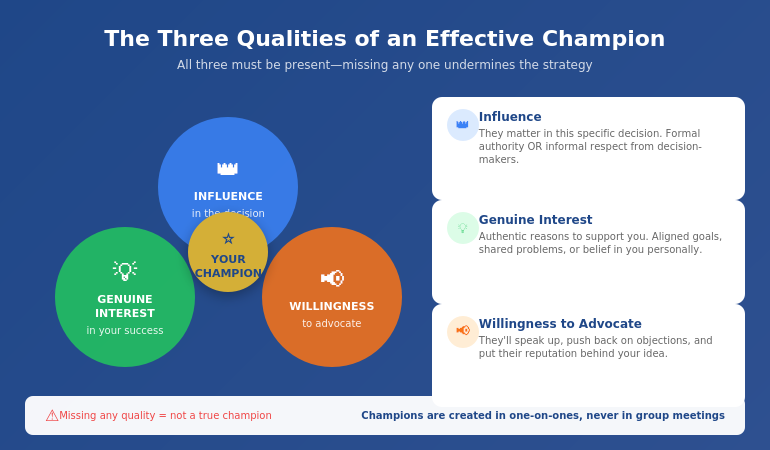
Not everyone can be your champion. The right champion has three characteristics:
1. Influence in the Decision
Your champion needs to matter in this specific decision. That might mean formal authority (they’re a decision-maker) or informal influence (decision-makers respect their judgment). Often, the most effective champions aren’t the most senior people—they’re the people whose opinions carry weight with the actual decision-makers.
2. Genuine Interest in Your Success
Champions work best when they have authentic reasons to support your proposal. Maybe it aligns with their goals. Maybe it solves a problem they care about. Maybe they believe in you personally. The motivation matters because champions often need to spend political capital defending your idea—they won’t do that for something they don’t actually believe in.
3. Willingness to Advocate
Some people might want your proposal to succeed but won’t actively fight for it. A true champion is willing to speak up, push back on objections, and put their reputation behind your idea. This requires a certain personality type—not everyone is comfortable in that role.
The intersection of these three qualities is rare. You might find someone influential who doesn’t care about your proposal. Or someone who cares deeply but lacks influence. Or someone with both but who avoids advocacy. Your job is to find the person who has all three—or to develop those qualities in a potential champion.
🎯 Master the Buy-In System
The Executive Buy-In Presentation System teaches the complete internal advocate approach—plus stakeholder mapping, objection handling, and the pre-meeting tactics that determine whether your proposal succeeds or fails.
What you’ll learn:
- The Champion Identification Framework
- The Enrollment Conversation script
- Stakeholder mapping for complex decisions
- How to neutralise blockers before they block
- The Follow-Through System for post-presentation momentum
Join the Executive Buy-In System → £199
Self-study programme with modules + templates + live Q&A calls. Study at your own pace.
How to Identify Your Champion
Finding your champion requires honest assessment of the decision-making landscape. Here’s the process I teach:
Step 1: Map the Decision-Makers
List everyone who will influence this decision. Include formal decision-makers (those who sign off) and informal influencers (those whose opinions matter). For each person, note:
- Their likely position on your proposal (supportive, neutral, opposed, unknown)
- Their level of influence in this specific decision
- Their relationship with you (strong, moderate, weak, none)
Step 2: Identify Potential Champions
From your map, look for people who are:
- Already supportive or leaning supportive (you need genuine interest)
- Influential enough to matter (their voice carries weight)
- Accessible to you (you can actually have conversations with them)
The best champions often aren’t obvious. They might be one level below the top decision-maker but highly trusted. They might be from a different department but respected for their judgment. They might be a peer who happens to have the CEO’s ear.
Step 3: Assess Willingness
Before approaching a potential champion, consider: Would this person actually advocate for a proposal? Some people avoid taking positions. Others speak up but only for their own initiatives. Look for people with a track record of supporting good ideas—even when they weren’t the originator.
Step 4: Choose Wisely
Having multiple champions can be powerful, but start with one. Choose the person who best combines influence, genuine interest, and willingness. You can expand later—but a strong single champion often outperforms multiple weak ones.
For more on stakeholder analysis, see my guide on stakeholder buy-in psychology.
📋 Note: The complete stakeholder mapping system—including templates for identifying champions and planning your approach—is covered in the Executive Buy-In System programme.
The Enrollment Conversation
You cannot create an internal advocate in a group meeting. This is perhaps the most important thing I can tell you about the sponsor approach.
Group meetings are the worst place to build support. People are cautious. They’re watching others. They’re protecting themselves. No one wants to be the first to champion an idea that might fail publicly.
Champions are created in one-on-one conversations—ideally before the formal presentation is even scheduled.
Here’s the enrollment conversation structure I teach:
1. Open with Genuine Curiosity
Don’t pitch. Ask questions. “I’m working on a proposal for [X] and I’d value your perspective. What would you need to see for something like this to work?”
This does two things: it shows respect for their judgment, and it reveals what they actually care about—information you can use to shape your proposal.
2. Listen More Than You Talk
Let them share concerns, questions, and suggestions. Take notes. Ask follow-up questions. The more they talk, the more invested they become—and the more you learn about how to position your proposal for success.
3. Incorporate Their Input
After the conversation, actually use their feedback. When people see their ideas reflected in your proposal, they feel ownership. Ownership drives advocacy.
4. Make the Ask
Once you’ve had substantive conversations and incorporated input, you can make the explicit ask: “This is going to the steering committee next month. Would you be willing to support it? I think your perspective on [their area of expertise] could really help.”
Notice the ask is specific. You’re not asking them to “help” vaguely—you’re asking for explicit support in a specific context.
5. Equip Them
Champions can only advocate effectively if they have the right information. Share your key points, anticipated objections, and responses. Make it easy for them to defend your proposal without needing you present.
💡 The Enrollment Conversation Is Where Champions Are Made
The scripts and practice scenarios for these conversations are detailed in the Executive Buy-In System. But even without formal training, the principles above will dramatically improve your approach: genuine curiosity, active listening, incorporation of feedback, specific asks, and proper equipping.
Activating Your Champion
Having a champion isn’t enough. You need to activate them effectively. Here’s how:
Before the Presentation
Brief them on the landscape. Who else will be in the room? What positions have people already taken? What objections are likely? Your champion should walk in informed, not surprised.
Agree on their role. Will they speak early to establish momentum? Will they address specific objections? Will they stay quiet unless needed? Different situations call for different approaches. Discuss and agree.
Share your materials in advance. Your champion should see your presentation before the meeting. They might catch issues, suggest improvements, or simply feel more confident advocating for something they’ve reviewed.
During the Presentation
Don’t look to them for rescue. Your champion shouldn’t be your safety net for a poorly prepared presentation. Do your job well; let them amplify your success rather than compensate for your failures.
Create openings. When appropriate, you can create natural moments for your champion to contribute: “Sarah has been thinking about the operational implications—Sarah, what’s your view?” This gives them a platform without making their support seem staged.
After the Presentation
Debrief immediately. What worked? What didn’t? What follow-up is needed? Your champion often has insights into room dynamics that you missed while presenting.
Keep them informed. As the decision progresses, keep your champion updated. They may have opportunities to advocate in conversations you’re not part of—but only if they know what’s happening.
Thank them genuinely. Champions spend political capital on your behalf. Acknowledge that investment, regardless of the outcome.
For more on the pre-meeting strategy, see my guide on pre-meeting executive alignment.
🎯 The Complete Buy-In System
Stop leaving buy-in to chance. The Executive Buy-In Presentation System teaches everything in this article—plus stakeholder mapping, objection handling, political navigation, and follow-through tactics—in a structured programme with templates, scripts, and live support.
The programme includes:
- The Champion Identification Framework
- Enrollment Conversation scripts
- Stakeholder mapping templates
- Objection pre-emption strategies
- The Follow-Through System
- Live Q&A calls for your specific situations
Join the Executive Buy-In System → £199
Self-study programme with live Q&A support. Study at your own pace.
Frequently Asked Questions
What is a champion in business presentations?
A presentation champion is someone with influence in the decision-making group who actively advocates for your proposal. Unlike a passive supporter who might vote yes if asked, a champion proactively speaks up for your idea, counters objections, and uses their credibility to build support—both in formal meetings and in informal conversations where decisions often really happen.
How do you get executive buy-in for a proposal?
Executive buy-in requires working outside the presentation itself. Identify stakeholders before you present, have one-on-one conversations to understand concerns and incorporate feedback, cultivate a champion who will advocate for you, and address objections before they surface publicly. The presentation confirms momentum you’ve already built—it rarely creates new support from scratch.
Why do good presentations get rejected?
Most rejected presentations fail for political reasons, not content reasons. The presenter had no champion advocating for them. Key stakeholders had concerns that weren’t addressed beforehand. Opposition formed in private conversations. Decision-makers had already decided before the presentation started. Strong content matters, but it can’t overcome weak stakeholder groundwork.
What if I don’t know anyone senior enough to be my champion?
You don’t necessarily need someone senior—you need someone influential in this specific decision. That might be a peer who’s highly respected, someone from a related department whose opinion carries weight, or your direct manager who can advocate upward. Start building relationships before you need them. The best time to develop potential champions is when you don’t have an immediate ask.
How do I approach a potential champion without seeming political?
Lead with genuine curiosity rather than asking for support. “I’d value your perspective on this challenge” is authentic relationship-building. “Will you support my proposal?” feels transactional. Build the relationship through substantive conversations about the work. The ask for support comes later, naturally, after you’ve demonstrated respect for their judgment and incorporated their thinking.
What if my champion can’t attend the actual presentation?
Champions are often more valuable outside the presentation than inside it. They can advocate in pre-meetings, informal conversations, and follow-up discussions. If your champion can’t attend, ask them to speak with key decision-makers beforehand, and keep them informed so they can continue advocating as the decision progresses through other forums.
How far in advance should I start building champion relationships?
Ideally, you’re building relationships continuously—not just when you need something. For a specific proposal, start cultivating your champion at least 2-4 weeks before the formal presentation. This gives time for multiple conversations, incorporating feedback, and allowing your champion to do their own informal advocacy. Last-minute champion recruitment rarely works.
📧 The Winning Edge Newsletter
Weekly insights on executive presentations, stakeholder management, and what actually works in corporate decision-making.
📋 Free: Executive Presentation Checklist
A pre-presentation checklist that includes the champion check, stakeholder assessment, and objection preparation. Use it before every important presentation.
About the Author
Mary Beth Hazeldine is the Owner & Managing Director of Winning Presentations. With 24 years of corporate banking experience at JPMorgan Chase, PwC, Royal Bank of Scotland, and Commerzbank, she has navigated complex stakeholder environments and delivered high-stakes presentations in boardrooms across three continents.
A qualified clinical hypnotherapist and NLP practitioner, Mary Beth combines executive communication expertise with evidence-based techniques for managing presentation anxiety. She works with senior teams on high-stakes funding rounds and executive approvals.
Your Next Step
Before your next important presentation, ask yourself: Who is my champion?
If you can’t name someone specific—someone who will actively advocate for your proposal in conversations you’re not part of—you have work to do before you work on your slides.
The internal advocate approach isn’t about politics or manipulation. It’s about recognising how decisions actually get made in organisations, and working with that reality rather than against it.
Strong proposals deserve strong advocates. Find yours.
Related: If your preparation process needs work too, see today’s companion article on the preparation order that doubles approval rates—because even with a champion, your content still needs to be right.


