
Tag: executive prompt pack

12 May 2026
Senior female executive in navy blazer presenting executive slides on an ultra-wide monitor in a modern glass boardroom

Best AI Tools for Executive Presentations: The Prompt Pack That Replaces Ten

Quick answer: The best AI tools for executive presentations are not new apps — they are the two you already have access to. ChatGPT and Microsoft Copilot will build board-grade slides in twenty-five minutes, but only if you prompt them like an executive, not like a tourist. The difference between a generic AI slide and a credible executive slide is the prompt. The Executive Prompt Pack is a tested library of 71 prompts engineered for board decks, investor pitches, quarterly business reviews, and strategy presentations. It replaces the hour you currently spend arguing with ChatGPT. £19.99, instant download, no subscription.

The problem with “best AI tools” lists

Every article on the first page of Google for this query recommends the same ten apps: Gamma, Beautiful.ai, Tome, Pitch, Decktopus, Presentations.ai, SlidesAI, and a handful of newer entrants. They all promise the same thing: paste your content in, get a deck out.

Executives who have tried them know the result. Generic slides. Template-heavy. Stock-image aesthetic. Content that reads like a consulting pitch from 2014. They will save you design time — and cost you credibility in the boardroom, because the structure is wrong.

Here is what those lists miss: the tool is not the bottleneck. The prompt is. A CFO preparing a capital allocation deck does not need a new SaaS subscription. She needs to know how to ask ChatGPT or Copilot for a CapEx justification structure that actually gets approved. Most executives have never been taught to write that prompt.

Until you fix the prompt, switching tools just gives you better-looking bad slides.

A second, quieter problem: most of the AI presentation apps on those lists require their own subscription, their own login, their own data-security review. For executives in regulated sectors — financial services, healthcare, pharmaceuticals, public sector — approving a new SaaS vendor for commercially sensitive decks is a six-week exercise. By the time procurement has signed off, the board meeting has already happened.
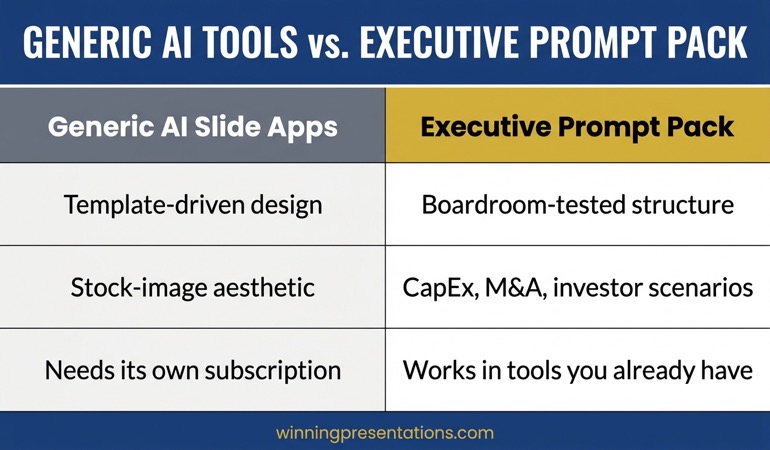
Comparison graphic showing generic AI slide tools on the left producing template-driven output versus the Executive Prompt Pack on the right producing board-grade structured slides for CapEx, M&A, and investor decks

The tools you already have — used correctly

ChatGPT (including the free tier) and Microsoft Copilot (bundled with most corporate Microsoft 365 licences) are the two most capable AI tools available to executives today. They outperform every purpose-built presentation AI on the market for one reason: they can follow complex, multi-layered instructions written by someone who knows what an executive deck needs.

A generic prompt — “make slides for my board meeting about Q2 results” — produces generic output. That is not a tool failure. That is a prompt failure. The model has no way to know that your board chair reads pre-reads the night before, that the audit committee will question any variance above 8%, or that the format must fit the standard deck template used across the group.

The Executive Prompt Pack translates executive context into prompt structure. Each prompt has been built from boardroom-experienced scenarios: what the audience actually asks, what gets approved, what causes rework, what makes a deck survive scrutiny. You paste your data in. ChatGPT or Copilot returns a structured draft. You refine. Twenty-five minutes from blank page to executive-ready.

The pack is platform-agnostic. Every prompt works in ChatGPT (free or paid), Microsoft Copilot in PowerPoint, Copilot Chat, Gemini, and Claude. You are not locked into one vendor, and you do not need a new procurement review to start using it tomorrow morning.

What you get in the Executive Prompt Pack

  • 71 ready-to-use prompts covering board decks, investor pitches, quarterly business reviews, and strategy presentations
  • Scenario prompts for capital expenditure, M&A, restructuring, technology investment, budget approval, and crisis briefings
  • Slide-structure prompts — opening hooks, executive summary slides, data storytelling, recommendation framing, Q&A preparation
  • Prompts tested in ChatGPT, Microsoft Copilot, Gemini, and Claude — works across all major AI platforms
  • Instant download, no subscription, no expiry
  • £19.99 — roughly the cost of a single ChatGPT Plus month

Stop arguing with ChatGPT. Start shipping executive slides.

The Executive Prompt Pack — 71 prompts built from boardroom scenarios. Paste your context, get a structured executive draft, refine in minutes. Works in ChatGPT, Copilot, Gemini, and Claude. £19.99, instant download, no subscription.

Get the Executive Prompt Pack →

Designed for executives preparing high-stakes board, investor, and strategy presentations.

Is this right for you?

The Executive Prompt Pack is for senior professionals who already use ChatGPT or Microsoft Copilot and are frustrated by the generic output. Finance directors building CapEx cases, strategy leads drafting board papers, heads of function preparing quarterly reviews, founders cleaning up investor decks late at night — this is the audience.

It is not for people looking for a design tool or a template gallery. The output is structure and copy, not styling. You will still paste the drafts into your own PowerPoint or Keynote template.

It is also not for people who want to avoid editing. The prompts accelerate the first 80% of the work. The final 20% — your judgement, your numbers, your voice — stays with you. That is by design. The moment you hand a deck to AI end-to-end, the executive in the room knows.

Frequently asked questions

What is the best AI tool for executive presentations?

ChatGPT and Microsoft Copilot, used with executive-grade prompts. Both outperform specialist presentation-AI apps because they follow complex, structured instructions. The limiting factor is almost never the model — it is the prompt. That is why a prompt library tested against real boardroom scenarios produces better output than any new app, and why executives in regulated sectors prefer working with tools already approved by their IT and compliance teams.

Does the Executive Prompt Pack work with Microsoft Copilot?

Yes. Every prompt has been tested in Microsoft Copilot in PowerPoint, Copilot Chat, and ChatGPT (free and paid tiers). Because the prompts are platform-agnostic text, they also work in Gemini and Claude. You are not locked into one AI subscription.

How long does it take to build a board deck with the pack?

Approximately 25 minutes from blank page to a structured first draft for a 12–15 slide executive deck. That assumes you have your data, context, and decision ready — the pack accelerates the structuring, framing, and copy, not the strategy underneath.

Is £19.99 a subscription?

No. £19.99 is a one-time payment. Instant download via Gumroad. No recurring charges. No login required after purchase. The prompts are yours, and so are any updates released within the product lifecycle.

What if I already have ChatGPT Plus?

The pack is complementary, not a replacement. ChatGPT Plus gives you faster model access. The Executive Prompt Pack gives you the instructions to get boardroom-ready output. Many users keep both — Plus for general use, the pack for executive deliverables.

Can I use it for investor pitches and external decks?

Yes. The pack includes prompts engineered specifically for investor pitches, fundraising decks, and external strategy presentations, alongside internal board, audit committee, and quarterly review formats.

About the author

Mary Beth Hazeldine is Owner & Managing Director of Winning Presentations. With 24 years of corporate banking experience at JPMorgan Chase, PwC, Royal Bank of Scotland, and Commerzbank, she advises executives across financial services, healthcare, technology, and government on structuring presentations for high-stakes funding rounds and approvals. Winning Presentations was founded in 1990 and has supported executive communication at HSBC, Morgan Stanley, BNP Paribas, UniCredit, and MFS Investment Management.

09 May 2026
Senior executive reviewing an AI-assisted PowerPoint deck on a laptop in a corporate office with a London skyline in the background.

AI Prompts for Business Presentations (£19.99 Executive Prompt Pack)

AI Prompts for Business Presentations: A Practical Pack Built for Executive Decks

If you’re looking for AI prompts for business presentations, you’re likely trying to move faster without dropping the standard — a board update, an investor brief, a strategy recommendation, a quarterly review — and generic prompts keep giving you generic slides. The Executive Prompt Pack (£19.99) gives you 71 ready-to-use prompts for ChatGPT and Microsoft Copilot, built around the scenarios senior professionals actually present: board decks, investor pitches, quarterly reviews, and strategy presentations. Instant access, lifetime use, works with whichever AI tool your organisation prefers. This page explains what’s inside, who it’s built for, and how to judge whether the pack is the right fit for the work you’re doing.

Why Generic AI Prompts Produce Weak Business Presentations

Most AI prompts shared online are written for general business writing — marketing copy, emails, blog posts, summaries. When you apply those prompts to business presentations, the output is competent but structurally wrong for a senior audience. The recommendation arrives on slide eight instead of slide one. The language is explanatory rather than decision-focused. Slides read as prose rather than executive content that works without narration. The tool is capable; the instructions are mis-calibrated.

The problem compounds when the stakes rise. Boards and executive committees read decks in advance, arrive with prepared questions, and expect a structure that signals the decision required within the first thirty seconds. Generic AI prompts don’t know any of that. They default to the conventions of informational writing — context, build-up, conclusion — and produce slides that test an executive’s patience rather than respecting it. Writing prompts that override these defaults requires knowing what board-level audiences actually need, which takes years of experience that most professionals don’t have time to develop on the fly.

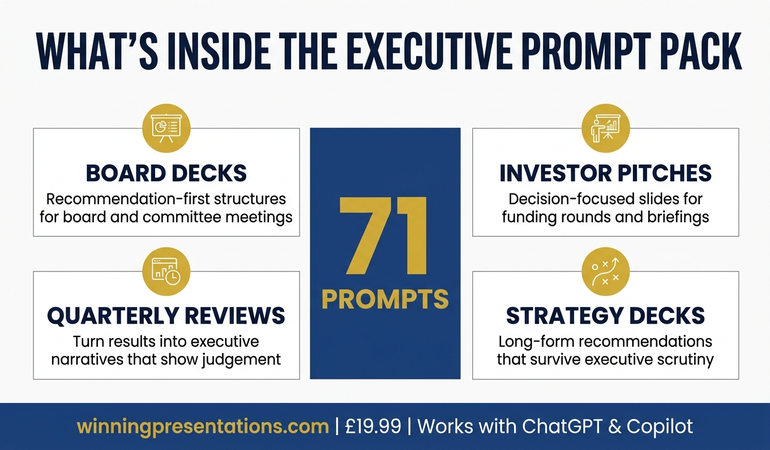
Infographic showing what's inside the Executive Prompt Pack: 71 prompts for ChatGPT and Copilot, covering board decks, investor pitches, quarterly reviews, and strategy presentations

AI Prompts Built Specifically for Executive Business Presentations

The Executive Prompt Pack is a collection of 71 prompts written specifically for business presentations at executive level. They’re not adapted marketing prompts or general AI templates. Each prompt is structured around a specific task in the executive presentation workflow — narrative structure, recommendation-first openings, board-ready slide content, executive language, Q&A preparation, strong closes — and calibrated to produce output that holds up in front of a senior audience without heavy manual editing.

The pack is drawn from Mary Beth Hazeldine’s 25 years working with executives across banking, professional services, technology, and government. The prompts encode the structural and linguistic conventions that senior presentations require: recommendation on the first slide, evidence organised by decision relevance rather than chronology, language that respects the reader’s time, and slide content that functions for asynchronous reading. These conventions take years to absorb through experience. The prompts make them available the moment you download the pack.

Every prompt is ready to use — paste it into ChatGPT or Microsoft Copilot, add your specific content details, and receive output tuned for an executive audience. There’s no prompt engineering required, no configuration, no setup. The pack is delivered as downloadable files on Gumroad, with lifetime access and no subscription. You keep the prompts and use them on every presentation you build from the day you enrol.

What You Get

  • 71 ready-to-use prompts — covering the full business presentation workflow, from narrative structure through final rehearsal
  • Works with ChatGPT and Microsoft Copilot — every prompt is tested on both tools, with notes on which works better for each task
  • Board deck prompts — build recommendation-first structures for board meetings, committees, and governance updates
  • Investor pitch prompts — structure credible, decision-focused slides for funding rounds and investor briefings
  • Quarterly review prompts — turn results into executive narratives that show judgement, not just numbers
  • Strategy presentation prompts — frame long-form strategic recommendations in a way that survives executive scrutiny
  • Executive language and Q&A prompts — sharpen the register of your content and anticipate the questions senior audiences actually ask
  • Instant access, lifetime use — no subscription, no expiry, downloadable immediately from Gumroad

£19.99 — instant access, lifetime use, works with ChatGPT and Copilot.

The Prompts That Understand Executive Business Presentations

Most AI prompts are written for general business writing and fall apart at executive level. The Executive Prompt Pack (£19.99) gives you 71 prompts built specifically for business presentations — board decks, investor pitches, quarterly reviews, strategy recommendations — drawn from 25 years of executive work across financial services and corporate leadership. Use them in ChatGPT or Microsoft Copilot to produce board-ready slide content in 25 minutes rather than starting from scratch every time. Instant access, lifetime use, no subscription.

Get the Executive Prompt Pack → £19.99

Instant download. Lifetime access. Works with ChatGPT and Copilot.

Is This Right for You?

The Executive Prompt Pack is built for mid-to-senior professionals who use ChatGPT or Microsoft Copilot in their presentation workflow and present to executive audiences — boards, committees, investors, leadership teams, or client decision-makers. It’s particularly useful if you find AI outputs require heavy manual editing before they reach executive quality, or if you spend time rewriting prompts from scratch every time you start a new presentation. It also suits professionals building their first board-level deck and wanting a structured AI workflow from the outset, rather than learning through trial and error with a high-stakes audience.

It’s not a general AI writing pack. The prompts are narrowly focused on executive business presentations — they’re less useful for internal team updates, informal stakeholder briefings, or general marketing work. It’s also not a presentation skills course: if your primary challenge is delivery, voice, or presence rather than structuring and drafting slide content, a different resource will serve you better. The pack does one thing — help you build executive-level business presentations faster using AI — and it does that one thing thoroughly.

Frequently Asked Questions

Do the prompts work with both ChatGPT and Microsoft Copilot?

Yes. All 71 prompts are written to work with either tool, and the pack includes guidance on which is better for each stage of the workflow. Many executives use ChatGPT for upstream structural work (narrative logic, argument testing, language sharpening) and Microsoft Copilot for the in-deck drafting directly inside PowerPoint. The prompts are calibrated for both paths.

What kinds of business presentations do the prompts cover?

The pack covers the presentation types senior professionals encounter most often: board decks, investor pitches, quarterly reviews, strategy recommendations, capital investment cases, and executive committee submissions. Within each type, there are prompts for narrative structure, opening recommendations, slide content, executive language, Q&A preparation, and closes — so the full workflow is covered rather than just the drafting stage.

Is £19.99 realistic for a pack of 71 executive prompts?

The price reflects the format. Because the pack is a structured set of downloadable prompts rather than coaching or live instruction, the cost stays low. For professionals who build business presentations regularly, the pack typically pays for itself on the first presentation by saving two to three hours of prompt rewriting and manual editing. Lifetime access means the cost never recurs.

Do I need prompt engineering experience to use the pack?

No. Every prompt is ready to use as written — paste it into ChatGPT or Copilot, add your specific content (the topic, the audience, the decision required), and the prompt handles the structure and executive calibration. The pack is designed for busy professionals who want to use AI productively without learning prompt engineering as a separate skill.

Can I use the prompts on multiple presentations?

Yes. Lifetime access means you can apply the prompts to every business presentation you build from the day you download them onward. That’s the core value of the pack — it keeps earning its place every time you face a new executive deck, not just the first one.

Who is this not suitable for?

The pack is less useful for professionals who don’t currently use ChatGPT or Microsoft Copilot in their work, or whose presentations are primarily internal team updates and client catch-ups rather than executive-level decks. It’s also not designed for delivery skills development — if your primary challenge is confidence, voice, or stage presence rather than content structure and AI-assisted drafting, a different resource is a better starting point.

09 Apr 2026
Senior executive using AI tools to build executive PowerPoint presentations

ChatGPT Prompts for PowerPoint Presentations

Quick Answer

ChatGPT can help you build PowerPoint presentations — but only if you give it the right prompts. Generic prompts produce generic slides: text-heavy, structurally weak, and unsuited to executive audiences. The Executive Prompt Pack gives you 71 prompts written specifically for executive PowerPoint presentations — covering slide structure, narrative flow, exec-level language, Q&A preparation, and board-ready outputs. At £19.99 with instant access, it is the fastest way to stop getting mediocre slides from good AI tools. This page explains what makes executive PowerPoint prompts different, who the pack is built for, and what you get inside.

The Problem With Generic ChatGPT Prompts for Presentations

Most professionals who use ChatGPT for PowerPoint presentations start in the same place: they describe the presentation topic and ask the tool to help. Sometimes they paste in existing content and ask for it to be rewritten. The result is usually competent — grammatically clean, logically organised, clearly expressed. And almost entirely wrong for an executive audience.

The problem is not the tool. It is the prompt. ChatGPT does not know that your board expects the recommendation on slide one, not slide eight. It does not know that the CFO in the room reads the deck in advance and will arrive with prepared objections, not an open mind. It does not know that executive slide content needs to work without narration — that every slide must be self-explanatory for the committee member who is reading it rather than listening to it. Without that context, ChatGPT defaults to the conventions of a general presentation: build the case, then give the conclusion. Executive audiences expect the reverse.

The result is a presentation that looks polished but performs poorly. The chair skips to the end. The CFO asks a question your second slide would have answered. The committee defers rather than decides, because the recommendation was buried too deep in the logic chain to feel actionable. These are not problems with your ideas. They are problems with the structure — and they are problems that better prompts solve.

Writing executive-quality prompts from scratch requires knowing what boards need, how committee members read decks, and how to instruct AI in the specific vocabulary of decision-focused slide architecture. Most professionals do not have that vocabulary — and spending time developing it defeats the purpose of using AI in the first place.

The Solution: Prompts Built for Executive Presentations

The Executive Prompt Pack is a collection of 71 prompts written specifically for executives building PowerPoint presentations for boards, committees, and C-suite audiences. They are not generic AI prompts with “executive” added to the title. They are structured around the specific challenges of senior-level communication: recommendation-first structure, decision-focused slide architecture, exec-level language, and preparation for expert scrutiny.

Each prompt is ready to use — paste it into ChatGPT or Microsoft Copilot, add your specific content details, and receive output calibrated for an executive audience. The prompts cover every stage of the presentation preparation workflow: structuring your narrative, building individual slides, sharpening the language for a senior audience, preparing your opening, anticipating board questions, and refining your close.

The pack is built on 16 years of advising senior professionals on high-stakes presentations across financial services, healthcare, technology, and government. The prompts encode the structural and linguistic conventions that board-level presentations require — conventions that take years to develop through experience, and that most professionals only begin to understand after a presentation has already fallen short.

The distinction between a prompt that produces a useful slide and one that produces a board-ready slide is specific and learnable. The Executive Prompt Pack makes that distinction available immediately, without requiring any prior knowledge of prompt engineering or AI tool configuration. You bring your content and your audience; the prompts bring the structure.

What You Get Inside the Executive Prompt Pack

  • 71 ready-to-use prompts — covering the full executive presentation workflow, from first draft to final rehearsal
  • Narrative structure prompts — build recommendation-first decks for boards, committees, and C-suite audiences
  • Slide content prompts — generate board-ready slide text that works without narration, built for asynchronous reading
  • Executive language prompts — sharpen your language to match the register and precision that senior audiences expect
  • Q&A preparation prompts — anticipate the questions a sceptical board will ask, and structure clear, defensible answers
  • Opening and close prompts — craft a recommendation that lands in the first thirty seconds, and a close that invites a decision
  • Copilot and ChatGPT compatible — prompts tested on both tools, with guidance on which works better for each task
  • Instant access, £19.99 — no subscription, no expiry, downloadable immediately from Gumroad

Stop Wasting Time on Prompts That Don’t Understand Executive Presentations

The Executive Prompt Pack gives you 71 prompts built specifically for board-level PowerPoint presentations. Use them in ChatGPT or Microsoft Copilot to produce executive-quality slide content — structured, precise, and decision-focused — without starting from scratch every time.

  • ✓ 71 prompts — covering every stage of executive presentation preparation
  • ✓ Works with ChatGPT and Microsoft Copilot
  • ✓ Built for board, committee, and C-suite presentations
  • ✓ Instant access — no subscription, no expiry

Get the Executive Prompt Pack → £19.99

Instant access · No subscription · Works with ChatGPT and Copilot

Is This Right for You?

The Executive Prompt Pack is for you if: you present to boards, committees, investors, or C-suite leadership and use ChatGPT or Microsoft Copilot in your preparation workflow. It is particularly useful if you find that AI outputs require significant manual editing before they reach executive quality, or if you spend time rewriting prompts from scratch each time you start a new presentation. It is also the right fit if you are building your first board presentation and want a structured approach from the start, rather than learning through trial and error with an unfamiliar audience.

The Executive Prompt Pack is not for you if: you primarily present to internal teams or external clients rather than senior governance audiences, or if you do not currently use ChatGPT or Microsoft Copilot in your work. The prompts are calibrated for executive-level presentations in formal contexts — they are not general-purpose business writing tools. If your primary challenge is building confidence as a presenter rather than structuring and drafting content, a different resource will serve you better.

Frequently Asked Questions

Does ChatGPT actually work for PowerPoint presentations?

Yes — but the quality of the output depends entirely on the quality of the prompt. ChatGPT can generate slide content, restructure arguments, sharpen language, and help you anticipate questions. What it cannot do on its own is understand the specific conventions of executive presentation — recommendation-first structure, decision-focused slide architecture, the register of board-level language. Prompts that encode these conventions produce executive-quality output. Generic prompts do not. The Executive Prompt Pack gives you 71 prompts that encode those conventions, ready to use immediately.

What are the best prompts for executive presentation slides?

The most effective prompts for executive slides are specific about three things: the audience (who is in the room and what they need to decide), the structure (recommendation first, evidence second, risk third), and the language register (precise, neutral, decision-focused — not promotional or narrative). A prompt that specifies all three produces slides that function in a board environment without heavy manual editing. The Executive Prompt Pack is built entirely on this approach, covering every presentation type from capital investment cases to Q3 results to governance updates.

How many prompts do you need for a PowerPoint presentation?

A complete executive presentation typically requires prompts for four to six distinct tasks: structuring the narrative, drafting the opening recommendation, writing individual slide content, sharpening the language for a senior audience, preparing for likely questions, and refining the close. Having ready-made prompts for each stage removes the friction of starting from scratch and keeps the output at executive level throughout the preparation process. The Executive Prompt Pack covers all of these stages across 71 prompts, so you have the right prompt for each task without searching or improvising.

ChatGPT vs Copilot for presentations — which should I use?

Both tools are useful at different stages of the presentation workflow. Microsoft Copilot integrates directly into PowerPoint and works well for generating slide content within an existing deck structure. ChatGPT works better for the upstream work — structuring the narrative, testing the argument logic, sharpening the language before you build the slides. Many executives use both: ChatGPT for the thinking and structure, Copilot for the in-deck drafting. The Executive Prompt Pack includes prompts optimised for both tools, with guidance on which to use at each stage.

Is the Executive Prompt Pack worth it for a one-off board presentation?

At £19.99 with instant access, the pack pays for itself if it saves two to three hours of prompt rewriting on a single presentation — which it typically does. For a one-off board presentation, the most immediately useful sections are the narrative structure prompts, the slide content prompts, and the Q&A preparation prompts. These three sections alone cover the most time-intensive parts of executive presentation preparation. The full pack remains available for any future presentations, with no additional cost or subscription required.

The Winning Edge

Weekly insights on executive presentations, AI tools, and boardroom communication — for senior professionals preparing high-stakes presentations.

Subscribe Free

About the author

Mary Beth Hazeldine, Owner & Managing Director, Winning Presentations. With 25 years of corporate banking experience at JPMorgan Chase, PwC, Royal Bank of Scotland, and Commerzbank, and 16 years training senior professionals, she advises executives across financial services, healthcare, technology, and government on structuring presentations for high-stakes funding rounds, board approvals, and regulatory hearings.