“That’s an interesting perspective, but let me show you why the data disagrees.”
Seventeen words. Five seconds to say them. £4 million gone.
The CFO had raised a concern about implementation risk. I had prepared for this question. I had three slides of data proving our risk mitigation was solid. I was ready.
So I corrected him. Politely. Professionally. With impeccable data.
And I watched his face close. Not angry—worse. Neutral. The engaged executive who’d been leaning forward for 20 minutes leaned back, crossed his arms, and didn’t ask another question for the rest of the presentation.
The deal died in that moment. Everything after was theatre.
Quick answer: The most expensive executive presentation mistakes aren’t about slides, structure, or preparation. They’re about the words you say in critical moments—responding to a question, handling an objection, or reacting to resistance. I’ve lost deals with perfect decks and won deals with mediocre ones. The difference was almost always something I said (or didn’t say) in a 5-second window. This article covers the 7 in-room mistakes that kill executive buy-in and the exact language patterns that prevent them.
Why 5 Seconds Can Undo 5 Weeks of Work
After 24 years in corporate banking—JPMorgan Chase, PwC, Royal Bank of Scotland, Commerzbank—I’ve been in hundreds of rooms where deals lived or died. The pattern I’ve observed is humbling: preparation gets you to the table, but what you say in critical moments determines whether you leave with a yes.
Here’s why those 5-second windows matter so much:
Executives are constantly evaluating two things: your proposal AND you. They’re asking themselves: “Is this person someone I can work with? Do they listen? Do they get defensive? Will they be a problem when things go wrong?”
Your slides answer the first question. Your in-room behaviour answers the second.
A single defensive response can flip their mental model from “this person is competent” to “this person will be difficult.” And once that flip happens, your data doesn’t matter anymore. They’re not evaluating your proposal—they’re looking for reasons to say no.
The CFO I mentioned earlier? He later told my colleague: “The proposal was solid. But when I raised a concern, he made me feel stupid. I don’t want to work with someone who does that.”
I hadn’t made him feel stupid intentionally. I’d just corrected him. With data. Professionally.
But in executive dynamics, being right isn’t the same as being effective.
Mistake #1: Correcting an Executive (Even When You’re Right)
This is the mistake that cost me £4M, and I see it constantly.
An executive says something that’s factually incorrect or based on outdated information. You have the data that proves otherwise. Your instinct is to correct them—politely, of course.
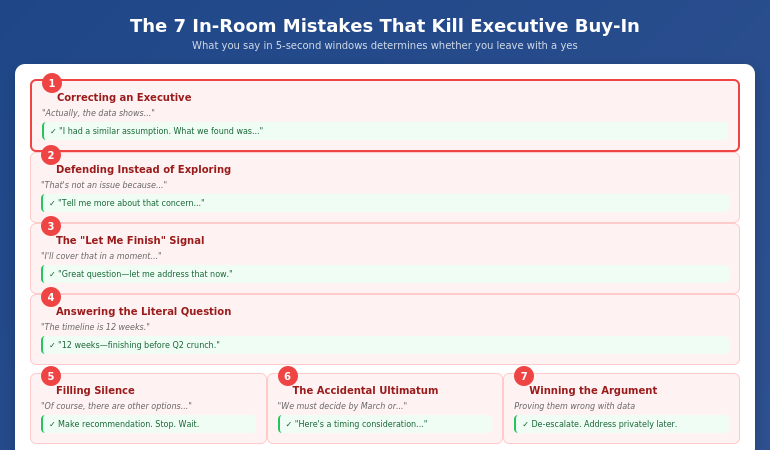
What you say: “Actually, the data shows something different…” or “That’s not quite accurate—let me explain…”
What they hear: “You’re wrong and I’m about to prove it in front of your colleagues.”
Executives have egos. More importantly, they have positions to protect. Correcting them publicly—even gently—triggers a defensive response. They stop listening to your content and start protecting their status.
What to say instead:
“That’s a really important point. I had a similar assumption initially. What we found when we dug deeper was…”
This does three things: validates their thinking, admits you once thought the same (so they’re not stupid for thinking it), and introduces new information as discovery rather than correction.
Or try: “You’re right that [acknowledge the valid part of their concern]. The piece that changed our thinking was…”
Find the kernel of truth in what they said—there almost always is one—and build from there rather than contradicting.
⭐ Master the Critical Moments That Win (or Lose) Executive Buy-In
The Executive Buy-In Presentation System teaches you exactly what to say—and what never to say—in the high-stakes moments that determine whether you get approval.
You’ll learn:
- Language patterns that turn resistance into engagement
- How to handle objections without triggering defensiveness
- The psychology behind executive reactions (and how to work with it)
- Scripts for the 10 most common deal-killing moments
See the Executive Buy-In System on Maven →
Cohort-based programme for senior professionals. See Maven for dates.
Mistake #2: Defending Instead of Exploring
When an executive raises an objection, your instinct is to address it. To explain why it’s not a problem. To defend your proposal.
This instinct is wrong.
What you say: “I understand the concern, but here’s why it’s not an issue…” or “We’ve actually addressed that—let me show you…”
What happens: You’ve just entered an adversarial dynamic. They raised a concern; you dismissed it. Now they have to either accept that their concern was invalid (unlikely) or push harder to prove they were right to raise it (likely).
I watched a colleague lose a £2M consulting engagement this way. The client mentioned concerns about timeline. My colleague immediately launched into a detailed explanation of why the timeline was achievable. Fifteen minutes of defending.
The client wasn’t asking for reassurance. She was asking to be heard.
What to say instead:
“Tell me more about that concern. What specifically worries you about [X]?”
Or: “That’s worth exploring. When you think about [the concern], what would need to be true for you to feel comfortable?”
This does something powerful: it moves you from opposing positions to the same side of the table. You’re now exploring the concern together, not defending against an attack.
Often, when you explore, you discover the stated concern isn’t the real concern. The executive worried about “timeline” might actually be worried about resource allocation, or political dynamics, or a past project that went badly. You can’t address the real concern if you’re busy defending against the stated one.
Mistake #3: The “Let Me Finish” Signal
You’re explaining a key point. An executive interrupts with a question. You say some version of: “I’m going to cover that in a moment” or “Let me just finish this thought” or “Hold that—I’ll get there.”
What you intend: Orderly presentation flow. You have a structure and you’re sticking to it.
What they experience: Their question isn’t important enough to answer now. You value your agenda over their curiosity.
Executives interrupt because something you said triggered a thought they want to explore. That interruption is engagement. It’s interest. It’s exactly what you want.
When you defer their question, you’re telling them their engagement doesn’t matter. Many will stop engaging entirely.
What to say instead:
“Great question—let me address that now.” Then answer it, even if it disrupts your flow. Your slides can wait. Executive engagement cannot.
If the question truly would be answered better with context from later slides: “That’s actually the perfect lead-in to the next section. Mind if I show you something that’ll help frame the answer?” Then go directly to that section.
The key insight: their agenda matters more than your agenda. Flexible presenters who follow executive interest build more trust than rigid presenters who stick to their script. If you struggle with staying composed when your flow is disrupted, see my article on how to stop rambling when nervous.
Mistake #4: Answering the Question They Asked
This sounds counterintuitive, but stay with me.
An executive asks: “What’s the implementation timeline?”
You answer: “Twelve weeks for phase one, then another eight weeks for full rollout.”
Factually accurate. Completely unhelpful.
Because the question behind the question was probably: “Is this going to disrupt Q2?” or “Will this conflict with the ERP migration?” or “Am I going to have to explain a delay to the board?”
The mistake: Answering the literal question without addressing the underlying concern.
What to say instead:
“Twelve weeks for phase one—so we’d complete before the Q2 crunch you’re navigating.” Or: “Twelve weeks, and I’ve coordinated with Sarah’s team to make sure we’re not competing for the same resources as the ERP work.”
If you don’t know the underlying concern, ask: “Before I answer, help me understand what’s driving that question. Is there a timing constraint I should know about?”
Executives are often asking about implications, not facts. The presenter who answers implications builds more trust than the one who answers facts.
⭐ Learn to Read What Executives Are Really Asking
The Executive Buy-In Presentation System teaches you to hear the question behind the question—and respond in ways that build trust instead of triggering resistance.
The programme includes:
- Decoding executive questions: what they ask vs. what they mean
- Response frameworks that address concerns without being defensive
- Practice scenarios with real executive objection patterns
- Recovery techniques when you sense you’ve lost the room
See the Executive Buy-In System on Maven →
For executives and senior professionals who present to decision-makers.
Mistake #5: Filling Silence
You make your recommendation. The room goes quiet. Executives are thinking.
The silence feels uncomfortable. So you fill it: “Of course, there are other options we could consider…” or “I know this is a big decision…” or “Let me show you a few more supporting points…”
What you’ve just done: Undermined your own recommendation. Signalled that you’re not confident. Given them reasons to delay.
Silence after a recommendation is often good. It means they’re processing. They’re considering. They’re taking you seriously.
When you fill that silence, you interrupt their processing. Worse, you often plant doubts that weren’t there: “Other options? Maybe I should ask about those.”
What to do instead:
Make your recommendation. Then stop talking. Let the silence sit for 5-10 seconds (it will feel like an hour). If you must say something, try: “I’m happy to answer questions, or if it would be helpful, I can walk through the alternatives we considered and why we landed here.”
Notice the difference: you’re offering to provide more information if they want it, not volunteering it out of nervousness.
The executives who get buy-in most consistently are comfortable with silence. They make their case, then wait. They project confidence by not needing to fill every gap.
Mistake #6: The Accidental Ultimatum
You’re trying to convey urgency. The window for this opportunity is closing. You want them to act.
What you say: “If we don’t move forward by March, we’ll lose this opportunity” or “This is a now-or-never situation.”
What they hear: You’re pressuring them. You’re trying to force a decision before they’re ready. You don’t trust them to make good choices on their own timeline.
Even if the urgency is real, framing it as an ultimatum triggers resistance. Executives don’t like being told what to do. They especially don’t like feeling manipulated into decisions.
What to say instead:
“I want to flag a timing consideration. The vendor’s pricing is locked until March 15th—after that, we’re looking at a 20% increase. I’m not trying to rush the decision, but I wanted you to have that context.”
Or: “There’s a window here that I think is worth noting. Here’s what changes if we move in Q1 versus Q2…” Then present the trade-offs neutrally.
The difference: you’re providing information for their decision, not pressuring them toward your preferred outcome. Same facts, different framing, completely different response.
Mistake #7: Winning the Argument, Losing the Room
An executive pushes back. Hard. They’re wrong—you can prove it. You have data, precedents, expert opinions. You can win this argument.
So you do. Point by point, you dismantle their objection. You’re thorough. You’re factual. You’re right.
And you’ve just lost the room.
Because every other executive watched you publicly defeat one of their peers. They’re now thinking: “If I raise a concern, will I get the same treatment?”
The room goes quiet. Not because they’re convinced—because they’ve decided not to engage. They’ll raise their concerns after you leave, in conversations you’re not part of, where decisions will be made without your input.
What to do instead:
When you sense an argument forming, de-escalate: “I think we might be looking at this from different angles. Can we step back? Help me understand the core concern here.”
Or try: “You’re raising something important. Let me make sure I understand it fully before I respond.”
If they’re genuinely wrong about something material, address it one-on-one after the meeting, not publicly in the room. Save their face. Preserve your relationship. Get the same outcome without the collateral damage.
For more on presenting to senior audiences without triggering these dynamics, see my guide on presenting to senior leadership.
What’s the most common mistake that kills executive buy-in?
Correcting executives publicly, even when you’re factually right. When you contradict an executive in front of their peers, you trigger a defensive response that has nothing to do with your proposal. They stop evaluating your idea and start protecting their status. Instead, validate first (“That’s an important point”), then introduce new information as discovery rather than correction (“What we found when we explored further was…”).
How do I handle executive objections without being defensive?
Explore before you defend. When an executive raises a concern, your instinct is to explain why it’s not a problem. Resist this instinct. Instead, ask: “Tell me more about that concern” or “What specifically worries you about that?” This moves you from opposing positions to exploring together. Often, the stated concern isn’t the real concern—and you can’t address what you don’t understand.
What should I do when an executive interrupts my presentation?
Answer their question immediately, even if it disrupts your flow. Interruptions are engagement—exactly what you want. When you defer with “I’ll cover that later,” you signal that your agenda matters more than their interest. Executives who feel unheard stop engaging. Your slides can wait; executive engagement cannot.
⭐ Stop Losing Deals in Critical Moments
The Executive Buy-In Presentation System gives you the exact language, frameworks, and practice you need to handle high-stakes moments without triggering resistance.
What you’ll master:
- The psychology of executive decision-making under pressure
- Scripts for the 10 most common buy-in killers
- Recovery techniques when you sense you’ve lost the room
- Practice scenarios with feedback from senior peers
See the Executive Buy-In System on Maven →
Cohort-based on Maven. See current dates and availability.
Frequently Asked Questions
Can I recover if I make one of these mistakes mid-presentation?
Sometimes. If you catch yourself early, you can course-correct: “Actually, let me reframe that. What I should have said was…” Acknowledging the misstep shows self-awareness. If you’ve lost an executive (they’ve gone quiet or defensive), consider addressing it directly: “I sense I may have missed something important in how I responded to your question. Can you help me understand what I should be considering?” Humility can recover what defensiveness cannot.
What if the executive is genuinely wrong about something material?
Address it privately if at all possible—after the meeting, one-on-one. If you must address it in the room, use the “I had the same assumption” frame: “That was actually my initial read too. What changed my thinking was…” This corrects without contradicting. You’re sharing a learning journey, not proving them wrong.
How do I know if I’ve lost the room?
Watch for: executives who were engaged going quiet, crossed arms or leaning back, checking phones or watches, questions that become pointed or skeptical rather than curious, and the senior decision-maker deferring to others (“What do you all think?”) instead of engaging directly. These signals don’t mean you’re definitely lost, but they warrant a check-in: “I want to pause and make sure we’re tracking. Is this addressing what matters, or should we shift focus?”
Is it better to prepare answers for tough questions or respond naturally?
Both. Prepare frameworks for common objection patterns, but don’t script word-for-word answers. Scripted responses sound rehearsed and often miss the nuance of the actual question. Know the categories of concerns you might face (timeline, cost, risk, resources, political implications) and have a general approach for each. Then listen carefully to the specific question and adapt. The combination of preparation and presence beats either one alone. For strategic pre-meeting work, see my guide on stakeholder mapping for presentations.
📧 The Winning Edge Newsletter
Weekly insights on executive presentations, stakeholder strategy, and the language patterns that win buy-in.
The 5-Second Difference
That CFO who killed my £4M deal taught me something I couldn’t learn from any presentation training: what you say in critical moments matters more than everything else combined.
Preparation gets you in the room. Slides give you credibility. But the words you choose when an executive pushes back, questions your assumptions, or goes quiet—those 5-second windows determine whether you leave with a yes.
I’ve since learned to pause before responding to tough questions. To validate before correcting. To explore before defending. To welcome interruptions as engagement rather than disruption.
These aren’t natural instincts—they’re learned behaviours that feel wrong until you see them work.
The good news: once you recognise the patterns, you can prepare for them. You can practice the language. You can build the reflexes that turn deal-killing moments into deal-making ones.
Five seconds is long enough to lose everything. It’s also long enough to win.