Quick answer: Senior leaders treat the 72 hours before a high-stakes presentation as a structured protocol, not a panicked sprint. Day 1 (T-72 to T-48): final slide audit, message-discipline pass, internal stakeholder pre-read. Day 2 (T-48 to T-24): full out-loud rehearsal, hostile Q&A drill, technical setup test. Day 3 (T-24 to T-0): light review only, sleep priority, last-90-minute body and breathing protocol. The goal is not more preparation. It is reducing decision-load and protecting your nervous system in the room.
JUMP TO:
Henrik runs strategy at a mid-cap industrial group in Frankfurt. Three days before his board presentation on a €240m acquisition recommendation, he was still rebuilding slide 14. He had eight versions of the same waterfall chart on his desktop. Two of them contradicted each other on synergy assumptions. The CFO had sent a note that morning asking three sharp questions about goodwill amortisation. Henrik opened his laptop at 11pm to start drafting answers and realised, with genuine alarm, that he could not remember whether he had eaten dinner.
This is the pattern most senior leaders fall into before a high-stakes presentation. Not lack of preparation — too much, too late, in the wrong order. The slide deck becomes a moving target. The narrative blurs. The body, which needs to be calm in the room, is instead burning through cortisol three nights running. By the time the meeting starts, the presenter has used 80% of their cognitive capacity on the deck and 20% on the actual audience.
The protocol below is what changes. It is not a productivity hack. It is a structure for the final 72 hours that protects two things: message discipline and nervous-system reserve. Both matter. Either one missing, and a strong proposal can land flat in front of an audience that should have approved it.
If you want a structured framework, not a checklist:
Senior professionals presenting decisions to boards and executive sponsors use The Executive Buy-In Presentation System — a self-paced programme covering the structure, psychology, and preparation that earns serious approval.
Why 72 hours, not 7 days
The instinct of less experienced presenters is to extend the runway. A week of prep. Two weeks. The thinking is that more time equals more confidence. In practice, the opposite happens. Long runways encourage tinkering — adding slides, changing taxonomy, second-guessing the core argument. The deck swells. The narrative softens. The presenter ends up over-prepared on details and under-prepared on the two questions the senior audience will actually ask.
Senior leaders who present regularly converge on a 72-hour window because it forces a different mode. At T-72 the deck has to be substantively complete. The remaining time is not for content creation — it is for compression, rehearsal, and recovery. The protocol below assumes you arrive at T-72 with a draft you would defend if pressed. If you do not have that, you have a different problem. Stop reading this and finish your draft.
For deeper structural rules on what an executive deck needs to contain before T-72 even begins, see the 15-minute board presentation template and the 31-point first board presentation review.
Day 1 (T-72 to T-48): audit and message discipline
The first 24 hours of the protocol have one job: lock the message. Not the slides. The message.
Open a blank document. Without looking at your deck, write three sentences:
- What I am asking the audience to decide or do — phrased as a single ask in plain language.
- The single strongest reason they should agree — not three reasons, one.
- The objection I am most worried about — phrased as the audience would phrase it, not as you would dismiss it.
If you cannot write all three in under ten minutes, your deck has a clarity problem and no amount of polishing in the next 48 hours will fix it. You need to compress the argument before you touch a slide.
Once you have those three sentences, walk through your deck slide by slide and ask, of every slide: does this slide help the audience say yes to the ask? Slides that do not earn their place at this stage come out, regardless of how much work went into them. Senior leaders are ruthless here. Decks that present at C-suite level usually need to lose 30-40% of their slide content in the final 72 hours, not add to it.
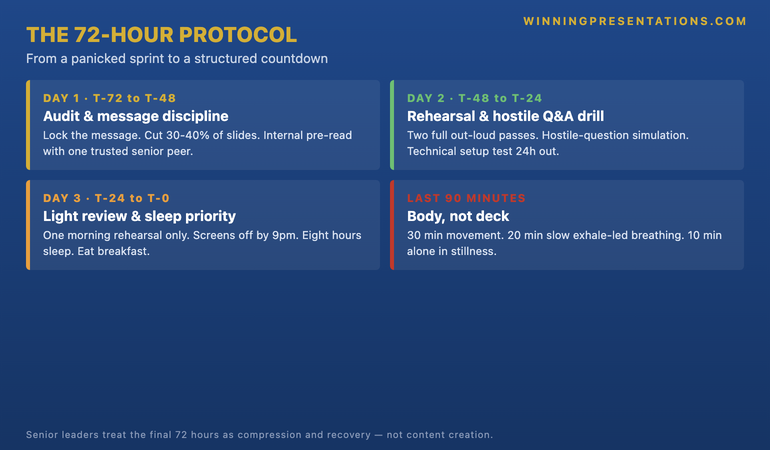
The other Day 1 task is the internal pre-read. Send your deck or executive summary to one trusted colleague who is senior enough to push back honestly. Not a peer. Not someone whose job depends on agreeing with you. Ask them one question only: “If you were in that room, what would stop you saying yes?” Their answer becomes your hostile Q&A material for Day 2. You do not need a long meeting — a 20-minute conversation gives you 80% of what you will hear in the actual room.
Day 2 (T-48 to T-24): rehearsal and hostile Q&A
Day 2 is rehearsal day. This is where most senior leaders cut corners and pay for it in the room. The temptation is to “talk through” the deck mentally — mouth the words, picture the flow, trust that on the day it will come together. It will not. Mental rehearsal builds confidence in your knowledge of the deck. It does not build the muscle memory that lets you handle interruption, redirect questions, or recover when a senior board member cuts you off mid-slide.
You need to rehearse out loud, on your feet, in the same posture you will use in the actual room. If you will be standing, stand. If you will be presenting from a seated position around a board table, sit and rehearse from your chair. The body learns the room. Practising in conditions that do not match the actual setting trains the wrong nervous-system response.
Stop relying on instinct in the room.
The Executive Buy-In Presentation System is a self-paced programme — 7 modules walking you through the structure, psychology, and delivery that get senior approval. Built for senior professionals presenting decisions to boards, investment committees, and executive sponsors. Monthly cohort enrolment, optional recorded Q&A calls. £499, lifetime access to materials.
- The decision-readiness framework that earns senior approval
- Stakeholder analysis and pre-meeting positioning protocols
- The slide structures that hold up under board scrutiny
- Hostile question handling and recovery techniques
- Optional bonus Q&A calls (recorded — watch back anytime)
Explore The Executive Buy-In Presentation System →
Designed for senior professionals across financial services, healthcare, technology, and government.
Run the deck twice. First pass: full presentation, no interruptions, target time. Most decks run 25-40% over on first rehearsal. Cut accordingly. Second pass: presentation with simulated interruptions. Either ask a colleague to interrupt you with three pre-loaded questions, or set a timer to ring twice during your run-through and pick up wherever you are. The skill is not delivering uninterrupted — it is recovering cleanly when you are interrupted.
Then comes the hostile Q&A drill. Take the objection your trusted colleague raised on Day 1. Add the three sharpest questions you can imagine the most senior person in the room asking. For each, prepare a 30-second answer with this structure: direct answer first, then evidence, then implication. Not the other way around. Senior audiences want the conclusion before the argument. If you find yourself building up to the answer, you are losing the room before you have started.
The technical setup test belongs in Day 2, not Day 0. Open the deck on the actual machine you will present from. Test the projector, the cable, the remote, the screen-sharing. Confirm the file plays, fonts render, embedded video runs. Do this 24 hours out, not 30 minutes before. Technical problems discovered at T-30 minutes burn the cognitive reserve you need for the room.
Day 3 (T-24 to T-0): light review and sleep
The final 24 hours are the hardest to manage because every instinct screams “more rehearsal”. This is wrong. The final 24 hours are recovery. Your nervous system needs to be calm in the room, and that is built in the day before, not in the hour before.
One full run-through in the morning of Day 3, in your normal voice, at normal pace. That is your final substantive rehearsal. After that, you stop creating and start protecting.
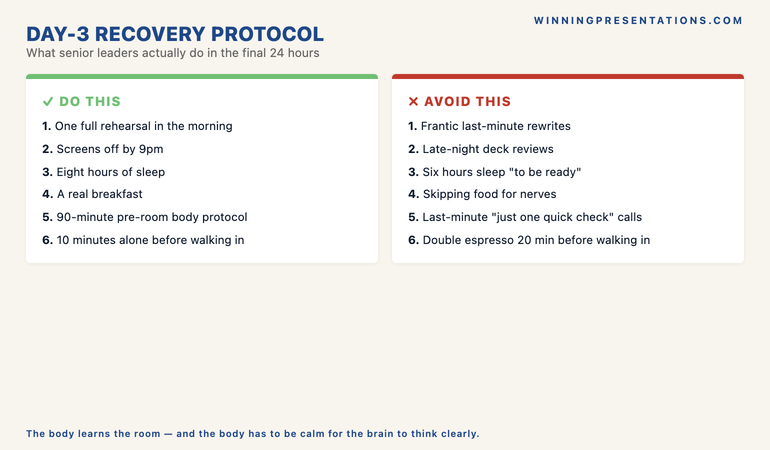
Sleep is the single highest-leverage variable in the final 24 hours and it is the one most senior leaders treat as optional. Sleep deprivation does not just feel bad. It measurably reduces working memory, slows recall under pressure, narrows attention, and amplifies the body’s stress response. A presenter who has slept six hours instead of eight is operating with a cognitive deficit roughly equivalent to mild intoxication. That is the deficit they bring into a room where every word matters.
Screens off by 9pm the night before. No deck reviews after dinner. No “just one more pass” to check a number. The number is what it is. If you spot something wrong at 11pm, write it on a single piece of paper, put it on top of your bag, and deal with it in the morning. The brain reviews while you sleep — give it a clean problem to solve, not a panicked one.
Eat breakfast. A real one. Most presenters skip food on the morning of a high-stakes meeting because of nerves. Going into a 90-minute board presentation in a fasted, caffeinated, stress-elevated state is a recipe for the trembling-hands, dry-mouth, racing-heart cluster that makes presenters look less competent than they are.
The 8-slide CFO presentation template covers the structural side of the same problem: when the deck is right, you have less to remember in the room and your nervous system has a smaller load to carry.
The last 90 minutes
The 90 minutes before you walk into the room are reserved for body, not deck. By this point, if your deck is not ready, no amount of last-minute review will help. Cramming at this stage measurably hurts performance. The brain consolidates information overnight and during quiet review windows — frantic re-reading of slides at T-30 minutes overwrites recall, it does not strengthen it.
What works:
- 30 minutes of physical movement if possible — a walk outside, stairs, anything that activates the body and burns off excess cortisol. The body cannot be calm and tense at the same time. Movement resets the baseline.
- 20 minutes of slow breathing — extended exhale (4 counts in, 6-8 counts out). This activates the parasympathetic nervous system and lowers heart rate. Five minutes does almost nothing. Twenty minutes resets the autonomic baseline.
- 10 minutes alone before entering the room — no phone, no last-minute conversations, no quick “anything I should know?” Conversations at this stage transfer other people’s anxiety into your nervous system. Stand still. Breathe. Walk in calm.
Want the slide structure that goes with the protocol?
The Executive Slide System gives you 26 templates, 93 AI prompts, and 16 scenario playbooks for board, investment committee, and executive decision presentations. £39, instant access — pairs naturally with the 72-hour protocol when your deck still needs structural work before T-72.
What senior leaders never do in the last 72 hours
Three patterns separate experienced senior presenters from the rest. None of them are about the deck. All of them are about decision-load.
They do not change the deck after T-24. Late changes introduce errors that the rehearsal did not stress-test. The slide that gets reworked the night before is the slide that gets the wrong number on it. If something is genuinely wrong at T-24, fix it and rehearse the affected section twice. If it is a refinement, leave it.
For more on what one of those high-stakes decision slides should actually contain, see the partner article on the £10M decision slide — what must be on it, what must be off.
They do not consult others in the last 24 hours. Senior leaders learn to stop seeking reassurance the day before. Last-minute consultations introduce other people’s framing, other people’s anxieties, other people’s questions about whether the deck is “ready”. The deck is as ready as it is going to be. Reopening that question 16 hours before the meeting just reignites the cortisol cycle.
They do not let calendar churn into T-0. The hours before a high-stakes presentation get blocked. No back-to-back meetings. No “just one quick call”. No interruptions that fragment attention. The brain needs a quiet runway to consolidate the rehearsal work into automatic recall. A morning of frantic meetings before a 2pm board presentation guarantees a depleted, scattered presenter walks into that room.
Frequently asked questions
Is 72 hours enough preparation for a board presentation?
Yes — if the deck is substantively complete at T-72. The 72-hour protocol is for compression, rehearsal, and recovery, not content creation. Building the deck itself usually takes one to three weeks of work. The 72 hours start when the deck is ready to present, not when you start drafting.
What if I am asked to present with less than 72 hours notice?
Compress the protocol. The structure still works at T-48 or even T-24 — the priorities just collapse. Day 1 work (message discipline) stays. Day 2 work (rehearsal and hostile Q&A) becomes a single concentrated session. Day 3 work (sleep and recovery) is non-negotiable. Cut Day 2 short before you cut Day 3.
How many times should I rehearse the full presentation?
Twice in full on Day 2, once on the morning of Day 3, then no more. Three full out-loud rehearsals is the point of diminishing returns for most senior presenters. Beyond that, you are not improving — you are draining cognitive reserve you need in the room.
Should I memorise my opening line?
Yes. The first 30 seconds are the highest-stakes part of any senior presentation. Memorise the opening verbatim — not the full deck, just the opening. Knowing exactly how you will start removes the most common point of nervous-system collapse and gives you a calm runway into the rest of the presentation.
The framework that holds when the room turns hostile.
Designed for senior professionals who present decisions to boards, investment committees, and executive sponsors. The Executive Buy-In Presentation System — 7 self-paced modules covering the psychology and structure that earn serious approval. £499, lifetime access to materials.
Get The Winning Edge newsletter
A weekly note from Mary Beth on the structure, psychology, and preparation that earns senior approval. One idea, one application, one specific scenario — every Thursday morning.
Not ready for the full system? Start here instead: download the free Executive Presentation Checklist — a single-page reference for what every senior presentation needs before it leaves your desk.
Next step: Block 72 hours in your calendar before your next high-stakes presentation. Not “prep time” — three labelled blocks (T-72, T-48, T-24) with the protocol tasks above. The structure does the work.
About the author
Mary Beth Hazeldine is Owner & Managing Director of Winning Presentations Ltd, founded in London in 1990. With 24 years of corporate banking experience at JPMorgan Chase, PwC, Royal Bank of Scotland, and Commerzbank, she advises executives across financial services, healthcare, technology, and government on structuring presentations for high-stakes funding rounds and board approvals.