Tag: executive credibility

15 Apr 2026
Female executive presenting difficult financial results to a board, calm authoritative composure

Presenting Bad News to Senior Leadership: The Structure That Maintains Credibility

Quick Answer: Senior leaders looking at difficult results want accuracy, cause, and corrective action — not softening. The structure that works: context → bad news → root cause → corrective action → forward commitment. This order positions you as a leader taking ownership, not a presenter delivering unpleasant information to an uncomfortable room.

Astrid had seventy-two hours.

As head of the Consumer division for a mid-sized financial services group, she had watched the quarterly numbers deteriorate through February. By the time March closed, the shortfall against target was 23% — not the 10–12% the business had quietly acknowledged in internal planning meetings, but a number that was going to land in front of the Group CFO and two non-executive directors on Thursday morning with no soft landing.

Her first instinct was to open with the positives. March had been genuinely strong in two product lines. Customer satisfaction scores were holding. She could walk them through those before arriving at the revenue figure, give them something to feel reassured by before the difficult moment.

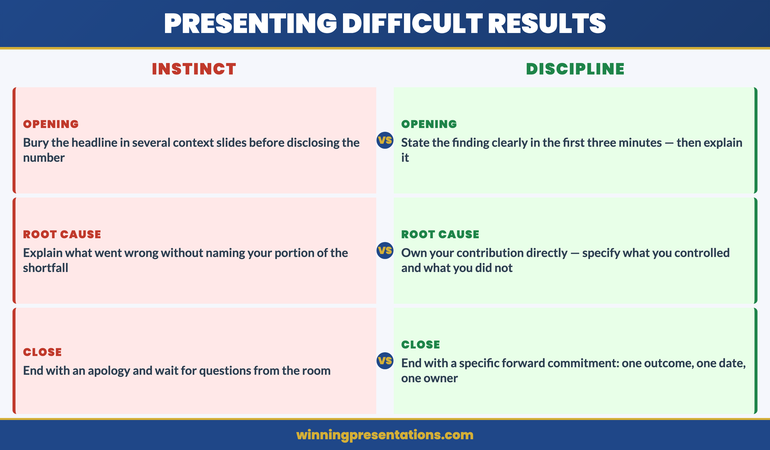
She did not do that. She had been in enough of these rooms to know that senior leaders are rarely fooled by sequencing. They had already seen the headline number before the meeting. What they were measuring was whether she understood what had happened, whether she owned it, and whether she had a credible path forward. Opening with positives would read as deflection.

So she rebuilt the deck from scratch. Context first — one slide on the market conditions her division had been navigating. Then the number, stated plainly, with the variance shown clearly against both target and prior quarter. Root cause on the next slide, in her own words, without distributing fault across teams she hadn’t yet named. Then corrective action. Then a forward commitment with a specific date and a measurable outcome.

Thursday’s meeting ran seventeen minutes shorter than scheduled. The CFO asked three focused questions about the corrective action timeline. The non-executives asked none. Astrid had given them nothing to be uncertain about.

If you are building a deck to present difficult results or a funding shortfall, the Executive Slide System has slide templates and scenario playbooks specifically designed for difficult-results presentations — so your structure holds under pressure, not just in theory.

Explore the System →

Why the Instinct to Soften Bad News Backfires

The urge to cushion a difficult number is understandable. It comes from wanting to protect relationships, manage anxiety in the room, and give people a moment to absorb context before the impact lands. Most executives have been trained, implicitly or explicitly, that you lead with strengths and work towards the challenge.

In a board or senior leadership setting, this approach tends to produce exactly the opposite result. By the time you reach the difficult number, your audience has often already seen it — in a pre-read, a briefing note, or a conversation with your finance partner. What they are watching is not the number itself, but how you handle it. Starting with positives before bad news signals one of two things: either you do not fully grasp the severity, or you do grasp it and are trying to soften the reaction. Neither reading builds confidence.

There is also a structural problem. When an executive buries the headline, the audience spends the early part of the presentation waiting for it. They stop engaging with your context slides and your positive indicators because they are mentally anticipating the moment when the real news arrives. You lose the room before you have said the difficult thing.

The executives who come out of difficult presentations with their credibility intact are the ones who state the situation with clarity, explain it without excuse, and shift the conversation to what happens next as quickly as possible. That is not a personality type — it is a structure. And structure can be built before you walk into the room.

If you have ever navigated a budget shortfall presentation, you will recognise this pattern. The instinct to build up to the variance rather than state it is almost universal — and almost universally counterproductive.

Executive Slide System — £39, instant access

Build a Deck That Holds Credibility When Results Are Difficult

When the number is bad, structure is your greatest asset. The Executive Slide System gives you the frameworks, slide templates, and scenario playbooks to build presentations that hold up under scrutiny — not just on paper, but in the room with senior stakeholders who have already seen the figure.

  • Slide templates for difficult-results presentations, variance reviews, and recovery plans
  • AI prompt cards to structure your narrative before you open PowerPoint
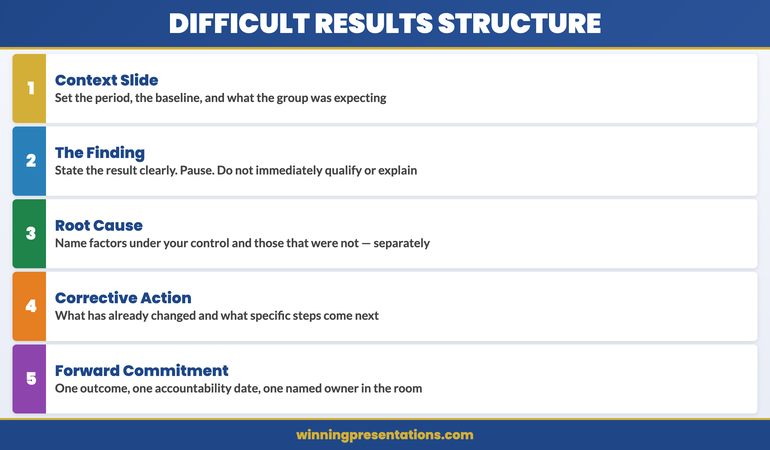
  • Framework guides: context → finding → cause → action → commitment
  • Scenario playbooks for board meetings, investor updates, and executive reviews
  • Root cause framing that owns the issue without distributing blame across your team

Designed for leaders presenting to boards, investors, and senior leadership teams.

Get the Executive Slide System →

The Five-Part Structure for Difficult Results Presentations

The structure below is built for situations where the news is materially bad — a significant miss against target, a funding shortfall, a project outcome that falls short of what was committed. It is not designed for minor variances that sit within normal operating tolerance. When the number is genuinely difficult, this sequence works because it follows the logical order in which a senior audience needs to receive and process information.

1. Context (one slide). Not positives — context. What were the conditions under which this period operated? Market environment, competitive dynamics, regulatory changes, or operational constraints that are relevant to understanding the outcome. This is not excuse-building; it is framing. Senior leaders need to know whether they are evaluating a team’s performance against a backdrop that was materially harder than planned, or against conditions that were largely as expected.

2. The bad news, stated plainly (one slide). Actual versus target. Actual versus prior period. The gap in absolute terms and as a percentage. No softening language. The slide should make the number visible and clear before your commentary begins.

3. Root cause (one to two slides). What drove the shortfall? This section requires the most preparation because it needs to be accurate, specific, and framed in a way that demonstrates analytical rigour without reading as defensive or blame-laden. More on this structure in the next section.

4. Corrective action (one to two slides). What is already in motion? What will change as a result of this analysis? Corrective action slides are where credibility is rebuilt — but only if the actions are specific, timed, and owned. Vague commitments (“we will review our processes”) are worse than no corrective action slide at all.

5. Forward commitment (one slide). A clear, measurable statement of where the business or project will be at the next review point. This is distinct from a corrective action. It is the outcome you are committing to, not the inputs you are changing. Senior leaders make decisions based on what they can hold you to; the forward commitment is what gives them that anchor.

The entire deck should run to eight to twelve slides. Length is not credibility. Precision is.


Five-part structure for presenting bad news to senior leadership: context, finding, root cause, corrective action, forward commitment

How to Frame Root Cause Without Creating a Blame Narrative

Root cause framing is where most difficult presentations come unstuck. The executive presenting has spent weeks or months close to the situation. They know who made which decisions. They may have raised concerns that were not acted on. Keeping that out of the room — or more accurately, structuring it so that it informs the analysis without becoming a blame narrative — requires deliberate preparation.

The first discipline is to separate causes from contributors. A cause is a structural or operational factor that can be analysed and addressed. A contributor is a person, team, or decision point. Your root cause slide should deal entirely in causes. Contributors may need to be discussed, but that conversation belongs in a different forum — usually a private one, before or after the main presentation.

The second discipline is to be specific about what you do and do not know. If the root cause analysis is still incomplete, say so on the slide. Senior leaders are not expecting omniscience — they are expecting rigour. “Root cause analysis is 80% complete; these three factors are confirmed, this fourth is still under investigation with a conclusion expected by [date]” is a stronger position than presenting a tidy but underpowered explanation that an experienced non-executive will immediately see through.

The third discipline is to own the portion that sits with you. If you led the team, approved the plan, or made the call that contributed to the outcome, acknowledge it in a single, direct sentence. Not an apology — an acknowledgement. “The original demand forecast that I signed off in November proved to be overly optimistic in three market segments” is a statement of fact that demonstrates ownership. It closes the room’s silent question (“does she know what her part in this was?”) before anyone has to ask it.

This approach is equally important when presenting a sensitive or unexpected situation to a board. The principles that apply to presenting a difficult topic to the board — clarity, ownership, and a clear forward path — hold across scenario types. The structure may vary; the underlying disciplines do not.

If you are building this kind of deck under time pressure, the Executive Slide System includes scenario playbooks written specifically for difficult-results presentations — so you have a tested framework to build from, not a blank slide.

The Forward Commitment Slide: What Senior Leaders Actually Need to See

Many executives treat the final slide of a difficult-results presentation as a summary or a list of next steps. Senior leaders are looking for something more specific: a measurable commitment that they can hold you to at the next touchpoint. The forward commitment slide is not a close — it is a contract.

The slide should answer three questions in plain language. First: what will the situation look like at the next review? Second: by when? Third: what would cause that commitment to change, and how will you communicate if it does?

The third element is the one most often omitted. Senior leaders understand that forecasts are subject to revision — what concerns them is the absence of a clear escalation trigger. If you include a statement such as “if the Q2 market recovery does not materialise by mid-May, I will flag this by [date] with a revised projection,” you demonstrate that you are managing forward actively, not just reporting backward.

The language on the forward commitment slide matters. Avoid language that hedges without qualifying: “we expect to return to plan” tells a non-executive nothing they can work with. Instead: “We are committing to [specific metric] by [specific date], based on the corrective actions described on the previous slide. This assumes [named assumption]. If that assumption changes, I will communicate by [date].”

That level of specificity is what converts a difficult presentation into a demonstration of leadership. Anyone can report a bad number. What senior boards are watching is whether you are the person who can manage the situation forward.

This structure transfers well beyond quarterly results. If you have ever needed to present a mid-year business review where performance is off track, the forward commitment section is the element that determines whether you leave that room with confidence or questions hanging in the air behind you.

Executive Slide System — £39, instant access

Structure Your Difficult Presentation Before You Open PowerPoint

The Executive Slide System is built around preparation, not just slide design. AI prompt cards walk you through structuring context, root cause, corrective action, and forward commitment — so when you do sit down to build the deck, every section is already clear in your thinking. Templates are formatted for board, investor, and executive team environments.

Get the Executive Slide System →

Handling Questions You Cannot Answer in the Room

In a difficult-results presentation, the Q&A section carries more weight than in most executive meetings. The room is alert. Senior leaders who were quiet during your presentation may become more direct once they begin asking questions. And occasionally, a question will arrive that you cannot answer — not because you are unprepared, but because the data or the analysis is not yet available.

The worst response to an unanswerable question in this context is to attempt an answer you cannot substantiate. Senior leaders who know the subject — and many board members and non-executives have deep functional expertise — will identify the gap immediately. Attempting an answer under pressure and getting it wrong is far more damaging to credibility than acknowledging the limits of what you currently know.

The response that works is honest and structured: “I don’t have the complete analysis on that yet. My current understanding is [what you do know]. I will have a full answer to you by [specific date and format].” This response demonstrates three things simultaneously: that you are not guessing, that you know the boundaries of your own analysis, and that you are committing to close the gap in a defined timeframe.

It is worth preparing, before the meeting, a short list of questions you are likely to be asked that you cannot yet fully answer — and rehearsing the holding response for each. That preparation is not about scripting — it is about ensuring you do not reach for speculation under pressure. The discipline of identifying the gaps in advance also often reveals whether those gaps are material enough to warrant further work before the presentation takes place.

One additional note on follow-up: whatever you commit to in the room, deliver it before the deadline you stated. A difficult-results presentation followed by a missed follow-up commitment compounds the original problem significantly. The holding response only builds credibility if the follow-through is reliable.


How to handle unanswerable questions in a difficult results presentation — four steps: acknowledge, state what you know, name the gap, commit to a date

Tone and Pacing When the News Is Bad

Delivery decisions in a difficult-results presentation matter as much as the structure. The way you pace your words, the register you use, and the degree of calm you project in the room all carry information — information that a senior audience is actively reading.

The most common tonal error is over-apologising. A single, clear acknowledgement of a shortfall is appropriate and expected. Repeated apologies shift the register from professional accountability to discomfort — and discomfort in the presenter makes the room more uncomfortable, not less. Senior leaders do not want to manage your reaction to the news. They want to understand the situation and move forward.

Pacing should be deliberate, particularly on the core finding slide. Executives who are anxious about a number sometimes speak faster at precisely the moment they should slow down. Stating the variance clearly, pausing, and allowing the room a beat to process before moving to root cause signals composure and confidence. It communicates, without saying so directly, that you are not afraid of the number — you are working through it.

Language precision is also part of tone. Phrases such as “it’s been a challenging quarter” or “the environment has been difficult” are heard by senior leaders as hedges. They are not wrong, but they are imprecise — and in a difficult presentation, imprecision reads as evasion. The more specific your language, the more confidence you project. “Revenue came in at £4.2m against a target of £5.4m, a shortfall of £1.2m driven by two factors” is a more credible opening than a general description of difficulty.

Finally, your energy level in the corrective action and forward commitment sections should rise slightly relative to the root cause section. Not artificially — but with a visible shift in engagement and directness. You are moving from analysis to action, and that transition in pace and energy signals that the conversation is now forward-looking. That shift is what leaves the room with confidence that the situation is being managed, not just documented.

Presenting bad news is a leadership skill that develops over time — but it develops faster when you have a repeatable structure and a clear sense of what your audience is actually listening for. For perspective on how this discipline fits into the broader discipline of executive communication across teams and time zones, the practical tactics in these Teams presentation hacks are worth applying to your virtual presentation preparation as well.

Frequently Asked Questions

Should you present bad news at the start or end of the meeting?

In a dedicated difficult-results meeting, the core finding — the bad number — should come early, after a brief context slide. Placing it at the end does not reduce its impact; it only delays the conversation and signals that you were reluctant to address it directly. Senior leaders typically know the headline before the room convenes. Your job is to take them through root cause and corrective action, and that conversation needs as much of the meeting time as possible. State the finding clearly, then move forward.

How do you maintain credibility when results are significantly below target?

Credibility in a difficult-results presentation is built through specificity, ownership, and forward commitment — not through the quality of the result itself. Own the portion of the shortfall that sits with you, in direct language and without hedging. Demonstrate rigorous root cause analysis, even where the analysis is incomplete — naming what you know and what you are still investigating is more credible than a tidy but thin explanation. Then commit to a specific outcome by a specific date. Senior leaders are not expecting perfect results; they are expecting capable leadership of an imperfect situation.

What’s the right tone when presenting difficult results to the board?

Calm, direct, and precise. Avoid over-apologising — a single acknowledgement of the shortfall is appropriate; repeated apology shifts the atmosphere in the room and puts the board in the position of managing your discomfort rather than engaging with the situation. Use specific language rather than general descriptions of difficulty. Slow your pace slightly when stating the core finding, then shift to a more active register when you reach corrective action and forward commitment. The board needs to leave the room confident that the situation is being actively managed, and tone is a significant part of communicating that.

Get weekly insights for executive presenters

Every Thursday, The Winning Edge delivers one focused, actionable idea on executive communication, presentation structure, and high-stakes speaking — direct to your inbox.

Subscribe to The Winning Edge →

Looking for a quick-reference checklist before your next high-stakes presentation? Download the free Executive Presentation Checklist — a concise guide to the structure, slides, and delivery points that matter most to senior audiences.

About the Author

Mary Beth Hazeldine

With 25 years of corporate banking experience at JPMorgan Chase, PwC, Royal Bank of Scotland, and Commerzbank, she advises executives across financial services, healthcare, technology, and government on structuring presentations for high-stakes funding rounds and approvals.

13 Apr 2026
Female executive Director presenting to the leadership team — deliberate, grounded gesture visible, open palm facing audience, corporate boardroom, authoritative confident posture, editorial photography style

Presentation Gestures: The Body Language Signals That Build Executive Credibility

Quick Answer

Presentation gestures undermine executive credibility when they are unconscious and driven by anxiety — self-touching, repetitive movements, or hands hidden below the table. They build credibility when they are intentional and match the pace of speech: open palms to signal transparency, contained gestures to signal precision, and deliberate pauses that give the body time to settle. The goal is not to choreograph movement — it is to stop nervous movement from speaking louder than your words.

Priya had been promoted to Director six months earlier and had presented to the executive leadership team twice since then. Both times, the feedback from her line manager was the same: technically excellent, but something feels slightly off in the room. People aren’t quite as convinced as they should be given the quality of the content.

The third time, her line manager sat in and watched. Afterwards, he asked her to watch a recording of the presentation — just the first three minutes, with the sound off.

What Priya saw startled her. She had no idea her hands were doing what they were doing. Throughout the opening — the part where she was most confident in her content — her left hand was touching her collar repeatedly, then her right hand was gripping the edge of the table, then both hands were clasped together in front of her. Her upper body was also subtly angled away from the most senior person in the room. She looked, she said afterwards, “like someone who was waiting to be told off.”

The content of those three minutes was strong. The body language was reading a completely different story — one of self-protection, uncertainty, and low status. And the people in that room, all of them experienced at reading people under pressure, were responding to the story they could see, not the one they could hear.

Gesture is not decoration. In executive presentations, it is a primary communication channel — and unlike the words you choose, it operates largely below conscious awareness. Understanding how to manage your own gesture patterns is one of the most direct routes to building the kind of credibility your content deserves.

Is anxiety affecting how you present physically?

If nerves are showing up in your body language — tight gestures, gripping, self-touching — Conquer Speaking Fear addresses the underlying anxiety that drives these physical patterns, not just the surface symptoms. Explore the Programme →

Why gesture matters more than words in executive settings

The research on non-verbal communication in high-stakes professional contexts is consistent: when verbal content and non-verbal signals are misaligned, audiences prioritise the non-verbal signal. They may not be able to articulate why they are unconvinced — “something felt off” is the most common description — but the misalignment registers and creates a vague but persistent sense of doubt.

In executive settings, this effect is amplified by the seniority of the audience. Senior leaders are experienced at reading people under pressure. They have spent careers in rooms where people present optimistic forecasts, defend difficult decisions, and ask for resources they may not be confident about. They have learned to use non-verbal cues as a reliability signal — not consciously, but through accumulated pattern recognition. When your gesture patterns signal anxiety, they read it as uncertainty about your content, whether or not that is what the anxiety is actually about.

The practical implication is that gesture management is not about performance. It is about alignment — ensuring that the credibility signals your body is sending are consistent with the quality of the case you are making. An executive with a genuinely strong case who presents with high-anxiety body language loses credibility they did not need to lose. An executive with a moderate case who presents with calm, grounded body language buys the room’s patience and attention.

For a related dimension of executive physical presence, see eye contact technique for presentations: how to hold the room without staring anyone down.

The four gesture zones every executive presenter needs to understand

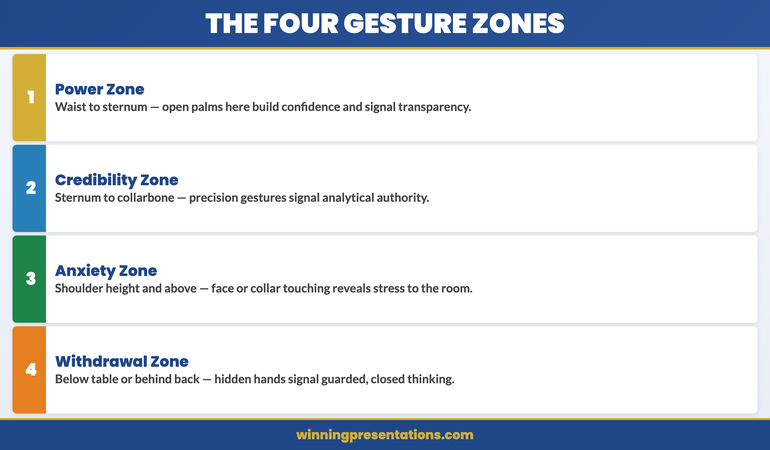
Gesture research identifies four distinct spatial zones that matter for executive presenters. Understanding which zone your habitual gestures occupy — and what each zone communicates — is the starting point for deliberate gesture management.

The four gesture zones for executive presenters infographic: the power zone, the credibility zone, the anxiety zone, and the withdrawal zone — showing what each communicates to the audience

The power zone. This is the space between your waist and your sternum, directly in front of your body. Gestures made in this zone — open, visible, with palms facing up or facing the audience — signal confidence and transparency. Leaders who gesture naturally in this zone tend to be perceived as authoritative without being aggressive. This is the zone you want most of your visible gestures to occupy.

The credibility zone. Slightly higher than the power zone, between your sternum and your collarbone. Gestures here — particularly precision gestures, where fingers and thumb touch — signal analytical confidence and attention to detail. Finance directors and technical specialists instinctively use this zone when discussing numbers or complex systems. It reads as competence.

The anxiety zone. This is the space at or above shoulder height. Gestures that drift into this zone — touching your face, hair, or collar — are the clearest non-verbal signal of anxiety available to an audience. They are almost always involuntary and almost always noticed. If you know you have a habit of touching your face or neck when you are under pressure, this is the single most important thing to address.

The withdrawal zone. This is everything below the table or behind your back. Hands that disappear from view — clasped behind you, hidden below the desk line, shoved into pockets — signal that you are managing yourself rather than engaging with the room. The audience may not consciously notice, but the engagement deficit is real.

Conquer Speaking Fear

Address the Anxiety That’s Showing Up in Your Body

Anxiety-driven gestures are a symptom, not the problem. Conquer Speaking Fear — £39, instant access — is a 30-day programme built on nervous system regulation and clinical hypnotherapy techniques, designed for executives whose anxiety is showing up physically in high-stakes presentation settings.

  • 30-day structured programme for presentation anxiety
  • Nervous system regulation techniques for the days and hours before presenting
  • Clinical hypnotherapy-based approaches for deep-rooted speaking fear
  • In-the-moment composure strategies for when nerves spike unexpectedly

Get Conquer Speaking Fear →

Designed for executives whose anxiety is limiting their professional presence and credibility.

Grounding gestures vs distancing gestures

Within the power and credibility zones, there is a further distinction that matters for executive presentations: the difference between grounding gestures and distancing gestures. Both types occur in the visible zone and neither is inherently anxious — but they communicate very different things about your relationship with your content and your audience.

Grounding gestures are gestures that move towards the audience or that are centred and contained. Open palms facing upward or toward the audience, a gesture that physically moves in the direction of a screen or a person, a deliberate downward motion that emphasises a point — these all create a sense of connection and presence. They say, in non-verbal terms: “I am here, I am engaged with you, and I want you to receive what I am saying.”

Distancing gestures are gestures that move away from the audience or that are turned inward. Palms facing down in a pressing motion (which can read as dismissive when overused), hands folded in front of the body (which creates a physical barrier), arms crossed (ditto), or gestures that stay close to the body’s centreline without extending outward — these all create a sense of separation. The speaker appears to be presenting from behind a physical boundary.

The practical intervention is to notice, before you begin any high-stakes presentation, what your default gesture pattern is when you are under moderate stress. Most people have one. If you tend toward contained, inward gestures, practise a single grounding gesture — an open, slow sweep toward the screen when referring to a slide, or an open palm toward the audience when making a key point. You do not need to overhaul your natural style. One intentional, grounded gesture per major content section is enough to shift how the room reads you.

For a broader framework on building executive presence before you walk into the room, see executive presence in presentations: the components that signal authority before you speak.

How the boardroom table works for and against you

A significant proportion of high-stakes executive presentations happen seated — board meetings, steering committees, investor briefings. The boardroom table changes the gesture landscape in ways that most presenters do not fully account for.

The table creates a natural boundary that can easily slide into the withdrawal zone. When you are seated, the temptation is to keep your hands below the table line — particularly if you are feeling anxious or uncertain. This removes your most important credibility signal from view entirely. The audience sees a talking head and infers, correctly, that the rest of the body is doing something it does not want observed.

The single most effective intervention in a seated executive presentation is to keep both hands visible above the table line at all times — resting lightly on the table or gesturing in the power zone above it. This alone shifts the impression from guarded to open, without requiring any additional gesture changes.

The table also creates opportunities. A deliberate, palm-down press on the table surface when making a firm point registers as decisive. A single fingertip placed on the table to enumerate a list point draws the audience’s eye and creates emphasis without the largeness of a standing gesture. Seated presenters who learn to use the table surface as part of their gesture repertoire typically find that their perceived authority increases significantly.

If anxiety is causing you to physically close down in presentations — hands hidden, gestures contracted, body angled away — Conquer Speaking Fear addresses the underlying nervous system response that drives those physical patterns, rather than treating the symptoms in isolation.

Common gesture mistakes that undermine authority

Five gesture patterns appear consistently across executives whose body language is undermining their credibility. These are not personality flaws — they are learned responses to the specific stress of presenting to senior audiences, and they can be addressed with awareness and practice.

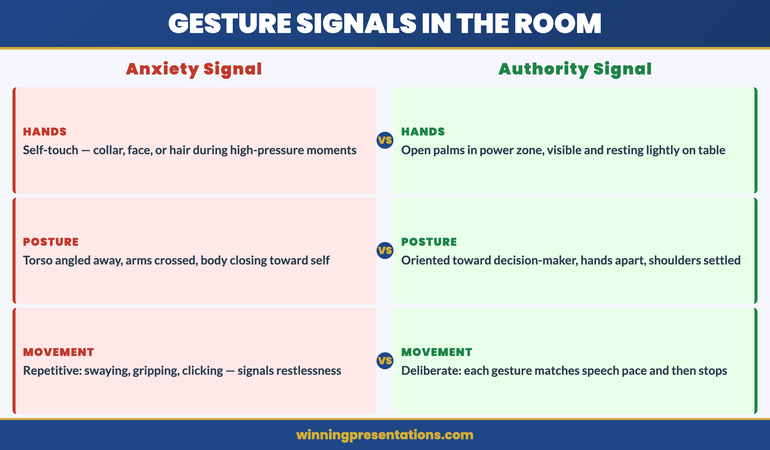
Common presentation gesture mistakes vs credibility-building alternatives: contrast panels showing anxious gestures (face touching, hidden hands, crossed arms) against grounded executive alternatives

The self-touch. Touching the face, neck, collar, hair, or ear during a presentation is the most visible anxiety signal available to an audience. It happens when the nervous system is trying to self-soothe under pressure. Awareness is the first step — if you know you do this, you can create a simple circuit-breaker: when you feel the impulse, redirect the hand to a deliberate gesture in the power zone instead.

The grip. Gripping the edge of a table, a pen, a pointer, or your own hands together conveys tension directly. The knuckles whiten, the forearm tightens, and the audience reads physical effort where you intend conviction. If you need something to hold, use a pen lightly — not gripped. Better still, keep your hands free and resting lightly on the table.

The fig leaf. Hands clasped together below the waist (standing) or in the lap (seated) create a closed, self-protective posture. This is one of the most common default positions for presenters under stress, and one of the most damaging in terms of perceived authority. The fix is to simply part the hands — resting them separately on the table or thighs — which immediately creates a more open and settled impression.

The repetitive movement. Swaying, rocking, pen-clicking, tapping, or any other repeated physical action draws attention from the content and signals restlessness or anxiety. These behaviours are almost always invisible to the presenter and very visible to the audience. A recording of your last presentation, watched with the sound off for two minutes, will tell you definitively whether you have a repetitive movement pattern.

The turned body. Presenting with your body or torso angled away from the most senior person in the room — usually the person you find most intimidating — creates a subtle but consistent impression of avoidance. The most effective correction is deliberate: before you begin, physically orient your body toward the decision-maker rather than toward the screen or the room in general.

For morning routine techniques that help you arrive at presentations in a calmer physical state, see the morning presentation protocol that elite executives use to manage pre-presentation nerves.

When nerves take over: recovering composure mid-presentation

Even experienced executive presenters encounter moments mid-presentation when the nervous system spikes unexpectedly — an aggressive question, an unexpected technical failure, a silence that lasts too long. In these moments, the body tends to revert to its anxious default, and the gesture patterns described above will all try to activate at once.

The most effective in-the-moment recovery technique is what performance coaches call the reset breath — a single, deliberate, slow exhale before you respond. The exhale activates the parasympathetic nervous system, which moderates the acute stress response. It takes less than three seconds. To the audience it looks like a considered pause before a thoughtful response. To your nervous system, it is a circuit breaker.

Pair the reset breath with a deliberate physical reset: both hands visible and flat on the table, shoulders dropped rather than raised, body facing toward the questioner. This physical posture tells your nervous system that you are in a position of stability rather than threat — which further moderates the anxiety response.

The longer-term solution is not performance management but the underlying anxiety itself. Gesture problems in executive presentations are almost always a symptom of a presenting anxiety that has not been fully addressed at its root — the belief, often below conscious awareness, that this presentation is dangerous, that failure here will be catastrophic, that the audience is looking for reasons to dismiss you. Addressing that belief — rather than managing its physical expressions — is what creates lasting change.

Conquer Speaking Fear — £39

From Managed Symptoms to Genuine Confidence

Conquer Speaking Fear — £39, instant access — is a structured 30-day programme using nervous system regulation and clinical hypnotherapy techniques. Designed for executives whose anxiety is showing up physically — in gestures, posture, or in-the-moment composure — and who want lasting change, not coping strategies.

Get Conquer Speaking Fear →

Designed for executives whose presentation anxiety is limiting their professional credibility.

Frequently Asked Questions

Should I rehearse specific gestures before a presentation?

Rehearsing specific gestures tends to make them look choreographed rather than natural — which creates a different kind of credibility problem. What is worth rehearsing is the absence of anxious gestures: recording yourself on your phone for five minutes while you walk through the opening of your presentation, then watching it back with the sound off to identify which anxiety patterns are active. Once you know what your default anxious gestures are, you can practise redirecting them rather than scripting replacements. The goal is not controlled performance — it is the physical calm that comes from a nervous system that is not in high alert.

Does gesture style need to change depending on the audience’s culture?

Cultural context does affect gesture norms, and this matters most in international or cross-cultural executive presentations. In general, contained gestures that stay in the power zone are culturally neutral — they read as professional and deliberate across most Western and Asian corporate cultures. What varies is the degree of expressiveness that is expected: some cultures read low gesture volume as composure, others as coldness or disengagement. If you are presenting to an audience from a culture significantly different from your own, the safest approach is to observe how your most respected counterparts in that culture gesture during presentations, and calibrate accordingly.

How long does it take to change habitual gesture patterns?

For most executives, awareness alone produces a noticeable change within three to five presentations. The anxious gesture pattern is habitual, not instinctive — which means it can be interrupted with conscious attention. What takes longer is the underlying anxiety that drives the pattern. If you find that the gestures return under high-pressure conditions even when you have worked hard to address them in lower-stakes settings, that is a signal that the anxiety itself needs to be addressed rather than just managed at the surface level.

The Winning Edge

Weekly executive communication insight — every Thursday

Practical, evidence-based analysis of presentation confidence, delivery, and body language for executives who present in high-stakes settings.

Subscribe to The Winning Edge →

About the Author

Mary Beth Hazeldine — Owner & Managing Director, Winning Presentations

With 25 years of corporate banking experience at JPMorgan Chase, PwC, Royal Bank of Scotland, and Commerzbank, Mary Beth advises executives across financial services, healthcare, technology, and government on structuring presentations and managing the anxiety that limits their professional impact. Her approach draws on neuroscience, performance psychology, and 16 years of executive presentation training.

24 Jan 2026
Professional woman evaluating her presentation slides and realizing what they signal about her competence to executives

What Your Slides Say About You (And It’s Not What You Think)

A CFO once told me why she rejected a £2 million budget request before the presenter finished slide three: “His slides told me everything I needed to know about his thinking. It was scattered.”

Quick answer: Executive slide design perception is how decision-makers read your competence, preparation, and thinking quality through your slides—before you speak a single word. Executives form judgments within 5 seconds of seeing your first slide. Cluttered slides signal cluttered thinking. Buried conclusions signal uncertainty. Wall-of-text slides signal you haven’t done the synthesis work.

In practice, the visual signals your slides send often matter more than the words on them. Executives aren’t reading your slides—they’re reading YOU through your slides.

When your slides send the right signals:

  • Executives lean in instead of checking email
  • Your recommendations get faster approvals
  • You’re seen as someone who “gets it”

Written by Mary Beth Hazeldine — executive presentation coach, 24 years corporate banking at JPMorgan Chase, PwC, RBS, and Commerzbank. I’ve sat in the room when slides killed careers and when they made them. Last updated: January 2026.

🚨 Presenting THIS WEEK? Check your slides for these 3 signals:

  1. Slide 1: Does your conclusion appear in the first 10 words? (If not, you’re burying the lead)
  2. Any slide: Can someone grasp the point in 3 seconds? (If not, it’s too cluttered)
  3. Titles: Do they make claims or just label topics? (“Revenue grew 23%” beats “Revenue Overview”)

Fix these three and you’ll send different signals immediately.

→ If your slide 1 doesn’t contain your decision ask, executives assume you don’t have one. Get the templates that fix this in 60 seconds →

📅 Have 7 days to transform your deck?

The slide signal system in this article takes one focused session to implement. Most professionals see the difference in how executives respond within their very next presentation.

I learned this lesson the hard way. Early in my banking career, I spent 40 hours building what I thought was a comprehensive deck. Fifty-seven slides. Every data point. Complete background on every issue.

The Managing Director stopped me on slide four.

“I can see you worked hard on this,” she said. “But I still don’t know what you want me to do.”

Forty hours of work. Four slides in. And my slides had already told her I didn’t understand what mattered. Not because of the content—but because of the signals the design sent about my thinking.

That moment changed how I approach every deck. And after 24 years of watching executives react to presentations, I now know exactly what signals matter—and which ones kill your credibility before you’ve finished your opening sentence.

What Executives Actually See (In the First 5 Seconds)

When an executive sees your slide, they’re not reading it. They’re scanning it for signals about YOU.

Research on cognitive load shows people form impressions within milliseconds of seeing a visual. Your audience has judged your slide—and by extension, your thinking—before you’ve finished your opening sentence.

Here’s what they’re actually processing:

Signal 1: Hierarchy (Do you know what matters?)

The first thing executives notice is whether there’s a clear visual hierarchy. Is there one dominant element? Or is everything competing for attention?

A slide with five equally-weighted bullet points tells the executive: “I couldn’t decide what was important, so I’m making you do it.”

A slide with one clear headline supported by three subordinate points tells them: “I’ve done the thinking. Here’s what matters.”

Signal 2: Density (Do you respect my time?)

Wall-of-text slides send an unmistakable message: “I haven’t distilled this enough to present it clearly, so I’m going to read to you.”

One senior partner at a consulting firm told me: “When I see a dense slide, I immediately wonder if the presenter understands the material well enough to simplify it. Usually they don’t.”

Signal 3: Structure (Can you think clearly?)

Executives are pattern-matchers. They’ve seen thousands of presentations. They immediately notice whether your deck follows a logical structure or feels random.

A deck that jumps from problem to solution to background to data to recommendation signals scattered thinking. A deck that flows—situation, complication, resolution—signals someone who can construct a coherent argument.

For more on title mistakes, see why “Overview” is the worst slide title.

Diagram showing what executives see in the first 5 seconds of viewing a slide: hierarchy, density, and structure signals

The Hidden Messages Your Slides Are Sending

Beyond the conscious signals, your slides send subconscious messages that executives process without even realising it.

“I’m not confident in my recommendation”

When you bury your conclusion on slide 15 instead of leading with it, executives interpret this as hedging. You’re building up to something because you’re not sure they’ll accept it.

A VP of product once told me: “When someone buries the ask, I assume they know it’s weak. If they believed in their recommendation, they’d lead with it.”

“I don’t understand my audience”

Technical details that belong in an appendix. Jargon that assumes expertise they don’t have. Context they already know being explained at length.

All of these signal the same thing: you haven’t thought about who’s in the room and what they need.

“I’m trying to impress rather than inform”

Over-designed slides with animations, complex charts, and visual flourishes often backfire. Executives see through them immediately.

A managing director at an investment bank put it bluntly: “Fancy slides usually mean the content is weak. The best presenters I know use the simplest slides.”

“I haven’t done the hard work”

It takes more effort to create a simple, clear slide than a complex one. As the saying goes: “If you can’t explain it simply, you don’t understand it well enough.”

Executives know this. When they see complex slides, they question whether you’ve done the synthesis work—or whether you’re just dumping information and hoping they’ll sort it out.

⭐ Slides That Signal “This Person Gets It”

The Executive Slide System gives you the exact structures that send the right signals—hierarchy, clarity, and confidence—from slide one.

What’s inside:

  • 12 executive-tested slide templates (board updates, budget requests, project proposals)
  • The “Headline Test” that ensures every title makes a claim
  • Before/after examples showing signal transformation

Get the Executive Slide System → £39

Built from 24 years in corporate banking + executive training work with senior stakeholders.

5 Slide Signals That Kill Your Credibility

These are the specific executive slide design perception mistakes that damage how you’re seen:

1. The “Agenda” Opening Slide

Starting with “Agenda” or “Overview” tells executives nothing. It’s a missed opportunity to signal that you understand what matters.

What it signals: “I’m going to walk you through this linearly because I haven’t identified what you actually need to know.”

The fix: Open with your conclusion or recommendation. “We should approve the £2M investment because it will generate £8M in returns within 18 months.”

2. The Wall of Bullets

Five or more bullet points of equal weight, each a complete sentence, filling the slide.

What it signals: “I couldn’t synthesise this information, so I’m presenting my notes instead of my thinking.”

The fix: One headline that makes a claim. Three supporting points maximum. If you need more, you need more slides.

3. The Chart Without a Story

A complex chart with no annotation, no highlight, no indication of what the viewer should notice.

What it signals: “I’m showing you data but I haven’t interpreted it. You figure out what it means.”

The fix: Every chart needs a headline that states the insight. “Revenue grew 23% despite market contraction” not “Revenue Chart Q3.”

4. The “Let Me Give You Context” Deck

Slides 1-10 are background. The recommendation doesn’t appear until slide 15.

What it signals: “I’m afraid you’ll reject my recommendation, so I’m delaying it as long as possible.”

The fix: Recommendation on slide 1. Context only when asked for or as appendix.

5. The Design-Over-Substance Slide

Beautiful gradients, custom icons, animations—but the content is thin or unclear.

What it signals: “I spent time on how this looks because I didn’t have confidence in what it says.”

The fix: Simple, clean, content-focused. Let the message carry the weight.

For more on executive summary best practices, see how to write the only slide that matters.

Want slide templates that send the right signals? The Executive Slide System (£39) includes 12 proven structures used by executives at top firms.

5 Slide Signals That Build Authority

These are the signals that make executives think “this person knows what they’re doing”:

1. Conclusion-First Structure

Your recommendation or key message appears in the first 10 seconds. No buildup. No suspense.

What it signals: “I’m confident in my position. I’ve done the analysis. Here’s what we should do.”

2. Headline-Driven Slides

Every slide title makes a claim, not a label. “Market share increased 15%” not “Market Share Update.”

What it signals: “I’ve interpreted the data. I’m not making you do my job.”

3. Strategic White Space

Slides that breathe. One idea per slide. Room for the eye to rest.

What it signals: “I’ve distilled this to what matters. I respect your cognitive load.”

4. Annotated Visuals

Charts with callouts. Diagrams with explanatory text. Visual elements that guide rather than overwhelm.

What it signals: “I’ve thought about what you need to see and made it easy to find.”

5. The “So What?” Test

Every slide answers “so what?” explicitly. No slide exists just to show information—each one drives toward the conclusion.

What it signals: “Everything here has a purpose. I’m not wasting your time.”

Comparison of credibility-killing slide signals versus authority-building slide signals that executives notice

⭐ If Your Slides Aren’t Getting the Response You Want

It’s probably not your content—it’s the signals your slides are sending. The Executive Slide System rewires how your deck communicates before you even speak.

You’ll get:

  • The “Signal Audit” checklist (run before every important presentation)
  • 12 slide templates that pass the executive perception test
  • Real before/after transformations from actual client decks

Get the Executive Slide System → £39

The same structures I used for 24 years in banking—now available as templates.

Before and After: Real Slide Transformations

Here’s what changing your slide signals looks like in practice:

Transformation 1: The Opening Slide

Before: “Q3 Performance Review — Agenda: 1. Background, 2. Market Overview, 3. Results, 4. Challenges, 5. Next Steps”

What it signalled: “Buckle up for a linear data dump. I’ll get to the point eventually.”

After: “Recommendation: Approve £500K additional investment in Product X. Q3 results exceeded targets by 23%, validating our strategy.”

What it signals now: “I know what you need to decide. Here it is.”

Transformation 2: The Data Slide

Before: Title: “Revenue Data” — Complex chart with 8 data series, no annotations, legend in small text.

What it signalled: “Here’s all the data. Good luck finding the insight.”

After: Title: “Revenue grew 23% while competitors declined” — Same data, but one trend highlighted, callout pointing to key inflection, competitors greyed out.

What it signals now: “I’ve analysed this. Here’s what matters.”

Transformation 3: The Recommendation Slide

Before: Bullet list of 7 recommendations, all equal weight, no prioritisation.

What it signalled: “I generated a list but couldn’t prioritise it for you.”

After: One primary recommendation in large text. Three supporting actions in smaller text. Clear next step with owner and deadline.

What it signals now: “I know what matters most. I’ve made the decision easy for you.”

For proven executive presentation structures, see the 12-slide template that commands the room.

Ready to transform your slides? The Executive Slide System (£39) includes the exact before/after templates you can apply immediately.

Frequently Asked Questions

How quickly do executives form impressions from slides?

Research suggests visual impressions form within milliseconds—faster than conscious thought. By the time you’ve said your first sentence, they’ve already judged your slide. This is why executive slide design perception matters so much: the signals happen before your content has a chance to land.

Does slide design really matter more than content?

No—but poor slide design can prevent good content from being heard. If your slides signal scattered thinking, executives will be skeptical of your content regardless of its quality. The design IS the first impression of your content.

What’s the biggest slide mistake executives notice?

Burying the lead. When your conclusion or recommendation doesn’t appear until deep in the deck, executives interpret this as either lack of confidence or lack of synthesis. Lead with your point. Support it with evidence.

Should I use professional design templates?

Clean, simple templates are fine. Over-designed templates can actually hurt you—they signal that you’re compensating for weak content. The goal is invisible design: formatting that helps the content communicate, not formatting that draws attention to itself.

How do I know if my slides are sending the wrong signals?

Apply the “3-second test”: show someone your slide for 3 seconds, then hide it. Ask them what the main point was. If they can’t tell you, your hierarchy is wrong. If they mention something other than your main point, your emphasis is wrong. If they say “it was really busy,” your density is wrong.

Can I fix bad slide signals quickly before a presentation?

Yes. Focus on three things: (1) Move your conclusion to slide 1, (2) Make every title a claim instead of a label, (3) Remove any slide that doesn’t directly support your conclusion. This won’t make your deck perfect, but it will send dramatically better signals.

Why do executives care about slides if they’re listening to me?

Executives are overwhelmed with information. Slides act as a filter—a quick way to assess whether this presentation is worth their full attention. Clean, well-structured slides signal that you’ve done the hard work of synthesis. That earns their attention. Cluttered slides signal the opposite.

Is This Right For You?

✓ This is for you if:

  • You present to executives, boards, or senior stakeholders
  • You’ve noticed your slides aren’t getting the response you want
  • You want templates that signal competence immediately
  • You’re willing to restructure how you build decks

✗ This is NOT for you if:

  • You only present to internal teams (lower stakes)
  • You want design software training, not structure help
  • Your main issue is delivery, not deck construction
  • You’re not willing to change how you organise information

⭐ The MD Who Stopped Me on Slide Four Taught Me Everything

That 57-slide deck that died on slide four? I rebuilt it using the structures now in the Executive Slide System. Same content. Different signals. The same MD approved it two weeks later—and asked for the template.

What you’ll get:

  • 12 executive-tested slide templates
  • The Signal Audit checklist
  • Before/after transformation examples

Get the Executive Slide System → £39

Built from structures that work in global banking and consulting-style environments.

📧 Optional: Get weekly slide strategies in The Winning Edge newsletter (free).

Your Next Step

Your slides are sending signals whether you intend them to or not. The question is whether those signals build your credibility or undermine it.

Run the 3-second test on your next deck. Check whether your conclusion appears in the first 10 seconds. Make sure every title makes a claim instead of labelling a topic.

Those three changes alone will transform your executive slide design perception—how executives read you through your slides.

For the complete system with templates and checklists, get the Executive Slide System (£39).

P.S. If presentation anxiety is affecting your delivery regardless of how strong your slides are, see what to do if you have a panic attack before presenting.

About the Author

Mary Beth Hazeldine is the Owner & Managing Director of Winning Presentations. The MD story that opened this article is real—and that rejected deck became the foundation for how she now teaches slide structure.

With 24 years at JPMorgan Chase, PwC, Royal Bank of Scotland, and Commerzbank—where one presentation could change funding, strategy, or careers—she’s seen thousands of executive presentations. The patterns of what works became the Executive Slide System.

Book a discovery call | View services

23 Jan 2026
Executive presenting with composed confidence after a project failure, demonstrating the ownership and forward-focus that rebuilds credibility

Presenting After Failure? The 3 Words That Saved a VP’s Career

The £2.1 million product launch had flopped. Now Marcus had to present to the same executives who’d approved the budget.

Quick answer: Presenting after failure requires a fundamentally different approach than normal presentations. The instinct is to defend, explain, or minimise—all of which destroy credibility further. The 3 words that work: “Here’s what’s next.” This reframe shifts the room from judgement mode to problem-solving mode, and it only works when paired with a specific slide structure that demonstrates you’ve already done the hard thinking.

In practice, presenting after failure means leading with accountability, pivoting quickly to forward action, and providing a concrete recovery framework—so executives see a leader taking ownership, not someone making excuses.

Last updated: January 2026 — Updated for 2026 with executive recovery slide examples + decision scripts that rebuild credibility fast.

📅 Presenting about a failure in the next 7 days? Do this now:

  1. Open with ownership (15 seconds max on what went wrong—no excuses)
  2. State “Here’s what’s next” before slide 2
  3. Present your recovery framework with specific actions and timelines
  4. Close with the decision you need—don’t leave it open-ended

This structure works because it demonstrates leadership, not defensiveness. Executives respect ownership + action far more than perfect outcomes.

I’ve coached executives through dozens of these moments—the failed product launches, the missed targets, the projects that went sideways. The ones who recovered their credibility all did something counterintuitive.

They stopped trying to explain what happened. And they started showing what happens next.

If you’re facing a presentation where you have to own a failure, this article gives you the exact structure that rebuilds trust instead of destroying it.

Why Your Instincts Are Wrong After a Failure

When a project fails, your brain goes into threat-response mode. You want to explain. Justify. Provide context. Show that it wasn’t entirely your fault.

Every one of these instincts will make things worse.

I see this pattern constantly: executives walk into failure presentations with 15 slides of explanation—market conditions, vendor issues, timeline pressures, resource constraints. They think they’re providing context. The room sees someone who can’t take ownership.

Marcus—the VP with the £2.1 million flop—made this mistake in his first attempt. His presentation opened with three slides explaining why the launch failed: competitor timing, supply chain issues, marketing budget cuts.

The CFO stopped him on slide four. “I don’t need a post-mortem. I need to know what you’re going to do about it.”

That’s when Marcus called me. And that’s when we rebuilt his presentation from scratch.

The problem wasn’t that his explanations were wrong. The problem was that presenting after failure requires a completely different psychological contract with your audience.

Executives don’t want to understand why something failed. They want to know you’ve already figured out the path forward.

The 3 Words That Change Everything

Here’s what we put on Marcus’s second slide, right after a single sentence acknowledging the failure:

“Here’s what’s next.”

Three words. That’s it.

These words work because they accomplish three things simultaneously:

  1. They signal ownership. You’re not asking permission to move forward. You’re already there.
  2. They shift the room’s mindset. Executives go from judgement mode to evaluation mode—assessing your plan rather than your past.
  3. They demonstrate leadership. Leaders don’t dwell. They act.

A product director named Jennifer used this exact phrase after a feature launch that alienated key customers. “The moment I said ‘here’s what’s next,’ I could feel the room relax,” she told me. “They weren’t there to punish me. They were there to solve a problem. I just had to show them I was already solving it.”

But these three words only work if what comes next is actually compelling. That’s where the slide structure matters.

Diagram showing why fighting the sweat response makes it worse - the sympathetic vs parasympathetic nervous system during presentations

⭐ The Slide Structure That Rebuilds Credibility

Executive Slide System includes the exact frameworks for high-stakes presentations—including recovery presentations after failures, setbacks, and missed targets.

What’s inside:

  • 5-slide recovery structure (ownership → action → decision)
  • Executive-tested slide templates
  • Before/after examples from real presentations

Get the Executive Slide System → £39

Built from 24 years in corporate banking + 15 years coaching executives through high-stakes boardroom moments.

Instant download • Use it today • Keep forever

📦 What You Get (Specifically):

  • 12 executive slide frameworks — including recovery presentations, bad news delivery, and credibility rebuilding
  • Before/after transformations — see exactly how to restructure failing presentations
  • The 60-second slide test — know instantly if your slides will land or bomb
  • Headline formulas — turn forgettable slide titles into executive attention-grabbers
  • Decision slide templates — get faster approvals with the right structure

The 5-Slide Structure for Recovery Presentations

After working with Marcus and dozens of other executives in similar situations, I’ve refined the structure that works for presenting after failure:

Slide 1: The Ownership Slide (30 seconds max)

One sentence stating what happened. No explanations. No context. No defensive qualifiers.

Marcus’s slide read: “The Q3 product launch missed revenue targets by 67%. I own that outcome.”

That’s it. Sixteen words. The instinct is to add more—but more words signal defensiveness, not leadership.

Slide 2: “Here’s What’s Next” (The Pivot)

Immediately pivot to forward action. This slide should contain your recovery thesis in one sentence, followed by the 3 words: “Here’s what’s next.”

Marcus wrote: “We’ve identified the three fixable issues and built a 90-day recovery plan. Here’s what’s next.”

Slide 3: The Recovery Framework

Show your thinking, not just your conclusions. Executives want to see that you’ve done the analysis. Use a simple framework—I recommend three columns: Issue, Root Cause, 30-Day Action.

This slide proves you’ve moved past blame and into solutions.

Slide 4: Timeline + Milestones

Specific dates. Specific metrics. Specific accountability.

Vague timelines (“over the coming months”) destroy credibility. Specific timelines (“Phase 1 complete by February 15, measured by X metric”) rebuild it.

Slide 5: The Decision Slide

End with what you need from them. Don’t leave it open. “I need approval to reallocate £400K from Q4 budget to fund the recovery plan. Can I have that today?”

This structure works because it demonstrates exactly what executives want to see: ownership, forward thinking, concrete planning, and decisive action.

For more on structuring executive-level presentations, see the executive presentation structure that gets buy-in.

Need the complete recovery presentation framework? Executive Slide System includes the full 5-slide structure plus templates for every high-stakes scenario. Get the Framework → £39

Instant download • Use it today • Keep forever

What NOT to Do (I’ve Seen Careers End This Way)

Before we go further, let me tell you about Sarah—a director who did everything wrong.

Her project had gone 40% over budget. Instead of the ownership + action structure, she opened with seven slides of explanation: scope creep, vendor delays, team turnover, unclear requirements from stakeholders.

Each slide was technically accurate. And each slide made things worse.

By slide five, the CEO interrupted: “Sarah, I’m hearing a lot of reasons why this isn’t your fault. What I’m not hearing is what you’re going to do about it.”

She didn’t have a good answer. She’d spent all her preparation time building the defence case instead of the recovery case.

She was moved to a different role within three months.

Here’s what to avoid when presenting after failure:

  • Don’t open with explanations. Even accurate ones signal defensiveness.
  • Don’t distribute blame. “The vendor failed to deliver” might be true—but it’s not leadership.
  • Don’t minimise. “It wasn’t as bad as it looks” insults your audience’s intelligence.
  • Don’t ask for sympathy. “It’s been a really difficult quarter” is irrelevant to executives.
  • Don’t leave the path forward vague. “We’re working on solutions” means you haven’t done the work yet.

The common thread: every one of these mistakes focuses on the past or on yourself. Recovery presentations must focus on the future and on the business.

Related: See the complete guide to presenting bad news without destroying your credibility.

The pre-presentation protocol timeline showing when to do each nervous system technique before presenting

⭐ Turn Your Next Difficult Presentation Into a Career Win

The executives who recover from failures aren’t luckier—they have better frameworks. Executive Slide System gives you the structures that transform difficult moments into leadership demonstrations.

Frameworks included:

  • Recovery presentation structure (5 slides)
  • Bad news delivery framework
  • Budget request structure (even after overruns)

Get the Executive Slide System → £39

Same frameworks I used with Marcus. His recovery presentation got the budget approved—and a promotion six months later.

Instant download • Use it today • Keep forever

How to Rebuild Credibility Over Time

The presentation is just the first step. Rebuilding credibility after a failure is a multi-month process that requires consistent follow-through.

Here’s what I coach executives to do in the 90 days after a recovery presentation:

Week 1-2: Over-communicate on Progress

Send brief weekly updates to the key stakeholders who were in that room. One paragraph, three bullet points: what you said you’d do, what you did, what’s next.

This seems excessive. It’s not. After a failure, silence breeds doubt. Proactive communication rebuilds trust.

Month 1: Hit Your First Milestone Publicly

Whatever you committed to in that recovery presentation, deliver the first milestone early if possible. Then make sure the right people know about it.

A VP of operations named James told me this was the turning point in his recovery: “I said I’d have the vendor situation resolved in 30 days. I got it done in 21 and sent a one-line email to the CEO. He replied with two words: ‘Well done.’ That was the moment I knew I was back.”

Month 2-3: Reference the Learning

In subsequent presentations, briefly reference what you learned from the failure. Not defensively—as a demonstration of growth.

“After Q3, we rebuilt our vendor assessment process. Here’s how that’s improved our Q4 planning…” shows you’ve extracted value from the setback.

If you’re nervous about these follow-up presentations, the physical symptoms are real. See how to stay composed when presenting under pressure—today’s partner article on managing the physical side of high-stakes moments.

Want every executive presentation framework in one place? Executive Slide System covers recovery presentations, board updates, budget requests, and more—all using the same psychology-backed structure. See All Frameworks → £39

Instant download • Use it today • Keep forever

Presenting After Failure: Common Questions

How do you present after a project failure?

Presenting after failure requires leading with brief ownership (one sentence, no excuses), pivoting immediately to “here’s what’s next,” presenting a concrete recovery framework with timelines and accountability, and closing with a specific decision request. The structure that works: Slide 1 (ownership), Slide 2 (pivot), Slide 3 (recovery framework), Slide 4 (timeline), Slide 5 (decision). Avoid explanations, blame distribution, and vague forward plans.

What do you say after a failed presentation or project?

The three words that work: “Here’s what’s next.” This phrase signals ownership, shifts the room from judgement to problem-solving, and demonstrates leadership. Follow immediately with your concrete recovery plan. Avoid phrases like “it wasn’t as bad as it looks,” “the circumstances were difficult,” or anything that distributes blame to others.

How do you rebuild credibility after a failure at work?

Rebuilding credibility after failure is a 90-day process: deliver your recovery presentation with the ownership + action structure, over-communicate progress weekly for the first month, hit your first milestone early and publicly, then reference the learning in future presentations. Consistency matters more than any single moment—executives watch whether you follow through on what you committed to.

Is This Framework Right For You?

✓ This is for you if:

  • You’re facing a presentation about a failed project, missed target, or setback
  • You need to rebuild credibility with executives or stakeholders
  • You want a proven structure (not generic advice)
  • You’re willing to lead with ownership, not explanations

✗ This is NOT for you if:

  • You want templates for routine presentations (this is for high-stakes moments)
  • You’re looking for ways to avoid accountability
  • You need legal or HR advice about a workplace situation
  • The failure involves ethical violations (different playbook required)

⭐ The Framework Marcus Used to Save His Career

After his £2.1M launch flopped, Marcus used the Executive Slide System to rebuild his recovery presentation. He got the budget approved—and was promoted six months later. The same frameworks are inside.

What you’ll use immediately:

  • 5-slide recovery structure
  • Ownership slide template
  • Recovery framework format

Get the Executive Slide System → £39

Built from 24 years in corporate banking. Tested across 200+ executive recovery presentations.

Instant download • Use it today • Keep forever

FAQ

Should I apologise when presenting after a failure?

Brief ownership is essential; extended apology is counterproductive. “I own that outcome” works. “I’m so sorry this happened and I want to apologise to everyone affected” takes too long and puts the focus on emotion rather than action. Executives want to see you’ve moved past the failure mentally—prolonged apology suggests you haven’t.

How long should I spend explaining what went wrong?

30 seconds maximum. One slide, one sentence stating what happened. The explanation instinct is strong, but every minute spent on the past is a minute not spent on the future. If executives want more context, they’ll ask—and then you can provide it. But most won’t. They care about the path forward.

What if the failure wasn’t entirely my fault?

It doesn’t matter for the presentation. Distributing blame—even accurately—makes you look weak. Take ownership of the outcome regardless of contributing factors. You can address process improvements (including vendor management or cross-functional coordination) in your recovery framework without pointing fingers. Leaders own outcomes; managers explain circumstances.

Can this structure work for team failures, not just individual ones?

Yes—and it’s even more important. When presenting on behalf of a team, you must own the outcome personally. “We failed” is weaker than “I led a team that didn’t deliver, and I’m accountable for that.” Then pivot to “here’s what’s next” and show the team’s recovery plan. Your willingness to take personal ownership for a team outcome is exactly what executives want to see from leaders.

📧 The Winning Edge Newsletter

Weekly frameworks for executive presentations, high-stakes communication, and the psychology of leadership presence. For senior professionals who present to boards, executives, and stakeholders.

Subscribe Free →

Your Next Step

If you’re presenting after failure, you’re facing one of the highest-stakes moments in your career. The good news: it’s also an opportunity.

The executives who handle these moments well—with ownership, forward focus, and concrete action plans—often emerge with more credibility than they had before. Failure handled well demonstrates leadership more clearly than success that came easily.

Remember: ownership (one slide), “here’s what’s next” (the pivot), recovery framework (show your thinking), timeline (specific dates), decision (what you need).

For the complete framework with templates and examples, get the Executive Slide System → £39.

About the Author

Mary Beth Hazeldine is the founder of Winning Presentations and creator of the Executive Slide System. She’s coached 200+ executives through recovery presentations after project failures, budget overruns, and missed targets—including Marcus, whose story opened this article.

With 24 years of corporate experience at JPMorgan Chase, PwC, Royal Bank of Scotland, and Commerzbank, she’s seen firsthand how the right presentation structure can rebuild—or destroy—executive credibility.

Book a discovery call | View services