Tag: executive briefing

13 May 2026
Featured image for Quarterly Review Slide Structure: The 4-Section Framework Senior Leaders Trust

Quarterly Review Slide Structure: The 4-Section Framework Senior Leaders Trust

Quick Answer

A quarterly review slide structure works when it follows a four-section frame: position, performance, pivot, provision. Each section maps to one or two slides. The frame turns a quarterly review from a status report into a decision conversation — what changed, what worked, what needs to change next, and what the executive committee needs to provision for the next quarter.

Mei runs a 14-person product engineering function inside a B2B SaaS company. Her quarterly reviews used to take three days to prepare and ninety minutes to deliver. Last December she finished her QBR feeling she had presented well. Two days later her boss sent a message: “Good update. What did you actually need from us?”

She had not asked for anything. The deck was 22 slides of accomplishments, metrics, and forward plans. The executive committee had no decision to make. The meeting was a transmission, not a conversation. Three months later she rebuilt the QBR around four sections — position, performance, pivot, provision — and went back into the room with eight slides instead of 22. Her boss asked three questions and committed to two resourcing decisions. The QBR became useful for the first time in two years.

If your QBR ends with no decision asked for and none made

A four-section structure forces every quarterly review into decision-shape. The exec committee leaves the room knowing what changed, what they need to provision, and what they decided.

Explore the Executive Slide System →

Why most QBRs fail to drive decisions

Standard QBR templates inherit a structural flaw: they are organised around what we did, not what changed. The result is a quarterly ritual that consumes calendar time without producing decisions. Three patterns recur across companies of every size:

The “Q1 Highlights” syndrome. Slide 2 lists six bullets summarising the quarter’s achievements. Slide 3 lists six more. By slide 5 the executive committee has skim-read the highlights, formed an impression, and lost interest. Highlights are not a position; they are a narrative the team writes about itself. Senior audiences need the position — what changed in the operating reality the team owns — not a curated set of wins.

Performance metrics presented without thresholds. A slide showing revenue at 94% of plan reads differently when the room knows the threshold for concern is 90% and the threshold for re-planning is 85%. Without the thresholds, the metric becomes a Rorschach test — every committee member projects their own anxiety onto it. The conversation that follows is about the metric, not the implication of the metric.

No provision request. The most common failure mode of a QBR is to end without asking the executive committee for anything. No headcount decision. No budget reallocation. No prioritisation choice. Senior committees exist to make those calls; a QBR that does not ask for any is using their time inefficiently. The exec committee will not initiate the request on your behalf — they expect the team to know what it needs and ask.
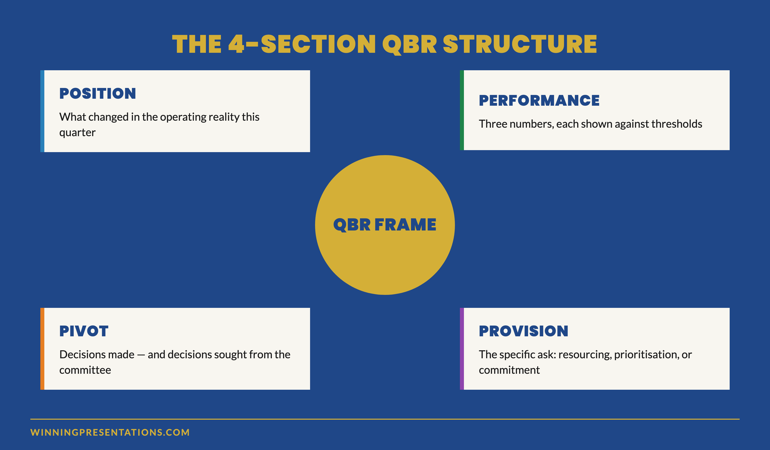
The 4-Section QBR Structure infographic showing Position, Performance, Pivot and Provision sections with the central question each section answers

The 4-section structure: position, performance, pivot, provision

The four-section frame works because each section answers a question the executive committee needs settled before they can usefully engage with the next.

Position. Where the function is now, relative to the position they held three months ago. The change in the operating reality. Two slides maximum.

Performance. The three or four metrics that matter, each shown against its threshold for concern and threshold for re-planning. Two slides.

Pivot. The decisions the team has already made for next quarter, and — separately — the decisions the team is bringing to the committee for input or approval. One or two slides.

Provision. The specific resourcing, prioritisation, or commitment the team needs from the committee in the next quarter. One slide.

Eight primary slides. An indexed appendix with everything else. The discipline is in the front eight; the appendix can run to whatever depth the function requires.

Build slides that earn time on the agenda

Stop running QBRs that end with no decision

  • 26 templates covering QBR, board, performance review, and strategic decision slides
  • 93 AI prompts for drafting position statements, performance commentary, and provision asks
  • 16 scenario playbooks including QBR with mixed performance, QBR after missed targets, and QBR before resourcing decisions
  • Master checklist for stress-testing every slide before the meeting

Executive Slide System — £39, instant access, 30-day refund if it does not fit your next quarterly review.

Get the Executive Slide System →

Designed for senior professionals running quarterly reviews with executive committees.

Section by section: what each one carries

Position — what changed in the operating reality

The position section answers one question for the committee: where is this function now, that it was not three months ago? Not “we delivered X.” Not “we launched Y.” The position is the change in the underlying reality — pipeline shape, customer mix, technical debt level, regulatory exposure, organisational health. The committee needs the position because every other section is interpreted in light of it.

Two slides is enough. The first describes the position in three lines. The second visualises the change — a chart, a quadrant shift, a heat-map comparison between this quarter and last. Avoid the temptation to add a third slide; the position is meant to be read fast and held in the room as backdrop for everything that follows.

Performance — three numbers, each with thresholds

Performance is where most QBRs lose discipline. The instinct is to show every metric the team tracks. Resist it. The committee can absorb three or four metrics during a QBR; anything beyond that gets skimmed and forgotten. Choose the three metrics that matter most for the committee’s decisions, and show each one against two thresholds:

  • The threshold for concern — at this level we re-plan internally without committee input.
  • The threshold for re-planning — at this level we bring the re-plan to the committee.

This treatment turns a metric into a decision instrument. The committee can see at a glance whether the number requires their attention or can be left with the function. It also reduces the time spent debating the metric — once thresholds are visible, the conversation is about whether the threshold is right, not whether the number is good.

Pivot — decisions made and decisions sought

The pivot section separates two kinds of decision. Decisions the team has already made for the coming quarter — informational, no committee input required. Decisions the team is bringing to the committee — actively seeking input or approval before the team acts.

This separation matters. Without it, the committee tends to weigh in on every forward-looking statement, which slows the meeting and dilutes the team’s authority. With it, the committee knows when to listen and when to engage. One slide for each side of the pivot is usually enough.

For senior leaders running these reviews regularly, structured QBR slide frames make the pivot section faster to build and easier to navigate. The Executive Slide System includes a QBR pivot template that visually distinguishes decisions made from decisions sought.

Provision — the specific ask

The provision slide is where the QBR earns its place on the calendar. It states the resourcing, prioritisation, or commitment the function needs from the committee for the next quarter. Three components:

  • The ask, in one sentence — what specifically you need from the committee.
  • The cost or trade-off the committee is being asked to accept.
  • The decision required from the committee in this meeting (or, if appropriate, by a stated date).

If a QBR has no provision ask, the meeting can be replaced by a written update. That is a useful test: could this QBR have been an email? If yes, restructure the deck to include a provision section that earns the meeting. If no provision ask is genuinely needed for the quarter, propose to the committee that the next QBR be replaced by a written brief and a 20-minute Q&A.
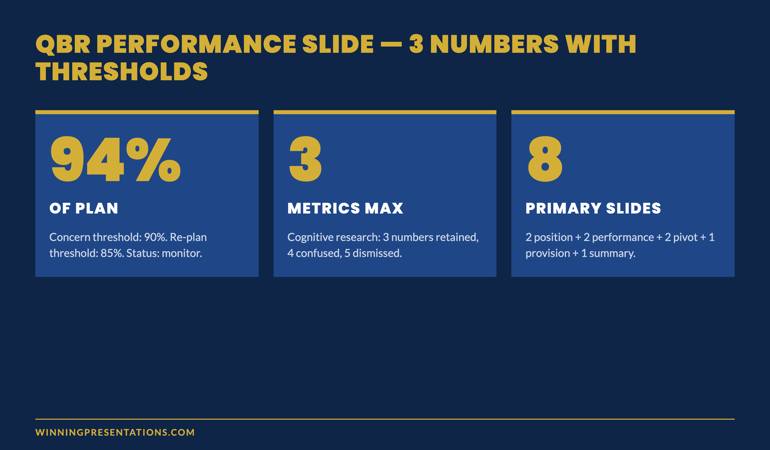
QBR Performance Slide With Thresholds infographic showing a metric chart with concern threshold (yellow) and re-planning threshold (red) overlaid against the actual quarterly performance line

Data discipline: three numbers per section

Each of the four sections should carry no more than three numerical claims on its primary slide. This is a hard discipline that improves QBRs more than any other single change. Three reasons:

The committee remembers three. Cognitive research on senior decision-makers consistently shows that three numbers per topic are retained, four are confused, five are dismissed. The QBR that presents twelve numbers on a single slide is teaching the committee to skim.

Three numbers force prioritisation. The team has to choose which three numbers carry the meaning. That choice is itself an act of senior judgement. The committee will read the choice as well as the numbers; the slide that confidently elevates three metrics signals a function that knows what matters.

Three numbers leave room for the question. A slide with three numbers leaves cognitive space for the committee to ask “what about X?” That question is the moment the QBR becomes a conversation. A slide with twelve numbers crowds the question out; the committee disengages instead of probing.

The slide system senior professionals use in banking, biotech, SaaS

Quarterly reviews. Board papers. Investment proposals. Strategic pivots. The same five-section logic underneath, scenario-specific templates on top. Executive Slide System — £39, instant access.

Get the Executive Slide System →

Designed for senior professionals running QBRs, board updates, and strategic reviews.

Frequently asked questions

How long should a QBR deck be in total?

Eight primary slides — two for position, two for performance, two for pivot, one for provision, and one summary. Plus an indexed appendix that can run to whatever depth the function needs. The appendix is for committee navigation during Q&A; it is not a place for slides that did not earn a position in the front eight.

What if the committee asks for “all the numbers” rather than three?

That request usually means the committee does not trust the team’s prioritisation. The fix is to have the prioritisation conversation explicitly: which three numbers would the committee want to see if they could only see three? Once that is settled, the committee tends to relax into the discipline. The “all the numbers” request rarely means they want to see twelve metrics every quarter.

Can this structure work for a quarterly business review with a customer?

Partially. The four sections still apply — position, performance, pivot, provision — but the audience is different. Customers want to see how their relationship with you has changed, not how your function has changed. The position section becomes the relationship position; the provision section becomes the joint commitment for the next quarter. The structure holds; the semantics shift.

What if there is no pivot to discuss this quarter?

That is rare in any function genuinely operating. If the team has made no decisions for the next quarter and is bringing nothing to the committee, the committee will conclude either that the function is on autopilot or that the team is concealing the pivot. Either reading damages credibility. If the quarter genuinely contains no pivot, name it explicitly: “This quarter contains no material change in direction. Here is why we believe the current plan continues to be right.” That framing converts a non-pivot into a deliberate act of judgement.

The Winning Edge — weekly newsletter for senior presenters

One framework, one micro-story, one slide pattern — every Thursday morning, ten minutes’ read. The senior leaders who subscribe present to executive committees, boards, and investors weekly.

Subscribe to The Winning Edge →

Not ready for the full system? Start here instead: download the free Executive Presentation Checklist — covers the four-section QBR test you can apply to your next deck before it leaves your desk.

For the partner article on board-pack structure, see board-ready executive slide templates.

Mary Beth Hazeldine — Owner & Managing Director, Winning Presentations Ltd. With 24 years of corporate banking experience at JPMorgan Chase, PwC, Royal Bank of Scotland, and Commerzbank, she advises senior professionals across financial services, healthcare, technology, and government on quarterly review structure, board paper format, and high-stakes executive communication.

08 Jan 2026
Businesswoman in a navy blazer typing on a laptop at a glass desk by a city window.

One Page Executive Summary: Why Length Fails (And the Format CEOs Actually Read)

Quick Answer: A one page executive summary works because CEOs don’t have time to hunt for your point. Lead with your recommendation in the first sentence, support it with three points maximum, and end with a clear ask. If you’re shrinking fonts to fit more content, you’ve already failed—the goal isn’t to compress information, it’s to eliminate everything that doesn’t drive a decision.

“I don’t have time to read this.”

The CFO slid the document back across the table. It was technically a one page executive summary—if you counted 9-point font, 0.5-inch margins, and text crammed into every available pixel.

The VP who’d prepared it had spent three days on it. He’d included everything: market analysis, competitive landscape, financial projections, risk factors, implementation timeline, team bios.

All on one page. Technically.

But “one page” isn’t about paper—it’s about cognitive load. That document required 15 minutes of focused reading. The CFO had 3 minutes between meetings.

I helped him rebuild it that afternoon. Same information hierarchy, different execution. The new version: 312 words, three bullet points, one chart, recommendation in the first sentence.

The CFO approved the £2.3M budget request the next morning.

Here’s what most people get wrong about the one page executive summary—and how to fix it.

🏆 FLAGSHIP PROGRAMME

The Executive Buy-In Presentation System

Master the one page executive summary and every other format executives expect. This comprehensive system teaches you exactly how to structure documents and presentations that get approved—every time.

What transforms: How you summarize, how you structure, and how you get decisions made faster.

Master Executive Communication →

Why “One Page” Isn’t About Length

A managing director at RBS once told me: “I can tell if I’ll read something in the first two seconds. Before I read a word, I’ve already decided.”

He wasn’t talking about content. He was talking about visual density.

When executives see a wall of text—even a one-page wall—their brain categorizes it as “work.” Something to be dealt with later. Something that requires energy they don’t have between meetings.

When they see white space, clear hierarchy, and a bold recommendation at the top, their brain categorizes it as “quick win.” Something they can process now. Something that respects their time.

The best one page executive summary isn’t the one with the most information. It’s the one that gets read.

The One Page Executive Summary Format That Gets Read

After 24 years creating executive documents at JPMorgan, PwC, RBS, and Commerzbank, here’s the format that consistently works:

Line 1: The Recommendation

Not context. Not background. The recommendation. “I recommend we invest £2.3M in platform migration, achieving 23% cost reduction within 18 months.”

A senior partner at PwC taught me this: “If I have to search for your point, I’ve already decided against it.”

Lines 2-4: Three Supporting Points

Not five. Not seven. Three. The brain processes three points as a complete argument. More than three feels like a list to wade through.

Each point: one sentence. Evidence, not explanation.

One Visual (If It Adds Clarity)

A chart that shows the trend. A table that compares options. A timeline that shows milestones.

If your visual requires explanation, it’s the wrong visual. The best executive charts are understood in under 5 seconds.

Final Line: The Ask

What do you need them to do? Approve? Decide between options? Provide input?

“Request: Approval to proceed by Friday COB.”

No ask, no action. Make it explicit.

One page executive summary format - the structure CEOs expect and read

The CEO Time Economics Nobody Considers

A client once pushed back: “But they need all this context to make an informed decision.”

I asked her to calculate her CEO’s hourly rate. At £1.5M annual compensation, it worked out to roughly £750 per hour.

“Your 10-page briefing document takes 30 minutes to read,” I said. “You’re asking for £375 of his time before he even knows what you want.”

She rebuilt it as a true one page executive summary. Three minutes to read. Clear recommendation. The CEO approved it in the elevator between floors.

Brevity isn’t about dumbing down. It’s about respecting the economics of executive attention.

For the complete framework on executive summary slides, see my in-depth guide: The Executive Summary Slide: How to Write the Only Slide That Matters.

FAQ: One Page Executive Summary

How long should a one page executive summary actually be?

One page means one page—ideally under 500 words with significant white space. If you’re using 8-point font and half-inch margins to fit everything, you’ve missed the point. CEOs judge documents by visual density before reading a single word. If it looks exhausting, it won’t get read.

What’s the best format for a one page executive summary?

Lead with your recommendation in the first sentence. Follow with three supporting points maximum. Include one visual if it adds clarity. End with a clear ask or next step. Everything else is context they can request if needed.

Why do CEOs prefer one page executive summaries?

Time economics. A CEO making £2M annually values their time at roughly £1,000 per hour. A 10-page document that takes 30 minutes to read costs them £500 in opportunity cost. A one-page summary that takes 3 minutes respects that reality—and signals you understand executive priorities.

📧 Join 2,000+ professionals getting weekly insights on executive communication. Subscribe to The Winning Edge →

📋 Free Download: Executive Presentation Checklist

Use this checklist before creating your next one page executive summary. Covers the format CEOs expect and the mistakes that get documents ignored.

Get Your Free Checklist →


About the Author

Mary Beth Hazeldine spent 24 years at JPMorgan, PwC, RBS, and Commerzbank. She’s a clinical hypnotherapist and MD of Winning Presentations.

29 Dec 2025
Board presentation structure - how to brief executives in 15 minutes or less

Board Presentation Structure: How to Brief Executives in 15 Minutes or Less

Last updated: December 29, 2025 · 9 minute read

The first time I presented to a board of directors, I made every mistake possible.

I prepared 45 slides. I started with background context. I buried my recommendation on slide 38. And when the CFO interrupted five minutes in to ask “What are you actually recommending?”, I fumbled through my deck trying to find the answer.

That was at Royal Bank of Scotland, early in my career. I learned more about board presentation structure in that painful 20 minutes than in years of regular presenting.

Here’s what I know now after 24 years of presenting to boards at JPMorgan Chase, PwC, Royal Bank of Scotland, and Commerzbank: boards don’t want information. They want decisions.

Your board presentation structure needs to deliver a clear recommendation, supported by evidence, with explicit asks — in 15 minutes or less. Everything else is noise.

At Winning Presentations, I’ve trained hundreds of executives on this exact framework. Here’s how it works.

⚡ Key Takeaways

  • Lead with your recommendation — boards want the answer first, then the evidence
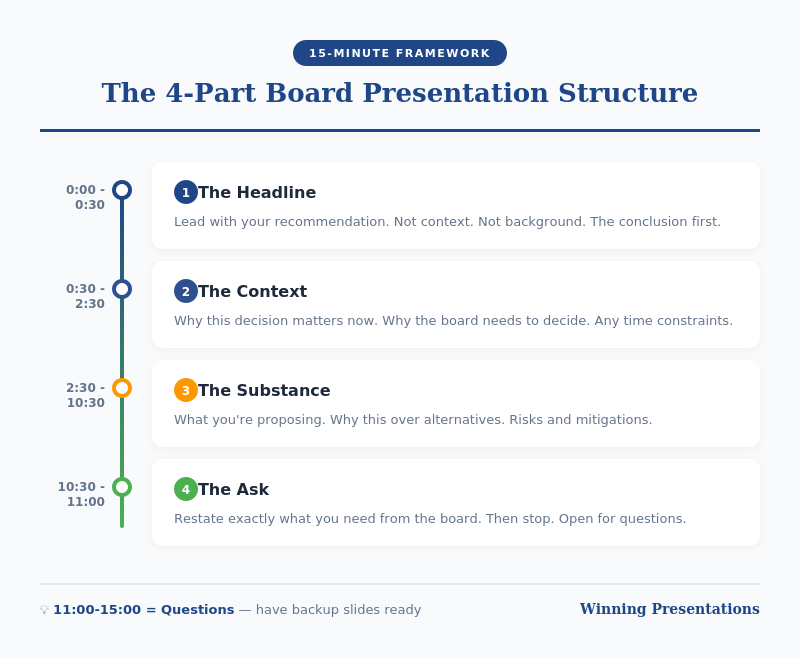
  • Use the 4-part structure: Recommendation → Context → Evidence → Ask
  • 15 minutes maximum — plan for 10, leave 5 for questions
  • One slide per section maximum — 4-6 slides total, not 40
  • End with a clear, specific ask — what decision do you need from them?

📥 FREE DOWNLOAD: Executive Presentation Checklist

The pre-presentation checklist I use before every board meeting. Covers structure, timing, and common pitfalls.

Download Free →

Why Board Presentation Structure Is Different

Regular presentations can meander. You can build to a conclusion. You can use suspense.

Board presentations cannot.

Harvard Business Review research shows that board members have limited attention spans for individual agenda items — often as little as 10-15 minutes. They’re processing multiple complex topics in a single meeting. They need to make decisions, not absorb information.

This means your board presentation structure must be:

  • Conclusion-first: Lead with your recommendation, not your analysis
  • Decision-oriented: Everything supports a specific ask
  • Ruthlessly concise: If it doesn’t support the decision, cut it
  • Interrupt-proof: You should be able to state your recommendation in 30 seconds if asked

The structure I’m about to share has been tested in hundreds of board presentations. It works because it’s designed for how boards actually process information.

The 4-Part Board Presentation Structure

Board presentation structure framework - the 4-part structure for executive briefings

Part 1: Recommendation (2 minutes)

Start with your conclusion. Not background. Not context. Your recommendation.

“I’m recommending we approve a £2.4M investment in the CRM upgrade, to be implemented over Q2-Q3, with expected ROI of 340% over three years.”

This should take 30 seconds to say and one slide to show.

Why lead with this? Because boards are thinking “What do you want from us?” from the moment you start. If you make them wait, they’re mentally searching for your point instead of listening to your argument.

By stating your recommendation first, you frame everything that follows. The board knows what to listen for.

For techniques on delivering this opening with confidence, see my guide on how to speak confidently in public.

Part 2: Context (3 minutes)

Now — and only now — provide the minimum context needed to understand your recommendation.

The key question: What does the board need to know to evaluate my recommendation? Nothing more.

This typically includes:

  • The problem or opportunity you’re addressing
  • Why this is board-level (scale, risk, strategic importance)
  • Timeline constraints, if any

One slide maximum. Often this can be combined with your recommendation slide if you’re ruthless about brevity.

What NOT to include: history of how you got here, alternative approaches you considered, technical details, organisational politics. These belong in the appendix if anywhere.

💡 Want Ready-Made Executive Templates?

The Executive Slide System includes board presentation templates built on this exact structure — plus 6 other frameworks for different executive contexts.

  • Board recommendation template
  • Executive summary one-pager
  • Investment case structure
  • Video walkthroughs of each framework

Get the Executive Slide System — £39 →

Part 3: Evidence (5 minutes)

Now support your recommendation with evidence. This is the “why you should agree” section.

Structure your evidence around the board’s likely concerns:

  • Financial: What’s the cost, return, and payback period?
  • Risk: What could go wrong, and how will you mitigate it?
  • Execution: Who’s accountable, and what’s the timeline?
  • Strategic fit: How does this align with company priorities?

Two to three slides maximum. Use data, not opinions. Be specific: “23% cost reduction” not “significant savings.”

Anticipate questions and address them proactively. If the CFO always asks about cash flow impact, include it before she asks.

Part 4: The Ask (2 minutes)

End with a crystal-clear ask. What specific decision do you need from the board today?

Good asks:

  • “I’m requesting approval to proceed with the £2.4M investment.”
  • “I’m seeking authorisation to negotiate final terms with the vendor.”
  • “I need the board’s input on whether to prioritise Option A or Option B.”

Bad asks:

  • “Thoughts?” (Too vague)
  • “I wanted to update you on our progress.” (Not a decision)
  • “Let me know if you have questions.” (Passive, not action-oriented)

If you don’t have a clear ask, question whether this needs to be a board presentation at all. Informational updates can usually be handled in pre-read documents.

For techniques on delivering powerful closings, see my guide on how to start a presentation — which also covers endings.

Board Presentation Structure: Timing Guide

Board presentation timing guide - how to allocate 15 minutes across four sections

If you have 15 minutes on the agenda, plan for 10 minutes of presenting and 5 minutes of questions.

Section Time Slides
Recommendation 2 min 1
Context 3 min 1
Evidence 5 min 2-3
Ask 1-2 min 1
Questions 5 min Appendix

Notice this gives you 4-6 slides maximum for your main presentation. Everything else goes in the appendix — ready if asked, but not in your core flow.

Board Presentation Structure: Slide Template

Here’s a template you can adapt for any board presentation:

Slide 1: Recommendation + Context

  • Headline: Your recommendation in one sentence
  • 3-4 bullets: Key context points
  • Visual: Timeline or high-level financial summary

Slide 2: Financial Case

  • Investment required
  • Expected return (ROI, NPV, payback)
  • Comparison to alternatives if relevant

Slide 3: Risk and Mitigation

  • Top 3 risks
  • Mitigation plan for each
  • Contingency if needed

Slide 4: Execution Plan

  • Timeline (phases, milestones)
  • Accountability (who owns this)
  • Dependencies

Slide 5: The Ask

  • Specific decision requested
  • What happens next if approved
  • When you’ll report back

Appendix: Technical details, alternative analysis, historical context, org charts — anything that supports questions but doesn’t need to be in the main presentation.

🎓 Master Executive Presentations

AI-Enhanced Presentation Mastery includes a complete module on executive and board presentations — plus live coaching sessions where I review your actual presentations and give direct feedback.

8 modules. 2 live sessions. Learn the techniques that got me through hundreds of board presentations.

Learn More — £249 →

Common Board Presentation Structure Mistakes

After reviewing hundreds of board presentations, these are the mistakes I see most often:

Mistake 1: Burying the Recommendation

Starting with history, context, or analysis before stating what you want. By slide 10, the board has mentally checked out.

Mistake 2: Too Many Slides

40 slides for a 15-minute slot is not thorough — it’s unfocused. Ruthlessly cut anything that doesn’t directly support your recommendation.

Mistake 3: No Clear Ask

Ending with “Any questions?” instead of a specific decision request. Boards need to know what you’re asking them to do.

Mistake 4: Reading the Slides

Your slides are for reference, not scripts. Speak to the board, not the screen. They can read faster than you can talk.

Mistake 5: Not Preparing for Interruptions

Boards interrupt. It’s how they process. If you can’t state your recommendation in 30 seconds when interrupted, you’re not prepared.

Your Next Step

Before your next board presentation, restructure using the 4-part framework: Recommendation → Context → Evidence → Ask.

Time yourself. If you can’t deliver it in 10 minutes, you haven’t cut enough.

Resources for Executive Presentations

📖 FREE: Executive Presentation Checklist
Pre-presentation checklist for board meetings and executive briefings.
Download Free →

💡 QUICK WIN: Executive Slide System — £39
7 frameworks + templates for any executive presentation context.
Get Instant Access →

🎓 COMPLETE SYSTEM: AI-Enhanced Presentation Mastery — £249
8-module course including executive presentations module + live coaching.
Learn More →

FAQs About Board Presentation Structure

How long should a board presentation be?

Plan for 10 minutes of presenting, leaving 5 minutes for questions if you have a 15-minute slot. Most board presentations can — and should — be delivered in under 10 minutes. If you need more time, you probably haven’t focused your message enough.

How many slides should a board presentation have?

4-6 slides maximum for your core presentation. Everything else goes in the appendix, ready for questions but not in your main flow. More slides usually means less clarity, not more thoroughness.

Should I include an executive summary slide in my board presentation?

Your first slide essentially IS your executive summary — your recommendation plus key context. A separate “executive summary” slide before this often wastes time and delays your main point.

What if the board interrupts before I finish my board presentation structure?

Expect interruptions — they’re normal in board settings. Be prepared to state your recommendation in 30 seconds if asked. Answer the question directly, then ask: “Shall I continue with the evidence, or would you like to discuss this point further?”

How do I handle tough questions during a board presentation?

Prepare your appendix with supporting data for likely questions. If you don’t know an answer, say “I’ll get you that information by [specific date]” rather than guessing. Board members respect honesty more than waffling.

What’s the biggest mistake in board presentation structure?

Burying the recommendation. Starting with background, context, or analysis instead of stating what you want. Lead with your conclusion — the board can follow your logic backward, but they can’t extract your point from 40 slides of analysis.


Mary Beth Hazeldine is the Owner & Managing Director of Winning Presentations and a Microsoft Copilot PowerPoint specialist. She has delivered hundreds of board presentations during 24 years at JPMorgan Chase, PwC, Royal Bank of Scotland, and Commerzbank, and now trains executives on high-stakes presentation skills.

Get Weekly Presentation Insights

Join 2,000+ professionals getting practical presentation tips every Tuesday.

Subscribe to The Winning Edge →