
Tag: decision follow-up

06 Apr 2026
A senior executive at a polished boardroom table reviewing a concise follow-up slide deck, with a glass office background and navy blue document folders, editorial photography style

Follow-Up Deck: Why Approvals Die After the Meeting and How to Fix It

Most approvals do not die in the meeting. They die in the three days afterwards, when the decision-maker returns to a full inbox, the urgency fades, and your proposal becomes one of twelve things waiting for attention. A well-structured follow-up deck is the single most underused tool for keeping executive approvals alive — and most executives never build one.

Ngozi had presented her transformation programme to the executive committee on a Tuesday. The room had been engaged. The CFO asked detailed questions about the cost model. The CEO nodded through the implementation timeline. At the end, the chair said the words every presenter dreads: “Thank you, Ngozi — we’ll come back to you on this.” By Friday, she had heard nothing. By the following Wednesday, two committee members had left for conferences. A month later, her proposal was still listed as “under review.” She had done everything right in the meeting. What she had not done was send a follow-up deck. Instead, she had sent a two-paragraph email with a PDF attachment of her original slides. The email got a read receipt but no response. The proposal stalled not because the committee disagreed — they had signalled support — but because no one had given them a clear, decision-ready document to move forward with. When she finally sent a structured follow-up deck six weeks later, it was approved within forty-eight hours.

Preparing a post-meeting deck for a stalled approval? The Executive Slide System includes decision-focused templates designed for high-stakes executive approval presentations. Explore the System →

Why Approvals Stall After Successful Meetings

The moment an executive presentation ends, the executive committee disperses back into their own priorities. A positive meeting creates intent, but intent is not a decision. Without something concrete to act on, that intent degrades. The half-life of a “we’ll come back to you on this” is shorter than most presenters realise.

Three dynamics work against you in the post-meeting window. First, decision-making friction: even supportive executives need a trigger to commit formally. Your original slides were designed for a live presentation — they do not function as a standalone decision document. Second, stakeholder drift: committee members who were aligned on Tuesday may have heard a counterargument by Thursday. Without a written reference point, the alignment you built in the room has nowhere to anchor. Third, competing priorities: the urgency your proposal felt in the room evaporates when the committee chair’s diary fills with unrelated crises.

The follow-up deck solves all three. It provides a trigger — a concrete document that moves the process forward. It anchors alignment — a written record of the direction the meeting was heading. And it reintroduces urgency — not through pressure, but through a clear next step with a defined timeline.

Understanding the pre-decision conversation that precedes executive approval is equally important — the follow-up deck works best when the right groundwork has been laid before the meeting, not improvised afterwards.

Build the Deck That Closes the Approval Gap

The Executive Slide System gives you templates for every stage of the executive approval journey — from the initial presentation to the follow-up deck that turns a promising meeting into a signed decision.

  • ✓ Slide templates for executive and board approval scenarios
  • ✓ AI prompt cards to build decision-ready decks fast
  • ✓ Framework guides for high-stakes approval presentations

Get the Executive Slide System → £39

Designed for executives preparing high-stakes presentations

What a Follow-Up Deck Contains — and What It Isn’t

A follow-up deck is not a compressed version of your original presentation. It is a different document with a different purpose. Where the original presentation was designed to persuade, the follow-up deck is designed to decide. These are distinct tasks that require distinct structures.

An effective follow-up deck for executive approval contains five components. The first is a decision summary — a single slide or opening section that restates what the committee is being asked to approve, in plain language. Avoid the qualifying language you might have used in the live presentation. “We are proposing a phased investment in infrastructure modernisation” becomes “The committee is asked to approve a £1.2M infrastructure investment with implementation beginning May 2026.” Clarity is not aggression. It is respect for the committee’s time.

The second component is a concise rationale update — two to three slides maximum that distil the business case to its essential logic. These are not a replay of your full argument. They are a written anchor that reminds decision-makers why the proposal was compelling. Include any new information that emerged during the meeting — questions that were asked and answered, concerns that were addressed, or data points that were requested and can now be provided.

The third component is a risk and mitigation summary. Committee members often stall not because they disagree, but because they cannot articulate a response to objections they anticipate from colleagues. A clear risk table — three to five rows covering the most likely concerns with specific mitigations — gives your supporters the language they need to champion the proposal in conversations you are not part of.

The fourth component is the implementation overview. A single timeline slide showing the first ninety days — milestones, owners, decision points — converts abstract approval into concrete commitment. Executives who approve a vague proposal often feel exposed. Executives who approve a specific plan feel informed. The difference is consequential.

The fifth component is the next-step request. This is the most frequently omitted section, and its absence is why so many follow-up decks fail to accelerate a decision. State clearly what you are asking the committee to do, by when, and how they should signal their response. “Please confirm approval by email to [chair] by April 10 to allow the project team to begin procurement” is actionable. “We welcome any questions” is not.
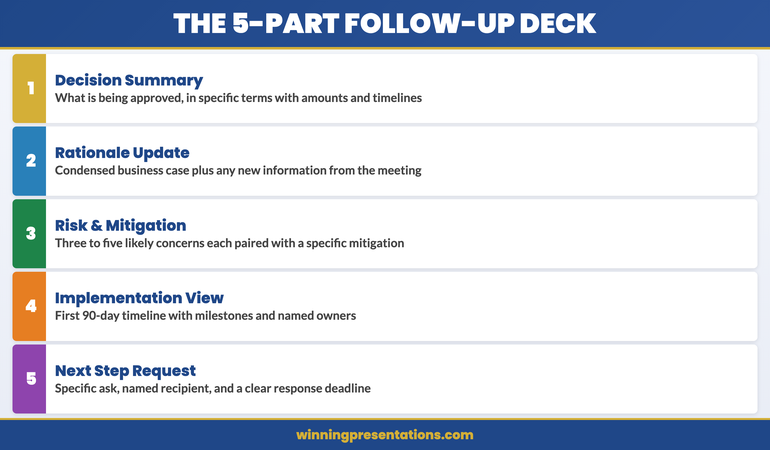
The five components of an effective executive follow-up deck: decision summary, rationale update, risk and mitigation, implementation overview, and next-step request

Timing and Delivery: When to Send It and How

The follow-up deck should be sent within twenty-four to forty-eight hours of the meeting. This is not a guideline — it is a strategic imperative. Within that window, the meeting is still recent, the committee’s impressions are still fresh, and you have the highest probability of capturing attention before competing priorities crowd your proposal out.

Waiting a week to prepare a polished document is a common mistake. A clean, clear five-slide deck sent the morning after a meeting outperforms a beautifully designed twelve-slide document sent five days later. The follow-up deck’s job is to maintain momentum, and momentum is time-sensitive.

Delivery should be direct, not through an assistant. Send it personally to the meeting chair with the committee members copied. The covering note should be one paragraph: acknowledge the meeting, state what is attached, and name the specific response you are requesting. Do not write a summary of your proposal in the email body — that is what the deck is for. Do not ask if there are any questions — that invites delay rather than decision.

The structure of high-stakes decision slides follows a specific logic that applies equally to live presentations and follow-up decks — the principles of decision architecture do not change because the medium has shifted from live to asynchronous.

If you are preparing multiple executive presentations for different stakeholders in parallel, the Executive Slide System provides the structural templates that allow you to build each deck — presentation and follow-up — from a consistent, decision-tested framework.

Structuring the Decision Summary Slide

The decision summary slide is the most important slide in your follow-up deck. It is the slide the committee chair will use to introduce the item in any subsequent discussion, and it is the slide that will be referenced when the approval is communicated to the wider organisation. Getting it right is not optional.

The decision summary should contain four elements only. The first is the ask: a single sentence naming what is being approved, in specific terms. Quantify wherever possible — amount, timeline, scope. The second is the rationale: one or two sentences giving the business case in plain language. This is not a condensed version of your full argument. It is the sentence a committee member would say if asked to explain the decision to a colleague who was not in the room.

The third element is the key condition: if there is a circumstance or assumption that makes the proposal viable, state it here. “Subject to legal review of the contract terms” or “Contingent on Q2 budget reforecast confirming £400K headroom.” This does not weaken the proposal — it demonstrates that you understand the constraints the committee is working within. Decision-makers who see their real-world constraints acknowledged are far more comfortable committing.

The fourth element is the decision date: the specific date by which you need a response for the implementation timeline to hold. This is not a deadline you are imposing. It is a project-management reality you are communicating. Frame it as information, not pressure: “Approval by April 14 allows the procurement process to begin within budget cycle.”
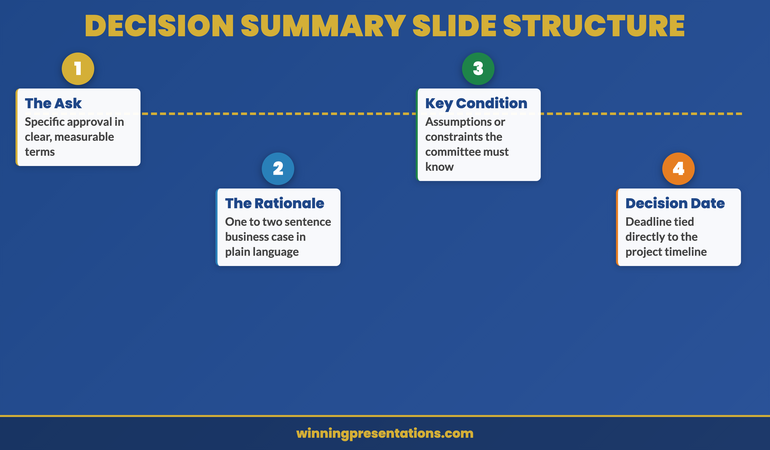
Decision summary slide structure for executive follow-up decks showing the four essential elements: ask, rationale, key condition, and decision date

Maintaining Momentum With Stakeholders After You Send It

Sending the follow-up deck is not the end of your approval management process. It is the beginning of a structured follow-up sequence that keeps the proposal visible without becoming intrusive. Most executives send the deck and then wait passively. This is where proposals stall.

If you have not received a response within forty-eight hours of sending the deck, a single follow-up is appropriate. This is not a chaser. It is a value-add: “I wanted to check whether any additional information would be useful before the committee considers the proposal.” This phrasing invites engagement without creating pressure. If there are open questions, this is when they surface — and surfacing them now is better than discovering them after the decision window has closed.

Identify the internal champions from your original meeting — the committee members who were visibly supportive — and maintain direct contact with them. These are the people who will advocate for the proposal in conversations you are not invited to. Giving them easy-to-use language — a clear one-paragraph summary they can share informally — is one of the most effective forms of approval management. It is also one of the least practised.

If your proposal contains a third-party dependency — a vendor quote that expires, a regulatory window that closes, a budget cycle that resets — communicate this proactively. Do not wait for the deadline to arrive and then rush to inform the committee. Flag it in your follow-up correspondence with enough lead time for the committee to act. This is not about creating artificial urgency. It is about ensuring that legitimate constraints are visible before they create problems.

For the complete board presentation follow-up protocol, including email templates and the twenty-four-hour action checklist, that guide covers every step of the post-presentation process. And if your proposal involves expanding an existing client relationship, our guide to upsell presentations covers how to make the expanded case when the client already knows and trusts you.

Structure Your Follow-Up Deck for Faster Approval

The Executive Slide System gives you the decision-focused templates and frameworks to build the follow-up deck that moves stalled proposals to approval — for £39.

Get the System Now → £39

Frequently Asked Questions

How long should a follow-up deck be after an executive presentation?

Five to seven slides is the right range for most executive follow-up decks. The purpose is not to re-present your full case — it is to make the decision easy to take. A decision summary, a condensed rationale, a risk overview, an implementation timeline, and a clear next-step request cover the essential ground without adding reading time the committee does not have. Longer decks signal that you are not sure what the decision-maker actually needs — and that uncertainty becomes their reason to delay.

Should the follow-up deck be different from the original presentation?

Yes — significantly. The original presentation was designed for live delivery, with slides that support spoken explanation. The follow-up deck must be self-explanatory, readable in isolation, and structured for a committee reading it asynchronously rather than listening in real time. Every slide must be able to stand alone without narration. This typically means more text on each slide than you would include in a live presentation, with section headers that tell the reader exactly what the slide is doing in the argument.

What if the committee has already asked for more information before deciding?

If the committee requested specific additional information during the meeting, your follow-up deck must address each request explicitly — with a slide that names the question that was asked, and provides the answer. Do not bury the responses in an appendix. Put them in the main body of the deck with a clear label: “Requested: Cost model breakdown for Phase 2.” This signals that you listened, you acted, and you are organised. More importantly, it removes the committee’s stated reason for deferring and creates a clear path to decision.

The Winning Edge

Weekly insights on executive presentations, slide strategy, and boardroom communication.

Subscribe Free

Preparing a high-stakes approval deck? Download the Executive Presentation Checklist — a structured framework for building decision-ready slides from first draft to final review.

If the approval you are chasing relates to a client account, our guide to the upsell presentation covers how to structure the expanded case for existing clients who are ready to grow.

About the author

Mary Beth Hazeldine, Owner & Managing Director, Winning Presentations. With 24 years of corporate banking experience at JPMorgan Chase, PwC, Royal Bank of Scotland, and Commerzbank, she advises executives across financial services, healthcare, technology, and government on structuring presentations for high-stakes funding rounds and approvals.

22 Mar 2026
Executive composing strategic follow-up email on laptop after boardroom Q&A session, focused expression, modern office with presentation materials visible in background

Post-Q&A Follow-Up: The Email That Converts ‘We’ll Think About It’ Into Approval

A regional operations director received pushback on a distribution network expansion in three consecutive Q&A sessions. Same outcome: “We’ll think about it.” After the third deferral, she changed her approach. Approved in one email.

Quick Answer: A post-Q&A follow-up email converts deferred decisions into approvals by doing three things: answering the questions that were actually asked (not the ones you wished they’d asked), addressing the concern behind the question that wasn’t voiced, and framing the next step so small that saying yes requires less effort than saying “let me think about it” again.

Got a “we’ll think about it” after your last Q&A?

If the Q&A ended without a decision and you’re not sure what to write in the follow-up, the Executive Q&A Handling System includes post-session follow-up frameworks designed to help move deferred decisions forward within 48 hours.

Explore the System →

The Distribution Network Expansion That Got Approval on the Fourth Attempt

Ines, a Regional Operations Director at a logistics company, presented a distribution network expansion across three board meetings. Each time, the Q&A went well—solid ROI projections, clear cost analysis, detailed implementation timeline. Each time, the result was identical: “We’ll think about it.” After the third deferral, she changed tactics entirely. Instead of requesting another board slot, she sent a follow-up email within 24 hours. Not a meeting recap. Not a gratitude note. A pivot. She zeroed in on one question the CFO had asked repeatedly—”What’s our exposure if demand forecasts don’t hit targets in Year 2?”—and provided a specific scenario analysis. Then she reframed the ask: “Would you be comfortable approving the network expansion for Year 1 only, with Year 2 contingent on Q4 demand validation?” The CFO responded within two hours. “Yes. Let’s lock in Year 1 and review in October.”

Turn Post-Q&A Silence Into Decisions That Move Forward

  • A complete Q&A handling system that covers preparation, in-session responses, AND the post-session follow-up that most Q&A training ignores entirely
  • Follow-up email frameworks designed to convert “we’ll think about it” into approval within 48 hours—with templates for each common deferral pattern
  • Question prediction methods that help you anticipate objections before the Q&A starts, so your follow-up addresses concerns before they crystallise into blockers
  • The reframing technique that turns partial objections into partial approvals—getting movement instead of stalling

Explore the Executive Q&A Handling System →

Designed for executive presentations where structured follow-up conversations help move decisions forward—because the real decision work often happens after the Q&A closes.

Why “We’ll Think About It” Is a Q&A Failure, Not a Decision Delay

“We’ll think about it” feels like a polite deferral. It’s actually diagnostic information. It tells you that the Q&A session failed to resolve the one concern that mattered most to the decision-maker.

In most cases, that concern was never voiced directly. The CFO asked about implementation timelines, but the real concern was risk. The VP asked about team capacity, but the real concern was whether this initiative competes with their own priorities. The CEO asked for “more data,” but the real concern was confidence—they didn’t trust the recommendation enough to put their name on it.

If you walk out of a Q&A with “we’ll think about it” and send a standard follow-up—”Thank you for the discussion, please find the deck attached”—you’ve wasted the most valuable conversion window in the entire decision cycle. The 24 hours after a Q&A session is when the decision-maker’s concerns are fresh, their memory of your answers is sharpest, and their willingness to engage is highest.

Your Q&A preparation needs to include a follow-up strategy, not just an in-session strategy. The follow-up email is where deferred decisions become approved ones.

The Three-Part Follow-Up Email Structure

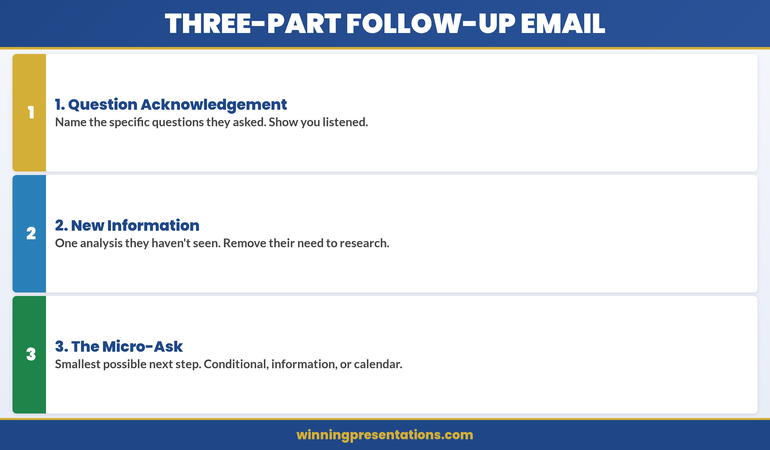
The post-Q&A follow-up email that converts deferrals into approvals has three parts. Not a summary. Not a recap. A conversion instrument.

Part 1: The Question Acknowledgement (2-3 sentences)
Name the specific questions that were asked. Not all of them—just the ones that revealed the decision-maker’s real concern. “You raised two important questions during our discussion: the implementation risk if the vendor timeline slips, and the impact on the Q3 reforecast if we start before Q2 results are final.” This tells the reader: I was listening to what you actually care about, not what I wanted to talk about.

Part 2: The New Information (3-5 sentences)
This is the critical section. Provide one piece of information, analysis, or framing that wasn’t in the presentation or the Q&A. Not something you forgot—something you’ve now prepared specifically in response to their concern. “Since our meeting, I’ve modelled the scenario where the vendor timeline slips by 6 weeks. The financial impact is £40k in additional parallel running costs—within our contingency budget of £75k. The attached one-page analysis shows the three trigger points where we’d escalate.” This demonstrates responsiveness and removes the decision-maker’s need to do their own analysis.

Part 3: The Micro-Ask (1-2 sentences)
Don’t ask for the full approval again. Ask for the smallest possible next step. “Would you be comfortable giving a conditional go-ahead for Phase 1, with Phase 2 contingent on the Q2 review?” Or: “Can we schedule 15 minutes next Tuesday to review the updated risk analysis? I can have it ready by Monday.” The micro-ask works because it reduces the decision from “approve everything” to “agree to this small thing.” And small agreements compound.

Three-part follow-up email structure infographic showing Question Acknowledgement, New Information, and Micro-Ask as stacked cards for converting deferred decisions

Answering the Question They Didn’t Ask Out Loud

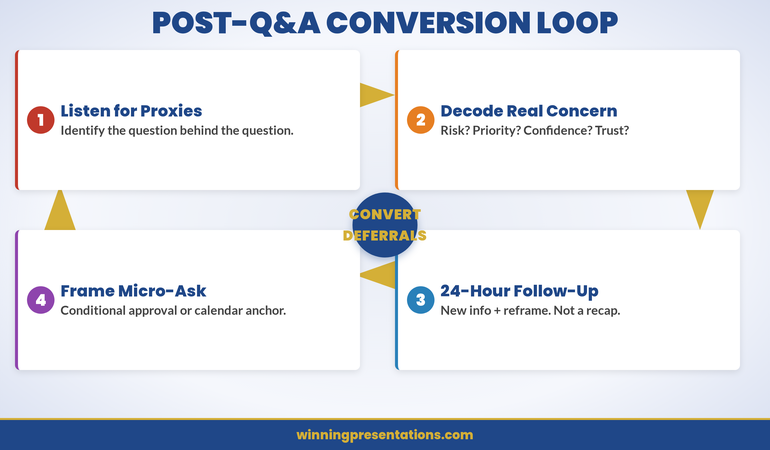
The most important question in any Q&A session is the one that wasn’t asked. Decision-makers rarely voice their deepest concern directly. Instead, they ask proxy questions—questions that circle the real issue without naming it.

Here’s how to decode common proxy questions:

“Can you walk me through the implementation timeline again?”
They’re not confused about the timeline. They’re worried the project will overrun and they’ll be associated with a failure. Your follow-up should address implementation risk explicitly—not repeat the timeline.

“Have you considered any alternatives?”
They’re not suggesting you missed options. They’re testing whether you’re married to one solution or capable of pivoting if it doesn’t work. Your follow-up should show flexibility: “If the initial approach encounters [specific obstacle], we have two fallback options already scoped.”

“What does the team think about this?”
They’re not asking for a poll. They’re worried about execution capability—does the team have capacity and willingness to deliver? Your follow-up should name specific people and their commitments.

If you predicted these questions before the session, you’ll recognise the proxy pattern in real time. Your follow-up email becomes the place where you answer the real question directly—something that’s difficult to do in the social dynamics of a live meeting but perfectly natural in a written follow-up.

Want to Predict the Questions Before They’re Asked?

The Executive Q&A Handling System includes the question prediction framework that maps likely objections to specific decision-maker roles—so your follow-up can address concerns when they arise.

Explore the System →

The 24-Hour Window: Why Timing Matters More Than Content

You have 24 hours after a Q&A session to send the follow-up that converts the deferral. After 24 hours, two things happen that work against you.

First, the decision-maker’s memory of your answers starts to degrade. They remember their own questions clearly—but your answers blur. If you don’t reinforce your strongest answers in writing within 24 hours, the decision-maker reconstructs their own version of what you said. That reconstruction is rarely favourable.

Second, other priorities fill the gap. The urgency you created in the presentation dissipates. By Wednesday, your Monday Q&A feels like last week’s problem. The decision-maker’s calendar fills with new requests, new presentations, new decisions. Your proposal moves from “I need to decide on this” to “I should revisit this when I have time.” That time never comes.

The 24-hour follow-up breaks this pattern. It arrives while the decision-maker still remembers the conversation, still feels the momentum, and still has mental space for your proposal. It gives them a reason to act now instead of later.

If you missed the 24-hour window, a 48-hour follow-up still works—but you need to create a new urgency. “Since our discussion, I’ve learned that the vendor pricing expires end of month” or “The project team I’ve reserved will be reassigned to another initiative on Friday.” Genuine time pressure, not manufactured scarcity.

Framing the Next Step So Small They Can’t Say No

The biggest mistake in post-Q&A follow-ups is asking for the same decision that was deferred. If the decision-maker said “we’ll think about it” to a £500k investment, asking again for £500k produces the same result.

Instead, shrink the ask. There are three ways to do this:

The Conditional Approval: “Would you be comfortable approving Phase 1, with Phase 2 contingent on [milestone]?” This works because it turns one big decision into two smaller ones. The first decision feels lower risk.

The Information Request: “Would it be helpful if I prepared a one-page risk analysis addressing the scenario you raised? I could have it ready by Thursday.” This works because you’re not asking for a decision—you’re asking for permission to be helpful. Nobody says no to “can I give you more information?”

The Calendar Anchor: “Can we block 15 minutes next Tuesday to review the updated analysis together?” This works because it commits the decision-maker to a specific follow-up moment. Without a calendar anchor, “we’ll think about it” means “we’ll forget about it.”

Each of these micro-asks does the same thing: it creates forward momentum without requiring the decision-maker to overcome the inertia of the full commitment. And once they’ve said yes to the small step, the full approval becomes a natural continuation, not a new decision.

This is why understanding how to handle situations where you don’t know the answer during the Q&A itself is so valuable—because “I’ll research that and send you the analysis by tomorrow” becomes a natural bridge to the follow-up email. The gap in your knowledge becomes your conversion opportunity.

Cycle infographic showing the four stages of the post-Q&A conversion loop: Listen for Proxy Questions, Decode the Real Concern, Send 24-Hour Follow-Up, and Frame the Micro-Ask

Stop Losing Approvals to Post-Q&A Silence

  • Follow-up email frameworks that convert “we’ll think about it” into approval within 48 hours—with templates for conditional approvals, information bridges, and calendar anchors
  • Question decoding guide that helps you identify the real concern behind proxy questions—so your follow-up addresses what the decision-maker actually cares about

Get the Executive Q&A Handling System →

Designed for the critical 24 hours after Q&A sessions where you can build momentum—because follow-up strategy often determines whether a deferral becomes a decision.

People Also Ask

How long should a post-Q&A follow-up email be?

Under 200 words in the email body. Decision-makers scan, they don’t read. Your email should have three short sections: acknowledge the key questions (2-3 sentences), provide one new piece of information (3-5 sentences), and make one small ask (1-2 sentences). If you need to provide detailed analysis, attach it as a one-page document and reference it in the email—don’t embed it.

Should I copy everyone who was in the Q&A session?

Copy only the people whose concerns you’re addressing directly. If the CFO asked the key question, send the follow-up to the CFO and copy your sponsor. Don’t copy the entire meeting list—it diffuses accountability and makes the email feel like a broadcast instead of a targeted response. If other attendees need updates, send those separately with different framing.

What if the decision-maker doesn’t respond to my follow-up email?

Wait 48 hours, then send a one-line follow-up with a calendar link: “Would 15 minutes on [specific day] work to discuss? Here’s a link to my calendar.” If there’s still no response after a week, the issue isn’t your follow-up technique—it’s either a priority misalignment or an organisational blocker. Ask your internal sponsor what’s happening behind the scenes before sending another email.

Is This Approach Right for You?

This is for you if:

  • You’ve had Q&A sessions that went well but ended with “we’ll think about it” instead of a decision
  • You’re sending standard “thank you for the meeting” follow-ups and not getting traction
  • You want a structured approach to the post-presentation phase that most Q&A training ignores
  • You’re presenting proposals that require multiple stakeholder approvals and need to keep momentum between meetings

This is NOT for you if:

  • Your Q&A sessions consistently end with clear decisions—your current process is working
  • You’re in a context where follow-up emails aren’t culturally appropriate (some organisations require formal proposal resubmission instead)
  • The deferral is genuinely about budget timing, not about unresolved concerns—in that case, a follow-up email won’t change the fiscal calendar

Frequently Asked Questions

I’m worried that a follow-up email will seem pushy. How do I avoid that?

Pushiness comes from asking for the same thing again without adding value. The three-part structure avoids this by design: you acknowledge their specific concern (showing you listened), provide new information they didn’t have before (adding value), and frame a smaller ask (reducing pressure). This reads as helpful and responsive, not pushy. The key is the new information—if your follow-up contains nothing the decision-maker didn’t already have, it is pushy.

What if there were multiple decision-makers and they had different concerns?

Send separate follow-ups. The CFO gets a follow-up addressing financial risk. The CTO gets a follow-up addressing technical feasibility. Each email should feel like a personal response to their specific question, not a mass communication. If you need both to agree, include one line that bridges to the other stakeholder’s concern: “I’ve also prepared the technical risk analysis that [CTO name] requested—happy to share if helpful.”

Should my follow-up email include the presentation deck as an attachment?

Only if they asked for it. Attaching the full deck makes your email feel like a broadcast, not a targeted response. Instead, attach only the new material—the one-page analysis, the updated financial model, the risk scenario you modelled. This signals that the follow-up contains something they haven’t seen before, which is the reason to open it.

The Winning Edge — Weekly

Q&A strategies, executive communication frameworks, and the presentation techniques that get decisions approved. One email weekly. Built for executives who present to other executives.

Join The Winning Edge

About the Author

Mary Beth Hazeldine is Owner & Managing Director of Winning Presentations. With 24 years of corporate banking experience at JPMorgan Chase, PwC, Royal Bank of Scotland, and Commerzbank, she advises executives across financial services, healthcare, technology, and government on structuring presentations for high-stakes funding rounds and approvals.
Book a discovery call | View services