
Tag: ChatGPT prompts

09 May 2026
Senior executive reviewing an AI-assisted PowerPoint deck on a laptop in a corporate office with a London skyline in the background.

AI Prompts for Business Presentations (£19.99 Executive Prompt Pack)

AI Prompts for Business Presentations: A Practical Pack Built for Executive Decks

If you’re looking for AI prompts for business presentations, you’re likely trying to move faster without dropping the standard — a board update, an investor brief, a strategy recommendation, a quarterly review — and generic prompts keep giving you generic slides. The Executive Prompt Pack (£19.99) gives you 71 ready-to-use prompts for ChatGPT and Microsoft Copilot, built around the scenarios senior professionals actually present: board decks, investor pitches, quarterly reviews, and strategy presentations. Instant access, lifetime use, works with whichever AI tool your organisation prefers. This page explains what’s inside, who it’s built for, and how to judge whether the pack is the right fit for the work you’re doing.

Why Generic AI Prompts Produce Weak Business Presentations

Most AI prompts shared online are written for general business writing — marketing copy, emails, blog posts, summaries. When you apply those prompts to business presentations, the output is competent but structurally wrong for a senior audience. The recommendation arrives on slide eight instead of slide one. The language is explanatory rather than decision-focused. Slides read as prose rather than executive content that works without narration. The tool is capable; the instructions are mis-calibrated.

The problem compounds when the stakes rise. Boards and executive committees read decks in advance, arrive with prepared questions, and expect a structure that signals the decision required within the first thirty seconds. Generic AI prompts don’t know any of that. They default to the conventions of informational writing — context, build-up, conclusion — and produce slides that test an executive’s patience rather than respecting it. Writing prompts that override these defaults requires knowing what board-level audiences actually need, which takes years of experience that most professionals don’t have time to develop on the fly.
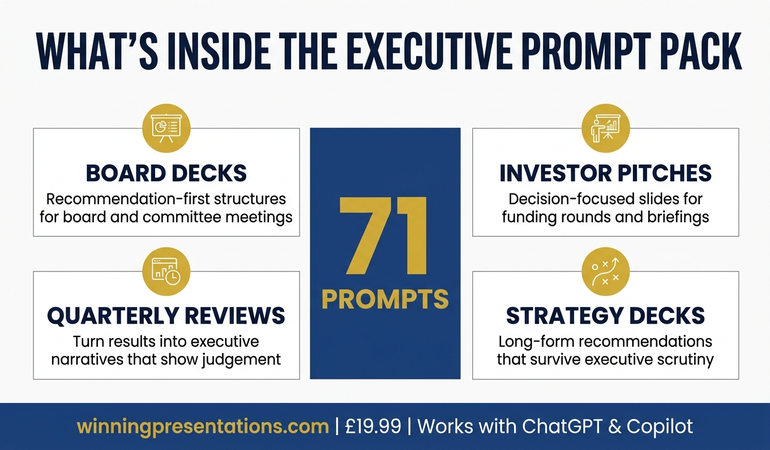
Infographic showing what's inside the Executive Prompt Pack: 71 prompts for ChatGPT and Copilot, covering board decks, investor pitches, quarterly reviews, and strategy presentations

AI Prompts Built Specifically for Executive Business Presentations

The Executive Prompt Pack is a collection of 71 prompts written specifically for business presentations at executive level. They’re not adapted marketing prompts or general AI templates. Each prompt is structured around a specific task in the executive presentation workflow — narrative structure, recommendation-first openings, board-ready slide content, executive language, Q&A preparation, strong closes — and calibrated to produce output that holds up in front of a senior audience without heavy manual editing.

The pack is drawn from Mary Beth Hazeldine’s 25 years working with executives across banking, professional services, technology, and government. The prompts encode the structural and linguistic conventions that senior presentations require: recommendation on the first slide, evidence organised by decision relevance rather than chronology, language that respects the reader’s time, and slide content that functions for asynchronous reading. These conventions take years to absorb through experience. The prompts make them available the moment you download the pack.

Every prompt is ready to use — paste it into ChatGPT or Microsoft Copilot, add your specific content details, and receive output tuned for an executive audience. There’s no prompt engineering required, no configuration, no setup. The pack is delivered as downloadable files on Gumroad, with lifetime access and no subscription. You keep the prompts and use them on every presentation you build from the day you enrol.

What You Get

  • 71 ready-to-use prompts — covering the full business presentation workflow, from narrative structure through final rehearsal
  • Works with ChatGPT and Microsoft Copilot — every prompt is tested on both tools, with notes on which works better for each task
  • Board deck prompts — build recommendation-first structures for board meetings, committees, and governance updates
  • Investor pitch prompts — structure credible, decision-focused slides for funding rounds and investor briefings
  • Quarterly review prompts — turn results into executive narratives that show judgement, not just numbers
  • Strategy presentation prompts — frame long-form strategic recommendations in a way that survives executive scrutiny
  • Executive language and Q&A prompts — sharpen the register of your content and anticipate the questions senior audiences actually ask
  • Instant access, lifetime use — no subscription, no expiry, downloadable immediately from Gumroad

£19.99 — instant access, lifetime use, works with ChatGPT and Copilot.

The Prompts That Understand Executive Business Presentations

Most AI prompts are written for general business writing and fall apart at executive level. The Executive Prompt Pack (£19.99) gives you 71 prompts built specifically for business presentations — board decks, investor pitches, quarterly reviews, strategy recommendations — drawn from 25 years of executive work across financial services and corporate leadership. Use them in ChatGPT or Microsoft Copilot to produce board-ready slide content in 25 minutes rather than starting from scratch every time. Instant access, lifetime use, no subscription.

Get the Executive Prompt Pack → £19.99

Instant download. Lifetime access. Works with ChatGPT and Copilot.

Is This Right for You?

The Executive Prompt Pack is built for mid-to-senior professionals who use ChatGPT or Microsoft Copilot in their presentation workflow and present to executive audiences — boards, committees, investors, leadership teams, or client decision-makers. It’s particularly useful if you find AI outputs require heavy manual editing before they reach executive quality, or if you spend time rewriting prompts from scratch every time you start a new presentation. It also suits professionals building their first board-level deck and wanting a structured AI workflow from the outset, rather than learning through trial and error with a high-stakes audience.

It’s not a general AI writing pack. The prompts are narrowly focused on executive business presentations — they’re less useful for internal team updates, informal stakeholder briefings, or general marketing work. It’s also not a presentation skills course: if your primary challenge is delivery, voice, or presence rather than structuring and drafting slide content, a different resource will serve you better. The pack does one thing — help you build executive-level business presentations faster using AI — and it does that one thing thoroughly.

Frequently Asked Questions

Do the prompts work with both ChatGPT and Microsoft Copilot?

Yes. All 71 prompts are written to work with either tool, and the pack includes guidance on which is better for each stage of the workflow. Many executives use ChatGPT for upstream structural work (narrative logic, argument testing, language sharpening) and Microsoft Copilot for the in-deck drafting directly inside PowerPoint. The prompts are calibrated for both paths.

What kinds of business presentations do the prompts cover?

The pack covers the presentation types senior professionals encounter most often: board decks, investor pitches, quarterly reviews, strategy recommendations, capital investment cases, and executive committee submissions. Within each type, there are prompts for narrative structure, opening recommendations, slide content, executive language, Q&A preparation, and closes — so the full workflow is covered rather than just the drafting stage.

Is £19.99 realistic for a pack of 71 executive prompts?

The price reflects the format. Because the pack is a structured set of downloadable prompts rather than coaching or live instruction, the cost stays low. For professionals who build business presentations regularly, the pack typically pays for itself on the first presentation by saving two to three hours of prompt rewriting and manual editing. Lifetime access means the cost never recurs.

Do I need prompt engineering experience to use the pack?

No. Every prompt is ready to use as written — paste it into ChatGPT or Copilot, add your specific content (the topic, the audience, the decision required), and the prompt handles the structure and executive calibration. The pack is designed for busy professionals who want to use AI productively without learning prompt engineering as a separate skill.

Can I use the prompts on multiple presentations?

Yes. Lifetime access means you can apply the prompts to every business presentation you build from the day you download them onward. That’s the core value of the pack — it keeps earning its place every time you face a new executive deck, not just the first one.

Who is this not suitable for?

The pack is less useful for professionals who don’t currently use ChatGPT or Microsoft Copilot in their work, or whose presentations are primarily internal team updates and client catch-ups rather than executive-level decks. It’s also not designed for delivery skills development — if your primary challenge is confidence, voice, or stage presence rather than content structure and AI-assisted drafting, a different resource is a better starting point.

07 Dec 2025
30 AI prompt cards for executive presentations - Copilot and ChatGPT prompts for budget requests, board decks, QBRs and more

AI Prompt Templates for Every Executive Presentation Type


AI prompt templates are the difference between generic AI output and slides worth presenting to executives.

Most people type vague requests like “create a presentation about Q3 results” and wonder why they get useless output. The AI isn’t broken — the prompt is. Without specific instructions, AI produces the average of everything it’s seen, which is mediocre.

After testing hundreds of prompts on real executive presentations, I’ve developed AI prompt templates for every major presentation type. These work with ChatGPT, Claude, Copilot, and any other AI assistant. Copy them, fill in your specifics, and get output you can actually use.

Here are the AI prompt templates that transform how you build executive presentations.

30 AI prompt cards for executive presentations - Copilot and ChatGPT prompts for budget requests, board decks, QBRs and more
AI prompt templates designed for specific executive presentation types

If you want ready-to-use prompts for executive presentations: Explore The Executive Prompt Pack →

71 ChatGPT and Copilot prompts for building executive slides in 25 minutes.

Why AI Prompt Templates Matter for Executive Presentations

Generic prompts produce generic output. AI prompt templates work because they provide the structure and specificity that AI needs to generate useful content.

Every effective AI prompt template includes:

  • Audience: Who will see this and what they care about
  • Purpose: What decision or action you need
  • Structure: The specific format you want
  • Tone: How it should sound
  • Content: Your raw material to work with

The AI prompt templates below follow this pattern for each executive presentation type. Copy the template, replace the bracketed sections with your specifics, and watch AI finally produce something worth editing.

AI Prompt Template #1: Executive Summary

Use this AI prompt template when you need to condense complex information into a single executive summary slide:

Create an executive summary slide for [TOPIC].

Audience: [ROLE/TITLE] who needs to [DECISION OR ACTION]
Time constraint: They will spend 30 seconds scanning this

Content to summarise:
[PASTE YOUR RAW CONTENT, BULLETS, OR KEY POINTS]

Structure the summary as:
– Headline: One sentence capturing the key message
– Bottom line: 2-3 sentences with the essential takeaway
– Key points: Maximum 4 bullets with the most important facts
– Recommendation: What you suggest they do

Tone: Confident, direct, no filler words
Format: Ready to paste into PowerPoint

This AI prompt template works because it tells the AI exactly what an executive summary needs — not just “summarise this” but the specific structure executives expect.

AI Prompt Template #2: Budget Request

Use this AI prompt template when building a budget presentation:

Create a budget request presentation for [PROJECT/INITIATIVE].

Audience: [CFO/FINANCE COMMITTEE/LEADERSHIP] who will approve or deny
Amount requested: [£X]
Payback period: [X months/years]

Here’s my raw information:
[PASTE YOUR BUSINESS CASE, COSTS, BENEFITS]

Structure as:
1. The Ask: Total amount and payback period (first slide headline)
2. The Problem: What happens if we don’t fund this (cost of inaction)
3. The ROI: Investment vs. return with specific numbers
4. The Breakdown: Where the money goes (include 10-15% contingency)
5. The Timeline: Key milestones and when returns materialise
6. The Decision: Exactly what approval you need and by when

Make the cost of NOT approving as clear as the cost of approving.
Tone: Confident, financially rigorous, specific

This AI prompt template produces budget slides that speak the language CFOs understand — ROI, payback, risk of inaction.

Want a full system of executive prompt templates?

The Executive Slide System includes 26 templates, 93 AI prompts, and 16 scenario playbooks — covering executive summaries, board, budget, QBR, investor pitch, and Q&A prep.

AI Prompt Template #3: QBR (Quarterly Business Review)

Use this AI prompt template for quarterly business reviews:

Create a QBR presentation for [Q1/Q2/Q3/Q4] [YEAR].

Audience: [LEADERSHIP TEAM/BOARD] reviewing [DEPARTMENT/BUSINESS UNIT] performance
Presenting: [YOUR ROLE]

Here are my quarterly metrics and notes:
[PASTE YOUR DATA, WINS, CHALLENGES, PLANS]

Structure as:
1. Headline Metrics: 3-5 key numbers with vs. target comparison (30 seconds)
2. Performance Narrative: The story behind the numbers (not just data)
3. Wins: Top 3 achievements this quarter (be specific)
4. Challenges: What didn’t go well and why (be honest)
5. Next Quarter Focus: Top 3 priorities and how they connect to strategy

For challenges, include what you learned and what you’re doing differently.
Make headlines tell the story — not “Q3 Revenue” but “Q3 Revenue Up 12% Despite Market Headwinds”
Tone: Balanced, accountable, forward-looking

This AI prompt template creates QBRs that tell a story instead of dumping data.

AI Prompt Template #4: Board Presentation

Use this AI prompt template for board-level presentations:

Create a board presentation for [TOPIC/REQUEST].

Audience: Board of Directors with governance and fiduciary responsibility
Board action needed: [APPROVAL/INFORMATION/DISCUSSION]

Here’s my content:
[PASTE YOUR MATERIALS]

Structure as:
1. Board Action Requested: Exactly what you need the board to decide (first slide)
2. Executive Summary: One slide they could use to make the decision
3. Strategic Alignment: How this connects to company strategy
4. Business Case: Investment required and expected return (max 2 slides)
5. Risk Assessment: Key risks with likelihood, impact, and mitigation
6. Recommendation: Clear statement of management’s position

Remember: Board members think about governance, risk, and shareholder value.
Keep to 10 slides maximum excluding appendix.
Tone: Formal, thorough, governance-aware

This AI prompt template produces board presentations that respect the board’s role and responsibilities.

10 executive presentation templates - QBR, budget request, board meeting, investor pitch, strategic recommendation slides
Each presentation type needs specific AI prompt templates — generic prompts produce generic output

Skip the blank-page step on your next presentation

71 prompts covering every executive scenario — from board updates to investor pitches to quarterly reviews — £19.99, instant access.

Get the Prompt Pack →

Designed for professionals who use AI tools for presentations

AI Prompt Template #5: Strategic Recommendation

Use this AI prompt template when presenting options and recommendations:

Create a strategic recommendation presentation on [DECISION TOPIC].

Audience: [LEADERSHIP TEAM] who need to choose between options
Decision deadline: [DATE]

Here’s my analysis:
[PASTE YOUR OPTIONS, ANALYSIS, DATA]

Structure using the SCR framework:
1. Situation: Current state and decision required
2. Complication: Why this is difficult (the tensions and trade-offs)
3. Options Analysis: Present 3 options with comparison matrix
4. Recommendation: Your clear recommendation with reasoning
5. Trade-offs Acknowledged: What you’re giving up with this choice
6. Implementation Path: What happens if they approve

Include a comparison table with criteria and how each option scores.
Lead with the recommendation — don’t make them wait.
Tone: Analytical, decisive, balanced

This AI prompt template creates recommendation slides that show your thinking, not just your conclusion.

AI Prompt Template #6: Project Status Update

Use this AI prompt template for status updates:

Create a project status update for [PROJECT NAME].

Audience: [STEERING COMMITTEE/EXECUTIVE SPONSOR]
Update period: [DATES]

Here’s my project data:
[PASTE YOUR METRICS, ACCOMPLISHMENTS, ISSUES]

Structure as:
1. Headline Status: GREEN/AMBER/RED with one-line explanation
2. Key Metrics Table: Timeline, Budget, Scope, Quality with targets vs. actual
3. What Changed: Completed, Started, Changed since last update
4. Risks and Issues: Active risks with mitigation status
5. Executive Action: What you need from leadership (or “no action required”)
6. Next Period: What’s coming up

Use traffic light indicators (🟢🟡🔴) for visual scanning.
Keep to one slide if possible.
Tone: Concise, factual, action-oriented

This AI prompt template produces status updates executives can scan in 30 seconds.

AI Prompt Template #7: Investor Pitch

Use this AI prompt template for investor presentations:

Create an investor pitch deck for [COMPANY NAME].

Audience: [VC/ANGEL/STRATEGIC INVESTORS]
Raise amount: [£X]
Stage: [SEED/SERIES A/B/ETC]

Here’s my company information:
[PASTE YOUR BUSINESS DETAILS, METRICS, TEAM INFO]

Structure as 10-12 slides:
1. Title: Company name + one-line description
2. Problem: The pain point (quantified)
3. Solution: Your product and how it solves the problem
4. Traction: Evidence it’s working (revenue, users, growth)
5. Market: Size of opportunity (bottom-up calculation)
6. Business Model: How you make money
7. Competition: Landscape and your differentiation
8. Go-to-Market: How you acquire customers
9. Team: Why you’ll win (relevant credentials only)
10. Financials: Projections with clear assumptions
11. Ask: Amount, use of funds, milestones

Lead with traction if you have it.
Use bottom-up market sizing, not top-down.
Tone: Confident, specific, founder-credible

This AI prompt template creates investor decks that follow the logic VCs use to evaluate opportunities.

AI Prompt Template #8: Present Bad News

Use this AI prompt template when delivering difficult messages:

Create a presentation delivering difficult news about [SITUATION].

Audience: [LEADERSHIP] who need to know about [MISS/FAILURE/PROBLEM]
Severity: [DESCRIBE THE IMPACT]

Here’s what happened:
[PASTE YOUR FACTS AND CONTEXT]

Structure as:
1. The News: State it directly in the first slide headline (don’t bury it)
2. Context: What factors contributed (factual, not defensive)
3. Lessons Learned: What you now understand that you didn’t before
4. Recovery Plan: Specific actions with realistic outcomes
5. Ask: What you need from leadership to execute recovery

Don’t make excuses. Don’t blame others.
Acknowledge trade-offs honestly.
Show you’re already working on solutions.
Tone: Direct, accountable, solution-focused

This AI prompt template helps you deliver tough messages while maintaining credibility.

How to Get the Most From AI Prompt Templates

Tip 1: Include your raw content. AI prompt templates work best when you give the AI something to work with. Paste your bullet points, data, or rough notes into the template.

Tip 2: Iterate after first output. The first response from any AI prompt template is rarely perfect. Follow up with “make it shorter,” “add more specific numbers,” or “make the recommendation clearer.”

Tip 3: Specify your audience. “CFO” produces different output than “board member” or “CEO.” The audience specification in these AI prompt templates is crucial — don’t skip it.

Tip 4: Use consistent AI prompt templates. Once you find AI prompt templates that work, save them. Consistency in your prompts produces consistency in your outputs.

FAQs About AI Prompt Templates

Do these AI prompt templates work with ChatGPT, Claude, and Copilot?

Yes. These AI prompt templates work with any AI assistant. The structure and specificity is what makes them effective, not the platform.

Should I use AI prompt templates for every presentation?

For first drafts, yes. AI prompt templates save significant time on initial content creation. You’ll still need to edit and refine, but you’re starting from a much better place.

How long should AI prompt templates be?

As long as needed to be specific. The AI prompt templates above are 100-200 words. That’s not too long — that’s precise. Short prompts produce vague output.

Can I modify these AI prompt templates?

Absolutely. These AI prompt templates are starting points. Adjust audience, structure, and tone specifications to match your specific needs.

Your Next Presentation

You have a presentation due soon. Before you start from scratch — or type a vague prompt and get useless output — try one of these AI prompt templates.

Copy the template for your presentation type. Fill in your specifics. Run it. Edit the output. You’ll have a first draft in 5 minutes that would have taken an hour to create manually.

That’s the power of good AI prompt templates: not replacing your thinking, but accelerating it.

The Executive Slide System complete package - 10 PowerPoint templates, 30 AI prompts, and quick start guide for executive presentations

Get the Complete Executive Slide System

26 templates, 93 AI prompts, and 16 scenario playbooks — covering executive summaries, board, budget, QBR, investor pitch, and Q&A prep. PowerPoint templates with structures already built in.

GET INSTANT ACCESS → £39

26 templates • 93 AI prompts • 16 scenario playbooks • Instant download • 30-day guarantee


Related: How to Create Executive Presentations That Get Approved in 2025 — the complete guide covering all 10 executive presentation types with AI prompt templates and frameworks.