Tag: ChatGPT presentation

28 Feb 2026
Executive preparing for presentation Q&A at desk with laptop and data tablet in corporate office

Most Executives Don’t Prep for Q&A. Here’s the AI Workflow That Changes That in 10 Minutes.

She’d spent 14 hours on the deck. Every slide was polished. The data was bulletproof. The recommendation was clear. Then the CFO asked one question — “What happens to the margin if we delay by a quarter?” — and she froze. Not because she didn’t know the answer. Because she’d never thought about it. Fourteen hours on slides. Zero minutes on Q&A preparation.

Quick Answer: Most executives prepare extensively for their presentation and not at all for the Q&A that follows it. Yet Q&A is where decisions actually get made or killed. AI changes this equation dramatically: in 10 minutes, you can feed your presentation to ChatGPT or Claude, ask it to role-play as your toughest stakeholder, and generate 15-20 likely challenge questions with concise answers. The executives who do this have a structural advantage over everyone else in the room — because almost nobody does.

🚨 Presenting this week? Quick check: Can you name the three hardest questions your audience might ask? Can you answer each in under 15 seconds? If not, you’ve found your preparation gap — and AI can close it in 10 minutes.

📌 If you’d rather see the structured frameworks than build them from scratch:

The AI prompts and answer structures in this article pair directly with the Executive Q&A Handling System — designed for senior professionals facing high-stakes boardroom, investor, and panel Q&A.

In 25 years of corporate banking — at JPMorgan, PwC, RBS, and Commerzbank — I never once saw a presentation succeed or fail because of the slides. The slides got people to the table. The Q&A determined whether they left with a yes or a “let’s revisit.”

But here’s what I also noticed: even the most senior executives spent almost all their preparation time on the deck and almost none on the questions that would follow it. It wasn’t laziness. It was that Q&A prep felt impossible — how do you prepare for questions you can’t predict?

That changed when AI became genuinely useful. I started asking clients to feed their presentations to ChatGPT or Claude before presenting, with a simple instruction: “You are a sceptical CFO reviewing this proposal. What are your top 10 concerns?” The quality of the questions was startling. Not perfect — but 70-80% overlap with what actually got asked.

Now I recommend this to every executive I work with. It takes 10 minutes. It costs nothing. And it gives you the one advantage that almost nobody in the room has: you’ve already rehearsed the hard questions.

The Q&A Preparation Gap: Why Smart Executives Get Caught Off Guard

How do executives prepare for tough questions? The honest answer, from two decades of watching them: most don’t. They prepare the presentation. They rehearse the delivery. They might anticipate one or two obvious questions. But systematic Q&A preparation — the kind where you map every likely question, draft concise answers, and stress-test for follow-ups — almost never happens.

There’s a structural reason for this. Slide preparation feels productive. You can see the deck taking shape. You can measure progress. Q&A preparation feels abstract and unbounded — there are infinite possible questions, so where do you even start?

This is exactly where AI changes the equation. AI can’t predict every question. But it can do something humans struggle with: it can systematically assume different perspectives and generate questions from each one. A sceptical CFO asks different questions than a supportive COO. A technical architect challenges different assumptions than a commercial director. AI can role-play all of them in minutes.

The result isn’t perfect prediction. It’s coverage. Instead of walking in having thought about 2-3 obvious questions, you walk in having considered 15-20 questions across multiple stakeholder perspectives. That’s the difference between hoping you won’t be caught off guard and knowing you’re prepared for most of what’s coming.

If you’re new to predicting questions systematically, the Question Map method gives you the manual framework. What this article adds is the AI acceleration layer that makes it practical even when you’re short on time.

The 10-Minute AI Q&A Preparation Workflow

This workflow works with ChatGPT, Claude, Copilot, or any capable AI assistant. The principle is the same across tools — you’re using AI as a sceptical audience simulator.

Step 1: Feed it your context (2 minutes). You don’t need to upload your entire deck. Give the AI a brief: “I’m presenting a proposal to [audience] requesting [decision]. The key points are [3-4 bullet points]. The budget is [amount]. The timeline is [duration].” The more specific you are about the audience and the ask, the better the questions will be.

Step 2: Assign a stakeholder role (1 minute). This is the step most people skip, and it’s the one that transforms the output. Don’t just ask “What questions might they ask?” Instead: “You are a sceptical CFO who has seen three similar proposals fail. What are your top concerns about this proposal?” The role-play instruction generates questions that sound like the people in your actual room.

Step 3: Generate questions by role (3 minutes). Run the prompt for 2-3 different stakeholder types. The CFO asks about cost and ROI. The COO asks about implementation and resources. The CTO asks about technical feasibility. Each role generates 5-7 unique questions, giving you 15-20 total.

Step 4: Draft 15-second answers (3 minutes). For each question, ask the AI to help you draft a concise answer using your actual data. “Draft a 2-sentence answer to this CFO question using these facts: [your data].” The 15-second constraint is critical — long answers in Q&A signal uncertainty. Short, structured answers signal confidence.

Step 5: Stress-test with follow-ups (1 minute). Pick the 3 hardest questions and ask the AI: “If I gave this answer, what would the follow-up question be?” This catches the second-level challenges that most people are completely unprepared for.

The AI Q&A preparation workflow showing five steps: feed AI your deck, assign stakeholder roles, generate challenge questions, draft 15-second answers, and stress-test with follow-ups

Walk Into Q&A Having Already Rehearsed the Hard Questions

AI generates the questions. The Executive Q&A Handling System gives you the frameworks for answering them — so every response sounds confident, concise, and credible:

  • The structured response frameworks that turn any question into a 15-second confident answer — including the PREP, Bridge, and Redirect techniques
  • Stakeholder-specific question banks — the actual questions CFOs, COOs, and board members ask, mapped by scenario
  • The follow-up question defence — how to handle “but what about…” without losing composure
  • Recovery scripts for the questions you genuinely didn’t anticipate

Get the Executive Q&A Handling System → £39

Built from thousands of executive Q&A sessions across global banking and consulting — including the questions that derail proposals and the answers that save them.

The Role-Play Prompts That Generate Real Questions (Not Generic Ones)

The quality of AI-generated questions depends entirely on how you prompt. “What questions might be asked about this proposal?” gives you generic questions. Role-play prompting gives you questions that sound like they’re coming from the actual person who’ll be in the room.

Here are the prompt structures that consistently produce the most realistic questions:

The Sceptical Finance Prompt: “You are the CFO of a £500M company. You’ve seen proposals like this before and most have underdelivered on ROI. You are friendly but rigorous. Review this proposal and give me your top 7 concerns, phrased as questions you would ask in the meeting.”

The Political Challenger Prompt: “You are a senior VP whose own project competes for the same budget as this proposal. You need to look supportive in public but you want this proposal deferred. What questions would you ask that sound reasonable but are designed to create doubt?”

The Technically Sceptical Prompt: “You are the CTO. You’ve been burned by projects with unrealistic technical timelines. You want to support innovation but you won’t approve anything that your team can’t actually deliver. What are your concerns?”

Can ChatGPT help with presentation questions? Absolutely — and it’s most useful when you give it a specific persona rather than asking for generic questions. The persona instruction forces the AI to generate questions from a particular perspective, which is far more realistic than a neutral “what might they ask?” approach.

The political challenger prompt is the one most executives never think to use — but it generates the most dangerous questions. The ones that sound supportive on the surface but are designed to stall your proposal. If you understand why executives ask questions they already know the answer to, you’ll recognise these patterns immediately.

AI generates the questions, but you need frameworks for answering them under pressure. The Executive Q&A Handling System gives you the response structures that work when you’re standing in front of the room and need to sound confident in 15 seconds.

Drafting 15-Second Answers: The Structure That Sounds Confident

Here’s a pattern I’ve observed across thousands of executive Q&A sessions: the length of your answer is inversely correlated with how confident you sound. Short, structured answers signal “I’ve thought about this.” Long, wandering answers signal “I’m figuring this out as I speak.”

The 15-second answer structure is: Position → Evidence → Implication.

Position: A one-sentence direct answer. “Yes, the margin impact is approximately 3% in Q1, recovering to baseline by Q3.”

Evidence: One supporting fact. “That’s based on the ramp-up cost curve we modelled using last year’s implementation data.”

Implication: One sentence connecting back to the decision. “The 12-month ROI is still 2.4x, which is above our threshold.”

That’s a complete answer in three sentences. Under 15 seconds. The questioner feels heard, the room feels informed, and you sound like someone who has done the work.

Where AI helps: after generating your list of likely questions, ask the AI to draft a Position-Evidence-Implication answer for each one using your actual data. Then review and adjust for accuracy. You’re not reading these answers verbatim in the meeting — you’re rehearsing the structure so it comes naturally when you’re under pressure.

For more on what happens when Q&A goes wrong and how to recover, see the 4-part executive system for handling difficult questions.

The Stress-Test: Follow-Up Questions That Break Weak Answers

The first question rarely kills a proposal. It’s the follow-up that does. The CFO asks about margin impact — you answer well. Then she asks: “And what happens to that margin if adoption is 30% below your projection?” That’s where unprepared presenters crumble.

AI is exceptionally good at generating follow-up questions because you can give it your answer and ask: “What would a sceptical questioner say next?”

Here’s the stress-test workflow:

Pick your 3-5 hardest questions from the role-play exercise. These are the ones where your answer feels weakest or where the data is softest.

Give the AI your draft answer and ask: “I gave this answer to a sceptical CFO. What is her next question?” The AI will typically probe the weakest assumption in your answer.

Prepare a second-level answer for each follow-up. If you can survive two rounds of questioning on your hardest topics, you can survive the actual Q&A. Most challenges don’t go deeper than two levels.

How do you use AI to prepare for presentation Q&A? Use it as a role-playing partner. Feed it your presentation context, assign it stakeholder roles, generate questions, draft structured answers, then stress-test the weakest ones with follow-up prompts. The entire process takes 10-15 minutes and covers more ground than hours of solo preparation.

The AI generates the questions and helps draft answers. The Executive Q&A Handling System gives you the proven frameworks for when you’re in the room and need to respond with confidence — including recovery techniques for the questions AI didn’t predict.

Stop Dreading the Questions More Than the Presentation

The presentation is the easy part — you control the content. Q&A is where proposals live or die. The Executive Q&A Handling System gives you control of Q&A too:

  • Structured response frameworks — PREP, Bridge, and Redirect techniques that make any answer sound confident and concise
  • The follow-up defence system — how to handle persistent questioning without losing composure or credibility
  • Stakeholder question banks — the actual patterns CFOs, board members, and sceptical executives use when they challenge proposals
  • Recovery scripts for genuinely unexpected questions — so you never freeze, even when caught off guard

Get the Executive Q&A Handling System → £39

Created by a presentation specialist who has coached senior professionals through the Q&A moments that decide careers and budgets.

Why Q&A Prep Is the Fastest Competitive Advantage in Any Room

Think about the last meeting where someone got asked a hard question and answered it immediately, calmly, with specific data. How did that person look? Prepared. Credible. In command of the material. Now think about the last time someone stumbled — paused too long, gave a vague answer, or said “I’ll get back to you on that.” How did that land?

The difference between those two outcomes is almost never intelligence or expertise. It’s preparation. And what makes Q&A prep such a powerful advantage is that hardly anyone does it. Your colleagues are spending hours perfecting slides that everyone will forget. You’re spending 10 minutes preparing for the questions that will determine the outcome.

In banking, I watched this dynamic play out hundreds of times. Two equally qualified directors presenting to the same committee. One had anticipated the CFO’s margin question. One hadn’t. The one who had prepared didn’t just answer the question — she revealed that she’d modelled three scenarios. That single moment of preparation changed the committee’s confidence in her entire proposal.

AI makes this preparation accessible to everyone. You don’t need a coach or a colleague willing to role-play as a hostile questioner. You need 10 minutes and a prompt. The question is whether you’ll use those 10 minutes — because most of your competitors won’t.

Is the Executive Q&A Handling System Right for You?

This is for you if:

  • You prepare thoroughly for presentations but rarely prepare for Q&A — and you know it’s a gap
  • You’ve been caught off guard by a question that derailed your proposal or killed your confidence
  • You present to senior executives, board members, or finance leaders who ask challenging questions
  • You want structured frameworks for answering ANY question confidently, not just the ones AI predicts

This is NOT for you if:

  • You’re looking for AI prompt templates (this article covers that — the product covers the answering frameworks)
  • You never face Q&A in your presentations
  • You already have a systematic Q&A preparation process you’re happy with

From 25 Years of Executive Q&A at JPMorgan, PwC, RBS, and Commerzbank. Now a System You Can Use Before Every Presentation.

I’ve watched Q&A sessions save proposals and destroy them. The Executive Q&A Handling System is built from the patterns that separate the executives who command the room from the ones who lose it:

  • Every response framework, stakeholder question bank, and recovery technique — refined from senior-level presentations across financial services, consulting, and technology
  • The answer structures that consistently sound confident under pressure
  • Works alongside the AI preparation workflow in this article — AI predicts the questions, the system gives you the frameworks for answering them

Get the Executive Q&A Handling System → £39

Instant download. Prepare for your next Q&A today.

Frequently Asked Questions

Which AI tool is best for Q&A preparation?

ChatGPT (GPT-4), Claude, and Copilot all work well for this. The key isn’t the tool — it’s the prompting technique. Role-play prompts with specific stakeholder personas produce significantly better questions than generic “what might they ask?” prompts. Use whichever AI tool you’re most comfortable with and focus on the quality of your instructions.

What if the AI generates questions nobody actually asks?

Expect about 70-80% relevance from well-prompted AI. The remaining 20-30% might be unlikely questions, but they’re rarely useless — they often reveal assumptions in your proposal you hadn’t examined. The point isn’t perfect prediction. It’s coverage. Even if 5 of your 20 generated questions never get asked, you’ve still prepared for 15 more questions than you would have otherwise.

How do I prepare for truly unexpected questions?

You can’t predict every question, but you can prepare a universal response structure. The Position-Evidence-Implication framework works for ANY question, even unexpected ones. If you’ve practised structured responses to 15 predicted questions, the muscle memory carries over to the unpredicted ones. You won’t have the perfect answer, but you’ll have the right structure — and that’s what sounds confident.

Does this work for technical Q&A or only executive-level questions?

The AI role-play approach works for any audience type. For technical Q&A, assign the AI a technical role: “You are a senior architect who has implemented three similar systems and two of them failed. What are your concerns about this technical approach?” The principle is identical — persona-based prompting generates more realistic questions than generic prompting, regardless of the domain.

The Winning Edge Newsletter

Weekly strategies for executive presentations that get decisions, approvals, and buy-in. Practical, tested techniques for senior professionals.

Subscribe free →

Optional free resource: CFO Questions Cheatsheet — the 10 questions finance leaders always ask, with structured response templates.

Also today: If your company is going through a restructure and you’re preparing to present your team’s case, read the reorg presentation structure that protects your department — then use the AI Q&A workflow above to prepare for leadership’s follow-up questions.

Your next presentation has a Q&A at the end. Your colleagues won’t prepare for it. You can — in 10 minutes. Use the AI workflow above to predict the questions, then use the frameworks to answer them with confidence.

→ Get the Executive Q&A Handling System (£39) and walk into your next Q&A fully prepared.

About the Author

Mary Beth Hazeldine is the Owner & Managing Director of Winning Presentations. With 25 years of corporate banking experience at JPMorgan Chase, PwC, Royal Bank of Scotland, and Commerzbank, she has delivered high-stakes presentations in boardrooms across three continents.

A qualified clinical hypnotherapist and NLP practitioner, Mary Beth combines executive communication expertise with evidence-based techniques for managing presentation anxiety. She has coached senior professionals and supported presentations for high-stakes funding rounds and approvals.

Book a discovery call | View services

25 Feb 2026
Executive with glasses evaluating AI-generated presentation on laptop screen, chin resting on hand in critical thought, printed slide documents on desk beside him

AI Presentation Structure: AI Can Write Your Slides. It Can’t Structure Your Argument.

I watched a board ignore 22 perfect AI-written slides — because not one of them asked for a decision.

Quick Answer: AI generates content — clear sentences, reasonable data points, professional formatting. What it can’t generate is AI presentation structure: the decision architecture that determines which slide goes where, what the room needs to decide, and why the evidence is sequenced to lead them there. If you ask AI to “create a board presentation,” you’ll get 15-20 slides of competent content with no argument. The fix: build the structural skeleton first (what decision, what recommendation, what evidence in what order), then use AI to fill each section.

A client — a VP at a technology company — sent me his board presentation and asked for feedback. It was 22 slides. Beautifully written. Consistent formatting. Every slide had clear bullet points and supporting data.

He’d used ChatGPT to build it, and the output was impressive. Clean language. Professional tone. Relevant content.

One problem: nowhere in 22 slides did it say what decision the board needed to make.

There was no recommendation. No “I’m asking for X by Y date.” No comparison of options with trade-offs. No cost of inaction. Just 22 slides of well-written information, sequenced in the order the AI had generated it — which was the order of his prompt, not the order of a decision-first argument.

I asked him: “If the board reads only slide 1, do they know what you’re asking for?” He looked at slide 1. It was a project overview. They wouldn’t know the decision until slide 19.

We restructured in 90 minutes. Same data, same AI-written content — but reorganised around a decision architecture. Recommendation on slide 2, evidence supporting it, options with trade-offs, specific ask with a deadline.

The board approved it in the first 10 minutes.

🚨 Built a presentation with AI and it feels flat? Quick check: Does slide 1 tell the room what decision you need? If the decision is on slide 15+, you have a content deck, not an argument.

→ Need the structural skeleton that makes AI output land? Get the Executive Slide System → £39

The Difference Between Content and Structure (And Why AI Only Gives You One)

Content is what your slides say. Structure is the order they say it in and why.

AI is extraordinarily good at content. Ask ChatGPT to “write a slide about Q3 revenue performance” and you’ll get a clear, professional summary with relevant data points. Ask it to “write 15 slides for a board presentation on Project Phoenix” and you’ll get 15 clear, professional slides.

What you won’t get is an argument. Because an argument requires something AI doesn’t have: knowledge of the decision-maker, the political context, the urgency, the alternatives, and the specific outcome you need from the room.

AI presentation structure fails because AI sequences content in the order it was prompted, not in the order that leads a room to a decision. It generates in narrative order (background → context → analysis → findings → recommendation) when executive communication requires decision-first order (recommendation → evidence → options → ask).

This is the fundamental gap. It’s not about better prompts, more specific instructions, or a different AI tool. It’s about the structural logic that determines what goes on slide 1, what goes on slide 5, and what the room is doing on slide 10.

For more on the difference between AI-enhanced and AI-generated presentations, see the full comparison.

Why do AI-generated presentations fail with executives?

Because executives read slides in decision mode — they’re looking for the recommendation, the risk, the cost, and the ask. AI generates slides in information mode — sequenced to inform, not to persuade. When an executive hits slide 5 and still doesn’t know what you’re asking for, they check out. The content might be better than anything you’d write manually. But without decision architecture, it’s like having a perfectly worded email with no subject line.

Why AI Presentations Fail in Executive Settings

After reviewing hundreds of AI-generated executive decks — from clients using ChatGPT, Copilot, Gamma, and others — I see the same three structural failures every time.

Failure 1: The recommendation is buried. AI typically generates in chronological or logical order: background first, analysis second, conclusions third, recommendation last. In a 20-slide deck, the recommendation lands on slide 17-20. By then, three executives have left and two more are on their phones. Executive presentations need the recommendation on slide 1 or 2 — everything after that is evidence supporting the ask.

Failure 2: No options or trade-offs. AI generates a single recommendation because that’s what it was asked for. But decision-makers need options. “I recommend A” gives the room two choices: yes or defer. “Here are three options with costed trade-offs, and I recommend A because…” gives them agency. AI doesn’t create options unless specifically prompted — and even then, it doesn’t quantify the trade-offs the way an executive audience needs.

Failure 3: No cost of inaction. The most powerful slide in any decision deck is the one that shows what happens if the room doesn’t decide. AI never generates this slide because it doesn’t understand that executive meetings exist to make decisions, and that deferral is the default outcome unless you make it expensive. The decision slide structure includes this by default — AI doesn’t.

⭐ Give AI the Structure It’s Missing — Then Let It Do What It’s Good At

The Executive Slide System gives you 22 structural skeletons — the decision architecture AI can’t generate. Each template tells you what goes on every slide and why. Then the 51 matched AI prompts (Draft → Refine → Executive Polish) fill the structure with content that sounds like you.

Your structure-first AI toolkit:

  • 22 executive slide templates — the structural skeleton for board decks, status updates, proposals, and recommendations
  • 51 AI prompts in 3 stages: Draft (generate content), Refine (sharpen for audience), Polish (stress-test as a skeptical CEO)
  • 15 scenario playbooks — find your exact situation, follow the template + prompt sequence like a recipe
  • Decision architecture built into every template — recommendation, options, cost of inaction, specific ask

Get the Executive Slide System → £39

Built from 24 years of executive presentations — the structural logic AI doesn’t have.

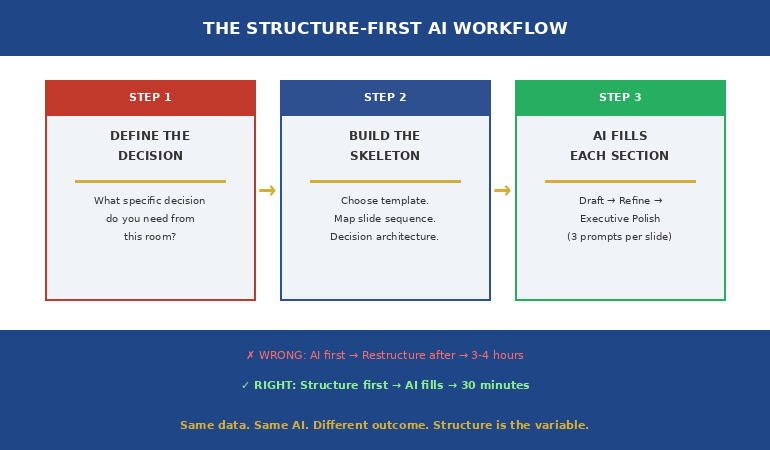
The Structure-First AI Workflow: Decision → Skeleton → AI

The fix is simple but counterintuitive: you need to build the structural skeleton BEFORE you open AI. Most people do the opposite — they prompt AI first, then try to restructure the output. That’s backwards.

Step 1: Define the decision. Before you write a single prompt, answer: “What specific decision do I need from this room?” Not “inform them about the project.” Not “update them on progress.” A decision: “Approve £400K additional budget by March 7.” If you can’t state the decision in one sentence, you’re not ready to build slides — with or without AI.

Step 2: Build the skeleton. Choose a template that matches your scenario. A board presentation needs a different skeleton than a project status update, which needs a different skeleton than an investment proposal. The skeleton determines what goes on each slide and in what order — recommendation first, evidence second, options third, ask last.

Step 3: Prompt AI to fill each section. Now — and only now — use AI. But not with a single prompt like “create a board presentation.” Instead, prompt section by section: “Write the executive summary for a £400K technology investment. The recommendation is to approve. The key evidence is…” When AI fills a pre-built structure, the output has the decision architecture the room needs.

This is the approach that turned my client’s 22-slide information deck into a 12-slide decision deck — same data, same AI-generated language, fundamentally different outcome.

For a library of proven prompts, see the complete guide to ChatGPT prompts for presentations.

The 3-Prompt System: Draft → Refine → Executive Polish

One prompt doesn’t produce executive-quality output. Three prompts do — if they’re sequenced correctly.

Prompt 1: Draft. Generate the content for a specific slide or section. Be specific about the scenario, the audience, and the data. “Create content for a Q3 business review for the finance committee. Include: revenue vs target, three significant wins with quantified impact, two challenges with root causes, and three priorities for next quarter.”

Prompt 2: Refine. Sharpen the output for the specific audience. “Make this more impactful for a CFO audience. Each win should quantify business impact. Challenges should include what we’re doing about them. Remove metrics that don’t connect to business outcomes.”

Prompt 3: Executive Polish. Stress-test it. “Review this through the eyes of a CEO with five other meetings today. What would they skip? What questions would they ask? Strengthen the ‘so what’ for each point. Ensure the decision is specific and time-bound.”

Each prompt layer adds something the previous one didn’t: the Draft gives you content, the Refine makes it audience-specific, and the Polish makes it decision-ready. Without the structural skeleton underneath, all three layers produce better-written information. With the skeleton, they produce an argument.

The Structure-First AI Workflow showing three steps from decision definition through structural skeleton to AI content filling

The 51 AI prompts in the Executive Slide System are pre-written in the Draft → Refine → Polish sequence for every template — so you’re not writing prompts from scratch. Open the template, run the three matched prompts, and the structural skeleton fills itself with executive-quality content. Get the Executive Slide System → £39

What AI IS Good At (Once the Structure Exists)

This isn’t an anti-AI article. AI is transformative for presentations — but only when it fills a structure rather than creating one.

Once you have the decision architecture in place, AI excels at: generating clear, professional language for each section; stress-testing your content from the audience’s perspective; finding gaps in your logic that you’ve become blind to; polishing language to be more concise and direct; and creating supporting data visualisations.

The combination of human structure + AI content is more powerful than either alone. You bring the judgement (what decision, what audience, what politics). AI brings the execution speed (clear language, consistent tone, gap identification). The structural skeleton is the interface between the two.

The professionals who are most effective with AI aren’t the ones writing the best prompts. They’re the ones who know what the room needs BEFORE they open ChatGPT. Structure first. AI second. That’s the workflow that gets decisions.

⭐ Stop Getting 22 Slides of Information and Zero Decisions

The Executive Slide System is the structural skeleton that makes AI output actually work in executive meetings. Each of the 22 templates includes the decision architecture — recommendation position, evidence sequence, options framing, specific ask — that AI can’t generate on its own.

Your structure-first AI deliverables:

  • 22 structural templates — recommendation-first, decision-ready, each with mapped slide sequence
  • 51 matched AI prompts — 3 per template (Draft → Refine → Executive Polish), pre-written and ready to paste
  • 15 scenario playbooks — find your exact situation, follow template + prompt sequence in under 30 minutes
  • 6 checklists — verify decision readiness, argument logic, and executive clarity before presenting

Get the Executive Slide System → £39

The structural logic from 24 years of executive banking + 51 AI prompts that fill it in minutes. Structure first. AI second. Decisions always.

The 15 scenario playbooks in the Executive Slide System tell you which template to open AND which AI prompts to run for your specific situation — so the structure-first workflow takes 30 minutes, not 3 hours. Get the Executive Slide System → £39

Is This Right For You?

✓ This is for you if:

  • You’ve used AI for presentations but the output feels flat, informational, or doesn’t get decisions
  • You want the structural logic that makes AI-generated content land with executive audiences
  • You want pre-written AI prompts matched to specific executive scenarios

✗ This is NOT for you if:

  • You don’t use AI for presentations and don’t plan to start
  • You’re looking for visual design templates (this is structural logic, not design)

⭐ 24 Years of Board-Level Decision Decks — Now a Structure AI Can’t Mess Up

Every template in the Executive Slide System was built from real executive approvals — board papers, SteerCo recommendations, ExCo investment cases. The decision architecture that got those approved is now the skeleton your AI fills.

Your AI-ready decision architecture:

  • Decision slide order that forces “what are you asking for?” onto slides 1–2 (not slide 19)
  • Options + trade-off slide formats executives actually use to decide — with costed consequences
  • Cost-of-inaction slide prompts — the missing slide in 90% of AI-generated decks
  • 51 matched AI prompts (Draft → Refine → Executive Polish) pre-written for every template

Get the Executive Slide System → £39

Built from board approvals, SteerCo recommendations, and ExCo investment cases at JPMorgan, RBS, PwC, and Commerzbank. Instant download. 30-day money-back guarantee.

Frequently Asked Questions

Can’t I just write better prompts instead of using templates?

Better prompts produce better content — but content isn’t the problem. The problem is structural logic: what goes on slide 1, what goes on slide 5, why the evidence is sequenced the way it is. No prompt, however sophisticated, gives AI the knowledge of your decision-maker, the political dynamics in the room, or the specific decision the meeting exists to make. Templates provide the structural skeleton that prompts can’t. Then prompts fill it brilliantly.

Does this work with ChatGPT, Copilot, and other AI tools?

Yes — because the structural problem is universal across all AI tools. ChatGPT, Copilot, Gamma, Claude, and every other AI presentation tool generates content in information mode. None of them generate in decision-first mode unless you provide the structure first. The templates work with any tool. The 51 AI prompts are written for ChatGPT-style interfaces but adapt to any conversational AI.

How long does the structure-first workflow take?

About 30 minutes for a complete executive deck. Five minutes to choose the right template for your scenario (the playbooks tell you which one). Five minutes to define the decision, recommendation, and key evidence points. Twenty minutes to run the three prompts per section and review the output. Compare that to 3-4 hours of prompt-iterate-restructure-prompt cycles when starting with AI alone.

What if my presentation is informational, not decision-based?

Most presentations that claim to be “informational” actually contain an implicit decision. A project status update implicitly asks “should we continue as planned?” A quarterly review implicitly asks “is this team performing?” If you genuinely need to inform without seeking a decision — a training session or a knowledge-share, for example — AI alone works fine. But for any presentation to leadership, there’s almost always a decision embedded. Find it, make it explicit, and build the structure around it.

📬 The Winning Edge — Weekly Newsletter

One executive presentation insight per week. AI workflows, structural frameworks, and the decision-first thinking that makes both work. No filler.

Subscribe Free →

Read next: AI handles slides. Q&A handles everything else. Read When You Don’t Know the Answer: 3 Responses That Save You in Q&A — the scripts for when AI can’t help.

Read next: If your next presentation involves giving sensitive feedback, read The Sandwich Feedback Trap: Why It Fails When You Critique Up (And the Mirror Structure That Works).

If your board pack goes out tomorrow morning — or your SteerCo pre-read is due by 5pm — don’t let AI decide the slide order. Build the structural skeleton first. Then let AI fill it. That’s how 22 slides of information become 12 slides that get a decision.

About the Author

Mary Beth Hazeldine is the Owner & Managing Director of Winning Presentations. With 24 years of corporate banking experience at JPMorgan Chase, PwC, Royal Bank of Scotland, and Commerzbank, she has delivered high-stakes presentations in boardrooms across three continents.

A qualified clinical hypnotherapist and NLP practitioner, Mary Beth combines executive communication expertise with evidence-based techniques for managing presentation anxiety. She has trained thousands of executives and supported presentations for high-stakes funding rounds and approvals.

Read more articles at winningpresentations.com

02 Jan 2026
How to make a presentation with AI - the complete 90-minute workflow

How to Make a Presentation With AI: The Complete 90-Minute Method [2026]

Want to make a presentation with AI in under 90 minutes? Last Tuesday, a client called me in a panic — board presentation in 4 hours, zero slides ready.By the time she walked into that boardroom, she had 12 polished slides, a clear narrative, and the confidence that comes from knowing exactly what to say.

The presentation landed. The board approved her proposal.

Total time to make a presentation with AI from scratch? 87 minutes.

I’ve spent 24 years creating presentations at JPMorgan Chase, PwC, Royal Bank of Scotland, and Commerzbank. For most of that time, a decent presentation took a full day. Sometimes two.

Not anymore.

If you want to learn how to make a presentation with AI that actually works — without spending your entire weekend on it — you need a system. Not random prompts. Not AI gimmicks. A repeatable process that combines human thinking with AI speed.

Here’s the exact method I use with clients.

For the fundamentals of presentation creation without AI tools, see my complete guide: How to Make a Presentation: The Complete Guide.

🎁 Want the prompts? Download my 10 Essential Copilot Prompts (free) — the exact prompts I use in the workflow below.

Why AI Changes How You Make a Presentation

The average professional spends 4-8 hours creating a single presentation. Some spend entire weekends.

Here’s why learning to make a presentation with AI is a game-changer:

  • First drafts in minutes — AI generates starting content instantly
  • Structure suggestions — AI can propose logical flows
  • Content expansion — AI fills in bullet points and speaker notes
  • Editing assistance — AI helps simplify and clarify

But here’s what most people get wrong: AI can’t replace thinking.

If you don’t know your purpose and audience, AI will just help you make a presentation faster — but it won’t be a good presentation. Garbage in, garbage out.

The 90-minute method works because it combines human strategy with AI execution.

How to Make a Presentation With AI: The 90-Minute Method

This workflow uses AI tools (Copilot, ChatGPT, or Claude) to accelerate each phase. Set a timer. Each phase has a strict time limit.

Phase 1: The Decision Frame (10 Minutes) — Human Only

Before you touch any AI tool, answer four questions in writing:

  1. What decision do I need from this presentation?
    Not “inform about Q3 results” but “approve the Q4 budget increase”
  2. Who makes that decision?
    Name them. Understand what they care about.
  3. What would make them say yes?
    What evidence, logic, or reassurance do they need?
  4. What would make them say no?
    What objections will they have? Plan to address them.

Write your answers in 2-3 sentences each. This is your presentation’s foundation.

If you skip this step, the next 80 minutes will be wasted. AI will help you make a presentation faster — but it’ll be the wrong presentation.

Phase 2: The Narrative Spine (15 Minutes) — AI-Assisted

Now use AI to help create your presentation’s structure.

Use this prompt:

I need to create a presentation to [YOUR DECISION FROM PHASE 1].My audience is [WHO DECIDES]. They care about [WHAT THEY VALUE].Their likely objections are [YOUR PHASE 1 ANSWERS].

Give me a 5-7 slide structure using the Problem → Solution → Action framework. For each slide, give me the headline (what the slide says) and the purpose (why this slide exists).

Review the AI output. Adjust the order if needed. You now have your narrative spine.

The test: Can you explain your presentation in 30 seconds using only these headlines? If not, ask AI to simplify the structure.

Phase 3: Content Generation (25 Minutes) — AI-Powered

Now — and only now — do you open PowerPoint or Google Slides. This is where AI dramatically accelerates how you make a presentation.

If you have Copilot in PowerPoint:

Create a slide about [YOUR HEADLINE]. Include [SPECIFIC DATA OR POINTS]. Keep text minimal — maximum 4 bullet points of 6 words each.

If you’re using ChatGPT or Claude:

I’m creating a slide with this headline: [HEADLINE]The purpose of this slide is: [PURPOSE]Give me 3-4 bullet points (maximum 6 words each) that support this headline. Make them specific and actionable.

For each slide in your structure:

  1. Use AI to generate initial content
  2. Review and edit (remove anything generic)
  3. Move to the next slide

At the end of Phase 3, you should have a complete first draft.

⚡ Get 25 Tested AI Prompts

The Copilot Quick-Start Prompt Pack (£9.99) includes prompts for every phase — structure, content, refinement, and speaker notes. Stop guessing what to ask AI.

Phase 4: Visual Refinement (20 Minutes) — Human-Led

AI can help you make a presentation quickly, but human judgment is still needed for refinement.

Go through each slide and apply these rules:

The One-Point Rule: Each slide makes ONE point. If you have two points, you need two slides.

The 6-Word Rule: No bullet point longer than 6 words. If it’s longer, ask AI to shorten it:

Shorten this bullet point to 6 words maximum while keeping the meaning: “[YOUR LONG BULLET POINT]”

The Squint Test: Squint at your slide. Can you still tell what it’s about? If not, simplify.

Phase 5: The Polish Pass (15 Minutes) — AI-Assisted

Final refinements that separate good from great:

Opening check (3 minutes): Does your first slide create curiosity? Ask AI:

My presentation is about [TOPIC]. My opening slide says “[CURRENT TITLE]”. Give me 3 alternative opening headlines that create curiosity and hint at the value the audience will get.

Flow check (5 minutes): Click through in slideshow mode. Mark any transitions that feel abrupt.

Closing check (3 minutes): Does your final slide tell the audience exactly what to do?

Spelling/grammar check (4 minutes): Run spell-check. Read titles aloud.

Phase 6: Speaker Notes (5 Minutes) — AI-Powered

Use AI to generate speaker notes for each slide:

Write brief speaker notes for this slide. Include: one conversational opening sentence, key talking points (not reading the slide), and a transition to the next topic which is [NEXT SLIDE HEADLINE].

You’re done. Total time: 90 minutes.

The Best AI Tools to Make a Presentation

Here’s what works best for different situations:

Tool Best For Limitations
Microsoft Copilot PowerPoint users, enterprise Requires Microsoft 365 subscription
ChatGPT Content generation, any platform Can’t edit slides directly
Claude Long content, detailed structures Can’t edit slides directly
Canva AI Visual-first presentations Less control over structure
Gamma Quick drafts from prompts Limited customisation

My recommendation: Use ChatGPT or Claude for Phases 1-2, then Copilot (if available) for Phases 3-6.

Common Mistakes When Using AI to Make a Presentation

Mistake 1: Skipping the Decision Frame. AI can’t read your boss’s mind. You need to define purpose and audience first.

Mistake 2: Using generic prompts. “Make a presentation about sales” gives generic results. Include your specific context, audience, and goals.

Mistake 3: Accepting AI output without editing. AI gives you a starting point, not a finished product. Always review and refine.

Mistake 4: Over-relying on AI for structure. AI suggests common structures. For high-stakes presentations, human judgment about what your specific audience needs is irreplaceable.

Mistake 5: Forgetting to fact-check. AI can make things up. Verify any statistics or claims before presenting.

The 90-Minute AI Presentation Checklist

Print this and use it every time you make a presentation with AI:

Phase Time AI Role Done?
Decision Frame 10 min Human only
Narrative Spine 15 min AI-assisted
Content Generation 25 min AI-powered
Visual Refinement 20 min Human-led
Polish Pass 15 min AI-assisted
Speaker Notes 5 min AI-powered

FAQs: Making Presentations With AI

Can AI make a complete presentation for me?

AI can generate slides, but it can’t replace thinking. You still need to define your purpose, know your audience, and review the output. Think of AI as a fast assistant, not a replacement for strategy.

Which AI tool is best for PowerPoint?

Microsoft Copilot is best if you have it — it works directly in PowerPoint. Otherwise, use ChatGPT or Claude to generate content, then paste into PowerPoint manually.

How do I make AI output less generic?

Include specific context in your prompts: your industry, audience, their concerns, your company’s situation. The more specific your input, the more useful the output.

Is 90 minutes realistic for a good presentation?

Yes — for most business presentations. The method works because it eliminates time wasted on blank-page syndrome, template hunting, and rewriting. You focus only on what matters.

Your AI Presentation Toolkit

Here’s everything you need to make a presentation with AI efficiently:

🎁 FREE: 10 Essential Copilot Prompts
The exact prompts from this article — ready to copy and paste.


⚡ QUICK WIN (£9.99): Copilot Quick-Start Prompt Pack
25 tested prompts for every phase of AI-powered presentation creation.


📚 COMPLETE AI TOOLKIT (£29): PowerPoint Copilot Master Guide
201-page guide with prompts, workflows, and advanced techniques for AI presentations.


🎯 COMPLETE SYSTEM (£39): The Executive Slide System
17 templates + 51 AI prompts + video training. For high-stakes presentations to executives.

🎓 Master AI-Enhanced Presentations

Ready to go beyond prompts? The Executive Buy-In Presentation System teaches you how to combine AI tools with proven frameworks to create presentations that win executive approval.

  • 7 modules of video training
  • AI prompt sequences that build on each other
  • The Decision Definition Canvas
  • Executive-ready templates
  • Live Q&A sessions

Learn More About the Course →


Related Articles:

📧 Get The Winning Edge

Weekly AI presentation tips, new prompts, and insights from 24 years in corporate boardrooms. No fluff. No spam.

Subscribe Free →


Mary Beth Hazeldine spent 24 years in corporate banking at JPMorgan Chase, PwC, Royal Bank of Scotland, and Commerzbank. As a qualified clinical hypnotherapist and founder of Winning Presentations, she now trains executives on high-stakes presentations — combining proven frameworks with AI tools that actually work.