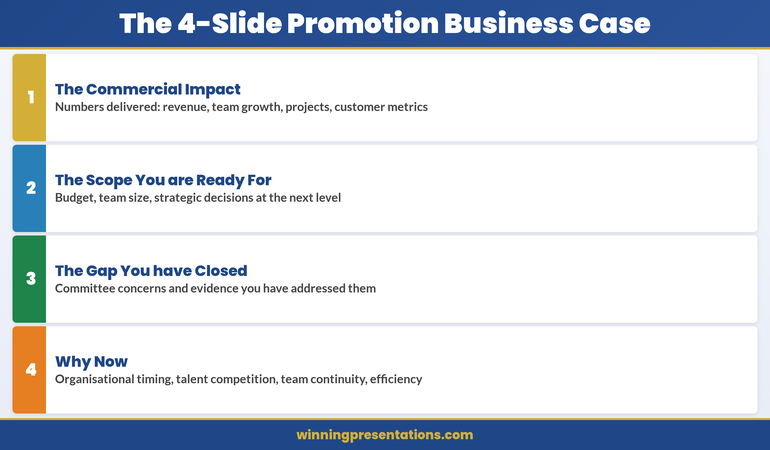
Tag: business case presentation

21 Apr 2026
Senior female executive presenting her career case to two board-level leaders in a polished boardroom, composed and authoritative, navy tones, editorial photography style

Promotion Presentation: How to Make the Business Case for Your Own Advancement

Quick Answer

A promotion presentation is not a request for recognition — it is a business case. Frame your advancement as the solution to a specific organisational problem, support it with quantified evidence from the past twelve months, anticipate the “not ready” objection with pre-emptive evidence, and deliver it in a format that mirrors the standards you apply to every other executive decision. Senior leaders approve promotions when they can see the business logic, not just the tenure.

Priya had been doing the CFO role in everything but title for fourteen months. She managed the treasury function, chaired the audit subcommittee, deputised for the outgoing CFO during his extended sick leave, and delivered the annual accounts presentation to the board — an event no other Finance Director in the business had ever been asked to lead. She had not been passed over; no formal process had started. She simply assumed that the evidence was visible and that the right conversation would happen when the time was right.

The time never quite arrived on its own. A restructure was announced. An external search was commissioned for a Group CFO. Priya’s name appeared on nobody’s shortlist because nobody had a structured record of what she had been doing. The hiring panel knew she was capable. They did not know how to articulate her case internally, because she had never given them the language to do it.

Priya was not passed over because she lacked the evidence. She was passed over because she had never organised that evidence into a format her organisation could act on. The business case for her promotion existed; it simply had not been presented.

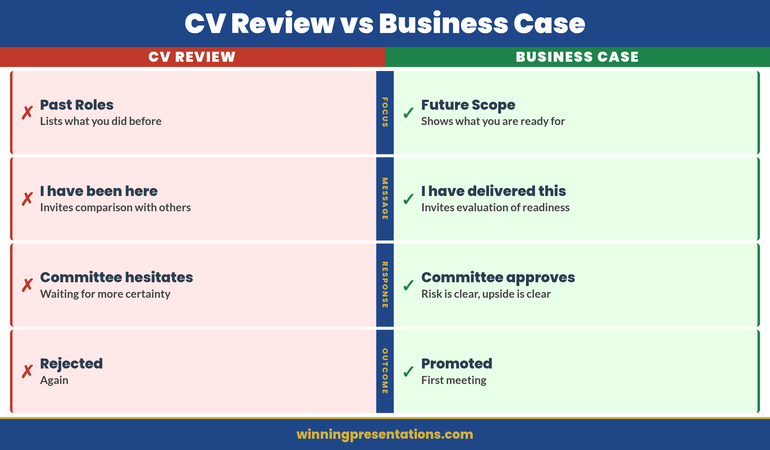
The executives who consistently advance are not always the most accomplished. They are the ones who have learned to treat their own career advancement with the same analytical precision they apply to any other business decision they take to a senior committee.

Why Most Promotion Pitches Fail Before They Reach the Decision-Maker

The most common failure mode in promotion conversations is not rejection — it is deferral. “Let’s revisit this in six months” is almost always code for: the person making the case did not give us a clear enough reason to act now. Decision-makers rarely say that explicitly. They schedule another review instead.

Promotion pitches fail at three points. The first is framing: the candidate presents their tenure and competence rather than the business problem their advancement would solve. The second is evidence: achievements are described rather than quantified, making comparison with any external candidate impossible. The third is timing: the conversation is initiated before the candidate has built sufficient internal support, leaving the formal decision-maker without allies when the case is discussed.

Each of these failures is structural. They are not personality failures or confidence failures — they are presentation failures. The evidence may be solid; the problem is that it has not been organised into a format that a busy senior leader can process, evaluate, and act on under time pressure.

The solution is to treat your own promotion like any other business case you have presented: with a clear recommendation, supporting evidence, a response to the most predictable objections, and a specific ask.

The Business Case Framing: You Are Solving a Problem, Not Asking a Favour

The shift that changes everything in a promotion conversation is moving from a narrative about yourself to a narrative about the organisation. “I have been performing at this level for two years and I believe I deserve recognition” is a request. “The business has a gap at Group Finance leadership level, and my track record in the deputy role makes me the lowest-risk path to filling it” is a business case.

The distinction is not cosmetic. It changes the entire structure of the conversation. When you frame your promotion as a business problem — a capability gap, a succession risk, a transition challenge — you give the decision-maker something to agree with before they have to agree with you. They can support the idea of solving the problem without committing to you personally in the first instance. Your case then becomes the argument for why you, specifically, are the most efficient solution.

To build this frame, identify the specific business problems your promotion would solve. Is there a succession gap? A capability shortage? A risk created by the current structure? A growth objective that requires senior capacity at your level? Each of these is a legitimate business driver for promotion, and each is more persuasive than personal merit alone, because it gives your advocate something to present on your behalf when you are not in the room.

The question to answer in your framing is: “Why does the business need this to happen now?” The answer to that question is the foundation of your case.

Building Your Evidence File: The Twelve-Month Impact Audit

Before any promotion conversation, conduct a structured audit of your impact over the previous twelve months. Do not rely on memory and do not rely on your performance review documents, which tend to capture activity rather than impact. Instead, build a working document that contains four categories of evidence.

The first is financial outcomes: revenue generated or protected, costs reduced, budget variances managed, capital deployed. Any figure that appears in a management account or board report and that your decisions influenced belongs here. Quantify in absolute terms and as a percentage improvement where relevant.

The second is organisational outcomes: projects delivered, teams led, structural changes implemented, risks identified and resolved. These are the contributions that do not always appear in financial metrics but that senior leaders recognise as the work of someone operating above their grade.

The third is stakeholder outcomes: relationships built, decisions influenced, external credibility established, internal alignment achieved. If you have managed an external client relationship, led a major procurement, or been the internal face of a significant initiative, record it explicitly.

The fourth is scope evidence: instances where you performed at a higher level than your role required — covering a more senior colleague, leading a cross-functional workstream, representing the function at board or committee level. This is the category that most directly supports the case that your title has not kept pace with your actual level of operation.

Compile the audit before you begin structuring your promotion conversation. The material is unlikely to surprise you, but organising it systematically will reveal patterns of contribution that are not visible when the evidence is scattered across emails, project updates, and memory.

Translating Your Achievements Into Board-Ready Language

Senior decision-makers evaluate people using the same language they apply to any resource allocation decision: impact, risk, and return. Your evidence file needs to be translated from the language of individual performance into the language of organisational investment.

The translation rule is: every achievement should have a measurable outcome attached. “Led the supplier renegotiation” becomes “Led the supplier renegotiation, reducing annual category spend by 12% and extending contract terms by three years.” “Managed the team during the restructure” becomes “Maintained team retention at 94% through a six-month restructure period, against a sector average of 78%.”

When a direct financial metric is unavailable, use proxy metrics: time saved, risk reduced, scope managed, or scale of stakeholders involved. The goal is not to fabricate precision but to attach some external reference point that allows a decision-maker to calibrate the significance of what you did.

Avoid comparative language that positions you against your peers inside the organisation — this generates political risk without adding persuasive value. Instead, use external benchmarks where available: sector averages, industry norms, or publicly reported figures from comparable organisations. External comparisons strengthen the case without creating internal friction.
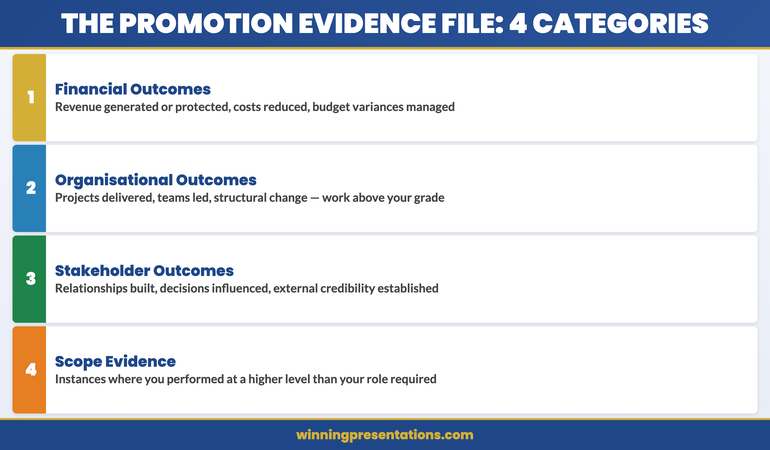
The Promotion Business Case — four evidence categories: Financial Outcomes, Organisational Outcomes, Stakeholder Outcomes, Scope Evidence

The Executive Slide System — Structure Every High-Stakes Deck

Your promotion case needs to be as sharply structured as any other business case you present. The Executive Slide System gives you the frameworks, templates, and slide structures to build a compelling, board-ready case for your own advancement — and every other high-stakes presentation you lead.

Get the Executive Slide System — £39 →

Anticipating and Answering the “Not Ready” Objection

The most common reason promotion conversations stall is the unspoken objection: “We’re not sure you’re ready for the full scope of the senior role.” This objection is rarely stated directly. It surfaces instead as a request for more time, a suggestion that you “continue to develop in the current role”, or a commitment to “revisit this in the next cycle.”

Because the objection is rarely explicit, most candidates never address it. The most effective approach is to surface it yourself and respond to it before it is raised. “I want to address directly the question of whether I am ready for the full scope of the role, because I know that is likely to be a concern given that I haven’t held the title formally.” Then answer it with the scope evidence from your audit: the specific instances where you have already been performing at the higher level.

The structure for this response is: acknowledge the concern, present the contrary evidence, and offer a specific reference. “My concern would be well-founded if I hadn’t been operating at this level for the past fourteen months. During that period I led [X], managed [Y] directly, and delivered [Z] in a context that was structurally equivalent to the senior role.” If a more senior colleague can attest to your performance at that level, reference them explicitly and ensure they have agreed to do so in advance.

Addressing the objection directly demonstrates the kind of confident self-awareness that senior leadership roles require. It also eliminates the gap that usually allows the objection to persist quietly beneath a polite deferral.

The One-Slide Personal Career Brief

In a formal promotion presentation, whether written or verbal, you need one slide — or one clearly delimited section — that summarises your entire case in ninety seconds. This is the component that your advocate will use when your case is discussed without you present, which is where most promotion decisions are actually made.

The one-slide brief has five components. The first is your current title and the level at which you have been operating in practice. The second is the business problem your promotion solves. The third is three to four headline impact metrics from your twelve-month audit, stated in board-ready language. The fourth is your response to the most predictable objection. The fifth is the specific ask: the title, the timing, and — if relevant — any structural change to your remit.

Keep the slide or section genuinely brief. The purpose is not to summarise your CV — it is to give a decision-maker a clear, memorable argument that they can repeat accurately to others. If someone who reads it once cannot reproduce the core logic five minutes later, it is too complex.

The discipline of constructing this brief will also help you identify the weakest element of your case. If any of the five components feels thin, that is where your preparation needs more work before the formal conversation begins.

Build a sharper promotion case with the Executive Slide System →

Structuring the Promotion Conversation: Timing, Audience, and Format

The most effective promotion conversations do not happen spontaneously. They are requested explicitly, prepared for in advance, and structured as a working meeting rather than an informal discussion. The distinction matters: an informal conversation gives the decision-maker permission to respond informally, which usually means no commitment and no timeline.

Request a dedicated meeting — thirty minutes, framed as a structured career conversation. Send a brief agenda in advance: three items, each stated as a business question rather than a personal request. This positions the meeting as a professional dialogue rather than a lobbying exercise.

Before the formal conversation, apply the same pre-meeting approach you would use for any other high-stakes decision. Identify the two or three people whose informal support will influence the formal outcome. Meet them individually, understand their perspective, and address any concerns privately before the formal meeting. The principles of stakeholder alignment apply as directly to career conversations as they do to any other executive decision.

On the question of format: for a formal promotion into a senior leadership role, a written one-page summary sent in advance of the meeting is worth preparing. It signals seriousness of intent and gives the decision-maker time to formulate a considered response rather than an instinctive one. It also creates a record of the conversation’s basis, which is useful if the outcome is a conditional commitment with milestones attached.
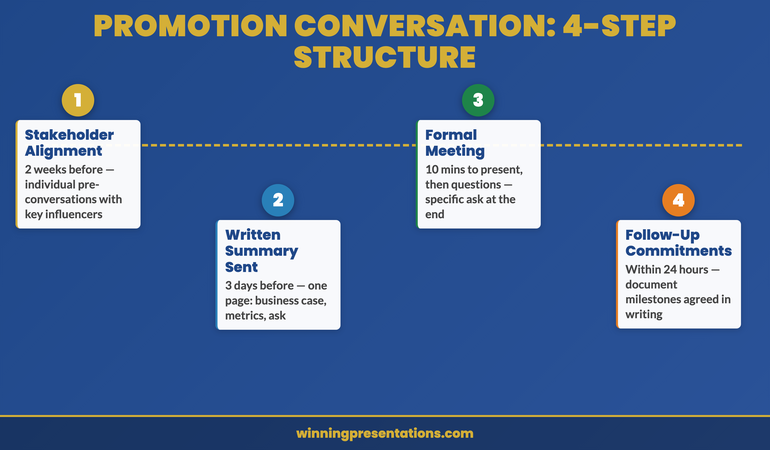
Promotion conversation structure roadmap: Step 1 Stakeholder alignment (2 weeks before), Step 2 Written summary sent (3 days before), Step 3 Formal meeting (the ask), Step 4 Follow-up with milestones

When the Answer Is “Not Yet”: Using the Conversation to Create a Pathway

A “not yet” response is not the end of the conversation — it is the beginning of the next one. How you handle the deferral determines whether it becomes a genuine developmental pathway or a polite way of managing you out of the conversation indefinitely.

If the answer is “not yet”, ask three specific questions before you leave the room. The first: what specific evidence or capability would need to be demonstrated for the answer to change? The second: what is the realistic timeline, and what external factors — headcount, restructure, budget cycle — will influence it? The third: who else needs to be part of this conversation for a decision to be made, and is it appropriate for you to speak with them directly?

These questions serve two purposes. They convert a vague deferral into a structured commitment, and they reveal whether the deferral is genuine or indefinite. If the decision-maker cannot answer the first question with any specificity, the barrier to your promotion is probably not developmental — it is political, structural, or budgetary. Knowing that allows you to make an informed decision about whether to continue building your case internally or to consider whether the organisation has the capacity to advance you at all.

Document the conversation and any commitments made immediately afterwards. If milestones were agreed, write them up and share them with the decision-maker within 24 hours: “Following our conversation, I understood the next steps to be…” This is not aggressive — it is professional. It also prevents the well-intentioned deferral from quietly disappearing from the decision-maker’s priority list. If you are planning a different kind of career move — into a new organisation or a lateral transition — the principles of the career pivot presentation apply to structuring that case.

Rescue Block

If your promotion conversation is imminent and you haven’t had time to build the full business case, focus on one thing: the scope evidence. The single most persuasive argument for promotion is concrete evidence that you have already been performing at the higher level. Write down the five most significant things you have done in the past twelve months that were above your current grade. Lead with those. Everything else can be structured after the first conversation.

The Executive Slide System

Structure your promotion case — and every other high-stakes presentation — with the Executive Slide System. Slide frameworks, business case structures, and executive presentation templates used by senior leaders across finance, operations, and professional services.

Get the Executive Slide System — £39 →

Frequently Asked Questions

How long should a promotion presentation be?

For a formal promotion conversation at senior level, a written summary of one page and a thirty-minute meeting is the right format. The written document’s purpose is not to be exhaustive but to be clear: it should contain your business case framing, three to four headline impact metrics, your response to the most predictable objection, and a specific ask. The meeting itself should be structured as a working conversation rather than a monologue. Present your case in ten to twelve minutes, then invite questions. The quality of the questions tells you where the resistance lies and gives you the opportunity to address it directly in the room.

Should you share your promotion case in writing before the meeting?

Yes, for a formal senior promotion into a defined leadership role. Sharing a brief written summary two to three days before the meeting serves several functions: it signals that you are treating the conversation seriously, it gives the decision-maker time to prepare a considered response, and it creates a record of the basis on which the conversation was held. For more informal conversations — an annual review where promotion is one of several topics — a written document is unnecessary and may come across as disproportionately formal. Use your judgement about the register of the conversation before deciding.

What if you don’t have direct financial metrics to support your promotion case?

Most functional roles have significant indirect financial impact that can be quantified with some effort. If direct financial metrics are genuinely unavailable, use proxy metrics: team retention rates, project delivery rates, stakeholder satisfaction from formal feedback processes, scope of roles managed, or complexity of decisions taken. For roles in HR, legal, communications, or research, the relevant metrics might be response time, case volume, coverage scope, or error rate. The goal is not financial precision but external comparability — any figure that allows a decision-maker to calibrate the significance of your contribution against some reference point beyond your own assertion is worth including. If you are preparing for a first presentation in a new leadership role after your promotion, the same principle of evidence-first communication applies.

The Winning Edge — A Newsletter for Executives Who Present

Every Thursday: one structured technique for executive presentations, business cases, and high-stakes decision meetings. Practical and direct.

Subscribe to The Winning Edge →

Free Resource

Download the Executive Presentation Checklist — the pre-flight audit used by senior leaders before every high-stakes presentation. Covers structure, evidence, stakeholder alignment, and delivery.

Download the checklist (free) →

About the Author

Mary Beth Hazeldine has spent 25 years in banking and 16 years training executives to present with precision and authority. She works with senior leaders on high-stakes presentations, board communications, and career advancement conversations at the executive level.

20 Apr 2026
Female executive presenting proof-of-concept results to an investment committee in a corporate boardroom, data charts on screen, composed and authoritative, navy and gold tones, editorial photography style

Proof-of-Concept Presentation: Securing the Next Stage of Approval

Quick Answer

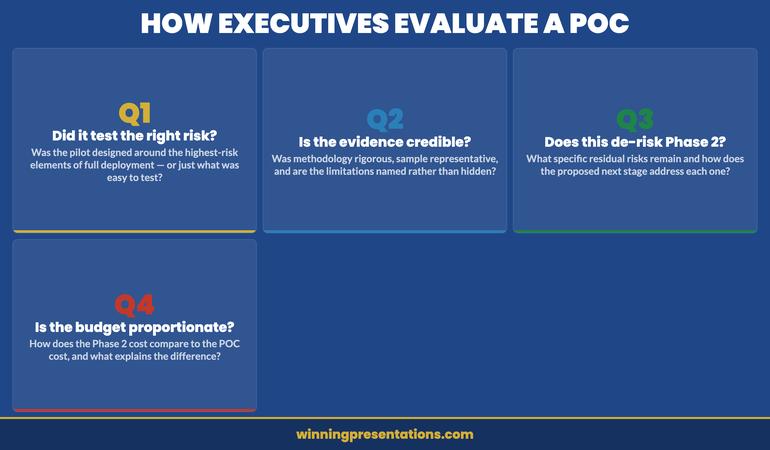
A proof-of-concept presentation must answer three questions for an executive audience: did the POC do what it was designed to test, is the evidence sufficient to de-risk the next stage, and is the investment required for that next stage proportionate to what has been demonstrated? Executives are not evaluating your work so far. They are evaluating whether the case for the next decision has been made.

Ingrid had led the pilot for fourteen weeks. The system integration had worked. User adoption in the test group had exceeded the original forecast. Customer satisfaction scores had improved by a measurable margin. By any internal metric, the proof of concept had been a success.

She walked into the investment committee certain that the results would speak for themselves.

They did not. The committee asked why the pilot group had been selected rather than a random sample. One board member questioned whether the cost overrun in month eleven was a structural issue or an anomaly. Another asked why the proposed Phase 2 budget was forty percent higher than the original POC cost when the scope was described as “similar.” Ingrid had answers to all of these questions, but they were not in her slides. She improvised. The committee asked for a revised submission.

The problem was not her results. The problem was her framing. She had presented a success report. What the committee needed was a decision document.

Building a case for executive approval of the next stage?

The Executive Slide System includes slide frameworks and scenario playbooks for proposal and approval presentations, including how to structure a POC business case for an executive decision meeting.

Explore the System →

What Executives Actually Evaluate in a POC Presentation

A proof-of-concept presentation sits at a peculiar intersection. The presenter has completed something and is proud of the outcome. The executive audience is starting something and needs to know whether to proceed. These are different conversations, and conflating them is the source of most POC presentation failures.

Executives evaluating a POC are not assessing past performance. They are assessing forward risk. The specific question in their minds is: does the evidence produced by this pilot reduce the probability of failure in the full deployment to a level we are willing to accept? That is a different question from “did the pilot succeed?” A pilot can succeed on its own terms and still fail to make the case for the next stage — if the methodology was too narrow, if the sample was unrepresentative, or if the next stage introduces risks that the pilot did not test.

This means a POC presentation must be built around the decision-maker’s risk calculus, not the execution team’s achievement narrative. The framing is: “Here is what we set out to test, here is what we learned, here is why that learning reduces the risk in what we are proposing next.” Not: “Here is everything we accomplished and how hard we worked.”

Understanding this distinction also clarifies what to leave out. Results that are impressive but irrelevant to the next-stage decision dilute the argument. Features that were tested but are not part of the next-stage scope add confusion. An appendix exists for detail; the main presentation exists for the decision.

The Three-Part POC Presentation Structure

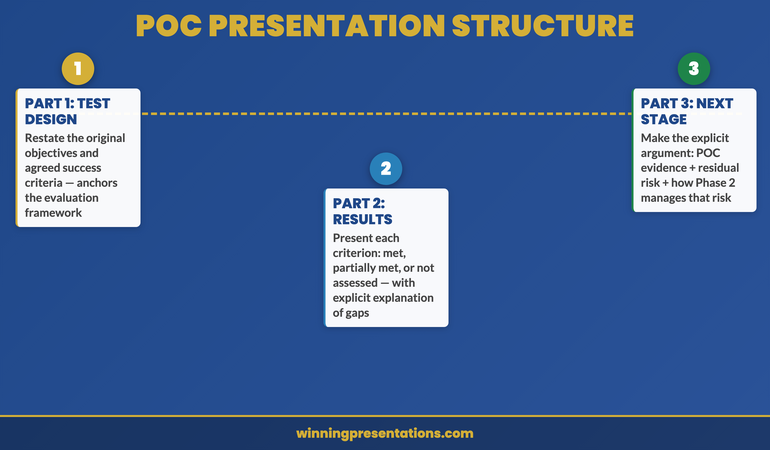
A proof-of-concept presentation that secures executive approval for the next stage follows a specific logical sequence. It does not begin with results; it begins with objectives. It does not end with a summary; it ends with a decision request.

Part 1: The original test design. Restate what the POC was designed to test and what success criteria were agreed at the outset. This matters because an executive audience may not remember — or may never have been fully briefed on — the original parameters. Starting with the design reanchors the conversation around the agreed framework rather than allowing retrospective judgements based on assumptions that were never part of the scope.

Part 2: Results against those criteria. Present each agreed success criterion and the actual result. Be explicit about which criteria were met, which were partially met, and which were not assessed. The last category requires a brief explanation: why was it not assessed, and does that create a risk for the next stage? Leaving unexplained gaps invites speculation from an audience trained to find risk.

Part 3: The next-stage case. Make the explicit argument for why the results from Part 2 are sufficient to proceed. This is where most POC presentations fail — they stop at presenting results and assume the committee will draw the inference. They often will not, or not in the direction you expect. Spell out the chain of reasoning: the POC tested the highest-risk elements of the full deployment, those elements performed as required, therefore the residual risk in proceeding is X, and the next stage is structured to manage X through Y mechanism.

POC presentation three-part structure: Part 1 Original Test Design, Part 2 Results Against Criteria, Part 3 Next Stage Case — with the key question each part answers for the executive audience

Framing Evidence for a Risk-Averse Audience

Executive audiences in investment or approval settings are calibrated for risk detection. They have been in meetings where over-confident presentations produced expensive failures. The result is a scepticism that is not personal and not irrational — it is institutional. Your evidence presentation needs to account for this.

The most credible approach to evidence framing in a POC context is to lead with methodology before results. Presenting what you measured and how you measured it before presenting what you found signals rigour. It also pre-empts the methodology questions that will otherwise arrive as objections after you have finished.

Acknowledge limitations explicitly and early. If the pilot sample was small, say so and explain why it is still representative for the purpose it served. If there were external variables that affected results, name them rather than leaving the committee to discover them in questions. An executive audience that discovers a limitation you did not mention loses confidence in the integrity of the entire presentation. An executive audience that hears you name a limitation clearly and then explain why it does not undermine the core finding respects the analytical honesty.

Use comparative context where possible. Raw numbers are harder to evaluate than numbers with a benchmark. If user adoption in the pilot reached 73%, that tells the committee little unless they know that comparable pilots in this sector typically land at 55–65%, or that the original forecast was 60%. Comparison makes data meaningful without overstating it.

The Executive Slide System

Proposal presentations that win approval are built around the decision, not the evidence. The Executive Slide System — £39, instant access — includes slide frameworks and scenario playbooks for business case and approval presentations.

  • Slide templates for executive approval scenarios
  • AI prompt cards to structure complex business cases fast
  • Scenario playbooks for POC, pilot, and phase-gate decisions
  • Framework guides for risk framing and evidence presentation

Get the Executive Slide System →

Designed for executives presenting business cases and proposals to senior decision-makers.

The Scope Creep Problem: What Not to Present

One of the most common structural errors in POC presentations is expanding the scope beyond what was originally agreed. During a pilot, the team almost always discovers adjacent opportunities, interesting edge cases, and potential future features. Including these in the approval presentation creates three problems.

First, it dilutes the core argument. The committee came to evaluate a specific proposal. Every additional element they are asked to consider creates a new decision variable and increases the cognitive load of the meeting. A presentation that covers more than it needs to is harder to approve than one that is precisely scoped.

Second, it signals uncertain scope management. If the pilot uncovered so many adjacent possibilities that the team felt compelled to include them all, a cautious executive will wonder whether the next stage will suffer from the same expansive thinking — and whether the budget being requested reflects that expansion.

Third, it opens new objections. Every new element you introduce is a new surface for scrutiny. Features or opportunities that you raise in passing may be the very things a sceptic seizes on to complicate the approval. If something is not essential to the next-stage decision, it belongs in a separate document or a future meeting.

The discipline required is to present only what the committee needs to make the specific decision in front of them: proceed to the next stage, at this scope, at this cost, on this timeline. Everything else is scope creep, regardless of how genuinely interesting it is.

Before the formal presentation, consider conducting stakeholder alignment conversations to understand which elements of the proposal are most important to each decision-maker — this often reveals where to focus and what to leave out.

Structuring the Next-Stage Ask

The next-stage ask is the most consequential slide in a POC presentation. It is also the most frequently underprepared. Most presenters treat it as a natural conclusion: here are the results, and now here is what we need next. But the logic connecting those two things must be made explicit, because it is exactly where an unconvinced committee member will intervene.

A well-structured next-stage ask has four components. First, a clear statement of what is being requested: not a “move forward” but a specific approval with named scope, budget, and timeline. Second, a direct link to the POC findings: “the results from Phase 1 demonstrate X, which means the primary risk in Phase 2 is Y, and we have structured Phase 2 to manage Y through Z.” Third, a risk summary: what are the remaining unknowns, how significant are they, and how will Phase 2 address them? This is not pessimism — it is the language of rigour that risk-aware executives respond to. Fourth, a cost-of-delay argument: what does waiting another quarter cost, in financial terms, strategic terms, or competitive terms?

The cost-of-delay argument is often omitted because it feels presumptuous. In practice, it is one of the most useful elements of any approval presentation because it reframes the decision. Without it, “defer” appears to be a low-cost option. With a concrete cost attached, deferral becomes a choice with a price — and most committees prefer to make that choice explicitly rather than implicitly.

For a broader view of how to close a proposal and secure commitment, the Executive Slide System includes scenario-specific frameworks for phase-gate and approval presentations.

Presenting When Results Are Mixed or Partial

Not every proof of concept produces clean results. Sometimes a key metric was not achieved. Sometimes the pilot ran into external factors that affected results. Sometimes the technology performed but the change management did not. How you handle mixed or partial results will significantly affect the committee’s confidence in your integrity — which, in turn, affects their confidence in your next-stage proposal.

The worst approach is to obscure partial results in favourable framing. An experienced executive audience will notice if positive results are presented in detail and negative results are glossed over with qualifying language. This creates a credibility problem that is far more damaging than the underlying result.

The most effective approach with mixed results is to acknowledge them directly, explain what caused them, and then make the case for why they do not undermine the next-stage proposal. If the CRM integration was slower than planned but the customer-facing functionality performed exactly as required, say so. Explain why the integration timeline will be different in Phase 2 (different resources, pre-built connectors, lessons incorporated). The argument is: “We encountered this, we understand why, and here is how Phase 2 is structured to avoid it.”

This approach is more persuasive than a purely positive presentation because it demonstrates analytical honesty, which is the quality that executive audiences most need to trust before they commit significant resources.

Handling mixed POC results: three-step approach — Acknowledge directly, Explain the cause, Make the Phase 2 case showing how the issue is addressed in the next stage

Common POC Presentation Mistakes

The most common mistake is presenting outputs rather than outcomes. Outputs are the things your team produced: the integration was built, the training was delivered, the data was collected. Outcomes are what those outputs achieved in terms that matter to the executive: customer retention improved, processing time reduced, error rate declined. Executive audiences make decisions based on outcomes, not outputs. A presentation that emphasises what was built over what it achieved misses the point of the exercise.

The second mistake is treating scope ambiguity as a minor detail. If there is genuine uncertainty about what is included in the next-stage budget or timeline, addressing it vaguely in a presentation will produce a much more painful discussion when it surfaces as a formal question. Be precise about what the next-stage scope includes and explicitly state what is excluded. “Phase 2 covers X, Y, and Z. The integration with the legacy finance system is out of scope for Phase 2 and will be addressed as a separate initiative.” That clarity signals control.

The third mistake is presenting to the wrong level of detail. A POC presentation to an investment committee should contain the evidence and argument necessary to make the next-stage decision. It should not contain every data point collected during the pilot. If the committee wants detail, they will ask; the appendix exists for that purpose. An overly detailed main presentation signals either poor judgement about audience needs or a lack of confidence in the top-level argument.

If you need to structure a broader executive presentation outline for the full business case, use the approved POC summary as your evidence anchor rather than repeating the pilot analysis in full.

The Executive Slide System

Slide templates and scenario playbooks for approval presentations, including POC and business case structures. £39, instant access.

Get the Executive Slide System →

Designed for executives presenting complex proposals and phase-gate decisions to senior audiences.

Frequently Asked Questions

How long should a proof-of-concept presentation be?

For a senior executive or investment committee setting, fifteen to twenty minutes of presentation time is appropriate, with ten minutes reserved for questions. In slides, this typically means twelve to eighteen slides: two or three on the original POC design and objectives, four to six on results and evidence, and four to six on the next-stage case and ask. Everything else belongs in the appendix. If you find yourself with significantly more slides than this, the presentation has not yet been edited to its decision-relevant content.

Should you mention the budget for the next stage in the POC presentation?

Yes — always. An approval presentation that does not include a specific budget request is incomplete. Executives cannot approve a next stage without understanding its cost, and leaving that number until it is asked for signals either that you are not confident in it or that you expect it to create a problem. Present the next-stage budget with a brief breakdown of its main components and a direct comparison to the POC cost, with an explanation of why the numbers differ if they differ significantly. Transparency about cost is a signal of financial competence, not vulnerability.

What if the committee is split on whether to proceed?

If you identify or suspect a split in the committee during the meeting, do not try to resolve it in real time by negotiating a compromise. Instead, acknowledge the different perspectives clearly: “It sounds like there are two different views on the timeline risk — one that the pilot has sufficiently de-risked it, and one that would want to see the vendor contract confirmed first. Is that a fair summary?” This reframes the disagreement as a structured problem rather than a conflict, and often surfaces a specific resolution — such as conditional approval subject to a named milestone — that neither side had proposed explicitly.

The Winning Edge — A Newsletter for Executives Who Present

Every Thursday: one structured technique for executive presentations, business cases, and high-stakes decision meetings. Practical and direct.

Subscribe to The Winning Edge →

Also available: the Executive Presentation Checklist — a free pre-presentation checklist for senior decision meetings.

If you are preparing for an executive decision meeting and need to align stakeholders in advance, read the companion article on running a stakeholder alignment workshop before the formal session.

About the Author

Mary Beth Hazeldine is the Owner and Managing Director of Winning Presentations. With 25 years of corporate banking experience at JPMorgan Chase, PwC, Royal Bank of Scotland, and Commerzbank, she advises executives across financial services, healthcare, technology, and government on structuring presentations for high-stakes funding rounds and approvals.

12 Apr 2026
Female chief digital officer presenting a digital transformation investment case to a board of directors in a glass-walled boardroom

Digital Transformation Board Presentation: How to Build the Business Case

Quick Answer

A digital transformation board presentation succeeds when it leads with strategic context rather than technical capability, frames the investment in terms of risk and competitive position rather than feature sets, and gives the board a clear choice with a recommended direction — not a technology briefing to absorb.

Priya had spent four months on the business case. As Chief Digital Officer at a mid-size financial services firm, she had commissioned an independent vendor review, benchmarked against three competitors, and built a financial model that showed a clear return within thirty months. The board presentation was scheduled for ninety minutes. She had allocated the first forty to walking through the technology landscape.

The Chair stopped her at slide nine. “Priya, we appreciate the detail, but can you take us to the decision? What are you actually asking us to approve?”

She had a recommendation on slide twenty-three. By the time she reached it, the board had mentally disengaged. The investment wasn’t approved that day — it was deferred for “further consideration,” which, in practice, meant another quarter of delay and a request for a shorter, clearer paper.

The problem wasn’t the quality of the analysis. It was the sequencing. Priya had built a presentation for an audience that wanted to understand the technology — but boards don’t want to understand the technology. They want to understand the risk, the opportunity cost, and the decision in front of them. The more technical context you provide before reaching the ask, the more confused and disengaged a board audience becomes.

Digital transformation is one of the most common investment decisions reaching boardrooms today. It is also one of the most frequently mishandled presentations — not because the analysis is weak, but because the story is told in the wrong order for a board audience.

Building a board-ready transformation deck?

If you’re preparing a digital transformation investment case for a board or executive committee, the Executive Slide System includes templates and frameworks for exactly this type of high-stakes approval presentation. Explore the System →

Why digital transformation presentations fail at board level

The most common failure mode in a digital transformation board presentation is technology-first sequencing. The presenter builds the story from capability outwards — here is what the technology can do, here is how we would implement it, here is the projected return. This is a logical order for a project team. It is the wrong order for a board.

Boards operate from a different frame of reference. Their primary concern is not operational capability — it’s fiduciary responsibility and strategic positioning. When a presentation opens with technology, it triggers a set of questions in the board’s collective mind that have nothing to do with the slides: Is this within our strategic priorities? Who is accountable if this goes wrong? What happens if we don’t do it? A technology-first presentation typically never answers these questions, because it was built around the solution rather than the decision.

The second failure mode is scope ambiguity. “Digital transformation” is a phrase that means different things to different people in the same boardroom. Without an explicit definition of what is and isn’t included in the scope of the investment, board members will import their own interpretations — and the discussion will fragment along those lines. A clear scope statement, positioned early in the deck, prevents this.

The third failure mode is the absence of a clear ask. Many digital transformation presentations end with a roadmap or a phased plan — but without a specific, bounded decision for the board to make. Boards are accustomed to approving specific things: a budget envelope, a mandate to proceed to the next phase, a vendor selection. An open-ended “we’d welcome the board’s thoughts on the direction” creates uncertainty about what is actually being requested and typically results in deferral.

For related thinking on how transformation programmes should be communicated to executive audiences, the article on how to structure a transformation programme presentation covers the ongoing communication layer that sits alongside the initial investment case.

Executive Slide System

Build the Board Case — Not Just the Deck

Digital transformation investments fail at board level when the presentation is built for the project team rather than the approving body. The Executive Slide System — £39, instant access — gives you the templates and frameworks to build a board-ready investment case that leads with strategic context, not technical capability.

  • Slide templates for investment approval and business case presentations
  • AI prompt cards to build your strategic narrative fast
  • Framework guides for structuring risk, ROI, and stakeholder impact
  • Scenario playbooks for high-stakes board and executive committee presentations

Get the Executive Slide System →

Designed for executives preparing complex investment cases for board and executive committee approval.

The presentation structure that works for board audiences

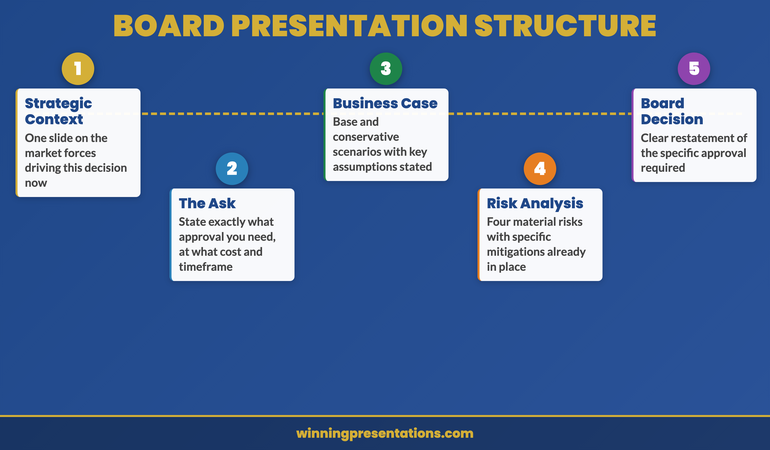
The most effective digital transformation board presentations follow a decision-first structure. The ask is on slide one or two — not at the end. This is counterintuitive for many executives who have been trained to build to a conclusion, but for board audiences it is almost always the right approach.

Digital transformation board presentation structure infographic showing six sections: strategic context, the decision, business case, risk analysis, implementation approach, and board ask

A seven-to-ten slide structure that reliably works for this type of presentation:

Slide 1 — Strategic context. One slide that frames the market or competitive position that makes this investment relevant now. This is not a market research presentation — it’s a single compelling observation that positions the decision in the context of the board’s existing strategic priorities.

Slide 2 — The decision. State clearly what you are asking the board to approve, at what cost envelope, over what timeframe, and with what accountability. Boards respond well to precision at this stage. Vagueness here creates anxiety throughout the rest of the presentation.

Slides 3–4 — Business case. The quantified case for the investment: revenue protection or growth, cost efficiency, operational risk reduction, or competitive positioning. Boards are not looking for exhaustive financial modelling — they’re looking for confidence that the numbers have been stress-tested and the assumptions are defensible.

Slide 5 — Risk analysis. What are the three or four material risks, and how are they being managed? A board that sees no risks on a transformation deck becomes more concerned, not less. Acknowledging risk credibly is a sign of programme maturity.

Slides 6–7 — Implementation approach. A high-level phased plan with clear milestones, governance structure, and accountability. Boards don’t need a Gantt chart — they need to see that there is a credible delivery framework.

Slide 8 — Alternatives considered. What other approaches were evaluated, and why is this the recommended option? A single slide on this prevents the question “have you considered X?” from derailing the discussion.

Slide 9 — The ask. A clear restatement of the specific decision required: budget approval, mandate to proceed to Phase 1, or endorsement of the vendor recommendation. This is the action slide — it should specify what happens next and who is responsible.

How to build the business case without losing the room

The business case section of a digital transformation presentation is where most presenters spend disproportionate time and where most boards switch off. The mismatch arises because the presenter is presenting the full analytical process — here is how we built the model, here is every assumption — when the board wants the conclusions and the confidence level behind them.

A practical approach: present the business case as a range rather than a point estimate. “The base case shows X, the conservative case shows Y, and the optimistic case shows Z — and here is the single factor that most significantly determines which scenario we’re in.” This demonstrates analytical rigour without requiring the board to follow detailed financial modelling, and it prepares them for the risk conversation that follows.

The business case should also address the cost of not acting. Many transformation investment cases focus entirely on the projected return from the investment, without quantifying the risk of the status quo. For a board audience, the cost of inaction is often the most compelling part of the argument — particularly where the competitive context shows that peers or competitors are already investing in the same capabilities.

For guidance on how to present technology evaluation decisions to mixed executive and finance audiences, the article on technology evaluation presentations for IT and finance covers the specific adaptations needed when multiple executive functions share the decision.

The Executive Slide System includes AI prompt cards specifically designed to help you pressure-test a business case narrative before the board meeting — see what’s included.

Framing risk: the argument boards actually respond to

Risk is the most important and most frequently mishandled section of a digital transformation board presentation. There are two failure modes: presenting no risks (which destroys credibility), and presenting an exhaustive list of every possible risk (which creates paralysis).

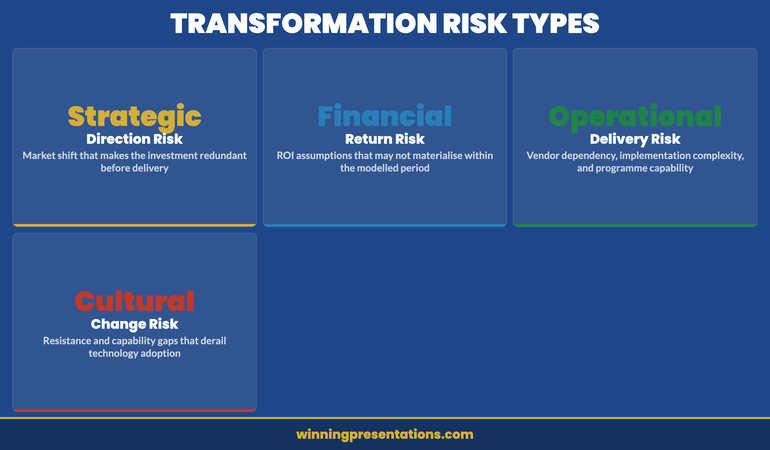
The format that works best for a board audience is a focused risk register with three columns: the risk, the likelihood and impact assessment, and the specific mitigation measure already in place or proposed. Limit this to four or five material risks. The board does not need to see operational delivery risks that sit below the programme governance threshold — only the risks that genuinely have strategic or financial significance.

Risk framing infographic for digital transformation board presentations showing four risk types: strategic, financial, operational, and dependency risks, with mitigation approaches for each

The framing of risk in this context also matters. A risk presented as “technology implementation failure” triggers a generalist anxiety in the boardroom. A risk presented as “vendor dependency risk — mitigated by contractual break clauses and a parallel in-house capability build in Phase 2” is specific, manageable, and demonstrates programme maturity. The specificity is what builds confidence.

One risk that boards consistently want to see addressed — and that is frequently absent from transformation decks — is organisational change risk. Technology implementation is typically not what derails digital transformation programmes. Cultural resistance, capability gaps, and middle management inertia are. Acknowledging this explicitly and showing that the people-side of the programme has a plan demonstrates the kind of executive maturity that boards look for in a programme sponsor.

Executive Slide System — £39

The Investment Case That Gets Approved

The Executive Slide System — £39, instant access — gives you a structured framework for building the kind of board-ready investment case that gets a decision rather than a deferral.

Explore the System →

Designed for executives presenting investment cases, strategic initiatives, and transformation programmes to boards.

The questions boards ask — and how to prepare for them

Experienced non-executive directors ask a fairly consistent set of questions in digital transformation presentations. Preparing for these in advance — and, where possible, pre-empting them in the deck — removes the most common sources of discussion that extend meetings beyond their allocated time.

The most frequent board questions in this context are: Why now? What happens if we don’t do this? How confident are you in the vendor? What does Phase 1 actually cost and what does it prove? Who is the senior accountable person, and what authority do they have? What does success look like at the twelve-month mark?

Each of these questions should have a clear, brief answer in the presenter’s head before the meeting — ideally with a corresponding slide or appendix page they can reference. The ability to answer “who is accountable?” with a specific name and a description of their authority is a more confidence-building answer than “we’re working through the governance structure.” Boards approve investments in people as much as in programmes.

For a broader discussion of how to anticipate and handle the difficult questions that arise in high-stakes presentations, the article on stakeholder buy-in psychology covers the underlying dynamics of executive decision-making in complex investment contexts.

Preparing the room before you enter it

The single most effective thing you can do to improve the outcome of a digital transformation board presentation is to have a brief, informal conversation with the Chair or Senior Independent Director before the formal meeting. This is not about lobbying — it’s about understanding whether there are specific concerns, recent experiences with similar investments at peer organisations, or governance questions that are likely to surface in the discussion.

Board members bring their external perspectives to every investment discussion. A non-executive who has recently seen a high-profile digital transformation failure at another company will bring that context into the room. A Chair who has a background in technology will have different questions to one whose career is in finance. Understanding the composition of the room allows you to calibrate your presentation — not to change the substance, but to sequence the content in a way that addresses the concerns most likely to arise.

A pre-meeting brief to the executive sponsor — not the full presentation, but a two-page summary of the ask and the key risks — is also worth considering for complex investment cases. It prevents the sponsor from hearing the analysis for the first time in the room and gives them the foundation to contribute constructively to the discussion rather than asking orientation questions.

For the cross-department alignment that often needs to happen in parallel with a transformation investment case, see also the approach covered in how to structure a cross-department quarterly review — the stakeholder alignment principles transfer directly to programme governance communications.

Frequently Asked Questions

How many slides should a digital transformation board presentation have?

For a ninety-minute board session, aim for eight to ten primary slides with an appendix of three to five supporting slides available for deep-dive questions. The board should be able to understand the investment case, the risks, and the decision from the primary deck alone. The appendix demonstrates rigour without slowing down the main presentation. If your primary deck is running beyond twelve slides, review whether each slide contains a decision-relevant point or whether it’s presenting process information that belongs in a supporting document rather than the presentation itself.

Should I include a financial model in the board presentation?

Include the outputs of the financial model — a single slide showing base, conservative, and optimistic scenarios with the primary assumptions stated — but not the model itself. Boards need to understand the logic and the confidence level behind the numbers, not to audit the spreadsheet. If a board member wants to review the model in detail, that conversation should happen in a pre-meeting briefing or a designated working session rather than during the formal presentation. Walking a board through financial modelling assumptions in real time typically results in the discussion getting stuck on technical detail rather than the strategic decision.

What if the board asks for a delay to “consider further”?

A deferral request usually signals one of three things: a specific unanswered question, an unresolved concern about governance or accountability, or a need for broader board alignment that hasn’t happened yet. The most useful response to a deferral is to ask directly what information or assurance would allow the board to make the decision at the next meeting. This converts a vague delay into a specific action list — and it demonstrates the programme maturity that boards are implicitly testing for when they ask for more time.

The Winning Edge — Weekly Insights for Executive Presenters

Every Thursday: one practical insight to sharpen your executive communication. No generic tips — only what works in real high-stakes rooms.

Join The Winning Edge →

Free resource: The Executive Presentation Checklist — a pre-meeting quality check for high-stakes presentations.

About the Author

Mary Beth Hazeldine — Owner & Managing Director, Winning Presentations

With 25 years of corporate banking experience at JPMorgan Chase, PwC, Royal Bank of Scotland, and Commerzbank, Mary Beth advises executives across financial services, healthcare, technology, and government on structuring presentations for high-stakes funding rounds and approvals. She is the creator of the Executive Slide System and the Conquer Speaking Fear programme.

08 Apr 2026

Resource Allocation Presentation: Structuring the Case When Budgets Are Contested

Quick Answer

A resource allocation presentation succeeds when it reframes the request from “we need resources” to “here is the cost the organisation is currently bearing by not having them.” Lead with the business impact of the current resourcing gap, quantify where possible, and present headcount or budget as the solution to a named problem — not as a departmental ask. The decision-makers approving your request are evaluating whether the business case justifies the investment, not whether you deserve support.

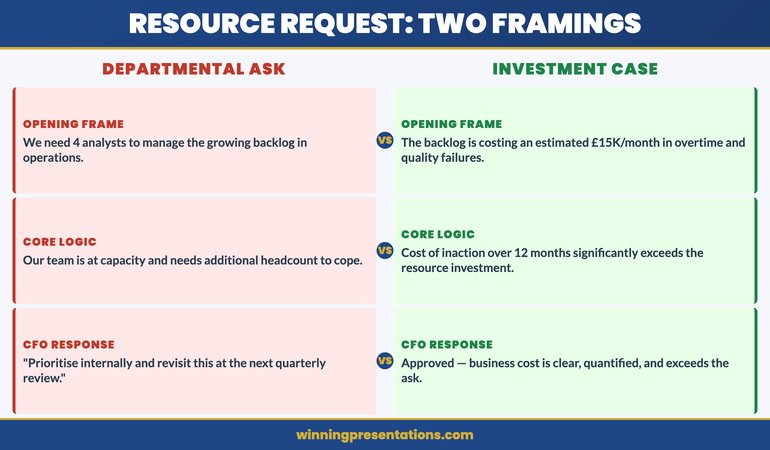
Priya had been waiting six months for approval to hire four additional analysts in her operations team. The backlog was growing. Her existing team were working consistent twelve-hour days. The quality issues were escalating. She had a presentation slot at the quarterly resource review and she was confident the case was obvious.

She opened with: “We need four additional FTEs in operations to manage the current workload and address the backlog that’s been building since Q3.”

The CFO responded: “We’re in a constrained environment. Can you look at prioritising internally and coming back to us with a revised request?” Meeting closed. No decision. Priya left without the headcount.

Three months later, a different team in the same organisation made an almost identical request using a different framing. They opened with the cost of the quality failures, not the size of the headcount gap. They quantified the revenue at risk from the backlog. They got approval the same day.

The two presentations had the same underlying business case. The difference was structural. One asked for resources. The other made the cost of not resourcing impossible to ignore.

Presenting a headcount or budget request this quarter?

Check whether your resource case is framed to get a decision:

  • Does your opening slide describe the business cost of the gap — not the size of the gap?
  • Have you quantified the impact in terms the CFO uses (revenue, cost, risk)?
  • Have you pre-empted the “prioritise internally” objection with a clear slide?

The Executive Slide System includes business case slide frameworks for resource requests, headcount justifications, and budget approvals. Explore the System →

Why Resource Requests Fail at the First Slide

The structural failure in most resource allocation presentations happens before the first supporting slide. It happens in the way the request is framed — and the framing sets the entire tone of the decision-making conversation that follows.

When you open a resource request with “my team needs X headcount” or “we need an additional £Y to deliver this programme,” you have inadvertently positioned yourself as a department competing for a limited pool of organisational resource. The CFO’s mental model shifts to rationing mode: who else is asking, what is the priority order, can this be deferred?

By contrast, when you open with the business impact of the resourcing gap — the revenue at risk, the regulatory exposure, the client attrition rate, the project delay costs — you have positioned the resourcing decision as an organisational investment decision with a clear return. The CFO’s mental model shifts to investment mode: what is the cost of acting, what is the cost of not acting, which is higher?

This is not a rhetorical trick. It is a structural accuracy. In most cases where resource requests are genuinely justified, the business cost of underresourcing is real and quantifiable. The problem is that presenters know this cost intuitively but rarely make it explicit in the presentation. They present the solution (more headcount) without first establishing the problem (the current cost of the gap) in terms that decision-makers recognise.

The fix is to invert the sequence. Present the problem in business cost terms first. Present the solution — the resource request — second. The business case then feels inevitable rather than aspirational.

The Reframe: From “We Need” to “Here Is the Cost”

Two-column comparison showing weak resource request framing versus business-cost reframe approach for executive presentations

The reframe requires identifying, before the presentation, what the organisation is currently paying — in cost, risk, or lost revenue — because the resource gap exists. This is the cost-of-inaction analysis, and it is the most important preparation step in building a resource allocation presentation.

For an operations team with a backlog, the cost-of-inaction might include: delay costs from client contracts with service level agreements, overtime costs already being incurred by existing staff, quality failure costs from rushed delivery, staff turnover risk from sustained overwork, and revenue at risk from clients considering alternative providers.

Not all of these will be fully quantifiable. Some will be directional estimates. That is acceptable — you are not building an actuarial model, you are building a business case. The standard is whether the aggregate cost picture is credible and directionally accurate. Executives making resource decisions are accustomed to working with estimates. They are not accustomed to presenters who have not attempted to quantify the cost at all.

Once you have the cost-of-inaction picture, the structure of your opening changes entirely. Instead of “we need four analysts,” you can open with: “The operations backlog is currently running at eight weeks, which is creating three types of business cost I’d like to walk you through — and I’m proposing a resourcing solution that addresses all three at a total cost significantly below what we’re currently absorbing.”

That opening does not ask for anything. It announces a cost problem and a solution. The ask comes later, after the problem has been established on its own terms.

For the financial slide structures that support this approach, see capital expenditure presentations: building the approval case for board-level investment decisions.

The Business Case Framework That Gets Resource Requests Approved

Stop presenting headcount and budget requests as departmental asks. The Executive Slide System gives you the slide structure to reframe resource allocation as a business investment decision — with the sequence that gets CFO approval.

  • Business case slide templates for headcount requests, budget approvals, and programme investment decisions
  • Cost-of-inaction slide frameworks that quantify the business impact of the current resource gap
  • AI prompt cards to build the five-slide resource case in under 15 minutes
  • Objection-handling slide structures for the “prioritise internally” and “revisit next quarter” responses

Get the Executive Slide System → £39

Designed for operations, finance, and programme leaders presenting resource cases to CFOs, board committees, and senior leadership teams.

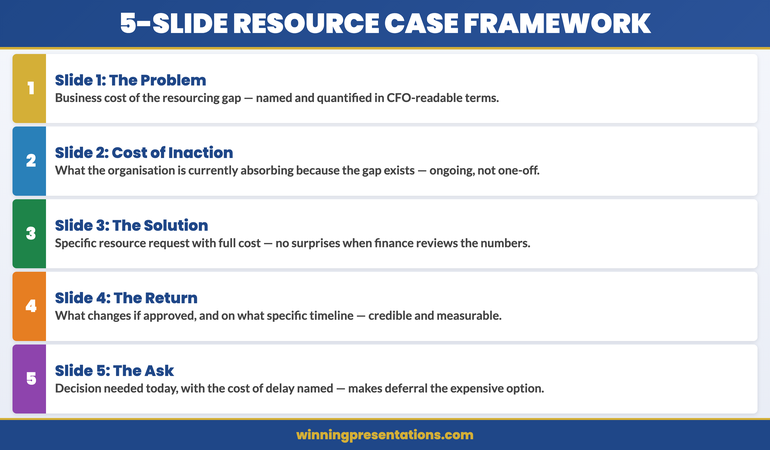
The Five-Slide Resource Allocation Framework

Most resource allocation presentations contain too many slides. The information needed to make a resource decision is focused: what is the problem, what does it cost, what is the proposed solution, what will it cost, and what is the expected return? Five slides cover this sequence. Every additional slide is generally context the decision-makers do not need in order to make the decision.

Slide 1 — The problem framed in business cost terms. A clear statement of the current resourcing gap and its business consequences. Not “we are understaffed” but “current resourcing is producing three identifiable cost outcomes for the business.” Name the outcomes. Quantify where you can.

Slide 2 — The cost-of-inaction analysis. This is often the most important slide in the deck, and the one most presenters skip. Show what the business is currently absorbing because the resourcing gap exists: delayed delivery, quality failures, staff overtime, client risk, regulatory exposure. Present this as an ongoing cost, not a one-off event. “We are currently absorbing an estimated £[X]K per month in [specific cost categories].”

Slide 3 — The proposed resource solution. Now — and only now — introduce the headcount or budget ask. “We are requesting approval for [specific resource] at a total cost of [£X] per annum, beginning [date].” Keep this slide clean and specific. Include the full cost — salary, benefits, onboarding, equipment — so there are no surprises in the financial review.

Slide 4 — The return on the investment. What will change if the request is approved? Be specific about which of the costs identified in slide 2 will be reduced or eliminated, and on what timeline. “Full resolution of the quality issue within 90 days of hire. Backlog reduction to four weeks by end of Q3. Overtime cost eliminated within six weeks.” Specificity here is credibility.

Slide 5 — The ask and the timeline. What do you need from this meeting, and by when? “We need a decision today to begin recruitment in April and have resource in place before Q3 deliverables begin.” Include the consequence of delay: “Each month of delay extends the backlog by approximately [X] weeks and incurs an estimated [£Y] in additional overtime.”

Five slides. Tight, evidence-based, decision-ready. For financial presentation structures supporting this framework, see zero-based budget presentations: building the case from a clean baseline.

How to Quantify the Business Case

The most common objection to the cost-of-inaction approach is: “I can’t quantify the cost precisely enough to put it in front of a CFO.” This objection is worth addressing directly, because it stops many managers from making the attempt.

A CFO reviewing a resource request does not expect a fully audited, actuarially precise cost model. They expect a credible, directionally accurate estimate of what the business is absorbing. The standard is whether the numbers are defensible under reasonable questioning — not whether they are exact.

A workable approach: identify two or three cost categories that are genuinely attributable to the resourcing gap and where you have enough data to produce a directional estimate. For a backlogged operations team: overtime hours worked per month multiplied by blended hourly rate; client SLA penalty clauses at risk; project delay costs from postponed deliverables. You do not need all three. Even one well-evidenced cost category is more persuasive than a verbal claim that “the team is at capacity.”

When presenting estimated figures, be transparent about the methodology: “Based on current overtime hours, we estimate this is costing approximately £15K per month in premium labour costs — and that figure excludes the quality failure costs, which are harder to quantify but have been flagged three times in client reviews this quarter.” Transparency about limitations increases, rather than decreases, credibility with financially sophisticated audiences.

If you’re building the financial case for a resource request this quarter, the Executive Slide System includes slide templates and AI prompt cards specifically designed for cost-of-inaction analysis — the structure that reframes headcount requests as investment decisions for CFO review.

Handling “Prioritise Internally” Objections

Resource allocation presentation objection-handling roadmap: four steps from objection to decision-ready response

“Have you considered whether this could be addressed through internal prioritisation?” is one of the most common responses to resource requests, and one of the most difficult to handle in a presentation setting if you haven’t prepared for it.

The question is not inherently adversarial. It is a legitimate governance question — the CFO’s job is to ensure that resource allocation reflects genuine need rather than departmental preference. The best response addresses it on those exact terms.

The preparation involves completing a credible internal prioritisation analysis before the presentation. What could the team stop doing, reduce in scope, or defer in order to absorb the additional demand? What is the business consequence of each trade-off? Present this analysis proactively — ideally as a dedicated slide in your five-slide framework — rather than waiting to be asked.

A slide that says “We have reviewed internal prioritisation options. Scenario A: defer [specific deliverable] to H2, with [specific business consequence]. Scenario B: reduce [specific workstream] to minimum viable scope, with [specific quality or risk consequence]. Neither scenario resolves the backlog within the Q3 timeline. The most cost-effective resolution remains the resource investment proposed.” This slide pre-empts the objection and demonstrates organisational rigour.

When the objection arises anyway — as it often does — you can respond: “We’ve actually modelled that, and it’s on slide 4. The short version is that the two realistic internal options both carry business costs that exceed the cost of the resource investment over a 12-month horizon. I’d be happy to walk through the detail.” You cannot be sent away to do work you’ve already done.

When to Present and When to Pre-Sell

The formal resource allocation presentation is not where decisions are made. In most organisations, significant resource decisions are made — or at minimum, strongly influenced — in the conversations that happen before the formal meeting. Understanding this changes how you should manage the process.

The most effective resource requesters approach formal presentations as confirmation meetings rather than persuasion meetings. By the time they walk into the room, the CFO or relevant budget holder has already seen the cost-of-inaction analysis in a one-to-one conversation, has had their primary concerns addressed, and has indicated — at minimum — that the case is credible. The formal presentation is where the decision is formalised, not where it is won.

This means the most important step in a resource allocation process often happens two weeks before the presentation: a brief, direct conversation with the decision-maker where you share the headline cost-of-inaction figure and ask whether they want to see the full analysis. “I wanted to give you a heads-up before the resource review — we’ve done some analysis on the backlog cost and I think the number will be higher than expected. Would it be helpful to walk you through it before the formal committee session?” Most CFOs say yes.

This pre-sell approach does not compromise the formal process. It ensures that the formal meeting is productive, focused, and conclusive — rather than an exploratory conversation where the CFO is encountering the case for the first time and needs time to process it before committing to a decision.

Today’s companion article on screen sharing presentations: keeping your audience engaged in virtual approval meetings covers the additional considerations for resource cases presented in remote or hybrid settings.

For revenue-related business cases, see revenue forecast presentations: structuring the financial narrative for senior review.

Stop Leaving Resource Decisions to “We’ll Revisit Next Quarter”

When resource requests are deferred, it’s usually because the business cost wasn’t clear enough to create urgency. The Executive Slide System includes the cost-of-inaction slide framework that makes deferral the more expensive option — and gets the decision at the meeting you’re in.

Get the Executive Slide System → £39

Built from business cases presented to CFOs and board committees across financial services, technology, and professional services.

Frequently Asked Questions

How many slides should a resource allocation presentation have?

Five slides is generally sufficient for a resource request presented to a CFO or senior committee: the problem framed in business cost terms, the cost-of-inaction analysis, the proposed resource solution, the expected return, and the ask with timeline. Additional slides may be appropriate for complex programme investments or multi-phase requests, but the core decision case should be completable in five. Appendices can carry supporting data for questions without adding to the main deck length.

What if I can’t quantify the business cost precisely?

Present a directional estimate with a transparent methodology, and acknowledge the limitations. A credible estimate — “we believe this is costing approximately £X per month, based on overtime hours and delayed delivery costs, though we acknowledge the quality failure component is harder to quantify” — is significantly more persuasive than a purely qualitative claim. CFOs are experienced at making decisions with imperfect data. They are not experienced at approving requests with no financial framing at all.

What’s the best time to submit a resource request?

Align resource requests with your organisation’s planning and budget cycle wherever possible — ideally the quarter before the cycle in which you need the resource in place. Outside of formal cycles, the right time is when the business cost of the gap has become quantifiable and significant. Presenting a resource request in a budget cycle is procedurally easier; presenting it mid-cycle requires a stronger business case. Both are possible — the strength of the cost-of-inaction analysis determines which will succeed.

How do I handle the response “headcount freeze is in place”?

A headcount freeze is a default policy response, not an absolute ceiling on resource decisions. The right response is to present the cost-of-inaction analysis as the reason the freeze should not apply to this request — or to explore whether the resource can be secured through alternative mechanisms: contract, consultancy, temporary cover, or internal reallocation with backfill. Presenting these alternatives proactively signals rigour and significantly increases the likelihood of a favourable decision even within a constrained environment.

The Winning Edge — Weekly Insights for Executive Presenters

Practical frameworks for structuring high-stakes presentations, managing executive audiences, and building decks that get decisions. Delivered every Thursday.

Join The Winning Edge →

Free resource: Executive Presentation Checklist — the pre-presentation checklist for business cases, resource requests, and approval presentations at board and senior leadership level.

About the Author

Mary Beth Hazeldine is the Owner & Managing Director of Winning Presentations. With 24 years of corporate banking experience at JPMorgan Chase, PwC, Royal Bank of Scotland, and Commerzbank, she has delivered high-stakes presentations in boardrooms across three continents.

A qualified clinical hypnotherapist and NLP practitioner, Mary Beth advises executives across financial services, healthcare, technology, and government on structuring presentations for high-stakes funding rounds and approvals.

Book a discovery call | View services

23 Mar 2026
Two executives shaking hands across a modern glass boardroom table with presentation screens showing partnership framework slides in navy and gold tones

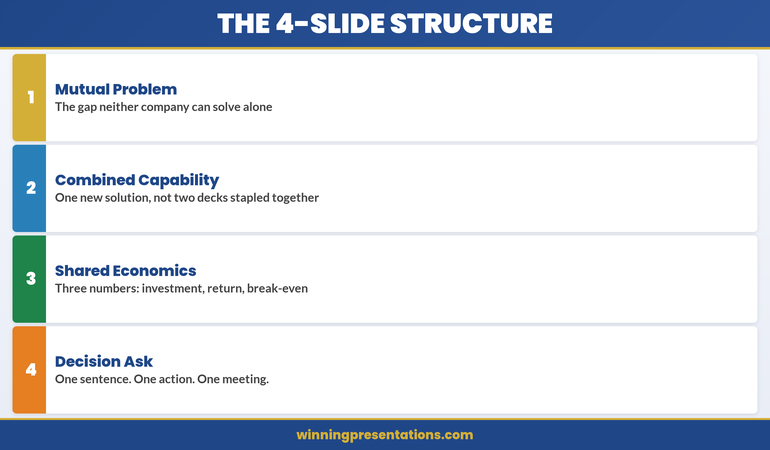
Partnership Proposal Presentation: The 4-Slide Structure That Gets Board Approval in One Meeting

Partnership Proposal Presentation: The 4-Slide Structure That Gets Board Approval in One Meeting

Lena spent six weeks preparing a partnership proposal for a logistics company’s board. She had 28 slides. Competitive analysis. Market sizing. Risk matrices. Implementation timelines stretching to 2028.

The board chair stopped her on slide 9. “Lena, what do you actually want us to decide today?”

She had buried the partnership ask behind 8 slides of context. The meeting ended with “let’s reconvene.” Three months later, a competitor closed the deal she’d been building for a year.

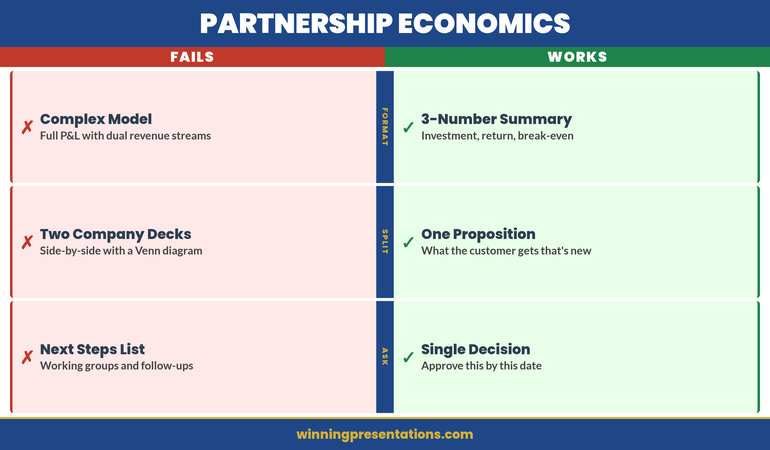
Quick Answer: A partnership proposal presentation that wins in one meeting follows a 4-slide structure: mutual problem, combined capability, shared economics, and a single decision ask. Most partnership pitches fail because they present two companies’ capabilities instead of one shared outcome. The structure below eliminates the “let’s reconvene” response by making the decision inevitable before slide 5.

Partnership proposal structure

Can you articulate these three elements clearly: the shared problem, the combined capability, and the single decision you’re seeking?

→ Explore the Executive Slide System for decision-first templates → View templates

I once watched a partnership proposal die in the most instructive way possible.

Two pharmaceutical companies — one with distribution, one with IP — were trying to bring a diagnostic product to market. The presenting team built a 34-slide deck. Slides 1–12 covered Company A’s capabilities. Slides 13–24 covered Company B’s capabilities. Slides 25–30 covered “synergies.” Slides 31–34 covered implementation.

The problem? The board saw two capability presentations stapled together. There was no shared problem. No combined economic model. No single decision they could say yes to.

The chair said: “This looks like two companies that want something from each other. Show me what the customer gets that they can’t get today.”

That feedback changed how I think about every partnership proposal. The structure isn’t two companies presenting side by side. It’s one new entity presenting a solution that didn’t exist before.

When I rebuilt the deck around that principle — mutual problem, combined capability, shared economics, single ask — the same board approved it in 40 minutes. Same companies. Same product. Different structure.

Why Most Partnership Proposals Get the “Let’s Reconvene” Response

Partnership presentations fail for a different reason than other executive pitches. They don’t fail because the idea is weak. They fail because the structure creates confusion about who benefits and what the decision actually is.

Most partnership decks follow this pattern: “Here’s what we do. Here’s what they do. Together, we’ll do more.” That sounds logical. It’s also the fastest route to deferral.

Boards and executive committees approve decisions, not concepts. When a partnership proposal presents two sets of capabilities, the audience has to do the synthesis work themselves. They have to imagine the combined offering. They have to calculate the shared economics. They have to figure out what they’re actually being asked to approve.

Most won’t. They’ll say “interesting — let’s schedule a follow-up” and move to the next agenda item.

The fix isn’t more slides or better data. It’s a structural change that moves the audience from “two companies presenting” to “one solution requesting approval.” That’s the difference between a 6-month partnership courtship and a 40-minute decision. A strong decision slide is the foundation of every partnership deck that gets approved in a single session.

The 4-Slide Structure That Closes a Partnership in One Meeting

This structure works because it mirrors how executive committees actually make decisions about partnerships. They don’t evaluate each company separately. They evaluate the proposition.

Slide 1: The Mutual Problem — What market gap or customer pain exists that neither company can address alone?

Slide 2: The Combined Capability — What does the partnership create that’s new? Not “Company A does X, Company B does Y.” Rather: “Together, we deliver Z, which doesn’t exist today.”

Slide 3: The Shared Economics — Revenue model, cost structure, and year-one projections. One model, not two.

Slide 4: The Decision Ask — What exactly do you need approved today? Scope, timeline, and the single next step.

Everything else — competitive analysis, risk assessments, implementation details — goes in the appendix. Available if asked. Never presented unprompted.

The 4-slide partnership proposal structure infographic showing mutual problem, combined capability, shared economics, and decision ask

⭐ Maven Flagship — Executive Buy-In

Turn reluctant stakeholders into active advocates

The Executive Buy-In Presentation System is a self-paced programme with 7 modules. Enrol with this month’s cohort, work through at your own pace — optional live Q&A calls are fully recorded.

£499, lifetime access to materials.

Enrol in the Executive Buy-In System →

Slide 1: The Mutual Problem Neither Company Can Solve Alone

This is the most important slide in the deck. It sets the entire frame for the decision.

Most partnership proposals skip this slide entirely or replace it with “market opportunity.” That’s a mistake. Market opportunity tells the audience the prize is worth winning. The mutual problem tells them why they can’t win it alone.

The structure is simple. One sentence for the customer pain. One sentence for why Company A can’t solve it alone. One sentence for why Company B can’t solve it alone. One sentence for what happens if neither company acts.

For the pharma partnership I mentioned, the mutual problem slide read: “Oncology practices need point-of-care diagnostics that integrate with existing lab workflows. We have the diagnostic IP but no distribution infrastructure. They have distribution in 4,200 oncologypractices but no proprietary diagnostic products. Without a partnership, the market defaults to the incumbent — and neither company captures the £340M opportunity.”

That slide did more work than the other 33 combined. It told the board exactly why this partnership mattered and what was at stake. Effective stakeholder mapping before the meeting ensures you know exactly whose concerns to address in this opening frame.

Slide 2: Combined Capability (Not Two Capability Decks Stapled Together)

This is where most partnership presentations go wrong. They present Company A’s strengths on the left and Company B’s strengths on the right, with a Venn diagram in the middle showing “overlap.”

Boards don’t invest in Venn diagrams. They invest in solutions.

Slide 2 should describe the new thing the partnership creates. Not what each company brings. What the customer receives that doesn’t exist today.

Instead of: “Company A: 15 years of diagnostic IP. Company B: 4,200-site distribution network.”

Write: “Together: point-of-care oncology diagnostics delivered to 4,200 practices within 18 months — a product-distribution combination no single competitor can replicate.”

The shift is from inputs (what each company contributes) to outputs (what the partnership delivers). Inputs interest internal teams. Outputs interest boards. Every approval I’ve seen land in one meeting made this shift explicitly on slide 2.

Slide 3: Shared Economics That Make the Decision Obvious

Partnership economics are inherently more complex than single-company financials. Two revenue streams, two cost structures, shared investment, and split returns. Most presenters try to show all of this.

Don’t. Show the combined model only.

The board needs three numbers: total investment required, projected year-one return, and break-even timeline. Everything else is appendix material.

The format that works: a single-page financial summary with three rows. Row one: “Joint investment — £X.” Row two: “Year-one projected revenue — £Y.” Row three: “Break-even — Z months.”

Below that, one sentence on how revenue splits. Not a detailed financial model. Just: “Revenue split: 60/40 in favour of distribution partner, reviewed annually.”

Executives approve partnerships faster when the economics are simple enough to explain to their own boards in one sentence. If your economics slide needs a 10-minute walkthrough, it’s too complex for a decision meeting. Understanding how executives evaluate proposals — especially in contexts like vendor selection decisions — reveals why simplicity always wins.

Partnership economics infographic comparing ineffective complex financial models versus effective 3-number decision format

Partnership Proposal Templates Ready to Use

Pre-built slide templates for partnership proposals and strategic recommendations, structured around the mutual problem, combined capability, shared economics, and decision ask.

Explore the Executive Slide System →

Used in cross-border partnership presentations at financial institutions and consulting firms.

Slide 4: The Decision Ask — One Sentence, One Action

The decision slide is where partnership proposals either close or stall. Most presenters end with “next steps” — a list of follow-up actions, working groups to form, and timelines to agree.

That’s not a decision. That’s a project plan. And boards don’t approve project plans in decision meetings.

The decision slide needs one sentence: “We are asking for approval to [specific action] by [specific date], with an initial investment of [specific amount].”

For the pharma partnership: “We are asking for board approval to execute the distribution partnership agreement with [Company B], with a joint investment of £2.1M and first product delivery targeted for Q3 2026.”

One sentence. One decision. One meeting.

If the board has questions — and they will — the appendix handles those. But the decision frame is set. They’re not evaluating a concept. They’re saying yes or no to a specific ask.

What Belongs in the Appendix (And What Doesn’t)

The 4-slide structure works because it’s lean. But that doesn’t mean you ignore the details. You just put them where they belong: ready for questions, never presented unprompted.

Appendix material for a partnership proposal includes competitive landscape analysis, detailed implementation timeline, full financial model with sensitivity analysis, legal and governance structure, and risk assessment with mitigation strategies.

What doesn’t belong in the appendix? Anything that changes the decision. If there’s a deal-breaking risk or a regulatory hurdle, that goes on slide 3 as a caveat, not hidden in appendix slide 14.

The rule I follow: if hiding it would embarrass you, it’s not appendix material. Put it on the main slide. Everything else can wait for questions.

Managing Presentation Confidence in Partnership Pitches

The 4-slide structure removes ambiguity from the room — but only if you’re able to deliver it with clarity. Presentation confidence matters in high-stakes partnership meetings. I’ve written about how to manage presentation anxiety using evidence-based approaches.

Is This Right for You?

✓ This is for you if:

  • You’re presenting a partnership, joint venture, or strategic alliance proposal to a board or executive committee
  • Your partnership discussions have stalled in “let’s keep talking” without a clear decision
  • You want a slide structure that moves from concept to approval in a single meeting

✗ This is NOT for you if:

  • You’re creating a general company overview or capability deck (not a partnership-specific pitch)
  • You need a legal partnership agreement rather than a presentation structure
  • The partnership has already been approved and you need implementation planning

Frequently Asked Questions

How do I handle partnership presentations when the other company wants their own slides in the deck?

This is the most common partnership presentation mistake. The answer is to build one unified deck together, not staple two decks side by side. Propose the 4-slide structure as the joint approach and offer to draft it. The company that controls the narrative controls the decision frame. If they insist on separate sections, add their content as appendix material and keep the core 4 slides focused on the combined proposition.

What if the board wants more financial detail than 3 numbers?

They will. That’s what the appendix is for. Present the 3-number summary on slide 3, then say: “The full financial model is in the appendix — happy to walk through any line item.” This lets the board control the depth. In my experience, most boards ask about one or two specific assumptions, not the full model. The 3-number summary gives them the decision frame; the appendix gives them the assurance.

Does this structure work for internal partnerships between departments, not just external ones?

Absolutely — and internal partnerships often need this structure even more. Cross-departmental initiatives frequently die because the proposal reads like two departments justifying their own budgets. The mutual problem slide is particularly powerful internally: “Neither Engineering nor Marketing can solve the customer onboarding bottleneck alone. Together, we can reduce time-to-value from 45 days to 12.” Same structure, same decision clarity.

📬 The Winning Edge — Weekly Presentation Intelligence

Join executives who receive one actionable presentation insight every week. Proposal structures, slide frameworks, and decision-making psychology — directly applicable to your next partnership pitch.

Subscribe to The Winning Edge →

🆓 Want to start free? Download the Executive Presentation Checklist first.

Read next: The 48-Hour Window After Every Q&A: Why Most Presentations Win the Room but Lose the Decision

Your next partnership proposal doesn’t need 28 slides. It needs 4. Download the Executive Slide System before your next joint meeting and build the proposal that gets approved in one session.

About the Author

Mary Beth Hazeldine is Owner & Managing Director of Winning Presentations. With 24 years of corporate banking experience at JPMorgan Chase, PwC, Royal Bank of Scotland, and Commerzbank, she advises executives across financial services, healthcare, technology, and government on structuring presentations for high-stakes funding rounds and approvals.

Book a discovery call | View services

21 Mar 2026
Executive presenting confidently in a glass-walled boardroom, screen behind showing clean structured slide with key metrics, senior leaders listening attentively

Promotion Business Case Presentation: The 4-Slide Structure That Wins Committee Approval

Claire was Head of Digital at a UK retail group. She’d submitted for Director three times and been rejected three times. “Not quite ready,” the feedback always said. No specific gaps, no roadmap to yes. On her fourth submission, she stopped writing a detailed CV and started building a business case presentation instead. Four slides. No prose. Just quantified impact: £2.1M in revenue from her team’s initiatives. Three cross-functional projects delivered. Headcount grown from 4 to 11 people under her management. The committee approved her promotion in the first meeting. Effective date six weeks later.

Quick answer: A promotion business case presentation stops the committee from evaluating you against abstract criteria and forces them to evaluate you against the numbers you’ve already delivered and the scope you’re ready for. Most promotion candidates submit a CV (which invites comparison and judgment) or a rambling narrative (which buries the business case in words). Instead, build four slides: The Commercial Impact you’ve delivered, The Scope you’re ready for, The Gap you’ve already closed, and Why Now. Each slide answers one specific question. Together, they answer the only question that matters: “Is this person clearly ready, or are we still waiting?”

Promotion decision meeting this month?

Most candidates prepare what they’ve done. Few prepare what they’re ready to do. If you’re walking into a promotion committee meeting with a CV or a vague narrative, you’re accepting the rejection you’ve already received twice.

  • Quantify exactly what you’ve delivered in the current role
  • Define the scope you’re ready for at the next level
  • Show the specific gaps you’ve already closed
  • Explain why the committee should move now, not wait

→ Skip ahead to the four-slide business case structure below.

The Fourth Submission That Worked

Claire had done everything right the first three times. Her CV was polished. She’d taken every leadership course available. She’d mentored junior team members. Her manager called her “a natural leader.” But the promotion committee saw the CV and asked: “Compared to other candidates at her level, is she exceptional?” That question invited comparison. Comparison invites hesitation.

Before the fourth submission, Claire rebuilt her approach entirely. She stopped thinking about proving she’d “earned” the promotion through tenure and effort. She started thinking like she was already in the role, and the committee needed a business case for moving her now. She quantified. She showed scope. She closed perceived gaps. She explained risk: the talent she’d develop was being poached by other teams because she wasn’t promoted. One presentation. Four slides. No hedging. The committee didn’t compare her to other candidates. They compared her to the cost of losing her. Promotion approved.

Why CVs Fail and Business Cases Win

The promotion decision is not a comparison decision. It never should be. But a CV invites comparison. So does a narrative summary of what you’ve done. Here’s why:

CVs Are Backward-Looking

A CV lists past roles, responsibilities, and achievements. The implicit message is: “I’ve been here a long time doing this very well.” The committee hears: “Are they better than other candidates who’ve also been somewhere a long time?” Suddenly you’re in a comparison tournament. If another strong candidate is being considered, you both look similar. Hesitation sets in.

Business Cases Are Forward-Looking

A business case says: “Here’s what I’ve delivered in the current role. Here’s what I’m ready to deliver at the next level. Here’s what could go wrong if you wait. Let’s decide now.” The committee isn’t comparing you. They’re evaluating risk and opportunity. Very different mental frame.

CVs Invite Questions You Can’t Answer

A CV prompts the committee to ask: “Is this person leadership material? Are they visionary? Will they grow into the role?” These are judgment questions. You can’t answer them with facts. You can only hope the committee sees it the way you do.

Business Cases Answer Questions Before They’re Asked

A business case says: “I’ve already led projects of this scale. I’ve managed budgets of this size. I’ve handled this type of stakeholder complexity. I’ve closed this gap. Here’s the evidence.” No speculation. No hopes. No judgment required—just an evaluation of readiness based on demonstrated scope.


CV Review vs Business Case comparison infographic contrasting backward-looking evaluation versus forward-looking scope demonstration across four dimensions (Focus, Message, Response, Outcome)

The Four Slides: Structure That Works

A promotion business case has exactly four slides. Not three (too little scope), not five (too much detail). Four slides answer four specific questions the committee is asking (whether they say it aloud or not):

  1. Slide 1 — Commercial Impact: What have you actually delivered? (Numbers only.)
  2. Slide 2 — Scope: What are you ready to lead? (Bigger picture.)
  3. Slide 3 — Gap: What did you need to learn? And have you learned it? (Addressing doubt.)
  4. Slide 4 — Why Now: What’s the cost of waiting? (Creating urgency.)

This structure works because it doesn’t ask the committee to evaluate you. It asks them to evaluate your readiness. Completely different exercise.

Promotion Committee This Month? Build the Business Case, Not the Narrative

If your committee meeting is coming up and you’re still working from a CV or a verbal narrative, the Executive Slide System gives you the exact four-slide business case structure to build instead. It includes:

  • The four-slide business case structure for promotion committees (commercial impact, scope, gaps closed, why now)
  • Worked examples showing how to quantify impact at executive level
  • Decision-slide frameworks designed for internal committee presentations
  • Templates ready to adapt to your organisation, role, and committee

Get the Executive Slide System → £39

Informed by real-world executive presentation experience across investment banking, SaaS, and consulting — including internal promotion contexts.

Slide 1: The Commercial Impact You’ve Delivered

This slide answers: “What has this person actually delivered?” Not in prose. Not in a list of responsibilities. In numbers.

What Numbers Go Here?

Revenue driven. Cost reduced. Headcount managed. Projects completed on time or early. Customer retention improvement. Market share gained. Team size growth. Budget managed without overspend. Retention of top talent you’ve developed. Any metric that matters to your organisation’s financial or operational success.

If you’re in a function that doesn’t directly drive revenue (HR, Finance, Operations), quantify the impact you’ve had on the business that relies on you: “Reduced hiring cycle time from 14 weeks to 7 weeks, enabling 40 critical hires in year two. Prevented £1.2M in turnover costs through culture initiatives.”

How Many Numbers?

Three to five numbers. No more. Each number should be large enough to be noteworthy and specific enough to be credible. “Big revenue” is vague. “£2.1M in revenue from digital commerce initiatives, 180% year-on-year growth” is specific.

Present Them Minimally

One number per line. No paragraphs. No explanation. The slide is pure fact. The explanation comes in the presentation moment, face to face.

Example Slide 1 (Digital Leader, Retail Group):

  • £2.1M revenue from digital commerce initiatives (Year 1–2)
  • Team scaled from 4 to 11 people (net retention 94%)
  • 3 cross-functional projects delivered on time: Platform migration, Customer data integration, Omnichannel pricing
  • Average digital customer NPS: +28 points year-on-year

This slide doesn’t prove Claire deserves a promotion. It proves she’s already delivered at the scope of the role she wants.

Slide 2: The Scope You’re Ready For

This slide answers: “What would this person be responsible for at the next level?” Again, no narrative. Just scope.

What Scope Information Goes Here?

Team size. Budget responsibility. Revenue or P&L ownership. Number of stakeholders. Strategic decisions you’d make. Cross-functional responsibilities. Geographic scope. Customer base. Market segment. Anything that defines the size and scale of the role you’re applying for.

Make It Comparative

Show current scope and next-level scope side by side. “Currently manage 11 people, £2.8M annual budget. Director role would manage 28–35 people, £7–9M annual budget, and P&L responsibility for three business units.” This makes the leap clear without being grandiose.

Example Slide 2 (Digital Director Role):

Dimension Current (Head of Digital) Next Level (Director)
Team size 11 28–35
Budget authority £2.8M (operational) £7–9M (P&L)
Strategic decisions Digital strategy execution P&L strategy, portfolio, resource allocation across 3 units
Stakeholder groups Marketing, IT, Finance, Operations Board, CEO, CFO, three business unit heads, external investors

The committee now sees that you’ve already led projects at 40–60% of the next-level scope. You’re not asking them to take a massive bet. You’re asking them to expand a proven track record.

Slide 3: The Gap You’ve Already Closed

This slide addresses the silent question every committee has: “What concerns do we have, and have they already been addressed?” Don’t wait for them to say it. Say it first.

What Gaps Commonly Come Up?

For first-time directors: “Have they managed a larger team?” or “Have they handled a serious people issue?” For cross-functional promotions: “Do they understand the P&L?” For external hires seeking rapid advancement: “Do they know our culture?” For technical leaders moving to management: “Can they lead non-technical people?”

Think back to feedback you’ve received. Think about what the next-level role requires that you haven’t yet formally held. That’s the gap.

Show the Evidence You’ve Already Closed It

Don’t say, “I’m ready to manage a larger team.” Say, “I’ve managed the Platform Migration project, which required me to coordinate 22 people across three departments for six months. Delivered on time, no overruns, 96% of team stayed post-project.”

Example Slide 3 (Digital Leader, potential gaps and evidence):

  • Gap: Can you handle P&L responsibility? → Evidence: Managed £2.8M annual budget with zero overruns for two years. Drove cost negotiations that saved 18% vs. year one. Forecast accuracy 94%.
  • Gap: Can you lead at board level? → Evidence: Presented quarterly business reviews to CFO and CEO for 18 months. Lead quarterly board updates on digital KPIs (8 presentations, zero rework requests).
  • Gap: Can you make the hard people decisions? → Evidence: Led the reorganisation of the digital team (11 people, reallocation of three, one exit managed professionally). Retained 100% of high performers during restructuring.
  • Gap: Can you develop the next generation? → Evidence: Promoted two team members to senior roles. One is now leading the platform team. 94% of team stayed, suggesting effective development and engagement.

The committee stops worrying about gaps. They start thinking about timing.


The 4-Slide Promotion Business Case structure infographic showing stacked cards: The Commercial Impact, The Scope You are Ready For, The Gap You have Closed, Why Now

Slide 4: Why Now

This is the most underrated slide. It answers: “Why should we move now instead of waiting six months, a year, or until a formal opening exists?”

Reasons to Move Now

Organisational timing: “We’re about to launch the omnichannel initiative. The role I’m being considered for will own it. Waiting six months means losing momentum and delaying revenue impact.”

Market competition: “Two competitors have hired directors into similar roles in the last quarter. Talent in this space is moving fast. If we wait, the best people available now might not be available in six months.”

Risk of attrition: “I’ve had three conversations in the last two months about external opportunities. I’m not looking, but I’m being sought out. A decision now sends a clear signal about career progression in this organisation.”

Team stability: “If this role opens formally, I’d be a candidate. So would external hires. A decision now avoids the chaos of a competitive internal process that could destabilise the team.”

Capability readiness: “I’ve deliberately taken on stretch assignments in the last 18 months to prepare for this role. I’m at peak readiness now. Waiting longer doesn’t add capability—it just delays momentum.”

Frame It as Mutual Benefit, Not Threat

The worst version of Slide 4 is: “I have other offers, so decide now or lose me.” The best version is: “Here’s why moving now benefits the organisation more than waiting.” These are genuinely different messages.

Example Slide 4 (Digital Leader):

  • Organisational: Omnichannel strategy launch (Q2) requires director-level ownership. Director structure in place now ensures strategic alignment from day one.
  • Talent landscape: Digital director roles in retail are tight. Three director-level hires completed by competitors in the last quarter. First-mover advantage matters.
  • Team continuity: Current structure has been stable for 18 months. Promoting internally ensures zero transition risk and maintains momentum.
  • Cost: Internal promotion costs 60% less than external recruitment for this level.

The committee hears: “This is smart business.” Not: “Hurry or I leave.”

Unsure how to quantify your impact?

Many executives underestimate what they’ve delivered because they focus on activity instead of outcome. The Executive Slide System includes a metrics framework that walks you through finding and framing the numbers that matter most for your role.

Common Mistakes That Sink Promotion Cases

Mistake 1: Burying Impact in Narrative

You say: “I’ve managed several large projects, led a team through significant growth, and delivered strong results.”

The committee hears: “Maybe.”

Say instead: “£2.1M revenue, team grew from 4 to 11, three projects on time.”

The committee hears: “Clearly.”

Mistake 2: Confusing Current Scope With Next-Level Scope

You say: “As director, I’d continue what I’m doing now, but at a larger scale.”

The committee worries: “So you’d be doing the same job, bigger. Who develops the next generation of heads of function?”

Say instead: “Currently I execute digital strategy. As director, I’d own digital strategy and P&L for three business units, allocate resources across portfolios, and report to the CEO quarterly.”

The committee hears: “You’ve thought about the leap.”

Mistake 3: Ignoring the Gaps They’re Worried About

You present your four slides. The committee thinks: “What about P&L? Has she handled a board-level conversation? Can she manage a larger team?”

These worries sit silent. Unanswered. They become reasons to delay the decision.

Say it first. Show the evidence. Close the gap before they voice it. They can’t worry about something you’ve already addressed.

Mistake 4: Creating Urgency by Threat

You say: “I’ve had offers from other companies, so I need a decision by Friday.”

The committee hears: “You’re a flight risk. If we promote you and you leave anyway, we’ve wasted time.”

Say instead: “The omnichannel initiative launches in Q2. This director role needs to own that strategy from day one. A decision in March means we’re ready; a decision in May means we’re playing catch-up.”

The committee hears: “You’re thinking about the business, not just yourself.”

Mistake 5: Not Presenting It as a Presentation

You email four slides with a cover letter to the committee.

The committee reads it in their calendar between two other emails. The four slides sit in isolation without context.

Insist on 15 minutes in the room. Present the four slides. Let them ask questions. The presentation—your presence, your clarity, your composure—is half the power. The slides are the other half.

When Your Manager’s Advocacy Isn’t Enough, the Business Case Has to Speak for Itself

Most candidates wait for their manager to make the case in the room. When the committee meets without you, your manager’s opinion becomes the only evidence. The Executive Slide System gives you the specific slide formats that shift the conversation from advocacy to documented impact — the promotion business case, the decision-slide structure, and the quantified impact framework.

Get access to: Promotion business case frameworks, decision-slide structures, and the exact formats for presenting quantified impact to senior committees.

Get the System → £39

How to Present Your Four Slides

The four slides are useless if they sit in an inbox. They’re powerful if you present them in person, face to face, to the decision-making committee.

Book 15 Minutes

Not 30. Not 45. Fifteen. Long enough to present clearly. Short enough that it feels confident, not defensive. “I’d like 15 minutes with the promotion committee to walk through my business case for the director role.”

Start With the Rescue

Before the first slide, say: “I’m not here to ask you to compare me to other candidates. I’m here to show you why moving now is better for the business than waiting. I’ve organised this around four questions I know you’re asking: What have I delivered? What am I ready for? Have I closed the gaps you’re worried about? Why should we move now? Let’s walk through them.”

You’ve just told them the meeting won’t be self-aggrandising or political. It will be clear and business-focused. That’s the tone that wins.

Present Without Over-Explaining

Show Slide 1. Say: “Here’s what I’ve delivered in the current role. Four key metrics: revenue, team growth, projects, customer impact. Any questions?” Wait for them. Let them ask. Then move to the next slide.

You’re not performing. You’re having a business conversation. They’ll respect that.

End With Openness

After Slide 4, say: “That’s the case. What questions do you have?” Sit down. Let them ask. Don’t keep talking. Silence here is not awkward—it’s them processing. Let them process.

When They Say They’ll Think About It

They will. Say: “I appreciate that. Is there anything you’d like me to clarify or any information I should get you before you decide?” This is not pushy. It’s professional. You’re saying: “I’ve made the case clearly. If there are gaps in the case, I want to fill them.”

Know Your Committee Before You Present

The four slides work, but only if you know who you’re presenting to. Before you schedule that 15-minute meeting, know:

  • Who has final say? (CEO, CFO, Board of people?)
  • What does each person care about most? (CFO cares about cost and P&L. CEO cares about strategy. Your boss cares about continuity.)
  • What concerns might each person have? (Frame Slide 3 to address each person’s specific concern.)
  • Have you worked with them before, or is this your first high-stakes interaction? (If it’s your first, prove you can handle board-level presence.)

Understanding your audience before you present is the foundation of every executive presentation. Your promotion business case is no exception.

Is This Right For You?

This four-slide business case approach is right for you if you can answer YES to at least two of these:

  • ✓ You’ve been told “not quite ready” before, and you want to change that conversation from judgment to business reality
  • ✓ You’ve delivered measurable impact in your current role, but the committee doesn’t seem to see it
  • ✓ You’re being considered for promotion but haven’t had the chance to present your case directly to the decision-makers
  • ✓ You’re worried that without a structured argument, the committee will compare you to other candidates and hesitate

This approach is NOT right for you if:

  • ✗ You’re in a role where you haven’t yet delivered any measurable impact (in that case, focus on delivering first, then building the case)
  • ✗ The organisation doesn’t have formal promotion committees (in that case, the conversation is one-on-one, not structural)
  • ✗ You’ve already been told you’re promoted pending a formal announcement (you don’t need to persuade; you need to transition)

Frequently Asked Questions

Should I include these four slides in my official application, or present them separately?

Separate. Your official application—CV, cover letter, form—follows the organisation’s process. The four-slide business case is what you present to the decision-making committee after your application is accepted. It’s not a replacement. It’s the tool you use in the meeting to move from “maybe” to “yes.”

What if I’m being promoted internally and the committee already knows my work?

They know your role. They might not know the quantified impact. Many executives don’t realise how much revenue their team drove or how many people they’ve successfully developed until they start looking for the numbers. Even if the committee knows you well, the numbers create clarity that relationships alone can’t. Show the slides anyway. It changes the conversation from “we like working with you” to “you’ve demonstrably delivered at the next level’s scope.”

What if I can’t quantify some of my impact?

Quantify what you can. For the rest, show evidence of scope. If you’ve managed a project that involved coordinating 20 people for six months, that’s scope, not a number. If you’ve led a cross-functional initiative that touched three departments, that’s scope. Numbers are better, but scope is credible too. Just make sure every slide has either a number or a significant scope indicator. Don’t leave a slide blank because you “didn’t have numbers.”

Should I mention other job offers to create urgency?

No. Frame urgency around the business case (Slide 4) instead. “The omnichannel initiative launches in Q2” is urgency. “I have another offer” is a threat. The committee might promote you, but you’ll start the role with a damaged relationship because they felt pressured. Use business urgency instead.

What’s Inside the Executive Slide System

The Executive Slide System gives you slide structures, templates, and decision frameworks for the executive presentation scenarios you face most often — including the promotion business case, the budget briefing, the governance reset, and the stakeholder presentation.

What you get:

  • Slide templates for 12 executive scenarios (including the complete four-slide promotion business case)
  • Decision-slide frameworks designed for committee presentations
  • Worked examples from real executive presentations (SaaS, consulting, financial services)
  • Pre-briefing strategy guides
  • One-time price: £39

Get the Executive Slide System → £39

The Presentation Is Only the Beginning

The four slides win the committee’s approval. But that approval only happens if you’ve done the work before you walk into the room.

Build your case over weeks, not days. Collect the numbers. Run the projects. Develop the people. Close the gaps. The four slides are the summary of work you’ve already been doing. They’re not magic. They’re clarity.

When Claire walked into her fourth promotion committee meeting, the four slides weren’t new to her. She’d been building that case for 18 months through the projects she’d taken on, the metrics she’d tracked, the scope she’d deliberately expanded. The four slides just made it visible.

That’s when the committee saw what had been true all along: she was already ready.

Get weekly guidance on executive presentations

Every Monday, a short email with the presentation strategy that moves decisions. Join 2,400+ executives.

Subscribe to the Newsletter

🆓 Free resource: Executive Presentation Checklist — a free guide to strengthen your presentation preparation.

Related: Why Your Evaluation Presentation Needs Structure

The same principle applies to technology evaluations and other high-stakes business decisions. The technology evaluation presentation that gets both IT and Finance to say yes follows a similar framework: show impact, define scope, prove readiness, create urgency. Different context, same structure.

About Mary Beth Hazeldine

Mary Beth spent 16 years in investment banking and corporate finance at RBS, where she made and lost pitches at every level. She’s sat in promotion committees. She’s submitted CVs and been rejected. She’s also seen what works—and what doesn’t. Now she helps executives build presentations that change decisions. She’s based in Edinburgh and works with leaders across SaaS, consulting, and financial services.

Your promotion business case doesn’t prove you deserve the role. It proves the organisation deserves the upside of moving you now.

12 Feb 2026
Executive presenting headcount request to leadership team with approval indicators

The Headcount Request That Got Yes When Everyone Said No

“We’re in a hiring freeze. The answer is no.”

That’s what my client heard when she mentioned her headcount request to her CFO in the corridor. The company had just announced a 15% budget reduction. Every department was being told to do more with less. And Sarah needed 12 new engineers to deliver a project the CEO had personally championed.

Two weeks later, she got all 12 approved.

Not because she had special connections. Not because the freeze was lifted. But because her presentation made it impossible to say no — by making the cost of “no” crystal clear.

I’m sharing this now because headcount requests in 2026 face unprecedented scrutiny. AI is reshaping workforce planning, budgets are tight, and executives are asking harder questions about every hire. The old approach — “we need more people because we’re busy” — doesn’t work anymore. What works is a business case so compelling that approval becomes the obvious choice.

Quick answer: Successful headcount requests don’t ask for people — they present a business case for outcomes. The structure that works: lead with the business problem (not the resource gap), quantify the cost of inaction, present headcount as the solution to a problem leadership already cares about, and pre-answer the objections before they’re raised. This approach gets approval even during hiring freezes because it reframes the request from “cost” to “investment with measurable return.”

I’ve helped executives request headcount in every economic condition — boom times when money flowed freely, and downturns when every hire required CEO approval. The pattern is consistent: the requests that get approved aren’t the ones with the best justification. They’re the ones with the best presentation.

Sarah’s situation was typical. She had a genuine need — her team was working 60-hour weeks, attrition was climbing, and the CEO’s pet project was at risk. But her first draft presentation was also typical: a list of reasons why she needed more people, supported by workload data and burnout statistics.

It would have failed. Here’s why — and what we changed.

Why Most Headcount Requests Fail

The fundamental mistake in headcount presentations is starting with the resource gap. “We need 12 more engineers because…” immediately puts leadership in defence mode. They hear “cost” before they hear “value.”

The Psychology of No

When executives hear a headcount request, three mental processes activate simultaneously:

Budget protection: “Where will this money come from? What else won’t get funded?”

Precedent fear: “If I approve this, what other requests will follow?”

Accountability anxiety: “If this hire doesn’t work out, it’s my signature on the approval.”

Your presentation has to address all three — before they become objections.

The “Busy” Trap

The most common headcount justification is also the weakest: “We’re too busy.” Every department is busy. Every manager feels understaffed. “Busy” doesn’t differentiate your request — it makes you sound like everyone else who’s asking.

What executives actually need to hear: not that you’re busy, but that specific business outcomes are at risk without additional resources. That’s a completely different conversation.

🎯 Executive Slide System — Headcount Request Templates Included

Stop building headcount presentations from scratch. The Executive Slide System includes ready-to-use templates for resource requests, budget approvals, and business cases — all structured to get executive buy-in.

  • Business case structure that leads with outcomes
  • ROI calculation frameworks executives trust
  • Objection pre-answer templates
  • Decision slide formats that drive approval

Get the Executive Slide System → £39

Instant download. Used in headcount requests that have secured hundreds of new hires across banking and consulting environments.

The 5-Slide Structure That Gets Yes

Here’s the exact structure Sarah used to get 12 engineers approved during a hiring freeze:

Slide 1: The Business Problem (Not the Resource Gap)

Don’t open with “We need more people.” Open with the business problem that leadership already cares about.

Sarah’s opening: “Project Phoenix — the CEO’s priority initiative — is at risk of missing its Q3 deadline. Current trajectory shows a 67% probability of 8-week delay, which would push launch past the competitor window.”

Notice what’s not mentioned: headcount, engineers, workload, burnout. The first slide is entirely about business impact. Leadership is now thinking about Project Phoenix, not about budget.

Slide 2: The Cost of Inaction

Before you present your solution, make the cost of doing nothing undeniable.

Sarah’s slide: “An 8-week delay costs £2.4M in delayed revenue, puts the Series B timeline at risk, and allows CompetitorX to establish market position. Additionally, current team attrition trajectory suggests we lose 3 senior engineers in the next 90 days — each representing £180K in replacement and ramp-up costs.”

This slide does the heavy lifting. When the cost of inaction is £2.4M+, the cost of 12 engineers looks like a bargain.

Slide 3: The Solution (Now You Can Mention Headcount)

Only after establishing the problem and the cost of inaction do you present headcount as the solution.

Sarah’s framing: “To deliver Phoenix on schedule and protect the £2.4M revenue, we need to add 12 engineers over the next 6 weeks. This represents a £840K annual investment that protects £2.4M in near-term revenue and establishes the team capacity for the 2027 roadmap.”

The headcount request is now positioned as a solution to a problem leadership wants solved — not as a cost to be minimised.

Slide 4: The Risk Mitigation

Address the “what if it doesn’t work” fear before it’s voiced.

Sarah included:

  • Hiring timeline: Specific milestones with contingency plans
  • Ramp-up plan: How new hires become productive (with timeline)
  • Success metrics: How leadership will know the investment is working
  • Exit ramp: What happens if business conditions change

This slide removes the “what if” anxiety that kills approvals.

Slide 5: The Decision

End with a clear, specific ask — not a vague request for “support.”

Sarah’s close: “I’m requesting approval to open 12 engineering requisitions immediately, with a £840K annual budget allocation. This protects £2.4M in Phoenix revenue and positions us for the 2027 roadmap. I need your decision by Friday to maintain the hiring timeline.”

Clear ask. Clear timeline. Clear next step.


5-slide headcount request structure showing business case framework for approval

Want this structure as a ready-to-use template? The Executive Slide System includes the complete headcount request framework — plus decision slides, ROI calculators, and objection pre-answers.

Get the Templates → £39

Making the Numbers Undeniable

The difference between headcount requests that get approved and those that get “let’s revisit next quarter” often comes down to how the numbers are presented.

The ROI Frame

Never present headcount as a cost. Always present it as an investment with measurable return.

Weak: “12 engineers will cost £840K annually.”

Strong: “A £840K investment protects £2.4M in revenue and enables £4.2M in 2027 roadmap delivery. ROI: 7.9x in year one.”

The numbers are the same. The frame is completely different.

The Comparison Anchor

Give leadership a reference point that makes your request seem reasonable.

Sarah’s anchor: “The cost of 12 engineers (£840K) is less than the cost of the 8-week delay (£2.4M), less than the cost of losing 3 senior engineers to attrition (£540K in replacement costs), and less than the consulting alternative (£1.2M for equivalent capacity).”

When you anchor against worse alternatives, your request becomes the sensible middle ground.

The Staged Approach

If your full request feels too large, offer a staged alternative that gets you started.

Sarah’s backup: “If 12 immediate hires isn’t possible, a phased approach of 6 now and 6 in Q2 still protects the Phoenix timeline, though with reduced margin for error.”

This shows flexibility while maintaining the business case. Leadership often approves the full request when they see you’ve thought through alternatives.

📊 Build Business Cases That Get Approved

The Executive Slide System gives you the frameworks for any approval presentation — headcount, budget, project investment, or strategic initiative. Stop guessing what executives want to see.

  • Cost-of-inaction calculation templates
  • ROI presentation frameworks
  • Risk mitigation slide structures
  • Decision slide formats that drive action

Get the Executive Slide System → £39

Instant download. Developed from 24 years of corporate banking presentations where every resource request faced intense scrutiny.

Pre-Answering the Objections

The best headcount presentations answer objections before they’re raised. Here are the five you’ll face — and how to address them in your slides:

Objection 1: “Can’t you do more with AI/automation?”

Pre-answer: Include a slide on what you’ve already automated and why the remaining work requires human judgment. “We’ve automated 40% of routine tasks. The remaining work — architecture decisions, client relationships, complex problem-solving — requires experienced engineers.”

Objection 2: “What about contractors instead of FTEs?”

Pre-answer: Show the total cost comparison including ramp-up time, knowledge retention, and long-term flexibility. Contractors often cost more when you factor in everything.

Objection 3: “Can you reprioritise instead?”

Pre-answer: Show what gets cut if you don’t add headcount — and the business impact of those cuts. Make leadership choose between options, not between “yes” and “no.”

Objection 4: “What if the project gets cancelled?”

Pre-answer: Show how the roles support multiple initiatives, not just one project. “These 12 engineers support Phoenix, but also provide capacity for the 2027 roadmap and reduce our single-point-of-failure risk on critical systems.”

Objection 5: “Why now? Can’t it wait?”

Pre-answer: Show the cost of delay. “Every month we wait adds £300K to the eventual cost (higher salaries in a tighter market, extended project timeline, continued attrition of current team).”

Handling the Tough Q&A

Even with perfect slides, headcount requests face intense questioning. Here’s how to handle the moments that determine approval:

When They Challenge Your Numbers

Don’t get defensive. Show your work.

“The £2.4M delay cost comes from three factors: £1.8M in delayed subscription revenue based on current pipeline, £400K in additional contractor costs to extend the bridge period, and £200K in opportunity cost from the sales team’s reduced confidence in our delivery timeline. I can walk through each calculation.”

When They Ask for Less

Don’t immediately agree. Show the trade-offs.

“I can work with 8 instead of 12, but I want to be transparent about what that means: we move from 95% confidence on the Q3 deadline to about 70%, and we lose the buffer for the inevitable surprises. If 8 is the decision, I’ll make it work — but I want leadership to understand the risk we’re accepting.”

When They Want to Delay the Decision

Make the cost of delay concrete.

“I understand the desire for more time. But every week we delay the hiring process adds roughly 2 weeks to the project timeline, because good candidates don’t stay on the market. If we decide Friday, we can still hit Q3. If we wait until end of month, Q3 becomes unlikely.”

Facing tough Q&A on your headcount request? The Executive Q&A Handling System gives you frameworks for handling challenges, pushback, and curveball questions with confidence.

Get the Q&A System → £39

What Happened to Sarah

Sarah presented to the CFO, COO, and CEO on a Thursday morning. The same CFO who had said “the answer is no” in the corridor.

The presentation took 12 minutes. The Q&A took 20. Most of the questions were about implementation details — a sign that approval was likely.

By Friday afternoon, she had written approval for all 12 positions.

The CFO told her afterwards: “I’ve seen a hundred headcount requests this year. Yours was the only one that made me feel like saying no would cost us money.”

That’s the reframe that changes everything. Not “please give me resources” but “here’s what you lose if you don’t.”

🎯 Get Your Headcount Approved

The Executive Slide System includes everything you need to build a headcount presentation that gets yes:

  • Business case templates: Lead with outcomes, not resource gaps
  • Cost-of-inaction frameworks: Make “no” more expensive than “yes”
  • ROI calculators: Present investment, not cost
  • Objection pre-answers: Address concerns before they’re raised
  • Decision slides: Clear asks that drive approval

Get the Executive Slide System → £39

Instant download. The same frameworks used in headcount requests that have secured hundreds of new hires — even during hiring freezes.

📬 PS: Weekly strategies for executive presentations and getting buy-in. Subscribe to The Winning Edge — practical techniques from 24 years in corporate boardrooms.

Frequently Asked Questions

What if my company has a strict hiring freeze with no exceptions?

Even “no exceptions” freezes have exceptions — they just require CEO-level approval and an exceptional business case. Use the cost-of-inaction framework to show that the freeze is costing more than the hire. If the numbers are compelling enough, freezes get unfrozen. If they’re not, at least you’ve positioned yourself for first approval when the freeze lifts.

How do I request headcount when I can’t quantify the revenue impact?

Focus on risk and cost avoidance instead of revenue. “Without this hire, we have single-point-of-failure risk on a critical system” or “Current overtime costs are £X per month and climbing” or “Attrition risk in the current team represents £Y in replacement costs.” Not everything ties to revenue, but everything ties to something leadership cares about.

Should I ask for more than I need, expecting to be negotiated down?

No. Ask for exactly what you need with clear justification. Padding your request damages credibility and invites the “let’s cut this by 30%” response. If you need 12, ask for 12 and show why 12 is the right number. You can offer a phased alternative, but don’t inflate the initial ask.

How long should a headcount presentation be?

Five to seven slides maximum for the core presentation. You can have backup slides for detailed questions, but the main narrative should be completable in 10-15 minutes. Executives make headcount decisions quickly when the business case is clear — long presentations signal unclear thinking.

Related: If past presentation failures are affecting your confidence in high-stakes requests like headcount approvals, read Presentation PTSD Is Real: Signs You’re Still Carrying an Old Failure for techniques to break the pattern.

Sarah’s CFO was right about one thing: during a hiring freeze, the default answer is no.

But defaults can be overridden — when the cost of “no” is higher than the cost of “yes.”

Your headcount request isn’t about getting resources. It’s about presenting a business case so compelling that approval becomes the obvious choice.

Lead with the problem. Quantify the cost of inaction. Position headcount as the solution. Pre-answer the objections. Ask for a clear decision.

That’s how you get yes when everyone else is hearing no.

About the Author

Mary Beth Hazeldine is the Owner & Managing Director of Winning Presentations. With 24 years in corporate banking at JPMorgan Chase, PwC, Royal Bank of Scotland, and Commerzbank, she has supported hundreds of resource requests, budget approvals, and headcount presentations in high-scrutiny environments.

A certified hypnotherapist and NLP practitioner, Mary Beth combines executive communication expertise with an understanding of the psychology behind approval decisions. She helps professionals build business cases that get yes — even when the default answer is no.

Book a discovery call | View services