Tag: boardroom presentations

23 Feb 2026
Professional woman standing alone presenting to a boardroom of seated sceptical executives — presenting when the room has already decided against you

The Presentation You Give When the Room Has Already Decided Against You

Quick answer: When the room has already decided against your recommendation, a traditional presentation — background first, evidence second, ask at the end — guarantees rejection. The audience spends every slide building their counter-argument. The reversal framework works differently: acknowledge the objection first (proves you understand their position), reframe the decision criteria (shifts what they’re evaluating), present evidence against the NEW criteria (makes your recommendation logical under their reframed perspective), and make the ask inevitable. The room doesn’t change their mind — you change what they’re deciding about.

47 Slides. A Competing Internal Team. A Room That Had Already Said No.

The biotech company had 47 slides. The board had already been briefed by a competing internal team pushing an alternative approach. Every decision-maker in the room had seen the counter-proposal first — and had been nodding along to it for two weeks.

My client walked in knowing the room had pre-decided. Not hostile in a confrontational way. Worse. Politely certain they’d already found the better option.

We cut the 47 slides to 12. Not by removing information — by restructuring the logic. The first slide didn’t present the recommendation. It acknowledged the competing proposal’s strongest argument. The second slide reframed the decision criteria — not “which approach is cheaper?” but “which approach reduces regulatory risk in the first 18 months?” By slide 4, the room was evaluating a different question than the one they’d walked in with.

They approved the recommendation. £4.2 million in funding. From a room that had walked in ready to say no.

Not because the presentation was persuasive. Because the structure changed what the room was deciding about. That’s the difference between presenting to a hostile room and reversing one.

🚨 Presenting to a resistant room this week? Quick 60-second check: Does your first slide acknowledge their current position — or does it launch straight into YOUR recommendation? If it launches into your pitch, you’ve lost them by slide 2. They’re not listening. They’re building their counter-argument. → Need the exact reversal templates? The Executive Slide System (£39) includes the decision-reframing structure that turns hostile rooms into approvals.

Why Traditional Presentations Guarantee Rejection in a Hostile Room

When an audience has already decided against your recommendation, every element of a traditional presentation works against you. Here’s the structural problem:

Background slides confirm their position. You open with context: market data, project history, the problem you’re solving. The hostile audience doesn’t hear “context.” They hear “here’s why I think you’re wrong” — and they start mentally rehearsing their objections. By the time you reach slide 5, they’ve already formulated three reasons to reject you. Your background became their preparation time.

Evidence slides trigger counter-evidence. You present your data, your ROI projections, your implementation plan. Each data point the audience disagrees with hardens their resistance. In a neutral room, evidence builds your case. In a hostile room, evidence triggers an adversarial response — they’re not evaluating your data, they’re looking for the flaw that justifies their pre-existing position.

The late ask gives them an easy exit. After 20 slides of background and evidence, you finally ask for the decision. By now, the hostile audience has had 20 slides to build their “no.” The ask becomes a formality — they deliver the rejection they’ve been preparing since slide 1. You never had a chance because the structure gave them 20 minutes to fortify their opposition.

This is why “just present the facts and let them decide” fails catastrophically in a hostile room. The facts aren’t evaluated neutrally. They’re filtered through a pre-existing conclusion. The decision-first slide approach addresses this by restructuring when the audience encounters the key question — but in a hostile room, you need to go further. You need to change the question itself.

Diagram showing how traditional presentation structure guarantees rejection in hostile rooms — background confirms opposition, evidence triggers counter-arguments, late ask enables prepared rejection

The 4-Slide Reversal Framework That Changes What the Room Is Deciding

The Reversal Framework doesn’t try to persuade a hostile room to agree with you. It changes what they’re deciding about — so your recommendation becomes the logical answer to a different question.

Here’s how the 12-slide biotech presentation worked, condensed to its 4-slide core logic:

Slide 1: The Acknowledgement. Not your recommendation. Not your evidence. An honest acknowledgement of the room’s current position and why it makes sense. “The Phase 2 approach has clear cost advantages and faster initial timelines. I understand why it’s the preferred option.” This does something no traditional opening does: it disarms the audience. They walked in expecting you to argue against their position. Instead, you validated it. The adversarial dynamic breaks. For 30 seconds, the room stops preparing their counter-argument — because you’re not arguing. You’re agreeing. That 30-second window is where the reversal begins.

Slide 2: The Reframe. This is the architectural pivot. You don’t challenge their conclusion — you challenge the criteria they used to reach it. “But the decision criteria should include regulatory risk in the first 18 months — not just cost and speed. Here’s why.” You’re not saying they’re wrong. You’re saying the question is incomplete. This is psychologically powerful because it doesn’t require the audience to admit they were wrong about anything. They weren’t wrong about cost. They weren’t wrong about speed. They just weren’t evaluating the full picture. Nobody’s ego is threatened. The decision criteria simply got bigger.

Slide 3: Evidence Against the NEW Criteria. Now — and only now — you present your evidence. But mapped to the reframed criteria, not the original ones. The competing proposal wins on cost. Your proposal wins on regulatory risk, which you’ve just established as the criterion that matters most. The room evaluates your evidence against the expanded criteria and sees that your recommendation is the logical answer — not because you argued better, but because the question changed. At board-level presentations, this reframing technique is particularly effective because boards are conditioned to evaluate decisions against multiple criteria.

Slide 4: The Inevitable Ask. Restate the reframed decision criteria. Show how your recommendation satisfies them. Make the ask. “Given the regulatory risk profile, I’m recommending we proceed with the Phase 3 approach at a cost of £4.2M.” By this point, the ask doesn’t feel like a pitch. It feels like the obvious conclusion to the framework the room has already accepted. They’re not “changing their mind” — they’re making a different decision because the decision criteria changed.

Four slides. Acknowledge → Reframe → Evidence → Ask. The room walks in ready to say no. They walk out having approved — because you didn’t fight their position. You expanded it.

The Reversal Framework — including the acknowledgement template, the criteria reframe formula, and the evidence-mapping structure — is built into the Executive Slide System, with templates designed for steering committees, boards, and senior leadership meetings where pre-decided resistance is the norm.

The Slide Structure That Reverses Pre-Decided Rooms

The Executive Slide System gives you the Reversal Framework — the slide architecture that turns hostile rooms into approvals by changing what the audience is deciding about, not by arguing harder.

  • ✓ The Acknowledgement Slide template — disarm resistant stakeholders in the first 30 seconds
  • ✓ The Criteria Reframe formula — shift the decision question so your recommendation becomes the logical answer
  • ✓ Evidence-mapping templates — present data against the reframed criteria, not the ones you’ll lose on

Get the Executive Slide System → £39

Built from 24 years of executive presentations at JPMorgan, PwC, RBS, and Commerzbank — including high-stakes approvals where the room walked in ready to say no.

How to Reframe Decision Criteria Without the Room Realising

The reframe is the most critical slide in the Reversal Framework — and the most misunderstood. It’s not manipulation. It’s not a trick. It’s adding a decision criterion the room hasn’t considered, making their evaluation more complete rather than less.

Here’s the technique, broken down into three steps:

Step 1: Identify the criteria the room is currently using. In the biotech case, the room was evaluating on cost and speed. Those were the two criteria the competing team had presented — because they won on both. Your first task is to name the criteria the room is using, even if nobody has stated them explicitly. “The current evaluation is focused on cost and implementation speed — and the Phase 2 approach wins on both.”

Step 2: Introduce the missing criterion with a consequence. Not “here’s another thing to consider.” That’s too weak. Instead: “But there’s a criterion missing from this evaluation that changes the calculus entirely: regulatory risk in the first 18 months.” The word “consequence” is important. You’re not adding a nice-to-have. You’re introducing something that materially changes the outcome. The room’s attention shifts because you’ve signalled danger — there’s something they haven’t evaluated that could hurt them.

Step 3: Make the missing criterion the decisive one. Show — with evidence — why the missing criterion outweighs the existing ones. “A regulatory delay costs £800K per month. The Phase 2 cost advantage is £1.2M total. One regulatory setback eliminates the entire cost saving and creates a £2.4M exposure.” The maths makes the reframe concrete. The room isn’t changing their mind — they’re responding to new information that makes the previous evaluation incomplete.

This works because you’re not saying “you were wrong.” You’re saying “you were right — but incomplete.” That’s a much easier psychological position for decision-makers to accept, especially at the steering committee level where nobody wants to appear to have been manipulated or to have missed something obvious.

The 4-Slide Reversal Framework showing Acknowledge, Reframe, Evidence against new criteria, and Inevitable Ask — turning hostile rooms into approvals

Reading the Room: How to Know If the Reversal Is Working

The Reversal Framework creates observable shifts in the room’s behaviour. Knowing what to watch for helps you calibrate your delivery in real time.

Signal 1: The uncrossing. Hostile audiences have closed body language — crossed arms, leaned back, minimal eye contact. When the Acknowledgement Slide lands, you’ll see a physical shift. Arms uncross. Posture shifts forward slightly. One or two people make eye contact. This happens because you’ve broken the adversarial expectation. They expected a fight. You gave them validation. The physiological response is an opening — literally.

Signal 2: The note-taking shift. In a hostile room, decision-makers take notes to build their counter-argument (“didn’t account for X,” “timeline unrealistic”). When the Reframe Slide lands, the note-taking changes character. Instead of writing objections, they start writing the new criterion. They’re no longer building a case against you. They’re processing the reframe. Watch for the moment someone writes down your reframed criterion — that’s the moment the reversal is working.

Signal 3: The internal glance. After the Reframe Slide, watch for decision-makers glancing at each other. Not the hostile “can you believe this?” glance. The “did we miss this?” glance. This is the most powerful signal because it means the room is collectively realising their previous evaluation was incomplete. They’re checking whether their colleagues had considered the missing criterion. If nobody had, your reframe has just created a shared gap that only your recommendation fills.

Signal 4: Questions shift from challenges to logistics. In a hostile room, questions sound like “Where did you get those numbers?” and “Isn’t the alternative cheaper?” After a successful reversal, questions shift to “What’s the implementation timeline?” and “How soon can we start?” When questions move from challenging your premise to planning the execution, the room has decided — even if they haven’t formally voted yet.

The Reversal Framework templates inside the Executive Slide System include the acknowledgement opener, the criteria reframe formula, and the evidence-mapping structure — plus AI prompts to build your reversal deck in 25 minutes so you’re prepared even when you discover the resistance the morning of the meeting.

Stop Losing Recommendations to Rooms That Decided Before You Spoke

You’ve walked into meetings where every face said no before you opened your mouth. You’ve watched good proposals die because the room had already committed to the alternative. The Executive Slide System gives you the reversal architecture that changes what they’re deciding about.

  • ✓ Stop presenting evidence to rooms that have already decided to ignore it
  • ✓ Stop losing budget approvals because a competing proposal was briefed first
  • ✓ Stop watching strong recommendations die because the room was pre-committed to “no”

Get the Executive Slide System → £39

The same reversal framework used by the biotech team that secured £4.2M from a board briefed against their proposal — 47 slides became 12, and the room that walked in ready to say no walked out having approved.

Common Questions About Presenting to Hostile Audiences

How do you present when the audience has already decided against you?

You don’t try to change their mind — you change what they’re deciding. The Reversal Framework uses four slides: Acknowledgement (validate their current position to disarm the adversarial dynamic), Reframe (introduce a decision criterion they haven’t considered that shifts the evaluation), Evidence (present your data against the reframed criteria where your recommendation wins), and Ask (make the recommendation inevitable under the expanded framework). The key psychological insight: people don’t resist changing their mind when they feel they’re making a better decision, not a different one. The reframe gives them new information that makes their previous evaluation incomplete — and your recommendation becomes the logical completion.

Can a presentation actually reverse a pre-decided room?

Yes, but not through better arguments or more data. Pre-decided rooms have already evaluated your type of evidence and reached a conclusion. Adding more of the same evidence reinforces their existing framework. The Reversal Framework works because it changes the evaluation framework itself — introducing a criterion the room hasn’t considered that shifts which option is logically superior. The biotech case study is typical: the room had decided on cost and speed grounds. The reframed criterion (regulatory risk) didn’t make them wrong about cost — it made cost insufficient as a decision factor. No ego threatened. No position reversed. Just a more complete evaluation that changed the answer.

What’s the best structure for presenting to resistant stakeholders?

The worst structure is the most common one: background → evidence → ask. In a resistant room, background gives stakeholders time to prepare their objections, evidence triggers counter-evidence, and the late ask enables the rejection they’ve been building toward. The best structure for resistant stakeholders is: acknowledge → reframe → evidence against new criteria → inevitable ask. This works because the acknowledgement breaks the adversarial dynamic (they expected a fight, you gave validation), the reframe expands the evaluation criteria (nobody’s wrong, the question just got bigger), and the evidence against the NEW criteria positions your recommendation as the logical answer to a question the room accepts as legitimate.

Is the Executive Slide System Right For You?

✓ This is for you if:

  • You regularly present to rooms where the audience has already formed an opinion — boards, steering committees, or leadership teams briefed by competing proposals
  • You’ve had good recommendations rejected because the room was pre-committed to an alternative
  • You want a structural framework for reversing resistant audiences — not motivational advice about “staying confident”
  • You need to build a reversal deck quickly, sometimes with hours of notice

✗ This is NOT for you if:

  • Your audience is neutral or supportive — the Reversal Framework is specifically for pre-decided resistance (neutral audiences need decision-first structure, not reversal architecture)
  • You’re looking for body language or delivery coaching (this is a slide structure framework)
  • Your presentations don’t involve a specific recommendation or ask (the framework is built around reversing a decision, which requires a decision to reverse)

47 Slides Became 12. A Hostile Room Became a £4.2M Approval. The Framework Is Now Available as Templates.

Every template in the Executive Slide System was built in boardrooms, steering committees, and programme governance meetings where the room walked in pre-decided — across 24 years at JPMorgan, PwC, RBS, and Commerzbank.

  • ✓ Reversal Framework templates — Acknowledge, Reframe, Evidence, Ask — built for pre-decided audiences
  • ✓ AI prompts to restructure your existing deck into reversal architecture in 25 minutes
  • ✓ Before/after examples from real executive presentations where the room started hostile and ended with approval

Get the Executive Slide System → £39

Used by programme directors, VPs, and department heads presenting in environments where the answer was “no” before they walked in — and “yes” before they walked out.

Frequently Asked Questions

What if the room won’t engage at all — stone-faced silence?

Stone-faced silence is actually better than active hostility — it means the room is waiting, not fighting. The Acknowledgement Slide is particularly powerful here because it breaks the expectation. The room expects you to pitch. When you validate their position instead, the silence shifts from resistant to curious. They’re listening to see where you’re going. The Reframe Slide then gives them something to evaluate — a new criterion they hadn’t considered. Stone-faced rooms often break into engagement at the reframe because you’ve introduced genuine new information. If the silence persists through the Evidence Slide, ask a direct question: “Does the regulatory risk factor change how you’d evaluate the two options?” This forces a response and makes the reframe explicit.

Does this work when my own manager is against the recommendation?

Yes, and it’s actually more important in this scenario. When your manager disagrees, a traditional “here’s why I’m right” presentation creates a direct conflict with someone who controls your career. The Reversal Framework avoids direct conflict entirely. You acknowledge your manager’s position (validating their thinking), introduce an additional criterion (not contradicting them — expanding the evaluation), and let the evidence speak to the expanded criteria. Your manager doesn’t have to admit they were wrong. They have to decide whether the new criterion changes the calculus — and if your evidence is strong, the answer is yes. The key: never frame it as “you missed this.” Frame it as “there’s new information that wasn’t available when the initial evaluation was done.”

What if I’ve already presented this recommendation and it was rejected — can I try the Reversal Framework on a second attempt?

Yes, but the Acknowledgement Slide becomes even more critical. You need to acknowledge the previous rejection explicitly: “Last quarter, I recommended the Phase 3 approach and the committee decided against it. The cost and speed evaluation was sound.” Then introduce what’s changed: “Since then, three things have shifted that change the risk profile…” The reframe works because you’re not saying the previous decision was wrong — you’re saying the conditions have changed. This gives decision-makers a psychologically safe way to reverse course: they made the right call with the information they had. Now the information is different. Second-attempt reversals have the highest success rate when you can name the specific change that makes the previous decision incomplete.

Get Weekly Presentation Intelligence

Reversal frameworks, decision-reframing techniques, and the slide architecture that turns resistant rooms into approvals — delivered every week for senior professionals who present in high-stakes environments.

Join the Newsletter

Related: If the hostile room triggers anxiety — the dread of walking into a meeting where every face says no, the fear of public failure — that’s a separate problem with a separate fix. Read Glossophobia at the C-Suite: Why Successful Executives Still Struggle for the clinical techniques that break the executive anxiety cycle.

Also today: If the problem isn’t collective resistance but a specific colleague actively sabotaging your presentation — feeding contradictory data to decision-makers or lobbying against you before the meeting — the structural defence is different. Read The Executive Who Tried to Sabotage My Client’s Presentation for the framework that makes sabotage structurally irrelevant.

Your next step: Think about your next meeting where the room might not be on your side. Check your deck: Does Slide 1 acknowledge their current position? Does Slide 2 introduce a criterion that changes the evaluation? If you’re leading with your recommendation instead, you’re presenting to a room that’s spending your entire deck building their “no.”

The room has already decided. Your structure needs to change what they’re deciding about. Build the reversal deck before the meeting — not after the rejection.

Get the Executive Slide System → £39

About the Author

Mary Beth Hazeldine is the Owner & Managing Director of Winning Presentations. With 24 years of corporate banking experience at JPMorgan Chase, PwC, Royal Bank of Scotland, and Commerzbank, she has delivered and supported high-stakes presentations in boardrooms where the room walked in pre-decided — steering committees, programme boards, and executive governance meetings where the default answer was “no” and the slide structure had to change it.

A qualified clinical hypnotherapist and NLP practitioner, Mary Beth has trained thousands of executives and supported high-stakes funding rounds and approvals across banking, consulting, and corporate environments.

Book a discovery call | View services

13 Feb 2026
Executive facing boardroom questions after presentation with confident composed posture

The Presentation Was Perfect. The Q&A Lost the Deal.

Quick answer: Senior executives rarely make decisions during your slides. They use the presentation to gather context, then use Q&A to test your thinking, probe your assumptions, and decide whether they trust your judgement. Most presenters spend 90% of preparation on slides and 10% on Q&A. The ratio should be closer to 50/50. Below: the strategic Q&A preparation system that turns the most dangerous part of your presentation into the most persuasive.

47 Slides. Standing Ovation. Zero Approval.

A client of mine — a senior director at a financial services firm — spent three weeks building what he called the best presentation of his career. A £3.2M technology investment. Beautiful slides. Compelling narrative. Clear ROI. The kind of deck that makes you think, “This is going to be easy.”

He delivered it flawlessly. Twenty-two minutes, no stumbles, perfect pacing. The CFO nodded throughout. The CTO leaned forward twice. When he finished, there was a pause — the good kind, the kind that feels like the room is absorbing what you’ve said.

Then the CFO asked one question: “What happens to the existing vendor contract if we approve this in Q2 instead of Q1?”

He didn’t know. Not because the answer was complicated — it was a straightforward penalty clause he hadn’t reviewed. He said, “I’ll need to come back to you on that.” The CTO followed with, “And what’s the migration risk if we run both systems in parallel?” He wasn’t sure about that either.

Two questions. Two “I’ll come back to you” answers. The CFO said, “Let’s reconvene when you have the full picture.” The project was delayed four months. By the time he got back in the room, the budget had been reallocated.

His slides were perfect. His Q&A preparation was almost zero. And that’s where the deal died.

In 24 years of banking across JPMorgan Chase, PwC, RBS, and Commerzbank, I’ve watched this pattern repeat in boardroom after boardroom. The presentation goes well. The Q&A collapses. And the presenter walks away confused because they thought the hard part was the slides.

🎯 Stop Losing Deals in Q&A

The Executive Q&A Handling System gives you the complete preparation framework for the part of your presentation that actually decides outcomes. Question mapping templates, the 3-part executive response structure, “I don’t know” recovery scripts, and hostile question deflection techniques — built from real boardroom situations across banking and consulting.

Used by senior professionals who’ve learned that Q&A preparation matters more than slide preparation.

Get the Executive Q&A Handling System → £39

Instant download — use it for your next Q&A this week.

Why Executives Actually Decide During Q&A (Not During Your Slides)

Here’s something most presenters don’t understand about senior audiences: they don’t use your presentation to make a decision. They use it to build a mental model of your proposal. The decision-making happens during Q&A.

There’s a reason for this. Senior executives sit through presentations all day. They’ve learned that slides represent the presenter’s best case — the version where everything works, the risks are manageable, and the ROI is compelling. Of course it looks good. You built it to look good.

What they can’t see in your slides is how you think under pressure. Whether you’ve considered the second-order consequences. Whether you understand the risks you didn’t put on the slide. Whether your confidence comes from deep understanding or surface preparation.

Q&A reveals all of this in minutes.

When a CFO asks “what happens if the timeline slips by six months?” she’s not looking for a perfect answer. She’s looking at how you respond. Do you have the number? Do you have a framework for thinking about it? Do you panic, deflect, or engage? That response tells her more about the viability of your proposal than your entire slide deck.

This is why the same presentation can succeed or fail depending entirely on what happens after “Any questions?” The slides get you to the table. The Q&A decides whether you leave with approval.

The 90/10 Preparation Mistake (And What the Ratio Should Be)

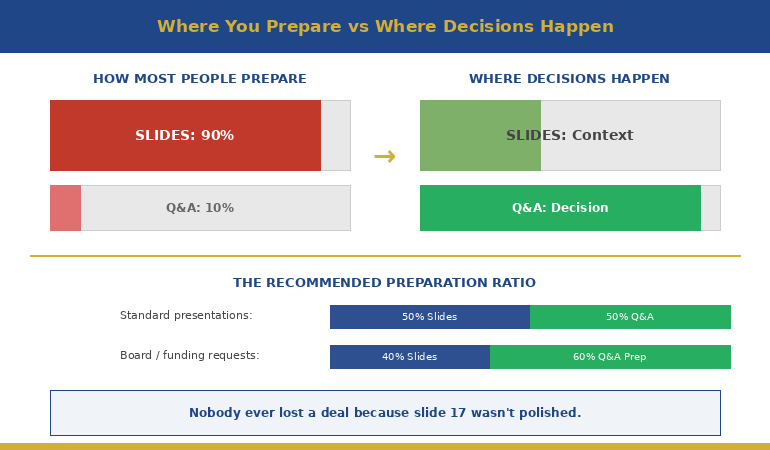
Most presenters spend roughly 90% of their preparation time on slides — designing, refining, rehearsing the narrative — and leave maybe 10% for thinking about questions. Often that 10% happens the night before, when you lie in bed imagining worst-case scenarios without actually preparing responses.

The problem isn’t that slides don’t matter. They do. A poor executive presentation structure will lose your audience before you reach Q&A. But once your slides are solid — clear structure, clear recommendation, clear ask — additional slide refinement produces diminishing returns. The marginal value of your twentieth revision of slide 14 is close to zero.

The marginal value of preparing for the CFO’s top three questions? Enormous.


Diagram showing presentation preparation ratio versus where executive decisions actually happen during Q&A

Here’s the preparation ratio I recommend to my clients: once your slides are structurally sound, split your remaining preparation time 50/50 between rehearsing the presentation and preparing for Q&A. For a high-stakes presentation — a board approval, a funding request, a major proposal — I’d go further: 40% slides, 60% Q&A preparation.

That feels counterintuitive. It felt counterintuitive to the senior director who lost the £3.2M deal too. But after working with hundreds of executives through high-stakes presentations, I can tell you: nobody ever lost a deal because slide 17 wasn’t polished enough. Plenty have lost deals because they couldn’t answer question two.

📋 Want the complete Q&A preparation system?

The Executive Q&A Handling System includes question mapping templates, response frameworks, and the exact preparation process that turns Q&A from your biggest risk into your strongest asset.

Get the Executive Q&A Handling System → £39

The Question Map: Predicting What They’ll Ask

The biggest myth about Q&A is that questions are unpredictable. They’re not. In my experience, you can predict the majority of the questions you’ll receive — if you prepare systematically rather than hoping for the best.

I teach my clients a technique called Question Mapping. Before any high-stakes presentation, you build a map of likely questions organised by stakeholder and by category. Here’s how it works:

Step 1: List every person in the room and their primary concern.

The CFO cares about cost, risk, and return. The CTO cares about technical feasibility and integration. The COO cares about operational disruption. The CEO cares about strategic alignment and timing. Each person will ask questions through their lens. Knowing the lens tells you the question before it’s asked.

Step 2: For each person, write the three questions they’re most likely to ask.

Not the questions you’d like them to ask — the questions they’ll actually ask based on their role, their concerns, and any history you have with them. If the CFO challenged your timeline last time, she’ll challenge your timeline again. Prepare for that specific challenge.

Step 3: For each question, prepare your answer AND your evidence.

The answer is what you’ll say. The evidence is what you’ll show — a backup slide, a data point, a reference to a comparable situation. This is where appendix slides become essential. They’re not afterthoughts; they’re your Q&A arsenal.

Step 4: Identify the two or three questions you can’t answer yet — and prepare honest responses for those too.

Knowing what you don’t know is just as important as knowing what you do. We’ll cover how to handle these in a moment.

When my client lost the £3.2M deal, I asked him afterwards: “Did you do a question map?” He looked at me blankly. He’d spent three weeks on slides and zero minutes mapping the questions his audience was guaranteed to ask. The CFO’s question about the vendor contract penalty wasn’t obscure — it was the most obvious financial question in the room. Ten minutes of question mapping would have caught it.

Answer Architecture: The 3-Part Executive Response

Knowing what they’ll ask is half the battle. The other half is structuring your answer so it lands with a senior audience. Most people answer executive questions the way they’d answer in conversation — they think out loud, circle around the point, add context, and eventually arrive at the answer. For a peer, this is fine. For a CFO with six more meetings after yours, it’s fatal.

I teach a three-part response structure that works for virtually any executive question:

Part 1: Direct Answer (first sentence)

Start with the answer. Not the context, not the caveat, not the background. The answer. “The migration risk is moderate — we estimate two weeks of parallel running with a 15% contingency built in.” The executive now has what they need. Everything after this is supporting detail.

Part 2: One Supporting Point (second sentence)

Give one piece of evidence or reasoning that strengthens your answer. “We’ve based that on the migration timeline from the Singapore rollout last year, which had similar complexity.” One point. Not three. Not a data dump. One credible reference that shows your answer isn’t a guess.

Part 3: The Bridge (optional third sentence)

If it’s useful, connect back to a point from your presentation or redirect to a related strength. “That’s actually why we’ve built the phased approach I showed on slide 8 — it gives us an exit ramp at each stage.” This turns a defensive moment (answering a question) into an offensive one (reinforcing your proposal).

Three sentences. Sometimes two. Never seven. The discipline of brevity in Q&A communicates the same thing it communicates in your slides: you know what matters and you’re not afraid to be direct about it.

📊 Question Maps + Response Frameworks + Recovery Scripts

The Executive Q&A Handling System gives you the complete toolkit: question mapping templates for every stakeholder type, the 3-part response structure with worked examples, “I don’t know” recovery scripts, hostile question techniques, and preparation checklists you can run before any high-stakes presentation.

Get the Executive Q&A Handling System → £39

Instant download. Built from 24 years of real boardroom Q&A across JPMorgan Chase, PwC, RBS, and Commerzbank.

The Most Powerful Answer: “I Don’t Know, But…”

Here’s something that surprises most of my clients: the executives I’ve worked with over 24 years don’t expect you to know everything. What they can’t tolerate is pretending you do when you don’t.

When you bluff in Q&A, senior people can tell. They’ve sat through thousands of presentations. They know the difference between someone who’s genuinely confident in their answer and someone who’s constructing one in real time. Bluffing doesn’t just fail to convince them — it actively undermines every other answer you’ve given, including the ones you were right about.

“I don’t know” — when it’s honest — is a trust-building statement. But it needs a second half.

The formula: “I don’t have that figure yet. Here’s what I do know: [related fact]. I’ll have the specific answer to you by [date].”

Three elements: honest admission, related context that shows you understand the territory, and a specific commitment to follow up. The admission shows integrity. The related context shows competence. The commitment shows accountability. Together, they communicate something more valuable than the actual answer: that you’re someone who can be trusted with a £3.2M decision.

My client who lost the deal said “I’ll need to come back to you on that” — which is close but missing the middle element. He didn’t demonstrate that he understood the territory around the question. Compare that with: “I don’t have the exact penalty clause figure, but I know the contract has a 90-day notice period and we’d be within that window for a Q2 start. I’ll confirm the specific financial impact by Friday.”

Same honesty. Completely different impression. The first version says “I didn’t prepare for this.” The second says “I understand the landscape even though I’m missing one data point.”

For a deeper dive into handling the really difficult questions — the hostile ones, the ambush questions, the ones designed to put you on the spot — this guide covers specific techniques for those situations.

🔍 Want the “I don’t know” recovery scripts and hostile question playbook?

The Executive Q&A Handling System includes word-for-word scripts for every Q&A scenario — including the ones you can’t predict. Plus the question mapping template that catches most questions before they’re asked.

Get the Executive Q&A Handling System → £39

How do you prepare for Q&A after an executive presentation?

Use a Question Map: list every person in the room and their primary concern, write the three most likely questions each will ask, prepare direct answers with supporting evidence, and identify the questions you can’t answer yet. Aim to spend at least 50% of your remaining preparation time on Q&A once your slides are structurally sound.

Why do good presentations still fail to get approval?

Because executives don’t decide during slides — they decide during Q&A. Your slides present your best case. Q&A reveals how deeply you’ve thought about risks, alternatives, and second-order consequences. Two unanswered questions can undo twenty-two minutes of perfect delivery.

What’s the best way to answer questions from senior executives?

Use the 3-part structure: direct answer first (one sentence), one supporting point (evidence or reasoning), then an optional bridge back to your presentation. Keep responses under three sentences. Brevity in Q&A signals confidence and clarity — rambling signals uncertainty.

🏆 The Complete Executive Q&A Handling System

Everything you need to turn Q&A from your biggest vulnerability into your strongest moment. Built from 24 years of high-stakes boardroom presentations where the real decisions happened after the slides.

  • Question Mapping templates (by stakeholder role and concern type)
  • The 3-Part Executive Response framework with worked examples
  • “I Don’t Know” recovery scripts that build trust instead of destroying it
  • Hostile question deflection and reframing techniques
  • Appendix slide strategy — what to prepare and when to deploy
  • Pre-presentation Q&A preparation checklist

Built from real situations across banking, consulting, and corporate leadership. Not theory — pattern recognition from hundreds of executive Q&A sessions.

Get the Executive Q&A Handling System → £39

Instant download. Customise for your next high-stakes presentation.

Frequently Asked Questions

How long should I spend preparing for Q&A versus preparing slides?

Once your slide structure is solid, split remaining preparation time at least 50/50 between presentation rehearsal and Q&A preparation. For board-level or funding presentations, consider 40/60 in favour of Q&A. No executive ever rejected a proposal because slide 17 wasn’t polished — but many have rejected proposals because the presenter couldn’t answer question two.

What if I’m asked a question I genuinely haven’t thought of?

Use the “I don’t know, but…” formula: honest admission, one related fact that shows you understand the territory, and a specific commitment to follow up with the answer by a named date. This builds more trust than a bluffed answer that unravels under follow-up questioning.

Should I invite questions during the presentation or only at the end?

For senior audiences, invite questions throughout. Executives don’t wait well — if they have a question on slide 4, they won’t be listening to slides 5 through 20. Saying “I welcome questions at any point” also signals confidence. If the question is answered on a later slide, say so: “Great question — I cover that in two slides. Shall I jump ahead or continue?”

How do I handle it when the Q&A goes completely off-topic?

Acknowledge the question’s value, then redirect: “That’s an important point, and it deserves proper attention. Can I take that offline with you after this meeting so we can give it the time it needs? I want to make sure we cover [the decision you need] in the time we have left.” This respects the questioner while protecting your agenda.

📬 The Winning Edge Newsletter

Weekly executive presentation strategies — Q&A preparation, slide structures, and boardroom techniques that actually work. No filler.

Subscribe Free →

📥 Free: Executive Presentation Checklist

Includes a Q&A preparation section — covers question mapping, response structure, and the appendix slides you need ready before any high-stakes presentation.

Download Free →

Related reading: The breathing technique that stopped my pre-presentation vomiting — managing the physical side of high-stakes presentations, including Q&A anxiety.

Your next step: Before your next presentation, take fifteen minutes and build a Question Map. List every person in the room, their primary concern, and the three questions they’re most likely to ask. Prepare a direct answer for each one. That fifteen minutes will do more for your outcome than another three hours of slide refinement. And if you want the complete Q&A preparation system — question maps, response frameworks, recovery scripts, and hostile question techniques — the Executive Q&A Handling System (£39) gives you everything you need to turn the most dangerous part of your presentation into the most persuasive.

About the Author

Mary Beth Hazeldine is the Owner & Managing Director of Winning Presentations. With 24 years of corporate banking experience at JPMorgan Chase, PwC, Royal Bank of Scotland, and Commerzbank, she has delivered high-stakes presentations in boardrooms across three continents.

A qualified clinical hypnotherapist and NLP practitioner, Mary Beth combines executive communication expertise with evidence-based techniques for managing presentation anxiety. She has trained senior professionals and executive audiences over many years and supported high-stakes funding and approval presentations throughout her career.

Book a discovery call | View services

08 Feb 2026
Executive mid-answer during boardroom Q&A with presentation screen visible behind

Appendix Slides: The 5 Backup Slides That Win Executive Q&A

The CFO asked a question I wasn’t expecting. I froze — then said, “I actually have a slide on that.”

As I flipped to my appendix, I watched her expression shift from skepticism to something like respect. The question was about our methodology assumptions — the kind of challenge that derails presenters who haven’t thought three steps ahead.

But I had thought three steps ahead. Not because I’m smarter than anyone else in the room. Because I’d learned something most presenters never figure out: appendix slides (also called backup slides) aren’t for “extra information.” They’re pre-built answers to the questions you’ll be asked.

After 24 years in corporate banking and consulting, I’ve noticed a pattern. The people who look most prepared in boardrooms aren’t the ones who memorised every data point. They’re the ones who anticipated the questions — and had slides ready.

Here’s how to build appendix slides that transform Q&A from a threat into an opportunity.

Quick answer: Effective appendix slides (backup slides) aren’t repositories for leftover data — they’re strategically prepared answers to anticipated questions. Build five types: (1) methodology backup for “how did you calculate that?”, (2) deeper data cuts for “what about segment X?”, (3) scenario alternatives for “what if we did Y instead?”, (4) historical context for “how does this compare to last time?”, and (5) risk mitigation for “what could go wrong?” Having these ready transforms Q&A from a threat into an opportunity to demonstrate thorough preparation.

⚡ Presenting to leadership this week?

Build these 3 appendix slides before anything else:

  1. The “How We Got This Number” slide. Whatever your key recommendation relies on — have the calculation visible and ready.
  2. The “What About [Their Pet Topic]” slide. Every senior leader has something they always ask about. Prepare for it.
  3. The “Plan B” slide. If they say no to your first recommendation, what’s the alternative? Have it ready.

These three slides cover 80% of the questions that catch presenters off guard.

If you don’t have the “How we got this number” slide ready, you’re not presenting — you’re negotiating credibility.

The difference between “I’ll get back to you” and “I have a slide on that” is preparation.
Start with templates designed for executive-level Q&A readiness.

Get the Executive Slide System → £39

Why Most Appendix Advice Is Useless

Search “appendix slides” and you’ll find the same advice everywhere: “Put extra information at the end of your presentation.” “Include detailed data that doesn’t fit in your main slides.” “Add references and sources.”

This advice is technically correct and practically useless.

It treats appendix slides as a dumping ground — a place to put things you couldn’t fit elsewhere. That’s backwards. It’s like saying “put a fire extinguisher somewhere in the building” without teaching people where fires actually start.

The real purpose of appendix slides is strategic anticipation.

Every presentation to senior leaders follows a predictable pattern. You present. They listen. Then they ask questions designed to test whether you’ve actually thought this through — or whether you’re just presenting someone else’s analysis.

The questions they ask fall into recognisable categories. And if you’ve prepared slides that answer those categories, something interesting happens: you stop dreading Q&A. You start looking forward to it. Because every question becomes an opportunity to demonstrate that you’re not just a messenger — you’re someone who thinks at their level.

For more on how senior leaders process presentations, see my guide on what executives actually read on your slides.

The 5 Types of Appendix Slides That Actually Matter

After observing thousands of executive presentations — and noting which questions consistently surface — I’ve identified five categories of backup slides that cover nearly every challenging question you’ll face.

Five categories of appendix slides with example questions for each type

Type 1: Methodology Backup (“How did you calculate that?”)

This is the most common challenge in data-heavy presentations. Someone questions your numbers — not because they think you’re wrong, but because they need to understand the foundation before they’ll trust the conclusion.

Your methodology backup slide should include:

  • Data sources (where the numbers came from)
  • Key assumptions (what you held constant)
  • Calculation logic (the formula or approach, simplified)
  • Sensitivity notes (what changes if assumptions shift)

When someone asks “How did you get to that 15% figure?”, you flip to this slide and walk them through it in 60 seconds. Their next response is almost always a nod, not a follow-up challenge.

Type 2: Deeper Data Cuts (“What about segment X?”)

Senior leaders often want to see how aggregate numbers break down. If you’re showing total revenue, someone will ask about revenue by region. If you’re showing overall customer satisfaction, someone will ask about enterprise vs. SMB.

Anticipate the two or three most likely segmentation questions and prepare slides that show:

  • The breakdown they’re likely to ask about
  • Whether the segment trend matches or diverges from the aggregate
  • Any notable outliers worth flagging

The magic phrase: “Great question — let me show you the breakdown.” Then flip to the slide you already prepared.

Type 3: Scenario Alternatives (“What if we did Y instead?”)

Decision-makers rarely accept the first option without exploring alternatives. If you’re recommending Option A, someone will ask what happens with Option B or C.

Your scenario alternative slides should show:

  • The alternative approach (briefly described)
  • Key differences in outcome (cost, timeline, risk, impact)
  • Why you’re not recommending it (the trade-off that makes it inferior)

This demonstrates that you didn’t just fall in love with your recommendation — you evaluated alternatives and made a reasoned choice.

Type 4: Historical Context (“How does this compare to last time?”)

Institutional memory runs deep in senior leadership. They remember the last time someone proposed something similar. They remember how it turned out.

Your historical context slide should address:

  • Previous similar initiatives (briefly)
  • What happened (outcome)
  • What’s different this time (why history won’t repeat)

If you don’t prepare this slide, someone will bring up the past anyway — and you’ll be caught defending against a comparison you didn’t anticipate.

Type 5: Risk Mitigation (“What could go wrong?”)

Every approval involves accepting risk. Leaders want to know you’ve thought about what could fail — and that you have a plan if it does.

Your risk mitigation slide should include:

  • Top 2-3 risks (the realistic ones, not the theoretical)
  • Likelihood and impact (brief assessment)
  • Mitigation approach (what you’ll do if each risk materialises)

This slide transforms “What could go wrong?” from a trap into an opportunity to show thorough thinking.

Build Your Main Deck and Appendix Fast — Without Starting From Blank

The Executive Slide System gives you the complete framework to structure your recommendation deck and prepare for Q&A. Build presentations that anticipate challenges before they’re asked.

Get the Executive Slide System → £39

Instant download. 30-day guarantee.

What’s inside:

  • 10 executive slide templates (recommendation, decision, update, and Q&A-ready structures)
  • 30 Copilot prompt cards (draft → refine → executive polish)
  • Before-You-Present cheat sheet (the 60-second quality check)
  • Lifetime updates + 30-day money-back guarantee

Use it today: Download → pick the recommendation template → drop in your key numbers → add 3 appendix slides using the framework above → present with confidence.

How to Predict Which Questions You’ll Be Asked

Building the right appendix slides requires knowing which questions are coming. Here’s how to predict them.

Step 1: Know Your Audience’s Patterns

Every senior leader has favourite questions. The CFO always asks about ROI assumptions. The COO always asks about implementation timeline. The CEO always asks about competitive response.

Before any presentation, ask yourself: What does each person in this room always want to know? Build an appendix slide for each pattern.

Step 2: Identify Your Weakest Points

You know where your argument is strongest — and where it’s vulnerable. The vulnerable spots are where questions will land.

Be honest with yourself: Which part of my recommendation would I challenge if I were in their seat? Build an appendix slide that addresses that challenge head-on.

Step 3: Anticipate the “Yes, But” Reactions

When you make your recommendation, imagine someone saying “Yes, but…” and completing the sentence. Common completions:

  • “Yes, but we tried something similar before…”
  • “Yes, but what about the risk of…”
  • “Yes, but how does this affect department X…”
  • “Yes, but the timeline seems aggressive…”

Each “yes, but” is an appendix slide waiting to be built.

Step 4: Ask Someone Who’s Been in the Room

If you haven’t presented to this group before, find someone who has. Ask them: “What questions did they ask you?” and “What caught you off guard?”

Their experience becomes your preparation advantage.

For more on handling difficult questions, see my guide on handling difficult questions in presentations.

The “Flip-Back” Technique for Q&A Confidence

Having appendix slides is only half the battle. Using them smoothly is the other half.

Here’s the technique I teach:

Step 1: Acknowledge the Question

“That’s a great question” or “I’m glad you asked that” — something brief that shows you’re not thrown off.

Step 2: Signal That You’re Prepared

“I actually have some data on that” or “Let me show you what we found when we looked at that specifically.”

This moment — before you’ve even shown the slide — is when perception shifts. You’re not scrambling. You anticipated this.

Step 3: Navigate Smoothly

Know your appendix slide numbers. Practice the navigation so you don’t fumble. In PowerPoint, you can type the slide number and press Enter to jump directly there.

Step 4: Answer Concisely

Don’t over-explain. Show the slide, make your point in 30-60 seconds, and ask if that addresses their question. Less is more.

Step 5: Return to Your Flow

After answering, return to where you were in your main presentation — or to your recommendation slide if you were near the end. Don’t let one question derail your entire narrative.

The Psychological Effect

When you flip to a prepared slide during Q&A, something subtle happens in the room. The questioner feels heard (you took their concern seriously enough to prepare for it). The rest of the room sees competence (you thought ahead). And you feel confident (you’re not improvising — you’re executing).

This is why appendix slides change the entire dynamic of executive presentations.

Why Building Appendix Slides First Changes Everything

Here’s a counterintuitive practice that transformed how I prepare presentations: build your appendix slides before your main deck.

Most people do the opposite. They build their main presentation, then throw some extra slides at the end as an afterthought. But this order is backwards.

When you build appendix slides first, you’re forced to think about:

  • What questions will this presentation raise?
  • What challenges will my recommendation face?
  • What context does my audience need that I might forget to include?

This thinking improves your main presentation. You realise which points need more support. You identify gaps in your logic before someone else points them out. You build a stronger argument because you’ve already stress-tested it.

The practical workflow:

  1. Draft your recommendation (one sentence)
  2. List every question or challenge you can imagine
  3. Build appendix slides for the top 5-8 challenges
  4. Now build your main presentation, informed by that thinking
  5. Review: did any appendix content belong in the main deck after all?

This approach takes slightly longer upfront but dramatically reduces revision cycles and — more importantly — transforms your Q&A performance.

For more on executive presentation structure, see my guide on executive presentation structure.

Stop Dreading Q&A. Start Looking Forward to It.

The Executive Slide System gives you the complete framework — main deck templates plus the structure to build appendix slides for every question category. Build presentations that anticipate challenges before they’re asked. Look like the most prepared person in every room.

Get the Executive Slide System → £39

Instant download. 30-day guarantee.

Frequently Asked Questions

How many appendix slides should I have?

Quality matters more than quantity. Aim for 5-10 well-prepared appendix slides that cover the most likely questions. Having 30 appendix slides you can’t navigate quickly is worse than having 5 you know inside out. Focus on the five types described above and you’ll cover most scenarios.

Should I mention my appendix slides during the presentation?

Generally, no. Let them discover your preparation during Q&A — that’s when the “I have a slide on that” moment creates the strongest impression. The exception: if you’re presenting something controversial and want to pre-empt objections, you might say “I have backup data on our methodology in the appendix if anyone wants to dig deeper.”

What if someone asks a question I don’t have an appendix slide for?

It happens. Acknowledge the question, answer as best you can verbally, and offer to follow up with more detail. The goal isn’t to have every possible answer prepared — it’s to have the most likely answers ready. Even covering 70% of questions with prepared slides dramatically improves your Q&A performance.

How do I quickly navigate to appendix slides during a live presentation?

In PowerPoint, type the slide number and press Enter to jump directly there. Know your appendix slide numbers before you present. Some presenters add a small index on their final main slide (visible only to them in presenter view) showing which appendix slides cover which topics. Practice the navigation until it’s smooth.

Your Next Step

Before your next executive presentation, try this: after you’ve drafted your recommendation, spend 30 minutes building appendix slides for the three most likely challenges. Just three.

Then notice how your confidence shifts. You’re no longer hoping they don’t ask hard questions. You’re ready for them. And that readiness shows — in your body language, your voice, and your willingness to engage with whatever comes.

The best-prepared person in the room isn’t the one who knows everything. It’s the one who anticipated what would matter — and prepared accordingly.

Ready to transform your Q&A performance?

Get the Executive Slide System → £39

📧 Get the Winning Edge Newsletter

Weekly insights on executive communication, presentation structure, and high-stakes delivery — from someone who’s spent 24 years in boardroom-style decision meetings.

Subscribe free →

Related reading: Once you’ve built your appendix slides, make sure your main deck is structured for how senior leaders actually scan. Read What Executives Actually Read on Your Slides (In the First 5 Seconds) to ensure your key content lands in the high-attention zones.

About the Author

Mary Beth Hazeldine is the Owner & Managing Director of Winning Presentations. With 24 years in corporate banking and consulting — plus years training senior professionals — she has seen exactly what gets challenged in executive Q&A and what separates presenters who look brilliant from those who look blindsided.

She now helps professionals build presentations that anticipate questions before they’re asked.

08 Feb 2026
Senior executive woman reviewing presentation slides on laptop with focused analytical expression in modern office

What Executives Actually Read on Your Slides (In the First 5 Seconds)

I watched a CFO flip through 47 slides in under two minutes. She stopped on three of them.

This was during my banking career, sitting in on a budget approval meeting. The presenter had spent weeks building what he thought was a comprehensive deck. Beautiful charts. Detailed analysis. Supporting data for every claim.

The CFO’s eyes landed on the slide titles. Then the recommendation boxes. Then the numbers in bold. Everything else — the carefully crafted explanations, the background context, the methodology sections — might as well have been invisible.

After 24 years in corporate banking and consulting, I can tell you: most slides are built for the wrong reader.

They’re built for someone who will read every word. Senior leaders don’t.

Here’s what they actually look at — and what they skip entirely.

Quick answer: Senior leaders read in a predictable pattern: slide title first (to decide if the slide is relevant), then any boxed recommendation or conclusion, then bolded numbers or outcomes, then the first bullet only. They skip methodology, background context, detailed explanations, and anything that looks like “supporting information.” Structure every slide so the most important content appears in those four high-attention zones.

⚡ Presenting to executives this week?

Quick fixes that take 15 minutes:

  1. Rewrite your slide titles as conclusions. Not “Q3 Sales Analysis” but “Q3 Sales Exceeded Target by 12%”
  2. Add a recommendation box to every decision slide. Bold border, 2 sentences maximum, top-right position.
  3. Bold the numbers that matter. Revenue, headcount, timeline, cost — the figures they’ll be asked about later.

These three changes put your key content where executive eyes actually land.

If your slide title doesn’t contain the decision or outcome, senior leaders assume you don’t have one.
Fix your titles first — then drop your content into templates built for executive scanning.

Get the Executive Slide System → £39

The Executive Reading Pattern

Senior leaders don’t read slides. They scan them.

This isn’t because they’re lazy or don’t care. It’s because they’re making decisions all day, and reading every word of every presentation would be impossible. They’ve developed a filtering system — a rapid triage that separates “need to know” from “nice to know.”

Understanding this pattern changes how you build slides.

The scan takes about 3-5 seconds per slide. In that window, a decision-maker determines: Is this slide relevant to me? Is there a decision required? What’s the key number or outcome? Do I need to dig deeper or can I move on?

If your most important content isn’t visible in those 3-5 seconds, it doesn’t exist.

The Executive Reading Pattern showing what executives look at first second and skip on slides

Here’s the scanning sequence I’ve observed across hundreds of boardroom presentations:

First: Slide title (0.5 seconds)
This is the gatekeeper. The title tells them whether to invest attention or flip to the next slide. Titles that describe content (“Market Analysis”) get skipped. Titles that state conclusions (“Market Share Dropped 8% — Action Required”) get attention.

Second: Boxes and call-outs (1 second)
Anything visually separated — recommendation boxes, key takeaway sections, highlighted conclusions — draws the eye next. Decision-makers have learned that presenters put important things in boxes.

Third: Bold numbers (1 second)
Revenue figures. Headcount. Timelines. Percentages. Costs. Leaders are trained to find numbers because numbers are what they’ll be asked about in the next meeting.

Fourth: First bullet point (1-2 seconds)
If they’re still on the slide, they’ll read the first bullet. Maybe the second. Rarely the third. Almost never the fourth or fifth.

Then: Decision to engage or move on
Based on those 3-5 seconds, they either ask a question, request you to slow down, or mentally move to the next topic.

For more on structuring presentations for senior audiences, see my guide on executive presentation structure.

Build Slides That Get Read in the First 5 Seconds

The Executive Slide System includes templates pre-structured for how senior leaders actually scan — with recommendation boxes, conclusion-first titles, and visual hierarchy that puts key content where eyes land first.

Get the Executive Slide System → £39

Built from 24 years of presenting in boardroom-style decision meetings.

What They Actually Read (In Order)

Let’s break down each high-attention zone and how to use it.

1. Slide Titles: Your 8-Word Headline

Most presenters write titles that describe what’s on the slide. “Revenue Overview.” “Project Timeline.” “Risk Assessment.”

These titles are useless to someone scanning quickly. They don’t answer the only question that matters: “What do I need to know?”

Better approach: Write titles that state the conclusion.

Descriptive Title (Skip) Conclusion Title (Read)
Q3 Sales Performance Q3 Sales Beat Target by £2.4M
Project Status Update Project On Track for March Launch
Budget Analysis Budget Request: £450K for Q2
Risk Factors Three Risks Require Board Decision

Notice the pattern: conclusion titles tell the reader what to think about the slide before they’ve read anything else. They can decide instantly whether to engage deeply or move on.

For more examples of this transformation, see my guide on slide titles before and after.

2. Recommendation Boxes: The Decision Zone

Decision-makers are trained to look for recommendations. Put your “ask” in a visually distinct box — border, background colour, positioned top-right or bottom of slide.

A good recommendation box contains:

  • What you’re recommending (one sentence)
  • What it costs or requires (one sentence)
  • Nothing else

Example: “Recommendation: Approve £200K for pilot programme. Decision required by March 15.”

That’s it. The supporting argument is in the rest of the slide — but the recommendation stands alone in its box, scannable in under two seconds.

3. Bold Numbers: The Facts They’ll Quote Later

When leaders leave your presentation, they’ll be asked: “What was the number?” Make sure the important numbers are visually unmissable.

Bold these categories consistently:

  • Revenue/cost figures
  • Headcount impacts
  • Timeline milestones
  • Percentage changes
  • Decision thresholds

Don’t bold for emphasis. Bold for memorability. If the audience can’t recall the key figure 30 minutes later, it wasn’t bold enough.

4. First Bullets: Your One Chance at Detail

If you have supporting points, the first bullet is prime real estate. The second bullet is acceptable. The third is rarely read. The fourth and fifth are essentially invisible.

This means: front-load your bullet lists. Put the most important point first, not last. Don’t build to a conclusion — start with it.

For more on what senior leaders look for, see my guide on the executive summary slide.

What They Skip Entirely

Equally important: knowing what decision-makers don’t read. This is where most presenters waste time and slide space.

Background and context sections

You know that “Background” slide at the beginning? The one that sets up why this topic matters? It gets skipped. The audience already knows why they’re in the meeting. Context that seems essential to you is old news to them.

Methodology explanations

“How we arrived at this recommendation” is rarely read unless someone challenges the conclusion. Lead with the answer; keep methodology in the appendix for questions.

Detailed timelines

Gantt charts with 47 task lines? Skipped. They want three things: when does it start, when does it end, what are the major milestones in between. Everything else is operational detail they’ll delegate.

Supporting data tables

Raw data is for analysts. Senior audiences want the interpretation. “Sales grew 12%” is readable. A table with 24 monthly figures that demonstrates 12% growth is not.

Paragraphs of any kind

If your slide has a paragraph on it, that paragraph is invisible. They don’t read paragraphs in presentations. They read headlines, bullets, and numbers. Paragraphs signal “this isn’t important enough to summarize” — so they skip them.

Anything below the fold

Content that requires scrolling or appears at the very bottom of a dense slide is effectively hidden. If it matters, it should be visible without effort.

How to Structure Slides for Executive Eyes

Here’s the slide structure that works for senior-level scanning:

Top of slide: Conclusion title
State what the slide proves in 8 words or fewer.

Top-right: Recommendation box (if decision slide)
What you want them to approve, and what it requires.

Middle: Visual or key data
One chart, one table, or 3-4 bullets maximum. Bold the numbers that matter.

Bottom: Source line (tiny) or next steps
If there’s a “so what” action, put it here. Otherwise, just the data source in small font.

What’s missing from this structure? Background. Methodology. Explanation. Context. All of that lives in your speaker notes or the appendix — not on the slide itself.

The 10-Second Test

Before finalising any slide, show it to someone for exactly 10 seconds, then hide it. Ask them: “What was that slide about? What’s the key number? What’s the recommendation?”

If they can answer all three questions, your slide is structured correctly. If they can’t, the important content isn’t in the high-attention zones.

For more on board-level presentations, see my guide on board presentation best practices.

Stop Building Slides That Get Skipped

The Executive Slide System gives you templates that put your content where senior eyes actually land — conclusion titles, recommendation boxes, and visual hierarchy built for 3-second scanning. Stop guessing. Start structuring for how decisions actually get made.

Get the Executive Slide System → £39

Instant download. Built from 24 years of boardroom experience.

Frequently Asked Questions

What if my executive audience wants detail?

Some do — but they want detail on demand, not upfront. Structure your slides for scanning, then have detailed appendix slides ready for questions. When someone asks “How did you calculate that?”, you can flip to the methodology. But don’t put methodology on the main slide where it will be skipped by the three people who don’t ask.

How many bullets are too many?

Three is ideal. Four is acceptable. Five is pushing it. Beyond five, you’re writing a document, not a slide. If you have more than five points, you either need multiple slides or you need to group points into categories.

Should I read my slides aloud during the presentation?

Never read content they can scan faster than you can speak. Instead, use your speaking time to add context, tell stories, and address the “so what” — the things that don’t fit in a scannable format. Your slides and your speaking should complement each other, not duplicate.

What about technical presentations with complex data?

The same principles apply, but with one addition: a “headline chart” that summarises the complex data before you show the detail. The audience wants to understand what the data means before they see the data itself. Give them the interpretation first, then offer to go deeper if they want.

Your Next Step

The next time you build a presentation, imagine your most senior audience member scanning each slide for 3-5 seconds. Ask yourself: In that window, can they see the conclusion? The recommendation? The key number?

If not, move that content to where their eyes actually land.

Your deck might look different — fewer words, more conclusion titles, bolder numbers. But it will work better. Because it’s built for how decision-makers actually read.

Ready to build slides that get read in the first 5 seconds?

Get the Executive Slide System → £39

📧 Get the Winning Edge Newsletter

Weekly insights on executive communication, presentation structure, and high-stakes delivery — from someone who’s spent 24 years in boardroom-style decision meetings.

Subscribe free →

Related reading: If the thought of Monday’s presentation is already keeping you up tonight, read The Night Before the Biggest Presentation of Your Career for the protocol that actually helps you rest before high-stakes moments.

About the Author

Mary Beth Hazeldine is the Owner & Managing Director of Winning Presentations. With 24 years of corporate banking experience at JPMorgan Chase, PwC, Royal Bank of Scotland, and Commerzbank, she has sat through thousands of executive presentations — and learned exactly where senior leaders look and what they skip.

She now helps professionals build slides that work for how decisions actually get made, not how presenters wish they were made.

04 Feb 2026
Executive looking frustrated after presentation with green checkmark on screen behind him — vague praise instead of actionable feedback

Why ‘Great Presentation’ Is the Worst Feedback You Can Get

“Great presentation, really liked it.” The CFO shook my client’s hand, smiled, and walked out. Three weeks later, the £1.8 million budget request was quietly shelved.

The quick answer: When executives tell you “great presentation,” it almost always means your deck failed to force a decision. Actionable presentation feedback sounds uncomfortable — “slide 3 needs the ROI number,” “cut sections 4 through 7,” “lead with the ask next time.” Vague praise is a polite exit. If you’re consistently hearing “good job” but not getting approvals, the problem isn’t your delivery. It’s your slide structure.

⚡ Presenting tomorrow and need actionable feedback fast?

Before you walk into the room, ask one person — your manager, a peer, a trusted stakeholder — these three slide-specific questions:

  1. “Which slide would you cut first if I had to lose three?”
  2. “Is my recommendation on the first substantive slide, or buried at the end?”
  3. “What’s the one question the CFO will ask that I haven’t answered?”

Those three answers will give you more useful feedback in ten minutes than a dozen “great job” responses after the meeting. If you want the slide structure that forces this kind of feedback automatically, the Executive Slide System (£39) builds decision points into every section.

The Night I Realised Praise Was a Warning Sign

Early in my banking career at JPMorgan Chase, I presented a credit restructuring proposal to a room of seven senior directors. Twelve slides. Thirty-five minutes. When I finished, the most senior director nodded and said, “Really well put together. Thanks for that.”

I walked out feeling brilliant. Told my manager it went well. Two days later, she pulled me aside: “They’ve gone with another approach. Apparently, the deck didn’t address the regulatory risk.”

Nobody in that room told me what was missing. They told me it was “well put together.” That phrase now sets off alarm bells whenever I hear a client use it. Because in 24 years of corporate banking — across JPMorgan, PwC, Royal Bank of Scotland, and Commerzbank — I’ve learned that the executives who give you a compliment and nothing else are the ones who’ve already mentally moved on.

The executives who interrogate your slides? They’re the ones about to approve something.

Vague vs Actionable: What Real Presentation Feedback Sounds Like

After 24 years of coaching executives through high-stakes presentations — from board-level budget approvals to investor pitches — I’ve noticed a pattern that separates the presenters who get promoted from those who plateau. It has nothing to do with charisma or slide design. It’s about the type of feedback they receive — and what they do with it.

Vague feedback sounds warm. “Great presentation.” “Really interesting.” “Good job, thanks.” It feels good in the moment, but it gives you nothing to improve. You walk out not knowing what worked, what didn’t, or what to change for next time.

Comparison chart showing vague presentation feedback versus actionable feedback with specific examples

Actionable presentation feedback sounds different — and often less comfortable. “Slide 3 needs a clearer decision point.” “The finance section is twice as long as it needs to be.” “Your recommendation should be on the first slide, not the last.” These responses tell you exactly what to change. They mean the listener engaged deeply enough with your content to form a specific opinion.

Here’s the uncomfortable truth: if every stakeholder tells you “great job” and nobody challenges a single slide, your deck didn’t provoke enough thought to drive a decision. You entertained the room. You didn’t move it.

What does ‘actionable feedback’ mean for a presentation? Actionable presentation feedback identifies a specific element — a slide, a data point, a structural choice, an argument — and tells you what to change, add, or remove. It’s feedback you can act on before your next presentation without guessing what the person meant.

Your Slides Should Force Decisions — Not Compliments

The Executive Slide System gives you the exact 12-slide structure that makes executive audiences engage, challenge, and approve — instead of politely nodding and moving on. Built from frameworks I’ve used across JPMorgan Chase, PwC, and RBS.

Get the Executive Slide System → £39

Includes 12-slide executive structure, decision slide templates, and the recommendation-first framework refined across 24 years of high-stakes corporate presentations.

Why Executives Default to ‘Great Presentation’ (It’s Not About You)

Before you blame yourself for getting vague praise, understand why it happens. Senior leaders default to “great presentation” for three reasons — and none of them mean your content was actually great.

Reason 1: Your deck didn’t demand a response. Most presentation structures end with a summary slide or a “thank you.” Neither forces a decision. When you don’t build a decision point into your slides, the only polite response is a compliment. Executives aren’t going to volunteer constructive criticism you didn’t ask for.

Reason 2: They’re being politically careful. In senior leadership, vague praise is often code for “I don’t want to commit to a position in this room.” If your presentation doesn’t make it easy for them to say yes or no, they’ll say “great job” because it’s the safest non-answer. I saw this constantly at Commerzbank — the more political the room, the vaguer the feedback.

Reason 3: They’ve already decided — and it’s not in your favour. This is the hardest one to accept. When a senior leader has already made up their mind against your recommendation, “great presentation” is a kindness. It lets them reject your proposal without rejecting you personally. My client with the £1.8 million budget request? The CFO had already allocated those funds elsewhere. The compliment was a consolation prize.

In every case, the problem isn’t the executive. It’s the structure of the presentation itself. A well-structured executive deck makes it nearly impossible for a room to respond with vague praise — because it forces specific questions, specific objections, and specific decisions.

📊 This is exactly why the Executive Slide System builds a decision slide into position 3 — before the supporting evidence — so executives engage with your ask immediately instead of passively consuming your content. Get the Executive Slide System → £39

How do you ask for feedback after an executive presentation? Never ask “how was it?” or “any feedback?” — these invite vague praise. Instead, ask a specific, slide-level question: “Was the risk section on slide 7 strong enough to address your concerns?” or “Would you restructure the recommendation on slide 3?” Specificity invites specificity.

The Feedback Extraction Framework (Stop Hoping — Start Structuring)

After watching hundreds of executives present at board level, I developed a four-step framework that consistently turns vague “nice job” responses into genuinely useful, actionable presentation feedback. The key insight: you have to build feedback extraction into the presentation itself — not bolt it on afterwards.

Four-step feedback extraction framework showing before, during, after, and apply stages for improving executive presentations

Step 1 — Before: Build a feedback scaffolding slide. Add a penultimate slide that asks the room a specific question. Not “any questions?” but “Which of these three options would you recommend, and why?” This forces the room to respond with substance. One of my clients at RBS started using a “decision criteria” slide that listed three options with trade-offs. The room couldn’t leave without picking one — and their feedback immediately became specific, because they had to justify a choice.

Step 2 — During: Watch for the lean-in moment. Every presentation has a moment where the audience shifts posture — they lean forward, pick up a pen, or furrow their brow. That’s the slide that landed. Note which slide triggered it. That’s your strongest content, and everything else should be restructured to match its impact. I teach executives to build their executive summary slide using the same approach that triggered that lean-in.

Step 3 — After: Ask slide-specific questions. Immediately after presenting (or within 24 hours), ask one targeted question: “If you could change one thing about slide 5, what would it be?” Not “how was the presentation?” — that invites “great job.” Make your question so specific that the only possible answer is actionable. If they respond with “it was fine,” that slide didn’t register. Move your attention to the slides that provoked an actual reaction.

Step 4 — Apply: One change per cycle. Don’t overhaul your entire deck based on one round of feedback. Change one thing — the opening, one data visualisation, the recommendation placement — and present again. Measure whether the feedback changes. This creates a compounding improvement loop that, over time, transforms a deck that gets polite nods into one that gets challenged, questioned, and approved.

Stop Getting Compliments. Start Getting Approvals.

The Executive Slide System includes the exact decision slide format, feedback-forcing structure, and recommendation-first framework I’ve refined across hundreds of executive presentations. Your deck shouldn’t generate praise — it should generate action.

Get the Executive Slide System → £39

Built from frameworks refined across JPMorgan Chase, PwC, Royal Bank of Scotland, and Commerzbank — where vague praise meant lost deals.

Why is vague feedback harmful for presentations? Vague feedback creates a dangerous illusion of success. When you’re told “great job” repeatedly, you stop improving. You keep using the same structure, the same slides, the same approach — and you can’t understand why budgets get delayed, projects stall, and decisions don’t happen. Vague praise doesn’t just fail to help you. It actively holds you back by convincing you nothing needs to change.

Why Your Slide Structure Determines Your Feedback Quality

This is the part most presentation advice gets backwards. They tell you to “ask better questions” or “request feedback proactively.” That helps — but it treats the symptom, not the cause.

The cause is your slide structure.

A deck that follows a narrative arc — context, evidence, analysis, recommendation — naturally builds to a decision point. When the last substantive slide presents a clear recommendation with trade-offs, the room has no choice but to respond with specific feedback. They have to say “I agree with option A because…” or “I disagree because slide 7 doesn’t address…” Either response gives you something concrete to work with.

Compare that to a deck that ends with a summary slide restating what you already said. The room has nothing to decide. No recommendation to accept or reject. No trade-offs to weigh. So they default to the only available response: “nice job.”

Every presentation I’ve restructured for clients — whether it was a £4 million budget proposal at JPMorgan or a quarterly business review at PwC — the single biggest change was moving the recommendation to the front and building decision points into every section. The result? Feedback went from “looks good” to “I need you to strengthen the compliance section before I can approve this.” That’s a completely different conversation. That’s a conversation that leads somewhere.

📊 The Executive Slide System builds this recommendation-first, decision-forcing structure into every slide — so your deck naturally generates the kind of actionable feedback that drives approvals. Get the Executive Slide System → £39

Related: If the feedback you’re receiving is “great job” but you feel physically ill before every presentation, the problem might be deeper than slide structure. Read: The Medication Question: What Executives Actually Do Before Big Presentations

Common Questions About Presentation Feedback

How do you give actionable feedback on a presentation? Reference specific slides by number, identify what’s missing rather than what’s wrong, and suggest a concrete change. “Slide 4 needs the ROI calculation” is actionable. “The middle section felt slow” is not. If you’re the one giving feedback, the most useful gift you can offer is a specific slide number paired with a specific recommendation.

What should I do if I only get positive feedback on my presentations? Positive-only feedback is a red flag, not a green light. It usually means your deck didn’t create enough tension to provoke a real response. Try adding a decision slide that forces the room to choose between options. Ask one person before you leave: “If you could only keep three slides from this deck, which three?” Their answer will tell you which slides actually mattered — and which were filler.

How do you improve a presentation when nobody gives you specific feedback? Stop waiting for others to tell you what’s wrong. Instead, audit your own deck using one metric: which slides generated questions or comments, and which generated silence? The silent slides are the ones to cut or restructure first. Build a decision point into every presentation — even a simple “do you agree with this recommendation?” — and the room will be forced to respond with specifics.

The Structure That Turns ‘Great Job’ Into ‘Approved’

I built the Executive Slide System after 24 years of watching presentations succeed and fail at the highest levels of corporate banking. It contains the exact slide order, decision frameworks, and recommendation-first structure that forces executive audiences to engage — not just applaud. If your presentations keep generating compliments but not commitments, your structure is the problem. This fixes it.

Get the Executive Slide System → £39

Includes 12-slide executive structure, decision slide templates, and the recommendation-first framework used in high-stakes approvals and funding rounds.

Frequently Asked Questions

Is ‘great presentation’ always negative feedback?

Not always — but it should trigger scrutiny. If “great presentation” comes with a specific follow-up action (approval, next meeting scheduled, budget allocated), the praise is genuine. If it comes with nothing else — no questions, no next steps, no decision — it’s a polite way of ending the conversation without committing. The tell is what happens in the 48 hours after: silence means it wasn’t great.

How do I get my boss to give me more specific feedback on my presentations?

Ask before you present, not after. Send your boss the deck in advance with one question: “Can you flag the slide that’s weakest before I present to the group?” This gives them permission to be critical in private (where it’s safe) rather than in public (where they’ll default to “looks good”). After the presentation, ask about a specific slide: “Did slide 6 make the case strongly enough?” The more specific your question, the more specific their answer.

What’s the fastest way to tell if my presentation actually worked?

Count the questions. A presentation that generated zero questions either answered everything perfectly (rare) or failed to engage the room (common). A deck that triggered three to five specific, content-level questions — “How did you calculate the ROI?” or “What’s the timeline risk?” — drove genuine engagement. The type of question matters too: questions about your data mean they’re evaluating your proposal. Questions about your background mean they’re evaluating you. One leads to approval. The other leads to “great presentation.”

📬 The Winning Edge Newsletter

Weekly insights on executive presentations, slide structure, and the psychology of getting buy-in — from 24 years inside corporate boardrooms. No fluff. No generic tips. Just the frameworks that actually work.

Subscribe to The Winning Edge → Free

🆓 Free Download: Executive Presentation Checklist

The pre-presentation checklist I give every client before high-stakes meetings. Covers slide structure, decision points, and the three things to verify before you present to senior leadership.

Download the Executive Presentation Checklist → Free

Your Next Step

If you walked out of your last presentation hearing “great job” and nothing else, your structure needs work. Not your delivery. Not your confidence. Your structure. A recommendation-first slide order with built-in decision points makes it nearly impossible for a room to respond with vague praise — because your deck demands a specific response.

Restructure one deck. Present it. Notice the difference: fewer compliments, more questions, better decisions. Get the Executive Slide System → £39

About the Author

Mary Beth Hazeldine is the Owner & Managing Director of Winning Presentations. With 24 years of corporate banking experience at JPMorgan Chase, PwC, Royal Bank of Scotland, and Commerzbank, she has delivered high-stakes presentations in boardrooms across three continents.

A qualified clinical hypnotherapist and NLP practitioner, Mary Beth combines executive communication expertise with evidence-based techniques for managing presentation anxiety. She works with executives preparing for high-stakes funding rounds and approvals across banking, consulting, and corporate leadership.

Book a discovery call | View services

19 Jan 2026
Executive presentation structure diagram showing the Decision-First Framework for C-suite buy-in

Executive Presentation Structure: The Format That Gets Instant Buy-In

Quick answer: The best executive presentation structure leads with the decision, not the data. Put your recommendation on slide one, follow with business impact and risk, then provide supporting detail only if asked. This “decision-first” structure matches how executives actually process information—and it’s why some presenters get instant buy-in while others get “let’s circle back.”

⚡ Presenting to executives in the next 48 hours? Here’s your structure:

Slide 1: Decision — what you want + expected outcome

Slide 2: Impact — why it matters (revenue, cost, risk)

Slide 3: Risk — what could go wrong + mitigation

Slides 4–6: Evidence — only data that supports your ask

Backup: Detail on demand (methodology, deep analysis)

The 11-Word Slide That Rescued a £4M Budget Request

The right executive presentation structure can change everything. I learned this watching a client named Sarah lose—then win—the same £4 million budget request.

The first time, Sarah presented 47 slides. Background, methodology, analysis, findings, recommendations. Textbook structure. The CFO flipped through seven slides, said “I don’t see what you’re asking for,” and moved to the next agenda item. Fourteen hours of preparation, dismissed in 60 seconds.

Six weeks later, Sarah presented again. Same request. Same CFO. But this time, her opening slide contained exactly 11 words: “Request: £4M to reduce customer churn by 23% within 18 months.”

The CFO leaned forward. “Now we’re talking. Walk me through the numbers.”

She got her budget approved in that meeting.

The data hadn’t changed. The structure had. After 24 years in corporate banking at JPMorgan Chase, PwC, and Commerzbank, I’ve seen this pattern hundreds of times. The executives who get buy-in aren’t better at analysis. They’re better at structure.

⭐ Get the Complete Executive Presentation Structure

Stop guessing what executives want. Get the exact slide order and decision-first framework used in boardrooms, steering committees, and high-stakes budget meetings.

Includes:

  • The Decision-First Slide Framework (exact structure)
  • 12 executive slide templates for different scenarios
  • Before/after examples from real boardroom presentations

Get the Executive Slide System → £39

Built from 24 years in corporate banking and 15+ years coaching executives through board updates, steering committees, and CFO decision meetings.

Why the Structure You Learned Is Wrong for Executives

Most professionals structure presentations the way they were taught: background → methodology → analysis → findings → recommendation. This is logical. It’s how you think through problems. And it’s exactly why executives stop listening by slide three.

Here’s the disconnect: you build presentations chronologically, but executives don’t consume them that way.

When a CFO opens your deck, they’re not thinking “I can’t wait to understand your methodology.” They’re thinking: “What do you need? Why should I care? Can I say yes and move on?”

If those questions aren’t answered immediately, you’ve lost them. Not because they’re impatient—because they’re triaging. A typical C-suite executive makes 35+ decisions per day. Every slide that doesn’t answer “so what?” gets mentally filed under “I’ll review later.” (They won’t.)

The executives who command attention flip the traditional structure entirely. They lead with the end. They put the decision first and the supporting detail last.

The Decision-First Structure Executives Actually Want

The most effective executive presentation structure follows what I call the Decision-First Framework. It’s the opposite of how most presentations are built—and that’s exactly why it works.

Traditional structure (what you learned):

Background → Process → Data → Analysis → Recommendation

Decision-first structure (what executives want):

Recommendation → Impact → Risk → Supporting Data (if needed)

This structure works because it matches how executives actually think. They don’t need to understand your journey to make a decision. They need to understand the decision itself, what happens if they say yes, and what could go wrong.

When you lead with your recommendation, something remarkable happens: executives engage differently. Instead of waiting to find out what you want, they’re immediately evaluating whether to approve it. You’ve shifted from “presenter explaining things” to “advisor proposing solutions.”

This is exactly how top-tier consulting firms structure client presentations. It’s how I structured every pitch at JPMorgan Chase. And it’s how my clients consistently get faster decisions than their peers.

Want the complete framework with templates for different scenarios? The Executive Slide System includes everything you need to restructure your next presentation. Get instant access →

The Exact Slide Order for Executive Presentations

Here’s the executive presentation structure I teach to banking professionals and FTSE 100 leaders. This works for budget requests, strategic recommendations, project updates, and board presentations:

Slide 1: The Decision Slide

State exactly what you’re asking for and the expected outcome. No background. No preamble. Example: “Recommendation: Approve £2.1M for CRM upgrade. Expected ROI: 340% over 3 years.”

Slide 2: The Impact Slide

Show what happens if they say yes. Revenue impact, cost savings, risk reduction—whatever matters most to this audience. Make the benefit concrete and quantified.

Slide 3: The Risk Slide

Address what could go wrong and how you’ll mitigate it. Executives always think about downside. If you don’t address it, they’ll ask—and you’ll look unprepared.

Slides 4-6: Supporting Evidence

Only include data that directly supports your recommendation. If a slide doesn’t help them say yes, cut it.

Backup Slides: Detail on Demand

Put methodology, detailed analysis, and additional data in backup. You’ll rarely need it—but when an executive asks, you look thorough, not disorganised.

This structure typically reduces a 30-slide presentation to 8-12 slides. More importantly, it reduces decision time from “let’s reconvene” to “approved.”


Decision slide, Impact slide, Risk slide, Supporting evidence, then Backup slides

⭐ Stop Building Slides That Get Ignored

Get the complete Decision-First Framework with plug-and-play templates for every executive scenario.

Includes:

  • The exact slide order for budget requests, board updates, and strategic recommendations
  • Action-title formulas that eliminate “Overview” and “Background” slides
  • Before/after transformations from real presentations

Transform Your Presentation Structure → £39

Instant download. Apply to your next presentation immediately.

How to Apply This Structure to Your Next Presentation

You don’t need to rebuild your entire deck. Start with these three changes:

1. Rewrite your first slide as a decision.

Take whatever’s on your current slide 1 and replace it with: “[Action verb]: [What you want] to [achieve outcome].” If your current first slide says “Q3 Project Update,” change it to “Recommendation: Extend Q3 timeline by 2 weeks to protect £400K deliverable.”

2. Move your recommendation forward.

Find wherever your current recommendation lives (usually slide 15 or later). Move it to slide 1. Yes, it feels uncomfortable. Do it anyway. The supporting detail still exists—it’s just in the right place now.

3. Apply the “so what?” test to every slide.

For each slide, ask: “Does this directly support my recommendation?” If the answer is no, move it to backup. Most presentations lose 30-40% of their slides this way—and become dramatically more effective.

This is exactly how successful CFO presentations are structured. The content isn’t simpler—it’s organised for how finance leaders actually make decisions.

Want a step-by-step system for restructuring your slides? The Executive Slide System walks you through the entire process with templates and real examples. See what’s included →

Related: Great structure is only half the equation. If nerves undermine your delivery, read How to Stop Saying “Um” (Without Sounding Robotic).

Common Questions About Executive Presentation Structure

What is the best structure for an executive presentation?

The best executive presentation structure leads with your recommendation, followed by business impact, risks, and supporting evidence. This “decision-first” approach matches how executives process information. They want to know what you’re asking for before they evaluate whether to approve it. Traditional structures that build to a conclusion waste executive attention.

How do you structure a presentation for senior leadership?

Structure presentations for senior leadership around decisions, not information. Open with your recommendation and expected outcome. Follow with the business case (why it matters), risk assessment (what could go wrong), and supporting data. Keep the main presentation to 8-12 slides and put additional detail in backup slides for reference.

How many slides should an executive presentation have?

Most effective executive presentations have 8-12 slides, plus backup. The goal isn’t a specific number—it’s ensuring every slide directly supports your recommendation. If a slide doesn’t help executives make a decision, it belongs in backup or should be cut entirely. Your executive summary slide alone should convey the core message.

⭐ Present Like Someone Who Understands Executives

Get the complete system for structuring presentations that get immediate buy-in—not polite nods and forgotten follow-ups.

What’s included:

  • The Decision-First Framework with exact slide order
  • 12 executive slide templates (budget, board, strategy, updates)
  • Before/after examples from real presentations
  • Action-title formulas that eliminate weak slide titles

Get Instant Access → £39

The same framework used in FTSE 100 boardrooms, investment banking pitches, and C-suite budget approvals.

FAQ

How long does it take to restructure my existing slides?

Most people can restructure a 20-slide presentation in 60-90 minutes once they understand the Decision-First Framework. The first time takes longest because you’re learning the approach. After that, you’ll naturally build presentations this way from the start—which actually saves time because you’re not second-guessing your structure.

What if my executive actually prefers detailed presentations?

Executives who “prefer detail” actually prefer having detail available when they want it. Lead with your recommendation and keep supporting detail in backup slides. When they ask for more information, you’ll look prepared. In my experience, once executives see a well-structured presentation, they rarely ask for the backup—but they appreciate knowing it exists.

Does this structure work for technical presentations?

Especially for technical presentations. Technical experts often bury their conclusions under methodology because that’s how they solve problems. But executives don’t need to understand your process—they need to understand your conclusion and its business implications. The Decision-First structure forces you to separate “what I did” from “what it means.”

Should I use the same structure for board meetings?

Yes, with one adjustment: boards have even less time and need even clearer decisions. For board presentations, I recommend putting your recommendation AND the expected vote on slide one. Example: “Recommendation: Approve acquisition of XYZ Corp for £12M. Board action requested: Approval vote.” This immediately frames the entire discussion.

📧 The Winning Edge Newsletter

Weekly insights on executive communication, presentation structure, and career-building skills. No fluff—just actionable frameworks from 24 years in corporate banking.

Subscribe Free →

Your Next Step

The right executive presentation structure isn’t about simplifying your message—it’s about sequencing it for how leaders actually make decisions. Lead with the decision. Follow with impact and risk. Put supporting detail where it belongs: available but not in the way.

Try this with your next presentation: write your recommendation as slide one before you create anything else. Build the rest of your deck to support that single slide. You’ll be surprised how much easier the whole process becomes—and how differently executives respond.

If you want the complete framework with templates, examples, and step-by-step guidance, get the Executive Slide System.

📋 Free Resource: Executive Presentation Checklist

Not ready for the full system? Start with this free checklist covering the 10 structural elements every executive presentation needs.

Download Free Checklist →

About the Author

Mary Beth Hazeldine is the Owner & Managing Director of Winning Presentations and a former corporate banker with 24 years of experience at JPMorgan Chase, PwC, Royal Bank of Scotland, and Commerzbank. She has trained over 5,000 executives on high-stakes presentation skills and helped clients secure more than £250 million in funding and budget approvals.

Mary Beth is also a qualified clinical hypnotherapist and NLP practitioner, specialising in helping professionals overcome presentation anxiety. After spending five years battling her own fear of presenting at JPMorgan, she developed the techniques she now teaches to executives worldwide.

Book a discovery call | View services

07 Jan 2026
C-suite presentation mistakes - 5 credibility killers that make executives stop listening

C-Suite Presentation Mistakes: 5 Credibility Killers That Make Executives Stop Listening

Quick Answer: The five c-suite presentation mistakes that destroy credibility are: (1) burying your recommendation under context, (2) using hedge words that signal uncertainty, (3) over-explaining before asked, (4) reading slides instead of commanding them, and (5) treating Q&A as an attack rather than an opportunity. Each mistake signals to executives that you’re not ready for senior-level conversations.

She had 14 slides. The CFO gave her 90 seconds.

I watched Sarah—a senior manager at RBS—prepare for weeks. Her analysis was flawless. Her c-suite presentation mistakes, however, were textbook. She opened with methodology. She built to her recommendation. She hedged every conclusion with “I think” and “maybe.”

The CFO interrupted on slide three: “What do you need from me?”

Sarah froze. Her recommendation was on slide 11. She stumbled through an explanation of why the background mattered first.

He was checking email by the time she reached her point.

The budget request was denied. Not because the idea was wrong—but because Sarah made every c-suite presentation mistake that signals “not ready for this room.”

Here are the five credibility killers I see executives make weekly—and how to avoid them.

🏆 FLAGSHIP PROGRAMME

The Executive Buy-In Presentation System

Stop making the mistakes that get you tuned out. This comprehensive system teaches you exactly how to structure, deliver, and close presentations that win C-suite approval—every time.

What transforms: How you open, how you handle pushback, and how you get decisions made in a single meeting.

Eliminate C-Suite Presentation Mistakes →

The 5 C-Suite Presentation Mistakes That Destroy Credibility

Mistake #1: Burying Your Recommendation

The instinct is natural: build context so the recommendation makes sense. But C-suite executives don’t process information like analysts. They don’t need to understand your journey—they need your destination.

When your recommendation appears on slide 11 of 14, you’re asking executives to hold attention through 10 slides of context they didn’t request. Most won’t.

The fix: State your recommendation in the first 30 seconds. “I’m requesting £2M for platform migration. Here’s why.” Then provide context only as requested.

Mistake #2: Hedge Word Epidemic

“I think we might want to consider possibly looking at…”

Every hedge word cuts your perceived conviction in half. Senior executives notice immediately. If you’re not confident in your recommendation, why should they be?

The fix: Delete “I think,” “maybe,” “might,” “possibly,” “perhaps,” “kind of.” State positions as positions: “I recommend Option B.”

Mistake #3: Over-Explaining Before Asked

Anticipating objections seems smart. But when you address concerns nobody raised, you create doubts that didn’t exist. You’re teaching the room what to worry about.

Worse, it signals anxiety. Confident presenters trust their recommendations to withstand scrutiny.

The fix: Present your case. Stop. Let questions emerge naturally. Address them when asked—not before.

Mistake #4: Reading Your Slides

The moment you turn to read your slides, you’ve lost the room. Executives can read faster than you can speak. If you’re adding nothing beyond what’s written, you’re wasting their time.

More importantly, reading signals that you don’t know your content well enough to present it naturally.

The fix: Slides are visual aids, not scripts. Know your content cold. Glance at slides for reference, but speak to the room, not the screen.

Mistake #5: Treating Q&A as an Attack

Defensive body language. Rushed answers. Over-justification. These signals tell executives you’re not comfortable with scrutiny—and therefore not ready for senior roles.

Questions aren’t attacks. They’re engagement. An executive asking tough questions is an executive taking you seriously.

The fix: Welcome questions. Pause before answering. Respond to exactly what was asked—then stop. Treat Q&A as the opportunity to demonstrate your thinking, not a test to survive.

C-suite presentation mistakes - 5 credibility killers with fixes for each

Why C-Suite Presentation Mistakes Matter More Than Content

Here’s the uncomfortable truth: executives often don’t remember your content. They remember how you made them feel.

If you projected confidence, clarity, and command, your recommendations carry weight—even if the details blur. If you projected uncertainty, over-preparation, and anxiety, even brilliant analysis gets discounted.

C-suite presentation mistakes signal something beyond the immediate meeting. They signal whether you’re ready for larger roles, bigger decisions, and higher stakes. Every presentation is an audition.

For more on building the communication skills that command executive rooms, see my complete guide: Leadership Communication Skills: Why Executives Talk Too Much (And Persuade Too Little).

FAQ: C-Suite Presentation Mistakes

What’s the most common c-suite presentation mistake?

Over-explaining context before reaching your recommendation. Executives form opinions within 30 seconds. If you spend the first five minutes on background, you’ve lost them before your point arrives. Lead with your recommendation, then provide only the context they request.

How do I recover from a c-suite presentation mistake mid-meeting?

Stop, acknowledge, and reset. Say: “Let me cut to what matters most—” then state your core recommendation in one sentence. Executives respect people who can self-correct. Continuing down a failing path is worse than admitting you need to change direction.

Do c-suite presentation mistakes differ by industry?

The five core mistakes are universal across industries. However, tolerance levels vary. Financial services executives typically have the least patience for lengthy context. Tech executives may tolerate more detail but still expect clear recommendations. Adjust brevity based on your audience’s culture.

📧 Join 2,000+ professionals getting weekly insights on executive communication. Subscribe to The Winning Edge →

📋 Free Download: Executive Presentation Checklist

Avoid these c-suite presentation mistakes before your next high-stakes meeting. This checklist covers the credibility signals that executives notice in the first 60 seconds.

Get Your Free Checklist →


About the Author

Mary Beth Hazeldine spent 24 years at JPMorgan, PwC, RBS, and Commerzbank. She’s a clinical hypnotherapist and MD of Winning Presentations.

This article was created with AI assistance; all stories and insights are based on 35 years of real client work.

13 Dec 2025
What 24 years in banking taught me about high-stakes presentations

What 24 Years in Banking Taught Me About High-Stakes Presentations

📅 Updated: December 2025

What 24 years in banking taught me about high-stakes presentations

Quick Answer

Executive presentation training rarely teaches what actually matters. After 24 years at JPMorgan, PwC, RBS, and Commerzbank, I learned that high-stakes presentations aren’t won with better slides — they’re won with better preparation, political awareness, and the ability to read a room. The presenters who consistently got approvals weren’t the most polished speakers. They were the ones who’d done the work before they walked in.

🎁 FREE DOWNLOAD

Executive Presentation Checklist

12-point checklist I wish I’d had when I started. One page. Print it before your next big meeting.

Download Free Checklist →

No spam. Unsubscribe anytime.


I still remember my first presentation to JPMorgan’s Executive Committee.

I was 26. I’d spent three weeks building a 45-slide deck. I knew every number, every assumption, every footnote. I’d rehearsed my talking points until I could recite them in my sleep.

Seven minutes in, the Global Head of Operations held up his hand. “What’s the ask?”

I froze. My ask was on slide 38.

“I’ll… I’ll get to that,” I managed.

“I don’t have time for you to get to it. What do you want us to do?”

I fumbled forward, completely thrown off my script. The meeting ended with a polite “send us a one-pager” — which in banking means no.

That moment was the beginning of everything I know about high-stakes presentations.

Lesson 1: The Decision Happens Before the Meeting

Here’s what they don’t teach in executive presentation training: by the time you walk into that room, most decisions are already made.

At a UK hight street bank, I watched a colleague present a flawless recommendation for a £3M technology investment. Perfect slides. Clear ROI. Confident delivery.

The CFO said no in under two minutes.

What my colleague didn’t know: the CFO had already committed that budget to another initiative. The decision was made three weeks earlier in a conversation he wasn’t part of.

The best presenters I worked with at JPMorgan spent more time before the meeting than during it. They’d walk the halls, grab coffee with stakeholders, understand the politics. By the time they presented, they already knew who would support them, who would push back, and what objections they’d face.

The presentation wasn’t where they made their case. It was where they confirmed what they’d already built.

Lesson 2: Executives Buy Confidence, Not Content

In 2008, I was presenting a risk assessment to the bank’s board during the financial crisis. Markets were collapsing. Nobody knew what would happen next.

I had two options: present the uncertainty honestly, or project confidence I didn’t feel.

I chose honesty. I said: “I don’t know what’s going to happen. Nobody does. But here’s what we do know, here’s what we’re watching, and here’s how we’ll respond to each scenario.”

After the meeting, the Chief Risk Officer pulled me aside. “That was the most credible presentation I’ve seen all week. Everyone else is pretending they have answers. You gave us a framework for decisions we can actually make.”

Confidence isn’t about having all the answers. It’s about being clear on what you know, what you don’t know, and what you recommend despite the uncertainty.

Executives don’t expect you to predict the future. They expect you to help them make good decisions with incomplete information. That’s what they do every day.

Seven lessons from 24 years of banking presentations

Lesson 3: Your Slides Are Not Your Presentation

At PwC, I worked with a partner who was legendary for client presentations. He’d walk in with three slides — sometimes two — and walk out with seven-figure engagements.

I once asked him how he did it.

“The slides are a prop,” he said. “They’re not the show. The show is what happens in the room. The conversation. The questions. The moment you see them lean forward because you’ve said something that matters to them.”

He was right. I’ve seen beautiful 50-slide decks put people to sleep. I’ve seen scribbled whiteboards close deals.

The difference isn’t the slides. It’s the presenter’s ability to:

  • Read the room and adjust in real-time
  • Answer questions they didn’t prepare for
  • Make the audience feel heard, not talked at
  • Create space for the decision to emerge naturally

Related: Executive Presentation Template: 12 Slides That Command the Room

📄
Want the Checklist?

12 things to do before every executive presentation. The prep work that actually matters.

Download Free →

Lesson 4: The Question You Don’t Expect Will Define You

At a US Investment Bank., I was presenting a £8M operations initiative to the regional CEO. Everything was going perfectly. Slides landing. Heads nodding. I was about to close with my ask.

Then the CEO asked: “What happens to the 47 people in Mumbai whose jobs this eliminates?”

I hadn’t prepared for that question. It wasn’t in my risk assessment. It wasn’t in my stakeholder analysis. I’d been so focused on ROI and efficiency that I’d completely missed the human element.

I stumbled through something about “redeployment opportunities” and “natural attrition.” It was vague and everyone knew it.

The CEO said: “Come back when you’ve thought about the people, not just the numbers.”

That presentation taught me something that’s shaped every executive conversation since: the question you don’t expect reveals what you haven’t thought through. And executives notice.

The best way to prepare for unexpected questions isn’t to anticipate every possible question. It’s to think more broadly about your recommendation in the first place. Who’s affected? What could go wrong? What would make you change your mind?

Related: How to Present to a CFO: The Finance-First Framework

Lesson 5: Vulnerability Builds More Trust Than Perfection

This one took me years to learn.

Early in my career, I thought executive presentations were performances. I needed to appear competent, polished, in control. Any sign of uncertainty was weakness.

Then I watched a Managing Director at RBS do something that changed my perspective.

She was presenting a strategy that had partially failed. Instead of burying the failure in positive spin, she opened with: “I want to tell you what went wrong, what I learned, and what I’d do differently.”

The room leaned in. For the next 20 minutes, she had complete attention. When she finished, the Chief Executive said: “That’s the most useful strategy review I’ve heard this year.”

She got more budget, not less.

Executives are surrounded by people telling them what they want to hear. Honesty — even uncomfortable honesty — is rare and valuable. The presenter who admits what didn’t work, explains why, and shows they’ve learned is more credible than the one with a perfect track record they can’t explain.

Lesson 6: Presence Trumps Content Every Time

At Commerzbank, I sat through hundreds of presentations. I started noticing a pattern.

The presenters who got approvals weren’t always the ones with the best analysis. They were the ones who:

  • Walked in like they belonged there
  • Made eye contact with decision-makers, not their slides
  • Spoke at a pace that commanded attention
  • Paused after making important points
  • Handled pushback without getting defensive

Executive presence is hard to define but easy to recognise. You know it when you see it. And it’s not about being the most charismatic person in the room — some of the most effective presenters I’ve worked with were quiet, understated people who simply projected certainty.

It can be learned. I’ve seen people transform their presence in a matter of months. But it requires deliberate practice, feedback, and usually someone who can show you what you can’t see in yourself.

Lesson 7: AI Won’t Save You

I’ve been using AI tools for presentations since they became available. They’re remarkable for certain things — generating first drafts, formatting consistently, iterating quickly.

But here’s what 24 years taught me that no AI can replicate:

  • Knowing that the CFO and COO don’t speak to each other, so you need separate pre-meetings
  • Sensing that the room has turned and you need to skip ahead
  • Hearing the question behind the question
  • Building relationships that mean your call gets answered

AI makes the mechanical parts of presentations faster. That’s valuable. But the mechanical parts were never the hard part.

The hard part is everything that happens between humans — the trust, the politics, the unspoken dynamics. That’s where presentations are won or lost. And that hasn’t changed in 24 years.

Related: Why AI Won’t Replace Presentation Skills (But Will Amplify Them)

The best presenters spent more time before the meeting than during it

What I’d Tell My 26-Year-Old Self

If I could go back to that first JPMorgan Chase presentation, here’s what I’d say:

Stop building slides. Start building relationships. The people in that room are more important than anything on your screen. Know what they care about before you walk in.

Lead with the ask. Respect their time. Tell them what you want, then justify it. Not the other way around.

Prepare for the conversation, not the presentation. Your slides will take 15 minutes. The Q&A will take 45. Prepare accordingly.

Get comfortable being uncomfortable. The moment that terrifies you — the hard question, the pushback, the silence — is where trust is built. Don’t run from it.

Find people who’ll tell you the truth. You can’t see your own blind spots. Get feedback from people who’ll be honest, not kind.

Why I Started Teaching This

After 24 years in banking, I’d collected a lot of lessons. Most of them learned the hard way.

When I moved into training, I discovered that most executive presentation training focused on the wrong things. Slide design. Speaking techniques. Body language tips.

All useful. But none of it addressed what actually determines outcomes: the strategic preparation, the stakeholder management, the ability to read a room and adapt in real-time.

So I built a programme that teaches what I wish I’d known at 26. Not theory — the actual skills and frameworks that worked in real boardrooms with real money on the line.

🎓 COHORT STARTING JANUARY 2026

AI-Enhanced Presentation Mastery

8 weeks of structured training on the skills that actually matter in high-stakes presentations — plus how to use AI to multiply your effectiveness.

  • 8 self-paced modules — Work through at your own pace
  • 2 live coaching sessions — Get direct feedback on your presentations
  • Proven frameworks — AVP, 132 Rule, S.E.E. Formula
  • Real examples — Before/after transformations from actual client work
  • Lifetime access — All materials, templates, and future updates

Presale Price: £499 £249 (ends December 31)

Join the January Cohort →

60 seats. 50% already filled.

Reading vs. Doing

What You Get Free Articles AI-Enhanced Mastery (£249)
Awareness of what matters
Proven frameworks (AVP, 132, S.E.E.) Mentioned ✓ Deep training
8 structured learning modules ✓ Self-paced
Live coaching sessions ✓ 2 sessions
Templates & prompt packs Examples ✓ Full library
Before/after transformations ✓ Real examples
Outcome Know what to do Actually do it

Not Ready for the Course?

Start with the free checklist. 12 things to do before every executive presentation.

Download Free Checklist →

Frequently Asked Questions

How is executive presentation training different from regular presentation skills?

Regular presentation training focuses on delivery — how to stand, how to speak, how to use slides. Executive presentation training focuses on outcomes — how to get decisions, how to manage stakeholders, how to handle high-stakes situations. The audience, the stakes, and the dynamics are fundamentally different.

Can presentation skills really be taught?

Yes, but not through lectures. The skills that matter — reading a room, handling pushback, projecting confidence — require practice with feedback. That’s why the Maven course includes live coaching sessions, not just video content.

What if I don’t work in banking?

The principles apply across industries. I’ve trained executives in biotech, SaaS, consulting, and manufacturing. The dynamics of high-stakes presentations — managing stakeholders, leading with conclusions, handling tough questions — are universal.

How long does it take to see improvement?

Most people see significant improvement within their first 2-3 presentations after training. The frameworks give you structure immediately. The confidence builds with practice.

📧
The Winning Edge Newsletter

Weekly insights on executive presentations from 35 years of training leaders. No fluff. No theory. Just what works.

Subscribe Free →

Related Reading

About the Author

Mary Beth Hazeldine spent 24 years in corporate banking at JPMorgan Chase, PwC, Royal Bank of Scotland, and Commerzbank before moving into executive training. Over 35 years, she’s helped clients raise over £250 million in funding and close deals worth over £100 million. She teaches at Winning Presentations and is launching the AI-Enhanced Presentation Mastery course in January 2026.