

Quick answer: This is a real executive presentation before and after audit. A 15-slide budget approval deck was restructured to 7 slides — cutting context the audience didn’t need, merging duplicate data, and moving the recommendation from slide 14 to slide 2. Not a single decision-critical data point was lost. The board approved it in one meeting.
Jump to:
Build Executive Decks That Get Approved — Without the Bloat
The Executive Slide System gives you decision-first slide structures for board meetings, budget approvals, steering committees, and every executive format — so you never build a 15-slide deck when 7 will get the decision.
Get the Executive Slide System → £39
Built from 24 years of corporate experience. Used in budget approvals, board presentations, and executive governance meetings.
She’d Been “Almost Ready” for Three Weeks. The Problem Wasn’t the Content.
A senior programme manager came to me with a deck she’d been revising for three weeks. Budget approval presentation for a £1.8M technology programme. Every time she thought it was finished, she’d add another slide. One more context slide. One more risk. One more stakeholder update.
Fifteen slides. Forty-five minutes of material for a thirty-minute slot.
I told her: “You don’t have a content problem. You have a confidence problem. You’re adding slides because you’re afraid of being caught without an answer. But every extra slide dilutes your recommendation and gives the board more reasons to defer.”
We sat down for 90 minutes. I audited every slide against one question: “Does this slide help the board make a decision, or does it just make you feel prepared?” Eight slides failed that test. We cut them. The remaining seven were restructured with the recommendation first.
For a quick version of this audit you can apply to any deck, try the 60-second test every executive slide should pass before your next boardroom meeting.
She presented the next day. Approved in one meeting. The board chair told her it was the clearest budget presentation he’d seen that quarter. Same data. Same project. Eight fewer slides.
The Executive Presentation Before the Audit: All 15 Slides (and What’s Wrong With Each)
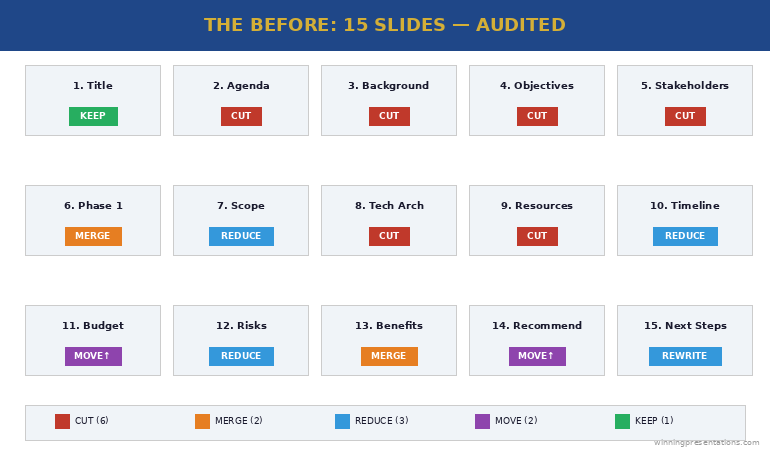
Here’s the original slide order, anonymised but structurally identical. I’ve tagged each slide with its function and the problem.
Slide 1: Title slide. “Programme Phoenix — Budget Approval Request.” Problem: None. Every deck needs a title. Keep.
Slide 2: Agenda. Listed all 15 sections. Problem: Agendas for executive presentations signal “this will be long.” Cut.
Slide 3: Programme background. Two paragraphs of context about why the programme exists. Problem: The board already approved Phase 1. They know why this exists. This slide is for the presenter’s comfort, not the audience’s decision. Cut.
Slide 4: Programme objectives. Five bullet points restating the business case. Problem: Duplicate of the original business case they already approved. Cut.
Slide 5: Stakeholder map. Org chart showing all stakeholders. Problem: The board doesn’t need to see who reports to whom. This is an internal working document, not a decision slide. Cut.
Slide 6: Phase 1 summary. What was delivered, milestones hit. Problem: Good content, wrong position. Merge with the recommendation slide as evidence, not a standalone. Merge.
Slide 7: Phase 2 scope. Detailed breakdown of Phase 2 deliverables. Problem: Too granular for a board audience. Reduce to three key deliverables and move detail to appendix. Reduce.
Slide 8: Technical architecture. System diagram. Problem: Nobody on this board is making a technical decision. This is an appendix slide. Cut.
Slide 9: Resource plan. Team structure and headcount. Problem: The board cares about cost, not headcount. Merge resource cost into the budget slide. Cut.
Slide 10: Timeline. Gantt chart with 20+ milestones. Problem: Too much detail. Reduce to 5 key milestones. Reduce.
Slide 11: Budget breakdown. Detailed cost table. Problem: Good slide, wrong position — should be slides 2-3, not slide 11. The board has been waiting 15 minutes for this. Reposition.
Slide 12: Risk register. 12 risks in a traffic light matrix. Problem: Twelve risks overwhelms. Reduce to the 3 risks the board can actually influence. Reduce.
Slide 13: Benefits realisation. Projected ROI and savings. Problem: Good content, but separated from the budget by two slides. Merge with budget to show cost AND return together. Merge.
Slide 14: Recommendation. “We recommend proceeding with Phase 2.” Problem: The recommendation is on slide 14 of 15. The board has been listening for 35 minutes before they know what you’re asking for. This should be slide 2. Reposition.
Slide 15: Next steps. Problem: Generic “pending approval” language. Replace with a specific ask: “Approve £1.8M. Authorise procurement. Target: contracts signed by March.” Rewrite.
The Executive Slide System gives you the decision-first structure so you build the right deck from the start — no 15-to-7 audit needed.
The 5 Cuts That Transformed the Deck
Every cut followed one of five principles. These work on any executive deck, not just this one.
Cut #1: Remove context the audience already has. The background and objectives slides (3 and 4) restated information the board approved months ago. If the audience was in the room when the decision was made, they don’t need a recap. That’s four minutes of presentation time that adds nothing. Slides removed: 3, 4.
Cut #2: Remove internal working documents. The stakeholder map (5), technical architecture (8), and resource plan (9) are useful for the programme team but irrelevant to a board decision. The test: “Would I send this slide to the board as a standalone?” If not, it doesn’t belong in the main deck. Slides removed: 5, 8, 9.
Cut #3: Merge data that answers the same question. The budget (11) and benefits (13) were separated by two slides, forcing the board to hold cost data in memory while listening to risks. Combined into one slide: “Investment: £1.8M. Return: £4.2M over 3 years. Payback: 11 months.” One slide. One decision. The Phase 1 summary (6) merged into the recommendation as evidence. Slides merged: 6→2, 11+13→one slide.
Cut #4: Reduce granularity to decision-level. The timeline (10) had 20+ milestones — reduced to 5 key dates the board needs to track. The risk register (12) had 12 risks — reduced to 3 the board can actually influence. Detail moved to appendix for anyone who wants it. Slides reduced: 10, 12.
Cut #5: Move the recommendation to slide 2. This is the structural change that transforms everything. The recommendation moved from slide 14 to slide 2. The board knows what you’re asking for within 60 seconds, and every subsequent slide becomes evidence supporting that recommendation. This is how steering committee presentations should be structured — decision first, evidence after.
The Executive Slide System (£39) gives you the decision-first slide structures for budget approvals, board meetings, and steering committees — build the 7-slide version from the start.
The Executive Presentation After the Audit: 7 Slides That Got Approved
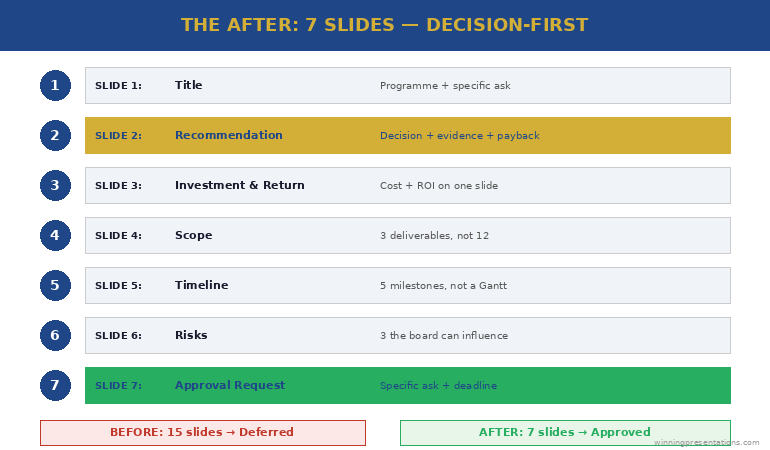
Here’s the restructured deck:
Slide 1: Title. “Programme Phoenix Phase 2 — Budget Approval (£1.8M)”
Slide 2: Recommendation. “Approve £1.8M for Phase 2. Phase 1 delivered on time and £40K under budget. Phase 2 delivers £4.2M return over 3 years with 11-month payback.”
Slide 3: Investment and return. Budget breakdown (3 categories, not 12 line items) plus projected return and payback period — on one slide. The board sees cost and value together.
Slide 4: Scope. Three key Phase 2 deliverables (not the full breakdown). Each linked to a specific business outcome. Detail in appendix.
Slide 5: Timeline. Five milestones: start, three checkpoints, go-live. Not a Gantt chart — a clean visual the board can track at a glance.
Slide 6: Risks. Three risks the board can influence, each with a mitigation already in place. Not a traffic light matrix — a clear “risk → mitigation → status” format.
Slide 7: Approval request. “Approve £1.8M. Authorise procurement to begin contract negotiation. Target: signed by 31 March.” One specific ask with a specific deadline.
Seven slides. Twenty minutes. Approved in one meeting. The approach to writing effective executive summary slides applies the same principle: say the essential thing first, then support it with evidence.
The 3 Rules for Auditing Any Executive Presentation Before and After
You can apply this audit to any deck in 30 minutes using three rules:
Rule 1: The decision test. For every slide, ask: “Does this help the audience make a decision, or does it just make me feel prepared?” If it’s for your comfort rather than their decision, cut it or move it to the appendix. This single question typically removes 30-40% of slides.
Rule 2: The position test. Your recommendation should appear by slide 2 or 3 — never at the end. If it’s later than slide 3, restructure. Everything after the recommendation becomes supporting evidence, not build-up. The same principle works for writing stronger slide titles — lead with the conclusion, not the context.
Rule 3: The merge test. If two slides answer the same question (e.g., “How much does it cost?” and “What’s the return?”), merge them. The board should never have to hold data from slide 11 in memory while listening to slides 12 and 13. If data points belong together, put them together.
The Executive Slide System (£39) applies all three rules by default — every template is decision-first, merged where appropriate, and stripped of context slides that don’t serve the audience.
Common Questions About Executive Deck Audits
How many slides should an executive presentation have?
There’s no universal number, but most executive decisions can be supported in 5-8 slides. The audit principle is more useful than a slide count: every slide must help the audience make a decision. If a slide exists for context the audience already has, internal detail they don’t need, or granularity beyond decision-level — cut it or move it to appendix.
How do you cut slides without losing important information?
You’re not losing information — you’re repositioning it. The appendix holds everything the main deck doesn’t. Detail-oriented audience members can review it. But the main presentation should contain only the slides that drive the decision. Most “important information” in bloated decks is important to the presenter, not to the decision-maker.
What’s the biggest mistake in executive presentations?
Burying the recommendation. In the audit above, the recommendation was on slide 14 of 15. The board spent 35 minutes waiting to find out what they were being asked to decide. Moving the recommendation to slide 2 changes the entire dynamic — every subsequent slide becomes evidence rather than build-up, and the audience listens with purpose because they know what decision you’re driving toward.
Stop Auditing Your Deck. Start Building It Right.
The Executive Slide System gives you decision-first templates for every executive format — board meetings, budget approvals, steering committees, and weekly leadership updates. Build the 7-slide version from the start.
Get the Executive Slide System → £39
Used in budget approvals, board presentations, and executive governance meetings across corporate and consulting teams.
Frequently Asked Questions
What should I put in the appendix?
Everything that supports your recommendation but isn’t needed for the decision itself: detailed cost breakdowns, technical architecture, full risk registers, resource plans, stakeholder maps, and granular timelines. The appendix exists for two purposes — answering detailed Q&A questions and providing an audit trail. If you never open the appendix, your main deck was perfectly structured.
What if my organisation requires a specific slide template with 15+ sections?
Many organisations have mandatory templates. Use them — but restructure the content within them. Move your recommendation to the earliest possible slide. Merge sections that answer the same question. Add “See appendix” to sections that don’t serve the decision. The template stays compliant. The content becomes decision-focused.
How do I know which slides to cut versus move to appendix?
Cut slides that contain information the audience already has (background, objectives they previously approved, restated business cases). Move to appendix slides that contain useful detail someone might ask about in Q&A (technical architecture, detailed costs, full risk registers). The distinction: cut = nobody needs this in this meeting. Appendix = someone might ask about this, but it shouldn’t be in the main flow.
Get Weekly Presentation Intelligence
Deck audits, slide structures, and the executive communication strategies that get decisions in one meeting — delivered every week.
Related: Once your deck is tight, the next risk is Q&A. Read Nobody Prepares for Q&A. That’s Why Q&A Kills the Presentation. — the Question Map for predicting every question before you present.
Your next step: Open your current deck. For every slide, ask: “Does this help the board make a decision?” If the answer is no, move it to the appendix. Your 15 slides will become 7 — and your approval rate will change overnight.
Want the decision-first templates so you build the right deck from the start?
About the Author
Mary Beth Hazeldine is the Owner & Managing Director of Winning Presentations. With 24 years of corporate banking experience at JPMorgan Chase, PwC, Royal Bank of Scotland, and Commerzbank, she specialises in executive-level presentation skills and decision-focused slide architecture.
A qualified clinical hypnotherapist and NLP practitioner, Mary Beth combines executive communication expertise with evidence-based techniques. She has spent 15 years auditing and restructuring executive decks for board presentations, budget approvals, and governance meetings.