Tag: audience engagement

07 Mar 2026
Professional presenter standing confidently at podium with empty chair visible in audience, navy and gold corporate tones, resilience and recovery atmosphere

Your Audience Just Walked Out of Your Presentation. Here’s Exactly What to Do in the Next 3 Seconds

Someone stood up and walked out in the middle of my presentation. Thirty people watched them leave.

For a moment—maybe two—I wanted to follow them. Disappear. Start over. The room went quiet. The kind of quiet that lasts three seconds but feels like thirty.

But I didn’t walk out. I stayed. And what happened next taught me more about presenting with confidence than years of perfect presentations ever could.

Quick Answer

When an audience member walked out during my board-level presentation, I recovered using a three-second reset technique that I’d learned from a previous on-stage freeze. I acknowledged the moment internally (not publicly), refocused on the people who were present, and finished strong. The walkout didn’t destroy the presentation—it actually strengthened my resilience and showed me exactly how to handle the worst-case scenario I’d feared for five years.

🚹 Scenario Diagnostic: The Mid-Presentation Walkout

Your pulse jumps. The room shifts. You think: “I’ve lost them. This is over.” But it’s not. A walkout—whether from disagreement, disinterest, or a genuine conflict—is not a reflection of your value as a presenter. It’s a moment. And moments can be recovered from. This article shows you exactly how.

What Actually Happened That Day

It was a quarterly business review with a client I’d been working with for three years. Twenty-eight employees in the room, plus two stakeholders I’d never met. I was forty minutes into a sixty-minute presentation on strategic initiatives for the coming year.

One of the new stakeholders was sitting three rows back. Professional. Quiet. Taking notes.

Then, without any visible change in their expression, they closed their notebook, stood up, and walked to the back of the room. They paused at the door, looked at their phone, and left. The door clicked shut.

I was mid-sentence. Something about quarterly targets. The words just… evaporated.

Twenty-eight people—including my client—were looking at me. Not at the person who left. At me. Their faces had that confused, slightly embarrassed expression people get when something unexpected happens in public.

I felt the heat rise from my neck to my face. My mouth went dry. For about two seconds, my brain offered me nothing but panic and shame.

Then I remembered something I’d learned the hard way five years earlier: The moment you acknowledge a disruption internally, you take back control of the room.

The Recovery Technique That Worked

Here’s what I did—and what you can do in the same situation:

Step 1: The Three-Second Internal Reset

I paused. Not dramatically. Just a natural beat, as if I’d been planning to pause anyway. During those three seconds, I did one thing: I accepted that the walkout happened and that it wasn’t mine to control.

That’s not positive thinking. That’s not “brushing it off.” It’s something sharper: radical responsibility. I didn’t cause the walkout. I don’t know their story, their deadline, their frustration level. So I released it.

Step 2: Refocus on the People Present

My eyes moved back to the people still in the room. I made direct eye contact with three people I knew well—my client, and two colleagues who always engaged. Their expressions told me everything: “Keep going. We’re still here.”

I made a conscious choice: I would not mention the walkout. I would not apologise for it. I would not make it mean anything about my presentation.

Step 3: Deliver the Next Sentence With Full Conviction

I said: “The targets I’m outlining represent a seventeen percent improvement over last quarter. Here’s how we get there.”

Not rushing. Not over-compensating. Just continuing. The room stayed with me.

After the presentation ended, I got three pieces of feedback: one person asked a thoughtful question about implementation, another said they appreciated the clarity, and my client pulled me aside to explain that the person who left had a family emergency and had to take an urgent call. They’d been professional enough not to interrupt, but they simply had to go.

The walkout had nothing to do with the presentation.

Why Audience Members Walk Out (And Why It’s Not Always About You)

This is crucial. Before I learned this distinction, I would have spent three days replaying the moment, analysing every word I’d said, convinced that the walkout proved I wasn’t a good presenter.

The reality is more nuanced—and more forgiving:

  • External emergencies: Family calls, health issues, work crises. In my case, this was exactly what happened.
  • Scheduling conflicts: Someone forgot they had another meeting and realised mid-presentation.
  • Disagreement: Sometimes, someone disagrees with you so fundamentally that they choose not to hear more. This is about your content—but it’s not about your worth.
  • Meeting fatigue: After attending five presentations in a day, some people simply hit their limit.
  • Unmet expectations: They expected a different type of content and realised quickly they weren’t going to get it.
  • Personal distress: You don’t know what’s happening in someone’s life. Mental health, grief, stress—these are silent.

Understanding this changed everything for me. A walkout is not a referendum on you. It’s a decision someone made based on information you don’t have.

The Three-Second Recovery Framework

I’ve now used this framework in three situations since that presentation: once with a genuine walkout, once with a technical failure, and once with a hostile question that could have derailed the entire room.

Here’s the framework:

Second 1: Pause and Breathe
Stop talking. Take one full breath. This isn’t about composure theatre—it’s about giving your nervous system one second to process. Your body will calm down faster if you give it permission.

Second 2: Acknowledge Reality Internally
Say to yourself: “That happened. I don’t control that. I do control what comes next.” This is not a mindset hack—this is a physiological fact. You cannot control audience behaviour. You can control your next words.

Second 3: Refocus Forward
Make eye contact with one friendly face. Then deliver your next sentence with the same conviction you had before the disruption. Not faster. Not louder. Same.

The entire cycle takes three seconds. You don’t need to be perfect. You need to be present.

The 3-Second Recovery infographic showing three steps: Pause, Anchor, and Resume with descriptions for mid-presentation recovery

Building Worst-Case Resilience Into Your Presentations

Recovery in the moment matters. But resilience built beforehand matters more.

After the walkout, I changed how I prepare for presentations. Here’s what actually moved the needle:

Pre-Presentation: Know Your Worst-Case Scenario

Before every presentation, I now ask: “What’s the one thing that would shake me most?” For me, it’s always some version of audience rejection—walkouts, hostile questions, visible disengagement. I name it. I picture it. I practice it.

Then I ask the follow-up: “If that happens, what will I do?” I rehearse my recovery, not my presentation content. That’s the work that changes everything.

Mental Rehearsal: The Worst-Case Run-Through

Once a week before a high-stakes presentation, I spend five minutes doing something most presenters skip: I mentally walk through the presentation with the worst-case scenario embedded in it. I see the walkout. I feel the pause. I notice myself recovering. I finish strong.

This isn’t doomsaying. This is inoculation. When the real worst-case moment comes, your nervous system recognises it. It’s not a shock—it’s a scenario you’ve already survived in your mind.

Content Design: Building In Flexibility

I also changed how I structure presentations. I now identify which sections are essential and which are flexible. If I need to cut content due to a disruption or an unexpected challenge, I know exactly what goes—and the core message survives.

This alone reduces the weight you carry into the room. You’re no longer holding “this has to go perfectly.” You’re holding “this core message will land, no matter what.”

Reactive vs Prepared presenter comparison infographic showing four scenarios: walkout, tech failure, public challenge, and post-presentation response

Resilience isn’t built during the presentation — it’s built before it. Conquer Speaking Fear gives you the mental rehearsal protocols and recovery frameworks that turn worst-case scenarios from threats into situations you’ve already survived in your mind. Get the programme → ÂŁ39

The After-Presentation Debrief That Matters

What you do in the sixty minutes after a disrupted presentation determines whether you grow or spiral.

Here’s my process:

Don’t Rehash Immediately

Right after the presentation with the walkout, I didn’t text my team. I didn’t email my client asking what went wrong. I didn’t scroll through the presentation looking for flaws. I took a thirty-minute walk and got coffee.

Your nervous system needs time to regulate before you analyse anything. If you start the analysis while you’re still in a dysregulated state, you’ll confirm every fear you have. You’ll find evidence for failure that isn’t actually there.

Gather Actual Feedback (Not Invented Feedback)

After I’d calmed down, I reached out to my client—not to apologise for the walkout, but to ask a genuine question: “How did the material land with the group?”

The answer was clear: it landed well. The walkout had no impact on the room’s perception of the presentation.

The One Question That Matters

I ask myself this question in every debrief: “What did I learn about myself as a presenter from this?” In this case, the answer was: “I’m more resilient than I thought. I can recover. I can stay present even when something unexpected happens.”

That’s not false confidence. That’s evidence-based confidence. I have proof now. I’ve done it.

Present Without the Fear of the Worst-Case Scenario

If you’ve spent years preparing for the exact moment a walkout happens—if you’ve rehearsed this fear in your head a thousand times—it’s time to move from fear to framework.

Conquer Speaking Fear is a comprehensive programme that teaches you exactly how to handle the scenarios that keep you up at night. Not toxic positivity. Not false confidence. Real, tested recovery techniques for real worst-case moments.

Get Conquer Speaking Fear → £39

The Fear I Carried for Five Years

Before this walkout actually happened, I’d feared it for nearly five years. I’d imagined it countless times. I’d built entire narratives about what a walkout would mean: that I wasn’t good enough, that people could see through me, that I didn’t belong on stage.

The fear was worse than the reality.

When the walkout actually happened, two things surprised me: First, I could recover. I’d learned how, and when the moment came, the learning held. Second, the room didn’t collapse. The presentation didn’t fail. Thirty people stayed, listened, engaged, and learned something.

One person’s behaviour didn’t determine the value of what I was offering.

This is the thing about worst-case scenarios: they lose their power the moment you survive them. Not because they weren’t scary—they were. But because you now have evidence that you can handle what you feared.

Want the slides to match the recovery?

Preparation reduces anxiety. The Executive Slide System (ÂŁ39) includes calm-presenter templates designed to minimise preparation stress when you are rebuilding confidence.

What Changed After the Walkout

I no longer rehearse the fear. I rehearse the recovery. I no longer ask, “What if someone walks out?” I ask, “If someone walks out, here’s exactly what I’ll do.”

That shift—from fear-based thinking to framework-based thinking—changed everything about how I show up in presentations. My anxiety dropped noticeably. My conviction increased. And paradoxically, since I stopped fearing walkouts, I’ve had far fewer of them.

I suspect this is because confidence is contagious. When you’re no longer radiating fear, audiences tend to stay engaged.

If you’re carrying the weight of a worst-case scenario—if you’re rehearsing what could go wrong rather than knowing what you’ll do if it does—this is your sign to break that cycle. The framework is learnable. The resilience is built. The recovery is possible.

The walkout I feared for five years lasted three seconds. The recovery framework I learned took twenty minutes to master. If you’re still rehearsing your fear instead of your response, the shift is faster than you think.

Stop Rehearsing Your Worst-Case Scenario on Repeat

The cycle of anxiety is simple: you fear something, you rehearse it mentally, the rehearsal feels real, the fear intensifies. You’re not broken — you’re caught in a loop. The exit is a framework, not willpower.

Get Conquer Speaking Fear → £39

Created by a clinical hypnotherapist who spent 5 years terrified of presenting — and now trains executives to present with confidence.

Is This Right For You?

This article—and the framework in it—is for you if:

  • You’ve experienced a disruption in a presentation and it knocked your confidence for days
  • You spend time before presentations imagining worst-case scenarios
  • You feel like you need to be perfect because any mistake means failure
  • You’ve been told to “just be confident” and that hasn’t helped
  • You’re in a high-stakes role where presentations matter—board meetings, client pitches, leadership communications
  • You want to get from “anxiety about what might happen” to “certainty about what I’ll do if it does”

This isn’t for everyone. If presentations don’t trigger anxiety for you, you don’t need this. But if you’ve ever felt that sick drop in your stomach when something unexpected happened on stage, this is for you.

What Five Years of Fear Actually Taught Me

I spent five years afraid of exactly what I’ve now survived and recovered from. That fear cost me opportunities, sleep, and peace of mind. Looking back, the only thing that moved the needle was learning the frameworks—not positive thinking, not breathing exercises, but real, practised recovery techniques.

Conquer Speaking Fear (£39, instant access) is the toolkit I built for senior professionals who need to recover from the moment that knocked them flat — combining clinical hypnotherapy, NLP, and physiological resets you can use minutes before walking on stage.

This is what changed everything for me. It is what I now use with senior professionals across financial services, consulting, technology, and government when their presentation confidence has been knocked down and needs to come back.

Get Conquer Speaking Fear → £39

People Also Ask

What should you do if someone walks out of your presentation?

First, pause internally (not externally). Acknowledge that you cannot control their behaviour. Refocus on the people still in the room. Continue your presentation with the same conviction you had before the walkout. Do not apologise or draw attention to it. The moment will pass, and thirty seconds later, the audience will have moved on—especially if you have.

How do you recover from a presentation that doesn’t go well?

Recovery happens in three stages: (1) Give yourself sixty minutes before analysing what happened; (2) Gather actual feedback from stakeholders, not invented feedback from your anxious mind; (3) Extract one specific learning about yourself or your approach that you can apply to the next presentation. Avoid the spiral of replaying the presentation endlessly or assuming it was worse than it was.

Is it normal to be anxious about presentations?

Yes. Presentation anxiety is one of the most common fears, even among experienced presenters and executives. The difference between anxious presenters and confident ones isn’t the absence of anxiety—it’s that confident presenters have frameworks for managing it. They know what they’ll do if something unexpected happens. They’ve rehearsed the recovery, not just the content.

Frequently Asked Questions

Can you recover from a walkout and still be respected?

Absolutely. In fact, how you handle a walkout is more memorable to an audience than the walkout itself. If you stay present, keep your composure, and continue with conviction, people will respect your professionalism. The person who walked out made a choice about them. Your response demonstrates something about you—specifically, that you’re not fragile and that you’re focused on serving the people who are still in the room.

What if the walkout is about your presentation?

It might be. Not all walkouts are emergencies—some are genuine disagreement or disengagement. Even then, the recovery is the same: you don’t chase them. You don’t apologise for their choice. You continue serving the people who are present. If there’s genuine feedback (not assumptions), gather it after the presentation. Use it to improve future presentations. But the fact that one person disagreed doesn’t invalidate the value you’re offering to everyone else in the room.

How do I stop being afraid of worst-case scenarios in presentations?

Stop trying to prevent them and start preparing for them. Fear thrives in uncertainty. The moment you have a framework for handling worst-case scenarios, the fear loses power. Learn about presentation anxiety recovery to understand how this works neurologically. Then practice the recovery framework until it’s automatic.

📬 Get Weekly Tactics for Confident Presenting

Every week, I send one framework that shifts how you show up in high-stakes presentations. No fluff. Just the techniques that work.

Subscribe to The Winning Edge

🆓 Free resource: 7 Presentation Frameworks — a free guide to strengthen your presentation preparation.

The One Thing to Remember

The walkout taught me something I couldn’t have learned any other way: I’m more resilient than my fear told me I was. The thing I’d rehearsed for five years turned out to be survivable, recoverable, and ultimately not even about me.

Your worst-case scenario is the same. It will probably happen someday—not because you’re destined to fail, but because you present to enough people over enough years that the odds catch up. And when it does, you’ll discover what I discovered: you can handle it.

The framework works. The recovery is real. And you’re more capable than your fear believes.

About the Author

Mary Beth Hazeldine is the Owner & Managing Director of Winning Presentations. With 25 years of corporate banking experience, she has delivered high-stakes presentations in boardrooms across three continents.

A qualified clinical hypnotherapist and NLP practitioner, Mary Beth combines executive communication expertise with evidence-based techniques for managing presentation anxiety. She advises senior professionals across financial services, consulting, technology, and government on building presentations that work — even when something unexpected happens.

27 Feb 2026
A professional woman standing alone at the end of an empty corporate boardroom after her presentation, surrounded by vacant leather chairs, capturing the silence and isolation when no one asks questions

No Questions After Your Presentation? That Silence Isn’t Approval

When nobody asks questions after your presentation, it rarely means unanimous agreement. It almost always means your audience disengaged before you finished. The silence feels comfortable in the moment — but the decision that follows is usually “deferred,” “let’s revisit,” or a quiet no. This article gives you three techniques to prevent post-presentation silence and one recovery protocol for when it’s already happened.

Eight executives. Forty-five minutes. Zero questions.

I was 18 months into my role at JPMorgan Chase, presenting a credit facility to the investment committee. I’d prepared for weeks. The analysis was tight. The recommendation was clear. When I finished and said “any questions?” — silence. Complete, polite, devastating silence.

I walked out thinking it went well. No pushback meant agreement, right?

The decision came back “deferred” — which in investment banking means nobody cared enough to engage. My presentation hadn’t failed on content. It had failed on engagement. The committee hadn’t disagreed with me. They’d stopped listening to me somewhere around slide 11.

The second time I presented to that committee, I planted three decision hooks throughout the deck — specific moments designed to make them lean in. Five questions in Q&A. Approved same meeting.

That was the day I learned: silence after a presentation isn’t the absence of objections. It’s the absence of interest. And interest is something you have to engineer deliberately.

Committee or leadership presentation this week?

Quick diagnostic: count the moments in your deck where you deliberately invite the audience to react — not at the end, but during the presentation. If the answer is zero, silence in Q&A is almost guaranteed. A structured engagement protocol fixes this before you walk in. See the Executive Q&A Handling System →

Why Silence Is Worse Than Tough Questions

Most professionals fear hostile questions. They shouldn’t. The most dangerous Q&A outcome isn’t a difficult question — it’s no questions at all.

Here’s why. When someone asks a tough question, they’re telling you three things: they listened, they care about the outcome, and they’re mentally engaged with your recommendation. Even a hostile question is a form of investment. That person is spending cognitive energy on your proposal.

Silence means none of those things happened.

In 25 years of corporate banking — across JPMorgan Chase, PwC, Royal Bank of Scotland, and Commerzbank — I’ve sat in hundreds of committee meetings. The presentations that got approved almost always generated questions. The ones that got deferred or quietly rejected? Silence.

Why does nobody ask questions after my presentation?

There are three common reasons: your content was too dense for the audience to process in real time, your structure didn’t create natural engagement points, or your conclusion didn’t require a decision. In all three cases, the fix is structural — not about your delivery or confidence. You need to build question-generating moments into your deck, not hope they emerge after it.

The pattern across executive presentations is consistent: silence is almost never about content quality. It’s about structural engagement. A brilliant 35-slide analysis that doesn’t create tension, choice points, or moments of surprise will get silence every time — regardless of how good the data is.

This is exactly what kills engagement in most corporate presentations — the assumption that good content automatically produces good discussion.

The Silence Protocol: 3 Prevention Techniques

After that JPMorgan experience, I spent years studying what separated presentations that generated rich Q&A from those that got polite silence. The difference was never the presenter’s confidence or charisma. It was always structural.

The presentations that generated questions had something built into them — deliberate engagement architecture. I call these the three prevention techniques.

Each one works by creating what psychologists call “knowledge gaps” — moments where the audience’s brain recognises it needs more information. When you create enough of these gaps during your presentation, questions become inevitable. The audience isn’t choosing to engage. They can’t help it.


Diagram showing The Silence Protocol with three prevention techniques: decision hooks, open loops, and planted controversy, plus one recovery method for post-presentation silence

Technique 1: Decision Hooks

A decision hook is a moment in your presentation where you explicitly frame a choice — and then move on without resolving it completely.

Here’s what this looks like in practice. Instead of presenting your recommendation as a conclusion, you present it as one of two possible paths: “There are two ways we could approach this implementation — a phased rollout over 12 months, or a full deployment in Q3. I’m recommending the phased approach, and I’ll show you why in the next three slides.”

The audience now has something to evaluate. They’re not passively receiving information. They’re mentally testing your recommendation against the alternative you just planted. By the time you reach Q&A, at least one person will ask about the path you didn’t recommend.

Where to place decision hooks: Slide 3 (after your executive summary), at the midpoint of your presentation, and one slide before your recommendation. Three hooks is the minimum. I plant them at the same points where I’d forecast likely questions using a question map — because the same structural moments that generate questions are the ones where hooks land hardest.

The formula: “There are [two/three] ways to approach [specific decision]. I’m recommending [option] because [one-sentence reason]. Let me show you the evidence.”

Diagram showing where to place decision hooks in a presentation: after the executive summary at slide 3, at the midpoint, and before the recommendation, with the decision hook formula and three reasons why it works

Turn Post-Presentation Silence Into Engaged, Productive Questions

The Executive Q&A Handling System (£39, instant access) gives you the complete framework for engineering audience engagement — including the question forecasting method, decision hook templates, and the Headline → Reason → Proof → Close structure that creates natural question points throughout any presentation.

  • The Question Forecasting method — predict and plant the exact questions your audience will ask
  • Engagement trigger templates that create knowledge gaps your audience can’t ignore
  • Recovery scripts for when silence has already happened (the “redirect and re-engage” protocol)
  • The 4-part answer structure that turns every question into a credibility-building moment

Get the Executive Q&A Handling System → £39

Built from 25 years of investment committee presentations. £39, instant access — no subscription.

Technique 2: Open Loops

An open loop is a piece of information you introduce but don’t complete. Your audience’s brain will hold that loop open until it gets resolved — and if you don’t resolve it fully during the presentation, they’ll ask about it in Q&A.

This isn’t manipulation. It’s how the brain processes incomplete information. Psychologists call it the Zeigarnik effect: unfinished tasks create cognitive tension that demands resolution.

Here’s an example from a real client presentation. A director was presenting a restructuring plan to the board. Instead of laying out every detail sequentially, she opened with: “This restructuring will affect three departments — but the impact on each is very different. I’ll walk you through engineering and operations today. The third department is where the real decision sits, and I’ve saved it for the end.”

The board was leaning forward by slide 4. By the time she reached the third department, two members had already prepared questions. The Q&A ran 20 minutes — exactly what she wanted.

How to create open loops:

  • The preview loop: “I’ll share the data that changed our recommendation — but first, let me show you what we originally assumed.”
  • The exception loop: “This approach works in every scenario except one. I’ll get to that exception in a moment.”
  • The contrast loop: “Our competitor took the opposite approach. The results are striking — and I’ll show you why our path is different.”

Each of these creates a gap your audience needs filled. And if you leave even one loop partially open, someone will ask about it. That’s not a risk — that’s the entire point.

Don’t want to write engagement triggers from scratch?

The Executive Q&A Handling System gives you the engagement trigger templates, decision hooks, and open-loop frameworks ready to use in any high-stakes presentation. £39, instant download — lifetime access.

Get the Q&A Handling System →

Is silence after a presentation good or bad?

In almost every corporate context, silence after a presentation is a negative signal. It typically indicates one of three things: the audience didn’t understand enough to form questions, the content didn’t create enough engagement to provoke curiosity, or the decision-makers have already mentally checked out. The rare exception is when the recommendation is so clear and well-supported that immediate approval follows — but in 25 years, I’ve seen that happen perhaps five times. If silence is followed by “we’ll come back to you” rather than an immediate decision, it wasn’t agreement. It was disengagement.

Technique 3: Planted Controversy

This is the technique most executives resist — and the one that works most reliably.

A planted controversy is a moment where you deliberately present a counterargument to your own recommendation. Not to undermine yourself — to create intellectual tension that demands discussion.

Here’s why it works. When you present a recommendation with no counterpoint, the audience has nothing to push against. Agreement is passive. But when you say “The strongest argument against this approach is X — and here’s why I still recommend it,” you’ve given the audience something to evaluate. You’ve shown intellectual honesty. And you’ve created a natural question point.

At Commerzbank, I watched a risk director use this brilliantly. He was recommending a credit line extension that the committee was likely to reject. Instead of pretending the risk didn’t exist, he opened his recommendation slide with: “The obvious concern with this extension is the sector’s volatility over the past two quarters. If I were sitting where you are, I’d ask why we’re recommending increased exposure.”

He then answered his own planted question with three data points. The committee didn’t need to voice the objection — he’d already addressed it. But the technique had a secondary effect: it opened the door for more nuanced questions. Instead of “isn’t this too risky?” they asked “what’s the exit strategy if volatility continues?” — a far more productive conversation.

How to plant controversy effectively:

  • Identify the strongest objection to your recommendation before you present
  • State it directly: “The biggest risk with this approach is…”
  • Answer it with evidence — but leave 10% of ambiguity
  • That 10% becomes a Q&A question you’ve already prepared for

This technique connects directly to question forecasting — if you can predict what the audience will object to, you can plant that controversy deliberately and control the conversation.

Stop Hearing Silence After Every Presentation You Give

The silence problem isn’t about your delivery or your data. It’s about structure — and structure is fixable. The Executive Q&A Handling System (ÂŁ39, instant access) gives you the complete engagement architecture so you never face dead silence again.

  • Decision hook templates you can drop into any presentation in 10 minutes
  • The open loop formula that makes your audience need to ask questions
  • Planted controversy scripts for high-stakes committee presentations
  • The complete recovery protocol for when silence has already happened

Get the Executive Q&A Handling System → £39

Designed for executives presenting to investment committees, boards, and senior leadership — where silence means a deferred decision. £39, instant access.

The Recovery: When Silence Has Already Happened

Prevention is ideal. But sometimes you’re standing at the front of a room and it’s already happened. You’ve said “any questions?” and you’re staring at eight faces that aren’t going to speak.

First: do not fill the silence yourself. The instinct is to keep talking — to summarise, to add caveats, to ramble into your own recommendation. Every word you say in that moment reduces the pressure on the audience to engage. The silence is uncomfortable for them too. Let it work.

Wait a full five seconds. It will feel like thirty. Then use one of these recovery lines:

he Silence Recovery Protocol showing Step 0 wait 5 seconds followed by three recovery options: The Redirect, The Specific Question, and The Stakeholder Call, each with the exact script to use and why it works

The redirect: “Let me ask this a different way — if you were going to push back on one part of this recommendation, which part would it be?”

This works because it reframes the question from “do you have anything to say?” (which allows passivity) to “which specific thing would you challenge?” (which assumes engagement).

The specific question: “The implementation timeline is where I expect the most debate. What’s your reaction to the Q3 target?”

This works because it removes the paradox of choice. Instead of asking the audience to generate a question from nothing, you’re giving them a specific anchor to respond to.

The stakeholder call: “[Name], I know this affects your division directly — what’s your initial reaction?”

This works because it shifts from an open-room question (where diffusion of responsibility means nobody speaks) to a direct, personal invitation. One person speaking breaks the silence for everyone.

How do you encourage questions after a presentation?

The most effective way to encourage questions isn’t to ask for them differently at the end — it’s to build question-generating moments throughout the presentation itself. Decision hooks, open loops, and planted controversies all create cognitive gaps that the audience needs resolved. By the time you reach Q&A, the questions already exist in their minds. You don’t need to encourage them. You just need to create the space for them to emerge. If you’re already at the “any questions?” moment and facing silence, redirect with a specific prompt: “If you were going to challenge one part of this, which part would it be?” This reframes from passive to active and almost always breaks the silence.

Is This Right For You?

The Executive Q&A Handling System is built for you if:

  • You present to committees, boards, or senior leadership where Q&A determines the outcome
  • You’ve experienced post-presentation silence and the “deferred” decisions that follow
  • You want to engineer engagement into your presentation structure rather than hope it happens
  • You need recovery scripts for when silence has already occurred

It’s probably not right if you already get strong audience engagement and your Q&A sessions run long. In that case, you might benefit more from handling the difficult questions that do come up.

🎓 25 Years of Boardroom Q&A. One System.

The Executive Q&A Handling System is built from 25 years of corporate banking and 16 years coaching senior professionals across financial services, healthcare, technology, and government. Every framework — the engagement triggers, the silence prevention protocol, the recovery scripts — comes from real boardroom situations where the room’s response decided whether the proposal moved forward.

Designed for senior professionals who present to boards, investment committees, and executive sponsors where engagement signals decisions.

Get the Executive Q&A Handling System → £39

Instant download — lifetime access to every framework and template.

Frequently Asked Questions

What if the silence genuinely means they agree?

It’s possible but rare. In my experience, genuine agreement after a presentation is followed by an immediate decision — “approved,” “let’s proceed,” or a direct next-step conversation. If the silence is followed by “we’ll come back to you,” “let’s take this offline,” or “deferred for further review,” it wasn’t agreement. It was disengagement. The safest approach is to build engagement architecture into every presentation. If they genuinely agree, the techniques in this article won’t harm your outcome. If they don’t agree, the techniques will surface the real objections before the meeting ends.

Won’t planting controversy make me look uncertain about my own recommendation?

The opposite. Addressing the strongest counterargument to your own recommendation demonstrates intellectual honesty and thoroughness. Investment committees and senior leadership teams respect presenters who acknowledge risk rather than pretend it doesn’t exist. The key is in the execution: state the counterargument clearly, then answer it with evidence. You’re not expressing doubt — you’re showing you’ve already considered and resolved the most likely objection.

How many decision hooks is too many?

Three is the sweet spot for a 20–30 minute presentation. One after your executive summary, one at the midpoint, and one before your final recommendation. More than five and the audience feels manipulated — each hook creates cognitive work, and too many will exhaust rather than engage. Fewer than two and you’re relying on the content alone to generate questions, which rarely works in committee settings.

📬 The Winning Edge — Weekly Newsletter

One executive presentation insight per week. Real scenarios, real scripts, zero filler. Written for professionals who present to decision-makers.

Subscribe Free →

📊 Presenting a budget defence this quarter? When finance wants to cut your team’s funding, the wrong slide structure guarantees you lose. Read: The Budget Defence Presentation: When Finance Wants to Cut Your Team’s Funding

Your next step: Before your next committee or leadership presentation, count the engagement moments in your deck. If you have fewer than three decision hooks, open loops, or planted controversies, add them now. The difference between silence and five productive questions isn’t talent or confidence — it’s structure.

About the Author

Mary Beth Hazeldine is the Owner & Managing Director of Winning Presentations. With 25 years in corporate banking — including roles at JPMorgan Chase, PwC, Royal Bank of Scotland, and Commerzbank — she advises executives across financial services, healthcare, technology, and government on high-stakes presentations and committee-level Q&A. A qualified clinical hypnotherapist and NLP practitioner, Mary Beth combines boardroom experience with evidence-based psychology to help professionals present with authority and close with confidence.

14 Jan 2026
persuasive presentation opening techniques - the first 10 seconds that determine whether your audience says yes or no

Persuasive Presentation Opening: The First 10 Seconds That Determine Everything

Quick Answer: Your audience decides in the first 10 seconds whether to engage or resist. Most presenters waste this window on introductions and agendas. Persuasive openings activate a problem the audience already feels—creating psychological readiness for your solution before resistance forms.

Two presentations. Same recommendation. Same data. Completely different outcomes.

The first opened with: “Today I’ll walk you through our Q3 marketing analysis and recommendations for budget reallocation.”

The board checked their phones within 30 seconds.

The second opened with: “We’re leaving ÂŁ2.3 million on the table every quarter. I’m going to show you exactly where it’s going and how to capture it.”

The board leaned forward.

Same presenter. Same room. Same data. The only difference was the first 10 seconds.

After watching hundreds of pitches succeed and fail at JPMorgan, I became obsessed with what separates openings that persuade from openings that lose the room before you’ve even started.

The difference isn’t charisma. It’s psychology.

⭐ Want a Structured Framework Instead?

If you want ready-made slide structures that guide your delivery — so you spend less time rehearsing and more time connecting — the Executive Slide System gives you exactly that.

Explore the Executive Slide System →

⭐ Slides That Persuade From Slide One

The Executive Slide System includes opening slide frameworks designed to capture attention and prime agreement—not just inform. Your first slide sets the psychological frame for everything that follows.

Get the Executive Slide System → £39

Why the First 10 Seconds Determine Everything

Your audience isn’t a blank slate. They arrive with competing priorities, natural skepticism, and limited attention. In the first 10 seconds, they’re unconsciously answering one question:

“Is this worth my attention?”

Open with your agenda, and the answer is “probably not.” Open with something that activates a problem they already feel, and the answer is “tell me more.”

This isn’t manipulation. It’s recognising that persuasion has a sequence. You can’t convince someone of your solution until they’re engaged with the problem. And you can’t engage them with the problem by talking about yourself.

The first 10 seconds set the frame. Everything after either reinforces that frame or fights against it.

For the complete psychology of influence in presentations, see our guide to persuasive presentations.

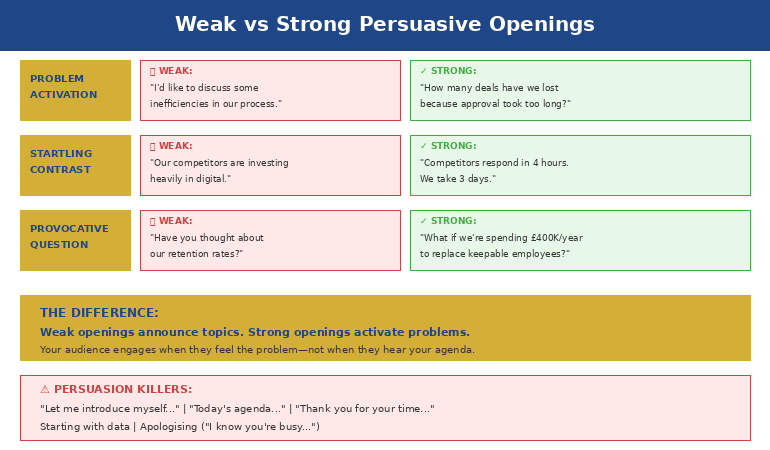
Comparison of weak vs strong persuasive presentation openings - what loses the room vs what captures attention

Three Persuasive Opening Techniques

1. The Problem Activation

Start with a problem your audience already feels—not one you need to convince them exists.

Weak: “I’d like to discuss some inefficiencies in our approval process.”

Strong: “How many deals have we lost because approval took too long?”

The weak version announces a topic. The strong version activates a frustration they’ve already experienced. Now they want to hear your solution.

2. The Startling Contrast

Juxtapose where they are with where they could be.

Weak: “Our competitors are investing heavily in digital transformation.”

Strong: “Our competitors respond to customer inquiries in 4 hours. We take 3 days. That gap is costing us market share every week.”

The contrast creates urgency. The specificity makes it real.

3. The Provocative Question

Ask something they can’t ignore.

Weak: “Have you thought about our retention rates?”

Strong: “What if I told you we’re spending ÂŁ400,000 a year to replace employees we could have kept?”

The question engages their mind. The specific number demands attention.

These techniques are part of a broader framework for persuasive presentations that work at every level.

What to Avoid in Persuasive Openings

The most common persuasion-killers I’ve seen in 25 years:

  • “Let me introduce myself…” — They don’t care about you yet. Make them care about the problem first.
  • “Today’s agenda covers…” — Agendas are administrative, not persuasive. Save them for after you’ve hooked attention.
  • “Thank you for your time…” — Gratitude is fine, but it signals you’re about to take, not give.
  • Starting with data — Numbers without context invite analysis, not agreement. Establish why the numbers matter first.
  • Apologising — “I know you’re busy” or “This might be boring” primes them to disengage.

Every one of these openings puts the focus on you or on neutral information. Persuasive openings put the focus on a problem the audience cares about solving.

🏆 Master Executive Persuasion

The Executive Buy-In Presentation System teaches the complete psychology of persuading senior leadership—from opening frames to closing techniques that get yes.

Learn More → £199

📧 Join 2,000+ professionals getting weekly presentation insights. Subscribe to The Winning Edge →

Frequently Asked Questions

Why are the first 10 seconds so important for persuasion?

Your audience decides in the first 10 seconds whether to engage or resist. Open with data, and they’re already forming counterarguments. Open by activating a problem they feel, and they’re primed to hear your solution. You’re not just starting—you’re setting the psychological frame for everything that follows. More techniques in our persuasive presentations guide.

What’s the best way to open a persuasive presentation?

Start with a problem your audience already feels, not with your solution. “What would it mean if you could cut approval time in half?” activates desire before resistance. Then your recommendation becomes the answer to their question, not an idea they need to evaluate.

Should I start a persuasive presentation with data or story?

Neither—start with a question or statement that activates a felt problem. Data invites analysis; stories take time to land. A sharp question that hits an existing pain point creates immediate engagement. Save data and stories for after you’ve captured attention. See our full persuasive presentations framework for sequencing.

đŸ“„ Free Download: 7 Presentation Frameworks

Get structured structures for persuasive presentations—including opening frameworks that capture attention and prime agreement.

Download Free →

Related: Persuasive Presentations: How to Change Minds Without Manipulation


Mary Beth Hazeldine spent 25 years at JPMorgan, PwC, RBS, and Commerzbank. She’s a clinical hypnotherapist and MD of Winning Presentations.

12 Jan 2026
Read the room virtual presentation - how to detect audience engagement signals during Zoom and Teams meetings

Read the Room Virtual Presentation: What You CAN See (When Everyone Says You Can’t)

Quick Answer: Everyone says you can’t read the room on Zoom. They’re wrong. You’re reading different signals—chat patterns, camera behaviour, response timing, voice tone—but the information is there. Virtual audiences are constantly telling you how engaged they are. You just need to know where to look.

“It’s impossible to read the room when everyone’s on mute with cameras off.”

I hear this from clients constantly. And I understand the frustration. You’re presenting to a grid of black rectangles, talking into silence, with no idea whether anyone is listening or scrolling Instagram.

But after coaching hundreds of executives through virtual presentations since 2020, I’ve learned something surprising: you can absolutely read a virtual room. You’re just looking for the wrong signals.

In person, you watch body language. Virtually, you watch behaviour patterns. And once you know what to look for, a “silent” Zoom room becomes remarkably readable.

Here’s what five years of virtual presentation coaching has taught me about reading the room when you can’t actually see the room.

🎯 Virtual Presentation Mastery

The Public Speaking Cheat Sheets include virtual-specific techniques for reading audiences, recovering engagement, and commanding attention through a screen.

Get the Cheat Sheets → £14.99

The Five Virtual Signals You’re Missing

Forget trying to read facial expressions through pixelated video. These behaviour patterns are far more reliable:

1. Chat Participation Patterns

Chat is your virtual equivalent of nodding and leaning forward. Watch for:

  • Early activity that goes silent: They were engaged, then you lost them. What changed?
  • Who responds vs. who doesn’t: If the same three people always engage, you’ve lost the rest.
  • Response speed: Instant replies mean they’re present. Delayed responses mean they’re multitasking.
  • Quality of responses: Thoughtful answers vs. “yes” or emoji reactions tell you depth of engagement.

2. Camera Behaviour

Cameras tell stories—even when they’re off:

  • Cameras turning off mid-presentation: You’ve given them permission to check out.
  • Cameras that were off coming on: Something you said pulled them back. Note what it was.
  • The decision-maker’s camera: If the senior person turns off, others often follow.

3. Response Timing to Direct Questions

When you ask “Marcus, what’s your take?”—the pause tells you everything:

  • Immediate unmute + response: They were listening.
  • Long pause, then “Sorry, could you repeat that?”: They were elsewhere.
  • Typing sounds before answering: They’re finishing something else first.

4. Unmute Patterns

Who jumps in voluntarily? Who stays silent even when invited?

  • Same people always unmuting: Others have mentally left.
  • Nobody unmuting after your question: Either they’re confused, disengaged, or the question was too vague.
  • People unmuting to add points: High engagement—they want to contribute.

5. The Audio Clues

Listen for what you can’t see:

  • Background typing: They’re doing something else.
  • Notification sounds: Their attention is being pulled away.
  • Children, dogs, doorbells: They’re dealing with distractions—grace required.
  • Complete silence vs. occasional “mmm” or acknowledgment: The first is concerning; the second shows presence.

For a complete guide to virtual delivery, see our virtual presentation tips.

Five virtual presentation signals - chat patterns, camera behaviour, response timing, unmute patterns, and audio clues

The “Create to Read” Principle

Here’s the key insight: in virtual presentations, you often need to create moments that force readable responses.

In person, you can passively observe. Virtually, you must actively prompt.

  • Instead of watching for nods: Ask “Type ‘yes’ in chat if this resonates with your experience.”
  • Instead of scanning for confusion: Say “On a scale of 1-5, how clear is this so far? Drop your number in chat.”
  • Instead of hoping for questions: Call on someone directly: “Priya, you’ve implemented something similar—what am I missing?”

The less you can see, the more you need to engineer visibility. Every 3-4 minutes, create a moment that requires your audience to do something observable.

This principle is central to effective audience engagement in presentations—and it matters even more in virtual settings.

When the Signals Say You’re Losing Them

You’ve spotted the warning signs. Now what?

  • Energy drop (cameras off, chat silent): “I want to pause here. I’m sensing this might not be landing the way I intended. What questions do you have before I continue?”
  • Confusion signals (hesitant responses, requests to repeat): “Let me approach this differently…” then simplify or use an analogy.
  • Multitasking sounds: “I know everyone’s juggling multiple priorities. Let me get to the decision point so we can wrap this up.”

Acknowledging reality—without apologising—builds trust. Your audience knows when they’re disengaged. Pretending otherwise loses credibility.

⭐ Slides Designed for Virtual Delivery

The Executive Slide System includes virtual-optimised frameworks—structured for screen sharing, with built-in engagement points that give you natural moments to read your audience’s response.

Get the Executive Slide System → £39

📧 Join 2,000+ professionals getting weekly presentation insights. Subscribe to The Winning Edge →

Frequently Asked Questions

Can you read the room in a virtual presentation?

Yes—but you’re reading different signals. Chat participation, camera behaviour, response timing, and voice tone all reveal engagement levels. The information is there; you just need to know where to look. See our full guide to audience engagement for more techniques.

What are the signs of a disengaged virtual audience?

Cameras turning off mid-presentation, chat going silent after early activity, delayed responses to direct questions, multitasking sounds (typing), and single-word answers when you ask for input. The earlier you spot these patterns, the easier to recover.

How do I keep a virtual audience engaged when I can’t see them?

Increase interaction frequency to every 3-4 minutes. Use chat prompts, polls, and direct name-calls. The less you can see, the more you need to create moments that require visible response. More strategies in our virtual presentation tips guide.

đŸ“„ Free Download: Virtual Presentation Checklist

Get the complete checklist for virtual presentation setup, delivery, and audience engagement—including the signals to watch for throughout.

Download Free →

Related: Audience Engagement Presentation: Why ‘Any Questions?’ Kills Every Presentation


Mary Beth Hazeldine spent 24 years at JPMorgan, PwC, RBS, and Commerzbank. She’s a clinical hypnotherapist and MD of Winning Presentations.

12 Jan 2026
Audience engagement presentation techniques - how to connect with and involve your audience throughout any presentation

Audience Engagement Presentation: Why ‘Any Questions?’ Kills Every Presentation

Quick Answer: “Any questions?” is the weakest possible way to engage your audience. It puts the burden on them to perform publicly, creates awkward silence, and signals you’ve run out of things to say. Real audience engagement happens throughout your presentation—not as an afterthought at the end. The best presenters create continuous connection through strategic interaction, directed questions, and reading the room in real-time.

The worst silence I’ve ever experienced in a presentation happened at Commerzbank in 2015.

I’d just delivered what I thought was a compelling 20-minute strategy update to the executive committee. I’d rehearsed thoroughly. My slides were polished. I’d hit every key point with precision.

Then I said the words that haunt every presenter: “Any questions?”

Silence. Twelve executives staring at their notepads. Someone coughed. The CFO checked his phone. After what felt like an eternity—probably eight seconds—the CEO said, “Thank you, let’s move on.”

I left that room convinced I’d failed. My content was wrong. My delivery was weak. I’d somehow lost them.

But when I reviewed the feedback later, I discovered something unexpected: they’d found the content excellent. The strategy was approved with minor modifications. The problem wasn’t my presentation—it was my ending.

“Any questions?” had killed the energy I’d built. It created an awkward moment that overshadowed everything before it. And it left everyone—including me—wanting to escape rather than engage.

That experience began a decade-long obsession with audience engagement. What I’ve learned from training over 5,000 executives since then has transformed how I think about presentations entirely. Engagement isn’t something you ask for at the end. It’s something you build from the first word—and maintain every moment until the last.

🎯 Quick-Reference Guides for Every Presentation Challenge

The Public Speaking Cheat Sheets include audience engagement techniques, body language cues to watch for, and recovery strategies when you’re losing the room—all in formats you can review minutes before presenting.

What’s inside:

  • Engagement techniques for every presentation length
  • Body language decoder: what audiences are really thinking
  • Recovery phrases when energy drops
  • Virtual vs. in-person engagement differences

Get the Cheat Sheets → £14.99

The ‘Any Questions?’ Trap

Here’s why “Any questions?” fails so consistently:

It puts the burden on your audience. You’re asking them to perform publicly—to raise their hand, formulate a coherent question, and speak in front of their colleagues. For most people, that feels risky. What if my question sounds stupid? What if I’ve misunderstood something obvious? The safest option is silence.

It signals you’ve finished. The moment you ask for questions, your audience’s brains shift from “receiving mode” to “escape mode.” They’re thinking about the next meeting, their inbox, their lunch. You’ve given them permission to mentally check out.

It creates awkward pressure. That silence after “any questions?” is excruciating for everyone. The longer it stretches, the more uncomfortable the room becomes. Your carefully built momentum collapses into mutual embarrassment.

It often comes too late. If someone had a question during your presentation, they’ve likely forgotten it by now. Or they’ve decided it wasn’t important enough to voice. The moment has passed.

The best presenters understand that ending a presentation well requires the same intentionality as starting it. “Any questions?” is the equivalent of ending a story with “and then some other stuff happened.” It’s not an ending—it’s an abdication.

Why 'any questions?' fails - diagram showing the psychological barriers that prevent audience participation

Why Audiences Disengage (It’s Not Your Content)

When audiences disengage, presenters almost always blame themselves: my content was boring, my delivery was flat, I should have been more dynamic.

Usually, they’re wrong.

After observing thousands of presentations across my banking career and coaching practice, I’ve identified the real reasons audiences check out—and content quality rarely makes the list.

Attention Cycles Are Biological

Research consistently shows that adult attention naturally dips every 10-15 minutes. This isn’t a choice your audience makes. It’s biology. Their brains need micro-breaks to consolidate information before they can absorb more.

If you’re presenting for 20 minutes without any pattern interrupt—a question, a story, a moment of interaction—you’re fighting neuroscience. And neuroscience will win.

Passive Listening Is Exhausting

Being talked at is tiring. It requires sustained focus without the relief of participation. Even the most fascinating content becomes draining when the audience has no role except to receive.

This is why great teachers don’t just lecture. They ask questions. They invite discussion. They create moments where students become participants rather than spectators.

Your presentations should work the same way. Presentation structure should include built-in moments where the audience shifts from passive to active.

They’re Distracted Before You Start

Your audience arrives with their own concerns: the meeting before yours, the deadline after, the email they didn’t finish. They’re not fully present when you begin, and it takes deliberate effort to pull them into your world.

A strong presentation opening creates that pull. But it’s not enough to hook them once—you need to keep reeling them back throughout.

The Room Itself Works Against You

Stuffy conference rooms, uncomfortable chairs, post-lunch timing, screens that are hard to see—environmental factors constantly pull attention away from you. You’re competing with physical discomfort, poor lighting, and the hypnotic lure of their phones.

Understanding these forces helps you fight them strategically rather than taking disengagement personally.

Four causes of audience disengagement - attention cycles, passive listening, prior distraction, and environmental factors

Reading the Room: The Signals You’re Missing

The best presenters I’ve worked with share one skill: they can read an audience in real-time and adjust accordingly. They notice disengagement early—and intervene before it spreads.

Here’s what to watch for:

Early Warning Signs (You Can Still Recover)

  • Shifting in seats: Physical discomfort is the first sign of mental restlessness
  • Eye contact dropping: They’re looking at slides, notes, or the table—anywhere but you
  • Micro-expressions of confusion: Furrowed brows, tilted heads, slight frowns
  • Pen tapping or fidgeting: Excess energy looking for an outlet

When you see these signals in one or two people, it’s normal. When you see them spreading across the room, you have 60-90 seconds before you’ve lost them completely.

Critical Warning Signs (Immediate Action Required)

  • Phone checking: They’ve decided your presentation is less interesting than their inbox
  • Crossed arms and leaning back: Physical withdrawal mirrors mental withdrawal
  • Side conversations: They’ve given up on you entirely
  • Glazed expressions: The lights are on but nobody’s home

Mastering presentation body language—both yours and theirs—is essential for real-time audience management.

Positive Engagement Signs (You’re Winning)

  • Leaning forward: Physical investment in what you’re saying
  • Nodding: Agreement and encouragement to continue
  • Note-taking: They want to remember this (strategic note-taking, not escape planning)
  • Direct eye contact: They’re with you, tracking your message
  • Subtle mirroring: Their body language matches yours—a sign of rapport

When you see these signals, you’re connecting. But don’t get complacent—engagement is easier to lose than to build.

7 Engagement Techniques That Actually Work

Forget the generic advice to “be more engaging.” Here are specific techniques I’ve refined across thousands of presentations:

1. The Directed Question

Instead of asking the room, ask an individual: “James, you’ve led similar projects—what’s been your experience with vendor resistance?”

This works because it removes the “who should answer?” ambiguity. James has been specifically invited to contribute. The rest of the room relaxes—and listens carefully, because any of them might be next.

Key rules: Only direct questions to people who can answer confidently. Never ambush someone with a question that might embarrass them. Read the room to identify who’s ready to contribute.

2. The Rhetorical Pause

Ask a question, then don’t wait for an answer: “What would happen if we launched six months late? [pause] We’d lose the entire holiday season. That’s ÂŁ4 million in revenue.”

This creates mental engagement without requiring public participation. Your audience answers in their heads—and they’re primed to receive your answer.

3. The Show of Hands

Simple but effective: “How many of you have dealt with this exact problem in the last month? [wait for hands] That’s most of the room. Good—this is relevant to all of you.”

Physical participation creates investment. Once someone has raised their hand, they’ve committed—they’re more likely to stay engaged.

4. The Callback

Reference something from earlier in your presentation—or from a previous interaction: “Remember the statistic I mentioned about customer retention? Here’s where it becomes actionable.”

Callbacks reward people who’ve been paying attention and re-engage those who drifted. They also create coherence, showing that your presentation has intentional structure.

5. The Strategic Story

When you feel energy dropping, pivot to a story: “Let me tell you about a client who faced exactly this challenge…”

Stories engage different parts of the brain than data and analysis. They’re easier to follow, more memorable, and create emotional connection. Learn more about storytelling in presentations.

6. The Movement Reset

Physical movement creates visual interest: “Let me come over to this side of the room…” or simply moving to a different position while speaking.

This works because static presenters become invisible. Our eyes are drawn to movement. Strategic repositioning literally makes the audience look at you again.

7. The Genuine Check-In

Periodically pause and check: “Before I move on—is this making sense? Is there anything I should clarify?”

This is different from “any questions?” because it comes mid-presentation, not at the end. It shows you care about their understanding, and it catches confusion before it compounds.

Seven audience engagement techniques that actually work - directed questions, rhetorical pauses, show of hands, callbacks, stories, movement, check-ins

⭐ Slides That Support Engagement, Not Sabotage It

The Executive Slide System shows you how to design slides that create natural pause points for audience interaction. Stop letting your slides force you into monotonous delivery.

Includes engagement triggers built into every slide framework—so you never accidentally present for 15 minutes straight without a connection point.

Get the Executive Slide System → £39

Virtual Audience Engagement: Different Rules Apply

Everything I’ve said so far becomes harder in virtual settings—and some techniques simply don’t work at all.

In a Zoom or Teams presentation, you can’t read body language reliably. You can’t make eye contact. You can’t use movement to reset attention. And your audience is surrounded by distractions you can’t even see.

Here’s how to adapt:

Increase Interaction Frequency

Where you might engage every 5-7 minutes in person, go for every 3-4 minutes virtually. Attention drops faster when people are staring at screens. Combat this with more frequent pattern interrupts.

Use Technology as Your Ally

Polls, chat participation, raised hand features—these are virtual replacements for physical interaction. Use them aggressively: “Type in the chat: what’s your biggest challenge with stakeholder buy-in?”

Chat answers are lower-risk than speaking up. You’ll get more participation.

Call Out Names Early and Often

“Marcus, I know you’ve worked on something similar—can you share a quick thought?” Direct engagement is even more important virtually because anonymity makes it easy to mentally disappear.

Assume They’re Multitasking

Because they probably are. Design your presentation so someone who misses 30 seconds can still follow the thread. Use more recaps, more explicit transitions, more “here’s where we are” markers.

For more on this topic, see our complete guide to virtual presentation tips.

Case Study: From Silent Room to Standing Ovation

Two years ago, I worked with a director at a pharmaceutical company—let’s call her Amanda—who was struggling with a recurring problem: every time she presented to her global leadership team, she felt like she was talking into a void.

“They just stare at me,” she said. “Cameras off, nobody reacting. I finish and there’s just silence before someone says ‘thanks’ and moves to the next agenda item.”

When I observed her presentation, I saw the problem immediately. She was delivering 25 minutes of continuous content with zero interaction. Excellent slides. Clear message. But nothing that invited her audience into the conversation.

We rebuilt her approach:

Minute 2: “Before I dive in—quick poll. How many of you have had to delay a product launch because of regulatory issues in the past year? Use the reactions to give me a thumbs up if yes.”

Minute 8: “Dr. Patel, you’ve navigated FDA requirements longer than anyone on this call—what’s your read on the new guidance?”

Minute 15: “Let me pause here. I’m about to propose something that might seem counterintuitive. I want to give you 30 seconds to think about whether it would work in your region.”

Minute 22: “In the chat, give me one word: what’s your biggest concern about this timeline?”

Her next leadership presentation was transformed. Cameras started turning on. People contributed in chat. The silence after she finished was replaced by immediate discussion. The CEO, who typically said nothing, asked two follow-up questions.

“I felt like I was actually talking with them,” Amanda told me, “not just at them. For the first time in two years.”

That’s what real audience engagement feels like. Not a desperate “any questions?” at the end—but continuous connection throughout. It’s a skill that compounds with practice, and it’s essential for presentation confidence.

📧 Join 2,000+ professionals getting weekly presentation insights. Subscribe to The Winning Edge →

Frequently Asked Questions

Why does ‘Any questions?’ kill audience engagement?

It puts the burden on your audience to perform publicly, creates awkward silence, and signals you’ve run out of things to say. Most people won’t volunteer questions in group settings—it feels risky. Instead of open invitations, use specific prompts or directed questions throughout. Learn more about how to end a presentation effectively.

How do I keep my audience engaged during a presentation?

Use strategic audience interaction throughout—not just at the end. Ask direct questions to specific people, use polls, create moments of reflection, and read body language to adjust in real-time. Plan engagement points every 5-7 minutes minimum.

What are the signs of a disengaged audience?

Crossed arms, phone checking, avoiding eye contact, side conversations, glazed expressions, and excessive note-taking (they’re planning their escape). The earlier you catch these, the easier to recover. See our guide to reading body language in presentations.

How often should I interact with my audience during a presentation?

Every 5-7 minutes at minimum for in-person presentations. This aligns with natural attention cycles. Interaction doesn’t always mean asking questions—it can be a pause for reflection, a show of hands, or a directed look. For virtual presentations, increase to every 3-4 minutes.

What’s the best way to handle an unresponsive audience?

Don’t keep asking open questions into silence. Instead, use directed techniques: “Sarah, you’ve dealt with this—what’s your experience?” or rhetorical questions that don’t require answers but create mental engagement. Movement and story pivots also help reset energy.

How do I engage a virtual presentation audience differently?

Use chat features, polls, and direct name calls more frequently. Virtual audiences disengage faster because they’re surrounded by distractions. Increase interaction frequency to every 3-4 minutes. See our complete guide to virtual presentation tips for more strategies.

đŸ“„ Free Download: 7 Presentation Frameworks

Get proven structures with built-in engagement points—so you never accidentally talk for 15 minutes without connecting with your audience. Includes virtual and in-person adaptations.

Download Free →

Related Resources

Continue building your audience engagement skills:

The Engagement Imperative

Audience engagement isn’t a nice-to-have. It’s the difference between presentations that change minds and presentations that waste everyone’s time.

The best presenters don’t wait until the end to connect with their audience. They build engagement from the first word. They read the room constantly. They intervene at the first sign of disengagement. And they never—ever—finish with “any questions?”

Start treating your audience as participants, not spectators. Plan your interaction points as carefully as you plan your content. And remember that a silent room isn’t a sign of failure—it’s a sign that you haven’t yet given your audience permission to engage.

Give them that permission early. Give it often. And watch what happens to your impact.


Mary Beth Hazeldine is a qualified clinical hypnotherapist, NLP practitioner, and Managing Director of Winning Presentations. After 5 years terrified of presenting, she built a 24-year banking career at JPMorgan Chase, PwC, RBS, and Commerzbank. She has treated hundreds of anxiety clients and trained over 5,000 executives.