Quick Answer
A resource allocation presentation succeeds when it reframes the request from “we need resources” to “here is the cost the organisation is currently bearing by not having them.” Lead with the business impact of the current resourcing gap, quantify where possible, and present headcount or budget as the solution to a named problem — not as a departmental ask. The decision-makers approving your request are evaluating whether the business case justifies the investment, not whether you deserve support.
In This Article
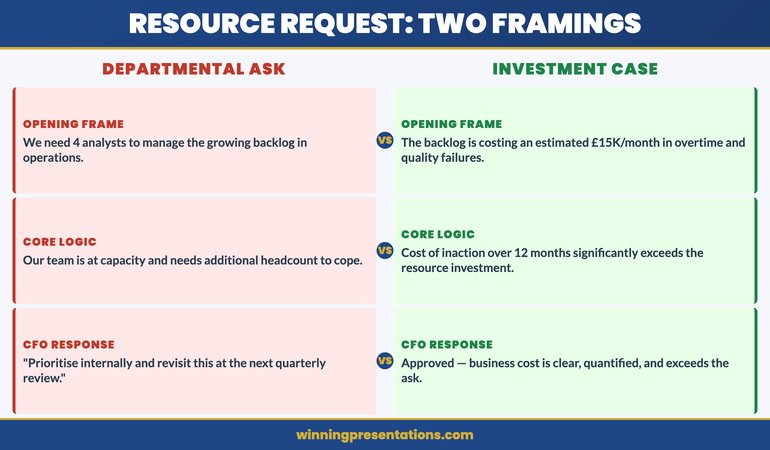
Priya had been waiting six months for approval to hire four additional analysts in her operations team. The backlog was growing. Her existing team were working consistent twelve-hour days. The quality issues were escalating. She had a presentation slot at the quarterly resource review and she was confident the case was obvious.
She opened with: “We need four additional FTEs in operations to manage the current workload and address the backlog that’s been building since Q3.”
The CFO responded: “We’re in a constrained environment. Can you look at prioritising internally and coming back to us with a revised request?” Meeting closed. No decision. Priya left without the headcount.
Three months later, a different team in the same organisation made an almost identical request using a different framing. They opened with the cost of the quality failures, not the size of the headcount gap. They quantified the revenue at risk from the backlog. They got approval the same day.
The two presentations had the same underlying business case. The difference was structural. One asked for resources. The other made the cost of not resourcing impossible to ignore.
Presenting a headcount or budget request this quarter?
Check whether your resource case is framed to get a decision:
- Does your opening slide describe the business cost of the gap — not the size of the gap?
- Have you quantified the impact in terms the CFO uses (revenue, cost, risk)?
- Have you pre-empted the “prioritise internally” objection with a clear slide?
The Executive Slide System includes business case slide frameworks for resource requests, headcount justifications, and budget approvals. Explore the System →
Why Resource Requests Fail at the First Slide
The structural failure in most resource allocation presentations happens before the first supporting slide. It happens in the way the request is framed — and the framing sets the entire tone of the decision-making conversation that follows.
When you open a resource request with “my team needs X headcount” or “we need an additional £Y to deliver this programme,” you have inadvertently positioned yourself as a department competing for a limited pool of organisational resource. The CFO’s mental model shifts to rationing mode: who else is asking, what is the priority order, can this be deferred?
By contrast, when you open with the business impact of the resourcing gap — the revenue at risk, the regulatory exposure, the client attrition rate, the project delay costs — you have positioned the resourcing decision as an organisational investment decision with a clear return. The CFO’s mental model shifts to investment mode: what is the cost of acting, what is the cost of not acting, which is higher?
This is not a rhetorical trick. It is a structural accuracy. In most cases where resource requests are genuinely justified, the business cost of underresourcing is real and quantifiable. The problem is that presenters know this cost intuitively but rarely make it explicit in the presentation. They present the solution (more headcount) without first establishing the problem (the current cost of the gap) in terms that decision-makers recognise.
The fix is to invert the sequence. Present the problem in business cost terms first. Present the solution — the resource request — second. The business case then feels inevitable rather than aspirational.
The Reframe: From “We Need” to “Here Is the Cost”
The reframe requires identifying, before the presentation, what the organisation is currently paying — in cost, risk, or lost revenue — because the resource gap exists. This is the cost-of-inaction analysis, and it is the most important preparation step in building a resource allocation presentation.
For an operations team with a backlog, the cost-of-inaction might include: delay costs from client contracts with service level agreements, overtime costs already being incurred by existing staff, quality failure costs from rushed delivery, staff turnover risk from sustained overwork, and revenue at risk from clients considering alternative providers.
Not all of these will be fully quantifiable. Some will be directional estimates. That is acceptable — you are not building an actuarial model, you are building a business case. The standard is whether the aggregate cost picture is credible and directionally accurate. Executives making resource decisions are accustomed to working with estimates. They are not accustomed to presenters who have not attempted to quantify the cost at all.
Once you have the cost-of-inaction picture, the structure of your opening changes entirely. Instead of “we need four analysts,” you can open with: “The operations backlog is currently running at eight weeks, which is creating three types of business cost I’d like to walk you through — and I’m proposing a resourcing solution that addresses all three at a total cost significantly below what we’re currently absorbing.”
That opening does not ask for anything. It announces a cost problem and a solution. The ask comes later, after the problem has been established on its own terms.
For the financial slide structures that support this approach, see capital expenditure presentations: building the approval case for board-level investment decisions.
The Business Case Framework That Gets Resource Requests Approved
Stop presenting headcount and budget requests as departmental asks. The Executive Slide System gives you the slide structure to reframe resource allocation as a business investment decision — with the sequence that gets CFO approval.
- Business case slide templates for headcount requests, budget approvals, and programme investment decisions
- Cost-of-inaction slide frameworks that quantify the business impact of the current resource gap
- AI prompt cards to build the five-slide resource case in under 15 minutes
- Objection-handling slide structures for the “prioritise internally” and “revisit next quarter” responses
Get the Executive Slide System → £39
Designed for operations, finance, and programme leaders presenting resource cases to CFOs, board committees, and senior leadership teams.
The Five-Slide Resource Allocation Framework
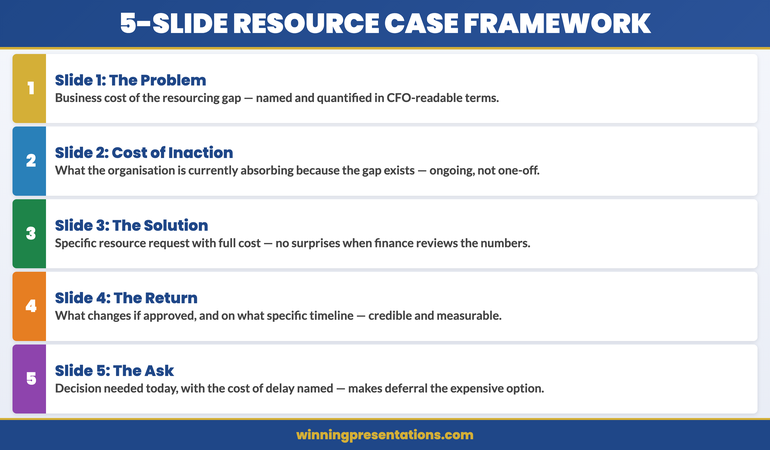
Most resource allocation presentations contain too many slides. The information needed to make a resource decision is focused: what is the problem, what does it cost, what is the proposed solution, what will it cost, and what is the expected return? Five slides cover this sequence. Every additional slide is generally context the decision-makers do not need in order to make the decision.
Slide 1 — The problem framed in business cost terms. A clear statement of the current resourcing gap and its business consequences. Not “we are understaffed” but “current resourcing is producing three identifiable cost outcomes for the business.” Name the outcomes. Quantify where you can.
Slide 2 — The cost-of-inaction analysis. This is often the most important slide in the deck, and the one most presenters skip. Show what the business is currently absorbing because the resourcing gap exists: delayed delivery, quality failures, staff overtime, client risk, regulatory exposure. Present this as an ongoing cost, not a one-off event. “We are currently absorbing an estimated £[X]K per month in [specific cost categories].”
Slide 3 — The proposed resource solution. Now — and only now — introduce the headcount or budget ask. “We are requesting approval for [specific resource] at a total cost of [£X] per annum, beginning [date].” Keep this slide clean and specific. Include the full cost — salary, benefits, onboarding, equipment — so there are no surprises in the financial review.
Slide 4 — The return on the investment. What will change if the request is approved? Be specific about which of the costs identified in slide 2 will be reduced or eliminated, and on what timeline. “Full resolution of the quality issue within 90 days of hire. Backlog reduction to four weeks by end of Q3. Overtime cost eliminated within six weeks.” Specificity here is credibility.
Slide 5 — The ask and the timeline. What do you need from this meeting, and by when? “We need a decision today to begin recruitment in April and have resource in place before Q3 deliverables begin.” Include the consequence of delay: “Each month of delay extends the backlog by approximately [X] weeks and incurs an estimated [£Y] in additional overtime.”
Five slides. Tight, evidence-based, decision-ready. For financial presentation structures supporting this framework, see zero-based budget presentations: building the case from a clean baseline.
How to Quantify the Business Case
The most common objection to the cost-of-inaction approach is: “I can’t quantify the cost precisely enough to put it in front of a CFO.” This objection is worth addressing directly, because it stops many managers from making the attempt.
A CFO reviewing a resource request does not expect a fully audited, actuarially precise cost model. They expect a credible, directionally accurate estimate of what the business is absorbing. The standard is whether the numbers are defensible under reasonable questioning — not whether they are exact.
A workable approach: identify two or three cost categories that are genuinely attributable to the resourcing gap and where you have enough data to produce a directional estimate. For a backlogged operations team: overtime hours worked per month multiplied by blended hourly rate; client SLA penalty clauses at risk; project delay costs from postponed deliverables. You do not need all three. Even one well-evidenced cost category is more persuasive than a verbal claim that “the team is at capacity.”
When presenting estimated figures, be transparent about the methodology: “Based on current overtime hours, we estimate this is costing approximately £15K per month in premium labour costs — and that figure excludes the quality failure costs, which are harder to quantify but have been flagged three times in client reviews this quarter.” Transparency about limitations increases, rather than decreases, credibility with financially sophisticated audiences.
If you’re building the financial case for a resource request this quarter, the Executive Slide System includes slide templates and AI prompt cards specifically designed for cost-of-inaction analysis — the structure that reframes headcount requests as investment decisions for CFO review.
Handling “Prioritise Internally” Objections
“Have you considered whether this could be addressed through internal prioritisation?” is one of the most common responses to resource requests, and one of the most difficult to handle in a presentation setting if you haven’t prepared for it.
The question is not inherently adversarial. It is a legitimate governance question — the CFO’s job is to ensure that resource allocation reflects genuine need rather than departmental preference. The best response addresses it on those exact terms.
The preparation involves completing a credible internal prioritisation analysis before the presentation. What could the team stop doing, reduce in scope, or defer in order to absorb the additional demand? What is the business consequence of each trade-off? Present this analysis proactively — ideally as a dedicated slide in your five-slide framework — rather than waiting to be asked.
A slide that says “We have reviewed internal prioritisation options. Scenario A: defer [specific deliverable] to H2, with [specific business consequence]. Scenario B: reduce [specific workstream] to minimum viable scope, with [specific quality or risk consequence]. Neither scenario resolves the backlog within the Q3 timeline. The most cost-effective resolution remains the resource investment proposed.” This slide pre-empts the objection and demonstrates organisational rigour.
When the objection arises anyway — as it often does — you can respond: “We’ve actually modelled that, and it’s on slide 4. The short version is that the two realistic internal options both carry business costs that exceed the cost of the resource investment over a 12-month horizon. I’d be happy to walk through the detail.” You cannot be sent away to do work you’ve already done.
When to Present and When to Pre-Sell
The formal resource allocation presentation is not where decisions are made. In most organisations, significant resource decisions are made — or at minimum, strongly influenced — in the conversations that happen before the formal meeting. Understanding this changes how you should manage the process.
The most effective resource requesters approach formal presentations as confirmation meetings rather than persuasion meetings. By the time they walk into the room, the CFO or relevant budget holder has already seen the cost-of-inaction analysis in a one-to-one conversation, has had their primary concerns addressed, and has indicated — at minimum — that the case is credible. The formal presentation is where the decision is formalised, not where it is won.
This means the most important step in a resource allocation process often happens two weeks before the presentation: a brief, direct conversation with the decision-maker where you share the headline cost-of-inaction figure and ask whether they want to see the full analysis. “I wanted to give you a heads-up before the resource review — we’ve done some analysis on the backlog cost and I think the number will be higher than expected. Would it be helpful to walk you through it before the formal committee session?” Most CFOs say yes.
This pre-sell approach does not compromise the formal process. It ensures that the formal meeting is productive, focused, and conclusive — rather than an exploratory conversation where the CFO is encountering the case for the first time and needs time to process it before committing to a decision.
Today’s companion article on screen sharing presentations: keeping your audience engaged in virtual approval meetings covers the additional considerations for resource cases presented in remote or hybrid settings.
For revenue-related business cases, see revenue forecast presentations: structuring the financial narrative for senior review.
Stop Leaving Resource Decisions to “We’ll Revisit Next Quarter”
When resource requests are deferred, it’s usually because the business cost wasn’t clear enough to create urgency. The Executive Slide System includes the cost-of-inaction slide framework that makes deferral the more expensive option — and gets the decision at the meeting you’re in.
Get the Executive Slide System → £39
Built from business cases presented to CFOs and board committees across financial services, technology, and professional services.
Frequently Asked Questions
How many slides should a resource allocation presentation have?
Five slides is generally sufficient for a resource request presented to a CFO or senior committee: the problem framed in business cost terms, the cost-of-inaction analysis, the proposed resource solution, the expected return, and the ask with timeline. Additional slides may be appropriate for complex programme investments or multi-phase requests, but the core decision case should be completable in five. Appendices can carry supporting data for questions without adding to the main deck length.
What if I can’t quantify the business cost precisely?
Present a directional estimate with a transparent methodology, and acknowledge the limitations. A credible estimate — “we believe this is costing approximately £X per month, based on overtime hours and delayed delivery costs, though we acknowledge the quality failure component is harder to quantify” — is significantly more persuasive than a purely qualitative claim. CFOs are experienced at making decisions with imperfect data. They are not experienced at approving requests with no financial framing at all.
What’s the best time to submit a resource request?
Align resource requests with your organisation’s planning and budget cycle wherever possible — ideally the quarter before the cycle in which you need the resource in place. Outside of formal cycles, the right time is when the business cost of the gap has become quantifiable and significant. Presenting a resource request in a budget cycle is procedurally easier; presenting it mid-cycle requires a stronger business case. Both are possible — the strength of the cost-of-inaction analysis determines which will succeed.
How do I handle the response “headcount freeze is in place”?
A headcount freeze is a default policy response, not an absolute ceiling on resource decisions. The right response is to present the cost-of-inaction analysis as the reason the freeze should not apply to this request — or to explore whether the resource can be secured through alternative mechanisms: contract, consultancy, temporary cover, or internal reallocation with backfill. Presenting these alternatives proactively signals rigour and significantly increases the likelihood of a favourable decision even within a constrained environment.
The Winning Edge — Weekly Insights for Executive Presenters
Practical frameworks for structuring high-stakes presentations, managing executive audiences, and building decks that get decisions. Delivered every Thursday.
Free resource: Executive Presentation Checklist — the pre-presentation checklist for business cases, resource requests, and approval presentations at board and senior leadership level.
About the Author
Mary Beth Hazeldine is the Owner & Managing Director of Winning Presentations. With 24 years of corporate banking experience at JPMorgan Chase, PwC, Royal Bank of Scotland, and Commerzbank, she has delivered high-stakes presentations in boardrooms across three continents.
A qualified clinical hypnotherapist and NLP practitioner, Mary Beth advises executives across financial services, healthcare, technology, and government on structuring presentations for high-stakes funding rounds and approvals.