Tag: AI prompts

09 May 2026
Senior executive reviewing an AI-assisted PowerPoint deck on a laptop in a corporate office with a London skyline in the background.

AI Prompts for Business Presentations (Β£19.99 Executive Prompt Pack)

AI Prompts for Business Presentations: A Practical Pack Built for Executive Decks

If you’re looking for AI prompts for business presentations, you’re likely trying to move faster without dropping the standard — a board update, an investor brief, a strategy recommendation, a quarterly review — and generic prompts keep giving you generic slides. The Executive Prompt Pack (£19.99) gives you 71 ready-to-use prompts for ChatGPT and Microsoft Copilot, built around the scenarios senior professionals actually present: board decks, investor pitches, quarterly reviews, and strategy presentations. Instant access, lifetime use, works with whichever AI tool your organisation prefers. This page explains what’s inside, who it’s built for, and how to judge whether the pack is the right fit for the work you’re doing.

Why Generic AI Prompts Produce Weak Business Presentations

Most AI prompts shared online are written for general business writing — marketing copy, emails, blog posts, summaries. When you apply those prompts to business presentations, the output is competent but structurally wrong for a senior audience. The recommendation arrives on slide eight instead of slide one. The language is explanatory rather than decision-focused. Slides read as prose rather than executive content that works without narration. The tool is capable; the instructions are mis-calibrated.

The problem compounds when the stakes rise. Boards and executive committees read decks in advance, arrive with prepared questions, and expect a structure that signals the decision required within the first thirty seconds. Generic AI prompts don’t know any of that. They default to the conventions of informational writing — context, build-up, conclusion — and produce slides that test an executive’s patience rather than respecting it. Writing prompts that override these defaults requires knowing what board-level audiences actually need, which takes years of experience that most professionals don’t have time to develop on the fly.
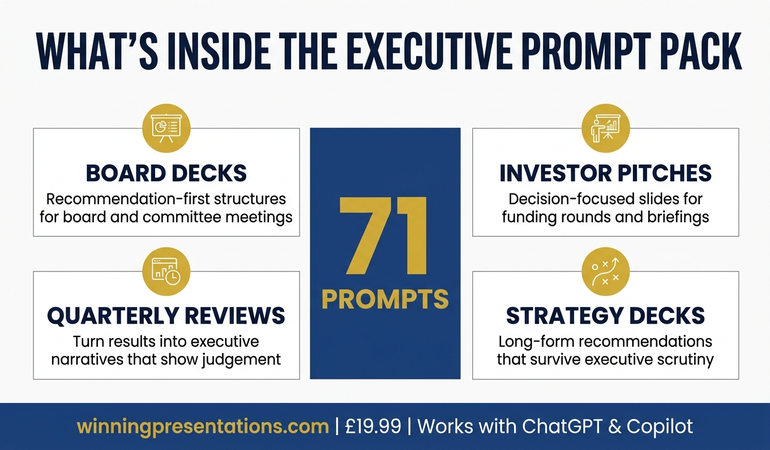
Infographic showing what's inside the Executive Prompt Pack: 71 prompts for ChatGPT and Copilot, covering board decks, investor pitches, quarterly reviews, and strategy presentations

AI Prompts Built Specifically for Executive Business Presentations

The Executive Prompt Pack is a collection of 71 prompts written specifically for business presentations at executive level. They’re not adapted marketing prompts or general AI templates. Each prompt is structured around a specific task in the executive presentation workflow — narrative structure, recommendation-first openings, board-ready slide content, executive language, Q&A preparation, strong closes — and calibrated to produce output that holds up in front of a senior audience without heavy manual editing.

The pack is drawn from Mary Beth Hazeldine’s 25 years working with executives across banking, professional services, technology, and government. The prompts encode the structural and linguistic conventions that senior presentations require: recommendation on the first slide, evidence organised by decision relevance rather than chronology, language that respects the reader’s time, and slide content that functions for asynchronous reading. These conventions take years to absorb through experience. The prompts make them available the moment you download the pack.

Every prompt is ready to use — paste it into ChatGPT or Microsoft Copilot, add your specific content details, and receive output tuned for an executive audience. There’s no prompt engineering required, no configuration, no setup. The pack is delivered as downloadable files on Gumroad, with lifetime access and no subscription. You keep the prompts and use them on every presentation you build from the day you enrol.

What You Get

  • 71 ready-to-use prompts — covering the full business presentation workflow, from narrative structure through final rehearsal
  • Works with ChatGPT and Microsoft Copilot — every prompt is tested on both tools, with notes on which works better for each task
  • Board deck prompts — build recommendation-first structures for board meetings, committees, and governance updates
  • Investor pitch prompts — structure credible, decision-focused slides for funding rounds and investor briefings
  • Quarterly review prompts — turn results into executive narratives that show judgement, not just numbers
  • Strategy presentation prompts — frame long-form strategic recommendations in a way that survives executive scrutiny
  • Executive language and Q&A prompts — sharpen the register of your content and anticipate the questions senior audiences actually ask
  • Instant access, lifetime use — no subscription, no expiry, downloadable immediately from Gumroad

£19.99 — instant access, lifetime use, works with ChatGPT and Copilot.

The Prompts That Understand Executive Business Presentations

Most AI prompts are written for general business writing and fall apart at executive level. The Executive Prompt Pack (£19.99) gives you 71 prompts built specifically for business presentations — board decks, investor pitches, quarterly reviews, strategy recommendations — drawn from 25 years of executive work across financial services and corporate leadership. Use them in ChatGPT or Microsoft Copilot to produce board-ready slide content in 25 minutes rather than starting from scratch every time. Instant access, lifetime use, no subscription.

Get the Executive Prompt Pack → £19.99

Instant download. Lifetime access. Works with ChatGPT and Copilot.

Is This Right for You?

The Executive Prompt Pack is built for mid-to-senior professionals who use ChatGPT or Microsoft Copilot in their presentation workflow and present to executive audiences — boards, committees, investors, leadership teams, or client decision-makers. It’s particularly useful if you find AI outputs require heavy manual editing before they reach executive quality, or if you spend time rewriting prompts from scratch every time you start a new presentation. It also suits professionals building their first board-level deck and wanting a structured AI workflow from the outset, rather than learning through trial and error with a high-stakes audience.

It’s not a general AI writing pack. The prompts are narrowly focused on executive business presentations — they’re less useful for internal team updates, informal stakeholder briefings, or general marketing work. It’s also not a presentation skills course: if your primary challenge is delivery, voice, or presence rather than structuring and drafting slide content, a different resource will serve you better. The pack does one thing — help you build executive-level business presentations faster using AI — and it does that one thing thoroughly.

Frequently Asked Questions

Do the prompts work with both ChatGPT and Microsoft Copilot?

Yes. All 71 prompts are written to work with either tool, and the pack includes guidance on which is better for each stage of the workflow. Many executives use ChatGPT for upstream structural work (narrative logic, argument testing, language sharpening) and Microsoft Copilot for the in-deck drafting directly inside PowerPoint. The prompts are calibrated for both paths.

What kinds of business presentations do the prompts cover?

The pack covers the presentation types senior professionals encounter most often: board decks, investor pitches, quarterly reviews, strategy recommendations, capital investment cases, and executive committee submissions. Within each type, there are prompts for narrative structure, opening recommendations, slide content, executive language, Q&A preparation, and closes — so the full workflow is covered rather than just the drafting stage.

Is £19.99 realistic for a pack of 71 executive prompts?

The price reflects the format. Because the pack is a structured set of downloadable prompts rather than coaching or live instruction, the cost stays low. For professionals who build business presentations regularly, the pack typically pays for itself on the first presentation by saving two to three hours of prompt rewriting and manual editing. Lifetime access means the cost never recurs.

Do I need prompt engineering experience to use the pack?

No. Every prompt is ready to use as written — paste it into ChatGPT or Copilot, add your specific content (the topic, the audience, the decision required), and the prompt handles the structure and executive calibration. The pack is designed for busy professionals who want to use AI productively without learning prompt engineering as a separate skill.

Can I use the prompts on multiple presentations?

Yes. Lifetime access means you can apply the prompts to every business presentation you build from the day you download them onward. That’s the core value of the pack — it keeps earning its place every time you face a new executive deck, not just the first one.

Who is this not suitable for?

The pack is less useful for professionals who don’t currently use ChatGPT or Microsoft Copilot in their work, or whose presentations are primarily internal team updates and client catch-ups rather than executive-level decks. It’s also not designed for delivery skills development — if your primary challenge is confidence, voice, or stage presence rather than content structure and AI-assisted drafting, a different resource is a better starting point.

06 May 2026
Senior leaders waste hours on generic Copilot output. Three specific prompts turn Copilot into a genuine board-presentation partner. Here is how.

Copilot PowerPoint for Board Presentations: The 3 Prompts That Work

QUICK ANSWER

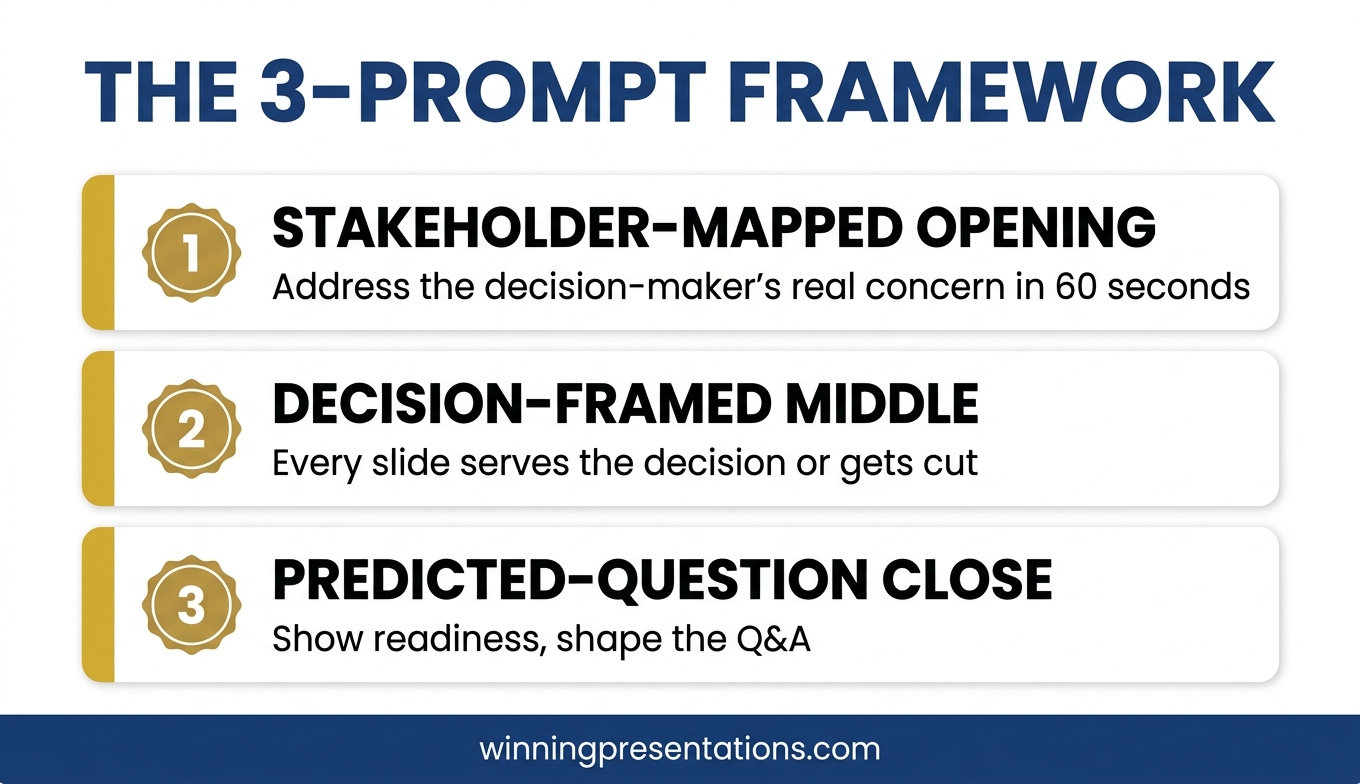
Most senior leaders use Copilot to ask for a complete board presentation. That is why the output reads generic. Three specific prompts, used in the right order, turn Copilot into a genuine board-presentation partner: a stakeholder-mapped opening, a decision-framed middle, and a predicted-question close. Each prompt assumes the strategic work is yours. Copilot drafts the structure so you can spend your time on judgement, not formatting.

If you want the structured approach behind these prompts

The AI-Enhanced Presentation Mastery course from Maven is a self-paced programme covering the prompt and workflow patterns that take Copilot from drafting tool to presentation partner.

Explore the Programme →

Ngozi, a regional operations director at a biotech company, rebuilt the same board deck four times in one afternoon. She had used Copilot to generate the first draft — a 12-slide update for the quarterly operations review. The output looked polished. The sections were logical. The language was professional. But when she read it back, it could have belonged to any company, in any industry, at any quarter. Her board would read three slides and switch off.

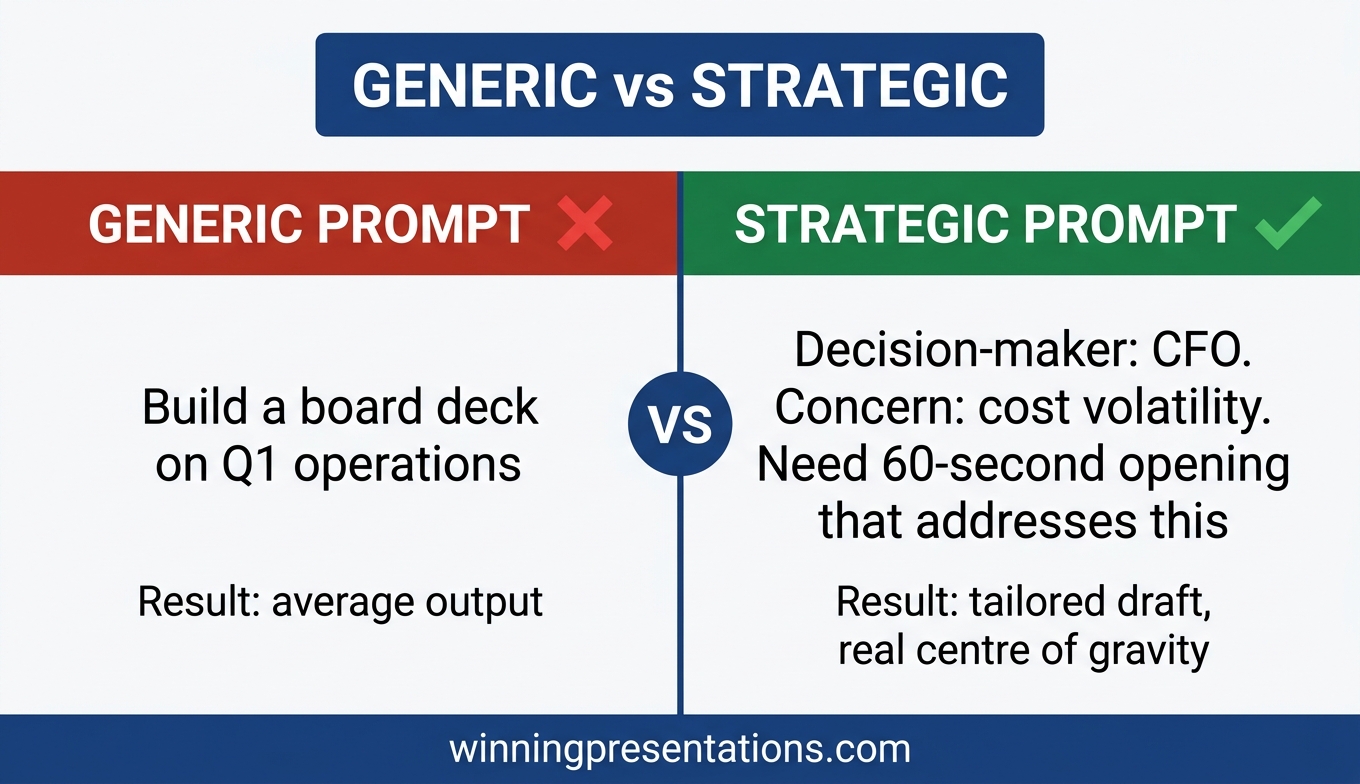
She opened a blank prompt window and tried again. “Build a board deck covering Q1 operations performance.” Same result. Slight variations in headings. Same generic feel. By the third attempt she had realised something that changes how senior leaders should use Copilot for presentations: the AI is not the problem. The prompt is asking the AI to do strategic work that only the presenter can do.

The professionals who get genuinely useful Copilot output for board presentations do something different. They do the strategic thinking first, then use Copilot to draft the structure their thinking requires. Three specific prompts, used in the right order, make this work. Each assumes that the judgement is yours and the drafting is Copilot’s.

Why most Copilot board decks read generic

Copilot is a drafting tool. It is very good at producing coherent text that matches patterns it has seen before. It is not good at knowing which board member will block your proposal, what the finance director is quietly worried about, or why this particular quarter matters differently from the last three. These are strategic inputs only the presenter has.

When senior leaders prompt Copilot with “build a board deck on X” the AI has nothing to work with except pattern-matching. It produces the average of every board deck it has ever seen. Average board decks are unmemorable. They earn polite acknowledgement and no action.

The shift is to stop asking Copilot for decks and start asking Copilot for specific structural work. The three prompts below do that. Each names exactly what structural output is needed. Each supplies the strategic context Copilot cannot guess. Each produces drafts that feel tailored because they are.

Three-prompt framework for using Copilot on board presentations: stakeholder-mapped opening, decision-framed middle, predicted-question close

WHEN COPILOT HAS TO HOLD UP IN A BOARDROOM

Move beyond basic AI usage to executive-grade output

The AI-Enhanced Presentation Mastery course is a self-paced programme with 8 modules and 83 lessons on using AI (including Copilot) to structure, draft, and refine presentations that hold up at senior levels. 2 optional live coaching sessions with Mary Beth, fully recorded — watch back anytime. Monthly cohort enrolment; lifetime access to materials.

  • 8 modules, 83 lessons on AI-assisted executive presentation work
  • Prompt and workflow patterns for Copilot and ChatGPT, board-level output
  • 2 optional live coaching sessions with Mary Beth (recorded)
  • Self-paced, no deadlines, no mandatory live attendance
  • Monthly cohort enrolment — enrol any time

Β£499, lifetime access to all course materials.

Explore AI-Enhanced Presentation Mastery →

Designed for senior professionals who need AI to produce executive-grade output, not generic drafts.

Prompt 1: The stakeholder-mapped opening

The opening of a board presentation carries more weight than the middle. Board members decide in the first two or three slides whether to lean in or let their attention drift. The opening has to land for the specific people in the room, not for boards in general.

Before you prompt Copilot, write down three facts:

  • Which board member matters most on this topic — who will either support or block the decision?
  • What that person is quietly worried about before the meeting (risk, cost, reputation, precedent)
  • What they need to see in the first two slides for you to have their attention for the rest

Now the prompt:

“I am presenting to a board where the most influential decision-maker on this topic is [role]. Their primary concern before this meeting is [specific worry]. I need a two-slide opening that addresses their concern in the first 60 seconds, without burying the answer. Draft Slide 1 (the one-sentence answer to the implied question they’re bringing into the room) and Slide 2 (three supporting points that map to their concern). No preamble, no company-of-the-future language.”

Copilot produces an opening grounded in a real person’s real concern. That is different from every generic board-opener it would otherwise draft. You will still edit the output. But the draft will have a centre of gravity to edit around.

Prompt 2: The decision-framed middle

The middle of a board deck is where most presentations drift. Slide after slide of context, data, background. By the time the presenter arrives at the ask, the board has spent its attention on material that was the journey, not the answer. Board members rarely say this out loud. They just disengage.

A decision-framed middle does the opposite. Every slide exists because it supports a specific decision the board is about to make. Slides that do not serve that decision get cut or moved to an appendix.

The prompt:

“The decision the board is making is: [specific decision]. Assume they already know [common background you would otherwise over-explain]. Build a 4-slide middle that (1) names the decision in one sentence at the top of Slide 1, (2) shows the two realistic options the board can choose between, (3) gives the supporting evidence for the recommended option, and (4) addresses the strongest argument against. Each slide must directly serve the decision. No context slides, no history, no company-values language.”

The output will be tighter than a generic Copilot draft because the prompt has told Copilot what to leave out, not just what to include. The discipline of naming the decision forces Copilot to cut the padding that would otherwise fill the deck. If you want an overview of where this fits in the broader AI-for-presentations landscape, ChatGPT for PowerPoint presentations covers the parallel approach for non-Microsoft environments.

Before and after comparison of Copilot board deck drafts showing how strategic context in the prompt changes the output quality

Prompt 3: The predicted-question close

The close of a board presentation is the slide you land on before the Q&A begins. Most closes are either a generic “Thank you, questions?” slide or a summary of everything already covered. Both waste the moment. The slide the board is looking at when the first question comes is the slide that shapes the first question.

A predicted-question close shows the board the three questions you are ready to answer. That does two things at once. It frames the Q&A around the questions you want. And it signals preparation — the board member about to ask a harder question will often reframe it because your visible preparedness has raised the bar.

The prompt:

“The three hardest questions the board will ask about [specific proposal] are likely to be [Q1], [Q2], [Q3]. Draft a single closing slide that lists all three as bullet points with a one-sentence direct answer under each. Professional tone, no defensive language, no hedging. The purpose of the slide is to show readiness, not to answer in full — each answer should invite a conversation, not close it down.”

The closing slide produced by this prompt does something unusual. It leaves the board with the impression that you have already thought through the hard parts. That is the impression most senior leaders want and rarely manage to create. It also makes the Q&A shorter and more focused, which every board member quietly appreciates.

Want the prompts ready to use?

The Executive Prompt Pack contains 71 ChatGPT and Copilot prompts for PowerPoint presentations — including board-level prompts, stakeholder-mapped openings, and decision-framed middle sections. Β£19.99, instant download.

Get the Executive Prompt Pack →

How to sequence the prompts

The three prompts are designed to be used in order. Opening first, because the opening sets what the rest of the deck has to support. Middle second, because the middle adapts to the opening you have committed to. Close third, because the close has to match the questions the opening and middle will provoke.

Running them in any other order usually produces a deck that feels stitched together. Running them in order produces a deck that feels coherent, even when each prompt runs in a separate Copilot session. Senior leaders who use this sequence regularly report that the total time from blank deck to editable first draft drops from two or three hours to around 25 minutes — and the draft is actually worth editing.

One more thing. Copilot’s output still needs an editorial pass. The prompts give you a draft with a real centre of gravity. They do not give you a final deck. The best Copilot PowerPoint prompts and the editing workflow that cleans up the output work together. Neither replaces the other.

The three prompts also apply when you are using Copilot to refine an existing deck, not to build from scratch. Run the opening prompt against the first two slides you already have. The gap between the current opening and the stakeholder-mapped version is usually where the board was losing attention. Fix that first.

Frequently asked questions

Do these prompts work with ChatGPT as well as Copilot?

Yes. The structural logic is the same. ChatGPT and Copilot will produce slightly different drafts because their training and defaults differ, but the prompts give both models the strategic context they need. If you are comparing the two tools for executive slide work, Copilot vs ChatGPT for executive slides covers the differences in detail.

How long should it take to prepare the strategic inputs before prompting?

Around 15 to 20 minutes for most board presentations. That feels slow the first time, but it replaces one to two hours of generic output and rework. The strategic inputs are the same work the presenter would have had to do anyway — the prompts just make the thinking explicit up front.

What if I do not know who the most influential board member on the topic is?

Ask one of your peers or your sponsor. Board influence is rarely what the org chart suggests. The influential member on a cost decision is usually not the one who dominates strategy discussions. If the topic is genuinely novel, the most influential person is whoever has asked the sharpest questions at the last two meetings on adjacent topics.

Should I tell the board I used Copilot to draft the deck?

No, and the question itself points to a worry worth examining. Copilot is a drafting tool, the same way Word is a typing tool. The value you bring is the strategic thinking, the editorial judgement, and the delivery. Leading with “I used AI” tends to shift attention from the decision to the tool, which is not what board time is for.

Do these prompts apply to investor presentations as well as board presentations?

Partially. The stakeholder-mapped opening and the predicted-question close translate cleanly. The decision-framed middle needs adapting because investor presentations often have a different centre of gravity — investment thesis rather than operating decision. The structural discipline still helps.

The Winning Edge

Weekly thinking for senior professionals on executive presentation craft — slide structure, Q&A, delivery, AI, and the judgement calls the frameworks do not cover. Thursday mornings, one considered issue.

Subscribe to The Winning Edge →

Not ready for the full programme? Start here instead: download the free Pyramid Principle Template — the structure most board slides fail to use, in a one-page reference.

Next step: pick one upcoming board presentation. Run the stakeholder-mapped opening prompt this week. See whether the draft lands differently from your usual Copilot output. That one change tends to be the one that reveals the rest.

For the parallel comparison between Copilot and ChatGPT on executive slide work, see Copilot vs ChatGPT for executive slides. For what happens when Copilot’s first draft does not hold up under boardroom scrutiny, see why Copilot’s first draft fails boardroom tests.


About the author

Mary Beth Hazeldine is Owner & Managing Director of Winning Presentations Ltd, a UK company founded in 1990. With 24 years of corporate banking experience at JPMorgan Chase, PwC, Royal Bank of Scotland, and Commerzbank, she advises senior professionals across financial services, healthcare, technology, and government on structuring presentations for high-stakes decisions, board approvals, and executive scrutiny.

18 Dec 2025
AI presentation workflow showing time savings from 6 hours to 90 minutes with before and after comparison

AI Presentation Workflow: How I Cut Creation Time from 6 Hours to 90 Minutes

The exact system I use with Copilot to build presentations that actually win decisions

My AI presentation workflow changed everything.

Six months ago, I spent 6 hours on a pitch deck for a biotech client. The slides looked professional. The data was solid. The client lost the funding round.

Last month, a similar client needed a similar deck. I used my AI presentation workflow. Spent 90 minutes. They raised Β£4.2 million.

Same me. Same expertise. Completely different approach to using AI.

🎁 Free Download: Get my 10 Essential Copilot Prompts β€” the exact prompts I use in this workflow. No email required.

Here’s what I’ve learned after testing AI presentation workflows on hundreds of client decks: most people use Copilot backwards.

They open PowerPoint, type “create a presentation about Q3 results,” and wonder why the output looks generic and forgettable.

That’s not an AI presentation workflow. That’s hoping AI will think for you. It won’t.

The workflow I’m sharing today is different. It’s the system I’ve refined over the past year, tested on real presentations for investment banks, biotech founders, and SaaS executives. It’s also the foundation of the course I’m launching in January.

Why Your AI Presentation Workflow Isn’t Working

Let me guess what’s happening:

You prompt Copilot. You get 15 slides of generic structure β€” title, agenda, overview, data, data, data, summary, questions. It’s technically correct. It looks like every other AI-generated deck.

You spend the next two hours trying to fix it. Moving slides around. Rewriting bullet points. Fighting with formatting. By the end, you’ve saved no time and the presentation still feels… flat.

Sound familiar?

The problem isn’t Copilot. The problem is you’re asking AI to do your strategic thinking. It can’t. Here’s what AI cannot do:

  • Decide what your audience needs to believe
  • Determine which data actually matters for this decision
  • Structure an argument that leads to action
  • Know when to break the rules for impact

That’s your job. But here’s the breakthrough: once you’ve done that thinking, AI executes ten times faster than you can manually.

The AI presentation workflow I’m about to share separates strategic thinking (you) from execution (AI). That’s why it works.

Want the Complete System?

The AI-Enhanced Presentation Mastery course teaches this entire workflow with templates, 50+ prompts, and live practice sessions.

January cohort: Β£249 (increases to Β£499 in April)

Only 60 seats. Early bird ends December 31st.

See what’s included β†’

4-step AI presentation workflow - AVP Framework, 132 Rule, SEE Formula, and AI Execution with time for each step
The AI Presentation Workflow: 4 Steps

This is the exact process I use. It works for investor pitches, board presentations, sales decks, and executive updates. The frameworks adapt to any presentation type.

Step 1: AVP Framework (5 minutes β€” before you touch PowerPoint)

Before I prompt Copilot for anything, I answer three questions on paper:

A β€” Action: What specific decision or action do I need from this audience?

V β€” Value: What’s in it for them? Why should they care?

P β€” Proof: What evidence will make them believe me?

This takes 5 minutes. Most people skip it and spend hours wandering through slides wondering why nothing feels right.

Real example from a client deck last month:

  • Action: Approve Β£500K for the pilot programme by Friday
  • Value: This solves the customer churn problem costing us Β£2M annually
  • Proof: Three case studies showing 40% churn reduction, internal data on our trajectory, ROI calculation showing 4x return

Now β€” and only now β€” am I ready to use AI. See the difference? I’m not asking Copilot to figure out my strategy. I’m asking it to execute a strategy I’ve already defined.

Related: How to Structure a Presentation: 7 Frameworks That Actually Work

AVP Framework diagram showing Action Value Proof - three questions to answer before creating presentations with AI

Step 2: The 132 Rule for Structure

The 132 Rule is how I structure every presentation, regardless of length:

  • 1 β€” One core message (the thing you want them to remember)
  • 3 β€” Three supporting arguments (the structure of your case)
  • 2 β€” Two types of evidence per argument (facts + stories)

This is where Copilot becomes genuinely powerful.

My prompt (this took me months to refine):

“I’m presenting to [specific audience] requesting [specific decision]. My core message is [from AVP]. My three supporting arguments are: 1) [argument], 2) [argument], 3) [argument]. Create a presentation outline that opens with my recommendation, develops each argument with one data point and one brief example, and closes with my specific ask and timeline.”

Executive Resource

Stop Writing AI Prompts From Scratch

The Executive Prompt Pack gives you 50 battle-tested prompts for executive-level presentations β€” board updates, budget requests, investor briefs, and Q&A preparation. Built for PowerPoint Copilot and ChatGPT.

Get the Executive Prompt Pack β†’

Used by executives preparing for board briefings, budget requests, and high-stakes presentations.

That’s a 30-second prompt. Copilot generates a structured outline in another 30 seconds. What used to take me 45 minutes now takes one minute.

The key: I gave Copilot the strategic decisions. It handled the structural execution.

Related: Best Copilot PowerPoint Prompts That Actually Work

The 132 Rule for presentation structure - 1 core message, 3 supporting arguments, 2 evidence types per argument with visual tree diagram

Step 3: S.E.E. Formula for Each Section

Generic AI presentations fail because every slide sounds the same β€” informative but forgettable. The audience nods politely and does nothing.

The S.E.E. formula fixes this:

  • S β€” Statement: What’s the point of this slide? (One sentence, opinionated)
  • E β€” Evidence: What proves it? (Specific data, quote, or case study)
  • E β€” Emotion: Why does it matter to THIS audience? (The “so what?”)

My prompt for transforming flat slides:

“For this slide about [topic], the key statement is [X]. The evidence is [data point]. Rewrite to emphasise what this means for [specific audience] β€” connect it to their priorities, not just the numbers. Make the title state the conclusion, not describe the content.”

Copilot becomes a translation layer between your data and your audience’s concerns. You provide the strategic insight; it finds the words.

S.E.E. Formula for persuasive slides - Statement Evidence Emotion framework for transforming flat presentations
Step 4: AI Handles the Grunt Work

Once the strategic structure is solid, there’s tedious work that AI handles brilliantly:

  • Reformatting bullet points into cleaner layouts
  • Rewriting descriptive titles into action titles (“Q3 Revenue Analysis” β†’ “Revenue Beat Target by 12% β€” Here’s Why It’s Sustainable”)
  • Creating consistency across the deck
  • Generating speaker notes
  • Building an executive summary from the full deck

None of these require strategic thinking. All of them used to eat hours. Now they take minutes.

Related: PowerPoint Copilot Tutorial: Complete Guide 2025

AI presentation workflow time comparison table showing tasks reduced from 5+ hours to 70 minutes total

The Real Time Savings

Here’s what changed when I adopted this AI presentation workflow:

Task Before With AI Workflow
Strategic planning (AVP) Skipped β€” then struggled 5 minutes
Outline creation 45 minutes 2 minutes
First draft slides 2 hours 20 minutes
Formatting and polish 1 hour 10 minutes
Review and refinement 1.5 hours 30 minutes
Total 5+ hours ~70 minutes

That’s 4+ hours saved per presentation. If you create two presentations a week, that’s 400+ hours a year β€” ten full work weeks.

Who This Works For (And Who It Doesn’t)

This AI presentation workflow works if you:

  • Already know your content but struggle to structure it persuasively
  • Spend too long on slides that don’t get the results they should
  • Want to use AI strategically, not just as a shortcut
  • Present to executives, boards, investors, or clients who make decisions

This probably isn’t right for you if:

  • You want AI to do all the thinking (it can’t β€” and the results show it)
  • You’re looking for templates without learning the strategy behind them
  • You don’t present regularly enough to justify learning a system

I’m direct about this because I’d rather you know upfront. The people who get results from this workflow β€” and from my course β€” are professionals who present regularly and want to get dramatically better, faster.

What Happens in the Course

The AI presentation workflow above is the foundation. The AI-Enhanced Presentation Mastery course goes deeper:

8 self-paced modules (January–April 2026):

  • Module 1: AI as your strategic co-creator (not a shortcut)
  • Module 2: The AVP framework with templates and examples
  • Module 3: The 132 Rule β€” structuring any presentation
  • Module 4: S.E.E. formula β€” making every slide persuasive
  • Module 5: Data storytelling with AI
  • Module 6: Building your personal prompt playbook
  • Module 7: Executive presence and delivery
  • Module 8: The complete AI presentation workflow

2 live coaching sessions (April 2026):

  • Live deck reviews and feedback
  • Q&A on your specific challenges
  • Recordings available if you can’t attend

Resources you keep forever:

  • 50+ tested prompts (my personal library)
  • AVP and S.E.E. templates
  • Before/after slide transformations
  • The complete AI presentation workflow PDF
  • Lifetime access to all materials and updates

Ready to Master the AI Presentation Workflow?

January cohort opens December 31st.

Β£249 Β£499

Early bird price β€’ 60 seats maximum β€’ Lifetime access

Enrol Now β†’

Backed by the Maven Guarantee β€” full refund until halfway point

Try the Workflow Today

You don’t need the course to start. Here’s what to do with your next presentation:

  1. Before opening PowerPoint: Write down your AVP (Action, Value, Proof). 5 minutes.
  2. Use the 132 Rule: Define your one message, three arguments, and two pieces of evidence per argument.
  3. Prompt Copilot with your strategy: Use the prompts above β€” give it your decisions, let it execute.
  4. Apply S.E.E. to each slide: Statement, Evidence, Emotion.

If this workflow saves you even one hour on your next presentation, imagine what happens when you master the complete system.


Mary Beth Hazeldine is the Managing Director of Winning Presentations. She spent 24 years in corporate banking at JPMorgan Chase, PwC, Royal Bank of Scotland, and Commerzbank before training thousands of executives to present with impact. Her clients have raised over Β£250M using her frameworks.