

Quick answer: Most Copilot PowerPoint training online is built for junior productivity — meeting transcripts, email drafts, basic slide cleanup. Senior leaders need a different curriculum. A serious executive Copilot programme covers four things generic courses miss: research workflows for committee preparation, prompt patterns that match senior decision frames, editorial discipline about what to keep human, and applications specific to senior decks — structure, narrative compression, and Q&A preparation. The formats that work for senior calendars are self-paced with monthly enrolment and optional recorded coaching. Fixed live attendance, peer-cohort accountability, and daily homework do not. Before paying for any executive Copilot course, check the curriculum specifics, the instructor’s senior-deck experience, the use of real Microsoft 365 Copilot examples (not consumer ChatGPT), and whether content has been updated for the current Copilot release.
JUMP TO:
Caoimhe, Chief of Staff to a FTSE-listed CEO, was asked in a Tuesday-morning catch-up to “find a good Copilot training” for the firm’s five most senior leaders. By Wednesday afternoon she had three options open in browser tabs, and could already see why none of them would work. The first was a £49 ChatGPT-for-productivity course on a generalist learning platform: the example outputs were meeting transcripts and Slack-style summaries, not committee decks. The second was a one-day in-person workshop in central London at £950 a seat: she pulled up the five leaders’ calendars and found exactly zero shared windows in the next eight weeks. The third was a 12-week peer-cohort programme with mandatory weekly attendance and weekly homework deliverables; she imagined sending the firm’s COO a Slack reminder to “submit your prompt-engineering homework by Friday” and stopped reading.
The fourth option she found in the late afternoon was different. It was self-paced, written specifically for senior decks, with monthly enrolment so leaders could start when their calendars allowed rather than when a cohort began. The coaching sessions were optional and fully recorded, which meant any leader who couldn’t make a live call could watch back at their own pace without feeling they had missed the cohort. The curriculum bullets specifically referenced research workflows for committee prep, prompt patterns for senior frames, and editorial discipline — not “10 prompts to write better emails”. Caoimhe enrolled two of the leaders into the next monthly cohort and put a recurring calendar prompt for the others.
The relief, when she finally found the fourth option, was structural. The first three had failed for a single reason that none of them disclosed in their marketing copy: the format and curriculum had been built for an audience that was not hers. Senior leaders cannot attend fixed live sessions reliably; they will not submit weekly homework; they do not need productivity examples. Once the format finally matched the audience, the question of whether the training would land became answerable. The other three had been unanswerable from the start.
If you want a structured programme designed specifically for senior leaders using AI to build presentations:
The AI-Enhanced Presentation Mastery course is the self-paced Maven programme covering AI workflows for executive-grade presentation work — written for senior decks, not generic productivity examples. Monthly cohort enrolment so you can start when your calendar allows.
Why generic Copilot training fails senior leaders
The Copilot training market is dominated by courses written for the largest possible audience: junior knowledge workers, individual contributors, mid-level managers learning to use AI for productivity tasks. The example workflows in those courses are meeting transcripts, email drafts, project summaries, calendar triage, and routine content production. Those are valid use cases, and a course teaching them well is a perfectly reasonable purchase for the audience it targets. But it is not a course for someone who is preparing a Wednesday-morning steering committee deck on a £40m strategic decision. The two audiences need different things from the same product.
The first failure of generic Copilot training applied to senior work is curriculum scope. A senior leader does not need a three-module unit on “writing better emails with Copilot”. They need workflows for the four or five tasks where AI genuinely compresses senior-deck preparation: pulling research across the firm’s connected sources, structuring a contested recommendation, compressing a forty-slide draft into a fifteen-slide committee version, and stress-testing the answers to the questions the committee will ask. Generic courses spend most of their time on the workflows the senior leader has staff for, and almost no time on the workflows where the senior leader has to do the work themselves.
The second failure is example specificity. Generic courses use generic examples — “imagine you’re writing an email to your team” or “assume you need to summarise this meeting”. A senior leader watching those examples gets nothing transferable, because the prompt patterns that work for a five-person team email do not work for a paper going to an executive committee. The grammar of the prompt is different. The success criteria are different. The acceptable level of model confidence is different. A course that does not know what a senior-deck use case looks like cannot teach the prompt patterns that work for one. For a closely related treatment, see our companion guide on Microsoft Copilot for senior presentation work.
The four things serious executive Copilot training must cover
A curriculum built for senior leaders looks different from a generic Copilot course because it is anchored in the four use cases where AI compresses senior-deck preparation in measurable ways. Those four pillars are research workflows, senior-frame prompt patterns, editorial discipline, and presentation-specific applications. A course that covers all four with senior-deck examples is doing the work; a course that covers two of them with junior examples is not. Before paying for any executive Copilot programme, the curriculum should be auditable against these four pillars.
Pillar one is research workflows. Senior leaders preparing a committee paper need to pull internal evidence (the firm’s contracts, minutes, prior decisions, intranet documents) and external context (regulator positions, comparable-firm announcements, market data) into a single research brief. A course must teach the prompt sequence for that specific task — scope, pull, layer, contradict — and demonstrate it on a senior-deck use case. Pillar two is prompt patterns matched to senior decision frames: prompts that produce the kind of output a committee will actually weigh, not the kind of output a content marketing team will publish. The grammar is different and the discipline is teachable.
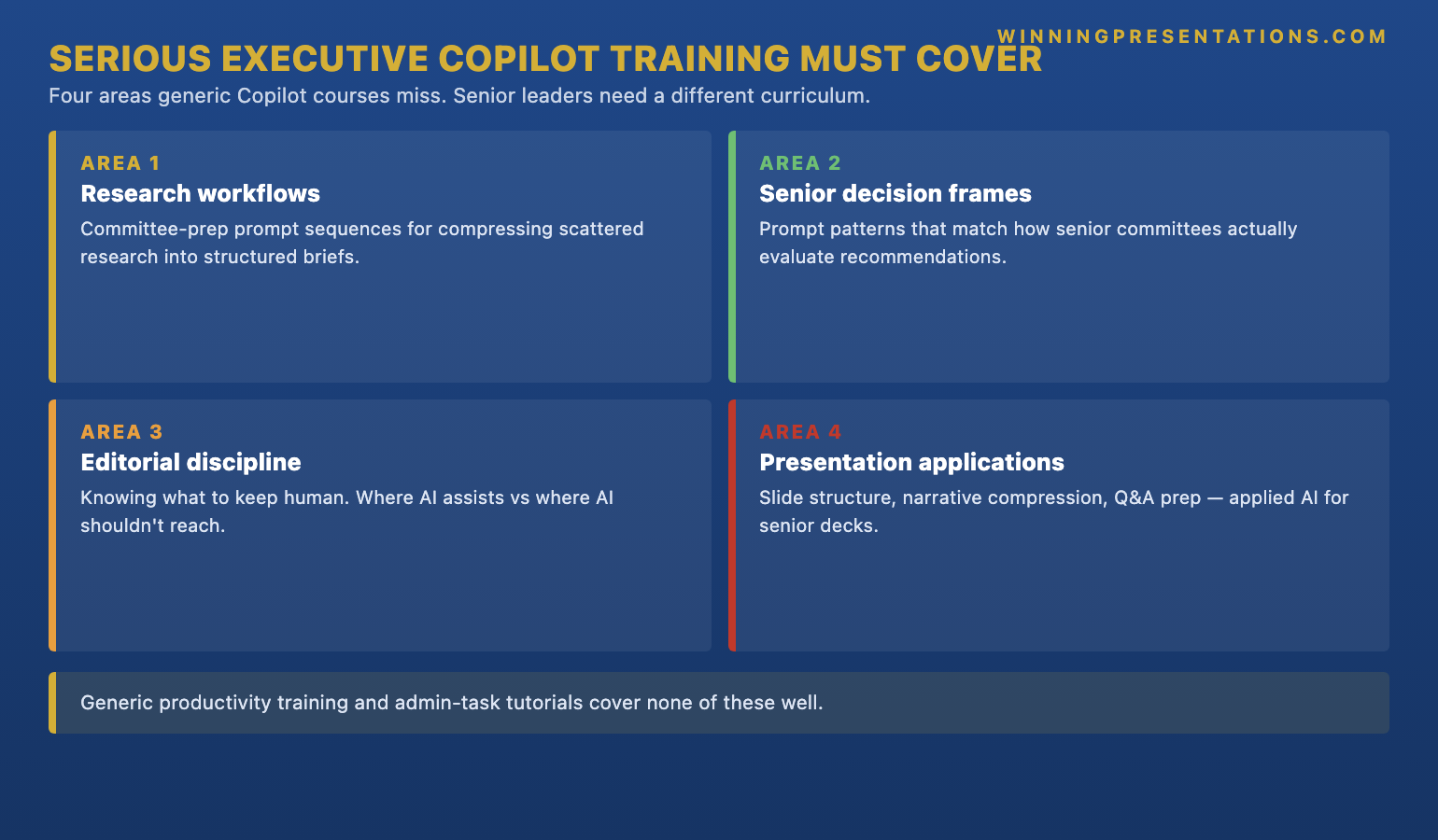
Pillar three is editorial discipline — the part of the curriculum that teaches what NOT to delegate to the model. A senior leader who hands the structural choices, the load-bearing claims, and the recommendation to Copilot produces decks that read as competent but generic, and the committee notices. A course that does not teach this discipline is producing a generation of senior users who lean on AI for the work they should be doing themselves. Pillar four is presentation-specific applications: slide structure, narrative compression from forty slides to fifteen, and the Q&A preparation pass that surfaces the contradictions the committee will press on. These are the senior-deck use cases where Copilot earns its keep, and they are the use cases generic productivity courses do not cover. For more on the prompt-writing patterns specifically, see our guide on Copilot prompts for executive presentations.
Build executive-grade presentations with AI assistance, on a schedule that matches a senior calendar.
The AI-Enhanced Presentation Mastery course is a self-paced programme with 8 modules and 83 lessons. Enrol with this month’s cohort, work through at your own pace — 2 optional live coaching sessions are fully recorded. Designed for senior professionals who need AI to produce executive-grade output, not generic productivity drafts.
- 8 modules, 83 lessons covering AI workflows for executive-grade presentation work
- Self-paced — no deadlines, no mandatory session attendance
- Monthly cohort enrolment — new cohort opens every month, enrol whenever suits you
- 2 optional live coaching sessions, fully recorded — watch back anytime
- Lifetime access to all course materials
The three formats that actually work for senior calendars
Curriculum is half the question. Format is the other half, and most executive Copilot training fails on format before it has a chance to fail on content. A senior leader’s calendar is the binding constraint: variable, frequently rearranged, with whole weeks lost to acquisitions, board cycles, and travel. A training format that assumes regular attendance at a fixed time is a format that will not be completed. A training format that assumes the leader can carve a consistent two-hour weekly slot is a format that will be abandoned in week three when a deal cycle starts. The formats that survive contact with a senior calendar share three properties: self-paced, asynchronous, and structured but flexible.
Self-paced means the leader controls the cadence. They might do four lessons in a single Saturday morning when a flight is delayed, then nothing for two weeks, then a weekend pass through three modules when the board cycle quiets. The course material is not waiting for a fixed Tuesday-evening live session that the leader has to choose between attending or skipping. Asynchronous means the live elements — coaching, Q&A, peer interaction — are recorded and available afterwards. The signal of a well-designed senior programme is not that there are no live elements; it is that the live elements are optional and the recordings are first-class material, not a consolation prize.
Structured but flexible means the curriculum has a clear shape — modules, lessons, an order — without imposing a rigid timeline. The leader can see what the next twelve hours of work looks like, and can fit those twelve hours into the next twelve weeks or the next twelve days. The formats that do not work are the inverse: fixed live attendance with no recordings (the leader misses week three and is now permanently behind), peer-cohort accountability built around junior-team norms (the senior leader feels infantilised and disengages), daily homework that has to be submitted (the leader skips two days, then ten, then all of it). For a related treatment of how senior leaders engage with online programmes, see our companion guide on how senior leaders use AI in presentations.
The credibility checks before paying for any course
The third question, after curriculum and format, is whether the course is teaching what it says it is teaching. The Copilot training market is crowded, and a glossy landing page is not evidence of substance. There are four credibility checks that take ten minutes each and are worth doing before any executive Copilot programme is paid for. These are the same checks Caoimhe ran on the fourth option after her three obvious-no candidates: curriculum specificity, instructor experience, platform fidelity, and content currency.
Curriculum specificity means the course’s published outline names the senior-deck use cases explicitly. A real executive course will say “research workflows for committee preparation” and “narrative compression for senior decks” in its module titles. A generic course rebadged for executives will say “advanced Copilot for professionals”. The first signals that the curriculum was built around senior-deck use cases. The second signals that the marketing copy was rewritten and the curriculum was not. Instructor experience is the second check — the person teaching the course should have personally built senior-grade decks for the kinds of audiences the course is targeted at. A trainer who has only ever worked with productivity examples will not be able to teach the prompt grammar that works for a steering committee paper.
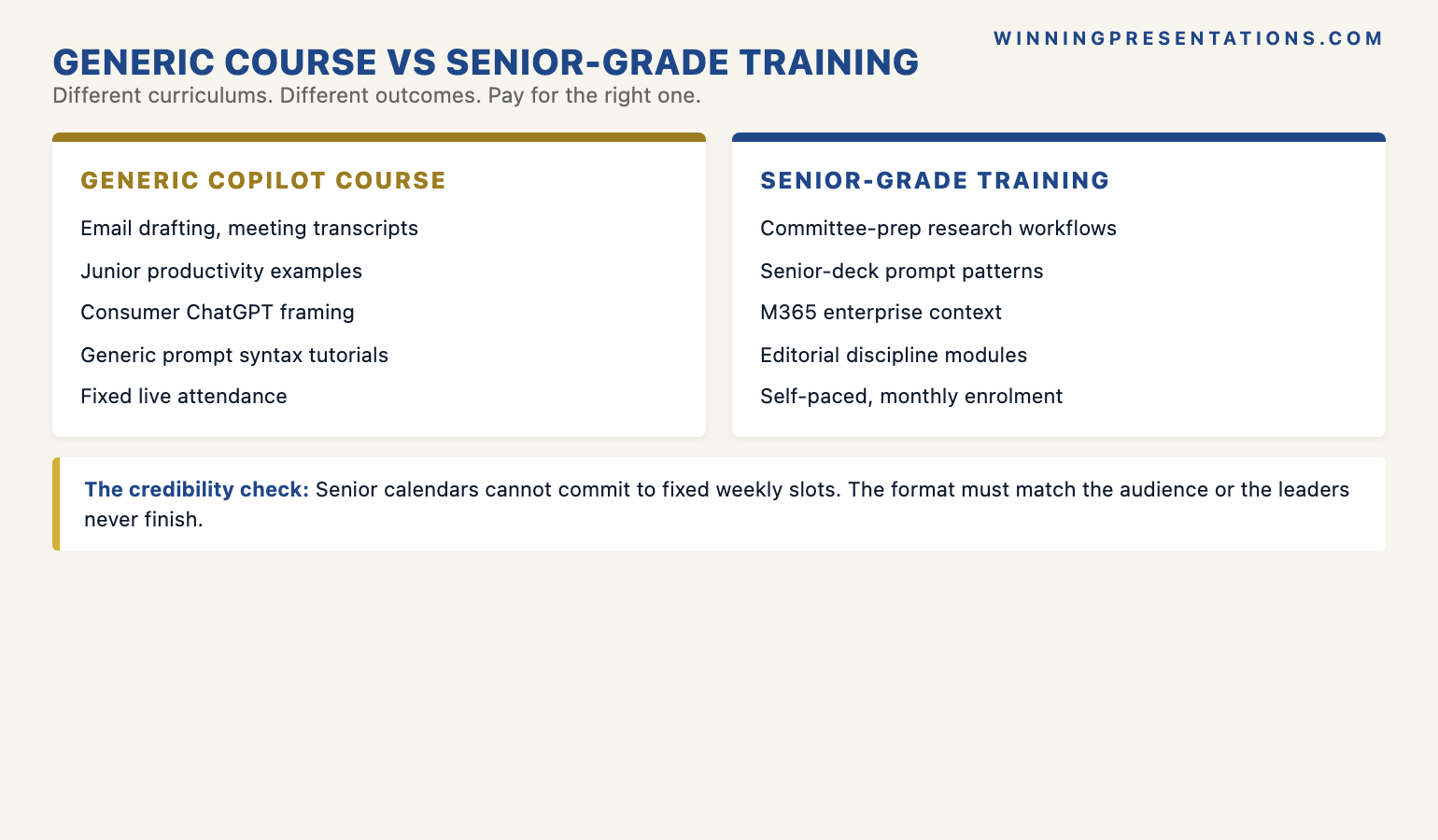
Platform fidelity is the third check, and the one most often skipped. Copilot for Microsoft 365 — the version that connects to SharePoint, OneDrive, Teams, and the firm’s email — is a different product from consumer ChatGPT, and the prompt patterns that work in one do not always transfer to the other. A course teaching senior leaders how to use AI for presentations should be using Microsoft 365 Copilot examples, not generic ChatGPT screenshots. If the course’s example outputs are obviously from chat.openai.com, the leader is buying a ChatGPT course with Copilot branding. Content currency is the fourth: Copilot has changed substantially over the last twelve months, and a course recorded eighteen months ago is teaching prompt patterns and capability boundaries that no longer match the live product. Look for a “last updated” date on the curriculum page, and for explicit references to recent Copilot features.
If you want a tactical prompt library to use alongside any executive Copilot programme:
The Executive Prompt Pack is 71 ChatGPT and Copilot prompts for executive PowerPoint work — research, structure, refinement, and committee-prep prompts written for senior-deck scenarios. £19.99, instant download, no subscription. Pairs naturally with the AI-Enhanced course.
What good outcomes actually look like
The last question — what should an executive Copilot programme actually produce in the leader who completes it — is the one most courses do not answer well. The wrong answer is “the leader has memorised twenty prompt patterns” or “the leader can recite the syntax for advanced Copilot features”. Senior leaders forget syntax the moment they close the course tab; that is not a defect, it is how senior brains allocate attention. The right answer is more structural and harder to fake. A leader who has completed a serious executive Copilot programme runs four prompts before every committee deck without thinking about them. The workflow has become reflex.
The four reflex prompts are the four pillars made operational. Before any committee paper, the leader scopes the question into a four-line research brief, pulls the internal evidence, layers the external context, and asks the model to surface contradictions. They do this not because they remember a course module on “prompt engineering” but because the workflow has been internalised as the way they prepare. The same is true on the structural side — they ask Copilot to compress a forty-slide working draft into a fifteen-slide committee version, and they ask the model to generate the seven hardest questions a sceptical committee member will ask. Both runs take twelve minutes. Both runs produce outputs the leader still has to edit. Neither output is the final deck. But the workflow has compressed two evenings of preparation into half a Saturday.
The other thing a serious programme produces is editorial confidence. A leader who has been through a real executive Copilot curriculum knows what to keep human and is unembarrassed about it. They will use Copilot for the research compression and the structural draft, and then they will close the model and edit the deck themselves — because they know which decisions in the deck the model should not make. That is not a limitation of their AI usage; it is the discipline that makes their AI usage produce executive-grade output rather than generic output. The recommendation framework, when the leader is choosing a course, is therefore: pick the programme whose published curriculum and instructor experience suggest it is teaching the four reflex prompts and the editorial discipline, in a format your calendar will actually let you complete. Most do not. The ones that do are worth the price difference. For a wider treatment of executive presentation training options, see our companion piece on executive presentation masterclasses online.
Frequently asked questions
How does Copilot PowerPoint training for executives differ from general Copilot training?
General Copilot training targets junior knowledge workers and uses productivity examples — meeting transcripts, email drafts, project summaries. Executive Copilot training targets the four senior-deck use cases where AI genuinely compresses preparation: research workflows for committee prep, prompt patterns for senior decision frames, editorial discipline about what to keep human, and presentation-specific applications like structure, narrative compression, and Q&A preparation. The example outputs are senior-grade decks and committee briefs, not five-person team emails. The prompt grammar that works for one audience does not transfer to the other, which is why a generic course rebadged as “executive” rarely teaches what senior leaders actually need.
Is the Maven AI-Enhanced Presentation Mastery course self-paced or live?
The course is self-paced. It contains 8 modules and 83 lessons that you work through at your own pace, with no deadlines and no mandatory session attendance. New cohorts open every month — the cohort is an enrolment batch, not a live structured programme. There are 2 optional live coaching sessions per cohort, both fully recorded, so you can watch them back any time if your calendar does not allow attending live. You retain lifetime access to all course materials.
Do I need to be technical to take a Copilot for executives course?
No. A serious executive Copilot programme is not teaching prompt-engineering syntax or technical configuration; it is teaching workflows that turn the tool into a presentation partner. The technical prerequisites are basic familiarity with Microsoft 365 (you can already open and edit a PowerPoint file) and access to Microsoft 365 Copilot at your firm. Everything else — what to ask, in what order, with what discipline — is the curriculum. Senior leaders who consider themselves “non-technical” routinely complete this kind of programme and end up using Copilot more effectively than technically-inclined colleagues, because they bring the editorial judgement that the workflow depends on.
Can the training be expensed and how should it be presented to L&D or finance?
Most senior professionals expense executive Copilot training under L&D, professional development, or AI capability building, and the £499 price point sits comfortably below typical executive-coaching thresholds. The framing that lands well with finance and L&D is functional: the programme teaches AI-assisted workflows for executive-grade presentation preparation, with measurable compression of senior-deck preparation time. Most firms now have an explicit AI capability build line in their L&D budget; presenting the training as that line item rather than as generic upskilling reduces approval friction. A receipt is provided on enrolment for expense submission.
The Winning Edge — weekly newsletter
The Winning Edge is a weekly newsletter for senior professionals who present at the executive level. One short email a week, focused on the structural moves that separate decks committees back from decks they defer. Subscribe to The Winning Edge →
Not ready for the full AI-Enhanced course? Start here instead: download the free 10 Essential Copilot PowerPoint Prompts cheat sheet — a one-page reference for the prompts senior leaders run before every executive deck.
About the author
Mary Beth Hazeldine is Owner & Managing Director of Winning Presentations Ltd. With 24 years of corporate banking experience at JPMorgan Chase, PwC, Royal Bank of Scotland, and Commerzbank, she advises executives across financial services, healthcare, technology, and government on structuring presentations for high-stakes funding rounds, board approvals, and strategic decisions.