Tag: AI presentation prompts

14 May 2026
Featured image for Generative AI Presentation Storytelling: 3 Prompts That Turn Dry Data Into a Narrative

Generative AI Presentation Storytelling: 3 Prompts That Turn Dry Data Into a Narrative

Quick Answer

Generative AI presentation storytelling works when the prompt forces the model into a narrative structure rather than a summary. The three prompts that consistently produce usable drafts are: the situation-complication-resolution prompt, the character-stake-shift prompt, and the data-to-decision prompt. Each forces the model to choose a narrative shape before it generates copy. Without that, AI produces summaries — and senior audiences disengage from summaries.

Hadiya had been a strategy lead in a global consulting firm for eleven years. Her team produced quarterly client decks for FTSE finance directors. In April she ran an experiment: she gave ChatGPT a 22-page client report and asked it to “write a presentation that tells the story of the data.” The model produced 14 slides. Polished bullets, neat headers, clean structure. Her partner read the draft and said, “This reads like a research summary. It doesn’t tell me anything I would remember after the meeting.”

Hadiya rewrote the deck by hand. The next month she tried again — different prompt. This time the draft was usable in 40 minutes. The difference was not the model. The difference was the structure she forced into the prompt before the model wrote a word.

If your AI-drafted decks read like summaries rather than stories

The model is not refusing to tell stories. It is defaulting to the structure most natural to a language model — paragraph-and-bullet summary — because the prompt did not ask for anything else.

Explore the Executive Prompt Pack →

Why generative AI defaults to summary, not story

Large language models are optimised for one task: predicting the next likely token given everything before it. When asked to “write a presentation,” the most likely structure across the training data is the summary deck — title, agenda, sections, bullets, conclusion. That structure dominates corporate output, so the model produces it by default.

A senior audience does not need the summary. They have read the pre-read; they have skimmed the report. What they need is the through-line — the question the data answers, the tension the analysis exposes, the decision that follows. None of that emerges from a prompt that says “write a presentation.”

The fix is not better writing on the model’s part. The fix is a prompt that names the narrative structure before the model generates a single word. Three prompts cover most senior-audience situations. Each one forces a different narrative shape into the output.
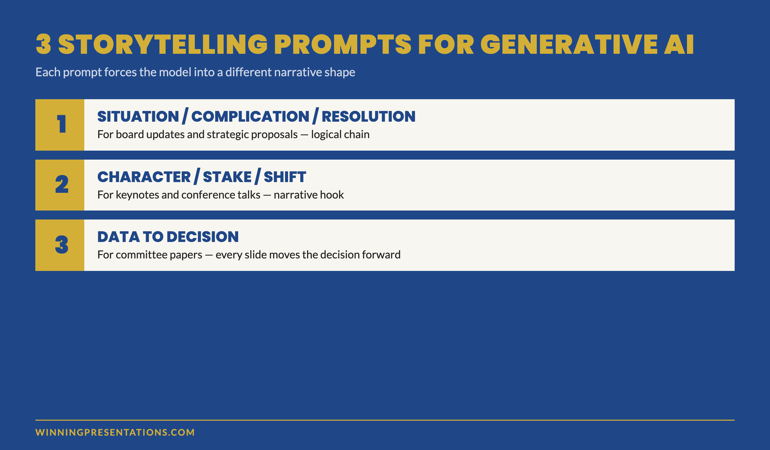
The 3 storytelling prompts for generative AI: situation-complication-resolution, character-stake-shift, and data-to-decision — with the use case for each shown as labelled cards

Prompt 1 — Situation, complication, resolution

Use this prompt when the audience needs to follow a logical chain from “where we were” to “where we are now” to “what we propose.” It is the structure underneath most McKinsey-style executive briefings, and it works because senior audiences are trained to listen for it.

The prompt skeleton:

PROMPT — Situation / Complication / Resolution

You are drafting a 12-slide executive presentation. Use the situation-complication-resolution structure. Slides 1–4: the situation (where the business was, supported by 3 specific data points from the source material). Slides 5–8: the complication (the new pressure or shift that disrupts the situation, supported by 2 data points and 1 named risk). Slides 9–12: the resolution (the recommendation, the expected outcome stated as a process commitment, the trip-wires, and the decision being asked of the audience). For each slide, write a 6-word headline and 3 supporting bullets of no more than 14 words each. Do not use abstract verbs (leverage, drive, enable). Use specific verbs from the source material.

The prompt does three things the default does not. It names the structure (situation-complication-resolution). It enforces evidence (specific data points from the source material). It bans the verbs that produce generic AI copy (leverage, drive, enable). The output reads as a deliberate piece of work, not a model’s average guess at what a presentation looks like.

The constraint that matters most is the verb ban. “Leverage” and “drive” are model-default verbs — they show up because they are common across the training data. Senior audiences register them as filler. A prompt that bans them forces the model to pull verbs from the source material instead. Those verbs are specific, sometimes technical, and almost always more credible.

When this prompt is the right choice

Use it for board updates, strategic proposals, and any presentation where the audience expects a logical progression from problem to recommendation. It is less effective for sales pitches, opening keynotes, or any setting where the audience needs an emotional hook before they engage with logic. For those, prompt 2 is stronger.

Prompt 2 — Character, stake, shift

The second prompt forces the model into a narrative shape: a person with something at stake, a moment when the situation changes, the decision that follows. It produces drafts that read like business stories rather than business summaries — useful for keynotes, all-hands briefings, conference talks, and any setting where the audience needs to feel the weight of the decision before they evaluate it.

PROMPT — Character / Stake / Shift

You are drafting a 10-slide presentation that opens with a real person facing a specific decision. Slide 1: name the person, their role, the moment, what was at stake. Slides 2–4: the situation as they understood it. Slide 5: the shift — the new information or moment that changed the calculation. Slides 6–8: how they responded, supported by evidence from the source material. Slide 9: what changed as a result. Slide 10: the decision the audience needs to make now. Use first or third person, not second person. No abstract verbs. No outcome guarantees — describe what the person did, not what was guaranteed to happen.

The “no outcome guarantees” line is critical. Generative AI defaults to outcome-promise language (“this approach delivered transformational results”) because that pattern is over-represented in marketing copy in the training data. Senior audiences are alert to outcome promises and discount the surrounding argument when they hear one. The prompt forces the model into process-commitment language instead.

The character requirement also blocks the model’s most common failure mode: opening with abstract market context. “In today’s rapidly evolving business environment” is the model’s default opener; it dies in the first 30 seconds in front of a senior audience. A real person at a real moment is the opposite.

Build executive slides in 25 minutes, not 3 hours

The Executive Prompt Pack — 71 prompts for ChatGPT and Copilot

  • 71 ready-to-use prompts for executive presentations — story, structure, opening, recommendation, risk, Q&A prep
  • Works in ChatGPT, Microsoft Copilot, and Claude — no separate setup
  • Copy-paste-and-fill format — replace the bracketed fields with your context, run the prompt
  • Includes the situation-complication-resolution and character-stake-shift prompts in full

The Executive Prompt Pack — £19.99, instant access, lifetime use.

Get the Executive Prompt Pack →

For busy professionals who want to create sharper, more strategic PowerPoint presentations.

When this prompt is the right choice

Use it for any presentation that opens with the audience cold — keynote, conference talk, sales pitch, internal kick-off — where the first 90 seconds need to earn the right to the rest. It is also the right prompt for change communications, where the human dimension is what carries the message past intellectual agreement into emotional acceptance.

Less suited to credit committee papers and quarterly board updates, where the audience already has the context and just wants the logic. For those, prompt 1.

Prompt 3 — Data to decision

The third prompt is for the situation senior professionals encounter most often: 30 pages of data that need to become a 12-slide deck that drives a single decision. Default AI prompts produce a “data summary deck” with a recommendation slide near the end. This prompt produces a “decision deck” with the data working as evidence, not as content.

PROMPT — Data to Decision

You are drafting a 12-slide decision deck. The audience must make a single decision at the end of the meeting. Slide 1: state the decision being asked of the audience in one sentence. Slide 2: the recommendation. Slides 3–6: the four most relevant data points that support the recommendation, one per slide. Each data slide must include the headline number, the source, the time period, and a one-sentence interpretation. Slides 7–9: the two or three counter-arguments and the response to each. Slide 10: the trip-wires that would force a re-vote. Slide 11: the resolution being put. Slide 12: the next decision point on the agenda. Do not include market context. Do not include backstory. Do not summarise — every slide must move the decision forward.

The instruction “do not include market context” sounds aggressive. It is necessary because market-context slides are the model’s most common form of padding. Senior audiences in a decision meeting do not need market context; they have it. A deck that opens with market context tells the audience the presenter does not know what they need.

The four-data-points constraint is also load-bearing. AI without a numeric constraint will produce 8–12 data points and trust the audience to pick the relevant ones. Senior audiences read that as analytical laziness. Four data points, with the analysis already done in the slide selection, reads as senior judgement.

For senior leaders running this prompt for the first time, the result is often disorienting — the deck looks shorter than expected, with no agenda slide, no executive summary, no closing thank-you. That is the point. It is a working document, not a conference talk. The room sees the work in the discipline of what was excluded.
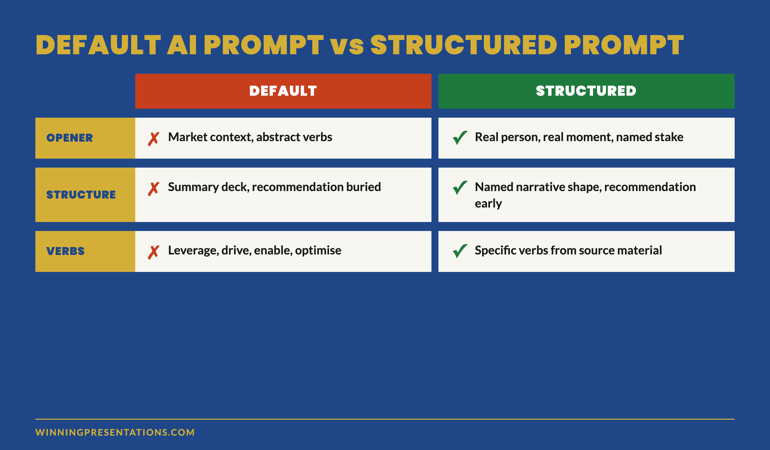
Default AI Prompt vs Structured Storytelling Prompt comparison table showing the difference in opener, structure, evidence treatment and verb selection across both approaches

The editorial pass: making AI output sound like you

Even with a strong prompt, AI output reads as AI output without an editorial pass. The model produces text that is grammatically perfect, lexically broad, and tonally even — and that combination is exactly the signature senior audiences register as machine-drafted. A short editorial pass changes the read.

Four moves that take 15 minutes and remove most of the AI signature:

Replace three abstract verbs with specific ones from the source material. Search the draft for “leverage,” “drive,” “enable,” “optimise,” “transform” — replace each with the verb the source document uses. The shift from generic to specific lifts the credibility of the surrounding sentence.

Cut the opening adjective on every bullet. AI defaults to “robust framework,” “comprehensive analysis,” “strategic approach.” Senior audiences treat opening adjectives as filler. Cut them. The bullet reads sharper.

Add one specific number that did not come from the source material. A specific time or duration (“17 minutes into the meeting”), a specific date (“between October and December”), a specific small number (“three of the seven options”) — one of these per page anchors the reader and signals the writer was actually present in the analysis.

Rewrite the recommendation in your own voice. The recommendation slide is the one the audience remembers. AI’s default recommendation language sounds borrowed from a McKinsey report. Yours should not. Read the AI draft, close the file, write the recommendation from scratch. Compare. Use whichever sounds like you.

The editorial pass takes 15 minutes on a 12-slide deck. It is the difference between an AI-drafted deck and an AI-drafted deck the audience does not register as AI-drafted. For senior leaders integrating AI into their workflow, this pass is the discipline that separates time saved from credibility lost.

Want the longer story behind these prompts?

If narrative structure is the gap — not just the prompt — the Business Storytelling Mini-Course covers the frameworks behind these three prompts: situation-complication-resolution, character-stake-shift, and data-to-decision. £29, instant access.

Get the Business Storytelling Mini-Course →

Turn numbers into stories that move executive decisions.

Frequently asked questions

Which model produces the best storytelling drafts — ChatGPT, Copilot, or Claude?

For these three prompts, the difference between the major models is smaller than the difference between a structured prompt and an unstructured one. ChatGPT-5 and Claude Sonnet 4.6 produce slightly more usable drafts on the character-stake-shift prompt because both are stronger at narrative voice. Copilot is stronger on the data-to-decision prompt because it can pull from your own files. None of them produce decision-grade copy without the editorial pass.

How much source material should I paste into the prompt?

For the situation-complication-resolution and data-to-decision prompts, paste the full source — most modern models handle 50+ page documents in a single prompt. For the character-stake-shift prompt, paste only the section about the character and the moment, plus the surrounding context. Pasting more dilutes the focus and produces a draft that wanders. Quality of source material in produces quality of structure out.

Can I run all three prompts on the same source and pick the best draft?

You can, and senior leaders increasingly do. The three drafts read very differently and the comparison clarifies which structure suits the audience. Run all three, compare openers and recommendations, then pick one and apply the editorial pass. Total time: about 60 minutes for a 12-slide deck — substantially less than writing from scratch, and the structural variety is itself a useful reasoning tool.

Does this work for slides themselves, or just the narrative copy?

The prompts produce headline-and-bullet copy ready to drop into slide templates. The visual layout, charts, and design treatment still need to be done in PowerPoint or Keynote — generative AI image and chart output for executive presentations is not yet at a quality that survives a senior audience. The narrative copy is where the time saving sits; the visual layer remains a manual step.

The Winning Edge — weekly newsletter for senior presenters

One framework, one micro-story, one slide pattern — every Thursday morning, ten minutes’ read. For senior professionals presenting to boards, investment committees, and executive sponsors who want my best material before it appears anywhere else.

Subscribe to The Winning Edge →

Not ready for the full prompt pack? Start here: download the free Executive Presentation Checklist — a one-page reference for the structural questions every executive deck must answer before the meeting.

For the matched workflow article, see ChatGPT and Copilot together — the two-tool stack that builds executive decks faster than either alone.

Mary Beth Hazeldine — Owner & Managing Director, Winning Presentations Ltd. With 24 years of corporate banking experience at JPMorgan Chase, PwC, Royal Bank of Scotland, and Commerzbank, she advises senior professionals across financial services, healthcare, technology, and government on integrating AI into executive presentation workflows.

05 Feb 2026
Executive woman reviewing AI-generated presentation output on laptop in corporate office

Prompt Layering: The Technique That Makes AI Output Executive-Ready

I asked ChatGPT to write an executive summary for a £3 million infrastructure proposal. It gave me something that read like a university essay.

Same tool. Same data. But the output was unusable in any boardroom I’ve ever sat in.

The problem wasn’t AI. It was how I was prompting it — one instruction, one shot, hope for the best. Most professionals do exactly this, and most get exactly this result: technically correct, strategically useless.

Then I discovered prompt layering. Not a single clever instruction, but a sequence of four prompts that build on each other — each one refining the output until it reads like something a senior leader actually wrote.

That single shift changed how I teach AI presentation prompts to executives. And it’s the technique that separates “AI-assisted” slides from “AI-generated” ones.

Quick answer: Prompt layering is a technique where you build AI presentation output through four sequential prompts — Role, Context, Task, Constraints — instead of cramming everything into one instruction. Each layer refines the previous output, producing executive-quality slides that sound like you wrote them. Senior leaders who use this approach report cutting revision time from hours to minutes while getting output their audience actually respects.

🎯 Presenting tomorrow? Copy these 4 prompts in order:

Prompt 1 (Role): “You are a senior strategy consultant who has written executive presentations for FTSE 100 boards. Your writing is concise, direct, and recommendation-led.”

Prompt 2 (Context): “I’m presenting to [AUDIENCE] about [TOPIC]. They care about [KEY CONCERN]. The decision I need is [SPECIFIC ASK]. Here’s my background data: [PASTE DATA].”

Prompt 3 (Task): “Create a [NUMBER]-slide executive presentation. Lead with the recommendation. Each slide should have one main message as the title. No bullet points longer than 8 words.”

Prompt 4 (Constraints): “Rewrite the output using these rules: no jargon, no passive voice, every slide answers ‘so what?’, and the entire deck could be understood by reading only the slide titles.”

Fill in the brackets. Run them in sequence (not all at once). Each prompt builds on the last.

A client — VP of Operations at a logistics company — showed me his “AI presentation workflow.” He’d type a paragraph-long prompt, get a full deck back, then spend three hours rewriting every slide.

“It’s faster than starting from scratch,” he said. He was right. But only barely.

I showed him the layering technique. Same AI tool, same topic, but four prompts instead of one. The first set the voice. The second loaded the context. The third defined the structure. The fourth applied the constraints.

His next board presentation took 40 minutes to build. Not 40 minutes of editing AI output — 40 minutes total, from blank screen to finished deck. His exact words afterwards: “It actually sounds like me now.”

That’s what prompt layering does. It doesn’t make AI smarter. It gives AI enough information to produce something you’d actually present.

Why Single-Prompt AI Fails at Executive Level

The standard approach to AI presentations looks like this: write one detailed prompt, hit enter, get a deck. Every tutorial teaches it. Every professional tries it. And almost everyone gets the same result — slides that are technically complete but strategically empty.

Here’s why. When you give AI one prompt, you’re asking it to simultaneously figure out your voice, understand your audience, structure your argument, and apply formatting constraints. That’s four cognitive tasks compressed into one instruction. Even experienced professionals can’t do all four at once. AI certainly can’t.

The output reveals the problem. Slide titles become generic (“Overview,” “Key Findings,” “Next Steps”). Content reads like a report, not a presentation. The recommendation — if there is one — gets buried on slide 9 instead of leading on slide 1.

I’ve seen this pattern across hundreds of executive presentations. The executives who get the worst AI output are often the ones who write the longest, most detailed single prompts. More instructions in one shot doesn’t mean better output. It means more confusion.

Prompt layering solves this by separating those four tasks into four sequential prompts. Each one does one job. And each one builds on the output of the last.

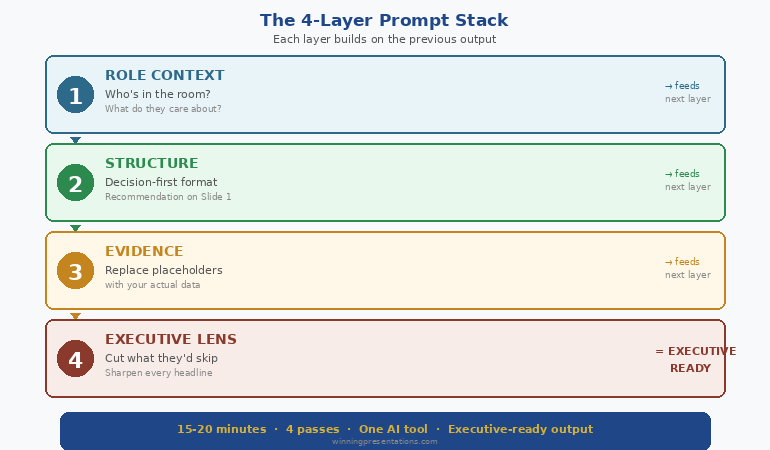
The 4-Layer Prompt Stacking Technique

The technique works because it mirrors how senior leaders actually think through a presentation — not all at once, but in layers. Role first. Context second. Structure third. Polish fourth.


The 4-layer prompt stacking technique showing Role then Context then Task then Constraints for executive-ready AI presentation output

Layer 1: Role (Set the Voice)

Before you ask AI to create anything, tell it who it is. This isn’t a gimmick. Role-setting changes the vocabulary, sentence length, and level of assumption in every output that follows.

Weak role: “You are a helpful assistant.”

Strong role: “You are a senior strategy consultant who has written board-level presentations for FTSE 100 companies. Your writing style is direct, recommendation-led, and assumes the reader is time-poor and sceptical.”

The difference in output is immediate. With the strong role, AI stops explaining basics, drops the hedging language, and leads with conclusions instead of background.

Layer 2: Context (Load the Intelligence)

This is where most professionals fail. They give AI the topic but not the situation. A board presentation about Q3 performance is completely different depending on whether results exceeded targets or missed them by 15%.

The context layer includes: who you’re presenting to, what they care about, what decision you need, what resistance you expect, and the raw data or talking points they need to see.

Paste your data here. Meeting notes, spreadsheet summaries, previous feedback — give AI the same briefing you’d give a junior analyst preparing your slides.

Layer 3: Task (Define the Structure)

Now — and only now — do you tell AI what to build. The task layer specifies slide count, format requirements, what goes on each slide, and how the argument flows.

Because AI already has the voice (Layer 1) and the intelligence (Layer 2), the structural output is dramatically better. Slide titles become specific. Content maps to what your audience actually needs to decide. Recommendations lead rather than follow.

Layer 4: Constraints (Apply the Polish)

The final layer is a rewrite instruction. You take the output from Layer 3 and run it through quality filters: no jargon, no passive voice, every slide answers “so what?”, slide titles tell the full story when read in sequence.

This layer is where generic becomes executive. It’s the equivalent of a senior partner reviewing a junior associate’s slides and saying “tighter, sharper, more direct.”

Four prompts. Four minutes. Output that used to require three hours of manual rewriting.


The Complete AI Presentation System

Prompt layering is one module inside AI-Enhanced Presentation Mastery — the self-study programme that teaches the full executive AI workflow. Modules release weekly. Live Q&A calls included. Join anytime and get everything released so far.

Join AI-Enhanced Presentation Mastery (See Dates & Pricing) →

Self-study modules + live Q&A calls. All sessions recorded.
The course is live now, with new modules releasing through April 2026. Join today and get instant access to everything released so far — plus every module as it drops.

Before and After: Real Executive Output

Theory is useful. Seeing the difference is convincing. Here’s what prompt layering actually produces compared to the standard single-prompt approach — using the same AI tool, same topic, same data.

Scenario: Q3 Board Update (Results Below Target)

Single prompt output — Slide 1 title: “Q3 2025 Performance Overview and Key Metrics Summary”

Layered prompt output — Slide 1 title: “Q3 Revenue Missed Target by 8%. Here’s the Recovery Plan.”

The first tells the board they’re about to see data. The second tells them exactly what happened and what you’re doing about it. One wastes their first 30 seconds. The other earns their attention immediately.

Scenario: Budget Request Presentation

Single prompt output — Closing slide: “Summary and Recommendations for Consideration”

Layered prompt output — Closing slide: “Approve £450K Q1 Investment. Payback by Month 9. Here’s Why Delay Costs More.”

The difference isn’t AI capability. It’s prompt architecture. The layered approach forces AI to write like a decision-maker rather than a report-generator.

The 3 Layering Mistakes That Ruin Executive Output

Prompt layering isn’t foolproof. I’ve watched senior professionals adopt the technique and still get mediocre output because of three specific errors.

Mistake 1: Combining Layers

The temptation is efficiency — why send four prompts when you can send two? Because combining layers defeats the purpose. When you merge Role and Context into one prompt, AI gives equal weight to voice and data. The voice gets diluted. The context gets summarised instead of absorbed.

Four separate prompts. Every time. The two minutes you “save” by combining costs you twenty minutes in rewrites.

Mistake 2: Skipping the Constraints Layer

Layers 1-3 produce good output. Layer 4 produces executive output. The constraints prompt is what removes jargon, tightens language, forces the “so what?” test, and ensures slide titles tell a complete story. Skipping it is like submitting a first draft to the board.

Mistake 3: Restarting Instead of Building

If Layer 3 output isn’t right, the instinct is to start over with a new prompt. Don’t. Instead, add a corrective instruction that builds on what’s already there: “Keep the structure but make the recommendation on slide 1 instead of slide 8.” AI retains context from previous layers. Starting over throws that context away.

Going deeper: The complete layering protocol — including audience-specific role templates and the editing loop that catches what Layer 4 misses — is covered in the AI-Enhanced Presentation Mastery programme. Join anytime — get instant access to all modules released so far, plus new ones dropping through April 2026.

When to Use Prompt Layering (And When Not To)

Prompt layering is the right technique for any presentation where the audience is senior, the stakes are real, and “good enough” isn’t good enough. Board updates. Budget requests. Client pitches. Investor decks. Steering committee presentations.

For internal team updates, training materials, or quick status slides, a single well-written prompt is perfectly fine. The 4-layer technique adds four minutes to your process. That investment pays off when the audience is a CFO. It’s overkill when the audience is your own team.

The decision framework I use: if the presentation could affect a decision, a budget, or your reputation, layer your prompts. If it’s informational, don’t.

Also worth noting: prompt layering fits inside a broader AI presentation workflow that includes research, structure, and rehearsal phases. The prompts are one part of a larger system.

And if the presentation you’re preparing also involves getting the format right for a CEO audience, the role layer becomes especially critical — the voice you set in Layer 1 needs to match the expectations of the room.

People Also Ask

What are the best AI prompts for executive presentations?

The best AI prompts for executive presentations use a layered approach — setting role, loading context, defining structure, then applying constraints in four separate prompts. This produces recommendation-led, jargon-free output that mirrors how senior leaders actually communicate. Single-prompt approaches consistently produce generic, report-style slides.

How do you make AI-generated slides look professional?

Professional AI slides come from professional prompting. The constraints layer — applied after structure is set — forces AI to remove jargon, eliminate passive voice, and ensure every slide answers “so what?” Most professionals skip this step and spend hours manually fixing what one additional prompt would solve.

Can AI replace presentation designers for executives?

AI replaces the content creation and structuring work, not the visual design. Executive AI workflows focus on argument architecture, slide messaging, and narrative flow — the strategic work that determines whether a presentation succeeds or fails. Visual polish is a separate step.


Learn the Full Executive AI Workflow

Prompt layering is one technique inside a complete system. AI-Enhanced Presentation Mastery covers the full workflow — from research to rehearsal — in self-study modules with live Q&A support. The programme is already in progress. Join anytime and access everything released so far, plus all future modules.

Join AI-Enhanced Presentation Mastery (See Dates & Pricing) →

Self-study. Weekly modules. Live Q&A calls recorded. Study at your own pace.
Join anytime — get instant access to all modules released so far, plus new ones dropping through April 2026

Frequently Asked Questions

Does prompt layering work with any AI tool or just ChatGPT?

The 4-layer technique works with any large language model — ChatGPT, Claude, Gemini, Copilot. The principle is universal: separating role, context, task, and constraints into sequential prompts produces better output regardless of which tool you use. The specific prompt wording may vary slightly between tools, but the layering structure remains the same.

How long does prompt layering add to my workflow?

Approximately four minutes for the prompting phase. Most professionals report saving 60-90 minutes on the back end because the output requires far less manual rewriting. The net time saving is significant — particularly for board presentations and budget requests where revision cycles typically consume hours.

I’ve tried detailed prompts before and the output was still generic. How is this different?

Detailed single prompts overload the AI with competing instructions. Layering separates each instruction type so AI can focus fully on one task at a time. The key difference is sequence: you’re building output in stages rather than asking for everything simultaneously. The constraints layer alone — applied to already-structured content — typically transforms generic output into something presentation-ready.

Can I use prompt layering for presentations I need to give tomorrow?

Yes. The four-prompt sequence takes under five minutes. The copy-paste prompts at the top of this article are designed for exactly that scenario. Fill in the brackets, run them in order, and you’ll have a structured draft in minutes. For high-stakes presentations, allow an additional 15-20 minutes for your own review and refinement.

📬 The Winning Edge Newsletter

Weekly AI presentation techniques, executive communication strategies, and frameworks for senior professionals. No fluff. Practical every time.

Subscribe free →

Quick win: Start with my free prompt pack — 10 tested prompts for executive presentations, including a role-setting template you can use immediately.

Get the Free Prompt Pack →

Related today: If the presentation you’re building needs the format your CEO actually wants, the role layer in prompt layering is where you set that expectation. And if nerves are the bigger issue, here’s what to do when you freeze mid-presentation.

Your Next Step

Open your AI tool. Don’t type a prompt yet.

Instead, write the role first. Who should this AI be when it writes for you? A senior strategy consultant? A CFO who’s reviewed a thousand budget presentations? A board secretary who knows what directors actually read?

Set that role. Then load your context. Then define the task. Then constrain the output.

Four prompts. Four minutes. Executive-quality output that sounds like you — not like a machine.

If you want the complete system — role templates for every audience type, the editing loop, the workflow senior leaders actually use, and the refinement protocol that catches what the constraints layer misses — explore AI-Enhanced Presentation Mastery.

Stop writing one prompt and hoping. Start layering — and watch your AI output become something you’d actually present.

About the Author

Mary Beth Hazeldine is the Owner & Managing Director of Winning Presentations. With 24 years of corporate banking experience at JPMorgan Chase, PwC, Royal Bank of Scotland, and Commerzbank, she has created hundreds of executive presentations — first manually, now with AI assistance.

A qualified clinical hypnotherapist and NLP practitioner, Mary Beth combines executive communication expertise with evidence-based techniques. She has helped senior professionals and teams create presentations that secure funding, approvals, and high-stakes decisions across three continents.

Book a discovery call | View services