Tag: AI Presentation Mastery

15 May 2026

Generative AI for Business Presentations Course: What Senior Leaders Actually Need

Quick Answer

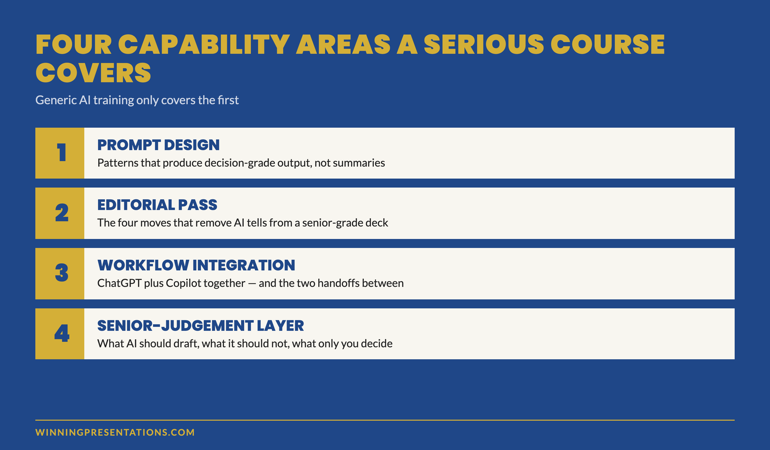
A generative AI for business presentations course earns its place in a senior leader’s calendar only if it covers four capability areas: prompt design that produces decision-grade output, the editorial pass that removes AI tells, the workflow integration across ChatGPT and Copilot, and the senior-judgement layer that decides what AI should and should not draft. Generic AI training covers the first; serious programmes cover all four. The structural questions below are how to tell them apart before paying.

Solveig had been a director of strategy at a Nordic energy group for nine years. She had attended three AI-for-business courses in the previous twelve months — one delivered by a global consultancy, one by an internal learning team, one by a well-known online platform. All three had been useful at the surface level. None had changed how she actually built her quarterly committee deck.

The fourth programme she signed up for landed differently. The difference was not the brand or the price. It was the curriculum’s centre of gravity. The first three courses had been about the AI tools. The fourth was about the work the AI tools were supposed to support — executive presentations to senior audiences. The structural difference is what made the programme worth her time.

This is the pattern senior leaders increasingly run into. The market is now full of generative AI courses. Most are tool-led. A small number are work-led. The work-led courses are the ones that move the needle for senior professionals already operating at executive level. The four capability areas below are the test that separates them.

If you have already done generic AI training and are still rewriting AI drafts by hand

The gap is not in the tool knowledge. The gap is in the senior-judgement layer that decides what AI should draft, what it should not, and what the editorial pass needs to do. That layer is what a serious course teaches.

Learn about AI-Enhanced Presentation Mastery →

Why most AI-for-presentations courses fail senior leaders

The standard generative AI course was designed for a wider audience than the senior leadership tier — knowledge workers across functions, with varying degrees of presentation work in their job. The curriculum reflects that. Most of the time is spent on the AI tools themselves: prompt structures, model differences, basic use cases. The presentation work is a thin layer at the end.

For a senior leader who already presents at executive level, this curriculum has three failure modes:

Tool fluency without senior context. The course teaches you how to write a prompt. It does not teach you how to write a prompt for a board update where the chair will tab the deck inside the first three minutes. The first half of the course is unnecessary; the second half is the part that was needed.

Generic editing rather than executive editing. Most courses cover “editing AI output” as a tonal exercise — make it sound less robotic. Senior audiences require more: removing the AI signature is one part; restoring the senior judgement that AI cannot supply is the larger part. Generic courses miss the second.

No workflow integration. The course teaches you AI tools in isolation. It does not address the integration with your existing presentation workflow — Copilot inside Microsoft 365, the handoff between drafting and slide layout, the source-provenance trail that senior audiences increasingly demand. The integration work is where most senior leaders get stuck after the course ends.

The market is starting to differentiate. The work-led programmes — the ones designed for senior leaders rather than for general knowledge workers — cover the four capability areas below. The tool-led programmes do not.

The four capability areas a generative AI for business presentations course must cover: prompt design, editorial pass, workflow integration, and senior judgement layer — labelled cards with brief descriptions

The four capability areas senior leaders need

Area 1 — Prompt design that produces decision-grade output

The base capability — but only the base capability. A senior leader does not need to learn what a prompt is or how to structure one. They need to learn the specific prompt patterns that produce drafts senior audiences engage with: the situation-complication-resolution prompt for board updates, the character-stake-shift prompt for keynotes, the data-to-decision prompt for committee papers.

The prompt design work is also where the editorial discipline begins. A weak prompt produces a draft that needs heavy editing; a strong prompt produces a draft that needs targeted editing. Senior leaders who have done generic AI training often plateau here — they can prompt the model, but their drafts still arrive needing 60% of the work re-done.

Area 2 — The editorial pass that removes AI tells

The editorial pass is the practice of taking an AI-drafted deck and removing the surface signals that mark it as AI-drafted. It is more than spell-check or tone-shifting. The senior-grade editorial pass has four moves: replace abstract verbs with source-document verbs, cut opening adjectives on bullets, add specific numbers that anchor the reader, rewrite the recommendation in your own voice.

A serious course teaches the editorial pass with examples — drafted-by-AI vs drafted-by-AI-and-edited side by side, so the senior leader can see the change in tone, density, and credibility that the editorial pass produces. Without that direct comparison, the editorial pass is hard to internalise.

Area 3 — Workflow integration across ChatGPT and Copilot

The third area is where the work moves from individual capability to integrated workflow. ChatGPT for structural and narrative drafting; Copilot for evidence extraction and slide layout; the handoff between the two. The course needs to teach the handoff explicitly — most senior leaders who learn the tools separately struggle to integrate them on real decks.

Workflow integration also means understanding which tool to use when, and when to use neither. A senior-grade course covers the situations where AI is the wrong choice — short decks, sensitive material, audiences of one — alongside the situations where the workflow earns its time saving.

Area 4 — The senior-judgement layer

The fourth area is the one most courses skip and the one that matters most for senior leaders. AI can draft a deck. AI cannot decide which recommendation is the right one for this audience at this moment. AI cannot weigh the political, organisational, and personal context of a senior leader’s situation. AI cannot substitute for the judgement that makes a recommendation defensible under board-level scrutiny.

The senior-judgement layer is the discipline of deciding, for any given deck, what AI should draft and what it should not. The recommendation slide — usually not. The risk framing — usually edited heavily. The evidence selection — yes, but with a verification pass. The opening — written by the senior leader.

This layer is what separates a course for senior leaders from a course for general knowledge workers. It is taught through case examples — real decks with the AI-drafted version, the senior-edited version, and the analysis of what the senior judgement added — rather than through theoretical principles.

Self-paced programme designed for senior professionals

AI-Enhanced Presentation Mastery — 8 modules, 83 lessons

  • 8 self-paced modules covering all four capability areas — prompt design, editorial pass, workflow integration, senior-judgement layer
  • 83 lessons with case examples — real executive decks at AI-drafted, senior-edited, and final stages
  • 2 optional live coaching sessions with Mary Beth — both fully recorded so you can watch back anytime
  • No deadlines, no mandatory session attendance — work through at your own pace
  • New cohort opens every month — enrol whenever suits you

AI-Enhanced Presentation Mastery — £499, lifetime access to all course materials.

Enrol in AI-Enhanced Presentation Mastery →

Designed for senior professionals using AI to build executive-grade presentations.

The structural questions to ask before enrolling

Before paying for a generative AI for business presentations course, four questions separate the work-led programmes from the tool-led ones. Ask them on the sales call, in the FAQ, or by emailing the course director directly. The way the question is answered tells you as much as the answer itself.

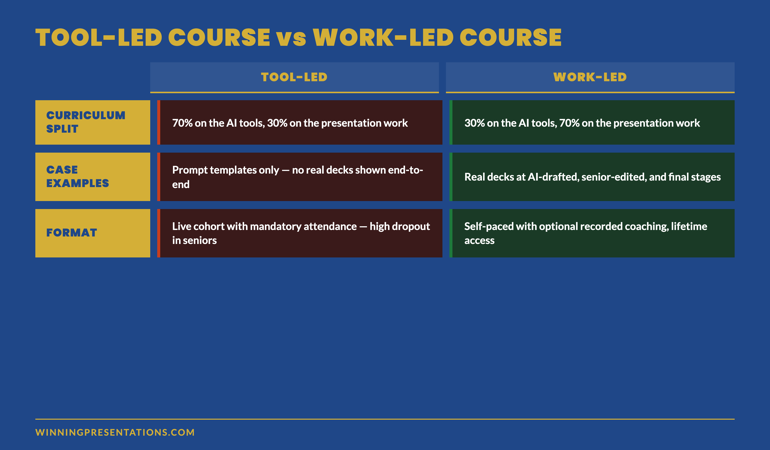
Question 1 — How much of the course is about the AI tools versus about the presentation work? A serious senior-leader course is roughly 30% on the tools and 70% on the work — the structural questions, the editorial discipline, the senior-judgement layer. A tool-led course is the inverse. If the answer is “we cover everything,” the course is tool-led with a thin presentation layer at the end.

Question 2 — Can I see a case example of a real deck before, during, and after the AI workflow? A work-led programme will show you. A tool-led programme will offer prompt templates instead. Prompt templates are useful; case examples teach the senior-judgement layer that prompt templates cannot.

Question 3 — Who is the course actually for? A serious senior-leader course will name a specific audience: directors, senior managers in financial services, executive leadership in regulated industries, partners in professional services. A generic course will say “anyone using AI for presentations.” The specificity of the audience definition reflects the depth of the curriculum.

Question 4 — What is the format, and is live attendance required? The trend in serious senior-level programmes is towards self-paced material with optional recorded coaching sessions. Senior professionals cannot reliably attend live sessions; courses that require live attendance signal a curriculum designed for a different audience. Watch out for the phrase “live cohort” — it usually means the course was designed around the trainer’s calendar rather than the senior learner’s calendar.

Tool-led course vs work-led course comparison: curriculum split, case examples, audience definition, and format requirements shown side by side

Format: live, self-paced, or hybrid?

The format question deserves its own treatment because the market signal is shifting fast. Three years ago, the default for senior-level training was “live cohort” — fixed weeks, mandatory attendance, scheduled coaching calls. Senior professionals could rarely attend the full programme; the dropout rate on live cohorts in senior segments has consistently been 35–55%.

The format that has displaced the live cohort for serious senior-level work is self-paced with monthly cohort enrolment. The programme is recorded; the materials are available indefinitely; coaching sessions, when they exist, are optional and recorded. The “cohort” is the enrolment batch — a community joining at the same time — not a live structured programme.

The advantage for senior leaders is real: you can engage with the material around your actual diary rather than around a fixed schedule. The advantage for the course is also real: completion rates rise sharply when senior professionals are not penalised for missing a Tuesday at 4pm. Programmes with this format report completion rates substantially higher than the live-cohort norm.

If a course markets itself as a “live cohort” with mandatory attendance, ask the structural question: who is this course actually for? It is rarely for senior leaders, regardless of how the marketing presents it.

Want to start with the tactical layer rather than the full programme?

The Executive Prompt Pack covers Area 1 (prompt design) at the tactical level — 71 ready-to-use prompts for ChatGPT and Copilot, organised by presentation scenario. £19.99, instant access. Many senior leaders use the prompt pack first, then move to the full course once they have seen what stronger prompts produce.

Get the Executive Prompt Pack →

71 prompts for executive presentations — ChatGPT, Copilot, and Claude.

Frequently asked questions

How long does AI-Enhanced Presentation Mastery take to complete?

The programme is self-paced. Most participants work through the 8 modules and 83 lessons over four to ten weeks, fitting the material around their workload. There are no deadlines and no mandatory session attendance. New cohorts open every month for enrolment. Once enrolled, you have lifetime access to all course materials and can return to specific modules as needed before high-stakes meetings.

Are the live coaching sessions required?

No. The 2 live coaching sessions are optional and fully recorded. Senior professionals frequently cannot attend live; the recordings let you engage with the material on your own schedule. The course content stands independently — the coaching sessions add depth and community for those who can attend, but completion does not depend on them.

Is this aimed at executives or at people working towards executive level?

Both, but the framing differs. Senior leaders who already present at executive level use the programme to integrate AI into their existing workflow without losing the senior-judgement layer. People working towards executive level use it to build the workflow alongside the judgement that the senior tier requires. The material covers the same content; what changes is how each group uses it.

What if my organisation has not yet rolled out Copilot — does the course still work?

Yes. The workflow modules cover both the full ChatGPT-plus-Copilot stack and the ChatGPT-only fallback for organisations without enterprise Copilot deployment. The senior-judgement layer is tool-agnostic. Many participants begin the programme on ChatGPT alone and add the Copilot integration later as their organisation rolls out Microsoft 365 with Copilot. The material accommodates both paths.

The Winning Edge — weekly newsletter for senior presenters

One framework, one micro-story, one slide pattern — every Thursday morning, ten minutes’ read. For senior professionals presenting to boards, investment committees, and executive sponsors who want my best material before it appears anywhere else.

Subscribe to The Winning Edge →

Not ready for the full programme? Start here: download the free Executive Presentation Checklist — a one-page reference for the structural questions every executive deck must answer.

For the matched workflow article, see the 2-tool ChatGPT and Copilot workflow for executive decks.

Mary Beth Hazeldine — Owner & Managing Director, Winning Presentations Ltd. With 24 years of corporate banking experience at JPMorgan Chase, PwC, Royal Bank of Scotland, and Commerzbank, she designs and delivers AI-Enhanced Presentation Mastery on Maven for senior professionals across financial services, biotech, technology, and government.

09 Dec 2025
Why most executive presentation training fails - 90% of skills lost within 1 week - January 2026 Maven course on executive presentations with only 60 seats

Why Most Presentation Training Fails (And What Actually Works) [2026]

📅 Published: December 9, 2025 — New AI-enhanced executive presentation training course launching January 2026

Updated 27 March 2026 — Revised for the latest Microsoft Copilot and ChatGPT capabilities.

I’m going to say something that might upset the training industry: most presentation training is a waste of money.

I’ve been on both sides. I’ve sat through corporate presentation workshops that cost £10,000 and changed nothing. I’ve also delivered training that transformed how executives communicate.

The difference isn’t the content. It’s not the slides. It’s not even the trainer’s credentials.

After 25 years in corporate banking and a decade of training executives, I’ve identified exactly why most presentation training fails — and the three elements that make training actually stick.

If you want a ready-made framework for executive presentations: Explore The Executive Slide System →

Templates, AI prompts, and scenario playbooks for building board-ready slides.

The Uncomfortable Truth About Presentation Training

Here’s what typically happens:

A company books a presentation skills workshop. An enthusiastic trainer delivers two days of content. Participants practice, get feedback, feel inspired. Everyone leaves with a workbook they’ll never open again.

Three weeks later? They’re presenting exactly the same way they did before.

Research backs this up. Studies on corporate training show that 90% of new skills are lost within a week if not reinforced. The “forgetting curve” is brutal — and most presentation training ignores it completely.

So why do companies keep spending money on training that doesn’t work?

Because the problem isn’t obvious. The training feels valuable. People enjoy it. HR can tick a box. But behaviour change? That’s much harder to achieve — and measure.

Why Traditional Executive Presentation Training Fails

I’ve analysed hundreds of presentation training programmes. The failures cluster around three core problems:

Problem #1: Generic Content for Specific Challenges

Most presentation training teaches universal principles: make eye contact, use fewer bullet points, tell stories.

That’s fine. But it ignores the reality that a board presentation requires completely different skills than a sales pitch. A biotech investor deck has different conventions than a SaaS demo. An internal strategy update isn’t the same as an external keynote.

The symptom: Participants learn “presentation skills” but can’t apply them to their actual high-stakes moments.

I spent 25 years at JPMorgan Chase, PwC, Royal Bank of Scotland, and Commerzbank. I know that a presentation to a credit committee requires surgical precision. A pitch to private equity demands a different energy. A board update needs executive brevity. Generic training doesn’t address any of this.

Problem #2: No Practice Under Pressure

Presenting in a safe training room is nothing like presenting when it matters.

When the CEO is watching. When £5 million is on the line. When your promotion depends on the next 15 minutes. That’s when nerves kick in. That’s when habits take over. That’s when all that training evaporates.

The symptom: People perform well in workshops but freeze in real situations.

Effective presentation training must simulate pressure. Not artificial pressure — real pressure. With stakes. With feedback that stings a little. With enough repetition that new behaviours become automatic.

Problem #3: One-and-Done Events

A two-day workshop is an event, not a transformation.

Real skill development requires:

  • Spaced repetition (practice over weeks, not hours)
  • Real-world application between sessions
  • Feedback on actual presentations, not role-plays
  • Accountability to implement changes

The symptom: Temporary enthusiasm followed by permanent reversion to old habits.

This is why executive coaching works better than workshops — but costs £500-1,000 per hour. Most people can’t access that level of support.

Three reasons presentation training fails: generic content for specific challenges, no pressure practice, and one-and-done events leading to permanent reversion to old habits

A DIFFERENT APPROACH TO EXECUTIVE PRESENTATION TRAINING

AI-Powered Executive Presentations

Live cohort course designed to fix everything wrong with traditional training

Join the January Waitlist

£249 early bird • Only 60 seats • Launching January 2026

The 3 Elements of Presentation Training That Actually Works

Not all training fails. Some transforms careers. Here’s what separates effective executive presentation training from expensive theatre:

Element #1: Context-Specific Application

Effective training starts with your actual presentations. Not hypotheticals. Not case studies from other industries. Your board deck. Your investor pitch. Your client presentation.

What this looks like:

  • Participants bring real presentations they’re working on
  • Feedback addresses their specific challenges
  • Templates and frameworks match their industry context
  • Practice scenarios mirror their actual high-stakes moments

When I train investment bankers, we work on pitch books and credit committee presentations. When I train biotech executives, we focus on investor days and scientific advisory boards. When I train SaaS leaders, we refine demo flows and QBR structures.

The principles are universal. The application must be specific.

Element #2: Distributed Practice with Accountability

The research is clear: distributed practice beats massed practice. Five one-hour sessions over five weeks creates more lasting change than one five-hour workshop.

What this looks like:

  • Training spread over weeks, not crammed into days
  • Assignments to apply learning between sessions
  • Peer accountability and feedback loops
  • Real presentations reviewed and refined throughout

This is why cohort-based courses outperform self-paced learning. You’re not just learning — you’re implementing, getting feedback, and iterating. The social pressure of a cohort keeps you accountable.

Element #3: Modern Tools Integration

Here’s where most executive presentation training is stuck in 2015.

AI tools like PowerPoint Copilot have fundamentally changed how presentations are created. Executives who master these tools save 10+ hours per week. Those who don’t are competing with one hand tied behind their back.

What this looks like:

  • Training that integrates AI tools from day one
  • Prompts and workflows specific to executive presentations
  • Focus on human + AI collaboration, not replacement
  • Practical application: use AI to build your actual presentations during training

The future of executive communication isn’t choosing between presentation skills and AI skills. It’s mastering both — using AI to handle the tedious work so you can focus on strategy, storytelling, and delivery.

💡 The Compound Effect: Executives who combine strong presentation skills with AI mastery don’t just save time — they produce better work. The AI handles structure and first drafts. The human brings judgment, nuance, and persuasion. Together, they’re unbeatable.

What Changes When Training Actually Works

I’ve seen what happens when executive presentation training is done right:

A VP of Strategy went from dreading board meetings to requesting them. Her proposals started getting approved on first presentation instead of being deferred for “more analysis.”

A startup founder raised his Series A in half the meetings his advisors predicted. His pitch wasn’t just clearer — it was structured to address investor objections before they were raised.

A management consultant got promoted two years ahead of peers. Her partners specifically cited her “exceptional client communication” — skills she developed in eight weeks of focused training.

The common thread? They didn’t just learn presentation skills. They transformed how they communicate under pressure, in their specific context, using modern tools.

The Hidden Cost of Bad Presentations

Let’s talk about what ineffective presentations actually cost:

Direct costs:

  • Deals lost to competitors with better pitches
  • Budgets rejected and projects delayed
  • Strategies misunderstood and poorly executed
  • Hours wasted on presentations that don’t land

Career costs:

  • Promotions that go to people who “present well”
  • Ideas attributed to whoever communicated them best
  • Executive presence questions that stall advancement
  • Confidence erosion from repeated underwhelming performances

Opportunity costs:

  • Influence you could have but don’t
  • Relationships that never deepen because communication falls flat
  • The compounding effect of years of suboptimal presentations

Most executives don’t calculate these costs. They accept mediocre presentations as normal. But the executives who invest in genuine skill development? They pull ahead — and keep pulling ahead.

Calculate Your ROI

If better presentations helped you close one extra deal, secure one budget approval, or accelerate one promotion — what’s that worth? For most executives, it’s 10-100x the cost of proper training.

See Course Details →

Why I’m Launching a Different Kind of Course

After years of corporate training, I kept hitting the same frustrations:

Companies wanted two-day workshops. I knew those don’t create lasting change.

Budgets limited training to generic content. I knew context-specific application is essential.

Traditional formats ignored AI tools. I knew these tools are transforming executive productivity.

So I designed something different.

AI-Powered Executive Presentations is an 8-week cohort course that addresses everything wrong with traditional executive presentation training:

Instead of generic content: You’ll work on your actual presentations throughout the course. Board decks. Investor pitches. Client presentations. Whatever high-stakes moments you’re facing.

Instead of one-and-done: Eight weeks of distributed learning with assignments, peer feedback, and accountability. The research-backed approach to lasting skill development.

Instead of ignoring AI: Deep integration of Copilot, ChatGPT, and other tools. You’ll learn to use AI as a force multiplier — saving hours while producing better work.

Instead of passive learning: Live cohort sessions. Hot seats where participants present and get real-time feedback. A community of peers facing similar challenges.

AI-Powered Executive Presentations 8-week curriculum covering foundations, AI creation, high-stakes delivery, and application with live cohort learning for January 2026

What You’ll Master in 8 Weeks

Weeks 1-2: Executive Communication Foundations

  • The 3Ps Framework (Proposition, Presentation, Personality) — the methodology behind the Executive Slide System gives you exactly what to type, updated for the latest Copilot and ChatGPT capabilities.

    Who This Course Is For

    This isn’t for everyone. It’s specifically designed for:

    Executives and senior managers who present to boards, leadership teams, or external stakeholders — and want those presentations to drive decisions, not just inform.

    Founders and entrepreneurs raising capital or pitching to enterprise clients — where every presentation directly impacts the business.

    Consultants and advisors whose credibility depends on how they communicate recommendations — and who want to stand out from peers.

    High-potential professionals who know that executive presence and communication skills are the difference between good careers and exceptional ones.

    If you’re already an excellent presenter, this course will make you exceptional. If you’re struggling with high-stakes presentations, this course will give you the skills and confidence to perform under pressure.

    Who This Course Is NOT For

    To be direct:

    Not for passive learners. This course requires active participation. You’ll present, get feedback, and iterate. If you want to sit back and absorb content, this isn’t the right fit.

    Not for people seeking quick fixes. Transformation takes eight weeks of consistent effort. If you’re looking for a magic bullet, you’ll be disappointed.

    Not for those uncomfortable with AI. This course integrates AI tools throughout. If you’re resistant to using Copilot and ChatGPT, you won’t get full value.

    Not for beginners. This is executive-level training. If you’ve never given a business presentation, start with foundational resources first.

    Stop Rebuilding Every Deck From Scratch

    22 executive slide templates, 51 AI prompts, and 15 scenario playbooks — designed so you can structure any board presentation, investment case, or strategic review in 30 minutes. Executive Slide System — £39, instant access.

    Get the Executive Slide System →

    Designed for executives and senior managers presenting in high-stakes environments.

    Start With a Framework, Not a Blank Slide

    The three elements of effective presentation training — context-specific application, distributed practice, and modern AI integration — are built into the Executive Slide System.

    10 board-ready templates. 30 AI prompts. Each template is structured around the frameworks that actually drive decisions in high-stakes executive environments.

    Executive Slide System — £39, instant access.

    Designed for executives and senior managers presenting to boards, leadership teams, and investors.

    Frequently Asked Questions

    How is this different from other presentation courses?

    Three key differences: (1) You work on your actual presentations, not generic exercises. (2) AI tools are integrated throughout, not ignored. (3) The cohort format with distributed practice creates lasting change, not temporary inspiration.

    What if I can’t attend all live sessions?

    Sessions are recorded. But the value comes from live participation, hot seats, and peer interaction. If you can’t commit to most live sessions, consider waiting for a future cohort.

    I’m not technical. Will I be able to use the AI tools?

    Yes. We start from basics and provide step-by-step guidance. By week 4, you’ll be using AI tools confidently — regardless of your starting point.

    What presentations can I work on during the course?

    Any high-stakes business presentation: board decks, investor pitches, client proposals, internal strategy presentations, QBRs, or keynotes. The more important the presentation, the more value you’ll get.

    Is there a guarantee?

    If you actively participate in the first two weeks and don’t find value, I’ll refund your investment. I’m confident in the methodology — it’s the same approach that has transformed how executives communicate under pressure.

    Why only 60 seats?

    Cohort size matters. Too large, and you lose the personalised feedback and community connection. Sixty participants is the maximum for maintaining quality while creating diverse peer interactions.

    Start Improving Today

    Whether or not the course is right for you, here are resources to improve your executive presentations now:

    About Mary Beth Hazeldine

    After 25 years in corporate banking at JPMorgan Chase, PwC, Royal Bank of Scotland, and Commerzbank, Mary Beth now trains executives to communicate with impact. She’s particularly focused on helping leaders integrate AI tools like Copilot into their workflow — creating better presentations in less time. She runs Winning Presentations and is launching the AI-Powered Executive Presentations course on Maven in January 2026.