

Quick Answer
Using AI to build executive slide decks works when you follow a structured five-stage workflow: brief, draft, edit, pressure-test, decide. Each stage has a specific output and a specific decision the senior leader makes before moving on. The workflow takes around 90 minutes for a 12–15 slide board pack — significantly faster than building from scratch, and substantially better than feeding source material to a model and accepting the output.
On this page
Rafaela leads strategic finance at a UK insurance group. In Q4 2025 her team built every board pack by hand — typically 30 hours per pack across three people. By Q1 2026 she had moved the team to an AI-augmented workflow. The first attempt produced a 22-slide deck in four hours that her CFO described, charitably, as “a McKinsey impression of a board paper.” The second attempt — the same source material, the same model, but a structured workflow — produced an 11-slide deck in 90 minutes that the chair signed off without amendment.
The difference was not the model. It was not the prompt. It was the workflow. AI without structure produces a confident first draft that reads as opinion. AI inside a structured workflow produces a senior-grade deck. Most senior professionals adopting AI for executive presentations have not yet been taught the workflow because the courses available focus on prompts rather than the editorial discipline that makes prompts pay off.
If your AI-drafted decks still need rebuilding before the board sees them
The fix is not better prompts. It is a structured workflow that uses the model where it is strongest and keeps human judgement where it belongs. Built around senior decision contexts, not generic AI training.
Why most AI-built decks fail in the boardroom
Three structural failures repeat across senior teams that have adopted AI for presentation work:
Skipping the brief. The team feeds source material to the model and asks for “a board pack.” The model produces a generic structure that fits no specific board. Without an explicit brief — audience, decision required, time budget, the leaning recommendation — AI cannot produce a deck targeted at the room you are walking into. The brief is the most-skipped stage and the most-costly skip.
Editing the prose, not the structure. When senior teams review AI output, the instinct is to polish wording. The structural problems — recommendation in the wrong place, options slide missing, risk treated as a list — go unaddressed because they are harder to see in well-formed prose. By the time the team realises the structure is off, the deck has been polished for two hours and there is reluctance to rebuild.
No pressure-test. The team treats the AI-edited draft as the final and walks into the meeting. The first board member who probes the recommendation discovers a gap the team would have caught if they had spent 20 minutes pressure-testing the deck against likely questions. The board reads the discovery as a credibility signal: they did not stress-test their own work.
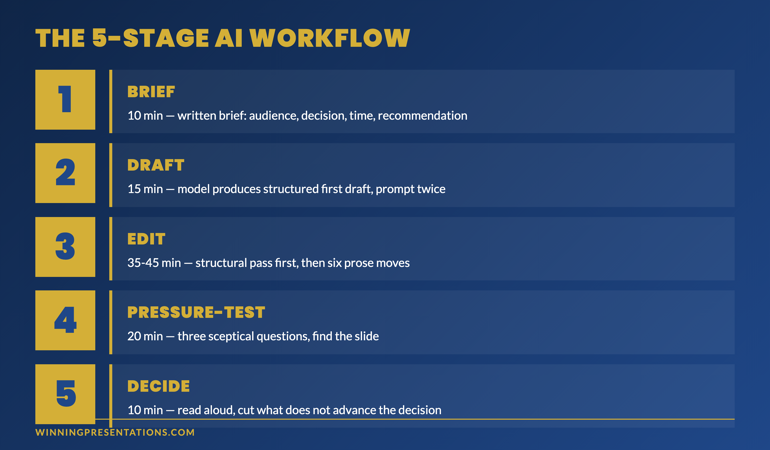
The 5-stage workflow: brief, draft, edit, pressure-test, decide
The five-stage workflow keeps the model in its strongest role and the human in theirs. Each stage produces a specific output before moving to the next.
Stage 1 — Brief (10 minutes). Output: a written brief that includes the audience, the decision required, the time budget for the meeting, the recommendation you are leaning towards, and the structure you want the model to use (the five-section frame: context, options, recommendation, risk, decision).
Stage 2 — Draft (15 minutes). Output: a structured first draft from the model based on the brief and the source material. Do not refine the prompt more than twice. The draft is meant to be incomplete; refinement happens in editing.
Stage 3 — Edit (35–45 minutes). Output: a deck where the structural and prose issues have been corrected. Six editorial moves — cut adjectives, replace abstract verbs with specific ones, source every number, break bullet symmetry, add counterpoint, insert your view.
Stage 4 — Pressure-test (20 minutes). Output: a list of the three questions a sceptical board member is most likely to ask, and the slide that answers each. If a question lands on a slide that does not answer it, the deck has a structural gap that needs closing before the meeting.
Stage 5 — Decide (10 minutes). Output: the final deck. Read aloud in the order it will be presented. Cut or rewrite any slide that does not advance the decision, carry a specific commitment, or survive being read aloud to a sceptic.
Total time: 90 minutes for a 12–15 slide board pack. This compares to roughly 4–6 hours for the same pack built by hand, with comparable quality if the workflow is followed and noticeably worse quality if any stage is skipped.
Build executive-grade AI-assisted presentations
Move beyond basic AI usage to senior-level presentation output
- 8 modules, 83 lessons of self-paced course content covering the full AI-augmented presentation workflow
- 2 optional live coaching sessions with Mary Beth — both fully recorded, watch back anytime
- Prompt library and editorial frameworks for senior decision contexts
- No deadlines, no mandatory session attendance — work at your own pace
Maven AI-Enhanced Presentation Mastery — £499, lifetime access to materials, monthly cohort enrolment.
Designed for senior professionals using AI to build executive-grade output.
Stage by stage: what each one produces
Stage 1 — Brief: the most under-rated 10 minutes
Senior leaders accustomed to writing decks themselves often skip the brief because, in a hand-built workflow, the brief is implicit — they hold it in their head. With AI in the loop, the brief has to be made explicit. The model cannot infer audience, decision shape, time budget, or recommendation lean from source material alone. Make these explicit in writing before the model sees a single source page.
A useful brief template covers six lines: who is the audience, what decision are they being asked to make, what is the time budget, what is the recommendation lean, what structure should the deck follow, and what tone is appropriate for the room. Six lines, ten minutes. The next 80 minutes are dramatically more productive because of it.
Stage 2 — Draft: prompt restraint
The temptation in stage 2 is to refine the prompt repeatedly until the model produces something close to a final draft. This usually backfires. Each prompt refinement increases the polish of the output but does not improve the structural quality. After two refinements, additional prompt iterations produce diminishing returns and start introducing artefacts — the prose becomes more confidently wrong.
The discipline is: brief in, prompt twice, accept whatever the model produces as the draft. The remaining work happens in editing, where senior judgement enters. Trying to make the model produce a final-quality draft is fighting against what AI is good at.
Stage 3 — Edit: structural before prose
Edit structure first, prose second. Open the draft and ask: is the recommendation on the right slide? Are options shown before recommendation? Is the risk slide a list or a set of trip-wires? Is there a decision slide? Fix the structure before touching prose. A well-structured deck with rough prose lands better than a polished deck with structural gaps.
Once the structure is right, apply the six prose moves — adjectives, verbs, numbers, bullet symmetry, counterpoint, view. The prose pass takes 25–35 minutes. The structural pass takes 10–15. Combined, the editing stage is the longest in the workflow and the one that determines whether the deck reads as senior-grade.
Stage 4 — Pressure-test: the three-question rehearsal
Spend 20 minutes thinking like the most sceptical member of your audience. Write down the three questions that person is most likely to ask. For each question, find the slide that answers it. If no slide answers it cleanly, the deck has a gap — close it now, not in the meeting.
This is the stage senior teams skip because the deck “looks ready.” It is the stage that prevents the in-room failure mode of a board member probing a soft point and the team discovering, in real time, that the soft point was not adequately covered.
Stage 5 — Decide: read aloud
The final stage is to read the deck aloud in the order it will be presented. Reading aloud catches problems that silent reading does not — sentences that are technically correct but awkward in the mouth, transitions that feel forced when spoken, recommendations that sound less convincing than they look. Mark every slide that does not pass three tests: does it advance the decision, does it carry a specific commitment, can I read this aloud to a sceptic without flinching?
For senior leaders building this discipline into their workflow, the AI-Enhanced Presentation Mastery course covers the full five-stage workflow with worked examples for board, exec committee, and investor decks.
What to look for in an AI presentation training programme
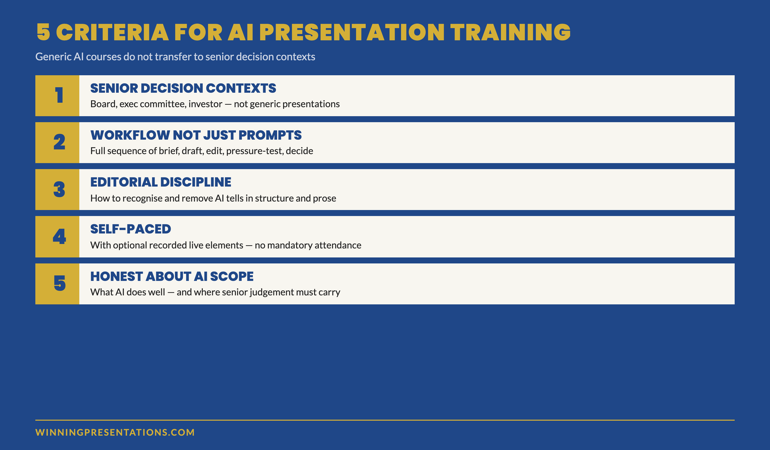
If you are evaluating training options for using AI to build executive presentations, five criteria separate genuinely useful programmes from generic AI training rebranded for presentations:
1. Senior-level decision contexts. The programme should teach against board, exec committee, investor, and high-stakes scenarios — not generic “make a presentation” exercises. Senior decisions have specific structural requirements that mid-level presentations do not.
2. Workflow, not just prompts. Prompt libraries are easy to find. Workflows that integrate prompting with editorial judgement and pressure-testing are rarer. The training should cover the full sequence, not just the AI-touching part.
3. Editorial discipline. The training should teach you how to recognise and remove the structural and prose patterns that betray AI drafts. Without this discipline, prompt training produces faster bad decks rather than better ones.
4. Self-paced with optional live elements. Senior professionals do not have predictable calendars. The format should let you work through material when the calendar allows; live elements should be optional and recorded.
5. Source-of-truth on what AI does and does not do well. The training should be honest about where AI helps and where it does not. Programmes that promise AI will “write your presentation for you” are selling a fantasy that boards have already learned to detect.
Frequently asked questions
How long does the workflow take for a typical board pack?
About 90 minutes for a 12–15 slide deck if all five stages are followed. Roughly 10 minutes brief, 15 minutes draft, 35–45 minutes edit, 20 minutes pressure-test, 10 minutes decide. Building the same pack from scratch takes 4–6 hours. The time saving is real; it depends on the workflow being followed in full rather than skipping stages to “save time.”
Does it matter which AI tool I use — Copilot, ChatGPT, Claude?
For executive presentation work the practical differences are small. Copilot in PowerPoint integrates with your own files, which speeds up the brief stage. ChatGPT and Claude work from pasted source material. The drafting quality is comparable; the editorial and pressure-test stages are identical regardless of the tool. Senior readers do not distinguish between tools; they distinguish between AI-edited and AI-unedited output.
Can I delegate the workflow to a junior team member?
The brief, draft, and prose-edit stages can be delegated. The structural-edit, pressure-test, and decide stages require senior judgement and should stay with the leader who owns the recommendation. A common pattern is for a junior to run stages 1–3 (brief through prose edit) and the senior leader to run stages 3 structural (rework structure if needed), 4, and 5.
What if my organisation restricts AI use for confidential material?
Use the workflow with non-confidential analogues to build the structure and language patterns, then apply the structural insights to your confidential deck without putting source material through the model. The five-stage discipline is valuable independently of whether AI touches the actual confidential material. Many senior teams use the workflow for the structural framing and hand-write the slides themselves.
The Winning Edge — weekly newsletter for senior presenters
One framework, one micro-story, one slide pattern — every Thursday morning, ten minutes’ read. Including the AI workflow patterns we are field-testing inside the Maven cohort each month.
For the partner article on the editorial pass that turns AI drafts into board-ready output, see generative AI for executive presentation decks.
Mary Beth Hazeldine — Owner & Managing Director, Winning Presentations Ltd. With 24 years of corporate banking experience at JPMorgan Chase, PwC, Royal Bank of Scotland, and Commerzbank, she advises senior professionals across financial services, healthcare, technology, and government on AI-augmented presentation work, board paper structure, and executive decision-making communication.