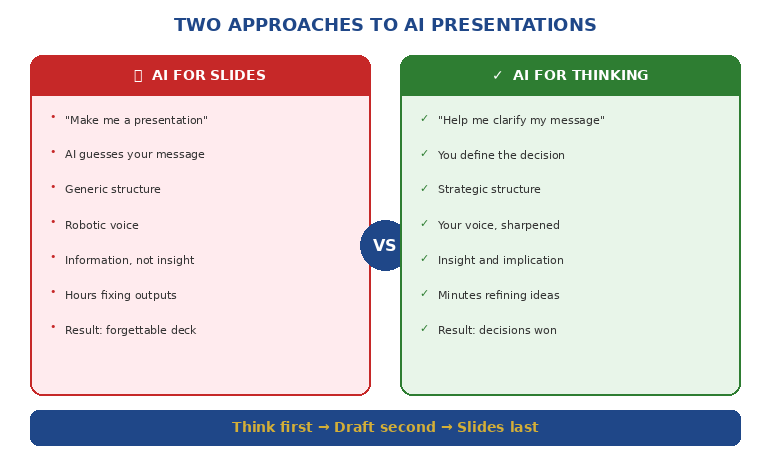
Quick answer: AI makes presentations faster but also makes them generic — because most people prompt AI with what they want to say, not how they say it. To teach AI your presentation style, you need three things: a style brief (your tone, sentence patterns, and vocabulary), a structure framework (your preferred message architecture), and a critique loop (prompts that make AI edit its own output against your standards). This turns AI from a content generator into a strategic co-creator that sounds like you, not like everyone else.
Presenting this week? Do this in 15 minutes:
1. Write a 200-word style brief (your tone + vocabulary + 2 sample paragraphs)
2. Pick one structure rule: AVP for persuasion slides, 132 Rule for overall flow
3. Paste both into your AI tool before your content brief
4. Generate your first draft
5. Run the critique loop: “Does this follow my structure? Remove any phrase I wouldn’t use.”
That’s the free version. The AI-Enhanced Presentation Mastery course gives you the complete system — style brief template, all four frameworks, 30+ critique prompts, and a reusable AI playbook.
Jump to:
A marketing director showed me two versions of the same quarterly business review.
Version A was the one she’d written herself: sharp, direct, slightly dry. Her signature move was opening every section with a one-line insight before the data. The CFO loved it because he could scan the headlines and get the story in sixty seconds.
Version B was the one she’d asked ChatGPT to create from the same data. It was technically correct. Every point was there. But it read like it had been written by a committee — smooth, cautious, with phrases like “leveraging synergies” and “driving alignment across stakeholders” that she would never use in real life.
She said: “It’s faster but it’s not mine. The CFO would read this and think someone else wrote it. Which defeats the entire purpose.”
That conversation crystallised something I’d been seeing across every executive I work with: AI doesn’t have a quality problem. It has a voice problem. And the voice problem exists because nobody teaches you how to train AI on your style — your frameworks, your vocabulary, your preferred message structure. They just teach you how to write prompts. Which is like teaching someone how to use a steering wheel without explaining where they’re driving.
Why Every AI Presentation Sounds the Same
AI language models are trained on billions of words of internet text. When you ask one to “write a slide about Q3 performance,” it draws on the average of everything it’s ever seen about quarterly performance slides. The result is competent, generic, and indistinguishable from what everyone else is getting.
This is the fundamental problem with how most people use AI for presentations. They prompt for content — “write me five bullet points about customer retention” — and get content that could have come from anyone in any company in any industry. The content is accurate. It’s also forgettable.
The professionals who actually benefit from AI do something different. They don’t ask AI to generate content. They ask AI to execute their thinking — using their frameworks, their vocabulary, their preferred structure. The AI does the heavy lifting, but the output carries their signature.
The difference shows up immediately. When you give AI a bare prompt, you get generic corporate language. When you give AI your style brief and your message framework, you get output that sounds like a faster, more productive version of you.
This is exactly the approach taught in AI-enhanced presentation creation — structure first, AI second. The structure is what makes the output yours. The AI is what makes it fast.
PAA: Why do AI-generated presentations sound so generic?
Because most people prompt AI with what to say, not how to say it. AI defaults to the statistical average of everything it’s been trained on — which means smooth, corporate, committee-style language. To get output that sounds like you, you need to provide your style brief (tone, vocabulary, sentence patterns), your preferred message architecture (frameworks like AVP or the 132 Rule), and a critique prompt that makes AI edit its own output against your standards.
Stop Getting Generic Output. Start Getting Output That Sounds Like You.
AI-Enhanced Presentation Mastery teaches you how to build AI workflows that preserve your voice, your frameworks, and your communication style. 8 modules covering structure, messaging, slide design, data storytelling, and a complete personal AI playbook you’ll reuse for every presentation.
Get AI-Enhanced Presentation Mastery →
Self-paced course with live coaching and lifetime access — see the next cohort on Maven.
Self-paced modules + live support + lifetime access.
The Style Brief: Teaching AI Your Voice in 5 Minutes
A style brief is a short document — 200 words maximum — that tells AI how you communicate. Not what you want to say. How you say things.
Here’s what goes into an effective presentation style brief:
Tone descriptors. Three to five words that describe your communication style. Examples: “direct, evidence-led, slightly dry humour” or “warm, structured, practical” or “analytical, precise, minimal adjectives.” AI language models respond dramatically to tone descriptors — they shift the entire register of the output.
Vocabulary preferences. Words you use and words you don’t. If you say “stakeholders” but never say “key stakeholders,” that matters. If you write “clients” instead of “customers,” specify it. If you avoid phrases like “leverage,” “synergise,” or “circle back” — tell the AI. This alone eliminates 80% of the generic feel.
Sentence pattern. Short sentences? Long analytical sentences? A mix? Do you open sections with a question or a statement? Do you use first person or third person? AI copies these patterns surprisingly well when you provide examples.
Two sample paragraphs. The most effective style brief includes two paragraphs you’ve actually written — presentation notes, an email to your boss, a section from a report. Not “ideal” writing. Your actual writing. AI learns more from your real voice than from your aspirational voice.
Once you have your style brief, you include it at the start of every AI conversation about presentations. The difference is immediate and, frankly, startling. Output goes from “could be anyone’s” to “sounds like mine” in a single prompt.
📊 Want the complete style brief template? AI-Enhanced Presentation Mastery includes the full style brief builder, sample briefs for different professional styles, and the prompt architecture that makes AI output match your voice consistently.
Structure-First AI: Why Frameworks Beat Freeform Prompts
The second reason AI presentations sound generic: people ask AI to create structure and content simultaneously. This is like asking a builder to design the house and construct it at the same time — you get something functional but unremarkable.
The professionals who get the best results from AI use a structure-first approach: they define the message architecture before AI writes a single word.
In the AI-Enhanced Presentation Mastery course, we teach three frameworks that work exceptionally well as AI instructions:
AVP (Action-Value-Proof). Every slide follows a three-part structure: what you want the audience to do (Action), why it matters to them (Value), and the evidence that supports it (Proof). When you give AI the AVP framework as an instruction — “Structure every slide using Action-Value-Proof” — the output immediately becomes more persuasive and more structured than freeform prompting.
The S.E.E. Formula (Statement-Evidence-Example). For slides that need to present data or make a case: lead with the insight statement, follow with the evidence that supports it, then provide a concrete example that makes it real. This stops AI from producing the generic “here are five data points” output and forces it to tell a story with every slide.
The 132 Rule. For overall presentation flow: one opening message (the 1), three supporting sections (the 3), two closing elements — a summary and a call to action (the 2). This gives AI a macro-structure that prevents the wandering, unfocused presentations that AI tends to produce when given open-ended briefs.
When you combine your style brief with a structure framework, AI stops guessing and starts executing. The output isn’t generic because it was never given the chance to be — you’ve constrained it with your thinking, your architecture, and your standards.
If you’re currently using ChatGPT prompts for presentations, adding structure frameworks to those prompts will transform the quality of what you get back.
PAA: How do you get better results from AI for presentations?
Provide structure before content. Instead of asking AI to “create a presentation about X,” give it your message framework (like AVP or the 132 Rule), your style brief (tone, vocabulary, sentence patterns), and the specific decision you want the audience to make. AI excels at executing within constraints — the tighter the framework, the better the output. Freeform prompts produce freeform results.
Frameworks First. AI Second. Your Voice Always.
AI-Enhanced Presentation Mastery gives you the AVP formula, S.E.E. wording framework, 132 Rule, and Insight-Implication-Action structure — then shows you exactly how to feed them to AI so every presentation sounds like you wrote it. Includes prompt packs, before/after transformations, and the complete AI workflow.
Get AI-Enhanced Presentation Mastery →
Self-paced modules + templates + prompt packs + live support + lifetime access — join the next cohort.
The Critique Loop: Making AI Edit Against Your Standards
Here’s what most people miss entirely: the first output AI gives you should never be the final version. AI is a first-draft machine. The magic is in the critique loop — using AI to edit its own output against your specific standards.
A critique prompt works like this. After AI generates your presentation content, you say: “Now review this output against these criteria: (1) Does every slide follow AVP structure? (2) Are there any phrases I wouldn’t use? Remove ‘leverage,’ ‘synergise,’ and ‘key stakeholders.’ (3) Is any slide trying to make more than one point? Split it. (4) Does the opening grab attention in the first sentence?”
This is essentially turning AI into your personal presentation coach — one that knows your standards because you’ve defined them explicitly.
The most effective critique prompts we’ve developed in the course follow three levels:
Level 1: Structure critique. “Does this presentation follow the 132 Rule? Is the opening message clear? Do the three middle sections support different aspects of the argument? Does the closing include both a summary and a specific call to action?”
Level 2: Messaging critique. “Review each slide against the S.E.E. formula. Does every claim have evidence? Does every evidence point have a concrete example? Flag any slide where the message is vague or abstract.”
Level 3: Voice critique. “Compare this output against my style brief. Flag any sentences that use passive voice (I use active). Remove any corporate jargon that isn’t in my vocabulary list. Shorten any sentence longer than 25 words.”
Running all three levels takes about 5 minutes. The result is output that’s been through a more rigorous editorial process than most people apply manually — and it sounds like you, not like an AI.
If you’re already using PowerPoint Copilot, layering a critique loop on top of its output is the single fastest way to improve quality.
📊 Want all three critique prompt levels? AI-Enhanced Presentation Mastery includes the complete critique prompt pack — structure, messaging, and voice — plus the Master Prompt Pack with 30+ prompts for every stage of presentation creation.
Building Your Personal AI Presentation Playbook
The goal isn’t to use AI better for one presentation. It’s to build a reusable system that makes every future presentation faster and more consistently excellent.
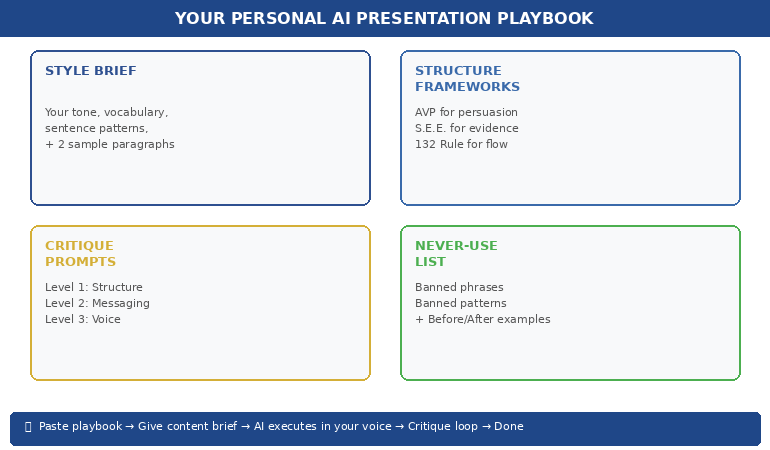
Your personal AI playbook is a single document — we provide the template in the course — that contains everything AI needs to produce your-quality output every time:
Your style brief (200 words — tone, vocabulary, patterns, samples).
Your preferred frameworks (AVP for persuasion slides, S.E.E. for evidence slides, Insight-Implication-Action for data slides, 132 Rule for overall structure).
Your critique prompts (three levels — structure, messaging, voice).
Your “never use” list (phrases, words, and structural patterns that aren’t your style).
Your before/after examples (two or three examples showing generic AI output transformed into your-style output — so AI can learn from the patterns).
When you start a new presentation, you paste the playbook into your AI conversation first, then give your content brief. The AI has everything it needs to produce first-draft output that’s already 80% there. The critique loop handles the final 20%.
This is the difference between using AI as a random content generator and using AI as a strategic co-creator. One saves you time. The other saves you time and makes your work better.
PAA: Can AI really match your personal presentation style?
Yes — if you train it properly. AI is exceptionally good at mimicking communication patterns when given explicit examples. The key is providing a style brief (tone, vocabulary, sentence patterns, sample paragraphs), structure frameworks (so AI doesn’t default to generic architecture), and critique prompts (so AI self-corrects against your standards). The AI Playbook approach means you set this up once and reuse it for every presentation, with improving results over time.
Building presentations this month?
The AI-Enhanced Presentation Mastery course includes the complete playbook template, the style brief builder, all four structure frameworks (AVP, S.E.E., 132 Rule, Insight-Implication-Action), and the full critique prompt pack. Start building your personal AI system this week — and notice the difference in your next deck.
Join the next cohort. Self-paced course with live coaching — see the next cohort on Maven. Join the next cohort →
AI Should Sound Like You — Not Like Everyone Else
AI-Enhanced Presentation Mastery is the course that treats AI as your execution engine — not your replacement. 8 modules covering structure frameworks, messaging formulas, data storytelling, slide design, critique prompts, and the personal AI playbook that makes every future presentation faster and unmistakably yours.
Get AI-Enhanced Presentation Mastery →
Self-paced modules + live support + templates + prompt packs + lifetime access — join the next cohort.
Frequently Asked Questions
Do I need to be technical or know how to code to teach AI my style?
No. Everything in this approach uses plain language — the same language you’d use to brief a colleague. You write your style brief in natural English. You describe your frameworks in normal sentences. The AI does the technical translation. If you can write an email explaining how you like things done, you can build an AI playbook.
Does this work with ChatGPT, Copilot, and other AI tools?
Yes. The style brief and structure framework approach works with any AI language model — ChatGPT, Claude, Copilot, Gemini, or whatever comes next. The principles are about how you communicate with AI, not which AI you use. The course provides prompts formatted for the most popular tools, and the playbook is tool-agnostic.
How long does it take to build a personal AI playbook?
The initial playbook takes about 45 minutes to build using the course template. The style brief takes 15 minutes, the framework selection takes 10 minutes, the critique prompts take 10 minutes, and assembling your before/after examples takes 10 minutes. After that, you reuse the playbook for every presentation — updating it only when your style evolves or you discover new patterns.
What if I’m not sure what my communication style actually is?
This is more common than you’d think — and it’s one of the most valuable outcomes of the playbook-building process. Module 2 of the course includes a “style discovery” exercise where you analyse three pieces of your own writing to identify your natural patterns. Most people are surprised by how consistent their style is once they look for it. The exercise takes 20 minutes and gives you the foundation for everything else.
📬 The Winning Edge Newsletter
Weekly strategies for executive presentations, AI workflows, and career-critical communication. No fluff.
Related: Once your AI workflow is producing personalised output, you need the right slide structure to put it in. If you’re presenting pilot results, the 8-slide pilot-to-rollout structure gives you the decision deck framework. And if presenting triggers nerves despite strong preparation, the imposter syndrome pre-presentation reset addresses the nervous system patterns that override your confidence.
AI doesn’t have a quality problem. It has a voice problem. And the voice problem is yours to solve — by teaching AI your frameworks, your vocabulary, your standards, and your style.
Build the playbook. Use the critique loop. Start with your next presentation.
🎯 Want the complete system — frameworks, prompts, templates, and live support?
About the Author
Mary Beth Hazeldine is the Owner & Managing Director of Winning Presentations. With 24 years of corporate banking experience at JPMorgan Chase, PwC, Royal Bank of Scotland, and Commerzbank, she combines presentation psychology with AI workflow design to help professionals create faster, clearer, and more persuasive presentations.
A qualified clinical hypnotherapist and NLP practitioner, Mary Beth has spent 15 years training executives in communication strategy. AI-Enhanced Presentation Mastery is her flagship course for professionals who want to use AI as a strategic co-creator — not a replacement for their thinking.