Year: 2025

17 Dec 2025
The Pyramid Principle for Presentations - McKinsey's secret weapon for executive communication

The Pyramid Principle for Presentations: McKinsey’s Secret Weapon (Used Wrong by Most)

📅 Updated: January 2026

Quick Answer

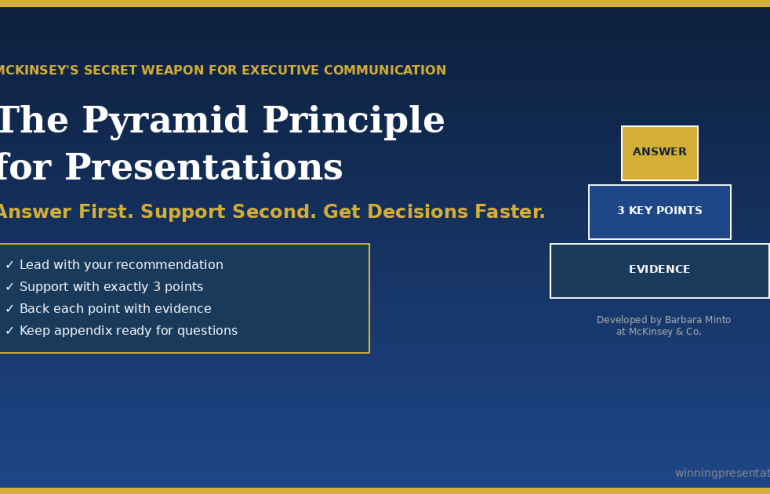
The Pyramid Principle is a communication framework developed by Barbara Minto at McKinsey that structures presentations top-down: lead with your answer first, then support it with 3 key points, each backed by evidence. It’s the opposite of how most people present (building to a conclusion) and dramatically more effective for executive audiences who want your recommendation, not your thought process.

Contents


“Win the room. Every time.” — weekly tactics on executive presentations, Copilot for PowerPoint, and the psychology of persuasion. Free, from Mary Beth Hazeldine.

Send me the free newsletter →

What Is the Pyramid Principle?

The Pyramid Principle was developed by Barbara Minto at McKinsey in the 1960s and has since become the standard for executive communication at consulting firms, investment banks, and Fortune 500 companies worldwide.

The core idea is simple: start with the answer.

Most people present bottom-up — they walk through their analysis, build the case piece by piece, and finally reveal their conclusion. This feels logical to the presenter. It mirrors how they did the work.

But it’s torture for the audience.

Executives don’t want to follow your journey. They want your destination. They want to know what you recommend, then decide whether they need the supporting detail.

The Pyramid Principle flips the structure:

  1. Start with the answer — your main recommendation or finding
  2. Group supporting arguments — 3 key points that prove your answer
  3. Order logically — each point supported by evidence

It’s called a “pyramid” because the structure looks like one: single point at the top, broader supporting base below.

Related: Presentation Structure: 7 Frameworks That Actually Work

Why It Works for Executive Presentations

I’ve trained executives at JPMorgan, PwC, and dozens of other firms. The Pyramid Principle works because it aligns with how senior leaders actually process information.

Executives are time-poor. A CEO might have 15 minutes between meetings. If your conclusion is on slide 12, they’ll never see it. If it’s on slide 1, they can engage immediately — and choose whether to dig deeper.

Executives are decision-makers. They don’t need to understand every detail of your analysis. They need to know: What do you recommend? Why? What do you need from me? The Pyramid answers all three in the first 2 minutes.

Executives will interrupt. If you’re building to a conclusion, every question derails you. If you’ve already stated your answer, questions become productive exploration of supporting points.

A client of mine — a director at a major consulting firm — used to get interrupted constantly in partner meetings. His presentations were thorough but bottom-up. We restructured using the Pyramid Principle. The interruptions didn’t stop, but they changed: instead of “get to the point,” partners started asking “tell me more about point 2.” He made partner 8 months later.

Got the framework — but your next deck is still bottom-up?

Executive Slide System has the Pyramid Principle built into 26 templates and 93 AI prompts, so you can apply Minto’s structure to a real deck without rebuilding from scratch. £39, instant download, 30-day refund.

Explore the System →

The Pyramid Structure (Slide by Slide)

Here’s how to apply the Pyramid Principle to a typical executive presentation:

Slide 1: The Answer

State your recommendation or key finding in one sentence. Be direct. Be specific.

  • ❌ “We’ve been analysing the market opportunity…”
  • ✅ “We should acquire Company X for £15M — it will generate £4M annual savings within 18 months.”

Slide 2: Supporting Point 1

Your strongest argument. Lead with the point, then provide evidence.

  • Point: “The acquisition eliminates our largest cost centre”
  • Evidence: Current outsourcing costs, projected in-house costs, timeline to realise savings

Slide 3: Supporting Point 2

Second strongest argument, same structure.

  • Point: “Company X has technology we’d need 2 years to build”
  • Evidence: Capability comparison, build vs. buy analysis

Slide 4: Supporting Point 3

Third argument. Never more than 3 — if you need more, you haven’t synthesised enough.

  • Point: “The asking price is below market value”
  • Evidence: Comparable transactions, valuation methodology

Slide 5: Implications

What this means for the business. Risks, dependencies, timeline.

Slide 6: Next Steps

What you need from the audience. One clear ask.
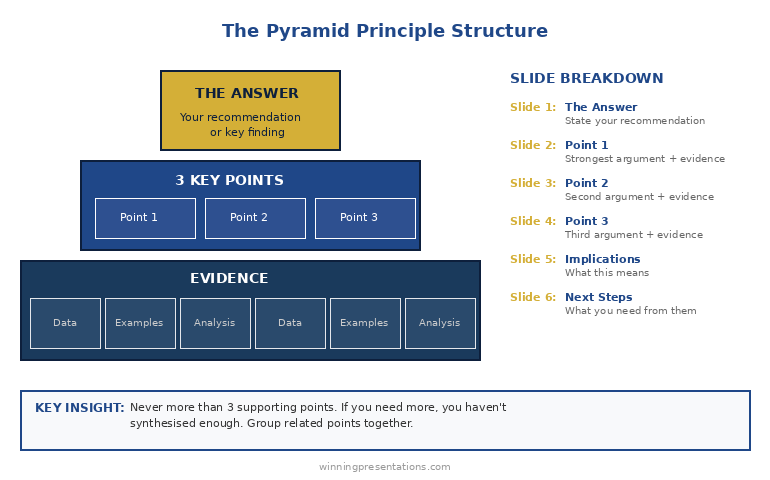
Pyramid Principle structure diagram - answer at top, 3 supporting points below, evidence at base

The Rule of Three: Why exactly 3 supporting points? Because humans can hold 3-4 items in working memory. More than 3 points and your audience starts forgetting the first one. Fewer than 3 and your argument feels thin. Three is the magic number.

The consulting director I mentioned earlier? He’d known the Pyramid Principle for years — but still struggled to execute it. The Executive Slide System gave him ready-to-use templates that forced him to structure properly. Eight months later, he made partner.

The MECE Rule: Mutually Exclusive, Collectively Exhaustive

The Pyramid Principle has a companion concept: MECE (pronounced “me-see”). Your supporting points should be:

Mutually Exclusive: No overlap between points. Each argument is distinct.

  • ❌ “It saves money” and “It reduces costs” (these overlap)
  • ✅ “It saves money” and “It saves time” and “It reduces risk” (distinct)

Collectively Exhaustive: Together, they cover all the important ground. No major gaps.

MECE matters because overlap confuses your audience (“wait, didn’t you already say that?”) and gaps invite objections (“but what about…?”).

Before you finalise your 3 supporting points, ask:

  1. Is there any overlap between these points?
  2. If someone accepted all 3 points, would they accept my answer?
  3. What’s the strongest objection — and is it addressed?

Apply the Pyramid Principle in under 30 minutes

26 templates + 93 AI prompts that fill slides in pyramid order. £39, instant access.

Get the System →

Before and After: A Real Example

Here’s how the Pyramid Principle transforms an actual presentation:

BEFORE (Bottom-Up):

  1. Slide 1: Agenda
  2. Slide 2: Background on the project
  3. Slide 3: Methodology we used
  4. Slide 4: Data we collected
  5. Slide 5: Analysis of Option A
  6. Slide 6: Analysis of Option B
  7. Slide 7: Analysis of Option C
  8. Slide 8: Comparison matrix
  9. Slide 9: Risks and considerations
  10. Slide 10: Our recommendation

Problem: The CEO checked out by slide 4. The recommendation never landed.

AFTER (Pyramid Principle):

  1. Slide 1: “We recommend Option B — it delivers 40% higher ROI with acceptable risk”
  2. Slide 2: Point 1 — ROI comparison (Option B wins on financial returns)
  3. Slide 3: Point 2 — Implementation timeline (Option B is fastest)
  4. Slide 4: Point 3 — Risk profile (Option B risks are manageable)
  5. Slide 5: What we need to proceed
  6. Appendix: Methodology, detailed analysis, data (available if asked)

Result: CEO approved in the meeting. Total presentation time: 8 minutes.

Want ready-made before/after examples for your own presentations? The Executive Slide System includes real transformation examples you can use as models.

3 Common Mistakes (And How to Fix Them)

Mistake 1: Burying the answer in context

❌ “Given the market conditions and our strategic priorities and the competitive landscape… we recommend X.”

✅ “We recommend X.” Full stop. Context comes after, if needed.

Mistake 2: More than 3 supporting points

If you have 5 points, you haven’t synthesised. Group related points together. “Financial benefits” can cover cost savings, revenue increase, and working capital improvement — that’s one point, not three.

Mistake 3: Supporting points that don’t actually support

Every point must directly answer “why should I accept your recommendation?” If a point is interesting but doesn’t support your answer, cut it or move it to the appendix.

Related: Executive Presentation Template: 12 Slides That Command the Room

From Framework to Finished Presentation

The Pyramid Principle tells you how to structure your thinking. But there’s a gap between knowing the structure and having slides ready for Monday’s board meeting.

That’s where most people struggle. They understand “answer first, 3 supporting points” — but what exactly goes on each slide? How do you phrase the opening? What evidence is compelling vs. overwhelming?

I’ve spent 24 years closing that gap.

The Executive Slide System gives you the complete Pyramid Principle deck — not just a framework, but ready-to-use slides with placeholders you fill in. Plus AI prompts to generate content for each section and scripts for what to say when you present.

What’s Included: Free vs. Paid

What You Get Free Checklist Executive Slide System (£39)
Pyramid Principle overview
7 frameworks reference card
Ready-to-use PowerPoint templates ✓ 17 templates
Pyramid Principle slide deck ✓ 6-slide template
AI prompts for each slide ✓ 51 prompts
Before/after examples ✓ Real transformations
Result Understand the principle Present like McKinsey

Walk into the boardroom with slides that lead with the answer first

Executive Slide System — 26 templates including Strategic Recommendation, Board Meeting Opener, and Executive Summary. Built-in frameworks: Pyramid Principle, SCQA, AVP. £39.

Get the Slide System →

Want the complete toolkit?

The Pyramid Principle is one of seven frameworks senior presenters need. The Complete Presenter Bundle pulls all seven products together — slides, Q&A, anxiety, storytelling, delivery, openers, cheat sheets — for £99 (save £91.97 vs buying separately). Lifetime access.

Get the Complete Presenter Bundle — £99 →

Frequently Asked Questions

What is the Pyramid Principle in simple terms?

The Pyramid Principle means starting with your answer or recommendation first, then supporting it with 3 key points, each backed by evidence. It’s the opposite of building to a conclusion — you state the conclusion immediately and let your audience decide how much supporting detail they need.

Who invented the Pyramid Principle?

Barbara Minto developed the Pyramid Principle while working at McKinsey & Company in the 1960s. She later wrote “The Pyramid Principle: Logic in Writing and Thinking,” which became the standard text for business communication at consulting firms worldwide.

When should you NOT use the Pyramid Principle?

Avoid the Pyramid Principle when your audience needs to be emotionally engaged before hearing your conclusion (use the Hero’s Journey instead), when you’re delivering bad news that requires context first, or when you genuinely don’t have a recommendation yet. It’s designed for situations where you have a clear answer and a decision-making audience.

What is MECE and how does it relate to the Pyramid Principle?

MECE stands for Mutually Exclusive, Collectively Exhaustive. It’s a test for your supporting points: they should have no overlap (mutually exclusive) and together cover all the important ground (collectively exhaustive). MECE ensures your argument is logically airtight.

How many supporting points should I have?

Exactly 3. Human working memory can hold 3-4 items comfortably. More than 3 points and your audience starts forgetting earlier ones. If you have 5 points, you haven’t synthesised enough — group related points together.

📧 The Winning Edge Newsletter

Weekly insights on presentations that close deals, win budgets, and advance careers. Join 2,000+ executives.

Subscribe Free →

🎁 Not Ready to Buy? Start Here.

Get the free checklist with the Pyramid Principle template and 6 other frameworks. You can upgrade to full templates later.

Download Free Checklist →

Related Resources

Struggling with nerves when presenting to executives? The Pyramid Principle helps you sound confident because you lead with your answer. But if physical anxiety is holding you back, see: Stage Fright Before Presentations: The First 60 Seconds Protocol


About the Author

Mary Beth Hazeldine has trained executives on high-stakes presentations for 16 years. With 24 years in corporate banking at JPMorgan Chase, PwC, Royal Bank of Scotland, and Commerzbank, she’s used the Pyramid Principle in hundreds of board presentations and client pitches. She’s tested the framework across investor pitches, board updates, and biotech regulatory presentations.

17 Dec 2025
Presentation Structure: 7 Frameworks That Actually Work - proven structures from McKinsey, TED, and top executives

Presentation Structure: 7 Frameworks That Actually Work [2026]

📅 Updated: December 2025

Want the complete toolkit?

Structure is one piece of presenting at executive level. The Complete Presenter Bundle pulls all seven products together — slides, Q&A, anxiety, storytelling, delivery, openers, cheat sheets — for £99 (save £91.97 vs buying separately). Lifetime access.

Get the Complete Presenter Bundle — £99 →

Quick Answer

The best presentation structure depends on your goal: use the Problem-Solution-Benefit framework for sales, the Pyramid Principle for executive briefings, or the What-So What-Now What structure for data presentations. This guide covers 7 proven frameworks with slide-by-slide breakdowns, so you can choose the right structure for any situation.

📦 USED BY 250+ EXECUTIVES

Executive Slide System — £39

All 7 frameworks as ready-to-use PowerPoint templates. 51 AI prompts. Slide-by-slide scripts. Stop starting from blank slides.

Get the Templates — £39 →

Instant download. Lifetime access. 30-day money-back guarantee.

“Win the room. Every time.” — weekly tactics on executive presentations, Copilot for PowerPoint, and the psychology of persuasion. Free, from Mary Beth Hazeldine.

Send me the free newsletter →


Why Structure Matters More Than Content

I’ve watched brilliant people give terrible presentations. PhDs who can’t explain their research. CFOs who lose the board in slide three. Salespeople who know the product cold but can’t close.

The problem is never knowledge. It’s structure.

A client came to me last year with a 47-slide deck for a £2M deal. Every slide was accurate. Every data point was relevant. And the prospect said: “This is really comprehensive. We’ll get back to you.”

They didn’t.

We restructured the same content into 12 slides using Framework 1 below. Same information, different architecture. The next prospect signed in the room.

Structure is the difference between information and persuasion.

Here are 7 frameworks that work — each designed for a specific situation. Use the wrong one and you’ll confuse your audience. Use the right one and you’ll guide them exactly where you want them to go.

Framework 1: Problem-Solution-Benefit (Sales Presentations)

Best for: Sales pitches, proposals, any presentation where you’re asking for a decision

Why it works: Humans are wired to solve problems. When you start with a problem your audience recognises, they lean in. When you present the solution, they’re already primed to say yes.

The structure (7 slides):

  1. The Problem — State the pain your audience feels. Be specific. “Most sales teams spend 40% of their time on admin instead of selling.”
  2. The Cost — Quantify what the problem costs them. Time, money, opportunity. “That’s £180K per year in lost productivity for a team of 10.”
  3. The Cause — Explain why the problem exists. This positions you as someone who understands.
  4. The Solution — Introduce your answer. High-level, not features.
  5. How It Works — 3 steps maximum. Keep it simple.
  6. Proof — One case study with specific numbers. “Acme reduced admin time by 60% in 90 days.”
  7. Next Step — One clear action. Not “any questions?” but “I recommend we start a pilot next week.”

Pro tip: Spend 70% of your time on slides 1-3. If your audience doesn’t feel the problem, they won’t care about your solution.

Related: Sales Presentation Template: The Structure Top Performers Use

Framework 2: The Pyramid Principle (Executive Briefings)

Best for: Board presentations, executive updates, any audience with limited time and high authority

Why it works: Executives don’t want to follow your thinking process — they want your conclusion. The Pyramid Principle, developed at McKinsey, puts your answer first and lets the audience drill down only if needed.

The structure:

  1. The Answer — Lead with your recommendation or key finding. “We should acquire Company X for £15M.”
  2. Supporting Point 1 — First reason with evidence
  3. Supporting Point 2 — Second reason with evidence
  4. Supporting Point 3 — Third reason with evidence
  5. Implications — What this means for the business
  6. Next Steps — What you need from them

The rule of three: Never more than 3 supporting points. If you need more, you haven’t synthesised enough.

Pro tip: Prepare 10 slides of backup detail you may never show. Executives will ask questions — have the data ready, but don’t put it in the main flow.

Related: The Pyramid Principle for Presentations: McKinsey’s Secret Weapon


Stop Reinventing the Wheel

The Executive Slide System includes the Pyramid Principle, Problem-Solution-Benefit, and all 15 other frameworks as ready-to-use templates. Just fill in your content.

Get All 7 Templates — £39 →

Framework 3: What-So What-Now What (Data Presentations)

Best for: Quarterly reviews, analytics presentations, any data-heavy content

Why it works: Data alone is meaningless. Your audience needs to know what it means and what to do about it. This framework forces you to interpret, not just report.

The structure:

  1. What — The facts. “Revenue is up 12% but margin is down 3 points.”
  2. So What — The interpretation. “We’re winning more deals but at lower prices — likely due to competitor pressure in the mid-market.”
  3. Now What — The action. “I recommend we raise prices 5% on enterprise while holding mid-market rates.”

Apply it to every chart: Before you show any data visualisation, prepare your “So What” statement. If you can’t explain why the data matters, don’t include it.

Pro tip: Most data presentations fail because they’re all “What” and no “So What.” Force yourself to have one insight per slide.

Related: QBR Presentation Template: Quarterly Reviews That Retain Clients

Framework 4: The Hero’s Journey (Keynotes & Vision Presentations)

Best for: Conference talks, company all-hands, any presentation meant to inspire

Why it works: Stories are how humans make sense of the world. The Hero’s Journey — the structure behind every great film — works because it’s hardwired into how we process information.

The structure:

  1. The Ordinary World — Where we are today. Establish the status quo.
  2. The Challenge — The disruption that demands change.
  3. The Journey — The obstacles overcome, lessons learned.
  4. The Transformation — What changed. The new capability or insight.
  5. The New World — The better future now possible.
  6. The Call to Action — What the audience should do to join this journey.

Pro tip: The hero isn’t you — it’s your audience. Position them as the protagonist who can achieve the transformation.

Framework 5: SCQA (Consulting-Style Presentations)

Best for: Strategy presentations, recommendations, complex problem-solving

Why it works: SCQA (Situation-Complication-Question-Answer) creates narrative tension. By the time you reach the Answer, your audience is desperate to hear it.

The structure:

  1. Situation — The context everyone agrees on. “We’re the market leader in the UK with 34% share.”
  2. Complication — The problem or change that disrupts the situation. “But a new competitor entered last quarter and is winning on price.”
  3. Question — The strategic question that must be answered. “How do we defend our position without destroying margin?”
  4. Answer — Your recommendation, followed by supporting analysis.

Pro tip: The Complication is where you create urgency. Make it specific and quantified — “They’ve taken 8 points of share in 6 months” hits harder than “competition is increasing.”

Framework 6: The 10-20-30 Rule (Pitch Decks)

Best for: Investor pitches, startup presentations, any high-stakes pitch with time pressure

Why it works: Guy Kawasaki’s rule forces discipline: 10 slides, 20 minutes, 30-point minimum font. It prevents the most common pitch mistake — death by PowerPoint.

The 10 slides:

  1. Title — Company, name, contact
  2. Problem — The pain you solve
  3. Solution — Your unique approach
  4. Business Model — How you make money
  5. Secret Sauce — Why you win (technology, team, timing)
  6. Marketing Plan — How you reach customers
  7. Competition — Landscape and your differentiation
  8. Team — Why you’re the right people
  9. Financials — Projections and key metrics
  10. Ask — What you want and what you’ll do with it

Pro tip: 30-point font isn’t just about readability — it forces you to cut words and focus on what matters.

Related: Investor Pitch Deck Template: The Sequoia Format That Raised Billions

Framework 7: The Modular Deck (Flexible Meetings)

Best for: Client meetings, consultations, any presentation where the conversation might go in different directions

Why it works: Not every presentation is linear. The Modular Deck gives you building blocks you can rearrange in real-time based on audience interest.

The structure:

  1. Opening Module — 3-5 slides that always come first (context, agenda, key question)
  2. Core Modules — 4-6 self-contained sections of 3-5 slides each, any of which can be skipped or reordered
  3. Closing Module — 3-5 slides that always come last (summary, next steps, call to action)

Pro tip: Number your core modules clearly (Section 1, Section 2) so you can say “Let’s skip to Section 4” without fumbling. Use PowerPoint’s Zoom feature to navigate non-linearly.

Comparison chart showing which presentation framework to use for different situations - sales, executive, data, keynote, consulting, pitch, flexible

How to Choose the Right Framework

Use this decision tree:

Are you asking for money or a decision?

  • Investor pitch → 10-20-30 Rule
  • Sales presentation → Problem-Solution-Benefit

Are you presenting to executives?

  • Board or C-suite → Pyramid Principle
  • Strategy recommendation → SCQA

Are you presenting data?

  • Quarterly review → What-So What-Now What

Are you trying to inspire?

  • Keynote or all-hands → Hero’s Journey

Is the conversation unpredictable?

  • Client meeting → Modular Deck

Why Frameworks Alone Aren’t Enough

Here’s what I’ve learned training executives for 35 years: knowing the framework is 20% of the battle. Executing it is the other 80%.

I’ve seen people use the Pyramid Principle and still bury the lead. I’ve watched sales presentations with perfect Problem-Solution-Benefit structure fail because the proof wasn’t credible. I’ve reviewed decks that followed every rule but still felt flat.

The difference between good and great is in the details: how you phrase the opening line, which proof points you choose, how you handle the “so what,” what you put on each slide.

That’s why I built the Executive Slide System.

It’s not just frameworks — it’s ready-to-use templates with every slide designed for maximum impact. You get the exact structure, the placeholder text, the AI prompts to generate content, and the scripts for what to say.

My clients have used these templates to close over £250 million in deals. Not because the frameworks are secret — you just read them above. Because the execution is dialled in.

What’s Included: Free vs. Paid

What You Get Free Checklist Executive Slide System (£39)
7 framework summaries
One-page reference card
Ready-to-use PowerPoint templates ✓ 17 templates
Before/after examples ✓ Real transformations
AI prompts for each framework ✓ 51 prompts
Slide-by-slide scripts ✓ What to say per slide
Result Know the theory Present like a pro

🎯 MOST POPULAR

Executive Slide System

17 PowerPoint templates. 30 AI prompts. Slide-by-slide scripts.
Built from frameworks that have closed £250M+ in deals.

Get Instant Access — £39 →

✓ Instant download   ✓ Lifetime access   ✓ 30-day guarantee

Frequently Asked Questions

What is the best structure for a presentation?

The best presentation structure depends on your goal. For sales presentations, use Problem-Solution-Benefit. For executive briefings, use the Pyramid Principle (answer first, then supporting points). For data presentations, use What-So What-Now What. The key is matching structure to audience expectations — executives want conclusions upfront, while sales prospects need to feel the problem first.

How do you structure a 10-minute presentation?

For a 10-minute presentation, use 5-7 slides maximum: opening hook (1 slide, 1 minute), main point with 3 supporting arguments (3-4 slides, 7 minutes), and closing call to action (1 slide, 2 minutes). The most common mistake is trying to cover too much — focus on one core message and make it memorable.

What is the 5-5-5 rule in PowerPoint?

The 5-5-5 rule suggests no more than 5 words per line, 5 lines per slide, and 5 text-heavy slides in a row. It’s a useful guideline for preventing death by PowerPoint, but I prefer the “one idea per slide” principle — each slide should make exactly one point that your audience can grasp in 3 seconds.

How do you structure a presentation for executives?

Use the Pyramid Principle: lead with your recommendation or conclusion, then provide 3 supporting points with evidence, then implications and next steps. Executives have limited time and want your answer, not your thought process. Prepare backup slides for detailed questions but keep the main flow to 6-8 slides.

What is the SCQA framework?

SCQA stands for Situation-Complication-Question-Answer. It’s a consulting-style framework that creates narrative tension: start with agreed context (Situation), introduce the problem (Complication), frame the strategic question, then deliver your recommendation (Answer). It works because by the time you reach the Answer, your audience is primed to hear it.

Not Ready to Buy? Start Here.

Get the free checklist with all 7 frameworks as a one-page reference. You can upgrade to templates later.

Download Free Checklist →

📧
The Winning Edge Newsletter

Weekly insights on presentations that close deals, win budgets, and advance careers.

Subscribe Free →

Related Resources

About the Author

Mary Beth Hazeldine has trained executives on high-stakes presentations for 35 years. With 24 years in corporate banking at JPMorgan Chase, PwC, Royal Bank of Scotland, and Commerzbank, she’s seen what separates presentations that close from those that stall. Her clients have closed over £250 million using her presentation frameworks. She teaches at Winning Presentations.

16 Dec 2025
The First 30 Seconds: Why Most Presenters Lose Their Audience Immediately

The First 30 Seconds: Why Most Presenters Lose Their Audience Immediately

I’ve sat through over 500 executive presentations in my career.

Board meetings at JPMorgan. Investor pitches at PwC. Strategy sessions at RBS. Budget reviews at Commerzbank.

And I can tell you the exact moment most presenters lose their audience: somewhere between second 5 and second 30.

Not minute 5. Not slide 5. Second 5.

After 25 years in investment banking and 16 years training executives, I’ve seen the pattern so many times I can predict it. The presenter walks up, clears their throat, and says some version of:

“Good morning everyone. Thanks for having me. Today I’m going to talk about our Q3 results and the strategic initiatives we’re planning for next year. I’ll try to keep this brief because I know you’re all busy.”

And just like that — before a single piece of content has been delivered — the room is gone.

Phones come out. Eyes glaze over. The CFO starts reviewing emails. The CEO is mentally planning their next meeting.

The presenter hasn’t even started, and they’ve already lost.

What’s Actually Happening in Those First 30 Seconds

Here’s what most people don’t understand about audiences: they’re not neutral. They’re not sitting there thinking, “I can’t wait to hear what this person has to say.”

They’re thinking: “Is this going to be worth my time?”

That’s the only question running through their minds. And they answer it fast — usually within 10-30 seconds.

Neuroscientists call this the “primacy effect.” We form impressions quickly and then spend the rest of our time confirming them. If you open weak, you’re fighting that first impression for the next 20 minutes.

If you open strong, everything that follows lands better.

The stakes couldn’t be higher. And most presenters waste this moment completely.

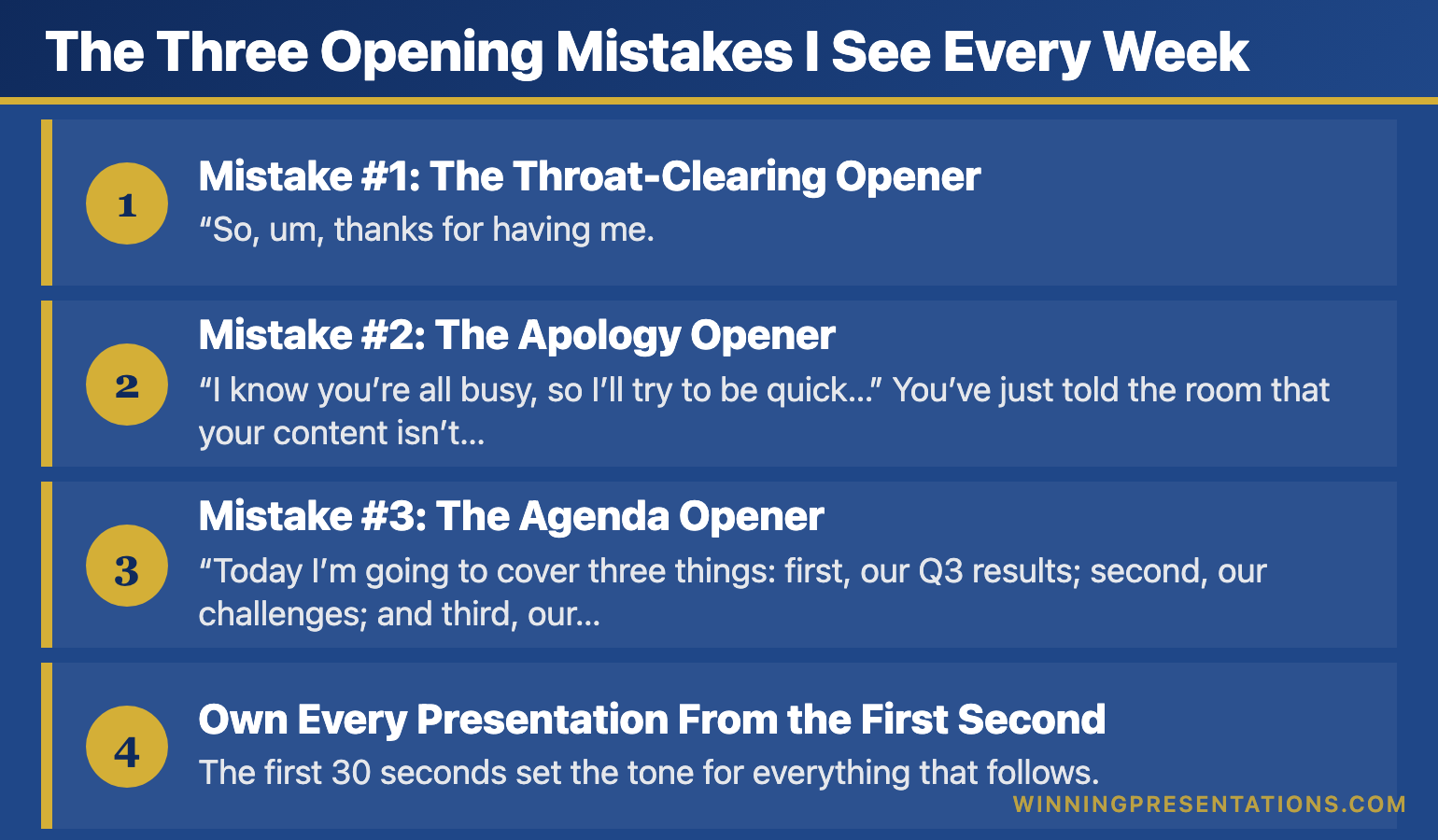
The Three Opening Mistakes I See Every Week

After training over 10,000 executives, I’ve identified the three opening mistakes that kill presentations before they start:

Infographic for: first 30 seconds presentation (image 1)

Mistake #1: The Throat-Clearing Opener

“So, um, thanks for having me. Let me just get my slides up here… okay, there we go. So today I’m going to talk about…”

This signals nervousness, lack of preparation, and — worst of all — that what’s coming isn’t important enough to be planned properly.

Mistake #2: The Apology Opener

“I know you’re all busy, so I’ll try to be quick…”

You’ve just told the room that your content isn’t valuable enough to deserve their full attention. Why would they give it to you?

Mistake #3: The Agenda Opener

“Today I’m going to cover three things: first, our Q3 results; second, our challenges; and third, our plan for next year.”

Boring. Predictable. Zero reason to pay attention. You’ve just told them everything they’re going to hear, so now they don’t need to listen.

The Pattern I’ve Noticed: The executives who get promoted, who close deals, who get their budgets approved — they never open this way. They’ve learned (often through painful experience) that the first 30 seconds determine everything that follows.

Own Every Presentation From the First Second

The first 30 seconds set the tone for everything that follows. The Executive Slide System gives you the exact opening frameworks senior leaders use to command attention and establish authority from the very first word.

Executive Slide System →

What I Learned from a £4 Million Mistake

Early in my banking career, I watched a senior colleague lose a £4 million deal in the first 30 seconds of a pitch.

He walked in, fumbled with the projector, apologized for being “a bit under the weather,” and opened with: “So, I know you’ve seen a lot of these pitches, but hopefully we can show you something different today.”

Hopefully? Hopefully?

The investors checked out immediately. I watched their body language shift — arms crossed, eyes down, phones appearing. The rest of the presentation was technically excellent, but it didn’t matter. The decision had already been made.

Afterwards, the lead investor told us: “You lost me at ‘hopefully.’ If you’re not certain your solution is different, why should I be?”

That moment changed how I thought about presentations forever.

If your first slides need to earn attention instead of losing it, The Executive Slide System gives you 22 ready-made templates to start from.

The 30-Second Framework That Changes Everything

After years of testing, refining, and watching what actually works in high-stakes situations, I developed a simple framework for the first 30 seconds:

Seconds 1-5: PRESENCE
Don’t speak immediately. Walk to your spot. Plant your feet. Make eye contact with three people. Breathe. This silence signals confidence and commands attention.

Seconds 6-15: HOOK
Open with something that creates curiosity — a surprising statistic, a bold statement, a relevant story, or a thought-provoking question. Make them need to hear what comes next.

Seconds 16-25: RELEVANCE
Connect your hook to their world. Why should they care? What’s at stake for them? Make it personal and immediate.

Seconds 26-30: PREVIEW
Tell them exactly what they’ll get from the next few minutes. Be specific about the value you’re delivering.

That’s it. Thirty seconds to transform your presentation from forgettable to commanding.

After the First 30 Seconds, Then What?

The Executive Slide System gives you the complete structure to follow through on a powerful opening — so every presentation you deliver is as strong at the end as it was at the start.

Executive Slide System →

Master Your First 30 Seconds (And Everything After)

The 30-Second Framework is just one module in my comprehensive AI-Enhanced Presentation Mastery course on Maven.

Over 6 weeks, you’ll learn:

  • How to open any presentation with confidence
  • The structure that keeps executives engaged
  • How to handle tough Q&A without freezing
  • Using AI tools to cut preparation time by 80%
  • The closing techniques that drive action

This isn’t theory — it’s the exact system I’ve used to train 10,000+ executives at companies from startups to leading organisations.

Live cohort starts January 2026.

Join the Course →

Why This Matters More Than Ever

In an age of Zoom fatigue and shrinking attention spans, the first 30 seconds matter more than they ever have.

Your audience has more distractions than ever. More tabs open. More messages pinging. More reasons to tune out.

But here’s what hasn’t changed: humans are still wired to pay attention to what’s interesting, relevant, and delivered with confidence.

Master those first 30 seconds, and you’ve earned the right to the next 30 minutes.

Waste them, and you’re talking to a room that’s already moved on.

The choice is yours.


Frequently Asked Questions

Why are the first 30 seconds of a presentation so important?

Research on first impressions shows audiences form judgements about a speaker’s credibility within seconds. If you open weakly — fumbling with slides, apologising, or reading your agenda — the audience mentally downgrades everything that follows. A strong opening creates a halo effect that carries through the entire presentation.

How do I make a strong first impression in a presentation?

Pause before speaking, make eye contact with the room, and deliver your opening line with conviction. Your first sentence should be surprising, relevant, or emotionally resonant — not logistical. Physical presence matters as much as words: stand still, speak clearly, and project confidence even if you do not feel it.

What should I say in the first 30 seconds of a presentation?

Lead with a hook: a striking observation, a question the audience has been thinking, or a brief scenario that illustrates the problem you are solving. Follow immediately with why this matters to them specifically. Do not introduce yourself or outline your agenda — save that for after you have earned their attention.

How do I recover if I start a presentation badly?

Pause, take a breath, and reset. You can say something like “Let me start with the most important point” — this reframes the opening without drawing attention to the stumble. Audiences are forgiving of a rocky start if the content that follows is strong. The recovery matters more than the mistake.

Mary Beth Hazeldine spent 25 years in investment banking at JPMorgan, PwC, RBS, and Commerzbank before becoming an executive presentation coach. She has trained over 10,000 executives and her clients have raised over £250 million using her presentation frameworks. Learn more at Winning Presentations.

One More Thing — Before You Go

Owning the first 30 seconds is the hardest part. The Executive Slide System gives you the structure to back it up — a complete decision-first framework that keeps executives with you all the way through.

Explore the System

Related Reading:

16 Dec 2025
Presentation Opening Lines: 50 Examples from TED Talks to Boardrooms

Presentation Opening Lines: 50 Examples from TED Talks to Boardrooms

Quick Answer: The best presentation opening lines create instant curiosity. Examples: “What if everything you knew about [topic] was wrong?” or “In the next 10 minutes, I’ll show you how to [specific benefit].” Avoid “Today I’m going to talk about…” — it kills attention immediately.

You’re standing in front of the room. Everyone’s looking at you. And you have exactly 10 seconds before they decide whether to pay attention or check their phones.

What do you say?

After training over 10,000 executives, I’ve collected the opening lines that actually work — from TED stages to investment banking boardrooms. Here are 50 you can steal today.

Want these 50 lines in a swipe file?

Get my Presentation Openers & Closers Swipe File — ready to copy, paste, and customize for your next presentation.

Get the Swipe File →

Opening Lines That Create Curiosity

These openers make your audience need to know what comes next:

1. “What if everything you’ve been taught about [topic] is wrong?”

2. “There’s a reason 90% of [audience] fail at [challenge]. And it’s not what you think.”

3. “I’m about to show you something that changed how I think about [topic] forever.”

4. “The biggest lie in [industry] is that [common belief]. Here’s the truth.”

5. “Three years ago, I discovered something that [specific result]. Today, I’m sharing it with you.”

“Win the room. Every time.” — weekly tactics on executive presentations, Copilot for PowerPoint, and the psychology of persuasion. Free, from Mary Beth Hazeldine.

Send me the free newsletter →

Opening Lines with Shocking Statistics

Numbers that surprise create instant engagement:

6. “75% of [audience] will [negative outcome] this year. You don’t have to be one of them.”

7. “In the time it takes me to finish this sentence, [striking statistic].”

8. “£4.2 million. That’s what [problem] cost companies like yours last year.”

9. “The average [professional] spends 23 hours a week on [activity]. I’m going to show you how to cut that in half.”

10. “Only 3% of [audience] ever achieve [goal]. Here’s what they do differently.”

Opening Lines with Stories

Stories activate emotion and memory:

11. “Last Tuesday, I watched a CEO lose a £10 million deal in eleven words.”

12. “When I walked into my first board meeting at JPMorgan, I made a mistake I’ll never forget.”

13. “Picture this: It’s 2am, you’re staring at 47 slides, and your presentation is in 6 hours.”

14. “The worst presentation of my career taught me the most valuable lesson.”

15. “A client called me last week in a panic. What happened next surprised us both.”

5 Categories of Powerful Presentation Opening Lines

Got the opening line — now build the rest in under 30 minutes

Once your hook lands, you still need 11 more slides that hold attention. Executive Slide System: 26 templates, 93 AI prompts, frameworks built in. £39, instant download.

Get the Slide System →

If you want slides that match the impact of a strong opening line, The Executive Slide System gives you 22 ready-made templates to start from.

Want the complete toolkit?

A strong opening is one piece of an executive presentation. The Complete Presenter Bundle pulls all seven products together — slides, Q&A, anxiety, storytelling, delivery, openers, cheat sheets — for £99 (save £91.97 vs buying separately). Lifetime access.

Get the Complete Presenter Bundle — £99 →

Opening Lines with Questions

Questions force active engagement:

16. “When was the last time you sat through a presentation and thought, ‘I wish this was longer’?”

17. “What would it mean for your career if you could [specific outcome]?”

18. “How many of you have ever [common frustrating experience]?” (Wait for hands)

19. “What’s the one thing standing between you and [goal]?”

20. “If I could guarantee [result], would that be worth 15 minutes of your time?”

Opening Lines with Bold Statements

Confidence commands attention:

21. “Everything you’re about to hear contradicts conventional wisdom. And it works.”

22. “I’m not here to give you information. I’m here to change how you think.”

23. “This presentation will either transform your approach or confirm you’re already doing it right.”

24. “By the end of this session, you’ll never [common mistake] again.”

25. “I’ve spent 25 years in boardrooms. Here’s what actually matters.”

Opening Lines for Specific Situations

For Board Presentations:

26. “I’ll give you the recommendation first, then the reasoning. We need £2.3 million to [goal].”

27. “Three numbers tell the story of this quarter: [X], [Y], and [Z].”

28. “Before I show you the data, let me tell you what it means for next year.”

For Investor Pitches:

29. “[Market] is a £4 billion problem. We’ve built the solution.”

30. “In 18 months, we’ve gone from idea to £2 million ARR. Here’s how we’ll 10x that.”

31. “The companies that invested in [comparable] early made 40x returns. This is that opportunity.”

For Sales Presentations:

32. “Your competitors are already doing this. Let me show you what you’re missing.”

33. “I’ve spoken to 50 companies like yours. They all have the same problem.”

34. “What if I told you there’s a way to [benefit] without [sacrifice]?”

For Team Meetings:

35. “I’ve got good news and better news. Which do you want first?”

36. “We’ve achieved something this quarter that’s never been done before.”

37. “I need your help solving a problem that’s been keeping me up at night.”

Opening Lines to Avoid

Never start with these — they kill momentum instantly:

❌ “Good morning, my name is… and today I’m going to talk about…”

❌ “Can everyone hear me okay?”

❌ “I know you’re all busy, so I’ll try to be quick…”

❌ “I’m just going to quickly run through…”

❌ “Sorry, let me just get my slides working…”

❌ “I’m not really an expert, but…”

For a deeper dive into why these openings fail and the psychology behind what works, read my complete guide: How to Start a Presentation: 15 Powerful Openers That Grab Attention.


Mary Beth Hazeldine has trained over 10,000 executives in presentation skills. With 25 years in investment banking (JPMorgan, PwC, RBS, Commerzbank) and 16 years as a presentation coach, she knows what works in high-stakes situations. Learn more at Winning Presentations.

Frequently Asked Questions

What are good opening lines for a presentation?

Strong opening lines create curiosity or recognition. Examples include posing a specific problem your audience faces, sharing a brief scenario they relate to, citing a surprising piece of data, or making a bold claim you will then support. Avoid generic openers like “Good morning, my name is…” or “Today I will be covering…”

How do you write an opening statement for a presentation?

Start by identifying the one thing your audience cares about most, then craft a sentence that speaks directly to that concern. Use specific language — name the scenario, the stakes, or the outcome. Test it by asking: would this make a busy executive look up from their phone?

What is the 10-20-30 rule for presentations?

The 10-20-30 rule, popularised by Guy Kawasaki, suggests presentations should have no more than 10 slides, last no longer than 20 minutes, and use font no smaller than 30 points. While not universally applicable, the principle — simplicity, brevity, and readability — applies to all executive presentations.

How many words should a presentation opening be?

Your opening should be 30-50 words — roughly 15-20 seconds of speaking time. This is enough to deliver one compelling hook. Longer openings risk losing momentum. After the hook, transition to your key message within the first 60 seconds.

Related Reading:

16 Dec 2025
How to Start a Presentation: 15 Powerful Openers That Grab Attention

How to Start a Presentation: 15 Powerful Openers That Grab Attention

Quick Answer: The best way to start a presentation is to grab attention in the first 10 seconds with a surprising statistic, a bold statement, a relevant story, or a thought-provoking question. Avoid starting with “Today I’m going to talk about…” — you’ll lose your audience before you begin.

I’ve watched over 500 executive presentations in my career. Investment bankers pitching billion-pound deals. Biotech founders presenting to skeptical investors. Senior leaders defending budgets to hostile boards.

And I can tell you exactly when most of them lost their audience: the first 30 seconds.

The opening of your presentation isn’t just important — it’s everything. Get it wrong, and you’re fighting an uphill battle for the next 20 minutes. Get it right, and your audience leans in, ready to hear what you have to say.

After 25 years in investment banking at JPMorgan, PwC, RBS, and Commerzbank — plus 16 years coaching executives on high-stakes presentations — I’ve identified exactly what works. Here are 15 powerful openers that grab attention and set you up for success.

Want 50 ready-to-use opening lines?

My Presentation Openers & Closers Swipe File gives you structured opening lines for every situation — from board meetings to investor pitches.

Get 50 Opening Lines →

Why the First 10 Seconds Matter More Than Anything Else

Neuroscience tells us something uncomfortable: your audience decides whether to pay attention within the first 10 seconds. Not 10 minutes. Ten seconds.

This is called the “primacy effect” — we remember beginnings and endings far more than middles. And in those crucial first moments, your audience is asking one question:

“Is this going to be worth my time?”

If you start with “Good morning, my name is Sarah and today I’m going to talk about our Q3 results…” — you’ve already answered that question. And the answer is no.

Here’s what the best presenters do differently.

15 Powerful Ways to Start a Presentation

15 Powerful Presentation Openers Infographic

1. The Shocking Statistic

Numbers that surprise create instant engagement. The key is contrast — show them something that challenges their assumptions.

Example: “75% of venture-backed startups fail. But the companies that master investor presentations are 40% more likely to get funded. Today, I’m going to show you exactly what separates the funded from the forgotten.”

Why it works: You’ve created a gap between what they know and what they need to know. Now they have to keep listening.

2. The Bold Statement

Make a claim that’s unexpected or even slightly controversial. This triggers curiosity and positions you as someone with a point of view.

Example: “Everything you’ve been taught about presenting to boards is wrong. And it’s costing you promotions.”

Why it works: You’ve challenged the status quo. Even if they disagree, they want to hear your reasoning.

3. The Relevant Story

Stories activate different parts of the brain than data alone. A well-chosen story creates emotional connection and makes abstract concepts concrete.

Example: “Three years ago, I sat in a boardroom in Frankfurt and watched a CFO lose a £4 million budget approval in eleven words. He opened with ‘I know we’re over budget, but let me explain.’ The meeting was over before it started.”

Why it works: Stories create suspense. Your audience wants to know what happened next — and how to avoid the same fate.

4. The Thought-Provoking Question

Questions engage the brain differently than statements. They force your audience to think, which means they’re actively participating rather than passively listening.

Example: “When was the last time you sat through a presentation and thought, ‘I wish this was longer’?”

Why it works: You’ve made them smile and acknowledged a shared frustration. You’re on the same side now.

5. The “Imagine” Scenario

Invite your audience into a future state. This technique, borrowed from hypnotherapy, creates a vivid mental picture that makes your solution feel tangible.

Example: “Imagine walking into your next board presentation completely calm. You know exactly what to say. The executives are nodding. And when you finish, the CEO says, ‘That was exactly what we needed.’ What would that be worth to you?”

Why it works: You’ve made them feel the outcome before you’ve explained the process.

6. The Counterintuitive Truth

Share something that goes against conventional wisdom. This positions you as an expert with insider knowledge.

Example: “The best presentations I’ve ever seen had zero bullet points. None. And they won billion-pound deals.”

Why it works: You’ve challenged a default assumption. Now they need to understand why.

Stop Fumbling Your Presentation Openings

The Executive Slide System gives you structured opening frameworks that command attention immediately — so you walk into every presentation knowing exactly how to start.

Executive Slide System →

7. The Specific Promise

Tell them exactly what they’ll get from the next few minutes. Be specific and benefit-focused.

Example: “In the next 12 minutes, I’m going to give you the three-slide structure that’s helped my clients raise over £250 million in funding. You can implement it in your next presentation tomorrow.”

Why it works: You’ve set clear expectations and promised immediate value. They know what’s coming and why it matters.

8. The Shared Problem

Articulate the pain your audience is experiencing. When people feel understood, they trust you to provide the solution.

Example: “You’ve spent three weeks on this presentation. You’ve rehearsed it a dozen times. And you still can’t shake the feeling that when you stand up, your mind will go blank and everyone will see you’re not ready.”

Why it works: You’ve demonstrated that you understand their world. You’re not just another presenter — you’re someone who gets it.

Struggling with presentation anxiety?

My Calm Under Pressure Toolkit gives you breathing techniques, confidence frameworks, and mental preparation strategies used by professional speakers.

Get the Confidence Toolket →

9. The Behind-the-Scenes Insight

Give them access to information they wouldn’t normally have. This creates a sense of exclusivity and trust.

Example: “I’ve sat in due diligence meetings at four global banks. And I can tell you exactly what the investment committee says after you leave the room…”

Why it works: You’re offering insider knowledge. They’re getting something not everyone gets access to.

10. The Historical Parallel

Connect your topic to a famous moment in history. This adds weight and context to your message.

Example: “In 1984, Steve Jobs stood in front of shareholders and said three words that changed Apple forever. Those three words weren’t about technology — they were about belief. And they’re the same three words you need in your next pitch.”

Why it works: You’ve borrowed credibility from a known success story and created curiosity about the connection.

11. The Live Demonstration

Show rather than tell. A well-executed demo captures attention like nothing else.

Example: Start by silently walking to the front of the room, pausing for three full seconds, and making eye contact with five people before saying a word. Then say: “That silence made you pay attention. Today, I’m going to show you how to command a room before you even speak.”

Why it works: You’ve demonstrated your expertise in real-time. No one is checking their phone now.

12. The Personal Failure

Vulnerability creates connection. When you share a mistake, you become human — and your audience trusts you more.

Example: “The worst presentation of my career was in front of 200 people at a banking conference. I blanked on my own name. Literally forgot who I was. And what I learned in the next 30 seconds saved my career.”

Why it works: They want to know how you recovered. And they believe you’ll help them avoid the same fate.

13. The Unexpected Object

Bring a physical prop. Objects create visual interest and give you something to anchor your message.

Example: Hold up a single slide printout. “This is the only slide that mattered in a £50 million deal. One slide. The other 47 were background noise. Today, I’ll show you how to find your one slide.”

Why it works: Physical objects break the pattern of typical presentations. People pay attention to what’s different.

14. The Direct Challenge

Challenge your audience to think differently or take action. This creates engagement through a sense of urgency.

Example: “By the end of this presentation, you’ll either change how you open every meeting — or you’ll keep losing your audience in the first 30 seconds. The choice is yours.”

Why it works: You’ve raised the stakes. This isn’t just information — it’s a decision point.

15. The Silence

Sometimes the most powerful opening is no words at all. Strategic silence commands attention and demonstrates confidence.

Example: Walk to the front. Stand still. Look at your audience for 5 full seconds. Then, quietly: “Now that I have your attention… let’s talk about why most presentations lose it.”

Why it works: Silence is unexpected. In a world of noise, quiet commands the room.

The Openings That Kill Your Credibility

Now that you know what works, here’s what to avoid:

❌ “Can everyone hear me?” — Start as if you’re already in command.

❌ “I’m just going to quickly talk about…” — The word “just” diminishes your message before you’ve delivered it.

❌ “I know you’re all busy, so I’ll try to be quick…” — You’ve just signaled that what you’re about to say isn’t important.

❌ “Today I’m going to talk about…” — Boring. They know you’re going to talk. Show them why they should care.

❌ “Let me just share my screen…” — Technical fumbling kills momentum. Have everything ready before you speak.

❌ Apologizing for anything — Never open with an apology. It puts you on the back foot immediately.

A Powerful Opening Deserves an Equally Powerful Deck

The Executive Slide System pairs your strong opening with a decision-first slide structure that keeps executives engaged from your first word to your final ask.

Executive Slide System →

If you want opening slides that command attention from the first second, The Executive Slide System gives you 22 ready-made templates to start from.

How to Choose the Right Opening for Your Situation

Not every opener works for every context. Here’s how to match your opening to your audience:

Board presentations: Use the Bold Statement, Specific Promise, or Shocking Statistic. Executives want confidence and clarity.

Investor pitches: Use the Relevant Story, Specific Promise, or Behind-the-Scenes Insight. Investors need to trust you before they trust your numbers.

Team meetings: Use the Shared Problem, Thought-Provoking Question, or “Imagine” Scenario. Internal audiences need to feel included.

Sales presentations: Use the Counterintuitive Truth, Direct Challenge, or Personal Failure. Buyers are skeptical — surprise them.

Conference keynotes: Use the Live Demonstration, Silence, or Historical Parallel. Large audiences need theatrical moments to stay engaged.

Ready to Transform How You Present?

For immediate help:

For complete transformation:

My AI-Enhanced Presentation Mastery course covers everything — from opening to closing, from confidence to content. Live cohort starts January 2026.

Join the Maven Course →

The 30-Second Opening Framework

If you remember nothing else from this article, use this simple framework for your next presentation:

Second 1-5: Establish presence (pause, make eye contact, breathe)

Second 6-15: Hook them (statistic, story, question, or bold statement)

Second 16-25: Create relevance (why this matters to THEM)

Second 26-30: Preview the value (what they’ll get from the next X minutes)The 30-Second Opening Framework: Presence, Hook, Relevance, Preview

That’s it. Thirty seconds to change the trajectory of your entire presentation.

One More Thing — Before You Go

If you want a complete presentation system — not just a strong opening — the Executive Slide System gives you the full structure from first slide to final close.

Explore the System

What Happens After a Great Opening

A powerful opening does more than grab attention — it changes the dynamic of the entire presentation.

When you open strong, you feel more confident. Your audience is engaged. You have momentum. Everything that follows is easier.

When you open weak, you spend the rest of the presentation trying to recover. You can feel the room’s attention drifting. You rush. You doubt yourself.

The difference between a presentation that wins and one that’s forgotten often comes down to those first 30 seconds.

Choose your opening carefully. Practice it until it’s second nature. And walk into that room knowing that before you’ve even finished your first sentence, you’ve already won half the battle.


Mary Beth Hazeldine is an executive presentation coach with 25 years in investment banking (JPMorgan, PwC, RBS, Commerzbank) and 16 years training executives to present with confidence. She has trained over 10,000 executives through Winning Presentations.

Related Reading:

Frequently Asked Questions

How should I start a presentation to grab attention?

Open with a surprising statistic, a bold statement, a relevant story, or a thought-provoking question. The first 10 seconds determine whether your audience leans in or checks out. Avoid starting with your name, your agenda, or ‘Today I’m going to talk about…’ — these signal a routine presentation.

What is the best opening line for a business presentation?

The best opening lines create immediate relevance for the audience. Try a specific problem statement they recognise (‘Every quarter, we lose three days rebuilding the same slides’), a counterintuitive claim, or a brief client scenario. The key is making the audience feel the topic matters to them personally, not just to you.

How do you start a presentation without being nervous?

Prepare your opening line word-for-word and practise it until it feels natural. Arrive early, claim your space, and take one slow breath before speaking. Starting with a well-rehearsed line gives you momentum — nervousness typically drops after the first 30 seconds once you hear your own voice sounding confident.

Should I start a presentation with a joke?

Only if humour is natural to your style and the setting allows it. In executive and board settings, opening with a relevant observation or insight is more effective than a joke. A failed joke creates awkwardness that takes minutes to recover from, while a compelling question or story creates instant engagement with zero risk.

📧 The Winning Edge Newsletter

Weekly insights on executive presentations, QBR strategies, and what’s actually working in boardrooms right now.

Subscribe Free →

15 Dec 2025
Best Pitch Deck Software 2026: 11 tools tested and ranked including Slidebean, Canva, Beautiful.ai, and Gamma. Updated December 2025.

Pitch Deck Software: The Tool Most Founders Waste Money On (And What Actually Matters)

🔄
Last Updated: December 2025• Verified all pricing & features

There’s no shortage of pitch deck tools—but most comparisons ignore how they’re actually used. This review looks at the best pitch deck software in 2026, focusing on real strengths and trade-offs.

Last month, a biotech founder showed me the pitch deck she’d spent 47 hours building in PowerPoint. It was 32 slides of dense text, clip art, and inconsistent fonts. She’d been rejected by 19 investors.

We rebuilt it in Slidebean in 4 hours. She closed her £2.3M seed round six weeks later.

The tool didn’t save her pitch. Her science was always solid. But the right software removed friction, applied investor-proven structure, and let her focus on story instead of wrestling with formatting.

I’ve tested every pitch deck tool that matters across 16 years of presentation consulting. This guide cuts through the marketing to tell you which ones actually work — and which are wasting your time.

🎁 FREE DOWNLOAD

Updated 27 March 2026 — Revised for the latest Microsoft Copilot and ChatGPT capabilities.

Pitch Deck Structure Checklist

The 10-slide framework I’ve refined across hundreds of client decks. Works with any software.

Download Free Checklist →

📋 Quick Answer: Which Pitch Deck Software Should You Choose?

  • Best overall for startups: Slidebean — investor-focused templates, analytics, professional services ($96/year)
  • Best free option: Canva — massive template library, easy to use (Free or $13/month)
  • Best for non-designers: Beautiful.ai — auto-formatting smart slides ($12/month)
  • Best AI-powered: Gamma — generates full decks from prompts ($8/month)
  • Best for PowerPoint users: Microsoft Copilot — AI inside your existing workflow (£30/month)

Still not sure? Use our decision tree below or book a free consultation.

🆕 What’s New in Pitch Deck Software (December 2025)

  • Gamma launched Agent Mode — conversational deck building with follow-up questions
  • Beautiful.ai increased Pro pricing to $12/month (was $10)
  • Microsoft Copilot added Agent Mode for PowerPoint users (Windows only)
  • Tome pivoted to sales/marketing focus — removed free AI features
  • Slidebean now offers $7/month Starter plan with AI builder access


Complete Comparison: All 11 Pitch Deck Tools

Before diving into individual reviews, here’s how every tool stacks up. I’ve tested each one on the same criteria: ease of use, design quality, investor-readiness, and whether it actually saves time.

Tool Price Best For AI Features Analytics Our Rating
Slidebean $7-42/mo Startups raising funding ✅ Full ✅ Investor tracking 9.5/10
Canva Free-$13/mo Budget-conscious, multi-purpose ✅ Magic Write ❌ None 8.5/10
Beautiful.ai $12-40/mo Non-designers, teams ✅ Smart Slides ✅ Viewer analytics 8.5/10
Gamma Free-$20/mo Speed, AI-first creation ✅ Full generation ✅ Pro only 8/10
Tome Free-$16/mo Sales teams, storytelling ⚠️ Paid only ✅ Engagement 7/10
Copilot for PowerPoint £30/mo PowerPoint power users ✅ Agent Mode ❌ None 8/10
Visme Free-$29/mo Data-heavy presentations ✅ AI Writer ✅ Pro only 7.5/10
Prezi Free-$25/mo Non-linear storytelling ✅ Create with AI ✅ Premium only 7/10
Pitch Free-$22/mo Team collaboration ✅ AI assist ✅ Engagement 7.5/10
Google Slides Free Collaboration, simplicity ✅ Gemini ❌ None 7/10
PowerPoint $7-22/mo Enterprise, full control ✅ With Copilot ❌ None 7/10

Prices verified December 2025. All ratings based on pitch deck creation specifically, not general presentation use.


Detailed Reviews: Every Tool Tested

1. Slidebean — Best for Startups Raising Funding ⭐ Top Pick

Price: Starter $7/month, Accelerate $42/month (billed annually)
Free tier: Yes, limited features
Best for: Seed to Series A founders who need investor-ready decks fast

Slidebean was built specifically for startup fundraising, and it shows. While Canva tries to be everything to everyone, Slidebean focuses on one thing: helping founders create decks that investors actually fund.

What I love:

  • Investor-proven templates — Based on decks from YC, 500 Startups, and successfully funded companies
  • AI auto-design — Input content, Slidebean handles layout. No dragging boxes.
  • Pitch analytics — See which slides investors spend time on (and which they skip)
  • Financial modeling tools — Built-in templates for projections and unit economics
  • Professional services option — Can upgrade to have their team write and design your deck

What’s limiting:

  • Less design flexibility than Canva (by design — prevents bad choices)
  • Locked to Slidebean platform (though exports to PDF/PPTX)
  • Some templates feel dated compared to newer AI tools

Real result: A SaaS founder I worked with used Slidebean to create her seed deck in 6 hours (vs. 40+ hours in PowerPoint previously). She raised £1.8M in 8 weeks. The analytics showed investors spent 3x longer on her traction slide than market size — insight that shaped her verbal pitch.

Verdict: If you’re actively fundraising and want a tool built for that exact purpose, Slidebean is the obvious choice. The investor analytics alone justify the cost.

🔗 Try Slidebean Free →

2. Canva — Best Free Option & Most Versatile

Price: Free, Pro $13/month
Free tier: Yes, very generous
Best for: Budget-conscious founders, multi-purpose design needs

Canva is the Swiss Army knife of design tools. It’s not built specifically for pitch decks, but its flexibility, massive template library, and unbeatable free tier make it the go-to for founders who need to create everything from decks to social media graphics.

What I love:

  • Thousands of pitch deck templates — More variety than any competitor
  • Magic Write AI — Generate and refine content within slides
  • Drag-and-drop simplicity — Zero learning curve
  • 60M+ stock assets — Photos, icons, graphics included
  • Exports everywhere — PDF, PPTX, video, web links
  • Free tier is actually usable — Not just a trial

What’s limiting:

  • Not built for pitch decks specifically — no investor analytics
  • Everyone uses Canva — VCs see the same templates constantly
  • Too many options can overwhelm (paradox of choice)
  • Requires design sense to avoid generic results

Real result: One pre-seed founder used Canva to create a clean, minimalist deck for her F&F round. Total cost: £0. She raised £150K. For early-stage, low-stakes pitches, Canva delivers.

Verdict: Start with Canva if you’re bootstrapping or need a multi-purpose tool. But if you’re raising £500K+, consider Slidebean or Beautiful.ai for more investor-focused features.

🔗 Try Canva Free →

3. Beautiful.ai — Best for Non-Designers

Price: Pro $12/month, Team $40/user/month (billed annually)
Free tier: 14-day trial only
Best for: Founders with no design skills who want polished results automatically

Beautiful.ai’s “Smart Slides” are genuinely clever. As you add content, the layout automatically adjusts to stay balanced and professional. You literally cannot make an ugly slide — the system prevents it.

What I love:

  • Smart Slides auto-format — Add text, layout adjusts. Magic.
  • Consistent design guaranteed — Impossible to break the template
  • Viewer analytics — Track engagement on shared decks
  • PowerPoint import/export — Works with existing files
  • 14-day free trial — Enough time to build a real deck

What’s limiting:

  • Limited customization (the trade-off for auto-formatting)
  • No free tier after trial — must pay or lose access
  • Smaller template library than Canva
  • Team pricing gets expensive fast ($40/user)

Real result: A technical founder with zero design sense used Beautiful.ai to create a Series A deck. His investors commented on how “clean and professional” it looked. He spent 4 hours total.

Verdict: If you’re a technical founder who thinks in code, not design, Beautiful.ai removes the guesswork. Just add content and let the AI handle aesthetics.

🔗 Try Beautiful.ai Free for 14 Days →

4. Gamma — Best AI-First Deck Generation

Price: Free (400 credits), Plus $8/month, Pro $20/month
Free tier: Yes, with AI credits
Best for: Speed-focused founders who want AI to do the heavy lifting

Gamma is the most AI-forward tool on this list. Give it a topic, and it generates an entire presentation in under a minute. The December 2025 update added “Agent Mode” for conversational deck building.

What I love:

  • Full deck generation from prompts — Type a topic, get 10 slides
  • Web-native format — Share links, not files
  • One-click restyling — Change themes without affecting content
  • Agent Mode (new) — AI asks clarifying questions before generating
  • Generous free tier — 400 credits to start

What’s limiting:

  • No PowerPoint export (PDF only)
  • AI-generated content needs heavy editing for accuracy
  • Less investor-specific than Slidebean
  • Credit system can feel limiting for heavy users

Real result: A founder used Gamma to create a first-draft pitch deck in 15 minutes. It required 2 hours of editing, but gave him a starting point instead of a blank page. For ideation and speed, Gamma is unmatched.

Verdict: Use Gamma when you need to go from zero to draft in minutes. But don’t send AI-generated content to investors without significant refinement.

🔗 Try Gamma Free →

5. Tome — Best for Sales Teams (Pivoted from Startups)

Price: Free (limited, no AI), Professional $16/month
Free tier: Yes, but AI features removed
Best for: Sales and marketing teams, not startup fundraising

Important update: Tome pivoted in late 2025 to focus on sales/marketing personas. They removed AI features from the free plan and now position as a sales enablement tool rather than a general presentation maker.

What I love:

  • Beautiful narrative flow — Designed for storytelling
  • Video/audio embedding — Rich multimedia support
  • CRM integrations — Connect to sales workflows
  • Engagement analytics — Track what prospects view

What’s limiting:

  • No AI on free plan (major change from 2024)
  • Not PowerPoint-compatible
  • Pivoted away from startup/investor focus
  • User reviews mention layout inflexibility

Verdict: If you’re in sales creating proposals and leave-behinds, Tome works. But for investor pitch decks specifically, other tools are now better suited.

🔗 Try Tome →

6. Microsoft Copilot for PowerPoint — Best for PowerPoint Power Users

Price: £30/month (Copilot add-on to Microsoft 365)
Free tier: No
Best for: Professionals already in the Microsoft ecosystem

If your company lives in PowerPoint and you’re not switching, Copilot brings AI directly into your existing workflow. The December 2025 “Agent Mode” update added conversational interactions — ask Copilot questions and it makes surgical edits.

What I love:

  • Works inside PowerPoint — No new tool to learn
  • Agent Mode (December 2025) — Conversational, not just one-shot prompts
  • Document to slides — Transform Word docs into presentations
  • Brand consistency — Respects your company templates
  • Speaker notes generation — Automatic talking points

What’s limiting:

  • Expensive (£30/month on top of Microsoft 365)
  • Agent Mode currently Windows-only
  • Requires good prompts to get good results
  • No investor analytics or tracking

Real result: Using Copilot, I helped a client turn a 40-page strategy document into a 15-slide board presentation in 25 minutes. The time savings are real.

Verdict: If you’re already paying for Microsoft 365 and use PowerPoint daily, Copilot is worth the add-on. If you’re starting fresh, purpose-built tools like Slidebean or Beautiful.ai offer more for pitch decks specifically.

🔗 Read our complete Copilot tutorial →

7. Visme — Best for Data-Heavy Presentations

Price: Free (limited), Starter $12.25/month, Pro $24.75/month
Free tier: Yes, with 10 monthly credits
Best for: Founders with complex data needing visualization

Visme shines when your pitch deck needs charts, infographics, and data visualization. With 50+ data widget types, it handles complex information better than most competitors.

What I love:

  • 50+ data visualization types — Charts, graphs, infographics
  • Google Sheets/Excel integration — Live data updates
  • AI writing assistant — Generate and refine content
  • Interactive elements — Embed videos, forms, animations
  • Brand kit — Maintain consistency across decks

What’s limiting:

  • Steeper learning curve than Canva
  • AI features require Pro subscription
  • Can feel overwhelming with options
  • Less startup-specific than Slidebean

Verdict: If your pitch relies on complex data (biotech, fintech, analytics companies), Visme’s visualization tools are unmatched. For simpler decks, it may be overkill.

🔗 Try Visme’s AI pitch deck generator →

8. Prezi — Best for Non-Linear Storytelling

Price: Free (limited), Standard $7/month, Plus $15/month, Premium $25/month
Free tier: Yes, with Prezi branding
Best for: Presenters who want to break from linear slides

Prezi’s zoomable canvas creates a different kind of presentation — one big visual that you navigate rather than linear slides. It’s memorable when done well, but risky for traditional investor audiences.

What I love:

  • Unique visual format — Stands out from every PowerPoint
  • AI presentation generator — Create from prompts
  • Video integration — Record yourself over slides
  • Great for complex topics — Show how ideas connect

What’s limiting:

  • Unfamiliar format can confuse investors
  • Motion can cause nausea (seriously)
  • Not exportable to PowerPoint properly
  • Learning curve for the canvas approach

Verdict: Prezi works for educational content and conference talks. For investor pitch decks, the unfamiliar format creates unnecessary risk. Stick to linear slides for fundraising.

🔗 Try Prezi Free →

9. Pitch — Best for Team Collaboration

Price: Free (3 presentations), Pro $8/member/month, Business $22/member/month
Free tier: Yes, limited presentations
Best for: Co-founding teams building decks together

Pitch is Google Slides with polish. If your founding team needs to collaborate in real-time with smooth handoffs, Pitch delivers the most refined experience.

What I love:

  • Real-time collaboration — Google Docs-style simultaneous editing
  • Pitch Rooms — Send decks with videos to stakeholders
  • Engagement analytics — Track what viewers see
  • Beautiful templates — Modern, clean designs
  • AI assist — Help with content and formatting

What’s limiting:

  • Free tier limited to 3 presentations
  • Less investor-specific than Slidebean
  • Smaller template library than Canva
  • Pricing per-member adds up for teams

Verdict: If you’re a team of 2-5 co-founders building your deck together, Pitch’s collaboration features are excellent. Solo founders may not need it.

🔗 Try Pitch Free →

10. Google Slides — Best for Simplicity & Collaboration

Price: Free
Free tier: Yes, fully free
Best for: Quick, collaborative decks without budget

Google Slides is basic but reliable. With Gemini AI integration in 2025, it now generates content and suggests designs — though not as sophisticated as purpose-built tools.

What I love:

  • 100% free — No hidden costs
  • Real-time collaboration — Multiple editors simultaneously
  • Works everywhere — Browser-based, any device
  • Gemini AI — Generate slides from prompts
  • Version history — Never lose work

What’s limiting:

  • Limited templates and designs
  • No analytics or tracking
  • Basic compared to AI-powered alternatives
  • Exports to PowerPoint can break formatting

Verdict: Google Slides works for internal decks and early drafts. For investor-facing presentations, upgrade to a tool with better design automation.

🔗 Open Google Slides →

11. Microsoft PowerPoint — Best for Enterprise & Full Control

Price: Microsoft 365 Personal $7/month, Business $12.50/month
Free tier: Web version is free with limited features
Best for: Enterprise users who need maximum flexibility

PowerPoint is the industry standard for a reason — it does everything. But “everything” also means hours of manual work that AI tools now automate.

What I love:

  • Total control — Every pixel customizable
  • Universal compatibility — Everyone can open PPTX
  • Mature feature set — Animations, transitions, everything
  • Works offline — No internet required
  • Add Copilot for AI — Best of both worlds (at extra cost)

What’s limiting:

  • Manual design work — time-consuming
  • No built-in analytics
  • Easy to make ugly slides without design skills
  • Copilot costs extra £30/month

Verdict: PowerPoint + Copilot is powerful for those who master it. But most founders should start with AI-native tools and export to PPTX if needed.

🔗 Get PowerPoint →


Stop Guessing What to Type. Start Building in 25 Minutes.

The Executive Prompt Pack gives you 71 tested prompts for ChatGPT and Copilot — structured by scenario so you know exactly what to type:

  • Build from scratch — scenario prompts for board reviews, budget requests, and investor decks
  • Rescue and rewrite — audit an existing deck, condense it, or fix one slide at a time
  • Industry-specific prompts for financial services, banking, consulting, and executive audiences
  • Power modifiers that transform any prompt into board-ready output
  • The 25-minute deck workflow that replaces 3–4 hours of manual building

Works with ChatGPT, Microsoft Copilot, and Edit with Copilot (formerly Agent Mode). Updated March 2026.

Get the Executive Prompt Pack → £19.99

Decision Tree: Choose Your Tool in 60 Seconds

Still not sure? Answer these questions:

Decision tree flowchart for choosing pitch deck software based on budget, design skills, and use case

🎯 Quick Decision Guide

Q1: What’s your budget?

  • £0 → Canva Free or Google Slides
  • Under £15/month → Canva Pro, Gamma, or Beautiful.ai
  • Budget isn’t the constraint → Continue to Q2

Q2: Are you actively raising funding?

  • Yes, raising £500K+ → Slidebean (investor analytics matter)
  • Yes, raising under £500K → Beautiful.ai or Canva Pro
  • No, internal/sales use → Continue to Q3

Q3: Do you have design skills?

  • Yes → Canva (maximum flexibility)
  • No → Beautiful.ai (auto-formatting prevents bad design)

Q4: Do you need speed above all else?

  • Yes, I need a draft in 15 minutes → Gamma
  • I can invest 4-8 hours for quality → Any of the above

Q5: Are you already using PowerPoint daily?

  • Yes, and I’m not switching → PowerPoint + Copilot
  • No, I’m open to new tools → Choose based on Q1-Q4


For 71 tested prompts covering every scenario — build from scratch, rescue an existing deck, or fix individual slides — the Executive Prompt Pack gives you exactly what to type, updated for the latest Copilot and ChatGPT capabilities.

When to Stop Using Software and Hire Professionals

Here’s what I tell every founder: Tools are training wheels. They help you learn structure. But they have limits.

After 16 years in presentation consulting, I can spot template-based pitches in 30 seconds. So can VCs.

Software Works When:

  • You’re raising under £500K (friends & family, pre-seed)
  • You have 10+ hours to invest in learning and iteration
  • Your business model is straightforward to explain
  • You’re using the deck as a starting point, not final product

Hire Professionals When:

  • Raising £500K+ — Cost of poor deck > cost of professional help
  • Series A or later — Institutional investors expect excellence
  • Multiple rejections — Your deck probably isn’t the problem; your narrative is
  • Complex business model — Marketplace, B2B2C, deep tech
  • Tight timeline — Can’t afford to learn by trial and error

🎯 RAISING £500K+?

Stop wrestling with templates

We build investor-ready decks with field-tested narrative structure, professional design, and delivery coaching.

Deck Review

Expert feedback on your existing deck

£500

Full Deck Creation

Custom narrative + professional design

£2,000-5,000

Pitch Coaching

Deck + delivery mastery

Custom

Book Free Discovery Call →

30 minutes. No sales pressure. Honest advice on your situation.

71 Prompts. Every Scenario Covered.

Build from scratch, rescue an existing deck, or perfect individual slides — the Executive Prompt Pack covers every scenario. Works with ChatGPT, Copilot, and Edit with Copilot. Updated March 2026.

Get the Prompts → £19.99

Frequently Asked Questions

Can I really raise funding with a free tool like Canva?

Yes, but with caveats. Canva works for friends & family rounds and small seed raises. For institutional VCs, the lack of investor analytics and the risk of using templates they’ve seen before can hurt. If you’re raising £500K+, invest in Slidebean or hire professionals.

Which tool do VCs prefer?

VCs don’t care about your tool — they care about your story, metrics, and team. That said, they notice poor design. Any tool on this list produces professional results if used well. What matters is clarity, not the software logo.

Should I use AI to write my pitch deck content?

Use AI for first drafts and iteration, not final content. AI-generated text is generic by definition — it can’t capture your unique value proposition or specific traction metrics. Use Gamma or Copilot to accelerate, then heavily edit everything.

How long should my pitch deck be?

10-15 slides for in-person pitches. Standard structure: Problem, Solution, Product, Market, Business Model, Traction, Team, Competition, Financials, Ask. Include 15-20 backup slides for Q&A.

Can I use Gamma or Tome instead of PowerPoint?

For web-based sharing, yes. But many VCs still request PPTX files. Check if your target investors accept link-based presentations before committing to a web-only tool.

What’s the biggest mistake founders make with pitch deck software?

Treating templates as fill-in-the-blank forms. Templates give structure, not substance. The biggest failure is using generic language and stock examples instead of your specific story and metrics.

Is Slidebean worth the price compared to free options?

If you’re actively fundraising, yes. The investor analytics alone — seeing which slides investors spend time on — provides insights that improve your verbal pitch. For internal presentations, free tools work fine.

Related Resources

Your Next Step

You’ve now seen how all 11 pitch deck tools compare. Here’s what to do:

  1. If you’re learning: Start with Canva Free or Gamma
  2. If you’re raising under £500K: Use Beautiful.ai or Canva Pro
  3. If you’re raising £500K+: Choose Slidebean or book a call with us

Remember: The best pitch deck software is the one you’ll actually use to tell a compelling story. Your content and delivery matter more than which tool you choose.

Good luck with your pitch. 🚀

MB

Mary Beth Hazeldine

Owner & Managing Director, Winning Presentations

With 16 years in presentation consulting and 24 years in corporate banking at JPMorgan, PwC, RBS, and Commerzbank, Mary Beth advises executives on high-stakes presentations. She specializes in AI-enhanced presentation skills for executives who create high-stakes pitches.

📧 The Winning Edge Newsletter

Weekly insights on presentations, AI tools, and executive communication. Join 10,000+ professionals.

Subscribe Free →

Disclosure: This article contains affiliate links. We may earn a commission if you purchase through these links at no extra cost to you. We only recommend tools we’ve tested and believe will benefit our readers. All pricing verified December 2025.

15 Dec 2025
Featured image for SaaS Sales Presentation Templates: 7 Decks With 40%+ Close Rates

SaaS Sales Presentation Templates: 7 Decks With 40%+ Close Rates

📅 Updated: December 2025

SaaS sales presentation templates - 7 decks with 40%+ close rates overview

Quick Answer

The best SaaS sales presentations follow a consistent structure: Problem → Cost of Inaction → Solution → Proof → ROI → Next Step. This article breaks down 7 real deck templates from SaaS companies achieving 40%+ close rates, with specific slides you can adapt for your own sales process.

🎁 FREE DOWNLOAD

Executive Presentation Checklist

The 12-point framework top SaaS sellers use before every demo. Use this BEFORE you build your deck.

Download Free Checklist →

No spam. Unsubscribe anytime.


A SaaS founder came to me last year with a problem: 47 demos, 3 closes.

His deck was 34 slides of features, screenshots, and integrations. Beautiful design. Consistent branding. Zero persuasion.

We rebuilt it using Template 1 below. His next quarter: 23 demos, 9 closes.

Same product. Different structure.

SaaS sales deck transformation - 6% to 39% close rate before and after comparison

Most SaaS sales presentations fail for the same reason: they’re product tours disguised as pitches. Features. Screenshots. Integrations. Pricing. The prospect sits through 30 slides, says “this is really interesting,” and then ghosts you for three weeks.

I’ve reviewed hundreds of SaaS sales decks over 35 years of presentation training. The ones that close at 40%+ share a common structure — and it’s not what most sales teams are taught.

Here are 7 templates that actually work.

What High-Converting SaaS Decks Have in Common

Before the templates, the pattern:

They lead with the prospect’s problem, not the product. The first 3-5 minutes should make the prospect feel understood, not pitched.

They quantify the cost of doing nothing. “Your current process costs you £X per month” is more persuasive than “our product saves you time.”

They show proof before features. Case studies and results come early. Feature deep-dives come only if the prospect asks.

They end with a clear next step. Not “any questions?” but “based on what you’ve told me, here’s what I recommend we do next.”

Related: Sales Presentation Template: The Structure Top Performers Use

7 SaaS sales presentation templates overview - choose based on your sales situation

Template 1: The Problem-Cost-Solution Deck (12 slides)

Best for: First demo calls, discovery-heavy sales processes

Structure:

  1. Title slide — Company name, prospect name, date
  2. Agenda — What you’ll cover (sets expectations)
  3. Their world today — Describe their current process (shows you understand)
  4. The problem — What’s broken, with specific pain points
  5. Cost of inaction — Quantified: time, money, opportunity cost
  6. There’s a better way — Transition slide
  7. Solution overview — High-level, not features
  8. How it works — 3 steps maximum
  9. Proof — One case study, specific numbers
  10. ROI for you — Projected savings/gains for THIS prospect
  11. What others say — 2-3 testimonials
  12. Recommended next step — Specific action, not “any questions”

Why it works: The prospect sees themselves in the first 5 slides. By the time you show the product, they’re already convinced they need something to change.

This is the template that took my client from 6% to 39% close rate. The structure forces you to earn the right to talk about your product.

Problem-Cost-Solution 12-slide structure - Understand, Solve, Prove phases

Template 2: The ROI-First Deck (8 slides)

Best for: CFO-heavy buying committees, enterprise deals

Structure:

  1. The number — Open with projected ROI: “£340K saved in year one”
  2. How we calculated it — Show your math (builds credibility)
  3. The 3 cost drivers — Where savings come from
  4. Proof it works — Similar company, similar results
  5. Implementation timeline — How fast they see value
  6. Investment required — Pricing in context of ROI
  7. Risk mitigation — Guarantees, pilot options
  8. Decision framework — What to consider, recommended path

Why it works: Finance buyers don’t care about features. They care about returns. This deck speaks their language from slide one.

I used this structure to help a fintech company close a £2.1M enterprise deal. The CFO later said: “You were the only vendor who showed us the math before showing us the product.”

Template 3: The Competitive Displacement Deck (10 slides)

Best for: Prospects using a competitor, replacement sales

Structure:

  1. What’s changed — Market shifts since they chose current vendor
  2. Where [Competitor] falls short — 3 specific gaps (based on discovery)
  3. What modern solutions do differently — Category evolution
  4. Our approach — How you solve those specific gaps
  5. Migration story — Company that switched, why, and results
  6. Side-by-side — Honest comparison (include where competitor wins)
  7. Switching cost analysis — Time to value, implementation support
  8. Customer success commitment — What happens after they sign
  9. Transition plan — Week-by-week for first 90 days
  10. Decision timeline — What needs to happen by when

Why it works: Switching vendors is risky. This deck acknowledges that risk and systematically removes objections.

Template 4: The Demo Deck (6 slides + live demo)

Best for: Product-led sales, technical buyers

Structure:

  1. What you told us — Recap discovery call priorities
  2. What we’ll show you — 3 things, tied to their priorities
  3. Quick context — 60-second company/product overview
  4. [LIVE DEMO] — Focused on their use case
  5. What you saw — Recap benefits (not features)
  6. Next steps — Trial, pilot, or procurement path

Why it works: Most demos are 45 minutes of clicking through features. This structure keeps the demo focused on what matters to THIS buyer.

⏱️
Stop Rebuilding These From Scratch

You could recreate these 7 templates yourself — hours of work for each one. Or get them as editable PowerPoints, tested on real deals that closed £250M+, ready to customise in 10 minutes.

Get the Executive Slide System — £39 →

Template 5: The Executive Briefing Deck (5 slides)

Best for: C-suite presentations, board-level decisions

Structure:

  1. The strategic challenge — Business problem, not product category
  2. Market reality — What’s changed, why action is urgent
  3. Recommended approach — Your solution as strategy, not software
  4. Expected outcomes — Business metrics, not feature benefits
  5. Decision and next steps — What you need from them

Why it works: Executives have 15 minutes and zero patience for feature tours. This deck respects their time and frames your product as a strategic decision.

Related: Executive Presentation Template: 12 Slides That Command the Room

Template 6: The Proof-Heavy Deck (10 slides)

Best for: Risk-averse buyers, heavily regulated industries

Structure:

  1. Who we’ve helped — Logo slide with recognisable names
  2. Case study 1 — Similar company, specific results
  3. Case study 2 — Different use case, similar results
  4. Case study 3 — Their industry specifically
  5. The pattern — What these companies have in common
  6. How we do it — Brief methodology
  7. Security and compliance — Certifications, data handling
  8. Implementation approach — De-risked rollout plan
  9. Support structure — What happens when things go wrong
  10. Getting started — Low-risk first step (pilot, POC)

Why it works: Some buyers need overwhelming evidence before they’ll move. This deck provides it systematically.

Template 7: The Expansion Deck (7 slides)

Best for: Upsells, cross-sells, existing customer growth

Structure:

  1. Your results so far — What they’ve achieved with you
  2. What’s changed — New challenges, growth, market shifts
  3. The gap — What’s now possible that wasn’t before
  4. The opportunity — Specific expansion recommendation
  5. Expected additional value — Quantified improvement
  6. How others expanded — Similar customer story
  7. Recommended path — Timeline and investment

Why it works: Expansion deals should feel like a natural next step, not a new sale. This deck builds on the relationship you’ve already established.

The Slide Most SaaS Decks Are Missing

After reviewing hundreds of decks, the most common gap: the “Cost of Doing Nothing” slide.

Most SaaS sellers assume the prospect knows their problem is expensive. They don’t. Or they’ve normalised it.

Quantify the status quo:

  • “Your team spends 12 hours/week on manual data entry. At £50/hour, that’s £31,200/year.”
  • “You’re losing 23% of leads to slow response time. On your pipeline, that’s £180K in missed revenue.”
  • “Compliance incidents cost £15K each to resolve. You had 4 last year.”

This slide alone can move close rates by 10-15%. It reframes your price as an investment, not a cost.

Related: Best Copilot PowerPoint Prompts That Actually Work

Which Template Should You Use?

  • Discovery-heavy process? → Problem-Cost-Solution (Template 1)
  • Selling to finance? → ROI-First (Template 2)
  • Replacing a competitor? → Competitive Displacement (Template 3)
  • Product-led sales? → Demo Deck (Template 4)
  • C-suite audience? → Executive Briefing (Template 5)
  • Risk-averse buyers? → Proof-Heavy (Template 6)
  • Existing customers? → Expansion (Template 7)

Why the Free Checklist Isn’t Enough

The free checklist gives you the thinking framework. But frameworks without templates means hours of work building each deck from scratch.

What You Get DIY Approach Executive Slide System
Time to create each deck 4-6 hours 10 minutes to customise
All 7 templates Build yourself ✓ Included
Tested on real deals No ✓ £250M+ closed
Frameworks included Basic checklist ✓ AVP, 132 Rule, S.E.E.
Updates You maintain ✓ Lifetime access
Investment Your time (28-42 hours) £39

📦 ALL 7 TEMPLATES + FRAMEWORKS

Executive Slide System

Every template from this article as editable PowerPoints. Plus the AVP framework, 132 Rule, and S.E.E. Formula that make them work.

Get the Templates — £39 →

Instant download. Lifetime access. 30-day refund guarantee.

Frequently Asked Questions

What should a SaaS sales deck include?

Every effective SaaS sales presentation needs: problem definition, cost of inaction, solution overview, proof (case studies with specific numbers), ROI projection for this specific prospect, and a clear next step. The exact structure depends on your buyer — see Templates 1-7 above for different situations.

How many slides should a SaaS sales deck have?

5-12 slides for most situations. Executive briefings can be as few as 5. Discovery-heavy demos might go to 12. Never more than 15 — if you need more slides, you need a clearer message. The 34-slide decks I see from most SaaS companies are why their close rates are under 20%.

What’s the difference between a pitch deck and a sales deck?

Pitch decks raise money (investor audience). Sales decks close customers (buyer audience). Investors evaluate market size, team, and return potential. Buyers evaluate problem fit, ROI, and implementation risk. The structure is different because the decision criteria are different. See our Investor Pitch Deck Template for the fundraising version.

How do I improve my SaaS demo close rate?

Three changes make the biggest difference: (1) Add a “Cost of Doing Nothing” slide that quantifies their current pain, (2) Show proof before features — case studies early, product deep-dives only if asked, (3) End with a specific next step, not “any questions?” These changes alone typically improve close rates by 10-20%.

📧
The Winning Edge Newsletter

Weekly insights on presentations that close deals and advance careers.

Subscribe Free →

Related Resources

About the Author

Mary Beth Hazeldine has trained sales teams on high-stakes presentations for 35 years. With 24 years in corporate banking at JPMorgan Chase, PwC, Royal Bank of Scotland, and Commerzbank, she’s seen what separates deals that close from those that stall. Her clients have closed over £250 million using her presentation frameworks. She teaches at Winning Presentations.

15 Dec 2025
Why AI presentations fail - the hidden problem with AI-generated slides and how to fix them

Why AI Presentations Fail (And How to Fix Them)

📅 Updated: December 2025

Why AI presentations fail - the hidden problem with AI-generated slides and how to fix them

Why AI Presentations Fail (And How to Fix Them)

Want a structured framework for this?

71 structured prompts for ChatGPT and Copilot — covering board decks, investor pitches, quarterly reviews, and strategy presentations.

Explore the Prompt Pack →

Quick Answer

AI presentations fail because they optimise for speed, not persuasion. Tools like Copilot, ChatGPT, and Gamma generate slides in seconds — but the output is generic, forgettable, and often counterproductive. The fix isn’t avoiding AI; it’s using frameworks first (AVP, 132 Rule, S.E.E. Formula) and AI second. This article explains why most AI-generated presentations underperform and the 4-step system to make yours actually work.

Executive Resource

Stop Writing AI Prompts From Scratch

The Executive Prompt Pack (£19.99) gives you 71 tested prompts for executive-level presentations — board updates, budget requests, investor briefs, and Q&A preparation. Built for PowerPoint Copilot and ChatGPT.

Get the Executive Prompt Pack →

Designed for executives preparing for board briefings, budget requests, and high-stakes presentations.
🎁 FREE DOWNLOAD

Executive Presentation Checklist

The 12-point framework that makes AI presentations actually persuade. Complete this BEFORE you prompt any AI tool.

Download Free Checklist →

No spam. Unsubscribe anytime.


AI presentation tools promise to save you hours. And they do — if you measure success by how fast you create slides.

But speed isn’t the goal. Persuasion is. Decisions are. Results are.

And by those measures, most AI presentations fail spectacularly.

I’ve trained executives on presentations for more than 16 years. In the last two years, I’ve watched AI tools transform how people create slides — and I’ve seen the results. The presentations are faster to create. They’re also worse at persuading.

Here’s what’s actually happening, and how to fix it.

The 5 Reasons AI Presentations Fail

1. AI Optimises for Completeness, Not Clarity

Ask ChatGPT or Copilot to create a presentation about your product, and you’ll get comprehensive slides covering every feature, benefit, and use case.

The problem? Comprehensive isn’t persuasive.

Human attention is limited. The best presentations focus ruthlessly on 2-3 key messages. AI doesn’t know which messages matter most to YOUR audience in THIS context. So it includes everything — which means nothing stands out.

The result: Your audience remembers nothing. The decision gets delayed. You’ve saved 4 hours of creation time and lost 4 weeks of momentum.

2. AI Can’t Read the Room

A CFO cares about ROI and risk. A technical buyer cares about integration and security. A CEO cares about strategic fit and competitive advantage.

AI doesn’t know who’s in the room. It generates generic content for a generic audience — which resonates with no one specifically.

I recently reviewed a sales deck created with Copilot for a client pitching a private equity firm. Beautifully formatted. Professionally structured. And completely wrong for the audience — they wanted 3 slides on financial returns, not 15 slides on product features. The deal went to a competitor who understood what the audience actually wanted.

The result: The AI presentation looked professional but felt tone-deaf.

3. AI Produces “Correct” But Forgettable Content

AI-generated text is grammatically perfect and factually accurate. It’s also utterly forgettable.

Why? Because AI optimises for the average of all presentations it’s trained on. It produces the most statistically likely content — which is, by definition, the most generic.

Great presentations aren’t average. They have a point of view. They take a stance. They make you think. AI doesn’t do that — unless you specifically prompt it to, and most people don’t.

The result: Your slides look like everyone else’s slides. In a competitive pitch, you blend in when you need to stand out.

5 reasons AI presentations fail - completeness over clarity, generic content, no audience awareness, missing structure, false confidence

4. AI Skips the Strategic Thinking

The hardest part of a presentation isn’t making slides. It’s deciding what to say.

What’s your core message? What action do you want? What objections will arise? What story ties it together?

AI tools skip this entirely. They jump straight to slide creation — which is like writing a novel by generating sentences without knowing the plot.

When I work with clients, we spend 70% of our time on strategy and 30% on slides. AI inverts this ratio. You spend 5 minutes prompting and get 20 slides — none of which answer the fundamental question: “Why should this audience care?”

5. AI Creates False Confidence

This might be the most dangerous failure mode.

When you struggle to create a presentation manually, you’re forced to think. You wrestle with structure. You cut slides that don’t work. You refine your message through iteration.

AI eliminates that productive struggle. You get a polished-looking deck in minutes and assume it’s ready. But “looks professional” isn’t the same as “will persuade.”

I’ve seen executives walk into board meetings with AI-generated decks that looked beautiful and completely failed to land. They trusted the tool instead of testing the thinking.

📄
Fix Your AI Presentations

Start with the free checklist — complete this BEFORE prompting any AI tool. It’s the strategic thinking AI can’t do for you.

Download Free Checklist →

If you want a structured approach to executive presentations, the Executive Prompt Pack gives you everything you need — £19.99, instant access.

The Hidden Costs of Failed AI Presentations

When AI presentations fail, the costs are real — even if they’re invisible.

Lost revenue: A SaaS company I worked with had a 23% close rate with AI-generated decks. We restructured their pitch around the AVP framework (Action-Value-Proof) and their close rate hit 34%. On an £8M pipeline, that’s an £880K swing — from changing how they presented the same product.

Wasted time: The promise of AI is saving time. But if your AI presentation requires 3 follow-up meetings to clarify what you meant, you’ve saved nothing. I’ve seen teams spend 4 hours “perfecting” AI output that would have taken 90 minutes to create properly from scratch.

Career stagnation: The executives who rely on AI for high-stakes presentations often plateau. They’re not developing the strategic thinking that separates good from great. Meanwhile, colleagues who understand frameworks and audience psychology advance faster.

I worked with a director at a major consulting firm who’d been passed over twice for partner. His presentations were technically solid but forgettable. After applying the AVP framework to his next client pitch, the feedback was: “That’s the clearest we’ve ever seen our strategy articulated.” He made partner 8 months later.

Decision paralysis: Generic AI presentations don’t drive decisions. They create more questions. “Can we schedule a follow-up to clarify…?” is the sound of an AI presentation failing.

Related: Best Copilot PowerPoint Prompts That Actually Work

How to Make AI Presentations Actually Work

AI isn’t the problem. Using AI without frameworks is the problem.

Here’s the 4-step approach that transforms AI from a liability into a genuine advantage:

Step 1: Start With Frameworks, Not Prompts

Before you touch any AI tool, answer these questions:

  • What’s the ONE action you want? (Not three actions. One.)
  • What’s the core value proposition for THIS audience?
  • What proof will they find credible?

This is the AVP framework: Action-Value-Proof. It takes 10 minutes to complete and makes your AI prompts 10x more effective.

Step 2: Use the 132 Rule for Structure

The 132 Rule: 1 message, 3 supporting points, 2 minutes maximum per section.

AI generates endless content. The 132 Rule forces focus. Before you prompt, decide your one message and three supporting points. Then prompt AI to develop ONLY those — not everything it thinks might be relevant.

Step 3: Prompt for Specificity, Not Completeness

Bad prompt: “Create a presentation about our product for potential customers.”

Better prompt: “Create 5 slides for a CFO audience. Core message: Our platform reduces month-end close from 12 days to 4. Focus on: (1) time savings, (2) error reduction, (3) ROI within 6 months. Tone: Direct, data-driven, no fluff.”

The difference? The second prompt embeds your strategic thinking into the AI request. You’re using AI as an execution tool, not a thinking tool.

Step 4: Apply the S.E.E. Formula to Proof

AI-generated proof is generic: “Companies see significant improvements…”

The S.E.E. Formula makes proof memorable: Story-Evidence-Emotion.

  • Story: “Acme Corp’s finance team was drowning in manual reconciliation…”
  • Evidence: “Within 90 days, they reduced close time from 12 days to 4.”
  • Emotion: “Their CFO told me it was the first time she left work before 7pm during month-end.”

AI can help you draft this — but only after YOU identify which story, what evidence, and what emotional hook matters for this audience.

Related: Executive Presentation Template: 12 Slides That Command the Room

The 4-step framework for AI presentations that work - AVP, 132 Rule, Specific Prompts, S.E.E. Formula

Who Gets AI Presentations Right — And Wrong

In my experience, AI presentations work for:

  • People who already know how to present — They use AI to execute faster, not to think for them
  • Internal updates with low stakes — When “good enough” is actually good enough
  • First drafts that will be heavily edited — AI as starting point, not final product

AI presentations fail for:

  • High-stakes pitches — Board meetings, investor presentations, competitive deals
  • Audiences you don’t understand well — AI can’t compensate for missing audience insight
  • People who skip the strategic thinking — Garbage in, garbage out

The professionals pulling ahead use AI as a strategic execution tool, not a content generator. They apply frameworks first, then use AI to execute 10x faster.

Stop Prompting AI Without a Framework

The Executive Prompt Pack (£19.99, instant access) gives you 71 tested prompts for every executive presentation scenario — built for PowerPoint Copilot and ChatGPT. Stop generating generic slides. Start producing board-ready decks that land decisions.

  • 71 prompts covering board updates, budget requests, investor briefs, and Q&A preparation
  • Frameworks embedded in every prompt — AI executes your strategy, not a generic template
  • Built for executives presenting at board and leadership level

Get the Executive Prompt Pack →

Instant digital download. Works with PowerPoint Copilot and ChatGPT.

Frequently Asked Questions

What are the disadvantages of AI presentations?

The main disadvantages are: generic content that doesn’t resonate with specific audiences, missing strategic structure, false confidence from polished-looking slides that don’t actually persuade, and skipping the thinking work that makes presentations effective. AI optimises for completeness and speed, not for the focus and audience awareness that drive decisions.

Why do AI-generated slides fail?

AI-generated slides fail because they produce statistically average content — the most likely output based on training data. Great presentations aren’t average. They have a point of view, focus ruthlessly on 2-3 key messages, and tailor everything to the specific audience. AI can’t do that thinking for you.

Is Copilot good for presentations?

Copilot is excellent for presentations — if you use it correctly. The tool itself is powerful. The problem is how people use it. When you apply frameworks like AVP (Action-Value-Proof) before prompting, Copilot becomes a massive time-saver. When you skip frameworks and just prompt, you get fast garbage. The tool is only as good as the thinking you bring to it.

How do I make AI presentations better?

Four steps: (1) Use the AVP framework to clarify your action, value proposition, and proof before touching AI. (2) Apply the 132 Rule — 1 message, 3 supporting points, 2 minutes per section. (3) Prompt for specificity, not completeness — tell AI exactly what to focus on. (4) Use the S.E.E. Formula (Story-Evidence-Emotion) to make proof memorable. This approach takes 25 extra minutes upfront but saves hours of follow-up and dramatically improves results.
>

15 Dec 2025
Sales presentation template - the 7-step structure top performers use to close deals

Sales Presentation Template: The Structure Top Performers Use

📅 Updated: December 2025 | Includes AI customisation prompts

Sales presentation template - the 7-step structure top performers use to close deals

Quick Answer

The best sales presentation template follows a 7-step structure: Hook → Problem → Solution → Proof → Differentiation → Investment → Next Steps. This framework works because it mirrors how buyers actually make decisions — moving from “why should I care?” to “how do I buy?” Below is the complete template with examples from deals that closed.

🎁 FREE DOWNLOAD

Sales Presentation Checklist

The 7-step structure with what to include on each slide. One page. Print before your next pitch.

Download Free Checklist →

No spam. Unsubscribe anytime.


I’ve seen hundreds of sales presentations over 35 years — the ones that close and the ones that don’t. The difference isn’t charisma or product quality. It’s structure.

Top performers follow a predictable framework. They know exactly what to say and when to say it. They don’t wing it, and they don’t rely on slides packed with features.

This template is the structure I’ve taught to sales teams at SaaS companies, professional services firms, and enterprise tech vendors. It’s based on how buyers actually make decisions — not how sellers want to present.

The 7-Step Sales Presentation Structure

Every effective sales presentation follows this arc:

The 7-step sales presentation structure - Hook, Problem, Solution, Proof, Differentiation, Investment, Next Steps

Step 1: The Hook (1 Slide)

Purpose: Earn the right to keep talking.

You have 30 seconds before your prospect decides whether to pay attention or check their phone. The hook isn’t your company history or your logo. It’s a statement that makes them think: “This person understands my problem.”

What to include:

  • A provocative statistic or insight relevant to their situation
  • A question that highlights a known pain point
  • A bold claim you’ll prove in the next 20 minutes

Example: “Companies like yours lose an average of £340K annually to inefficient procurement processes. In the next 15 minutes, I’ll show you how three of your competitors eliminated that loss — and how you can too.”

What NOT to do: Start with “Thanks for your time today” or your company’s founding story. Nobody cares. Yet.

Step 2: The Problem (2-3 Slides)

Purpose: Make the pain feel urgent.

Before you can sell a solution, your prospect needs to feel the cost of their current situation. This isn’t about inventing problems — it’s about articulating the ones they already have, better than they can.

What to include:

  • The specific problem you solve (not a vague industry challenge)
  • The cost of the problem — in money, time, or risk
  • Why the problem exists (without blaming them)
  • What happens if it’s not addressed

Example structure:

  • Slide 1: “The £340K Problem” — quantify the pain
  • Slide 2: “Why Traditional Solutions Fail” — show you understand their attempts
  • Slide 3: “The Hidden Costs” — reveal what they haven’t calculated

A financial controller I worked with at a fintech company had a brilliant problem slide: “Your finance team spends 47 hours per month on manual reconciliation. That’s not just expensive — it’s the reason your month-end close takes 12 days instead of 3.”

Step 3: The Solution (2-3 Slides)

Purpose: Show the path forward.

Now — and only now — do you introduce your solution. But here’s what most salespeople get wrong: they describe features when they should describe transformation.

What to include:

  • Your solution in one sentence (the “what”)
  • How it specifically addresses the problem you just described
  • The outcome they’ll experience (not the features they’ll get)
  • A visual showing the “before and after” state

Example: Don’t say “Our platform has automated reconciliation with ML-powered matching.” Say “Your finance team goes from 47 hours of manual reconciliation to 3 hours of exception handling. Month-end close drops from 12 days to 4.”

The demo question: If you’re including a demo, this is where it goes. But keep it focused — show only the parts that solve the specific problem you’ve highlighted. A 20-minute feature tour kills momentum.

📄
Get the Complete Template

Download the free checklist with all 7 steps, what to include on each slide, and common mistakes to avoid.

Download Free Checklist →

Step 4: The Proof (2-3 Slides)

Purpose: Remove doubt with evidence.

Claims are easy. Proof is what separates top performers from everyone else. Your prospect is thinking: “This sounds good, but will it actually work for us?”

What to include:

  • Case studies from similar companies (same industry, same size, same challenge)
  • Specific results with numbers (not vague testimonials)
  • Timeline to results (when will they see ROI?)
  • Customer logos that build credibility

The similarity principle: Prospects trust proof from companies that look like them. A case study from a Fortune 500 won’t convince a 50-person startup. Match your proof to your audience.

Example: “Acme Corp had the same challenge — 47 hours of monthly reconciliation, 12-day close. Within 90 days of implementation, they reduced reconciliation to 4 hours and closed in 5 days. Here’s their CFO explaining the impact.”

Related: Executive Presentation Template: 12 Slides That Command the Room

Step 5: The Differentiation (1-2 Slides)

Purpose: Answer “why you and not them?”

Your prospect is comparing you to alternatives — competitors, building in-house, or doing nothing. You need to make the choice obvious.

What to include:

  • Your unique approach (not just features)
  • Why alternatives fall short (without badmouthing competitors)
  • The risk of choosing the wrong solution

The “only we” test: Every differentiation claim should pass this test: “Only we [specific capability] which means [specific benefit].” If a competitor could make the same claim, it’s not differentiation.

Example: “Other reconciliation tools match transactions. Only we predict exceptions before they happen — which means your team fixes issues proactively instead of reactively. That’s the difference between a 5-day close and a 3-day close.”

Step 6: The Investment (1-2 Slides)

Purpose: Frame price as investment, not cost.

This is where deals stall. Not because the price is too high, but because the value hasn’t been established. If you’ve done steps 1-5 well, this slide should feel like a logical conclusion.

What to include:

  • The investment (be direct — don’t hide pricing)
  • ROI calculation based on the problem you quantified
  • Time to value (when they’ll see returns)
  • Options if available (good-better-best)

The ROI bridge: Connect your price directly to the problem. “You’re currently losing £340K annually to manual processes. The investment is £85K per year. That’s a 4x return — and most clients see positive ROI within 6 months.”

What NOT to do: Apologise for price, offer discounts preemptively, or rush through this slide. Confidence here signals value.

Step 7: The Next Steps (1 Slide)

Purpose: Make action easy.

Never end with “Any questions?” End with a clear path forward. Your prospect should know exactly what happens next and feel confident saying yes.

What to include:

  • The specific next step (not “let us know”)
  • Timeline for that step
  • What you’ll deliver and when
  • Who needs to be involved

Example: “Based on what we’ve discussed, I’d recommend a pilot with your EMEA finance team — low risk, high visibility. I can have the scoping document to you by Thursday, and we’d kick off in January. Does that timeline work with your planning cycle?”

Related: Investor Pitch Deck Template: The Sequoia Format That Raised Billions

Before and after sales presentation transformation - from feature-focused to buyer-focused structure

Common Sales Presentation Mistakes

After reviewing hundreds of sales decks, these are the patterns that kill deals:

1. Leading with your company

Nobody cares about your founding story, your office locations, or your org chart. Earn the right to talk about yourself by first demonstrating you understand them.

2. Feature dumping

Listing every feature signals you don’t know which ones matter. Top performers talk about 3-4 capabilities that directly address the prospect’s problem.

3. Generic proof

“We have 500 customers” means nothing. “We helped 12 companies exactly like yours reduce close time by 60%” means everything.

4. Hiding from price

When you bury pricing or rush through it, you signal that even you think it’s too expensive. Confident pricing backed by clear ROI closes deals.

5. Weak endings

“Let me know what you think” is not a close. “I’ll send the pilot proposal Thursday and follow up Friday to discuss” is a close.

Related: Best Copilot PowerPoint Prompts That Actually Work

Customising for Your Sales Cycle

This template flexes based on where you are in the sales process:

Discovery call (15 minutes): Hook + Problem + Solution overview. Save proof and investment for follow-up.

First pitch (30 minutes): Full 7-step structure, but lighter on proof. Focus on problem-solution fit.

Final presentation (45-60 minutes): Full structure with deep proof section. Include demo if relevant. This is where you handle objections and close.

Executive sponsor meeting (20 minutes): Hook + Problem (business impact) + Investment + Next Steps. Executives don’t need feature details — they need ROI and risk mitigation.

Using AI to Build Your Sales Deck

AI tools like Copilot and ChatGPT can accelerate your sales deck creation — if you prompt them correctly.

For the Hook:

“Generate 5 opening hooks for a sales presentation to [industry] companies about [problem]. Each hook should include a specific statistic or provocative question. Target audience: [title].”

For the Problem section:

“Create a problem statement for [your solution] that quantifies the cost of [specific problem] for [company size/type]. Include hidden costs most buyers don’t calculate.”

For Proof slides:

“Write a case study summary for a sales presentation. Company: [similar to prospect]. Challenge: [problem]. Solution: [your product]. Results: [specific outcomes]. Format: 3 bullet points, each under 15 words.”

For Differentiation:

“Compare [your solution] to [alternative approaches]. Focus on 3 unique capabilities that competitors cannot claim. Use the format: ‘Only we [capability] which means [benefit].'”

Related: How to Use Copilot in PowerPoint: Complete Tutorial 2025

From Template to Closed Deals

A template gives you structure. But structure alone doesn’t close deals.

What separates good salespeople from great ones is execution: customising the problem to each prospect, finding proof that resonates, handling objections with confidence, and closing with clarity.

The Executive Slide System includes this sales presentation template plus 9 more — all with AI prompts for rapid customisation and before/after examples showing how to transform generic decks into deal-closers.

⭐ RECOMMENDED

The Executive Slide System (£39)

10 ready-to-use executive presentation templates including the complete sales presentation structure — plus AI prompts to customise each for your specific deals.

  • Sales presentation template — The 7-step structure that closes
  • Before/after examples — See transformations from real deals
  • 30 AI prompts — Customise for any prospect in minutes
  • 9 more templates — Board, investor, strategy, QBR, and more

Get the Executive Slide System — £39 →

Instant download. Use for unlimited presentations.

What’s Included: Free vs Paid

Feature Free Checklist Executive Slide System (£39)
7-step sales structure
What to include per slide
Ready-to-use PowerPoint template
Before/after examples
AI customisation prompts 30 prompts
9 additional templates

Start With the Free Checklist

The 7-step framework with what to include on each slide. Print it before your next pitch.

Download Free Checklist →

Frequently Asked Questions

How long should a sales presentation be?

Match your presentation length to your meeting time minus 30% for discussion. For a 30-minute meeting, prepare 20 minutes of content. For a 60-minute meeting, prepare 40 minutes. The best sales presentations leave room for conversation — that’s where deals close.

Should I send the deck before or after the meeting?

After, always. Sending before lets prospects form opinions without context. Present first, then send a follow-up version with additional detail they can share internally. The follow-up deck can be longer — it’s a leave-behind, not a presentation.

How many slides should a sales presentation have?

12-18 slides for a 30-minute presentation. The 7-step structure typically produces: 1 hook, 2-3 problem, 2-3 solution, 2-3 proof, 1-2 differentiation, 1-2 investment, 1 next steps. Add an appendix for detailed specs if needed.

What if the prospect asks about price early?

Give a range, then redirect: “Investment typically runs £X-Y depending on scope. Let me show you what drives that range — and more importantly, the ROI clients see.” Don’t avoid price, but don’t let it derail your structure before you’ve established value.

How do I handle competitors coming up during the presentation?

Welcome it: “Great question — let me show you how we compare.” Your differentiation section should anticipate this. If they mention a competitor you didn’t address, pivot to your “only we” statements. Never badmouth — always redirect to your unique value.

📧
The Winning Edge Newsletter

Weekly insights on presentations that close deals, win budgets, and advance careers.

Subscribe Free →

Related Resources

About the Author

Mary Beth Hazeldine has trained sales teams and executives on high-stakes presentations for 35 years. With 24 years in corporate banking at JPMorgan Chase, PwC, Royal Bank of Scotland, and Commerzbank, she’s closed deals, won budgets, and seen what separates presentations that convert from those that don’t. She teaches at Winning Presentations.

14 Dec 2025
Pitch deck examples - 7 real decks from Airbnb, Canva, Loom and more that raised millions

Pitch Deck Examples: 7 Real Decks That Got Yes (Not Praise)

📅 Updated: January 2026 | Real decks, real funding rounds

Quick Answer

The best pitch deck examples share common patterns: they lead with a compelling problem, quantify the market opportunity, and make the ask crystal clear. Below are 7 real decks from companies like Airbnb, Canva, and Loom — with analysis of what worked and what you can apply to your own pitch.

Studying examples is smart. Using proven frameworks is smarter.

These decks raised millions because of their structure, not their design. The Executive Slide System gives you those exact frameworks — so your pitch gets meetings, not rejections.

From 24 years presenting to boards and investors: the slide structures that actually get yes.


Get the Executive Slide System → £39


Learning from funded decks is one of the fastest ways to improve your own pitch. But most “pitch deck examples” online are either too polished to be useful or from companies so famous that the lessons don’t apply.

These seven examples are different. They’re from real early-stage rounds — companies that weren’t yet household names, pitching investors who needed convincing.

I’ve helped build over 50 pitch decks in my career, including 12 that raised over £50M combined. The patterns I see in these famous decks are the same ones that work for my clients today.

Let’s break down what worked.

1. Airbnb (2009) — $600K Seed

What they raised: $600K from Sequoia Capital

Slides: 14

What worked:

  • Problem slide was visceral: “Price is an important concern for customers booking travel online” — backed by data showing hotels are 2-3x more expensive than alternatives
  • Market sizing was specific: Didn’t just say “travel is big.” Showed: 1.9B trips, $532B spent on travel, and their target slice
  • Traction was honest: Early numbers weren’t huge, but they showed growth trajectory

What you can steal: Make the problem feel expensive. Airbnb didn’t just say hotels are pricey — they quantified the gap and showed who was feeling the pain.

2. Buffer (2011) — $500K Seed

What they raised: $500K

Slides: 13

What worked:

  • Radical transparency: Shared exact revenue numbers, growth rates, and even their open salary formula
  • Simple product explanation: One sentence: “Buffer is the easiest way to schedule tweets and posts to Facebook”
  • Focus on retention: Showed that users who stayed past week 1 stayed forever

What you can steal: If you have good retention, lead with it. Investors know that acquisition can be bought — retention can’t.

3. Front (2016) — $10M Series A

What they raised: $10M from Social Capital

Slides: 12

What worked:

  • Problem slide named the villain: “Email was designed for individuals, not teams” — immediately relatable for anyone who’s struggled with shared inboxes
  • Competitive positioning was clever: Showed why Slack, Zendesk, and Gmail each missed the mark
  • Team slide was specific: Not just names and titles — showed relevant experience at Google, Dropbox, and why this team understood the problem

What you can steal: Name a villain everyone knows. Email, spreadsheets, meetings — if your product fixes a universal frustration, make that the centrepiece.

📄
Build Your Own Investor-Ready Deck

Get the 10-slide framework these successful decks follow — with what investors look for on each slide.

Download Free Checklist →

4. Intercom (2012) — $1M Seed

What they raised: $1M

Slides: 10

What worked:

  • Vision was bold but grounded: “The first customer communication platform built for the internet era”
  • Demo was prominent: Multiple slides showed the actual product — investors could see it worked
  • Timing narrative was strong: Explained why SaaS companies were ready for better customer communication now

What you can steal: Show the product early. If your product is genuinely good, screenshots do more than slides of text ever will.

5. Mixpanel (2012) — $10M Series A

What they raised: $10M from Andreessen Horowitz

Slides: 15

What worked:

  • Positioned against a giant: “Google Analytics shows you what happened. We show you why.” — instantly clear differentiation
  • Customer logos mattered: Uber, Airbnb, and other hot startups were already using them
  • Metrics were specific: Not just “growing fast” — exact percentages, retention curves, usage data

What you can steal: If you’re competing with a known player, make the contrast sharp. One sentence that shows what you do that they can’t.

6. Canva (2012) — $3M Seed

What they raised: $3M

Slides: 18

What worked:

  • Massive market, narrow entry: Showed the $130B design market, but focused on the underserved: non-designers who need to create
  • Before/after was powerful: Showed what design looked like before Canva (complicated, expensive) and after (simple, free)
  • Founder story added credibility: Melanie Perkins had already built and sold a similar product for school yearbooks

What you can steal: Before/after comparisons work. Show the painful “before” state and the transformed “after” — investors feel the value gap.

7. Loom (2016) — $2M Seed

What they raised: $2M

Slides: 11

What worked:

  • Problem was immediately relatable: “Explaining anything complex over text is painful” — every investor has felt this
  • Product demo was the pitch: They recorded the pitch using Loom — meta, but effective
  • Viral mechanics built-in: Showed that every video shared brings new users to the platform

What you can steal: If your product can demonstrate itself, let it. Loom’s meta approach proved the product while pitching it.

Related: Investor Pitch Deck Template: The Sequoia Format That Raised Billions

5 patterns across all funded pitch decks - problem first, specific metrics, traction, team, clear ask

The Patterns Across All 7 Decks

Every successful deck followed these principles:

1. Problem before solution

Not one of these decks started with the product. They all started with a problem the investor could feel.

2. Specific beats impressive

“£2.3M ARR growing 15% MoM” beats “we’re growing fast.” Every deck that worked used exact numbers.

3. Traction trumps projections

Investors have seen too many hockey-stick forecasts. Real customers, real revenue, real engagement — that’s what moved the needle.

4. Team slide earned its place

Every deck showed why this specific team was uniquely positioned to win. Not generic bios — specific, relevant experience.

5. The ask was clear

No deck ended with “we’re exploring options.” They said exactly how much, what it would fund, and what milestones it would achieve.

Related: 15 Killer Pitch Deck Templates That Raised £500M+

From Examples to Execution

Studying successful decks is useful. But when you sit down to build your own, you’re starting from a blank slide.

That’s where templates and frameworks help. Instead of guessing what goes where, you have a structure that works — proven by the decks that actually raised money.

⭐ RECOMMENDED

The Executive Slide System (£39)

Ready-to-use templates including the Sequoia 10-slide investor pitch deck format — plus 9 more executive presentation templates.

  • Investor pitch deck template — The exact structure these funded decks follow
  • Before/after examples — See how to transform weak slides
  • 30 AI prompts — Customise any template in minutes
  • 10 templates total — Board, budget, strategy, and more

Get the Executive Slide System — £39 →

Instant download. Use for unlimited presentations.

🏆 FOR FOUNDERS & EXECUTIVES

Need More Than Templates? Get the Complete System.

The Executive Buy-In Presentation System includes everything you need to present with confidence and close deals — from first pitch to final approval.

  • Frameworks that have helped clients raise £250M+
  • How to read the room and adapt in real-time
  • Scripts for handling investor objections
  • Personal review of your pitch deck


Learn More About the Executive Buy-In System → £199

Quick Reference: What to Steal From Each Deck

Company Raised Key Lesson
Airbnb $600K Make the problem feel expensive
Buffer $500K Lead with retention metrics
Front $10M Name a villain everyone knows
Intercom $1M Show the product early
Mixpanel $10M Sharp contrast with competitors
Canva $3M Before/after comparisons
Loom $2M Let product demonstrate itself

Frequently Asked Questions

Where can I find these pitch decks?

Most are publicly available. Search “[Company name] pitch deck PDF” — many founders have shared their original decks after raising. Sites like Slidebean, Pitch Deck Hunt, and the company blogs often host them.

How many slides should my pitch deck have?

10-15 slides maximum. The decks above ranged from 10 (Intercom) to 18 (Canva), but the average was 13. Every slide beyond 15 weakens your pitch.

Should I copy these decks exactly?

No. Use them for structure and principles, not design or content. Your story is different. The patterns — problem-first, specific metrics, clear ask — are what matter.

What if I don’t have traction like these companies?

Show other signals: waitlist size, LOIs, pilot agreements, engagement metrics. Buffer’s early deck had modest numbers but showed trajectory. Momentum matters more than magnitude.

Related Resources

About the Author

Mary Beth Hazeldine has helped clients raise over £250 million in funding over 35 years — including 12 pitch decks that raised over £50M combined. She teaches at Winning Presentations.