Quick answer: Template anxiety is the dip in confidence many senior presenters feel when their deck looks polished but they did not design it themselves. The structural cause is not the template — it is the gap between visible polish and felt ownership. The fix is not to abandon templates; it is to do the ownership work the template hides. Three practices close the gap: rewrite every word, run the deck without slides, and identify the slides whose argument is yours.
In this article
Sasha is a senior risk analyst who, eighteen months ago, would have spent three days designing every slide for a quarterly board pre-read. The output was uneven — some slides excellent, others rushed because she ran out of time — but every slide felt like hers. She knew where every word came from. She could defend any choice in any line.
Last quarter, under deadline pressure, she bought a senior-level template pack and used it for the same pre-read. The deck looked dramatically better than her previous quarters. Her director told her so. Her CFO commented on it. And on the morning of the board meeting, sitting in her car in the carpark, Sasha felt something she had not felt for years: a small but persistent worry that the deck was a costume she was wearing rather than a piece of work she had built. She walked in. The meeting went well. But the worry had cost her sleep the night before, and she could not name what had caused it.
The thing she could not name has a name. It is template anxiety, and it affects a surprising number of senior presenters who have switched from custom-built decks to high-quality templates. Understanding it changes how you prepare — and recovers the confidence the template seems to have taken away.
If the deck looks ready but you do not feel ready
Conquer Your Fear of Public Speaking is the framework for the gap between deck polish and presenter confidence. Built on Mary Beth’s own five years of presentation anxiety in corporate banking — the practical methods senior professionals use to walk into the room with the calm authority their work deserves.
What template anxiety actually is
Template anxiety is not the same as ordinary presentation nerves. Ordinary nerves come from the public-facing exposure of presenting itself — the eyes in the room, the questions, the chance of getting something visibly wrong. Template anxiety arrives earlier and quieter. It is the worry, sometimes consciously articulated and sometimes not, that the work in front of you is not fully yours. The deck is polished. You will deliver it. But somewhere underneath, you are aware that you assembled it rather than authored it, and that small distinction starts pulling at your confidence.
It tends to show up in three forms. First, an unfamiliar reluctance to “go off the slide” — to ad-lib, riff, or take the conversation somewhere the slide did not anticipate, because the slide is not yours and you are not certain how far it can be defended. Second, a vague worry about questions on specific points the slide makes — questions you would have welcomed a year ago when every word on the slide came from your keyboard. Third, a small, hard-to-name flinch when someone compliments the deck’s design — because the compliment is being addressed, partly, to someone else.
None of these are catastrophic. Senior presenters experiencing template anxiety still walk in and deliver. But the experience is meaningfully less satisfying than it used to be, and the recovery curve after the meeting is slower. Over time, that slow accumulation of unease can become its own problem.
Why polish without ownership reduces confidence
The mechanism is simple once you see it. Confidence in a presentation comes from two separate sources: belief in the content and belief in the form. When you build a deck from scratch, both sources are coupled — you authored both, so you have direct knowledge of both. When you use a template, the form is borrowed but the content is yours, and the two sources decouple. If your awareness focuses on the form (which it tends to when the form is visibly polished and not entirely yours), the content-confidence stops carrying you the way it used to.
This is not imposter syndrome in the usual sense. Imposter syndrome involves doubting whether you belong in the role at all. Template anxiety is more local — you belong in the role, you wrote the analysis, but the deck-as-object feels like a slightly borrowed garment. The fix is not psychological reassurance. It is to do the work that re-couples the form to the content in your own mind.
There is one other contributor worth naming. When the deck looks better than your decks have looked before, you may unconsciously raise your standard for how the spoken delivery should land. The template has set a higher bar visually, and you start worrying whether your delivery will match that bar. This is a useful reframe: the bar was always there. The template just made you notice it. The delivery needs the same preparation it always needed — neither more nor less because the slides are now polished.
Fix one: rewrite every word in your own voice
The single most effective practice for closing the ownership gap is to rewrite every word on every slide. Not edit. Rewrite.
Open the template. Take its first slide. Type a fresh version of the slide’s content in a separate document, in your own voice, without looking at the template’s wording while you type. Then transfer your version into the template’s structure. Do this for every slide that has copy on it.
This is more work than editing. It is not as much work as designing a deck from scratch. The point is not the time. The point is that the voice on the slide becomes yours by the act of having written it, in your own words, while sitting at your own desk. After this exercise, you can defend any sentence on any slide because you wrote that sentence. The template provided the shape; the words are now yours.
Most senior presenters who try this once never go back to editing. The confidence difference is large enough to feel even before the meeting starts.
Fix two: run the deck without slides at all
The night before the meeting, sit in a quiet room and present the deck without opening it. Out loud. To the wall, the dog, or a patient family member. Do not refer to the slides. Walk through what you are arguing, in what order, with what evidence, and what you are asking for at the end.
This sounds like over-preparation. It is in fact the opposite — it is the bare minimum re-coupling exercise. If you can deliver the argument coherently without slides, the slides are clearly supporting your thinking rather than driving it. If you cannot deliver the argument without slides, the slides are doing more of the cognitive work than you realised, and you need to do more rehearsal before the meeting.
The exercise has a secondary benefit. The act of speaking the argument aloud reveals which sentences sound natural in your voice and which still sound like template language. Anywhere you stumble, anywhere a phrase comes out wooden, anywhere you find yourself paraphrasing the slide rather than speaking the slide — those are sentences that need to be rewritten before the meeting.

Fix three: name the slides whose argument is yours
Identify the two or three slides in the deck whose argument is uniquely yours. The slide that contains the analysis only you could have done. The chart that visualises a pattern only you have noticed in the data. The recommendation slide whose reasoning you can defend in your sleep.
Mark them. Mentally, or with a small dot on your handout. These are your anchor slides. When you walk into the meeting, your confidence does not need to come from owning the entire deck. It comes from knowing that two or three specific slides exist where you have direct, full authority — slides where any question can be answered fluently, any challenge can be met with calm, any tangent can be navigated back to your point.
The other slides — the agenda, the executive summary, the appendix structure — are templated or supported scaffolding. They do not need to bear your full identity. They just need to be accurate and consistent with the slides that do.
This redistribution of psychological weight is the senior version of “trust your prep.” You do not have to feel ownership of every pixel. You have to feel uncompromising ownership of the slides that carry the argument. The template can hold the rest.
Walk into the room with the calm your work deserves
Conquer Your Fear of Public Speaking is the practical, psychologically-grounded framework for senior professionals who deliver excellent work but lose confidence in the room. Built on Mary Beth’s own five years of presentation anxiety in corporate banking — and the methods that turned it around.
- The cognitive-behavioural framework for the specific symptoms senior presenters experience
- Pre-meeting preparation rituals that anchor confidence in evidence, not affirmation
- In-the-room techniques for the moments when the body remembers anxiety the mind has forgotten
- £39, instant download, lifetime access
Get Conquer Speaking Fear — £39 →
Designed for senior professionals whose work is good but whose confidence in the room has slipped.
Three symptoms to watch for the morning of the meeting
Template anxiety often does not announce itself loudly. It shows up as small departures from your usual pre-meeting state. Three symptoms are worth tracking the morning of any high-stakes meeting where the deck was templated.
Symptom one: you keep wanting to look at the deck “one more time.” Healthy preparation reaches a stopping point — usually the night before — after which more rehearsal stops adding value. When you find yourself opening the deck repeatedly on the morning of the meeting, scrolling through, reassuring yourself it is still as you left it, that is template anxiety looking for a problem to fix. The fix is not to look again. The fix is to do something physical (walk, breathe, stretch) and trust the prep you have already done.
Symptom two: you start mentally rehearsing answers to questions about the design. Senior presenters under template anxiety sometimes catch themselves preparing for questions like “did you make this yourself?” or “where is this template from?” Those questions almost never come. Boards do not interrogate slide provenance; they interrogate content. If you are rehearsing answers about design ownership, your attention has slipped from the substance of the meeting to a peripheral concern. Notice it, label it, and redirect — what content questions might come, and what evidence supports your answers?
Symptom three: you avoid eye contact with the deck. This sounds odd, but presenters with template anxiety sometimes physically avoid looking at the deck right before the meeting — they will pace, drink water, scroll their phone, do anything except open the deck. This is the body’s way of avoiding the gap between what the deck is and what the presenter feels. The fix is to open the deck, sit with it, and say to yourself the version of “this is mine because I argued it” that is honestly true for you.
Anxiety responds to being named. The act of identifying which symptom you are experiencing reduces it more than most people expect. Template anxiety is no exception.
Pair confidence work with structural preparation
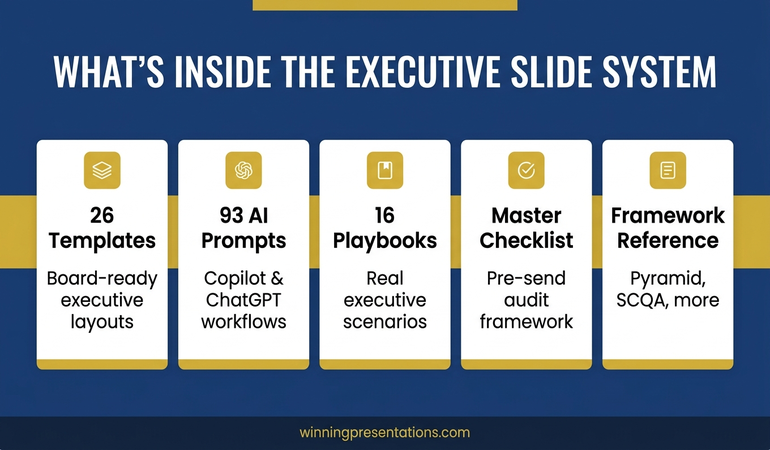
Confidence in a templated deck depends partly on the template being well-built in the first place. The Executive Slide System (£39) gives you 26 templates designed for senior board work — so the structural foundation is solid before the confidence work even begins.
Template anxiety is one of the quieter performance issues senior presenters face, partly because it does not look like fear. It looks like a small, persistent unease that costs you sleep and dulls your edge in the room. Naming it changes things. Doing the three practices changes more. The deck does not have to be hand-built to feel like yours — it has to be re-coupled to your voice, your argument, and the specific slides where the work is unmistakeably yours.
For senior presenters who experience the deeper version of this — physical anxiety symptoms, racing heart, trembling hands, dread building for days before the meeting — the partner article on handling the moment when an executive asks “is this your own work?” covers the live-room version of the same dynamic.

If you want a deeper framework for the broader dynamic — the specific patterns of senior-presenter anxiety, the cognitive techniques that shift them, and the in-the-room practices that turn dread into calm authority — the Conquer Your Fear of Public Speaking framework (£39) is built specifically for the experience senior professionals describe of “good work, but the room takes it out of me.”
FAQ
Does template anxiety go away the more I use templates?
For most senior presenters, yes — but only if you do the rewriting work. People who use templates passively (drop in content, change colours, deliver) tend to keep experiencing template anxiety even after years of use. People who rewrite every word, run the deck without slides, and identify their author slides typically stop noticing template anxiety within three or four meetings. The exposure does not heal it; the active ownership work does.
Should I just stop using templates if they affect my confidence?
For most senior presenters, no. Templates exist because most executive decks have well-understood structural problems, and reinventing those structures every time wastes time you cannot afford. The better answer is to keep using templates and build the confidence-recovery practices into your standard preparation. The work is small once it becomes routine.
Is template anxiety the same as imposter syndrome?
Related but different. Imposter syndrome involves a fundamental doubt about whether you belong in the role. Template anxiety is more specific — you believe you belong, you wrote the underlying analysis, but the deck-as-object feels less fully owned than your previous decks. The fix for template anxiety is local (re-couple form to content). The fix for imposter syndrome is broader and often warrants more sustained psychological work.
Why does template anxiety feel worse after a successful meeting?
Because the success belongs partly to the template, in your own internal accounting, and you sense the dilution of credit. This is a misreading. The success belongs to the work — the analysis, the argument, the recommendation, the live delivery — all of which is yours. The template is scaffolding. No one in the meeting watched the scaffolding. They watched you. Reframe the success as belonging to the work, where it actually belongs.
Get The Winning Edge — weekly
One sharp, story-led idea every Thursday on executive presentation craft, the psychology of the room, and the small habits that change how senior audiences receive you. Read by senior professionals across financial services, technology, and consulting.
Not ready for the full system? Start here instead: download the free Executive Presentation Checklist — a one-page reference that helps you walk in with the substance, not just the slides, fully prepared.
Pick the next templated deck on your calendar. Apply the three practices — rewrite, run without slides, name your author slides. Walk in with the deck and the confidence both feeling like yours.
About the author. Mary Beth Hazeldine is Owner & Managing Director of Winning Presentations Ltd, founded 1990. With 24 years of corporate banking experience at JPMorgan Chase, PwC, Royal Bank of Scotland, and Commerzbank, she advises executives across financial services, healthcare, technology, and government on structuring presentations for high-stakes funding rounds and approvals.