

Quick Answer
A proof-of-concept presentation must answer three questions for an executive audience: did the POC do what it was designed to test, is the evidence sufficient to de-risk the next stage, and is the investment required for that next stage proportionate to what has been demonstrated? Executives are not evaluating your work so far. They are evaluating whether the case for the next decision has been made.
In This Article
- What executives actually evaluate in a POC presentation
- The three-part POC presentation structure
- Framing evidence for a risk-averse audience
- The scope creep problem: what not to present
- Structuring the next-stage ask
- Presenting when results are mixed or partial
- Common POC presentation mistakes
- Frequently asked questions
Ingrid had led the pilot for fourteen weeks. The system integration had worked. User adoption in the test group had exceeded the original forecast. Customer satisfaction scores had improved by a measurable margin. By any internal metric, the proof of concept had been a success.
She walked into the investment committee certain that the results would speak for themselves.
They did not. The committee asked why the pilot group had been selected rather than a random sample. One board member questioned whether the cost overrun in month eleven was a structural issue or an anomaly. Another asked why the proposed Phase 2 budget was forty percent higher than the original POC cost when the scope was described as “similar.” Ingrid had answers to all of these questions, but they were not in her slides. She improvised. The committee asked for a revised submission.
The problem was not her results. The problem was her framing. She had presented a success report. What the committee needed was a decision document.
Building a case for executive approval of the next stage?
The Executive Slide System includes slide frameworks and scenario playbooks for proposal and approval presentations, including how to structure a POC business case for an executive decision meeting.
What Executives Actually Evaluate in a POC Presentation
A proof-of-concept presentation sits at a peculiar intersection. The presenter has completed something and is proud of the outcome. The executive audience is starting something and needs to know whether to proceed. These are different conversations, and conflating them is the source of most POC presentation failures.
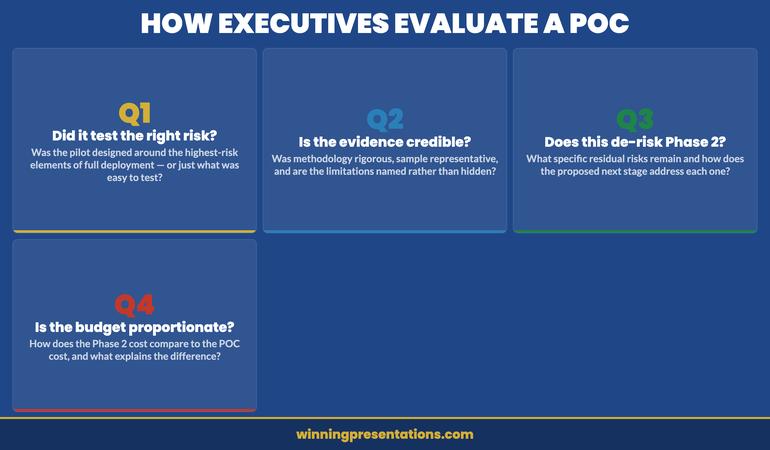
Executives evaluating a POC are not assessing past performance. They are assessing forward risk. The specific question in their minds is: does the evidence produced by this pilot reduce the probability of failure in the full deployment to a level we are willing to accept? That is a different question from “did the pilot succeed?” A pilot can succeed on its own terms and still fail to make the case for the next stage — if the methodology was too narrow, if the sample was unrepresentative, or if the next stage introduces risks that the pilot did not test.
This means a POC presentation must be built around the decision-maker’s risk calculus, not the execution team’s achievement narrative. The framing is: “Here is what we set out to test, here is what we learned, here is why that learning reduces the risk in what we are proposing next.” Not: “Here is everything we accomplished and how hard we worked.”
Understanding this distinction also clarifies what to leave out. Results that are impressive but irrelevant to the next-stage decision dilute the argument. Features that were tested but are not part of the next-stage scope add confusion. An appendix exists for detail; the main presentation exists for the decision.
The Three-Part POC Presentation Structure
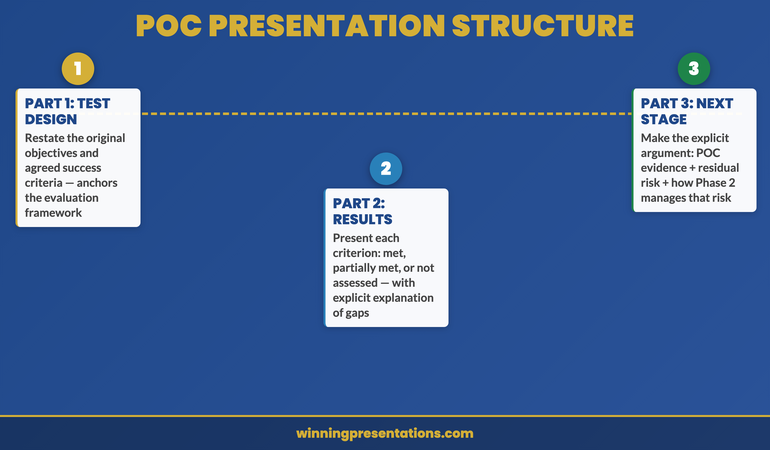
A proof-of-concept presentation that secures executive approval for the next stage follows a specific logical sequence. It does not begin with results; it begins with objectives. It does not end with a summary; it ends with a decision request.
Part 1: The original test design. Restate what the POC was designed to test and what success criteria were agreed at the outset. This matters because an executive audience may not remember — or may never have been fully briefed on — the original parameters. Starting with the design reanchors the conversation around the agreed framework rather than allowing retrospective judgements based on assumptions that were never part of the scope.
Part 2: Results against those criteria. Present each agreed success criterion and the actual result. Be explicit about which criteria were met, which were partially met, and which were not assessed. The last category requires a brief explanation: why was it not assessed, and does that create a risk for the next stage? Leaving unexplained gaps invites speculation from an audience trained to find risk.
Part 3: The next-stage case. Make the explicit argument for why the results from Part 2 are sufficient to proceed. This is where most POC presentations fail — they stop at presenting results and assume the committee will draw the inference. They often will not, or not in the direction you expect. Spell out the chain of reasoning: the POC tested the highest-risk elements of the full deployment, those elements performed as required, therefore the residual risk in proceeding is X, and the next stage is structured to manage X through Y mechanism.
Framing Evidence for a Risk-Averse Audience
Executive audiences in investment or approval settings are calibrated for risk detection. They have been in meetings where over-confident presentations produced expensive failures. The result is a scepticism that is not personal and not irrational — it is institutional. Your evidence presentation needs to account for this.
The most credible approach to evidence framing in a POC context is to lead with methodology before results. Presenting what you measured and how you measured it before presenting what you found signals rigour. It also pre-empts the methodology questions that will otherwise arrive as objections after you have finished.
Acknowledge limitations explicitly and early. If the pilot sample was small, say so and explain why it is still representative for the purpose it served. If there were external variables that affected results, name them rather than leaving the committee to discover them in questions. An executive audience that discovers a limitation you did not mention loses confidence in the integrity of the entire presentation. An executive audience that hears you name a limitation clearly and then explain why it does not undermine the core finding respects the analytical honesty.
Use comparative context where possible. Raw numbers are harder to evaluate than numbers with a benchmark. If user adoption in the pilot reached 73%, that tells the committee little unless they know that comparable pilots in this sector typically land at 55–65%, or that the original forecast was 60%. Comparison makes data meaningful without overstating it.
The Executive Slide System
Proposal presentations that win approval are built around the decision, not the evidence. The Executive Slide System — £39, instant access — includes slide frameworks and scenario playbooks for business case and approval presentations.
- Slide templates for executive approval scenarios
- AI prompt cards to structure complex business cases fast
- Scenario playbooks for POC, pilot, and phase-gate decisions
- Framework guides for risk framing and evidence presentation
Get the Executive Slide System →
Designed for executives presenting business cases and proposals to senior decision-makers.
The Scope Creep Problem: What Not to Present
One of the most common structural errors in POC presentations is expanding the scope beyond what was originally agreed. During a pilot, the team almost always discovers adjacent opportunities, interesting edge cases, and potential future features. Including these in the approval presentation creates three problems.
First, it dilutes the core argument. The committee came to evaluate a specific proposal. Every additional element they are asked to consider creates a new decision variable and increases the cognitive load of the meeting. A presentation that covers more than it needs to is harder to approve than one that is precisely scoped.
Second, it signals uncertain scope management. If the pilot uncovered so many adjacent possibilities that the team felt compelled to include them all, a cautious executive will wonder whether the next stage will suffer from the same expansive thinking — and whether the budget being requested reflects that expansion.
Third, it opens new objections. Every new element you introduce is a new surface for scrutiny. Features or opportunities that you raise in passing may be the very things a sceptic seizes on to complicate the approval. If something is not essential to the next-stage decision, it belongs in a separate document or a future meeting.
The discipline required is to present only what the committee needs to make the specific decision in front of them: proceed to the next stage, at this scope, at this cost, on this timeline. Everything else is scope creep, regardless of how genuinely interesting it is.
Before the formal presentation, consider conducting stakeholder alignment conversations to understand which elements of the proposal are most important to each decision-maker — this often reveals where to focus and what to leave out.
Structuring the Next-Stage Ask
The next-stage ask is the most consequential slide in a POC presentation. It is also the most frequently underprepared. Most presenters treat it as a natural conclusion: here are the results, and now here is what we need next. But the logic connecting those two things must be made explicit, because it is exactly where an unconvinced committee member will intervene.
A well-structured next-stage ask has four components. First, a clear statement of what is being requested: not a “move forward” but a specific approval with named scope, budget, and timeline. Second, a direct link to the POC findings: “the results from Phase 1 demonstrate X, which means the primary risk in Phase 2 is Y, and we have structured Phase 2 to manage Y through Z.” Third, a risk summary: what are the remaining unknowns, how significant are they, and how will Phase 2 address them? This is not pessimism — it is the language of rigour that risk-aware executives respond to. Fourth, a cost-of-delay argument: what does waiting another quarter cost, in financial terms, strategic terms, or competitive terms?
The cost-of-delay argument is often omitted because it feels presumptuous. In practice, it is one of the most useful elements of any approval presentation because it reframes the decision. Without it, “defer” appears to be a low-cost option. With a concrete cost attached, deferral becomes a choice with a price — and most committees prefer to make that choice explicitly rather than implicitly.
For a broader view of how to close a proposal and secure commitment, the Executive Slide System includes scenario-specific frameworks for phase-gate and approval presentations.
Presenting When Results Are Mixed or Partial
Not every proof of concept produces clean results. Sometimes a key metric was not achieved. Sometimes the pilot ran into external factors that affected results. Sometimes the technology performed but the change management did not. How you handle mixed or partial results will significantly affect the committee’s confidence in your integrity — which, in turn, affects their confidence in your next-stage proposal.
The worst approach is to obscure partial results in favourable framing. An experienced executive audience will notice if positive results are presented in detail and negative results are glossed over with qualifying language. This creates a credibility problem that is far more damaging than the underlying result.
The most effective approach with mixed results is to acknowledge them directly, explain what caused them, and then make the case for why they do not undermine the next-stage proposal. If the CRM integration was slower than planned but the customer-facing functionality performed exactly as required, say so. Explain why the integration timeline will be different in Phase 2 (different resources, pre-built connectors, lessons incorporated). The argument is: “We encountered this, we understand why, and here is how Phase 2 is structured to avoid it.”
This approach is more persuasive than a purely positive presentation because it demonstrates analytical honesty, which is the quality that executive audiences most need to trust before they commit significant resources.
Common POC Presentation Mistakes
The most common mistake is presenting outputs rather than outcomes. Outputs are the things your team produced: the integration was built, the training was delivered, the data was collected. Outcomes are what those outputs achieved in terms that matter to the executive: customer retention improved, processing time reduced, error rate declined. Executive audiences make decisions based on outcomes, not outputs. A presentation that emphasises what was built over what it achieved misses the point of the exercise.
The second mistake is treating scope ambiguity as a minor detail. If there is genuine uncertainty about what is included in the next-stage budget or timeline, addressing it vaguely in a presentation will produce a much more painful discussion when it surfaces as a formal question. Be precise about what the next-stage scope includes and explicitly state what is excluded. “Phase 2 covers X, Y, and Z. The integration with the legacy finance system is out of scope for Phase 2 and will be addressed as a separate initiative.” That clarity signals control.
The third mistake is presenting to the wrong level of detail. A POC presentation to an investment committee should contain the evidence and argument necessary to make the next-stage decision. It should not contain every data point collected during the pilot. If the committee wants detail, they will ask; the appendix exists for that purpose. An overly detailed main presentation signals either poor judgement about audience needs or a lack of confidence in the top-level argument.
If you need to structure a broader executive presentation outline for the full business case, use the approved POC summary as your evidence anchor rather than repeating the pilot analysis in full.
The Executive Slide System
Slide templates and scenario playbooks for approval presentations, including POC and business case structures. £39, instant access.
Get the Executive Slide System →
Designed for executives presenting complex proposals and phase-gate decisions to senior audiences.
Frequently Asked Questions
How long should a proof-of-concept presentation be?
For a senior executive or investment committee setting, fifteen to twenty minutes of presentation time is appropriate, with ten minutes reserved for questions. In slides, this typically means twelve to eighteen slides: two or three on the original POC design and objectives, four to six on results and evidence, and four to six on the next-stage case and ask. Everything else belongs in the appendix. If you find yourself with significantly more slides than this, the presentation has not yet been edited to its decision-relevant content.
Should you mention the budget for the next stage in the POC presentation?
Yes — always. An approval presentation that does not include a specific budget request is incomplete. Executives cannot approve a next stage without understanding its cost, and leaving that number until it is asked for signals either that you are not confident in it or that you expect it to create a problem. Present the next-stage budget with a brief breakdown of its main components and a direct comparison to the POC cost, with an explanation of why the numbers differ if they differ significantly. Transparency about cost is a signal of financial competence, not vulnerability.
What if the committee is split on whether to proceed?
If you identify or suspect a split in the committee during the meeting, do not try to resolve it in real time by negotiating a compromise. Instead, acknowledge the different perspectives clearly: “It sounds like there are two different views on the timeline risk — one that the pilot has sufficiently de-risked it, and one that would want to see the vendor contract confirmed first. Is that a fair summary?” This reframes the disagreement as a structured problem rather than a conflict, and often surfaces a specific resolution — such as conditional approval subject to a named milestone — that neither side had proposed explicitly.
The Winning Edge — A Newsletter for Executives Who Present
Every Thursday: one structured technique for executive presentations, business cases, and high-stakes decision meetings. Practical and direct.
Also available: the Executive Presentation Checklist — a free pre-presentation checklist for senior decision meetings.
If you are preparing for an executive decision meeting and need to align stakeholders in advance, read the companion article on running a stakeholder alignment workshop before the formal session.
About the Author
Mary Beth Hazeldine is the Owner and Managing Director of Winning Presentations. With 25 years of corporate banking experience at JPMorgan Chase, PwC, Royal Bank of Scotland, and Commerzbank, she advises executives across financial services, healthcare, technology, and government on structuring presentations for high-stakes funding rounds and approvals.


