

She had 47 slides of flawless analysis. The board rejected her proposal in 90 seconds.
Quick answer: The most costly executive slide mistake isn’t poor formatting or too much text—it’s burying the recommendation. The slide where you actually ask for the decision is where most presentations fail. Executives don’t want to discover your conclusion at the end. They want to evaluate it from the start. Lead with the ask, then provide the evidence to support it.
Last updated: January 2026 — with the latest executive slide patterns I’m seeing right now.
I’ve reviewed hundreds of executive presentations over 24 years in banking. The same mistake appears in nearly every rejected deck: the recommendation slide comes too late, says too little, or hides the ask inside paragraphs of context.
If your presentations get polite nods but no decisions, this is almost certainly why.
In this article:
The 47-Slide Rejection
A few years ago, I sat in on a budget presentation that still haunts me.
The presenter—a senior director at a financial services firm—had done everything right. Thorough market analysis. Detailed competitive landscape. Beautiful charts showing ROI projections over five years.
Forty-seven slides of preparation.
The CFO interrupted on slide 3: “What are you actually asking for?”
The presenter started scrolling. “I’m getting to that—it’s on slide 41.”
“Just tell me now.”
“We’re requesting £2.3 million for a platform upgrade that will—”
“Why didn’t you lead with that?”
The meeting ended 12 minutes later. Request denied. Not because the analysis was wrong, but because the ask was buried so deep that the CFO had already made up his mind by the time he found it.
The irony? Her recommendation slide was actually well-written. It just came 40 slides too late.
That’s the most costly executive slide mistake. Not the formatting. Not the fonts. The placement and prominence of the ask itself.
⭐ Get the Recommendation Slide Right Every Time
Stop burying your ask. The Executive Slide System gives you the exact structure for recommendation slides that get approved—not politely ignored.
Includes:
- The 3-part recommendation slide template
- 12 executive slide frameworks (including decision slides)
- Before/after examples from real approvals
Get the Executive Slide System →
Used by executives at financial services, tech, and consulting firms. Built from 24 years of high-stakes presentations.
Why the Recommendation Slide Fails
Most presentation advice tells you to build your case, then deliver the conclusion.
That works for essays. It fails for executive decisions.
Here’s why: executives aren’t reading your presentation to discover your conclusion. They’re evaluating whether to agree with a conclusion they expect you to have already reached.
When you bury the recommendation, you force them to sit through your entire thought process before they even know what you’re asking. By slide 15, they’re mentally checking out. By slide 30, they’ve already decided—usually “no,” because you haven’t given them anything to decide “yes” to.
I see this mistake weekly: the recommendation buried somewhere between slide 28 and slide 42, hidden in a wall of text that no one will read.
The three ways the recommendation slide typically fails:
- It comes too late. Buried after all the analysis, when attention is already gone.
- It’s too vague. “We recommend moving forward with the proposed initiative” tells them nothing.
- It’s buried in context. Three paragraphs of background, then the ask hidden in the fourth sentence.
Each of these is a different symptom of the same underlying problem: treating the recommendation as a conclusion rather than an opening.
⏱️ Before you scroll further, do this 10-second test: Open your last executive deck. Look at slide 2. Does it clearly state what you’re asking for, how much it costs, and when you need a decision? If not, you’ve found your problem.
I saw a perfect example of the “too vague” problem last year. A VP at a logistics company presented to her board with a recommendation slide that said: “We recommend proceeding with the digital transformation initiative pending further analysis.”
The board chair leaned back. “What does ‘proceeding’ mean? How much? When do you need an answer?”
She didn’t have those answers on the slide. They were buried in an appendix. The board moved on to the next item. Six months of preparation, dismissed in under two minutes—not because the strategy was wrong, but because the ask was invisible.
For more on slide titles that actually communicate, see why most slide titles fail.
How to Fix It (The 3-Part Structure)
The fix is simple but counterintuitive: put your recommendation on slide 2.
Not slide 41. Not “after the context.” Slide 2—right after your title slide.
Here’s the structure that works:
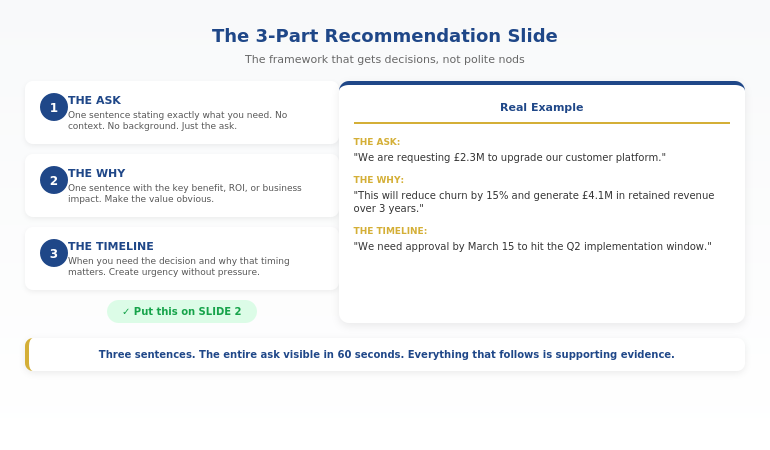
The 3-Part Recommendation Slide:
Part 1: The Ask (one sentence)
“We are requesting £2.3M to upgrade our customer platform.”
Part 2: The Why (one sentence)
“This will reduce churn by 15% and generate £4.1M in retained revenue over 3 years.”
Part 3: The Decision Needed (one sentence)
“We need approval by March 15 to hit the Q2 implementation window.”
That’s it. Three sentences. The entire ask on one slide, visible in the first 60 seconds.
Then you provide the supporting evidence. But now the executive knows what they’re evaluating. Every chart, every data point, every slide that follows is answering the question: “Should I approve this?”
A client of mine used this exact structure for a £4.2 million technology investment. The CEO approved it in a single meeting—not because the data was different, but because she didn’t have to wait until slide 35 to understand what she was deciding.
Want the exact template? The Executive Slide System includes the 3-part recommendation slide plus 11 other executive frameworks. Get Instant Access →
Before and After Examples
Let me show you what this looks like in practice.
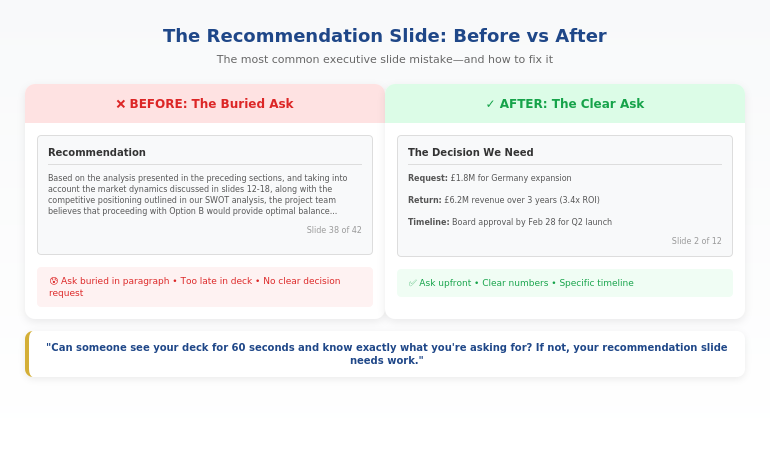
BEFORE (The Buried Ask):
❌ Slide 38 of 42: “Recommendation”
“Based on the analysis presented in the preceding sections, and taking into account the market dynamics discussed in slides 12-18, along with the competitive positioning outlined in our SWOT analysis, the project team believes that proceeding with Option B would provide the optimal balance of risk mitigation and growth potential, subject to the caveats noted in Appendix C.”
This tells the executive nothing. What’s Option B? How much does it cost? What do you need them to do? By slide 38, they’ve already stopped reading.
AFTER (The Clear Ask):
✓ Slide 2: “The Decision We Need”
Request: £1.8M for market expansion into Germany.
Return: Projected £6.2M revenue over 3 years (3.4x ROI).
Timeline: Board approval needed by Feb 28 to secure Q2 launch.
Same information. Completely different impact. The executive knows exactly what’s being asked in the first 30 seconds.
The “after” example above is based on a real client—a head of strategy at a manufacturing company who’d had three consecutive proposals deferred by the board. When I reviewed his decks, every single one buried the ask after 30+ slides of market analysis.
We restructured his Germany expansion proposal with the ask on slide 2. Same data, same analysis, same appendices—just a different sequence. The board approved it unanimously. Afterward, the chairman told him: “This is the first time I’ve actually understood what you were asking for.”
Three proposals deferred. One structural change. Immediate approval.
For more on executive decision frameworks, see the 3-slide system that gets faster decisions.
⭐ Stop Making the Most Common Executive Slide Mistake
Your recommendation slide is either getting you approvals or getting you ignored. Get the exact framework that works.
The Executive Slide System includes:
- Recommendation slide template (the 3-part structure)
- Executive summary slide framework
- Decision slide sequences that drive action
Instant download. Use it for your next presentation.
The Deeper Problem: Confusing the Summary with the Ask
One pattern I see constantly: executives confuse the executive summary slide with the recommendation slide.
They’re not the same thing.
I learned this the hard way during my banking years. I once spent two weeks preparing a presentation for a credit committee—beautiful executive summary, detailed analysis, comprehensive risk assessment. The committee chair stopped me five minutes in: “Mary Beth, this is all very thorough, but what do you actually need us to approve?”
I had a summary. I didn’t have a clear ask. The presentation was deferred, and I had to come back the following month with a proper recommendation slide. That experience taught me a lesson I’ve since taught hundreds of others: a summary tells them what they’re about to see; a recommendation tells them what you need them to do.
The executive summary slide tells the audience what they’re about to see. It’s a roadmap.
The recommendation slide tells them what you need from them. It’s an ask.
Many presentations have a decent executive summary but no clear recommendation slide at all. The ask gets scattered across three different slides, or buried in a “next steps” slide at the end that everyone skips.
If you’re not sure whether your presentation has this problem, try this test: Can someone look at your deck for 60 seconds and tell you exactly what you’re asking for, how much it costs, and when you need a decision?
If the answer is no, your recommendation slide needs work.
Want both frameworks? The Executive Slide System includes the executive summary AND recommendation slide templates, plus 10 other frameworks for high-stakes presentations. See What’s Included →
Related: If the thought of presenting your recommendation to senior leaders makes your heart race, you’re not alone. See what to do when your face turns red while presenting—it’s more common than you think, and there are specific techniques that help.
Executive Slide Mistakes: Common Questions
What is the most common slide mistake?
The most costly executive slide mistake is burying the recommendation. Instead of leading with the ask—what they need, how much it costs, when they need a decision—they build up to it through 30+ slides of analysis. By the time they reach the ask, the audience has already checked out. The fix: put your recommendation on slide 2, then provide the supporting evidence.
What makes executive slides different from regular presentations?
Executive slides need to enable decisions, not just convey information. Regular presentations can build to a conclusion; executive presentations must lead with one. Executives don’t have time to discover your thinking—they need to evaluate your recommendation quickly. This means clearer asks, less context, and recommendation slides that appear in the first 60 seconds.
How do you write a recommendation slide?
Use the 3-part structure: (1) The Ask—one sentence stating exactly what you need; (2) The Why—one sentence with the key benefit or ROI; (3) The Timeline—when you need the decision and why. Put this on slide 2, not slide 40. Every slide that follows should support this ask with evidence.
⭐ Get Decisions, Not Just Polite Nods
The Executive Slide System gives you the exact frameworks for recommendation slides, executive summaries, and decision sequences that actually get approved.
What’s inside:
- 12 executive slide templates (recommendation, summary, decision)
- Before/after examples from approved presentations
- The 60-second test for every deck
Get the Executive Slide System (£39) →
One approved budget request pays for this 100x over. Built from 24 years of executive presentations in banking and finance.
FAQ
Isn’t the executive summary the most important slide?
The executive summary tells people what they’re about to see. The recommendation slide tells them what you need from them. Both matter, but if you have to choose, the recommendation slide is more important—it’s the slide that actually gets you a decision. Many presentations have a decent summary but no clear recommendation, which is why they end with “let’s discuss offline” instead of approval.
How do I know if my recommendation slide is wrong?
Apply the 60-second test: Show your deck to someone unfamiliar with it. After 60 seconds, ask them: What am I requesting? How much does it cost? When do I need a decision? If they can’t answer all three, your recommendation slide needs work. It should appear on slide 2 and answer all three questions in three sentences or less.
What if my boss wants all the data first?
This is common, and it’s usually based on a misunderstanding of how executives read presentations. Try this: put the recommendation on slide 2, then say “the supporting analysis follows.” Most executives will appreciate the clarity. If your boss insists on data-first, include a clear recommendation slide anyway—just earlier than slide 40. The goal is ensuring the ask is impossible to miss.
How long should a recommendation slide be?
Three sentences maximum. One for the ask, one for the primary benefit or ROI, one for the timeline and decision needed. If you need more space, you’re including context that belongs on supporting slides. The recommendation slide is for the ask—nothing else.
📧 The Winning Edge Newsletter
Weekly insights on executive presentation mistakes, frameworks that get approvals, and the small changes that make the biggest difference. Practical advice from 24 years in corporate banking.
Your Next Step
Open your most recent executive presentation. Find the slide where you make your actual ask.
Is it on slide 2—or slide 35?
If it’s buried, you now know the most costly executive slide mistake—and exactly how to fix it. Move your recommendation to slide 2. Use the 3-part structure: Ask, Why, Timeline.
One change. Dramatically better results.
For the complete framework plus 11 other executive slide templates, get the Executive Slide System.
About the Author
Mary Beth Hazeldine is the Owner & Managing Director of Winning Presentations and a former corporate banker with 24 years of experience at JPMorgan Chase, PwC, Royal Bank of Scotland, and Commerzbank. She has trained thousands of executives on high-stakes presentation skills and helped clients secure more than £250 million in funding and budget approvals.
The “47-slide rejection” story in this article is based on a real presentation Mary Beth observed during her banking career. The presenter later used the recommendation-first approach and got her next budget request approved in a single meeting.