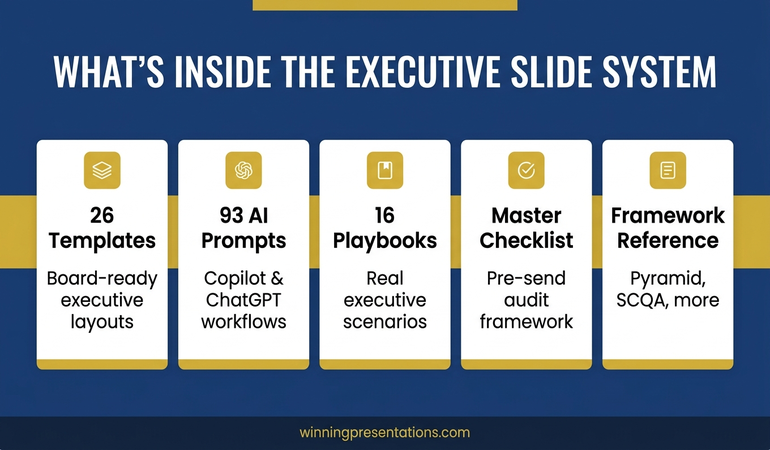
Quick answer: A board presentation course online is the wrong tool if you have a board meeting in the next four weeks. Most online courses run for six to twelve weeks and teach generic presentation theory. What senior presenters actually need is a structured system: templates engineered for board-level scrutiny, AI prompts that draft the slides, and scenario playbooks for the most common board situations. The Executive Slide System gives you all three in one download — 26 templates, 93 AI prompts, and 16 scenario playbooks. £39, instant access, no subscription. Use it for your next board meeting, not next quarter’s.
Short on time? If your board meeting is in the next month, you don’t need a course — you need the templates and structure that already work at board level. The Executive Slide System is built for exactly that. No multi-week curriculum. No live sessions to schedule. Just the structure, the slides, and the prompts to put it together quickly.
Why an online board presentation course is usually the wrong purchase
Search demand for “board presentation course online” is dominated by senior professionals about to present to a board and needing help fast. The problem is that most of the courses ranking for this query are not designed for that situation.
A typical online board presentation course is structured for learning over weeks: video modules, weekly assignments, optional live cohorts. The pedagogy is sound for someone studying the discipline. It is not useful for a finance director with three weeks until the audit committee, or a head of strategy presenting a transformation case to the main board next month. By the time you have completed module three on “the principles of executive communication,” your meeting has already happened.
The second problem is generality. Most courses cover a broad presentation skills audience — sales pitches, conference talks, internal updates, board papers — and treat the board context as one situation among many. In reality, board presentations have their own grammar: the structure that works in front of a chair, a senior independent director, and an audit committee chair is not the structure that works in front of a sales team or a customer.

What senior presenters actually need
The senior professionals who win at board level are the ones who use a structure that boards already trust, build slides that match it, and brief themselves with scenario playbooks for the most common board questions. The skill set is closer to a craft than a course curriculum.
That is what the Executive Slide System replaces a course with. It is the working library a senior presenter actually uses on a Monday morning when the board pack is due Friday. You do not study it for six weeks; you open it, choose the template that matches your situation, use the AI prompts to draft the slides, and let the scenario playbook tell you what the board is likely to ask. The trade-off is real — you give up the structured learning experience of a course — but you gain a structured deliverable for the meeting that is already in your diary.
What you get in the Executive Slide System
- 26 board-grade slide templates covering executive summaries, recommendation slides, financial cases, risk frameworks, scenario comparisons, and decision-ask slides
- 93 AI prompts for ChatGPT and Microsoft Copilot — engineered to draft board-level copy, not generic content
- 16 scenario playbooks for the most common board situations: budget approval, strategic proposals, restructuring updates, M&A briefings, and audit committee presentations
- A master checklist for board pack preparation, plus a framework reference covering the Pyramid Principle, SCQA, and decision-architecture structures used at senior levels
- Three downloadable files. Instant access via Gumroad. £39 one-time payment, no subscription, lifetime access
Walk into your next board with slides that hold up.
The Executive Slide System gives you 26 templates, 93 AI prompts, and 16 scenario playbooks designed for board-level presentations. Choose the template that matches your situation, draft the slides with the prompts, brief yourself with the playbook. Built for the meeting that is in your diary, not next quarter’s. £39, instant access, no subscription.
Get the Executive Slide System →
Designed for senior professionals presenting to boards, audit committees, and executive sponsors.
The structure that holds up at board level
Board members read pre-reads on the train. They form a view before you stand up. If your deck buries the ask in slide nine, the meeting is already against you.
The templates in the Executive Slide System reflect this. Every deck structure starts with the recommendation, follows with the evidence, and closes with the decision the board is being asked to make. The Pyramid Principle is the skeleton; the templates handle the flesh. The scenario playbooks then take it further: a capital expenditure ask follows a different sequence to a restructuring update, and a first-time presenter to the audit committee needs a different briefing than a CFO presenting Q3 results for the eighth time. The playbooks handle that variation, so you are not improvising the most important parts.
Stop rebuilding board decks from scratch every quarter. The Executive Slide System gives you the templates and prompts to draft a board-ready deck in under an hour, not a weekend. Get the Executive Slide System — £39 →
Is this right for you?
The Executive Slide System is for senior professionals who present to a board, audit committee, executive sponsor, or investment committee — and need their slides to land. Finance directors, heads of strategy, programme directors, transformation leads, and founders preparing to present to investors all use it as their working library.
It is not a course and does not pretend to be one. There are no video modules, no live sessions, no homework, no certificates. If you want a structured learning programme over several weeks, this is the wrong purchase — a longer-form curriculum will serve you better.
It is also not a design tool. The templates carry the structure and copy frameworks; you will still drop them into your organisation’s PowerPoint or Keynote template for branding. The output is structure and content, not aesthetics.
One payment. Lifetime access. No subscription, no recurring fee, no expiry. The Executive Slide System is £39 and is yours to use across every board presentation from now on. Download the Executive Slide System →
Frequently asked questions
Is the Executive Slide System a board presentation course?
No. It is a system of templates, AI prompts, and scenario playbooks — not a learning course. There are no video modules, no live cohorts, and no curriculum to work through. If your priority is the deck for a meeting in your diary rather than studying the discipline of board presentations over several weeks, this is the more practical purchase. If you want a structured course experience, look for longer-form online programmes instead.
How quickly can I use it for an actual board meeting?
Immediately. Open the file, choose the template that matches your situation (capital ask, strategy update, audit committee briefing), use the AI prompts to draft the copy, and the scenario playbook to anticipate questions. Most users have a first-pass deck within an hour or two.
Will it work for a first-time board presenter?
Yes. The scenario playbooks brief presenters who have not been in front of the board before — what the audit committee tends to focus on, how the chair usually opens, and what kinds of questions to expect from non-executive directors. Combined with the templates and framework reference, a first-time presenter has the same structural advantage as a regular board attender.
Does it cover different board types — UK plc, US corporate, founder, trustees?
The templates work across most senior governance contexts: a recommendation-led narrative, a clean evidence section, a scenario or risk frame, and an explicit ask. The structure translates across UK plc, US corporate, PE-backed, and trustee boards. Local etiquette and chair preferences sit on top of the structure, not inside it.
What format are the files in?
Three downloadable files via Gumroad: editable PowerPoint templates, the AI prompt library as a structured document, and the scenario playbooks as PDF reference guides. Compatible with PowerPoint, Keynote, and Google Slides.
Is £39 the full price?
Yes. £39 is a one-time payment, instantly delivered via Gumroad after checkout. No subscription, no recurring charges, no upsell required to use the system. Future updates within the product lifecycle are included at no additional cost.
📬 The Winning Edge — weekly newsletter
A short, practical email each Thursday for senior professionals who present at board level. Frameworks, structures, and one well-tested idea you can use in your next presentation. No filler.
About the author
Mary Beth Hazeldine is Owner & Managing Director of Winning Presentations. With 24 years of corporate banking experience at JPMorgan Chase, PwC, Royal Bank of Scotland, and Commerzbank, she advises executives across financial services, healthcare, technology, and government on structuring presentations for high-stakes funding rounds and approvals. Winning Presentations was founded in 1990 and has supported executive communication at HSBC, Morgan Stanley, BNP Paribas, UniCredit, and MFS Investment Management.