

Quick Answer
Screen sharing presentations create a distinct anxiety profile because you are simultaneously managing your slides, your camera presence, the technical environment, and an audience you largely cannot see — while knowing that any technical failure is immediately visible to everyone. The most effective way to manage this is through a structured pre-call setup routine that removes as many variables as possible before you start, combined with a clear protocol for handling the two most common disruptions: notification pop-ups and accidental tab-switching. Preparation reduces the cognitive load during the presentation and frees mental capacity for the actual content.
In This Article
- Why screen sharing creates a different kind of anxiety
- The visibility problem: why camera and screen together make anxiety worse
- Pre-call setup that reduces presentation anxiety
- Keeping your audience engaged when you can’t see their faces
- What to do when technical problems strike mid-presentation
- The mental reset for virtual presentations
- Frequently asked questions
Marcus had presented to this group four times before — all in person, all fine. He knew the material. He knew the audience. The Teams call was a formality.
He started sharing his screen. The presentation loaded. He was halfway through slide three when a notification banner appeared across the top of his screen: a message from his manager asking about an unrelated project, visible to the entire call. He minimised it. Then a second notification. He tried to close it. His cursor moved to the wrong window. For seven seconds, everyone on the call watched him navigate his desktop while his presentation sat frozen on slide three.
He recovered. He made a brief, light acknowledgement and moved on. But the disruption broke his concentration, and the remaining twelve minutes felt fragmented. He left the call certain the presentation had not landed the way the in-person version always did.
The problem was not his nerves. It was his setup. He had prepared the content and not the environment. Those are two different preparation tasks — and in a screen sharing presentation, the second matters as much as the first.
Presenting via Teams, Zoom, or Google Meet this week?
Run through this quick check before you share your screen:
- Have you enabled Do Not Disturb and closed every non-presentation window?
- Do you have a clear protocol for what to say if a technical problem occurs?
- Have you practised your recovery sentence for unexpected disruptions?
If virtual presenting still produces anxiety that preparation alone doesn’t resolve, Conquer Speaking Fear includes techniques for managing the specific anxiety patterns that online presenting triggers. Explore the programme →
Why Screen Sharing Creates a Different Kind of Anxiety
Presentation anxiety in general has a well-understood profile: fear of judgement, fear of blanking, fear of physical symptoms being visible to an audience. Virtual presentations share all of these triggers — and add several that are specific to the online environment.
In an in-person presentation, the slides are on a screen behind you. You turn to them occasionally but you are the focal point. Your face, your body language, and your voice carry the presentation. The slides are supporting material.
In a screen sharing presentation, your slides and your camera feed share the visual field simultaneously — or in some layouts, your camera is a small thumbnail while your slides dominate the screen. The audience is watching both you and your desktop environment in parallel. Any mistake on your desktop is as visible as any verbal stumble. This creates a second layer of performance anxiety that most in-person presenters have never experienced: the awareness that your entire digital workspace is on display.
There is also the absence of the audience’s visual feedback. In a room, you can see faces. You can tell, in real time, whether people are following you, whether they are confused, whether they are engaged or distracted. On a call where twelve cameras are off, you are presenting into a void. This absence of feedback activates the brain’s threat detection system in a way that in-person presenting does not. Without the reassuring signals of nodding, eye contact, or attentive posture, the mind fills the gap with its own narrative — which is rarely a positive one.
For the broader anxiety landscape of remote presentations, see presentation anxiety and the remote camera: why online presenting feels different — and what to do about it.
The Visibility Problem: Why Camera and Screen Together Make Anxiety Worse
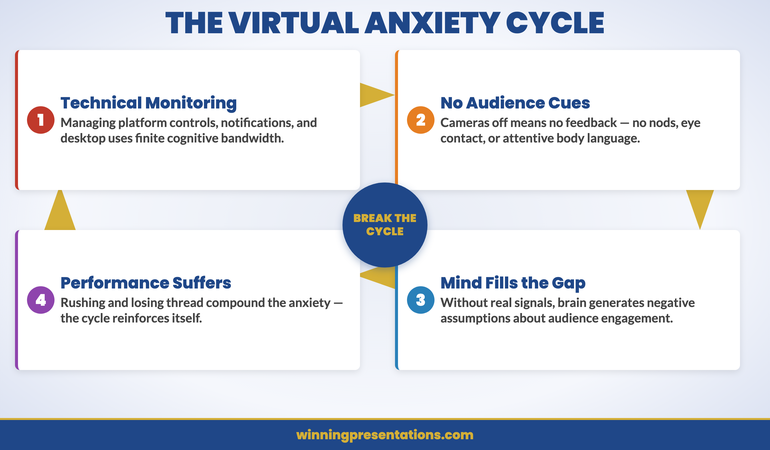
The cognitive load of a screen sharing presentation is structurally higher than an in-person presentation, and understanding this is the first step to managing the anxiety it produces.
In an in-person presentation, your cognitive attention is split between: the content you’re delivering, your audience’s reactions, and your own physical state. Three streams.
In a screen sharing presentation, the streams multiply: the content you’re delivering, your camera appearance, your desktop environment, the platform controls (mute, camera, screen share), the chat window, your audience’s reactions (limited, mostly invisible), your own physical state, and the ongoing monitoring for technical problems. Seven or eight streams, many of which require active monitoring rather than passive awareness.
This cognitive overload is why experienced, confident in-person presenters sometimes find virtual presentations more anxiety-provoking, not less. They are not less skilled. They are managing a genuinely more complex environment with the same finite cognitive resources.
The solution is not to try harder to manage all the streams simultaneously — it is to reduce the number of streams that require active attention. Pre-call setup does this by eliminating the desktop and platform variables before the presentation begins. When your notifications are off, your non-presentation windows are closed, and your platform settings are confirmed, the number of streams requiring active monitoring during the presentation drops back towards the in-person baseline.
Present Online Without the Adrenaline Hijack
If preparation alone isn’t enough — if the anxiety about screen sharing presentations persists even when the setup is right — the root cause is usually nervous system dysregulation, not a skills gap. Conquer Speaking Fear addresses this directly.
- 30-day programme using nervous system regulation techniques drawn from clinical hypnotherapy
- Specific module on virtual and remote presentation anxiety — the cognitive patterns that online presenting triggers
- In-the-moment reset techniques for managing anxiety when technical disruptions occur mid-presentation
- Tools for rebuilding confidence after a difficult virtual presentation experience
Get Conquer Speaking Fear → £39
Designed for executives and senior professionals whose virtual presentation anxiety is affecting performance, preparation time, or willingness to present.
Pre-Call Setup That Reduces Presentation Anxiety
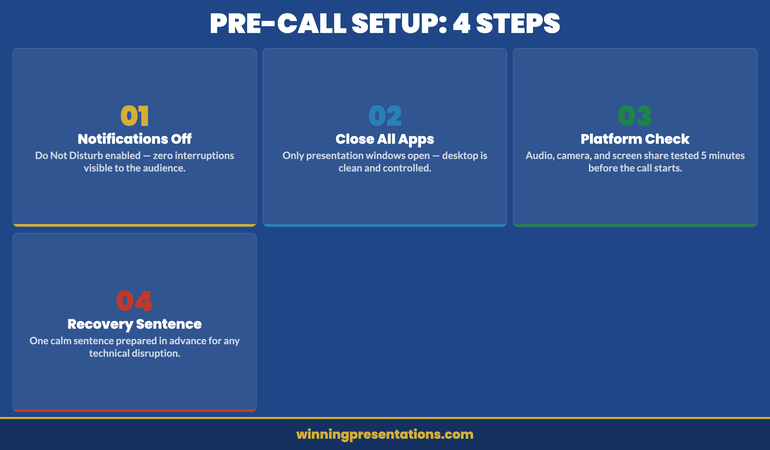
The most effective anxiety-reduction strategy for screen sharing presentations is environmental preparation — completing a systematic pre-call setup routine that removes the variables most likely to disrupt you. This is not the same as rehearsing the content. It is a separate preparation task that takes 10 minutes and pays disproportionate dividends during the call.
Notifications and distractions. Enable Do Not Disturb on your operating system before sharing your screen. On macOS this is in the menu bar; on Windows it is in the notification settings. Close every application that is not directly involved in the presentation: email, messaging apps, browser tabs unrelated to the presentation, and any background applications that generate notifications. This is the single most impactful preparation step, and the one most frequently skipped.
Browser and application organisation. If your presentation involves a browser or external applications, open only the tabs and windows you will need — in the order you will need them. Close everything else. If you need to switch between your slides and a live demonstration, practise the switch before the call so you know exactly which keyboard shortcut or window arrangement you’ll use.
Platform rehearsal. Know which screen you will share before the call begins. If you’re sharing a specific window rather than your full desktop, test that the window is the correct size and that the content is visible at the resolution your audience will see. Test your camera angle and lighting. Confirm your audio is working. Check that the mute and camera controls are where you expect them to be. Do this at least five minutes before the call starts — not as the call is beginning.
The recovery sentence. Prepare one sentence for technical disruptions that is calm, specific, and brief. “Bear with me one moment — I just need to re-share my screen.” Not an apology, not an explanation. One calm sentence, said with the same tone you’d use for any other transition. Knowing this sentence exists before you need it removes the cognitive burden of having to improvise it under stress.
For breathing and physical techniques to use in the minutes before any high-stakes presentation, see box breathing for executives: the 90-second technique for managing pre-presentation adrenaline.
If virtual presentation anxiety runs deeper than technical preparation can address — if it follows you from call to call regardless of how well you’ve set up — the Conquer Speaking Fear programme works at the nervous system level, not just the skills level.
Keeping Your Audience Engaged When You Can’t See Their Faces
One of the most disorienting aspects of presenting to cameras-off audiences is the complete absence of the visual feedback signals that regulate a presenter’s confidence in the room. In person, a nodding head tells you the point has landed. A furrowed brow tells you to pause and clarify. Stillness tells you the audience is processing. None of these signals are available on a screen sharing call where the audience has turned their cameras off.
The adaptation is to build explicit verbal check-ins into the presentation structure — moments where you actively invite a signal from the audience rather than waiting for one to emerge organically. These are not interruptions to the flow. They are designed pauses that serve two purposes: they give the audience a moment to engage, and they give you a moment of feedback that helps regulate your own presentation state.
Structured questions. Build one or two specific questions into your presentation that invite a brief, typed response in the chat. “Before I move to the financial case — any questions on the scope so far? Drop them in the chat and I’ll address them as we go.” This creates a micro-interaction that activates the audience’s attention and gives you visible evidence that they are present and engaged.
Deliberate pacing. Without visual cues, it is easy to rush. The absence of feedback activates anxiety, and anxiety accelerates speech. Build deliberate pauses — three to five seconds — after key points. These feel long to you and natural to the audience. They create emphasis and give the audience time to process before you move to the next point.
Explicit transitions. In person, a physical movement — turning to the screen, stepping forward, picking up a marker — signals a transition. In a screen sharing presentation, these physical cues are invisible or reduced. Compensate with verbal transitions that are slightly more explicit than they would be in person: “I’m moving to the financial case now — this is the section where I’ll need your input.” Explicit transitions keep the audience oriented when the visual cues are absent.
What to Do When Technical Problems Strike Mid-Presentation
Technical failures during screen sharing presentations are common enough that they should be treated as an expected event rather than an emergency. The anxiety they produce is disproportionate to their actual impact — audiences are generally understanding about technology problems, and a calm, practised response to a disruption frequently enhances rather than damages credibility.
The key insight is that how you respond to a technical problem tells the audience something about how you handle pressure generally. An executive presenter who says “bear with me” calmly and resolves the issue within 30 seconds demonstrates composure. An executive presenter who apologises extensively, explains the technical details of what went wrong, and visibly flusters demonstrates the opposite.
Have a clear mental protocol in advance. If your screen share drops: say your recovery sentence, stop sharing, close any unnecessary applications, and restart the share from the specific window you need. If your audio drops: unmute and repeat the last sentence as if the interruption hadn’t happened. If you accidentally switch to the wrong window: name it briefly and navigate back without commentary. In all cases, the goal is to return to the presentation content as quickly as possible with minimal disruption to the audience’s attention.
What you should not do: laugh nervously for an extended period, explain the technical problem in detail, apologise more than once, or let the disruption change your pace or register for the remainder of the call. The audience’s anxiety about the disruption mirrors yours. Calm behaviour from you produces calm in the room.
For the cognitive patterns that amplify anxiety after disruptions — the mental replaying and self-criticism that follows a difficult virtual presentation — see cognitive restructuring for presentation anxiety: the technique that breaks the self-critical loop.
The Mental Reset for Virtual Presentations
The anxiety that virtual presentations produce often has a specific character: it is anticipatory rather than in-the-moment. The most intense anxiety tends to occur in the minutes before the call begins — while setting up, waiting for participants to join, and managing the technical environment. Once the presentation is actually underway, many presenters find the anxiety reduces significantly.
This pattern has a practical implication. The most productive use of the minutes before a screen sharing presentation is not additional rehearsal of the content — it is a deliberate physical and mental transition from setup mode to presentation mode.
A simple three-step reset: complete your technical setup at least five minutes before the call starts so you are not still managing the environment when participants begin to arrive. Take two or three slow, deliberate breaths — not as an anxiety management technique, but as a physical signal to your nervous system that the preparation phase is over and the performance phase has begun. Say your opening sentence aloud once, at the pace you intend to deliver it. This is not rehearsal. It is calibration — resetting your pace, your register, and your focus to the presentation rather than the environment.
The virtual presentation environment is genuinely more challenging than in-person, and the anxiety it produces is a rational response to that complexity — not a sign of weakness or inexperience. The most effective mindset is one of practical problem-solving: identify what specifically about virtual presenting triggers your anxiety, and address each element systematically. Some of those elements respond to preparation. Some of them — particularly the deeply embedded nervous system responses — require a different kind of work.
Today’s companion article on resource allocation presentations: structuring the case when budgets are contested covers the executive presentation skills that underpin strong virtual business case delivery.
Stop Dreading Every Virtual Presentation on Your Calendar
When anxiety about screen sharing presentations follows you regardless of preparation, the nervous system is the issue — not the setup. Conquer Speaking Fear addresses the root cause with clinical techniques adapted for executive settings.
Get Conquer Speaking Fear → £39
A 30-day programme using nervous system regulation from clinical hypnotherapy — structured for executives who cannot afford to keep dreading the next call.
Frequently Asked Questions
Should I ask the audience to turn their cameras on during a screen sharing presentation?
It depends on the meeting culture and the level of formality. In a smaller group where camera-on is the norm, a brief, non-pressuring invitation at the start of the call is reasonable: “Feel free to have your cameras on if you’re set up for it — it helps me gauge the room.” In a larger meeting or where camera-off is the established norm, asking audiences to turn cameras on can create friction that outweighs the benefit. The more productive adaptation is to build explicit verbal check-ins into the presentation structure so you are generating feedback signals regardless of camera status.
How do I manage the anxiety of not knowing whether my audience is paying attention?
The absence of visual feedback is one of the most specifically anxiety-provoking aspects of virtual presenting, and it activates a particular mental pattern: filling the silence with negative assumptions about the audience’s engagement. The most practical response is to create explicit feedback moments — questions in the chat, brief check-ins, or direct invitations to signal understanding — rather than waiting for organic feedback that may not come. This gives you real data to replace the assumptions your anxiety is generating.
What’s the best way to handle a technical failure during a screen sharing presentation?
Prepare one calm, specific recovery sentence before the call starts: “Bear with me — I just need to re-share my screen” or “Audio issue — give me a moment.” Deliver it at the same pace and register as the rest of your presentation. Resolve the issue as quickly as possible. Return to the content without commentary on what went wrong. Do not apologise more than once. The audience’s response to a technical failure mirrors your own — calm handling from you produces a calm response from them.
Why do I feel more anxious presenting virtually than in person, even though I’m more experienced now?
Virtual presentations create a genuinely higher cognitive load than in-person presentations — you are managing more simultaneous streams of information and doing so without the visual feedback signals that regulate confidence in a room. Many experienced presenters find virtual formats more anxiety-provoking precisely because they are competent enough in-person to notice the difference. If the anxiety is persistent and affecting your performance or willingness to take on virtual presenting opportunities, it is worth addressing at the nervous system level rather than through additional technical preparation alone.
The Winning Edge — Weekly Insights for Executive Presenters
Practical techniques for managing presentation anxiety, building confidence in virtual settings, and presenting at your best when it counts most. Delivered every Thursday.
About the Author
Mary Beth Hazeldine is the Owner & Managing Director of Winning Presentations. With 24 years of corporate banking experience at JPMorgan Chase, PwC, Royal Bank of Scotland, and Commerzbank, she has delivered high-stakes presentations in boardrooms across three continents.
A qualified clinical hypnotherapist and NLP practitioner, Mary Beth advises executives across financial services, healthcare, technology, and government on managing presentation anxiety and building confidence for high-stakes speaking situations.