

Quick answer: The status decks senior executives actually read share three structural choices: a single RAG line with a single sentence of explanation per stream, milestones tied to a decision rather than to internal effort, and an explicit ask. Copilot can produce decks with these properties — but only if the prompts force them. The default Copilot status deck is dense, ungraded, and asks for nothing. The corrected prompt structure produces a four-slide deck a steering committee can read in under three minutes and act on in under five.
Jump to
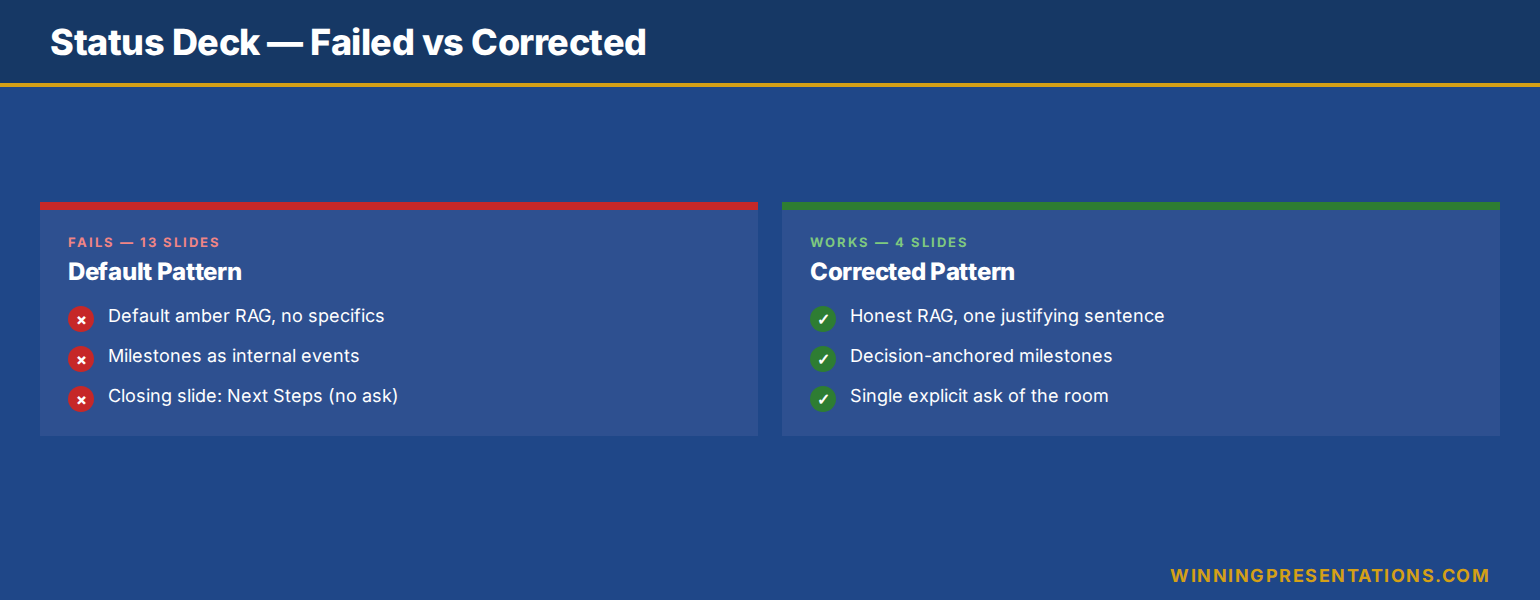
Connor McAlister is the senior programme manager for an enterprise data-platform migration at a UK insurer. Every fortnight he presents a status deck to the steering committee — a programme sponsor, two divisional CIOs, the head of risk, and the COO. For the first six months, his decks were the standard fare: thirteen slides, dense RAG tables, milestone lists running to twenty bullets, screenshots of the burndown chart, and a closing slide titled “Next Steps” containing five actions all owned by the programme team. The steering committee meeting always overran. Decisions Connor needed never quite landed.
What changed was not the work the programme was doing. It was the deck the steering committee was reading. Connor rebuilt the structure from four slides — overall RAG, milestone position relative to the next decision gate, top three risks with mitigation status, and a single explicit ask. He used Copilot to draft the new structure each fortnight from the same source data he had been using before. The meeting time fell from forty minutes to twenty-two. The decision Connor came in for was made in eighteen minutes flat.
The lesson is that executive status reporting is not a documentation exercise. It is a decision exercise. The steering committee does not need to know everything the programme team did in the last two weeks. It needs to know whether the programme is on track, what could derail it, and what they need to decide. Copilot can produce that deck if you instruct it to — but the default output goes the other way. The prompts below are what shift it.
Want a Copilot prompt library tuned for executive audiences?
The Executive Prompt Pack is the practical Copilot and ChatGPT library senior professionals use to produce executive-grade output rather than generic status reports. Seventy-one prompts covering executive summaries, risk framing, decision asks, and the constrained voice senior steering committees expect.
Why most status decks fail the executive read
The first failure mode is volume. A status deck that runs to twelve or fifteen slides is, in effect, a programme working document presented to an audience that has no time to read working documents. The steering committee opens the pack on an iPad five minutes before the meeting, scrolls to the summary slide, and looks at the RAG. If the summary slide does not exist, or if the RAG does not match the body, the rest of the deck is read with suspicion. Volume creates suspicion; concision creates trust.
The second failure mode is grade inflation. Most programme status decks code amber by default — green is reserved for completed phases, red is reserved for full crisis, and amber is everything in between. The result is that amber means nothing. The steering committee cannot distinguish a programme that needs a decision today from one that just needs a watching brief. RAG only works when the grading is honest, and honest grading requires the prompt to refuse a default answer.
The third failure mode is the absent ask. Status decks routinely close with “Next Steps” — actions owned by the programme team, requiring no decision from the committee. The committee then has nothing to do except acknowledge the report, and the meeting becomes a presentation rather than a working session. The deck that asks something — a decision, a budget, a sponsor escalation — uses the committee’s authority. The deck that asks nothing wastes it.
The four-slide executive status structure
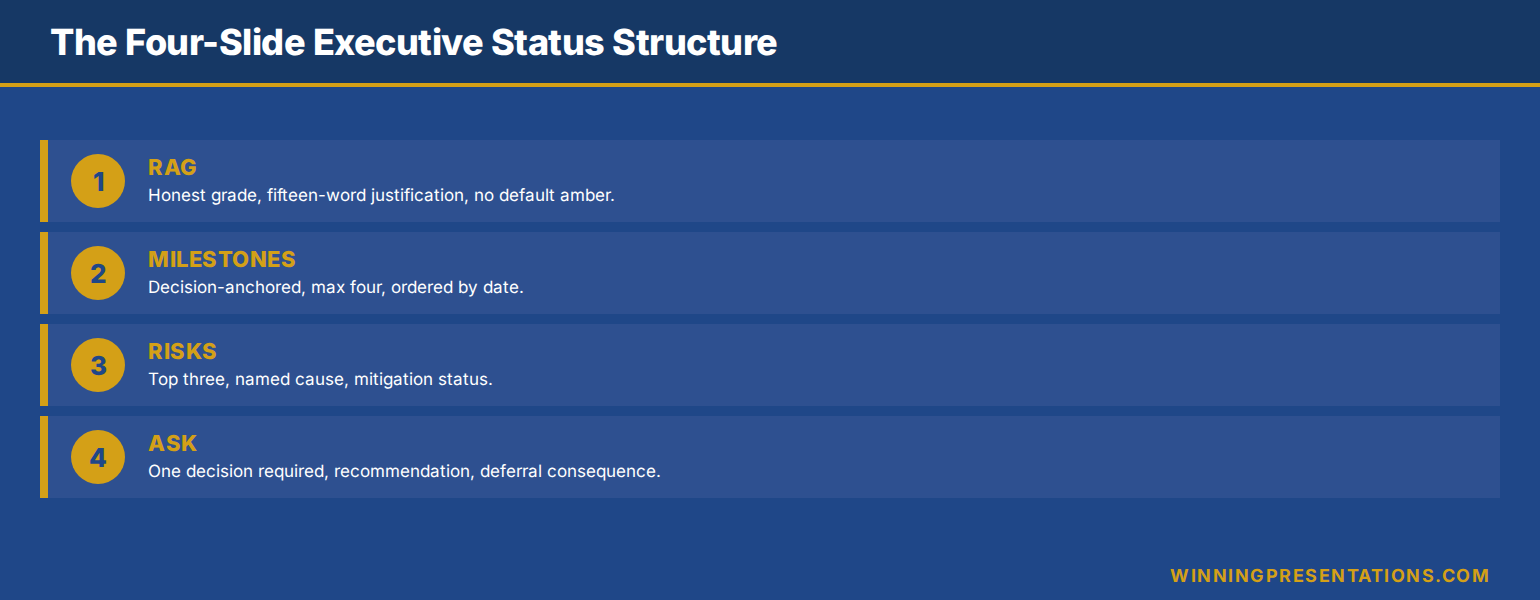
The structure that works for steering committees, executive sponsors, and senior governance audiences is four slides. Slide one is the headline RAG. Slide two is the milestone position relative to the next decision gate. Slide three is the top three risks with mitigation status. Slide four is the single ask. Everything else — burndown charts, work-package detail, individual workstream RAG — moves to appendix.
This is not a simplification. It is a structural acknowledgement that the steering committee’s job is to govern, not to consume detail. Detail belongs in the working pack the programme team uses internally. The status deck is a translation of that working pack into the smallest amount of information the committee needs to govern well. The translation is the work; once you have the structure, Copilot can do most of the drafting.
Four slides also reframes the meeting. With twelve slides, the meeting is a walkthrough. With four slides, the meeting is a discussion of the four points the deck raised. A well-structured steering committee presentation always defaults to fewer slides held longer rather than more slides clicked through quickly — the rhythm matches the audience.
The 71-prompt library for executive-grade AI output
Build executive slides in 25 minutes, not 3 hours. The Executive Prompt Pack — £19.99, instant download — gives you the practical Copilot and ChatGPT prompts senior project managers, finance leaders, and executive sponsors use to produce status, plan, and decision decks that read at executive level.
- 71 ChatGPT and Copilot prompts engineered for PowerPoint presentations
- Status reporting, RAG framing, milestone narration, and risk-and-ask prompts
- Voice-constrained — built to avoid the generic AI tone steering committees reject
- Works inside Copilot for PowerPoint and ChatGPT — copy, paste, adapt
- Designed for executive audiences: steering committees, sponsors, governance boards
Get the Executive Prompt Pack →
Built for senior project managers, programme leaders, and PMO heads reporting to steering committees and executive sponsors.
The RAG prompt: graded, not coloured-in
The first Copilot prompt produces the headline RAG slide. The structural job of this slide is to give the steering committee a single graded read on overall programme health, plus the one explanation that justifies the grade. Anything more is noise; anything less is unaccountable.
The prompt: “Using the workstream status data provided, produce a single overall programme RAG. Choose green, amber, or red. Constraint: amber is forbidden unless you can name one specific concern that would resolve to green if addressed and one specific concern that could deteriorate to red if not addressed. Default amber is not allowed. After the grade, write one sentence — fifteen words maximum — that justifies the grade in the language of decision impact, not effort.”
The “default amber forbidden” clause is the critical constraint. Without it, Copilot reproduces the grade-inflation pattern. With it, the grade becomes a decision. Either the programme is genuinely amber, with two named concerns, or it is green or red. The discipline of forcing the binary creates the honest grade.
The “decision impact, not effort” instruction kills the second failure mode — status sentences that read as “the team has worked hard on the data migration this fortnight”. Effort statements are invisible to executive audiences. Decision-impact statements — “data migration is on track to support the September go-live decision” — give the committee something to act on or relax about.
The milestones prompt: tied to decisions
The second prompt produces the milestone slide. The structural failure most milestone slides commit is presenting milestones as internal programme events — “complete vendor selection”, “issue requirements document”, “complete UAT”. These mean nothing to a steering committee whose job is to govern decisions, not to follow programme mechanics.
The prompt: “Using the programme plan, produce a milestone slide that lists only milestones tied to a decision the steering committee or a named executive will need to make. For each milestone, show planned date, current expected date, and the decision the milestone unlocks. Order chronologically. Maximum four milestones. If you have fewer than four decision-anchored milestones in the next quarter, show fewer.”
The decision-anchored framing transforms the slide. Instead of “complete vendor selection by Q2”, you get “vendor selection complete by 30 May, unlocking the contract approval decision required from the COO at the June steering committee”. The committee now sees not what the programme is doing, but what it is asking the committee to be ready for.
The “maximum four” constraint enforces materiality. Most programmes have ten to twenty live milestones at any time. Four is the count that forces the prompt to surface only the decision-relevant ones. The other milestones move to the appendix or to the working pack — visible if asked, invisible if not. A project status presentation that earns its slot follows the same materiality logic — the steering committee deck is a sub-set of the working programme document, not a copy of it.
The risks-and-asks prompt: explicit, not euphemistic
The third prompt produces the risks slide. The structural failure of risk slides is euphemism — “stakeholder alignment is being managed actively” instead of “the COO has not signed off the data-residency approach and the programme cannot release the integration phase until they do”. Euphemism protects the programme manager’s reputation but loses the committee’s attention. Specificity does the opposite.
The prompt: “Produce a risks slide listing the top three programme risks. For each risk, give: a one-sentence specific description naming the actor or system involved, the impact in plain language (cost, time, scope, or dependency), the mitigation already in flight, and the trigger that would force escalation. Constraint: no euphemistic language. If a risk is about a person’s decision, name the role. If about a vendor, name the vendor by relationship not company.”
The “name the role” constraint is the hardest one to deliver, and the most valuable. Programme managers are trained to anonymise risks — partly for political safety, partly through habit. The cost is that the committee cannot intervene without first asking who. Naming the role inside the risk surfaces the intervention path inside the slide. The chair reads it and knows immediately whether to escalate, sideline, or defer.
The fourth slide — the ask — is produced by a separate, simpler prompt: “Based on the risks, milestones, and RAG produced in the prior outputs, generate a single closing slide titled ‘Decision required’. State the one decision the committee needs to make today, the recommendation, and the consequence of deferring. Maximum thirty words on the slide. No options list — recommend one path.” A status deck that closes with a decision required and a recommendation uses the committee’s authority. The Executive Prompt Pack includes voice-constrained risk and ask prompts for project, programme, and PMO leaders working with steering committee audiences.
Want the full AI-presentation framework, not just prompts?
The Maven AI-Enhanced Presentation Mastery course is the self-paced programme for senior professionals using AI to build executive-grade presentations. 8 modules, 83 lessons, 2 optional recorded coaching sessions. £499, lifetime access — monthly cohort enrolment, no deadlines, no mandatory attendance.
What you cannot delegate to Copilot
The four-slide structure and the prompt sequence will produce a usable draft in twenty to thirty minutes from a set of source data that previously took two hours to assemble into a fortnightly pack. The saved time is real. What is not changing is the three judgement calls Copilot cannot make on your behalf, and that distinguish a programme manager who governs from one who reports.
The first is the honest RAG call. Copilot cannot tell you whether your programme is genuinely green or genuinely red. It can refuse default amber, but the underlying judgement — given what I know that the source data does not capture, where is this programme really — is the programme manager’s job. Treat the AI grade as a draft and revise it before the committee meeting if the live signal disagrees.
The second is the political timing of the ask. Copilot can produce a clean ask slide. It cannot tell you whether this is the steering committee meeting to raise it, or whether the better path is a one-to-one with the sponsor first. The decision-required slide is structurally correct; whether it lands depends on whether the room is ready for the decision. Programme managers who walk in with a clean ask slide and an unprepared room lose the decision and the credibility together.
The third is the audience-specific framing. The same status data presented to a CIO-led committee reads differently from the same data presented to a CFO-led committee. The CIO wants the technical risk articulated; the CFO wants the cost trajectory. Copilot does not know your committee. The structural draft works for both; the editing pass adapts for one.
Stop building status decks the committee scrolls past.
The Executive Prompt Pack — £19.99, instant download — gives you the seventy-one Copilot and ChatGPT prompts that produce status, plan, and decision decks executive audiences actually read, with voice and structure already constrained for governance forums.
Get the Executive Prompt Pack →
Built for senior project managers, programme leaders, and PMO heads working with steering committees and executive sponsors.
FAQ
Will the steering committee push back on a four-slide deck after years of receiving twelve?
Some will, briefly. The reframe to use is that the appendix contains everything that used to be in the body — the workstream RAG, the burndown chart, the resource heat-map — but is now available on demand rather than walked through. Most committees adapt within two cycles, because the meeting feels more productive and the decisions land cleaner. If a committee chair specifically wants more detail on a slide, that detail can be promoted from appendix without restructuring the deck.
How do I handle workstream-level RAG when the overall programme is one colour but the workstreams are mixed?
Show overall RAG on slide one with a one-sentence justification that names the dragging workstream if amber, or the recovering workstream if returning to green. The workstream-level RAG goes in the appendix. The committee’s job is overall governance; the workstream detail is the programme manager’s working concern. If a workstream is materially red and reasonably the whole programme is amber, the slide-one sentence should name it explicitly.
What if my programme has no decision required this cycle?
Replace the ask slide with an explicit “no decision required” closing — a single sentence saying the programme is on track and the next decision the committee will need to make is at the next governance gate. This protects the committee’s expectation that they have a role, and signals that you are tracking which decisions are coming, not just reporting backwards. A status deck that genuinely needs nothing is a credibility moment, not a missed slide.
Can the same prompt structure work for monthly executive reports as well as fortnightly status decks?
Yes — with adjustments to materiality. Monthly executive reports for senior governance forums often need a fifth slide on cumulative trajectory (RAG history, milestone slip pattern over time) that fortnightly steering decks do not. The four core prompts still apply; add a trajectory prompt for the longer cadence: “Show the last six months of overall RAG, milestone variance trend, and one sentence on directional read.” That converts the four-slide structure into a five-slide structure suitable for executive sponsor or board sub-committee use.
The Winning Edge — Thursday newsletter
Every Thursday, The Winning Edge delivers one structural insight for executives presenting to boards, investment committees, and senior stakeholders. No general tips. No motivational framing. One specific technique, one executive scenario, one action. Subscribe to The Winning Edge →
Not ready for the full prompt library? Start here: download the free Executive Presentation Checklist — a single-page review you can run on any executive deck before you present, including a structural test for status and steering committee material.
Next step: open the next status deck on your calendar and rebuild slide one — the headline RAG with one sentence of justification in decision-impact language, no default amber. That five-minute exercise sets the tone for everything else; once slide one earns trust, the remaining three slides land much faster.
Related reading: how to structure a project status presentation that earns its slot, and copilot prompts for executive presentations across the wider executive deck library.
About the author. Mary Beth Hazeldine is Owner & Managing Director of Winning Presentations Ltd, founded in 1990. With 25 years of corporate banking experience at JPMorgan Chase, PwC, Royal Bank of Scotland, and Commerzbank, she advises executives across financial services, healthcare, technology, and government on structuring presentations for high-stakes funding rounds, approvals, and board-level decisions.