
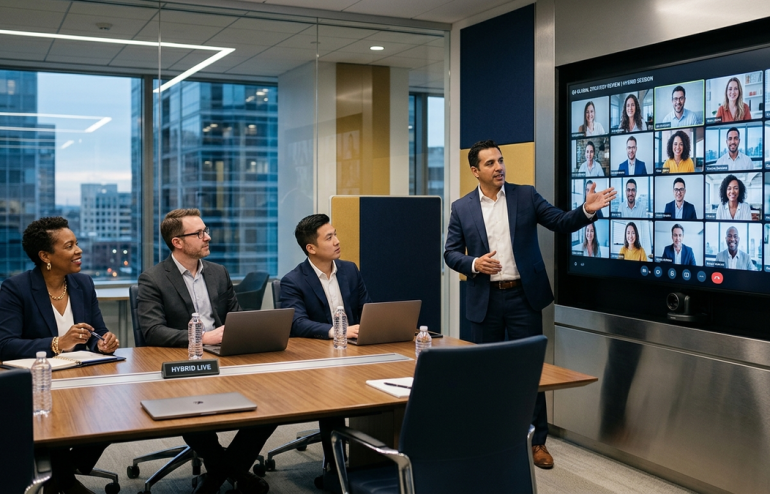
Quick Answer: Hybrid presentation mistakes almost always come from optimising for the room and treating the remote audience as an afterthought. The fix is to design every element — camera angle, screen visibility, voice routing, named questions — so a remote attendee experiences the meeting as the primary participant, not an observer. The room then adapts. The reverse never works.
JUMP TO:
Ines was sitting in her home office in Lisbon, dialled into a senior leadership offsite at her company’s London headquarters. Twelve colleagues were in the room. Three of them were on screen for her, packed into a wide-shot from a webcam at the back of a conference room. The presenter at the front was talking to the people in the room. She could see his back, occasionally his profile when he turned to a slide. The audio cut in and out depending on who spoke and where they sat.
She lasted twenty-three minutes. By minute eight she had her email open. By minute fifteen she had given up trying to follow the discussion. By minute twenty-three, when a question was directed at “anyone on Lisbon”, she had to ask them to repeat it because she had stopped listening. She did not contribute substantively to the rest of the offsite. Not because she had nothing to add. Because the meeting was structurally designed to exclude her.
This pattern is the most common executive complaint I hear in 2026. Hybrid meetings have become routine. Hybrid presentation mistakes have not been fixed. Remote attendees check out, and the in-room presenters do not realise it has happened.
If half your audience joins on screen and half is in the room
The Executive Slide System includes scenario playbooks for hybrid leadership meetings, mixed-audience boardrooms and distributed sales presentations — the structural templates that keep both audiences engaged in the same meeting.
Why remote attendees check out at slide 3
The pattern is consistent across the hybrid meetings I review. The presenter opens with energy. The remote attendee leans in. Slide one and two run clean — the slides are visible, the presenter is audible. By slide three something happens. The presenter turns to face the in-room audience for an extended exchange. The remote attendee suddenly cannot see them, hears them faintly, and watches the people in the room have a conversation they are not part of.
That moment is the inflection point. Once a remote attendee has been excluded from one substantive exchange, they relax their attention budget. The in-room audience experiences a single dynamic conversation. The remote attendee experiences a fragmented broadcast where the energy drops every time the presenter turns away from the camera.
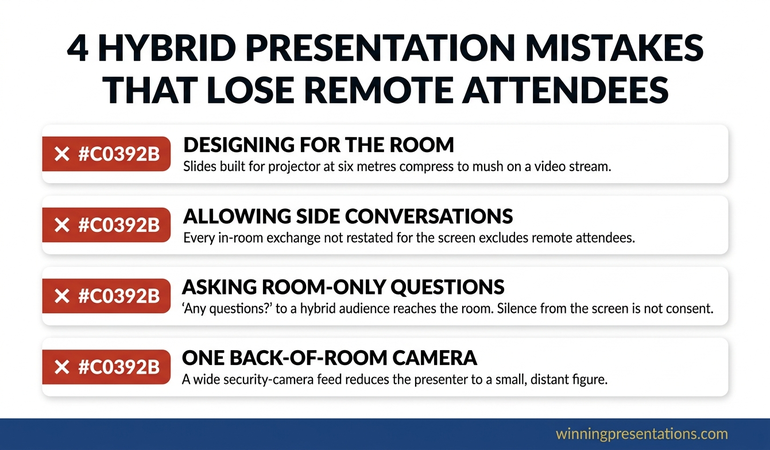
The structural reasons this happens almost always reduce to four mistakes.
Mistake 1: Designing for the room, not the screen
The presenter writes the deck for the people in the room. Slide density assumes a projector at six metres. Subtle visual gradients work fine on a screen but compress to mush over a video stream. The font that is comfortable in person is too small for someone reading on a laptop with a thumbnail-sized share window.
The fix is to design every slide for the screen first, then verify it works in the room. Larger fonts (28pt minimum for body text). High contrast (avoid pale grey on white). One idea per slide rather than one section per slide. The in-room audience never suffers from these constraints. The remote audience is excluded if you do not apply them.
The same principle applies to the mechanics of screen sharing. The screen sharing presentation guide covers how to verify what the remote audience actually sees before the meeting starts — aspect ratio, resolution, font rendering, navigation visibility.
THE EXECUTIVE SLIDE SYSTEM — £39
Stop building decks that read clearly in the room and disappear on screen
The Executive Slide System is 26 presentation templates, 93 AI prompts, 16 scenario playbooks, a master checklist and a framework reference. The hybrid meeting playbook covers screen-first slide design, audio routing patterns and the named-question protocol that keeps both audiences engaged. £39, instant access.
Get the Executive Slide System →
Designed for executives running hybrid leadership meetings, distributed boards and mixed-audience sales presentations.
Mistake 2: Letting side conversations happen in the room
Side conversations between in-room attendees are invisible to the remote audience but corrosive to the meeting. The room laughs at a joke the remote attendees did not hear. Two people in the room exchange a quick comment that the remote audience cannot follow but can sense was substantive. The presenter handles a question from the room without first restating it for the screen.
Each of these moments tells the remote attendee they are not in the same meeting. The cumulative effect is exclusion.
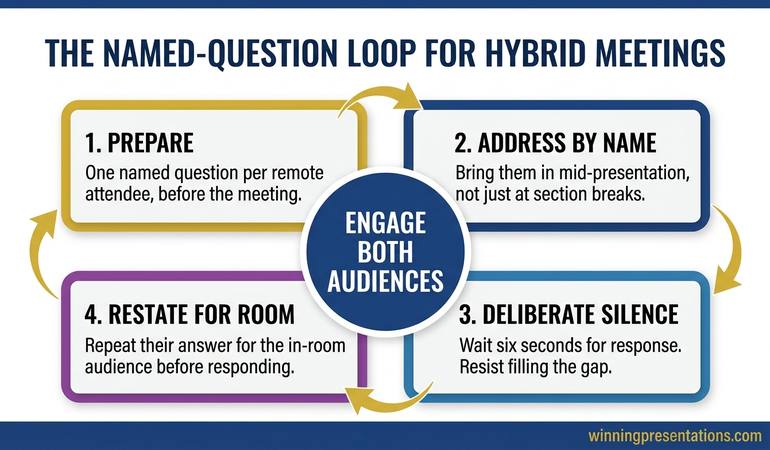
The fix is a single rule, enforced by the meeting chair: every contribution from the room is restated by the chair or presenter before it is responded to. “Henrik just asked — for those joining remotely — whether the timeline accommodates the German market entry. The answer is…” This adds three seconds per exchange. It is the difference between a hybrid meeting and a meeting with some people watching.
The hybrid meeting facilitation guide covers in detail how a chair or presenter can enforce this rule without breaking the flow of the in-room conversation.
Mistake 3: Asking the room for questions but not the screen
The presenter pauses, looks around the room and says “any questions before I move on?” The room responds. The screen does not. The presenter takes the silence from the screen as agreement and moves on. Three slides later, the remote attendees have a backlog of questions they did not feel invited to raise.
The structural fix is to address questions to specific named remote attendees during the body of the presentation, not just at section breaks. “Ines — before I move on, does the timeline as I’ve described it match what you’re seeing in the Iberia market?” This requires preparation. You need to know who is on the call, what they are likely to want to weigh in on, and which two or three named questions you will use through the meeting.
The named question is the single most effective hybrid technique I teach. It surfaces input from the screen that would otherwise stay silent. It signals to other remote attendees that the presenter is paying attention to them. It restores the meeting’s symmetry.
Mistake 4: One camera at the back of the room
The default hybrid setup — a wide webcam at the back of the room, capturing the presenter at the front along with the backs of the in-room audience — produces a remote experience that is functionally a security camera feed. The presenter is small. Their face is sometimes visible. The audio favours whoever is closest to the conference microphone.
For meetings of any consequence, this setup is not adequate. The minimum upgrades that change the remote experience:
- A second camera at the front, facing the presenter at eye level. The remote audience now sees the presenter’s face and reactions, not their back.
- Multiple omnidirectional microphones distributed across the room. Audio quality is the single biggest determinant of whether a remote attendee can stay engaged. Cheap microphones at the centre of a conference table produce a flat, distant audio signal that requires effort to follow.
- A second screen in the room showing the remote attendees prominently. When the in-room presenter and audience can see the remote attendees as faces — not as a small thumbnail tucked above the slides — the room treats them as participants.
The investment for a meeting room of any seriousness is modest. The behavioural shift is significant. Remote attendees who feel seen contribute more. In-room attendees who can see remote faces address them directly. The meeting becomes one meeting again.
For meetings where you cannot upgrade the room equipment, the hybrid presentation half-remote guide covers what an individual presenter can still do to compensate for a poor room setup.
Fixing the hybrid meeting before the next one
If you are running a hybrid presentation in the next two weeks and cannot solve the room equipment problem, here is the protocol that works with the setup you already have.
One day before:
- Confirm who is joining remotely. Identify two or three of them you will name during the meeting.
- Walk through your deck on a laptop screen at thumbnail size. Anything you cannot read is invisible to the remote audience. Fix it.
- Test the room camera and microphone with one remote colleague. Listen back. If you sound distant, fix it before the meeting.
At the start of the meeting:
- Greet the remote attendees first by name, in front of the room. This signals the cultural norm.
- State the protocol: “I’ll be naming people on the call regularly through the meeting. Please assume you will be asked to weigh in.”
- Position yourself so you can see the remote attendees on a screen while presenting. Do not present with your back to them.
During the meeting:
- Restate every in-room contribution for the remote audience before responding.
- Use named questions every five to seven minutes.
- Notice when a remote attendee unmutes or leans into the camera. Pause and bring them in.
This protocol does not solve a poor camera and microphone setup, but it materially closes the engagement gap. Ines’s company adopted it after the Lisbon offsite. Her contribution rate to leadership meetings recovered within four sessions.
FOR THE NEXT HYBRID MEETING ON YOUR CALENDAR
The complete scenario library for hybrid executive audiences
The Executive Slide System gives you 26 templates, 93 AI prompts and 16 scenario playbooks — including the hybrid meeting playbook with the screen-first slide design rules, the named question pattern and the contribution restatement protocol referenced above. £39, instant access, no subscription.
Frequently Asked Questions
Should hybrid meetings just be made fully remote?
For meetings where everyone could be remote and the in-person attendance is incidental, yes — the fully remote format is better than a hybrid that excludes some attendees. For meetings where in-person attendance has genuine value (workshop sessions, interpersonal trust-building, sensitive negotiations), the answer is to invest in the hybrid setup rather than retreat to either extreme. The all-remote format is honest. The all-remote format with a few people in a conference room is rarely both.
How do I run a hybrid Q&A so remote attendees actually speak?
Use the chat as a queueing mechanism. Tell remote attendees to drop their question into the chat with their name. The chair reads each one out, names the questioner, and gives them the floor to elaborate if they want. This eliminates the cold-start problem of having to interrupt verbally on a hybrid call. It also gives the chair the ability to manage the order of questions across in-room and remote contributors.
What if my company will not invest in proper hybrid room equipment?
Run as much of the meeting as possible from a personal laptop with a good webcam and microphone, even if you are physically in the conference room. Sit at the meeting table with your laptop in front of you. The remote audience now sees you at a normal eye level with clear audio. The other in-room attendees still join the laptop call from their own laptops in the same room. This produces a higher-quality remote experience than a single back-of-room camera, with no equipment investment.
How long should a hybrid presentation be?
Plan for the same length as the all-remote equivalent (roughly 60% of the in-person length). The constraint is the remote attention span, not the in-person one. The in-room audience can sit through forty minutes; the remote audience cannot. Optimise for the constraint that limits the meeting.
Presentation playbooks, delivered Thursdays
The Winning Edge newsletter covers the structures real executives use for high-stakes meetings — remote, hybrid and in person. One issue per week, typically read in four minutes.
Not ready for the full system? Start here instead: download the free Executive Presentation Checklist — a one-page structural review you can run over any deck the day before a hybrid meeting.
Partner post: When the audience is fully on screen rather than mixed, a different set of rules applies. The virtual board meeting presentation guide covers that scenario.
Your next step: Before your next hybrid meeting, write down the names of the three remote attendees you most want to hear from. Prepare one specific question for each. The meeting itself will be different.
About the Author
Mary Beth Hazeldine is Owner & Managing Director of Winning Presentations Ltd. With 24 years of corporate banking experience at JPMorgan Chase, PwC, Royal Bank of Scotland, and Commerzbank, she advises executives across financial services, healthcare, technology, and government on structuring presentations for high-stakes funding rounds and approvals.