Quick answer: Copilot can compress the first draft of a CFO budget presentation from three hours to forty-five minutes — but only if you feed it a structured five-prompt sequence rather than a single open instruction. The order matters: strategic narrative first, then variance, then risk, then investment-versus-cost split, then Q&A pre-empt. Each prompt references the prior output, so Copilot builds on its own scaffolding rather than restarting. Without that sequence, Copilot produces a generic finance deck that fails the first board read-through. With it, you walk in with a draft that needs trimming, not rebuilding.
Jump to
- Why Copilot’s first draft fails the CFO test
- The five-prompt sequence in order
- Prompt 1 — Strategic narrative frame
- Prompt 2 — Variance and prior-period bridge
- Prompt 3 — Risk and sensitivity envelope
- Prompt 4 — Investment-versus-cost split
- Prompt 5 — Q&A pre-empt
- What Copilot still cannot do for you
- FAQ
Anneliese Voss is the CFO of a mid-cap European industrials business. Last quarter she had a budget cycle from hell — a senior board sponsor on holiday, a finance team stretched thin by a system migration, and an audit committee meeting moved forward by three weeks. She had forty-five minutes between back-to-back meetings to produce the first draft of the FY budget presentation. She opened Copilot in PowerPoint, typed “create a budget presentation for the board covering next year’s plan with revenue, costs, headcount and capex”, and let it run.
What Copilot produced was not unusable. It was worse than that. It was generic — competent-looking slides with the structure of any budget deck, full of placeholder phrases like “strategic priorities” and “operational excellence”, with charts that mapped no real numbers to any real decision. Anneliese spent the next three hours rewriting almost everything. The forty-five-minute time saving was a forty-five-minute time loss.
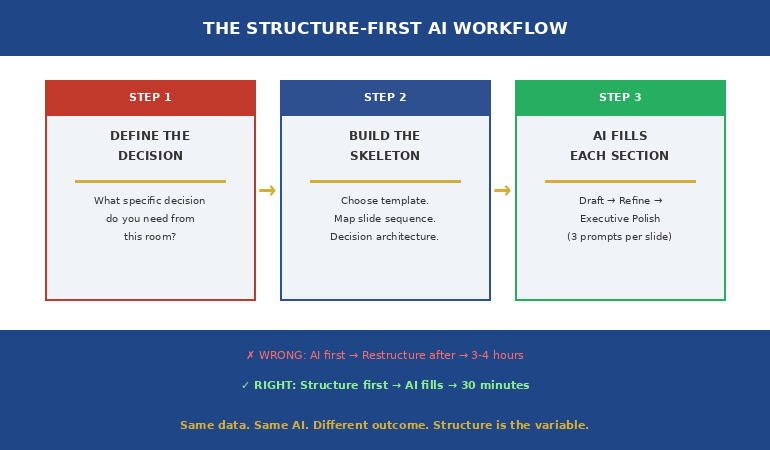
The lesson Anneliese took into the next budget cycle is that Copilot is not a single-prompt tool for executive finance work. It is a five-prompt tool, and the sequence matters more than any individual prompt. When she returned to the same task with a structured sequence — narrative first, then variance, then risk, then investment-versus-cost, then Q&A pre-empt — the forty-five minutes produced a draft that needed editing, not rebuilding. The board read-through happened. The recommendation landed.
Want the full Copilot prompt library for executive presentations?
The Executive Prompt Pack is the practical library senior professionals use to get sharper, more strategic output from Copilot and ChatGPT — built for executive presentations, not generic decks. Seventy-one prompts covering strategic narrative, variance framing, board Q&A, executive summaries, and decision slides.
Why Copilot’s first draft fails the CFO test
The default failure mode of Copilot in finance work is not factual error. It is structural emptiness. Asked for a budget presentation, Copilot returns a deck that looks like a budget presentation — the right slide titles, the right chart shapes, the right boilerplate language about strategic priorities and operating efficiency. What it lacks is the load-bearing content that makes a budget presentation work: the bridge from prior period to current ask, the variance commentary that anticipates the audit committee’s questions, the explicit framing of which line items are investment and which are cost.
The structural emptiness is a function of the single-prompt approach. When you ask Copilot for “a budget presentation”, you are asking it to compress the entire reasoning of a finance team into a single inference pass. It cannot do that work. What it can do is build one specific layer of the deck if you give it one specific instruction at a time, and let it use its earlier output as the substrate for the next layer.
The other failure mode is voice. Copilot defaults to a corporate-press-release tone — “we are committed to driving sustainable growth across the portfolio” — that no senior finance audience tolerates. CFOs and audit chairs read that voice as a tell that the deck was generated, not authored. The fix is not to ban the AI but to constrain the voice in the prompt itself, repeatedly, with reference to specific style anchors. Why Copilot’s first draft fails boardroom tests covers the editing pass that strips this voice; the prompt sequence below avoids generating it in the first place.
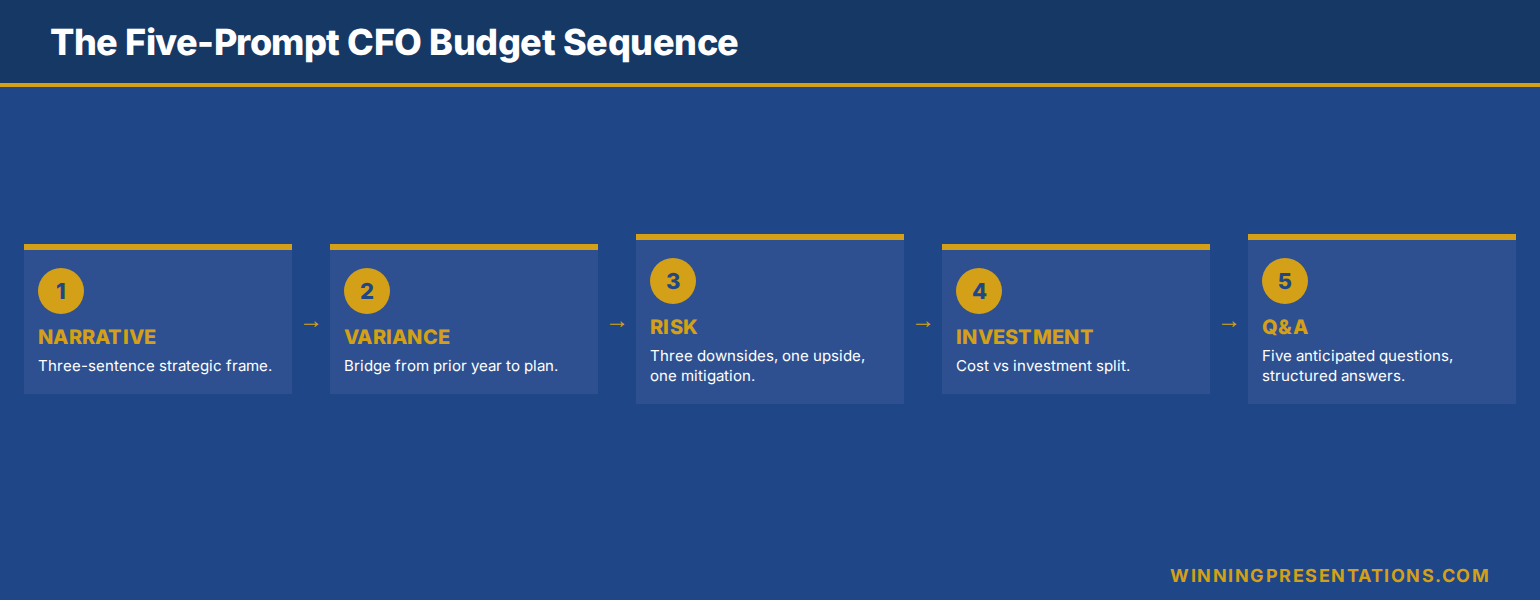
The five-prompt sequence in order
The sequence below is the structural skeleton for any CFO-level budget presentation. It assumes you have already pasted the financial source data — variance table, prior-period actuals, FY plan, sensitivity assumptions — into the Copilot context, either as a file reference, a paste, or a chat thread that includes them. Without source data, Copilot will invent numbers, which is the only failure mode worse than generic output.
Each prompt in the sequence is short. Each one references the prior output rather than starting from scratch. Each one constrains voice and detail to what the next layer needs. The total time, with source data prepared, is forty to fifty minutes — about thirty minutes of Copilot generation and editing, plus ten to fifteen minutes of structural review.
The sequence is not a script. It is a scaffold. Real budget presentations have edge cases — a contested capex line, a flat headcount with rising salary cost, a foreign-exchange exposure that has moved since the last audit committee. The scaffold accommodates these by giving you a clean structural draft to deviate from, rather than starting from a blank slide.
The 71-prompt library that sharpens executive presentations
Build executive slides in 25 minutes, not 3 hours. The Executive Prompt Pack is a practical Copilot and ChatGPT prompt library for senior professionals who need their AI output to read like a senior finance leader wrote it — not a press release. £19.99, instant download, 71 prompts.
- 71 ChatGPT and Copilot prompts engineered for PowerPoint presentations
- Strategic narrative, variance framing, executive summary, and Q&A pre-empt prompts
- Voice-constrained — built to avoid the generic AI tone CFOs and audit chairs reject
- Works inside Copilot for PowerPoint and ChatGPT — copy, paste, adapt
- Designed for executive presentations: budget, board, investment committee, steering
Get the Executive Prompt Pack →
Built for senior professionals presenting budgets, plans, and decisions to boards and audit committees.
Prompt 1 — Strategic narrative frame
The first prompt does not produce slides. It produces the narrative spine of the deck — the three-sentence answer to the question “what is the board being asked to approve, and why now”. Without this spine, every subsequent slide drifts. With it, each slide has a job: support the spine, qualify the spine, or quantify the spine.
The prompt itself: “Using the source data provided, draft three sentences that frame the FY budget request for an audit committee audience. Sentence one names the headline ask in financial terms. Sentence two identifies the strategic shift the budget supports versus prior year. Sentence three names the single largest risk and how the budget addresses it. Voice: senior finance leader speaking to audit committee, no marketing language, no platitudes.”
The output should be three sentences, no more. If Copilot produces a paragraph, ask it to compress to three sentences and remove any phrase that could appear in any company’s annual report. The compressed three sentences become the title slide narrative, the executive summary slide, and the closing recommendation slide — three slides anchored by one consistent message. A CFO-approved budget presentation template uses this same three-sentence spine as its structural base, regardless of company size or sector.
Prompt 2 — Variance and prior-period bridge
The variance slide is the slide that audit committees and boards spend most time on. It is also the slide Copilot is least naturally good at, because it requires reading the prior-period numbers, the current-period plan, and the bridging logic — and many AI tools attempt the third without securing the first two.
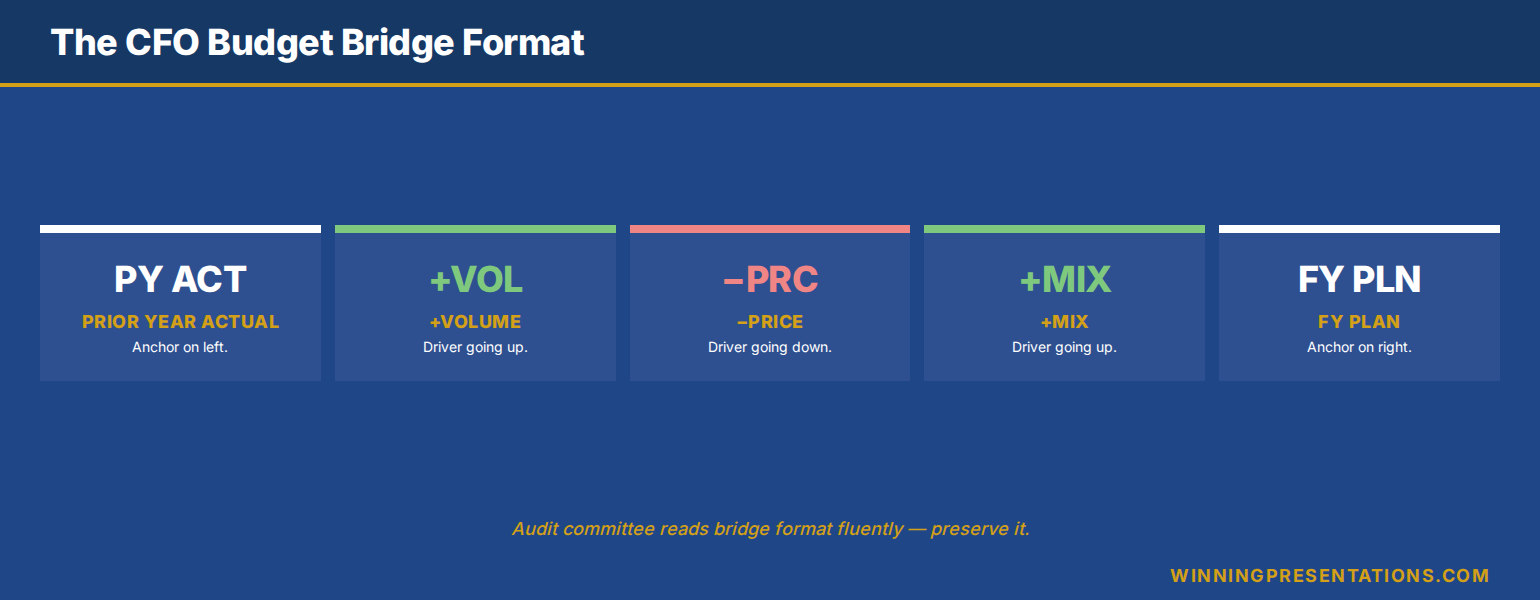
The prompt: “Using the prior-period actuals and FY plan in the source data, build a bridge slide that walks from prior-year actual to FY plan in four to six steps. Each step is a single line item or category. Each step has a value (positive or negative versus prior year) and a one-line rationale. Order the steps largest first. Do not invent any numbers. If a number is not in the source data, write [TBC] in its place.”
The “[TBC]” instruction matters. It is the constraint that prevents Copilot from filling gaps with plausible-looking inventions — the most dangerous failure mode in finance work. The bridge slide that comes back will not be perfect, but every number on it will be either real or marked as missing. The editing pass becomes verifying real numbers and filling marked gaps, rather than discovering invented ones.
For an audit-committee-grade variance slide, the bridge format is non-negotiable: prior-year base, plus or minus volume effect, plus or minus price effect, plus or minus mix or cost effect, plus or minus FX or one-off, equals current-year plan. Copilot will follow this format if you specify it. The deck the audit chair sees then matches the format the audit chair expects, which removes one layer of friction from the read-through.
Prompt 3 — Risk and sensitivity envelope
Risk slides in budget presentations fail in two predictable ways. They list every risk imaginable — twelve bullets, no prioritisation — and the audit committee tunes out. Or they list the top three risks but provide no sensitivity analysis, leaving the committee unable to weigh the materiality. Copilot will produce either of these failure modes by default. The prompt has to push it past both.
The prompt: “Using the FY plan from prior outputs, produce a risk slide with three components. First, the top three downside scenarios, ranked by impact on operating profit. Each scenario has a one-line description, a quantified impact (range, not point estimate), and a likelihood band (low, medium, high). Second, the single upside scenario most likely to materialise. Third, the single mitigating action the budget already funds against the largest downside. Voice: factual, no hedging language, no qualifiers like ‘subject to market conditions’.”
The “no hedging language” instruction is critical. Copilot defaults to qualifying every risk statement, which produces slides that read as if the finance function is hedging the hedge. Audit committees read that as evasion. The cleaner the risk slide, the more credible the budget. The prompt forces the cleanliness.
What you get back is a risk slide that names three downsides with quantified impact, names one upside, and names one mitigating action. That structure is what executive finance audiences want to see — risks acknowledged, sized, and managed — and what most budget decks fail to deliver. The slide will need editing, but the structure will be right. The Executive Prompt Pack includes voice-constrained risk-slide prompts for budget, capex, and strategic-plan presentations, each tuned to the audience that reads them.
Prompt 4 — Investment-versus-cost split
Most budget presentations conflate two very different categories of spend. There is cost — the spend required to keep the business running at current capability. And there is investment — the spend that builds new capability, capacity, or revenue. When the deck blurs the two, the audit committee cannot tell whether a year-on-year increase is operational drift or strategic intent. The board cannot tell whether to approve.
The prompt: “Using the FY plan, produce a single slide that splits total budget into two columns: cost-to-operate and investment-to-grow. Each column shows the top three line items by value, with year-on-year change versus prior period. Add a one-line description of what each investment line item is funding. Add a closing line stating what proportion of total budget is investment versus prior year. No marketing language. Use plain finance vocabulary.”
The split is what allows the audit committee to weigh the budget strategically rather than operationally. A flat or rising cost-to-operate raises questions about discipline. A rising investment-to-grow raises questions about return. Putting both side by side on a single slide forces the committee to discuss the right thing — strategic shift — rather than the wrong thing — line-by-line line-item review.
Ready for the full AI presentation framework, not just prompts?
The Maven AI-Enhanced Presentation Mastery course is the self-paced programme for senior professionals using AI to build executive-grade presentations. 8 modules, 83 lessons, 2 optional recorded coaching sessions. £499, lifetime access — monthly cohort enrolment, no deadlines, no mandatory attendance.
Prompt 5 — Q&A pre-empt
The fifth prompt does not produce a slide. It produces a one-page Q&A pre-empt — the five questions the audit committee is most likely to ask, with the structured answer for each. This page does not appear in the deck. It sits in your speaking notes and in the appendix, available if a question lands.
The prompt: “Based on the FY plan, variance slide, risk slide, and investment-versus-cost split produced in earlier outputs, generate the five questions an audit committee is most likely to ask. For each question, draft a forty-five-second structured answer in three parts: acknowledge the question, give the directly responsive number or fact, then bridge to the broader strategic position. No filler, no hedging. Voice: senior finance leader, decision-confident.”
The Q&A pre-empt is the layer most often skipped in budget preparation, and the layer most often regretted. A budget presentation that lands cleanly in the read-through can still lose the room in Q&A if the CFO is caught flat-footed by a question that was always going to come. Five minutes producing this prompt, ten minutes editing the answers, and you walk in with the structured response to the questions you are most likely to face.
This is also the prompt where Copilot’s value compounds the most. Because each prior prompt has been constrained, voice-controlled, and built on the same source data, the Q&A pre-empt the AI produces is grounded in the same numbers and same framing as the deck. Without the prior sequence, a stand-alone Q&A prompt produces generic interview-coaching language. With it, the questions and answers map directly to the slides the audit committee just read.
What Copilot still cannot do for you
The forty-five-minute draft is real, but the draft is a draft. Three things still need a senior finance human, and skipping any of them is the difference between a deck that lands and a deck that gets sent back for rework.
The first is the materiality judgement. Copilot will treat all numbers as equally significant. The judgement of which line items deserve airtime in a forty-minute audit committee slot, and which can sit in appendix or be summarised, is yours. The deck the AI produces typically has eight to twelve content slides; the deck the audit committee should see has five to seven. Cutting from the first to the second is structural editing, not prompt engineering.
The second is the political read. Every audit committee has live tensions — a contested capex line, a sponsor with a known view, a chair who is sceptical of headcount growth. Copilot does not know any of this. The strategic narrative the AI drafts will be technically correct but politically naïve. The CFO’s job is to bend the narrative around the live tensions — softening where appropriate, hardening where the case is strong, naming the elephant in the room where the room is going to ask anyway.
The third is the proof obligations. Copilot will state things the deck cannot defend. “Our cost discipline programme is on track” sounds fine until the audit chair asks for the run-rate evidence. Every claim in the deck has to be verifiable in the underlying numbers. The editing pass is the discipline of striking any sentence the budget pack itself does not prove.
None of these three jobs is being automated soon. What is being automated is the structural drafting — the work of taking source data and turning it into a passable executive deck format. That work used to take a CFO and finance team three hours. With the right prompt sequence, it now takes forty-five minutes, and the saved time goes back into the materiality judgement, the political read, and the proof discipline that AI cannot do.
Stop spending three hours on the structural draft of your budget deck.
The Executive Prompt Pack — £19.99, instant download — gives you the seventy-one Copilot and ChatGPT prompts that compress executive presentation drafting from hours to minutes, with voice and structure already constrained for senior finance audiences.
Get the Executive Prompt Pack →
Built for CFOs, finance directors, and senior professionals presenting budget, plan, and capex decisions.
FAQ
Does Copilot in PowerPoint actually read my source data, or do I need to paste numbers into the prompt?
Copilot in PowerPoint reads from open files in your Microsoft 365 environment if you reference them by name in the prompt — for example, “using the FY26 plan in BudgetPack.xlsx”. For documents not in the same workspace, paste the source numbers directly into the prompt or chat thread. Copilot will not invent numbers if you provide them and instruct it to flag missing values with [TBC]. Without source data, it will produce plausible-sounding but unverifiable figures, which is the worst failure mode in finance work.
Can I run all five prompts in a single Copilot session, or do I need to start fresh each time?
Run them in a single session. The reason the sequence works is that each prompt builds on the prior output — the variance prompt references the strategic narrative, the risk prompt references the variance, the Q&A pre-empt references all four. Starting fresh between prompts loses that compounding context, and the AI returns to generic defaults. Keep the chat thread open across all five prompts; the saved context is the productivity gain.
What if my company restricts Copilot for sensitive finance data?
Many finance functions operate Copilot in a tenanted Microsoft 365 environment with data-residency and protection controls — that is the configuration most large enterprises use for AI in sensitive workflows. If your IT or compliance function has not yet approved Copilot for finance data, the same prompt sequence works in any Copilot-equivalent enterprise AI assistant your organisation has approved. The structural sequence is the productivity unlock; the specific tool is interchangeable.
How much editing should the forty-five-minute draft actually need?
Roughly thirty per cent of the content, in our experience with senior finance leaders. The structural skeleton, the bridge format, and the risk-slide structure should be usable as drafted. The voice in places — particularly any phrasing Copilot defaults to that reads as marketing — needs replacing. The materiality call (which line items deserve their own slide) needs human judgement. The proof discipline (every claim verifiable) needs the CFO’s eye. Treat the forty-five-minute output as a structural draft, not a finished deck.
The Winning Edge — Thursday newsletter
Every Thursday, The Winning Edge delivers one structural insight for executives presenting to boards, investment committees, and senior stakeholders. No general tips. No motivational framing. One specific technique, one executive scenario, one action. Subscribe to The Winning Edge →
Not ready for the full prompt library? Start here: download the free CFO Questions Cheatsheet — the questions audit committees ask in budget read-throughs, and the structured response format that lands cleanly under pressure.
Next step: open the next budget deck on your calendar and run the first prompt — the strategic narrative frame. Three sentences, audit-committee voice, no marketing language. That five-minute exercise is the foundation everything else in the deck rests on; once it is right, the rest of the sequence builds itself.
Related reading: copilot prompts for executive presentations across the wider executive deck library, and why Copilot’s first draft fails boardroom tests, and the editing pass that fixes it.
About the author. Mary Beth Hazeldine is Owner & Managing Director of Winning Presentations Ltd, founded in 1990. With 25 years of corporate banking experience at JPMorgan Chase, PwC, Royal Bank of Scotland, and Commerzbank, she advises executives across financial services, healthcare, technology, and government on structuring presentations for high-stakes funding rounds, approvals, and board-level decisions.