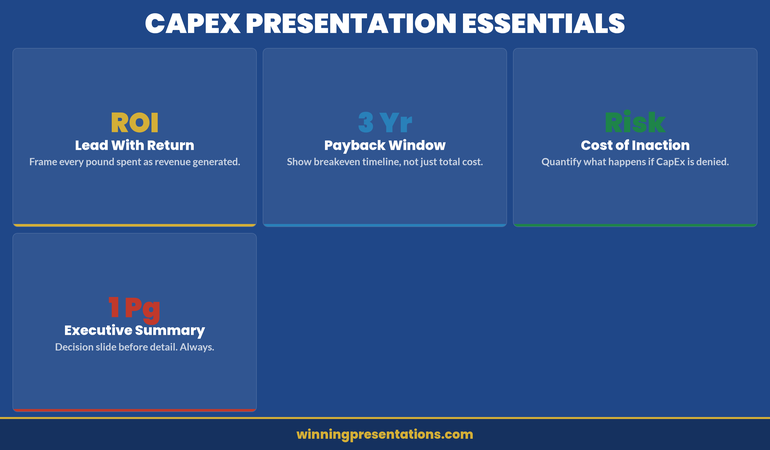
Finance committees reject CapEx requests that lack clear financial justification. The difference between approval and rejection is rarely the investment itself—it’s how you structure the business case and frame return on investment. A capital expenditure presentation must answer three questions immediately: Why now? How much? What’s the measurable return?
Vikram, Operations Director at a £85m logistics firm, had requested £2.3m for warehouse automation. Finance rejected it in fifteen minutes. The CFO said “weak business case.” Six months later, Vikram resubmitted with a restructured presentation: operational efficiency gains mapped to quarterly profit targets, risk mitigation quantified, ROI shown against three scenarios (conservative, expected, optimistic). This time, approval came in the first meeting. The difference wasn’t the investment. It was how he framed the capital expenditure presentation to speak to what the committee actually wanted to hear: risk-adjusted returns and strategic alignment.
Structure matters. Clarity builds confidence.
The Executive Slide System includes frameworks and templates designed for capital expenditure presentations. Explore the System →
Structure Your Business Case From First Slide
A capital expenditure presentation needs architecture, not a narrative dump. Finance committees evaluate requests using five core dimensions: strategic fit, financial return, timeline, risk, and alternatives. Every slide must address at least one. Open with an executive summary that names the investment, its purpose, and the expected return in a single sentence. Then move to the four-part structure:
Context. What’s driving the need? Market pressure, competitor action, operational bottleneck, or compliance requirement? Show the cost of not investing—cost of delay matters as much as investment size.
Solution. What will you acquire or build? Be specific: don’t say “technology platform.” Name the system, its core capability, and why this particular solution. Include implementation partners if relevant.
Financial Case. Three-year projection showing capital cost, implementation costs, operating cost changes, and revenue or savings impact. Include working capital requirements if material.
Risk and Mitigation. What could go wrong? Scope creep, delivery delays, adoption resistance, technology obsolescence. Show how you’ll manage each one. This is where governance and oversight shine.
Executive Slide System
Jump past DIY slide building. The Executive Slide System includes:
✓ Slide templates for finance requests and capital justifications
✓ AI prompt cards for ROI narratives and financial scenarios
✓ Framework guides for business case structure and risk communication
✓ Appendix templates for assumptions and sensitivity analysis
✓ Colour schemes and fonts pre-aligned to corporate governance standards
Designed for capital expenditure presentations and financial justifications
ROI Framing That Persuades Finance Committees
The phrase “return on investment” means nothing without context. A 15% ROI sounds weak if it’s compared to equity markets (historically 10%+ annually). But if the alternative is outsourcing at 8% cost of revenue, it’s compelling. Frame your capital expenditure presentation’s ROI against the actual comparator the committee uses internally: cost of capital, hurdle rate, or competitor benchmarks.
Use three scenarios: conservative (downside case, lower adoption or delayed benefits), expected (realistic case with minor headwinds), and optimistic (everything lands on schedule). Show payback period for each. Most CFOs want 18–36 months; if yours is longer, lead with the strategic rationale, not the ROI.
Separate cash flow from profit impact. Automation might improve EBITDA but consume cash in year two. Working capital swings matter. Show both. If your business is capital-constrained, leading with cash payback beats EBITDA gains.
Quantify non-financial benefits only if they translate to numbers eventually. “Improved customer satisfaction” without a link to retention or pricing power is noise. But “reduced churn by 2% → £1.4m incremental revenue” is material. Stay precise. Executive teams make £50m decisions on £200k annual benefit assumptions; rigour builds confidence.
Financial Justification Framework: What Committees Actually Want
Finance committees receive dozens of CapEx requests annually. Yours competes not just on absolute return, but on clarity and governance maturity. Present your justification in four layers:
Strategic layer: How does this capital deployment advance the published strategy? Name the strategic pillar explicitly. If your strategy says “operational excellence” and this is a supply chain investment, lead with that link. Ambiguous connections trigger scepticism.
Financial layer: What’s the direct return? Show calculation assumptions explicitly. CFOs will challenge your gross margin assumptions, implementation timelines, and adoption curves. Write them down. Transparency here prevents later accusations of “sandbagging” or hiding risks.
Risk layer: What’s the downside? A £3m investment with a 2% delivery-delay risk isn’t dangerous; a £50m bet with single-vendor lock-in is. Quantify risks you can, qualify risks you cannot. Show how governance (steering committees, go/no-go gates) will manage slippage.
Governance layer: Who’s accountable? Name the project sponsor, the finance owner, the steering committee chair. Define success metrics before you start spending. Show how monthly reviews will track actuals versus budget and benefits versus plan. Committees approve investment and oversight together; weak governance sinks strong financials.
A related internal link worth reviewing: if you’re presenting CapEx alongside compliance requirements, see our guide on compliance presentations to regulatory boards—the financial justification format translates directly.
Slide templates save hours. Framework guides save meetings.
Pre-built financial justification slides, ROI scenario templates, and risk communication frameworks for capital expenditure requests. £39 → Start now
Handling Pushback on Large Capital Requests
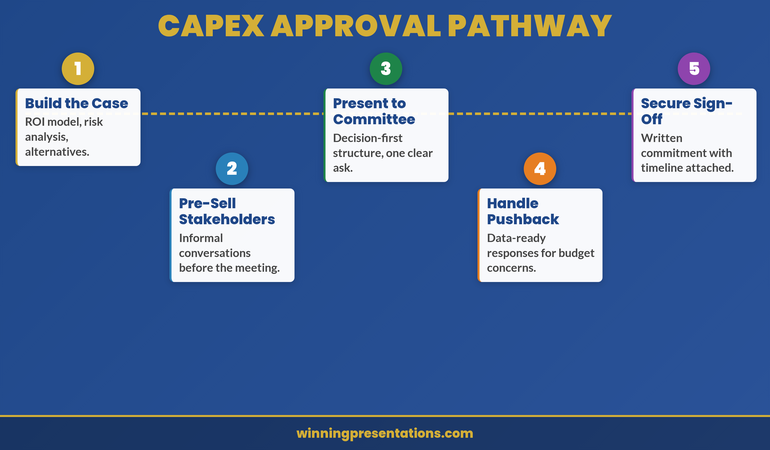
Finance committees will challenge every material assumption. Expect it. Prepare for it. The best capital expenditure presentations include an objection appendix—slides that live in reserve, supporting your core claims with deeper data.
Objection: “Payback is too long.” If your project has a 42-month payback, don’t defend it as acceptable. Instead, decompose it. Show what payback looks like in year three versus year one. Show how phasing implementation reduces upfront cost and accelerates early returns. Offer a staged investment: “£1.2m in phase one, £1.8m in phase two (gate-gated on phase one results).” Staged approaches reduce perceived risk and buy time for outcomes to prove themselves.
Objection: “We could outsource instead.” Have the outsourcing financials ready. Show why build beats buy (or admit it doesn’t and reframe around control, IP, or capability). If outsourcing is genuinely cheaper, your capital request is dead—unless you layer in strategic or risk factors outsourcing can’t solve. Be honest. Committees respect rigour more than optimism.
Objection: “Adoption risk is real.” Show your change management plan. Name the sponsor who’ll champion adoption. Quantify training investment and timeline. Tie adoption to incentive structures where possible. Finance wants to see that you’ve thought through the human side, not just the technology.
Objection: “What if benefits don’t materialise?” Build in benefit verification gates. Show when you’ll measure actuals against plan. Commit to a post-implementation review at 6 months and 12 months. Show corrective actions if tracking is off. This transforms pushback into partnership—you and finance are jointly invested in outcomes, not just spend.
The final element of a compelling capital expenditure presentation is a delivery roadmap that feels achievable. Don’t present an 18-month project with no interim milestones. Break it into quarters and show when key outputs (system live, first tranche of benefits realised, full adoption) hit the target.
Use a simple Gantt or staged diagram. Show dependencies clearly—if benefit realisation depends on vendor delivery or organisational change, make that visible. If you’re ahead of plan, say so. If you’ve absorbed early delays through schedule margin, say so. Committees want to see that you’re tracking, not gambling.
Attach a benefits tracking schedule to your presentation. Define what “success” looks like quantitatively in month 1, month 6, month 12, month 24. Name the person who owns measurement. Commit to monthly variance reporting in the first year. This transforms capital investment from a one-time decision into a managed programme. Governance rigour sells.
Frequently Asked Questions
How detailed should my financial model be in the presentation itself?
Show the summary (investment, payback, IRR, strategic fit) in slides. Build the detailed model (quarterly assumptions, sensitivity tables, build-versus-buy analysis) as appendices. Committee members may download the full pack before the meeting. Two-layer approach: headline numbers in the room, detailed justification on demand.
What if my CFO says the ROI isn’t strong enough?
This is valuable early feedback. Don’t defend weak ROI publicly; go back to the sponsoring business unit and ask if benefits assumptions are realistic or if the investment case should be rethought. Sometimes the answer is “reframe around strategic fit” rather than financial return. Other times it’s “this investment isn’t ready yet.” Better to learn that in a pre-meeting conversation than in the full committee room.
Should I present one scenario or three?
Three scenarios (conservative, expected, optimistic) show sophistication. But pick one as your “ask”—usually the expected case. Name it clearly. Show the others as upside and downside bounds. This prevents committees from anchoring to the optimistic case and then disappointing them when reality lands in the middle.
Stay ahead on executive communication.
Join The Winning Edge for weekly insights on presenting to boards, finance committees, and investor audiences. Practical frameworks. Real examples. No fluff.
If you’re new to presenting at this level, you might also find value in our guide on structuring your first board presentation in a new role—many of the financial governance principles overlap with capital expenditure requests.
A strong capital expenditure presentation is built on three pillars: crystal-clear business case structure, ROI framing that connects to your committee’s actual hurdle rate, and governance transparency that builds confidence in execution. Get those right, and finance committees move from scepticism to partnership. The Executive Slide System gives you templates to structure all three.
About Mary Beth Hazeldine
Mary Beth Hazeldine is Owner & Managing Director of Winning Presentations. With 24 years of corporate banking experience at JPMorgan Chase, PwC, Royal Bank of Scotland, and Commerzbank, she advises executives across financial services, healthcare, technology, and government on structuring presentations for high-stakes funding rounds and approvals.
The CFO looked at slide 38 and said eleven words: “Why should I fund something you can’t explain in one slide?”
Quick Answer: A capital expenditure presentation fails when it leads with the asset and hopes the CFO sees the value. A strong CapEx presentation structure leads with the business outcome the expenditure unlocks, positions the CFO as a co-owner of the investment thesis, and frames the approval as a strategic decision rather than a spending decision. The difference is whether Finance feels like a checkpoint or a champion.
Already preparing a CapEx presentation for next week?
If your capital expenditure presentation is treating the CFO as a gatekeeper instead of a strategic partner, the slide structure is working against you. The Executive Slide System includes CapEx-specific templates designed to frame financial approval as a shared investment decision.
The CapEx Request That Taught a VP a Costly Lesson
Kenji was the VP of Operations at a mid-sized logistics company. He’d built a solid business case for warehouse automation—a £2.3M investment that would reduce processing time by 40% and cut staffing needs by 18 positions over three years. He’d been careful. Three months of vendor evaluation. Detailed ROI analysis. Risk mitigation plan. He walked into the CFO’s office with a 35-slide presentation, confident the numbers would speak for themselves. The CFO watched him through the first four slides, then stopped him: “You haven’t told me why you’re here. Show me the business outcome first, then come back to the technical detail.” Kenji went back to his desk and restructured the deck. Business problem—first slide. Payback period—slide two. The CFO pre-read the new version, approved it in their next meeting, and told him: “I would have approved this the first time if you’d led with what we were solving, not what we were buying.”
Build the CapEx Presentation That Turns Your CFO Into Your Strongest Advocate
Deploy slide templates designed specifically for capital expenditure approvals—structured around the financial logic CFOs use to evaluate long-term investments
Use AI prompt cards that translate technical infrastructure needs into business outcome language Finance teams respond to
Build payback period slides that show the cost of delay, not just the cost of the investment
Include the decision-first slide framework that gets CFO alignment before the technical deep-dive
Built from 24 years presenting capital expenditure cases in banking—where CapEx approvals required sign-off from Finance, Risk, and the board in the same meeting.
Reframing CapEx: From Spending Request to Strategic Investment
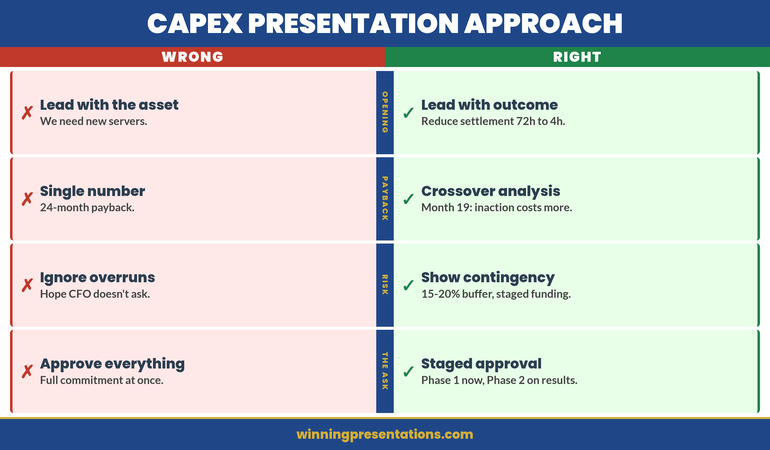
Most capital expenditure presentations open with the asset. “We need new servers.” “We need to upgrade the CRM.” “We need to replace the trading platform.” Every one of those sentences positions the CFO as a gatekeeper. You’re asking permission to spend money.
The reframe that changes the entire dynamic: open with what becomes possible after the investment. Not “we need new servers” but “we can reduce settlement processing from 72 hours to 4 hours, which eliminates the manual reconciliation that costs us £180k annually in labour and exposes us to regulatory risk every quarter.”
Now the CFO is evaluating a business outcome, not a purchase request. The conversation shifts from “can we afford this?” to “can we afford not to do this?”
This is not a language trick. It’s a structural decision about where your presentation starts. When your budget presentation leads with the business outcome, every subsequent slide—technical architecture, vendor selection, implementation timeline—becomes evidence supporting a decision the CFO already wants to make.
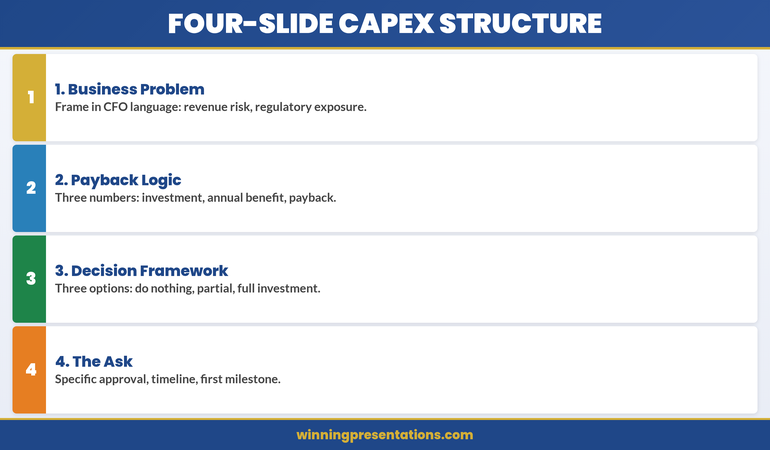
The Four-Slide CapEx Structure That CFOs Actually Approve
After watching capital expenditure presentations succeed and fail across four global financial institutions, I’ve identified a four-slide opening sequence that consistently gets CFO alignment before the technical detail begins.
Slide 1: The Business Problem Statement (Not the Technical Problem)
Frame the problem in language the CFO uses in their own presentations to the board. Revenue at risk. Regulatory exposure. Operational cost that scales with growth. Manual processes that prevent the team from working on higher-value activities. One slide. Two to three sentences. No technical jargon.
Slide 2: The Payback Logic
Not a full financial model—that goes in the appendix. Show three numbers: total investment, annual benefit, payback period. If the payback period is under 18 months, the CFO’s next question is about risk, not cost. If it’s over 24 months, you need a strategic justification on this same slide. Either way, the CFO now has the financial frame before seeing any technical detail.
Slide 3: The Decision Framework
Show the three options you evaluated and why you recommend this one. Not a vendor comparison—a decision comparison. Option A: do nothing (cost of status quo). Option B: partial upgrade (cost and limitations). Option C: full investment (cost and full benefit). The CFO sees that you’ve already done the analysis they would have asked for.
Slide 4: The Ask
State the specific approval you need, the timeline, and the first milestone. “We’re requesting £1.8M in CapEx for Q2 implementation, with first measurable benefit by Q3.” This is the slide where the CFO decides whether to keep listening or start asking questions. If you’ve structured slides one through three correctly, they keep listening.
Pre-Empting the Three CFO Objections That Kill CapEx Requests
Every CFO evaluating a capital expenditure request runs the same mental checklist. If your presentation doesn’t address these three objections before the CFO raises them, you’ve lost control of the conversation.
Objection 1: “What happens if the project overruns?”
CFOs have been burned before. Every CapEx request promises on-time delivery. Few deliver it. Your presentation needs a slide that acknowledges implementation risk honestly. Show your contingency budget (typically 15-20% of total). Show your milestone-based funding structure—if phase one doesn’t deliver the expected benefit, phase two funding is re-evaluated. This tells the CFO you’ve thought like a CFO, not like a project manager.
Objection 2: “Can we lease instead of buy?”
This is the CFO testing whether you understand the difference between CapEx and OpEx. If leasing is genuinely worse for this scenario, show why: higher total cost over the asset life, less control over upgrades, vendor dependency. If leasing is actually viable, acknowledge it—and show why ownership is better for this specific case. The worst answer is ignoring the question entirely.
Objection 3: “Why now? Can this wait until next fiscal year?”
This is the timing objection, and it kills more CapEx requests than budget constraints do. Your answer needs to be specific: what gets more expensive, more complex, or more risky if you delay twelve months? Quantify the cost of waiting. If the vendor’s pricing expires, say so. If a regulatory deadline makes this urgent, show the compliance timeline. If the team will lose capacity to competing projects in Q3, map it out.
If you address these three objections in your slides before the CFO raises them, something powerful happens: the CFO stops evaluating and starts advocating. They’ve seen that you understand their concerns. Now they’re helping you refine the proposal instead of challenging it.
Need to Present CapEx to Your CFO This Quarter?
Explore the slide templates designed to structure capital expenditure requests around the financial logic CFOs use to evaluate investments.
The Payback Slide That Changes How Finance Sees Your Request
Most CapEx presentations show a payback period as a single number. “24-month payback.” The CFO nods, writes it down, and moves to the next proposal that has a shorter one.
The payback slide that actually changes the conversation shows three things simultaneously: the cost of the investment, the cost of not investing, and the crossover point where doing nothing becomes more expensive than doing something.
Here’s what that looks like in practice. Your current system costs £420k per year in maintenance, workarounds, and manual processing. That cost increases by 12% annually as the system ages and the team grows. The new system costs £1.2M to implement and £180k annually to maintain. The crossover point—where cumulative cost of the old system exceeds cumulative cost of the new system—is month 19.
Now the CFO isn’t evaluating whether to spend £1.2M. They’re evaluating whether to keep spending £420k (and rising) per year on a system that’s getting worse. The CapEx request becomes the financially responsible choice, not the expensive one. This is the difference between presenting to a CFO who sees you as a cost centre and a CFO who sees you as a strategic partner.
If you’re also presenting quarterly forecasts alongside your CapEx case, the forecast presentation structure that simplifies complex financial data works on the same principle: show the trajectory, not just the snapshot.
Why Timing Your CapEx Presentation to Budget Cycles Matters More Than Content
You can build the perfect capital expenditure presentation and still get rejected if you present it at the wrong point in the budget cycle. CFOs think in cycles: annual planning, quarterly reviews, mid-year reforecasts. Each cycle has a different appetite for new expenditure.
The best window for CapEx approval is during annual planning (typically Q4 for the following year) when the CFO is actively allocating budget. The second-best window is immediately after a strong quarterly result, when there’s confidence in the financial outlook. The worst window is mid-quarter after a miss, when every new expenditure feels like a threat to the reforecast.
If you’re forced to present outside the ideal window, acknowledge it explicitly: “I know we’re mid-cycle, and I wouldn’t bring this outside planning season unless the timing risk justified it.” Then show why waiting for the next planning cycle costs more than approving now.
This is how experienced capital expenditure presenters operate. They don’t just build better slides—they time the conversation to match the CFO’s mental state about spending. The same proposal gets rejected in February and approved in October, not because the numbers changed, but because the context did.
Stop Losing CapEx Approvals to Structure Problems
Slide templates that lead with business outcomes and payback logic—so the CFO evaluates strategy, not just cost
AI prompt cards that help you frame capital expenditure in the language Finance teams use to justify investment to the board
Designed for capital expenditure presentations where the CFO needed to see payback logic before technical detail—and approved the investment in the pre-meeting.
People Also Ask
How many slides should a capital expenditure presentation have?
For CFO-level CapEx approval: 8-12 slides in the main deck, with detailed financial models and technical specifications in an appendix. The first four slides determine whether the CFO keeps listening or starts challenging. Those four slides—business problem, payback logic, decision framework, and the ask—must stand alone as a complete argument.
What’s the difference between a CapEx presentation and a budget presentation?
A budget presentation allocates recurring operational spending. A CapEx presentation justifies a one-time investment in a long-term asset. The approval criteria are different: budget presentations focus on allocation efficiency, while CapEx presentations focus on payback period, asset life, and strategic value. CFOs evaluate them with different mental models, so the structure must be different.
Should I include vendor details in a capital expenditure presentation?
Include vendor selection rationale, not vendor detail. The CFO needs to know you evaluated options and made a defensible choice. They don’t need the vendor’s technical architecture diagram. Show the decision logic: why this vendor, what the alternatives were, and what the switching risk is. Keep vendor-specific detail in the appendix for IT stakeholders who need it.
Is This Approach Right for You?
This is for you if:
You’re presenting a capital expenditure request to a CFO or finance committee and need approval, not just acknowledgement
Your previous CapEx requests have been deferred or sent back for “more financial detail”
You’re a technical leader who needs to translate infrastructure investment into business language
Your organisation requires formal CapEx approval and you want to get it done in one meeting, not three
This is NOT for you if:
Your CapEx request is under £10k and follows a simplified approval process
You’re presenting to a technical committee only, with no Finance stakeholders in the room
Your organisation doesn’t distinguish between CapEx and OpEx approvals
Frequently Asked Questions
My CFO keeps asking me to “come back with more detail” on CapEx requests. What am I doing wrong?
“More detail” usually means “you haven’t answered my real question yet.” CFOs rarely want more data—they want more clarity on payback period, implementation risk, and what happens if the project fails. Check whether your presentation addresses the three standard CFO objections: overrun risk, lease vs. buy, and timing. If any of those are missing, that’s what “more detail” actually means.
Should I present CapEx separately or include it in my quarterly review?
Present it separately unless the CapEx request is directly tied to a quarterly result. Quarterly reviews have their own agenda and time pressure. A CapEx request buried in a quarterly review gets evaluated with less attention and often deferred to a dedicated session anyway. Request a standalone 20-minute slot with the CFO. It signals that you take the financial commitment seriously.
How do I handle a CapEx presentation when the CFO has already said no once?
Don’t re-present the same case. Identify what changed since the rejection: new data, new urgency, new risk, or new competitive pressure. Open with that change. “Last quarter you said no because the payback period was too long. Since then, our maintenance costs increased 23% and the vendor raised implementation pricing by 15%. Here’s the updated analysis.” The CFO needs to see that new information justifies a new decision, not that you’re simply asking again.
The Winning Edge — Weekly
Advanced presentation strategy and executive communication insights. One email. Every week. No fluff, no sales pitch—just the frameworks that get decisions approved.
Mary Beth Hazeldine is Owner & Managing Director of Winning Presentations. With 24 years of corporate banking experience at JPMorgan Chase, PwC, Royal Bank of Scotland, and Commerzbank, she advises executives across financial services, healthcare, technology, and government on structuring presentations for high-stakes funding rounds and approvals.
Your CTO wants security and scalability. Your CFO wants ROI and risk mitigation. You need both departments signing off on the same technology purchase—and they’re speaking completely different languages.
Quick Answer: The most common reason technology evaluation presentations fail is that they’re built for one audience and hope the other one agrees. A strong technology evaluation presentation structure addresses both IT performance criteria and financial impact simultaneously, using parallel evidence that speaks to each department’s priorities without requiring translation.
⚠️ Diagnosis: Is Your Tech Evaluation Presentation Missing Something?
Your presentation is not failing because you lack technical detail or financial analysis. It’s failing because IT and Finance hear different stories from the same slides. You need a structure that lets both departments recognise their priorities instantly.
A senior infrastructure engineer named Sven was tasked with moving his organisation from a monolithic payment system to a cloud-native platform. The IT team had strong architectural preferences. Finance needed cost certainty. Instead of building separate business cases, Sven structured a single evaluation that showed how IT’s chosen architecture eliminated the specific cost categories Finance worried about most: manual reconciliation work (£240k annually), vendor overage fees during migration (another £120k), and post-launch infrastructure optimisation delays (£90k). He sent this pre-read to both teams structured as three parallel columns: Technical Requirements Met, Financial Impact, Timeline Risk. The CFO approved funding before the steering committee met. The CTO approved the approach before Finance gave it a second review. When the full group convened, the decision was simply confirmed.
Why Separating IT and Finance Approval Costs You a Month
Deploy structured slide templates designed for dual-audience technology evaluations—IT criteria on the left, financial impact on the right
Use prompts that help you position technical decisions as financial decisions (not just risk mitigation)
Build vendor comparison frameworks that show both architecture fit and cost justification simultaneously
Create business case slides that integrate technical requirements with budget approval criteria
Include pre-meeting diagnostic slides that signal to both stakeholders that their priorities are already understood
The Executive Slide System includes slide templates specifically for technology evaluation scenarios with AI prompt cards, scenario playbook guides, and diagnostic checklists for dual-audience alignment.
The Three Slides That Align IT and Finance Instantly
Technology evaluation presentations typically fail because they are built sequentially: here’s the problem, here’s the technical solution, here’s the cost. IT nods at slide two. Finance wakes up at slide three. Neither sees how their priorities connect.
The three slides that change this are:
Slide 1: The Business Impact Statement
This is not a financial summary. It’s a statement of what becomes possible (or what risk gets eliminated) after this technology is in place. Frame it as capability, not cost: “With [solution], we can deliver customer onboarding in 48 hours instead of 2 weeks” or “This integration removes our single point of failure in payments processing.” IT sees the technical outcome they’re responsible for. Finance sees the business consequence they’re accountable for.
Slide 2: The Architecture Approach (Stripped of Jargon)
Your CTO needs this detail. Your CFO does not. But your CFO needs to see that a real approach exists. Show the architectural approach in three boxes: what you’re replacing, how the new system sits between current tools, what integrations matter. Include one line of financial context per box: “This eliminates manual reconciliation (currently £180k annually in labour)” or “Migration follows this sequence to prevent revenue system downtime.”
Slide 3: The Approval Criteria Met
Create a two-column comparison. Left side: “Technical Requirements” (security rating, uptime percentage, API maturity, team capacity required). Right side: “Financial Requirements” (cost per user, implementation timeline impact, payback period, risk exposure reduction). Show how the selected solution meets both columns. This is the slide where IT and Finance finally see they’re evaluating the same thing.
Building Credible Evidence for Both Audiences
IT teams trust technical proof points: architecture diagrams, security certifications, API documentation, case studies from similar technical environments. Finance teams trust financial proof points: contract terms, reference customers of similar size, implementation cost breakdowns, risk-adjusted ROI models.
Your evidence strategy needs both. But don’t duplicate your slide space—integrate them. On your vendor comparison slide, for example:
Show security certifications (ISO, SOC 2, etc.) alongside average cost of a data breach in your industry
List team certification requirements alongside fully-loaded cost per developer month
Reference customer case studies that include both similar organisation size AND similar implementation budget
This evidence structure does something important: it stops IT and Finance from dismissing each other’s concerns. When IT sees that a “secure but slower” vendor choice increases implementation cost by £300k, they’re more willing to compromise on a “less certified but faster” option that Finance prefers. When Finance sees that a “cheaper” vendor requires 40% more server infrastructure than their sizing assumed, they understand IT’s resistance.
The Technology Evaluation Presentation Mistakes That Delay Approval
Most technology evaluation presentations fail not because they lack information, but because they ask IT and Finance to do translation work. Here are the mistakes that add three weeks to your approval timeline:
Mistake 1: Assuming “Total Cost of Ownership” is Self-Evident
You calculate TCO. Your Finance team recalculates it. They discover they counted hidden costs differently. Everyone redoes the analysis. Instead: show your TCO calculation methodology in the presentation itself. Let Finance validate the numbers before the meeting, not during it.
Mistake 2: Treating Risk as a Technical Issue Only
Your IT team worries about vendor lock-in, uptime guarantees, and data security. Your Finance team worries about vendor financial stability, contract exit terms, and liability limits. A strong technology evaluation presentation addresses both. Show the vendor’s financial health (not just their technical health). Show how contract terms protect the organisation if the vendor fails.
Mistake 3: Presenting Vendor Comparisons That Privilege IT Priorities
Your comparison might show “Vendor A has better API maturity” and “Vendor B has lower cost.” IT gravitates to A. Finance to B. You’ve created a false choice. Instead, show what IT gets for Finance’s chosen option (faster integration reduces cost) and what Finance gets for IT’s chosen option (better architecture prevents costly maintenance).
Are Both Departments Making the Same Decision?
The difference between approval in one meeting versus three is whether IT and Finance can see the same solution from their different angles. Get the slide templates designed for dual-audience alignment.
Most technology evaluation presentations include a financial business case. Few include the business case for deciding now versus deciding later.
This matters because IT and Finance have different timelines. IT worries about technical debt—the longer you wait, the more complex the migration. Finance worries about cost escalation—the longer you wait, the more expensive the solution. A strong presentation quantifies both.
Your business case slide should show:
Cost of current system in year 1, year 2, year 3 (licence escalation, maintenance burden, team capacity spent on workarounds)
Implementation cost if you decide now versus if you decide in 12 months (vendors raise prices, migration gets more complex with accumulated data, team turnover changes execution capability)
Risk cost if the current system fails before you migrate (revenue impact, recovery time, customer impact)
Opportunity cost: what the team could build instead of maintaining workarounds
This slide works because it frames the decision as “which timeline makes financial sense?” rather than “do we agree this technology is good?” IT and Finance can disagree on technology and still agree on timeline logic.
Stop Building Separate Presentations for IT and Finance
Dual-audience slide templates that let both departments recognise their priorities in one deck
Vendor evaluation frameworks designed to address both technical and financial approval criteria simultaneously
Designed for presentations where technology evaluations need IT procurement sign-off and CFO budget approval in the same meeting.
Is This Approach Right for You?
This structure works when:
You need approval from both IT and Finance in the same decision cycle
IT and Finance have measured you before and disagreed (one wanted to move fast, one wanted to move carefully)
The technology decision affects both infrastructure and budget planning
You want to avoid sequential presentations that create delays and re-analysis cycles
Your organisation has a history of technology projects where IT and Finance blamed each other for overruns or delays
If you’re presenting to IT only, or Finance only, you need a different emphasis. But if you need both departments saying yes in one meeting, this structure is the difference between approval and delay.
Master Dual-Audience Technology Presentations
PowerPoint slide templates for technology evaluation scenarios (vendor comparison, build vs. buy, migration business case, infrastructure investment)
AI-powered prompt cards that help you articulate technical decisions in financial language (and vice versa)
Scenario playbook guides including the exact slides IT and Finance need to see in technology vendor evaluations
Diagnostic checklists including approval criteria mapping (what each stakeholder needs to see to say yes)
The alignment framework used in presentations where both IT and Finance approved in a single meeting
Used in technology vendor evaluation presentations where IT and Finance stakeholders approved in the same meeting because both departments recognised their priorities in the slide structure.
People Also Ask
What’s the difference between a technology evaluation presentation and a vendor pitch?
A vendor pitch is the vendor selling to you. A technology evaluation presentation is you selling the decision to your stakeholders. The structure is completely different. Vendor pitches emphasise product capabilities. Technology evaluation presentations emphasise how the product solves your specific problem and meets your approval criteria. This is why vendors often can’t deliver the slides you actually need—they don’t know what your IT and Finance departments require to say yes.
Should I show multiple vendors or commit to one in the presentation?
Show multiple vendors if your organisation requires vendor comparison before approval. Show one vendor if you’ve already done the evaluation and you’re presenting the recommended choice. The mistake most people make is showing multiple vendors but letting different stakeholders prefer different ones. Use your vendor comparison slide to show why the recommended vendor is the right choice for both IT and Finance criteria, not just for one audience.
What if IT and Finance genuinely disagree on the best choice?
That’s not a presentation problem—that’s a decision problem. Your presentation can’t solve disagreement, but it can clarify what each department is optimising for. Often IT and Finance aren’t actually disagreeing on the technology; they’re disagreeing on which risk matters more. A strong presentation surfaces that disagreement so the business decision-maker can decide: is this a technical risk organisation or a financial risk organisation? Then everyone commits to the same choice based on that business logic.
Frequently Asked Questions
How long should a technology evaluation presentation be?
For IT and Finance together: 12-15 slides. You need enough detail that both departments see their concerns addressed, but not so much that you create confusion. Pre-read documents can contain additional technical or financial detail. The presentation itself should move decision-makers from “we need more information” to “we’re ready to decide.”
Should I include the vendor’s materials in my presentation?
No. Use the vendor’s materials for research and detail validation, but build your presentation from your stakeholders’ perspective. Vendor materials sell product features. Your presentation sells the decision to buy. The structure, evidence hierarchy, and audience focus are completely different. If you copy slides from vendor pitch decks, you’re inheriting their priority sequencing, not yours.
What’s the biggest mistake in technology vendor evaluation presentations?
Treating evaluation as a technical exercise and expecting Finance to simply rubber-stamp the IT decision. The biggest mistake is the reverse: treating it as a financial exercise and expecting IT to accept whatever Finance chooses. Both perspectives matter. Both approval criteria matter. Your presentation’s job is to show that the recommended choice wins on both dimensions, or explicitly show which dimension your organisation is prioritising if it doesn’t.
Every week, just the essentials
Advanced presentation strategy and stakeholder communication insights for the people who lead decisions. No sales messages. Only insights you can use Monday morning.
Mary Beth Hazeldine helps executive teams and technical leaders build presentations that actually get decisions approved. She works with CIOs, CTOs, CFOs, and business leaders on technology investment presentations where multiple stakeholders need to agree. Her framework for dual-audience presentations has been used in vendor evaluations, infrastructure investments, and technology transformation initiatives across financial services, healthcare, and professional services.
Claire was Head of Digital at a UK retail group. She’d submitted for Director three times and been rejected three times. “Not quite ready,” the feedback always said. No specific gaps, no roadmap to yes. On her fourth submission, she stopped writing a detailed CV and started building a business case presentation instead. Four slides. No prose. Just quantified impact: £2.1M in revenue from her team’s initiatives. Three cross-functional projects delivered. Headcount grown from 4 to 11 people under her management. The committee approved her promotion in the first meeting. Effective date six weeks later.
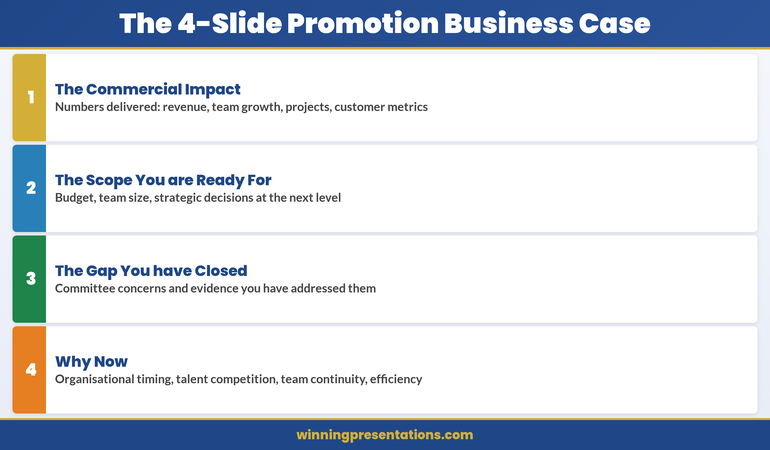
Quick answer: A promotion business case presentation stops the committee from evaluating you against abstract criteria and forces them to evaluate you against the numbers you’ve already delivered and the scope you’re ready for. Most promotion candidates submit a CV (which invites comparison and judgment) or a rambling narrative (which buries the business case in words). Instead, build four slides: The Commercial Impact you’ve delivered, The Scope you’re ready for, The Gap you’ve already closed, and Why Now. Each slide answers one specific question. Together, they answer the only question that matters: “Is this person clearly ready, or are we still waiting?”
Promotion decision meeting this month?
Most candidates prepare what they’ve done. Few prepare what they’re ready to do. If you’re walking into a promotion committee meeting with a CV or a vague narrative, you’re accepting the rejection you’ve already received twice.
Quantify exactly what you’ve delivered in the current role
Define the scope you’re ready for at the next level
Show the specific gaps you’ve already closed
Explain why the committee should move now, not wait
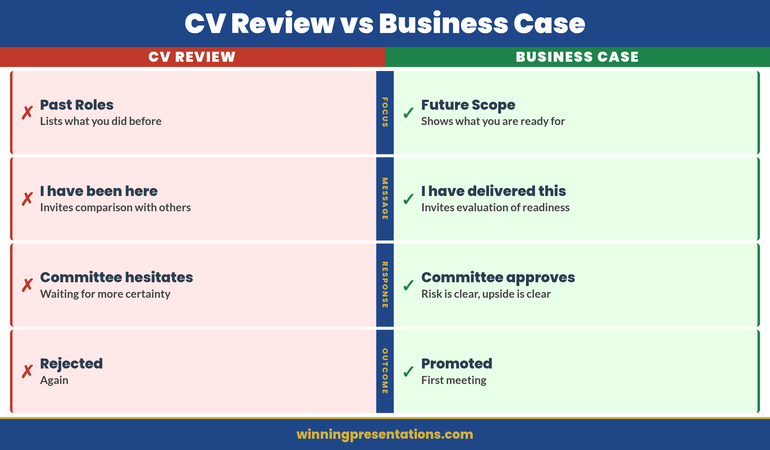
Claire had done everything right the first three times. Her CV was polished. She’d taken every leadership course available. She’d mentored junior team members. Her manager called her “a natural leader.” But the promotion committee saw the CV and asked: “Compared to other candidates at her level, is she exceptional?” That question invited comparison. Comparison invites hesitation.
Before the fourth submission, Claire rebuilt her approach entirely. She stopped thinking about proving she’d “earned” the promotion through tenure and effort. She started thinking like she was already in the role, and the committee needed a business case for moving her now. She quantified. She showed scope. She closed perceived gaps. She explained risk: the talent she’d develop was being poached by other teams because she wasn’t promoted. One presentation. Four slides. No hedging. The committee didn’t compare her to other candidates. They compared her to the cost of losing her. Promotion approved.
Why CVs Fail and Business Cases Win
The promotion decision is not a comparison decision. It never should be. But a CV invites comparison. So does a narrative summary of what you’ve done. Here’s why:
CVs Are Backward-Looking
A CV lists past roles, responsibilities, and achievements. The implicit message is: “I’ve been here a long time doing this very well.” The committee hears: “Are they better than other candidates who’ve also been somewhere a long time?” Suddenly you’re in a comparison tournament. If another strong candidate is being considered, you both look similar. Hesitation sets in.
Business Cases Are Forward-Looking
A business case says: “Here’s what I’ve delivered in the current role. Here’s what I’m ready to deliver at the next level. Here’s what could go wrong if you wait. Let’s decide now.” The committee isn’t comparing you. They’re evaluating risk and opportunity. Very different mental frame.
CVs Invite Questions You Can’t Answer
A CV prompts the committee to ask: “Is this person leadership material? Are they visionary? Will they grow into the role?” These are judgment questions. You can’t answer them with facts. You can only hope the committee sees it the way you do.
Business Cases Answer Questions Before They’re Asked
A business case says: “I’ve already led projects of this scale. I’ve managed budgets of this size. I’ve handled this type of stakeholder complexity. I’ve closed this gap. Here’s the evidence.” No speculation. No hopes. No judgment required—just an evaluation of readiness based on demonstrated scope.
The Four Slides: Structure That Works
A promotion business case has exactly four slides. Not three (too little scope), not five (too much detail). Four slides answer four specific questions the committee is asking (whether they say it aloud or not):
Slide 1 — Commercial Impact: What have you actually delivered? (Numbers only.)
Slide 2 — Scope: What are you ready to lead? (Bigger picture.)
Slide 3 — Gap: What did you need to learn? And have you learned it? (Addressing doubt.)
Slide 4 — Why Now: What’s the cost of waiting? (Creating urgency.)
This structure works because it doesn’t ask the committee to evaluate you. It asks them to evaluate your readiness. Completely different exercise.
Promotion Committee This Month? Build the Business Case, Not the Narrative
If your committee meeting is coming up and you’re still working from a CV or a verbal narrative, the Executive Slide System gives you the exact four-slide business case structure to build instead. It includes:
The four-slide business case structure for promotion committees (commercial impact, scope, gaps closed, why now)
Worked examples showing how to quantify impact at executive level
Decision-slide frameworks designed for internal committee presentations
Templates ready to adapt to your organisation, role, and committee
Informed by real-world executive presentation experience across investment banking, SaaS, and consulting — including internal promotion contexts.
Slide 1: The Commercial Impact You’ve Delivered
This slide answers: “What has this person actually delivered?” Not in prose. Not in a list of responsibilities. In numbers.
What Numbers Go Here?
Revenue driven. Cost reduced. Headcount managed. Projects completed on time or early. Customer retention improvement. Market share gained. Team size growth. Budget managed without overspend. Retention of top talent you’ve developed. Any metric that matters to your organisation’s financial or operational success.
If you’re in a function that doesn’t directly drive revenue (HR, Finance, Operations), quantify the impact you’ve had on the business that relies on you: “Reduced hiring cycle time from 14 weeks to 7 weeks, enabling 40 critical hires in year two. Prevented £1.2M in turnover costs through culture initiatives.”
How Many Numbers?
Three to five numbers. No more. Each number should be large enough to be noteworthy and specific enough to be credible. “Big revenue” is vague. “£2.1M in revenue from digital commerce initiatives, 180% year-on-year growth” is specific.
Present Them Minimally
One number per line. No paragraphs. No explanation. The slide is pure fact. The explanation comes in the presentation moment, face to face.
Example Slide 1 (Digital Leader, Retail Group):
£2.1M revenue from digital commerce initiatives (Year 1–2)
Team scaled from 4 to 11 people (net retention 94%)
3 cross-functional projects delivered on time: Platform migration, Customer data integration, Omnichannel pricing
Average digital customer NPS: +28 points year-on-year
This slide doesn’t prove Claire deserves a promotion. It proves she’s already delivered at the scope of the role she wants.
Slide 2: The Scope You’re Ready For
This slide answers: “What would this person be responsible for at the next level?” Again, no narrative. Just scope.
What Scope Information Goes Here?
Team size. Budget responsibility. Revenue or P&L ownership. Number of stakeholders. Strategic decisions you’d make. Cross-functional responsibilities. Geographic scope. Customer base. Market segment. Anything that defines the size and scale of the role you’re applying for.
Make It Comparative
Show current scope and next-level scope side by side. “Currently manage 11 people, £2.8M annual budget. Director role would manage 28–35 people, £7–9M annual budget, and P&L responsibility for three business units.” This makes the leap clear without being grandiose.
Example Slide 2 (Digital Director Role):
Dimension
Current (Head of Digital)
Next Level (Director)
Team size
11
28–35
Budget authority
£2.8M (operational)
£7–9M (P&L)
Strategic decisions
Digital strategy execution
P&L strategy, portfolio, resource allocation across 3 units
Stakeholder groups
Marketing, IT, Finance, Operations
Board, CEO, CFO, three business unit heads, external investors
The committee now sees that you’ve already led projects at 40–60% of the next-level scope. You’re not asking them to take a massive bet. You’re asking them to expand a proven track record.
Slide 3: The Gap You’ve Already Closed
This slide addresses the silent question every committee has: “What concerns do we have, and have they already been addressed?” Don’t wait for them to say it. Say it first.
What Gaps Commonly Come Up?
For first-time directors: “Have they managed a larger team?” or “Have they handled a serious people issue?” For cross-functional promotions: “Do they understand the P&L?” For external hires seeking rapid advancement: “Do they know our culture?” For technical leaders moving to management: “Can they lead non-technical people?”
Think back to feedback you’ve received. Think about what the next-level role requires that you haven’t yet formally held. That’s the gap.
Show the Evidence You’ve Already Closed It
Don’t say, “I’m ready to manage a larger team.” Say, “I’ve managed the Platform Migration project, which required me to coordinate 22 people across three departments for six months. Delivered on time, no overruns, 96% of team stayed post-project.”
Example Slide 3 (Digital Leader, potential gaps and evidence):
Gap: Can you handle P&L responsibility? → Evidence: Managed £2.8M annual budget with zero overruns for two years. Drove cost negotiations that saved 18% vs. year one. Forecast accuracy 94%.
Gap: Can you lead at board level? → Evidence: Presented quarterly business reviews to CFO and CEO for 18 months. Lead quarterly board updates on digital KPIs (8 presentations, zero rework requests).
Gap: Can you make the hard people decisions? → Evidence: Led the reorganisation of the digital team (11 people, reallocation of three, one exit managed professionally). Retained 100% of high performers during restructuring.
Gap: Can you develop the next generation? → Evidence: Promoted two team members to senior roles. One is now leading the platform team. 94% of team stayed, suggesting effective development and engagement.
The committee stops worrying about gaps. They start thinking about timing.
Building the case for your own promotion?
The Executive Presentation Starter Kit gives you the templates, checklists and prompts to walk into that committee prepared.
This is the most underrated slide. It answers: “Why should we move now instead of waiting six months, a year, or until a formal opening exists?”
Reasons to Move Now
Organisational timing: “We’re about to launch the omnichannel initiative. The role I’m being considered for will own it. Waiting six months means losing momentum and delaying revenue impact.”
Market competition: “Two competitors have hired directors into similar roles in the last quarter. Talent in this space is moving fast. If we wait, the best people available now might not be available in six months.”
Risk of attrition: “I’ve had three conversations in the last two months about external opportunities. I’m not looking, but I’m being sought out. A decision now sends a clear signal about career progression in this organisation.”
Team stability: “If this role opens formally, I’d be a candidate. So would external hires. A decision now avoids the chaos of a competitive internal process that could destabilise the team.”
Capability readiness: “I’ve deliberately taken on stretch assignments in the last 18 months to prepare for this role. I’m at peak readiness now. Waiting longer doesn’t add capability—it just delays momentum.”
Frame It as Mutual Benefit, Not Threat
The worst version of Slide 4 is: “I have other offers, so decide now or lose me.” The best version is: “Here’s why moving now benefits the organisation more than waiting.” These are genuinely different messages.
Example Slide 4 (Digital Leader):
Organisational: Omnichannel strategy launch (Q2) requires director-level ownership. Director structure in place now ensures strategic alignment from day one.
Talent landscape: Digital director roles in retail are tight. Three director-level hires completed by competitors in the last quarter. First-mover advantage matters.
Team continuity: Current structure has been stable for 18 months. Promoting internally ensures zero transition risk and maintains momentum.
Cost: Internal promotion costs 60% less than external recruitment for this level.
The committee hears: “This is smart business.” Not: “Hurry or I leave.”
Unsure how to quantify your impact?
Many executives underestimate what they’ve delivered because they focus on activity instead of outcome. The Executive Slide System includes a metrics framework that walks you through finding and framing the numbers that matter most for your role.
Common Mistakes That Sink Promotion Cases
Mistake 1: Burying Impact in Narrative
You say: “I’ve managed several large projects, led a team through significant growth, and delivered strong results.”
The committee hears: “Maybe.”
Say instead: “£2.1M revenue, team grew from 4 to 11, three projects on time.”
The committee hears: “Clearly.”
Mistake 2: Confusing Current Scope With Next-Level Scope
You say: “As director, I’d continue what I’m doing now, but at a larger scale.”
The committee worries: “So you’d be doing the same job, bigger. Who develops the next generation of heads of function?”
Say instead: “Currently I execute digital strategy. As director, I’d own digital strategy and P&L for three business units, allocate resources across portfolios, and report to the CEO quarterly.”
The committee hears: “You’ve thought about the leap.”
Mistake 3: Ignoring the Gaps They’re Worried About
You present your four slides. The committee thinks: “What about P&L? Has she handled a board-level conversation? Can she manage a larger team?”
These worries sit silent. Unanswered. They become reasons to delay the decision.
Say it first. Show the evidence. Close the gap before they voice it. They can’t worry about something you’ve already addressed.
Mistake 4: Creating Urgency by Threat
You say: “I’ve had offers from other companies, so I need a decision by Friday.”
The committee hears: “You’re a flight risk. If we promote you and you leave anyway, we’ve wasted time.”
Say instead: “The omnichannel initiative launches in Q2. This director role needs to own that strategy from day one. A decision in March means we’re ready; a decision in May means we’re playing catch-up.”
The committee hears: “You’re thinking about the business, not just yourself.”
Mistake 5: Not Presenting It as a Presentation
You email four slides with a cover letter to the committee.
The committee reads it in their calendar between two other emails. The four slides sit in isolation without context.
Insist on 15 minutes in the room. Present the four slides. Let them ask questions. The presentation—your presence, your clarity, your composure—is half the power. The slides are the other half.
When Your Manager’s Advocacy Isn’t Enough, the Business Case Has to Speak for Itself
Most candidates wait for their manager to make the case in the room. When the committee meets without you, your manager’s opinion becomes the only evidence. The Executive Slide System gives you the specific slide formats that shift the conversation from advocacy to documented impact — the promotion business case, the decision-slide structure, and the quantified impact framework.
Get access to: Promotion business case frameworks, decision-slide structures, and the exact formats for presenting quantified impact to senior committees.
The four slides are useless if they sit in an inbox. They’re powerful if you present them in person, face to face, to the decision-making committee.
Book 15 Minutes
Not 30. Not 45. Fifteen. Long enough to present clearly. Short enough that it feels confident, not defensive. “I’d like 15 minutes with the promotion committee to walk through my business case for the director role.”
Start With the Rescue
Before the first slide, say: “I’m not here to ask you to compare me to other candidates. I’m here to show you why moving now is better for the business than waiting. I’ve organised this around four questions I know you’re asking: What have I delivered? What am I ready for? Have I closed the gaps you’re worried about? Why should we move now? Let’s walk through them.”
You’ve just told them the meeting won’t be self-aggrandising or political. It will be clear and business-focused. That’s the tone that wins.
Present Without Over-Explaining
Show Slide 1. Say: “Here’s what I’ve delivered in the current role. Four key metrics: revenue, team growth, projects, customer impact. Any questions?” Wait for them. Let them ask. Then move to the next slide.
You’re not performing. You’re having a business conversation. They’ll respect that.
End With Openness
After Slide 4, say: “That’s the case. What questions do you have?” Sit down. Let them ask. Don’t keep talking. Silence here is not awkward—it’s them processing. Let them process.
When They Say They’ll Think About It
They will. Say: “I appreciate that. Is there anything you’d like me to clarify or any information I should get you before you decide?” This is not pushy. It’s professional. You’re saying: “I’ve made the case clearly. If there are gaps in the case, I want to fill them.”
Know Your Committee Before You Present
The four slides work, but only if you know who you’re presenting to. Before you schedule that 15-minute meeting, know:
Who has final say? (CEO, CFO, Board of people?)
What does each person care about most? (CFO cares about cost and P&L. CEO cares about strategy. Your boss cares about continuity.)
What concerns might each person have? (Frame Slide 3 to address each person’s specific concern.)
Have you worked with them before, or is this your first high-stakes interaction? (If it’s your first, prove you can handle board-level presence.)
This four-slide business case approach is right for you if you can answer YES to at least two of these:
✓ You’ve been told “not quite ready” before, and you want to change that conversation from judgment to business reality
✓ You’ve delivered measurable impact in your current role, but the committee doesn’t seem to see it
✓ You’re being considered for promotion but haven’t had the chance to present your case directly to the decision-makers
✓ You’re worried that without a structured argument, the committee will compare you to other candidates and hesitate
This approach is NOT right for you if:
✗ You’re in a role where you haven’t yet delivered any measurable impact (in that case, focus on delivering first, then building the case)
✗ The organisation doesn’t have formal promotion committees (in that case, the conversation is one-on-one, not structural)
✗ You’ve already been told you’re promoted pending a formal announcement (you don’t need to persuade; you need to transition)
Frequently Asked Questions
Should I include these four slides in my official application, or present them separately?
Separate. Your official application—CV, cover letter, form—follows the organisation’s process. The four-slide business case is what you present to the decision-making committee after your application is accepted. It’s not a replacement. It’s the tool you use in the meeting to move from “maybe” to “yes.”
What if I’m being promoted internally and the committee already knows my work?
They know your role. They might not know the quantified impact. Many executives don’t realise how much revenue their team drove or how many people they’ve successfully developed until they start looking for the numbers. Even if the committee knows you well, the numbers create clarity that relationships alone can’t. Show the slides anyway. It changes the conversation from “we like working with you” to “you’ve demonstrably delivered at the next level’s scope.”
What if I can’t quantify some of my impact?
Quantify what you can. For the rest, show evidence of scope. If you’ve managed a project that involved coordinating 20 people for six months, that’s scope, not a number. If you’ve led a cross-functional initiative that touched three departments, that’s scope. Numbers are better, but scope is credible too. Just make sure every slide has either a number or a significant scope indicator. Don’t leave a slide blank because you “didn’t have numbers.”
Should I mention other job offers to create urgency?
No. Frame urgency around the business case (Slide 4) instead. “The omnichannel initiative launches in Q2” is urgency. “I have another offer” is a threat. The committee might promote you, but you’ll start the role with a damaged relationship because they felt pressured. Use business urgency instead.
What’s Inside the Executive Slide System
The Executive Slide System gives you slide structures, templates, and decision frameworks for the executive presentation scenarios you face most often — including the promotion business case, the budget briefing, the governance reset, and the stakeholder presentation.
What you get:
Slide templates for 12 executive scenarios (including the complete four-slide promotion business case)
Decision-slide frameworks designed for committee presentations
Worked examples from real executive presentations (SaaS, consulting, financial services)
The four slides win the committee’s approval. But that approval only happens if you’ve done the work before you walk into the room.
Build your case over weeks, not days. Collect the numbers. Run the projects. Develop the people. Close the gaps. The four slides are the summary of work you’ve already been doing. They’re not magic. They’re clarity.
When Claire walked into her fourth promotion committee meeting, the four slides weren’t new to her. She’d been building that case for 18 months through the projects she’d taken on, the metrics she’d tracked, the scope she’d deliberately expanded. The four slides just made it visible.
That’s when the committee saw what had been true all along: she was already ready.
Get weekly guidance on executive presentations
Every Monday, a short email with the presentation strategy that moves decisions. Join 2,400+ executives.
Mary Beth spent 16 years in investment banking and corporate finance at RBS, where she made and lost pitches at every level. She’s sat in promotion committees. She’s submitted CVs and been rejected. She’s also seen what works—and what doesn’t. Now she helps executives build presentations that change decisions. She’s based in Edinburgh and works with leaders across SaaS, consulting, and financial services.
Your promotion business case doesn’t prove you deserve the role. It proves the organisation deserves the upside of moving you now.
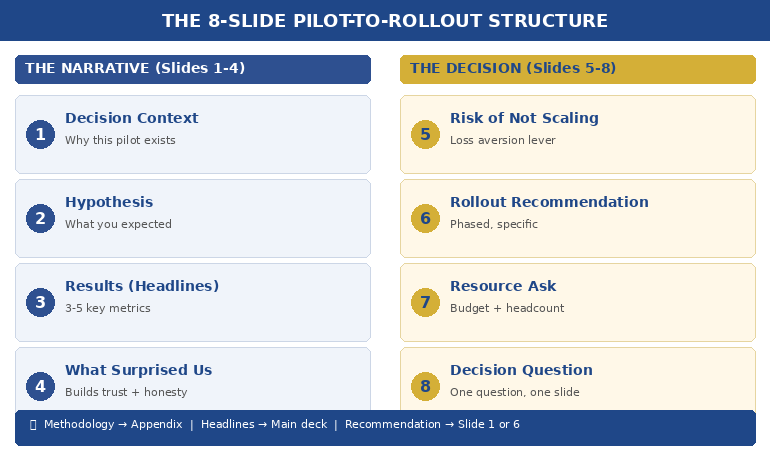
Quick answer: Most pilot programs that deliver strong results still fail to get full rollout approval — because the presentation focuses on what happened instead of what should happen next. The winning pilot results presentation follows an 8-slide structure: context, hypothesis, results, what surprised us, risk if we don’t scale, rollout recommendation, resource ask, and decision question. Lead with the recommendation. Prove it with the pilot. Make the decision easy.
My client’s pilot saved £1.2 million in twelve weeks.
The data was clean. The operations team loved it. The finance team had validated the numbers independently. By any rational measure, full rollout was the obvious next step.
She walked into the executive committee meeting with 34 slides. Fourteen of them were methodology. Eight were charts showing week-by-week performance. Four were appendix slides about the control group. She buried the recommendation on slide 29.
The CFO interrupted on slide 11. “What are you asking us to do?”
She stumbled. Started explaining the statistical model again. The CEO checked his phone. The meeting ran out of time before she reached the ask. They scheduled a follow-up — which took six weeks to land in diaries. By then, the pilot momentum was gone. A competitor launched a similar initiative. The rollout was approved eventually, but at half the budget she’d originally needed.
I’ve watched this pattern destroy pilot programs at JPMorgan Chase, Royal Bank of Scotland, and Commerzbank. The pilot works. The presentation doesn’t. Not because the data is weak — but because the structure treats executives like scientists instead of decision-makers.
Why Most Pilot Results Presentations Fail
The problem is structural, not intellectual. People who run successful pilots are usually rigorous thinkers. They’ve spent weeks or months collecting data, managing variables, documenting outcomes. When it’s time to present, they default to the format that feels most comfortable: the research report.
Executives don’t want a research report. They want three things answered in the first 90 seconds: What did you find? What do you recommend? What do you need from me?
The most common mistakes I see in pilot results presentations:
Leading with methodology. You spent months on the pilot design. Nobody in the room cares about your control group methodology unless they specifically ask. Start with what happened, not how you measured it.
Drowning in data. Every data point you collected feels important to you. Executives need three to five proof points, not thirty. The question isn’t “how much data do I have?” but “what’s the minimum evidence required for this decision?”
Burying the recommendation. If your recommendation appears after slide 15, you’ve already lost. The decision-maker is silently asking “where is this going?” from the moment you start speaking. Tell them immediately. Then prove it.
Ignoring the “what if we don’t” question. Every approval decision involves two risks: the risk of scaling and the risk of not scaling. Most presenters only address the first. The second is often more powerful — because executives are more motivated by what they might lose than what they might gain.
PAA: How do you present pilot results to executives?
Lead with your recommendation, not your data. Use the 8-slide structure: context (why we piloted), hypothesis (what we expected), results (what happened), surprises (what we didn’t expect), risk of inaction (what happens if we don’t scale), recommendation (what to do next), resource ask (what you need), and decision question (the specific yes/no). Keep methodology in the appendix for anyone who asks.
Your Pilot Delivered Results. Your Slides Need to Deliver a Decision.
The Executive Slide System gives you the exact slide structures, sequencing, and layouts that senior leaders expect — including decision decks, recommendation frameworks, and executive summary formats. Stop rebuilding from scratch every time you need approval.
Built from 24 years in corporate banking + 15 years training executives. Includes decision deck templates, slide-by-slide guidance, and the recommendation-first structure used in board updates, steering committees, and approval decks.
The 8-Slide Pilot-to-Rollout Structure
After helping executives present pilot results across banking, consulting, and corporate strategy for 24 years, this is the structure that consistently gets decisions — not just compliments.
Slide 1: The Decision Context. One sentence: why this pilot exists and what decision it was designed to inform. “We piloted [X] to determine whether [Y] should be rolled out across [Z].” This isn’t background. It’s a frame. You’re telling the room: you will make a decision today.
Slide 2: The Hypothesis. What you expected to happen. This matters because it shows intellectual honesty. If the results matched your hypothesis, it builds confidence. If they didn’t, it shows you’re presenting truth, not advocacy. Either way, it signals rigour without forcing anyone to sit through your methodology.
Slide 3: The Results (Headline Format). Three to five key metrics, each with a single headline: “Customer processing time: reduced 41% (target was 25%)” — “Error rate: down 67%” — “Team adoption: 94% within 3 weeks.” No charts yet. Headlines first. Let executives absorb the story before you prove it.
Slide 4: What Surprised Us. This is the slide that builds the most trust. Every pilot produces unexpected findings — things that went better than expected, things that were harder than anticipated, edge cases you hadn’t considered. Presenting them demonstrates that you’re not selling — you’re reporting honestly. Executives fund people they trust, not people who only share good news.
Slide 5: The Risk of Not Scaling. This is the slide most people forget — and it’s often the most persuasive. What happens if the pilot stays a pilot? Competitor implications, cost of delay, team morale impact, missed market window. Frame it as: “If we don’t move to full rollout, here’s what we’re accepting.”
Slide 6: The Rollout Recommendation. Clear, specific, actionable. Not “we recommend scaling” but “we recommend Phase 1 rollout to the Northern region by Q3, followed by full deployment by Q1 next year.” Include the phasing — executives are far more likely to approve a staged rollout than an all-at-once launch.
Slide 7: The Resource Ask. What you need: budget, headcount, timeline, executive sponsorship. Be specific. “£340K over 18 months, 4 additional FTE, and a named executive sponsor from Operations.” Vague asks get vague responses. Specific asks get decisions.
Slide 8: The Decision Question. One question, on one slide, in one sentence. “Do we approve Phase 1 rollout to the Northern region at a cost of £340K, with a go/no-go review at month 6?” This is the slide that forces the room to decide rather than discuss. Without it, you’ll get “let us think about it” — which, in most organisations, means “we’ll forget about this.”
📊 Need the decision deck structure? The Executive Slide System (£39) includes the recommendation-first sequencing and slide-by-slide templates you can adapt to any pilot, any industry.
The Data Executives Actually Need (Not What You Collected)
Here’s a rule I teach every executive I work with: the data that ran the pilot is not the data that sells the rollout.
During the pilot, you tracked everything — daily metrics, edge cases, process variations, team feedback, system performance. That’s operational data. It’s essential for running the pilot. It’s terrible for presenting the results.
Executives need decision data. Decision data answers one question: is the evidence strong enough to commit resources?
The translation works like this:
Operational data: “We processed 1,247 transactions across 14 business days with a 3.2% exception rate, down from 8.7% in the control period, representing a…” Decision data: “Error rate dropped 63%. At full scale, that’s £2.1M in annual savings.”
Operational data: “User adoption followed a standard S-curve with early adopter engagement at day 3, majority adoption by day 11…” Decision data: “94% team adoption in 3 weeks. No additional training budget required.”
The operational data goes in your appendix — available if anyone asks. The decision data goes on your slides. If you’re presenting data to non-technical executives, this translation is the single most important skill you can develop.
PAA: What data should you include in a pilot results presentation?
Focus on three to five headline metrics that directly support the scale/kill/pivot decision. Each metric should include: the result, the target (so executives can see if you exceeded or missed), and the business impact at full scale. Keep raw data, methodology, and detailed analysis in appendix slides — available on request but not cluttering the decision narrative.
Stop Translating Data Into Slides From Scratch
The Executive Slide System includes decision deck templates with pre-built layouts for results slides, recommendation slides, and resource ask slides — the exact formats that get pilot programs funded for full rollout.
Built from 24 years in corporate banking at JPMorgan Chase, PwC, RBS, and Commerzbank. The same frameworks used in board-level funding presentations and executive approval decks.
How to Present Scale, Kill, or Pivot Honestly
Not every pilot succeeds. And even successful pilots sometimes reveal that the original plan needs adjusting. The best pilot results presentations are honest about all three outcomes — scale, kill, or pivot — because intellectual honesty is what makes executives trust you with larger budgets.
If the recommendation is Scale: Lead with it. Don’t hedge. “The pilot exceeded targets on all three primary metrics. We recommend full rollout.” Then prove it with the data. Hedging a clear success makes executives question whether you’re confident in your own results.
If the recommendation is Kill: This is the presentation that builds the most career credibility, and most people avoid it. Saying “the pilot didn’t work, and here’s why, and here’s what we learned” demonstrates the kind of judgment that gets you trusted with bigger initiatives. Frame it as: “The pilot answered the question it was designed to answer. The answer is no — and here’s what that saves us.” Include the cost avoided by not scaling something that wouldn’t have worked.
If the recommendation is Pivot: This is the most common real-world outcome — and the hardest to present. The pilot partially worked, or it worked differently than expected, or it revealed a better opportunity than the original hypothesis. Structure it as: “The pilot validated [X] but revealed that [Y] is the higher-value opportunity. We recommend pivoting the rollout to focus on [Y], using the pilot learnings as the foundation.”
Whatever the recommendation, the 3-slide decision framework gives executives what they need: a clear recommendation, the evidence behind it, and a specific ask.
📊 Scale, kill, or pivot? The Executive Slide System (£39) includes the recommendation-first slide order for all three scenarios — so you never figure out the structure from scratch.
The Slide Nobody Includes: What Happens If We Don’t Scale
In 24 years of watching executive decisions, the single most persuasive slide I’ve seen in pilot results presentations is the one that answers: what do we lose by doing nothing?
Executives are loss-averse. Behavioural economics research consistently shows that the fear of losing something is approximately twice as motivating as the prospect of gaining something equivalent. This is why “we could save £2M” is less compelling than “we’re currently losing £2M per year by not scaling this.”
Your “risk of inaction” slide should include:
Competitive exposure. If you’ve piloted something that works, how long before competitors figure it out? “Three competitors are piloting similar approaches. First-mover advantage has a 6-month window.”
Cost of delay. Every month you don’t scale is a month of unrealised savings or revenue. Quantify it. “Each quarter of delay costs £520K in continued manual processing.”
Team momentum. Pilot teams lose energy when decisions stall. “The pilot team has been waiting 8 weeks for a decision. Two key team members have been approached by competitors.”
Sunk cost clarity. Not in the psychological fallacy sense — in the practical sense. “We’ve invested £180K in this pilot. Without rollout approval, that investment generates zero ongoing return.”
This isn’t manipulation. It’s giving executives the complete picture. They’re weighing two risks — the risk of acting and the risk of not acting. Most presenters only address the first. The complete picture, honestly presented, is what the approval packet method is designed to deliver.
PAA: How do you convince executives to scale a successful pilot?
Don’t try to convince — present the complete decision picture. Show the pilot results (headline metrics, not raw data), the risk of not scaling (competitor exposure, cost of delay, team attrition), the specific rollout recommendation (phased, with milestones), and the resource ask. Executives fund clarity, not enthusiasm. The strongest persuasion is a well-structured decision deck that makes saying yes easier than saying “let me think about it.”
The Pilot Worked. Don’t Let the Presentation Kill the Rollout.
The Executive Slide System gives you decision deck structures, recommendation-first sequencing, and executive summary formats — designed for the moments when your slides need to secure budget, headcount, and go-ahead. Built from real boardroom experience across banking, consulting, and corporate strategy.
Built from 24 years in corporate banking + 15 years training executives. Instant access to slide templates, sequencing guides, and the structures used in board updates, steering committees, and approval decks.
Frequently Asked Questions
How many slides should a pilot results presentation be?
Eight to twelve slides for the main deck, with appendix slides for methodology and detailed data. The 8-slide structure (context, hypothesis, results, surprises, risk of inaction, recommendation, resource ask, decision question) covers everything executives need. If someone wants the detail behind a number, that’s what appendix slides are for — available on request, not forced on everyone.
What if my pilot results are mixed — some metrics hit target and some didn’t?
Present honestly. Mixed results are the most common real-world outcome and executives respect transparency. Structure it as: “The pilot met or exceeded targets on [X, Y] and fell short on [Z]. Our recommendation accounts for this — we’re proposing a modified rollout that focuses on the validated elements while addressing [Z] through [specific adjustment].” Trying to spin mixed results as a clean win destroys credibility faster than the data itself.
Should I present pilot results differently to different audiences?
Yes — but the structure stays the same. For a CFO, lead with the financial metrics and ROI projection. For an operations executive, lead with efficiency and team impact. For a CEO, lead with strategic alignment and competitive positioning. The 8-slide structure accommodates this by adjusting which metrics you headline on Slide 3 and which risk you emphasise on Slide 5. The recommendation and ask stay identical regardless of audience.
How do I handle the “let’s extend the pilot” response?
“Let’s extend the pilot” is usually code for “I’m not confident enough to decide.” Address this directly: “I understand the instinct to gather more data. The risk is that extending the pilot for another quarter costs us [£X] in delayed savings and [competitive risk]. The data we have answers the question the pilot was designed to answer. If there’s a specific metric that would change the decision, I’d like to understand what that is so we can target it.” This reframes extension as a decision — not a default.
📬 The Winning Edge Newsletter
Weekly executive presentation strategies, decision deck frameworks, and career-critical communication insights. No fluff.
The pre-presentation checklist I give every executive before a high-stakes meeting. Covers structure, messaging, audience preparation, and the decision deck essentials.
Related: If presenting your pilot results triggers nerves — especially when the stakes are this high — read about why introverted executives often present better than extroverts. The calm, evidence-led delivery style that suits pilot presentations is exactly where introverts have the edge.
Your pilot did the hard work. The data exists. The results speak for themselves — if your slides let them. Use the 8-slide structure. Lead with the recommendation. Include the risk of not scaling. Make the decision question unavoidable.
And if you want the slide templates that make this structure effortless, the Executive Slide System (£39) has you covered.
About the Author
Mary Beth Hazeldine is the Owner & Managing Director of Winning Presentations. With 24 years of corporate banking experience at JPMorgan Chase, PwC, Royal Bank of Scotland, and Commerzbank, she has helped executives present pilot results, business cases, and funding requests in boardrooms across three continents.
A qualified clinical hypnotherapist and NLP practitioner, Mary Beth combines executive communication expertise with evidence-based techniques for managing high-stakes presentations. She has spent 15 years training executives in decision deck structure, stakeholder communication, and confident delivery.