Tag: budget request

17 Apr 2026
A finance director presenting a revised budget proposal to a sceptical finance committee in a corporate boardroom, navy and dark tones, editorial photography style

Budget Resubmission Presentation: What Finance Committees Need to See

Quick Answer: A budget resubmission fails when you present the same deck again. Finance committees rejected your original request for specific reasons — usually around ROI evidence, timing, or lack of alternatives analysis. A successful resubmission acknowledges the rejection, isolates the exact objections raised, addresses each one with new evidence, and presents the project as stronger, not unchanged. The slides are secondary to the diagnostic work that happens before you open PowerPoint.

Henrik had prepared for six weeks. The CapEx request was airtight — or so he thought. When the finance committee rejected his £2.3 million infrastructure upgrade, the feedback was three lines: “ROI timeline unclear. Alternatives not sufficiently explored. Timing not aligned with current priorities.”

He was deflated. His instinct was to go back in three months with the same deck, slightly updated. His CFO stopped him. “They didn’t reject the project,” she said. “They rejected the presentation of it. That’s a different problem.”

That distinction changed everything. Henrik spent two weeks doing the diagnostic work the first submission skipped — mapping the committee’s actual concerns, building a phased ROI model, and including a genuine alternatives analysis. Six weeks later, the resubmission was approved. Not because the project had changed. Because the presentation finally spoke to what the committee needed to hear.

If your budget request has already been rejected

The Executive Slide System includes slide templates designed specifically for finance and approval presentations — including resubmission scenarios where you need to address prior objections and rebuild credibility with the same committee.

Explore the System →

Why Most Budget Resubmissions Fail

The most common mistake in a budget resubmission is treating it as a resubmission. Executives go back with the same slides, the same narrative, and perhaps some updated figures — and are surprised when the committee says no again.

Finance committees have a specific memory of your previous presentation. They remember why they said no. When you return with something that looks largely unchanged, you signal either that you didn’t understand their objections, or that you understood them but couldn’t address them. Neither reading helps your case.

The second common mistake is addressing the wrong objections. Committees rarely tell you their real concerns in the formal feedback. “ROI timeline unclear” might actually mean “we don’t trust the assumptions in your model.” “Timing not aligned with current priorities” might mean “one board member has a competing project and has already lobbied against yours.” Understanding the surface objection and the underlying concern are different tasks.

A budget resubmission is not a second bite of the same apple. It is a new presentation built from a post-mortem of the first one. The executive who approaches it this way consistently outperforms the one who simply tries harder with the same material.

Executive Slide System

Structure the Resubmission So Finance Committees Say Yes

The Executive Slide System — £39, instant access — includes slide templates for finance and approval scenarios, AI prompt cards to rebuild your ROI narrative, and a scenario playbook for executives presenting to hostile or sceptical decision-makers. Designed for budget presentations where the first submission didn’t land and you need a structurally stronger case the second time.

  • Slide templates for CapEx, opex, and budget approval presentations
  • AI prompt cards to pressure-test your financial assumptions before the meeting
  • Framework guides for structuring an objection-response narrative
  • Scenario playbooks for finance committee, board, and investment committee presentations

Get the Executive Slide System →

Designed for executives facing second-attempt approval presentations.
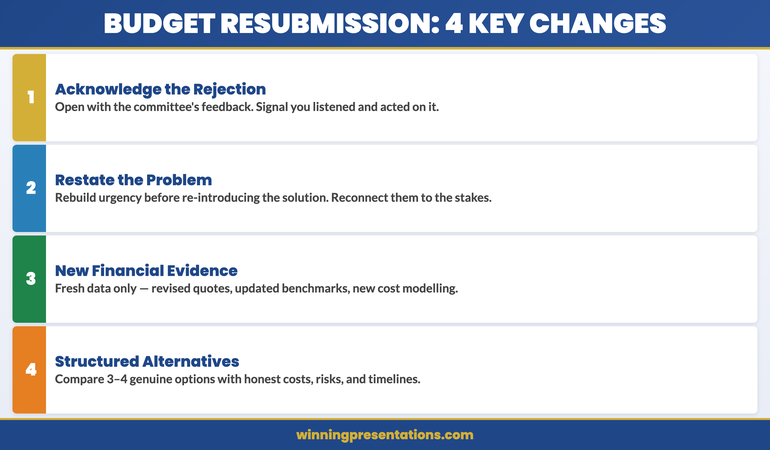

The Four Changes for a Successful Budget Resubmission infographic showing: Diagnose the Real Objection, Address with New Evidence, Reframe the Narrative, and Present the Alternatives

Diagnosing What the Committee Actually Objected To

Before you change a single slide, you need to understand what the committee actually objected to. This requires going beyond the formal written feedback, which is almost always a sanitised version of the real conversation.

Request a debrief with the chair of the finance committee or the most senior sponsor in the room. Frame it as seeking guidance: “I want to ensure I’m addressing the committee’s concerns properly before resubmitting. Would you be willing to give me fifteen minutes to understand what would strengthen the case?” Most chairs will say yes — they want well-constructed proposals coming back, not the same weak ones.

In that conversation, listen for three things. First, which objections were raised by whom — understanding the political landscape inside the committee matters. Second, what the committee would need to see to be confident in the ROI assumptions — this tells you what new evidence to gather. Third, whether the timing objection is real or a proxy for something else. If one committee member is pushing a competing capital project, timing becomes a way to delay your proposal rather than reject it outright.

Once you have this diagnostic information, map each concern to a specific change you will make in the deck. If you cannot identify what change addresses each concern, the resubmission is not ready yet. The internal link between concern and response is what makes the resubmission feel genuinely responsive rather than cosmetically updated. See how this approach connects to the pre-meeting work described in The Follow-Up Deck: Why Most Approvals Die After the Meeting.

The Four Changes That Earn a Second Look

Not every resubmission needs a complete rebuild. Most need four targeted changes, each one designed to address a specific category of concern that finance committees raise when they reject a budget request.

1. Acknowledge the rejection explicitly. Open the resubmission by referencing the previous presentation and what you heard from the committee. “Following the committee’s feedback in February, this revised proposal addresses three specific areas: the ROI timeline, alternatives analysis, and alignment with the current capital priorities.” This signals that you listened, that you did the work, and that this is a genuinely improved version — not the same material with fresh slides.

2. Restate the problem, not the solution. Many rejected budget requests spend the first ten slides describing the solution — the system, the infrastructure, the initiative — before establishing why the problem matters. Committees who weren’t sold the first time need to be reconnected to the urgency of the problem before they can evaluate the solution on its merits. Rebuild the problem slide before you rebuild anything else.

3. Introduce genuinely new financial evidence. If the ROI model was questioned, you need new inputs — not the same model with different formatting. Commission updated cost modelling, gather vendor quotes that support the assumptions, or bring in market benchmarks from a credible external source. The committee will recognise recycled figures dressed in new slides. New evidence signals that the financial case has been properly stress-tested.

4. Include a structured alternatives analysis. “We considered doing nothing, and also doing the project at half-scale” is not an alternatives analysis. A structured alternatives analysis presents three to four genuine options — including the do-nothing scenario — with honest comparative costs, risks, and timelines for each. This demonstrates that your preferred option is the recommended outcome of a rigorous process, not simply the option the team preferred from the start.

For a deeper look at how CapEx presentations are structured from the outset, see Capital Expenditure Presentation: The Slide Structure That Gets CapEx Approved.

If you need to rebuild the financial narrative quickly and ensure the slide structure meets finance committee expectations, the Executive Slide System includes prompt cards specifically designed for restructuring a presentation that didn’t land the first time.
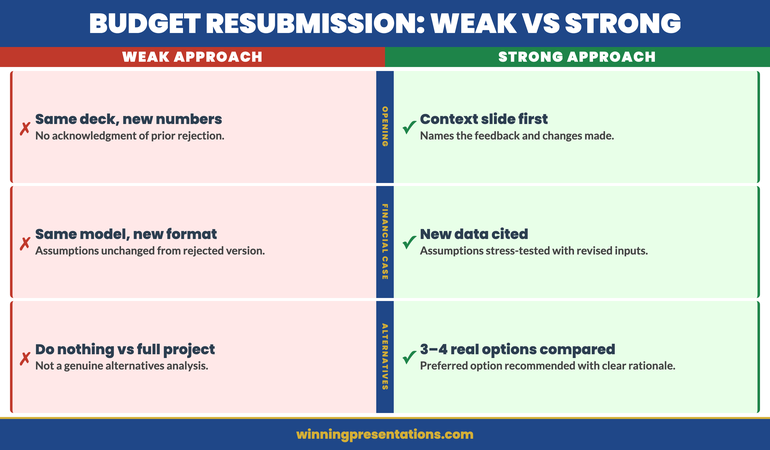

Weak vs Strong Budget Resubmission comparison infographic showing the difference between cosmetic updates and diagnostic restructuring across four dimensions: problem framing, ROI evidence, alternatives analysis, and objection response

Building Your Resubmission Case

A resubmission is not built in PowerPoint. It is built in the weeks of work that happen before you open a presentation tool. The slides are the output of a process — not the process itself.

Start by updating your stakeholder map. Between your first presentation and the resubmission, the political landscape inside the committee may have changed. New members may have joined. The CFO’s priorities may have shifted. A competing project may have been approved or rejected, which changes the available capital headroom. Your pre-meeting conversations should give you an updated picture of where support and opposition sit before you step into the room.

Next, rebuild the financial model with new inputs. If the committee questioned your assumptions, the only credible response is new data. If they challenged your implementation timeline, bring in updated project management assessments. If they were concerned about total cost of ownership, include a five-year cost comparison that previous models omitted. Every financial assumption that was challenged needs a corresponding piece of new evidence that wasn’t in the original submission.

Then update your risk section. Most first submissions understate implementation risk because project teams are optimistic about their own proposals. A resubmission that honestly names the risks — and then explains how each one is mitigated — signals intellectual rigour. Finance committees are more comfortable approving projects where the risk has been honestly assessed than projects where it appears to have been glossed over.

Finally, update your internal cross-references. If the resubmission references savings from a related initiative, or assumes integration with an existing system, those dependencies need to be named and confirmed in writing before the presentation. Assumptions that couldn’t be confirmed in the first submission should be confirmed before the second.

Structuring the Resubmission Deck

The structure of a resubmission deck differs from a first-pass budget request in one important way: the opening acknowledges the history. Committees who have already seen your proposal need to see that history acknowledged before they can engage with the updated case. A deck that opens as though the rejection never happened reads as either oblivious or evasive.

A resubmission deck structured for finance committees typically follows this sequence:

Slide 1 — Context slide: One line on when the original proposal was submitted and a single sentence on what feedback was received. This is not a defensive slide — it is a signalling slide. It says “I heard you, and this version responds to what I heard.”

Slides 2–3 — The problem: Rebuild the urgency of the business problem. Not the solution — the problem. What happens if this doesn’t get funded? What is the cost of delay, in concrete terms? If the committee didn’t feel the urgency the first time, this is where you earn it back.

Slides 4–5 — The updated ROI case: Present the revised financial model with its new inputs highlighted. Don’t bury the changes — surface them. “Since February, we have obtained revised vendor quotes and updated the model based on current market rates. The revised payback period is 3.2 years, compared to 4.1 years in the original submission.” Specificity here signals that the changes are real, not cosmetic.

Slide 6 — Alternatives analysis: Three or four genuine options, compared on cost, risk, and timeline. Recommend your preferred option at the end, with a brief rationale. Keep this slide to a grid — not paragraphs.

Slides 7–8 — Risk and mitigation: Name the top three implementation risks and the corresponding mitigation for each. If a risk was specifically raised by a committee member in the previous session, address it by name in this section.

Slide 9 — Implementation roadmap: Phased milestones, owners, and decision points. If the original timeline was challenged, show how the revised timeline is structured and what would trigger a go/no-go decision at each phase.

Slide 10 — The ask: One slide. The specific amount, the timing, and one sentence on what approval unlocks. For guidance on how this sequence connects to zero-based budget frameworks, see Zero-Based Budget Presentation: Justify Every Line to Finance.

Presenting the Resubmission Without Appearing Defensive

The tone of a resubmission matters as much as the content. Executives who come back into the room carrying resentment about the original rejection — even when that resentment is concealed — communicate it through their body language, their framing, and the way they handle questions.

The framing that works best is genuine curiosity about whether the case is now strong enough, not determination to get approval at all costs. “Following the feedback from February, we’ve done additional work that I’d like to walk you through” is a different energy from “We’ve addressed every concern that was raised.” The first is collaborative. The second is defensive.

When questions come, don’t pre-empt them with elaborate explanations of why the original model was correct. If the committee asks about a changed assumption, answer the question directly, then explain the new basis for that assumption. The order matters: answer first, explain second. Pre-emptive defensiveness reads as if you’re trying to win an argument rather than inform a decision.

Finally, be prepared to accept a partial approval. Finance committees sometimes approve a phased version of a project when they’re not ready to commit the full amount. If you have structured a phased option in your deck, you’re positioned to accept this outcome as a win rather than a compromise. “Yes to Phase 1, conditional review for Phase 2” can be a stronger outcome than a second outright rejection.

Ready to Rebuild the Case?

Slide Templates Designed for Finance Committee Presentations

The Executive Slide System — £39, instant access — gives you templates for CapEx, budget approval, and resubmission scenarios, plus AI prompt cards to restructure the financial narrative before you step back into the room.

Get the Executive Slide System →

Frequently Asked Questions

How long should I wait before resubmitting a rejected budget?

There is no fixed waiting period, but a resubmission submitted fewer than four weeks after rejection usually signals that insufficient diagnostic work has been done. The credibility of the resubmission depends on the quality of the changes, not the speed of the return. Most committees expect to see a resubmission at the next scheduled budget cycle — typically quarterly. If you have a compelling reason to return sooner, the context slide at the start of your deck should explain the timing rationale.

Should I request a pre-meeting with committee members before resubmitting?

Yes. Pre-meeting conversations with the committee chair and key decision-makers are one of the highest-value activities you can do before a resubmission. These conversations let you confirm that your revised case addresses the specific concerns that led to rejection, rather than the concerns you assumed were the issue. They also give you early signals about whether the timing is right and whether there are any political dynamics you need to account for in how you structure the presentation.

What if the rejection was politically motivated rather than financial?

Political rejections — where a committee member blocked the proposal for reasons unrelated to its financial merit — are common and require a different response to financial rejections. In this situation, the priority before resubmission is shoring up political support outside the meeting room. Identify who opposed the proposal and why, then work with your sponsor to either address their underlying concern or build a coalition of support strong enough that opposition becomes untenable. Resubmitting without addressing a political blockage produces the same result.

The Winning Edge — Free Weekly Newsletter

Practical frameworks for executives who present to boards, finance committees, and senior leadership. Every Thursday.

Subscribe to The Winning Edge →

Not ready for the full system? Start here instead: download the free Executive Presentation Checklist — a one-page reference covering the structural elements finance committees look for in budget and approval presentations.

About the Author

Mary Beth Hazeldine is Owner & Managing Director of Winning Presentations. With 25 years of corporate banking experience at JPMorgan Chase, PwC, Royal Bank of Scotland, and Commerzbank, she advises executives across financial services, healthcare, technology, and government on structuring presentations for high-stakes funding rounds and approvals.

11 Dec 2025
Budget presentation template - the 6-slide structure that gets CFOs to say yes - free template and AI prompts from Winning Presentations

Budget Presentation Template: How to Get Your Budget Approved First Time [2026]

Quick Answer: What Makes a Budget Presentation Get Approved?

The most effective budget presentation template follows a 6-slide structure: (1) The Ask — lead with your specific request and expected ROI, (2) The Problem — cost of inaction, (3) The Solution, (4) ROI calculation with assumptions, (5) Timeline with milestones, (6) Risk mitigation. CFOs approve budgets that make the ROI obvious and the decision easy. Put your ask on slide 1, not slide 15.

📥
Want the Complete Budget Template Pack?

Stop building budget decks from scratch. Get ready-to-use templates with the exact 6-slide structure CFOs expect — plus AI prompts to customise them for your specific request.

Updated 27 March 2026 — Revised for the latest Microsoft Copilot and ChatGPT capabilities.

✓ 6-slide budget template
✓ ROI calculator slides
✓ CFO-ready formatting
✓ AI customisation prompts

Get the Executive Slide System — £39

Includes budget, board, QBR, and strategy templates • Instant download


Why Most Budget Presentations Get “Let’s Revisit Next Quarter”

In 2019, a marketing director asked me to review her budget presentation before a critical board meeting. She wanted £400K for a new platform. Her slides were thorough — market research, vendor comparisons, implementation timeline.

She didn’t get the budget. The CFO said it was “interesting” and suggested they “revisit it next quarter.”

Three months later, she came back with the same request — but a completely different presentation. Six slides instead of twenty-two. Numbers framed differently. One critical addition.

She got £500K. More than she’d originally asked for.

The difference wasn’t better data. It was better structure.

After 24 years in corporate banking at JPMorgan Chase, PwC, Royal Bank of Scotland, and Commerzbank — where I helped clients secure over £250 million in funding — I’ve learned that budget approvals follow predictable patterns. CFOs and boards don’t reject good ideas. They reject presentations that don’t speak their language.

This is the budget presentation template that gets approvals — the same structure I teach executives who need to secure resources without endless back-and-forth.

What You’ll Learn in This Guide

  • The 6-slide budget template that gets CFOs to say yes
  • Why most budget requests get “let’s revisit next quarter” (and how to avoid it)
  • The ROI framework that makes your numbers impossible to ignore
  • How to use AI tools like Copilot to build your budget deck in 20 minutes
  • The one question you must answer before slide 1

📧 Get Weekly Presentation Tips

Join 500+ executives getting my best insights on AI-powered presentations every Thursday.
Subscribe to The Winning Edge →


Stop Guessing What to Type. Start Building in 25 Minutes.

The Executive Prompt Pack gives you 71 tested prompts for ChatGPT and Copilot — structured by scenario so you know exactly what to type:

  • Build from scratch — scenario prompts for board reviews, budget requests, and investor decks
  • Rescue and rewrite — audit an existing deck, condense it, or fix one slide at a time
  • Industry-specific prompts for financial services, banking, consulting, and executive audiences
  • Power modifiers that transform any prompt into board-ready output
  • The 25-minute deck workflow that replaces 3–4 hours of manual building

Works with ChatGPT, Microsoft Copilot, and Edit with Copilot (formerly Agent Mode). Updated March 2026.

Get the Executive Prompt Pack → £19.99

Why Most Budget Presentations Fail

I’ve reviewed hundreds of budget presentations. The pattern is painfully consistent:

Twenty slides of justification. Charts showing market trends. Competitive analysis. Implementation timelines. Risk assessments. All the “homework” that proves you’ve done your research.

And then the CFO says: “This is thorough. Let’s discuss it offline.”

Translation: No.

Here’s what most people miss: CFOs don’t approve budgets because of research. They approve budgets because of ROI.

Every budget request is competing against every other budget request in the company. The marketing platform competes against the sales tool competes against the engineering hire competes against the office expansion. CFOs are playing portfolio allocation.

Your job isn’t to prove your idea is good. Your job is to prove it’s the best use of the company’s next pound.

That requires a completely different presentation structure.Budget presentation ROI framework showing investment, return, timeline, and risk

The Budget Presentation Template: 6 Slides That Get Approved

This template is designed around how CFOs actually think. Instead of building up to your request, you lead with it. Instead of hoping they see the ROI, you calculate it for them.

Slide 1: The Ask (Yes, First)

Most budget presentations bury the request on slide 15. By then, you’ve lost them.

Start with what you want. Be specific. Be bold.

What to include:

  • The exact amount you’re requesting
  • What it will fund (one sentence)
  • The expected return (quantified)
  • When you need the decision

Example: “Requesting £400K for marketing automation platform. Expected return: £1.2M additional revenue in 12 months (3x ROI). Decision needed by January 15 for Q1 implementation.”

That’s 32 words. A CFO can read it in 8 seconds and know exactly what’s at stake.

Why this works: CFOs are busy. They’re context-switching between meetings. If they don’t know what you want in the first 30 seconds, they spend the rest of your presentation wondering “where is this going?” instead of evaluating your case.

Slide 2: The Problem (Cost of Inaction)

This is the slide most people skip — and it’s often the most important one.

Before a CFO will spend money on your solution, they need to feel the pain of the current state. What is the problem costing the company right now?

What to include:

  • The current state (quantified pain)
  • What it’s costing in money, time, or opportunity
  • What happens if we do nothing

Example: “Current state: Manual lead processing takes 12 hours/week (£31K annual labour cost). We’re losing 23% of leads due to slow response time (£180K lost revenue). Competitors using automation are winning deals we should be closing.”

Pro tip: “Cost of inaction” is more powerful than “benefit of action.” Loss aversion is real. A CFO will work harder to avoid losing £180K than to gain £180K.

Slide 3: The Solution (What You’ll Do)

Now — and only now — explain what you want to buy and why.

What to include:

  • What you’re proposing (specific solution)
  • Why this solution vs. alternatives
  • What success looks like

Keep this slide tight. You’re not selling the product — you’re selling the outcome.

Example: “Solution: HubSpot Marketing Hub (Enterprise). Why HubSpot: Integrates with existing Salesforce CRM, 4.5/5 G2 rating, 3 competitors in our space already using it. Success metric: Lead response time under 5 minutes, 15% conversion rate improvement.”

Related: The Executive Summary Slide: How to Write the Only Slide That Matters

Slide 4: The ROI (The Only Slide CFOs Actually Care About)

This is your make-or-break slide. Get this right, and everything else is supporting detail.

What to include:

  • Investment: Total cost (including implementation, training, ongoing)
  • Return: Expected revenue or savings (be specific)
  • Timeline: When returns begin, when you break even
  • Confidence level: How certain are these numbers?

Format this as a simple table:

Metric Amount
Total Investment (Year 1) £400,000
Expected Return (Year 1) £1,200,000
Net Benefit £800,000
ROI 200%
Payback Period 4 months

Critical: Show your assumptions. CFOs don’t trust black-box numbers. A footnote saying “Based on 15% conversion improvement (industry benchmark: 12-18%)” builds credibility. Hiding your assumptions destroys it.

💡
Building Your Budget Deck Now?

The Executive Slide System includes a pre-built ROI calculator slide with the exact table format above — just plug in your numbers. Plus AI prompts to generate your cost-of-inaction analysis.

Get the Templates — £39
or keep reading for the full framework ↓

Slide 5: The Timeline (How You’ll Execute)

CFOs have seen too many approved budgets go nowhere. Show them you’ve thought through implementation.

What to include:

  • Key milestones with dates
  • Who’s responsible for each phase
  • When they’ll see first results
  • Decision points and checkpoints

Example timeline:

  • January: Vendor contract signed, kickoff meeting
  • February: Implementation and CRM integration
  • March: Team training, pilot with 2 campaigns
  • April: Full rollout, first performance review
  • July: 6-month ROI checkpoint

Pro tip: Include a “kill switch” — a checkpoint where you’ll evaluate whether to continue. This reduces perceived risk. “If we’re not seeing 10% improvement by Month 4, we’ll pause and reassess.”

Slide 6: The Risk Mitigation (Why This Won’t Fail)

Every CFO is thinking about what could go wrong. Address it before they ask.

What to include:

  • Top 2-3 risks to success
  • How you’ll mitigate each one
  • What you’ve already done to de-risk

Example:

  • Risk: Team adoption is slow → Mitigation: Vendor provides dedicated onboarding specialist, we’ve identified 3 internal champions
  • Risk: Integration issues with CRM → Mitigation: IT has reviewed architecture, vendor has certified Salesforce integration
  • Risk: ROI takes longer than projected → Mitigation: Month 4 checkpoint, conservative projections (used 12% not 18% benchmark)

Why this works: By raising risks yourself, you show maturity and thoroughness. CFOs trust presenters who acknowledge uncertainty more than those who pretend everything is guaranteed.

The 6-Slide Budget Presentation Template - 1. The Ask 2. The Problem 3. The Solution 4. The ROI T. The Timeline 5. The Risk

The One Question You Must Answer

Before you build a single slide, answer this question:

“Why should the company invest this money in my project instead of any other project?”

This is what CFOs are really evaluating. Your budget request isn’t judged in isolation — it’s judged against every other request on their desk.

If you can’t articulate why your project deserves priority, neither can they. And when CFOs can’t articulate priority, they default to “let’s revisit next quarter.”

The marketing director I mentioned at the start? The difference in her second presentation wasn’t more data. It was one slide showing that her £400K request had higher projected ROI than two other approved projects. She made the CFO’s decision easy by framing her budget in portfolio terms.

She got more than she asked for because she made her project impossible to deprioritise.

For 71 tested prompts covering every scenario — build from scratch, rescue an existing deck, or fix individual slides — the Executive Prompt Pack gives you exactly what to type, updated for the latest Copilot and ChatGPT capabilities.

How to Build Your Budget Presentation with AI

With Copilot’s new Agent Mode, you can build a solid first draft of your budget presentation in about 20 minutes.

Prompt for Slide 1 (The Ask):

"Create an executive summary slide for a budget request. Amount: [£X]. Purpose: [one sentence]. Expected ROI: [X%]. Decision deadline: [date]. Format as 4 bullet points, each under 15 words."

Prompt for Slide 2 (Cost of Inaction):

"Create a 'cost of inaction' slide showing the business impact of not investing. Current problem: [describe]. Quantify: labour costs, lost revenue, competitive disadvantage. Make CFOs feel the pain of the status quo."

Prompt for Slide 4 (ROI):

"Create an ROI summary table for a budget request. Investment: [£X]. Expected return: [£X]. Include: total cost, expected return, net benefit, ROI percentage, payback period. Add a row for key assumptions."

Related: 50 Best Copilot PowerPoint Prompts That Actually Work

Budget Presentation Mistakes to Avoid

After reviewing hundreds of budget decks, these are the patterns that get requests rejected:

Mistake 1: Burying the ask

If your budget amount doesn’t appear until slide 10, you’ve already lost. CFOs spend the first 9 slides wondering “where is this going?” instead of evaluating your case. Lead with the number.

Mistake 2: Focusing on features, not outcomes

“This platform has AI-powered analytics, automated workflows, and real-time dashboards” tells a CFO nothing. “This platform will reduce lead response time from 12 hours to 5 minutes, increasing conversion by 15%” tells them everything.

Mistake 3: Presenting one option

Sophisticated budget presenters offer choices: “Option A: £400K for full implementation. Option B: £200K for pilot phase with expansion in Q3.” This gives CFOs control and shows you’ve thought through alternatives.

Mistake 4: No clear ROI

If you can’t quantify the return, CFOs can’t justify the spend. “This will improve efficiency” isn’t ROI. “This will save 500 hours annually (£25K in labour costs)” is ROI.

Mistake 5: Ignoring risk

Every CFO is thinking “what if this fails?” If you don’t address it, they assume you haven’t thought about it. Acknowledge risks, then explain your mitigation plan.

Budget Season Timing: When to Present

Timing matters more than most people realise:

  • Best time: 4-6 weeks before budget finalisation. CFOs are actively allocating funds and open to new requests.
  • Good time: Mid-quarter, when there’s flexibility for “found money” from underspent budgets.
  • Worst time: Right after budget lock. You’ll hear “great idea, let’s put it in next year’s planning.”

If you’re reading this in December 2025, January budget requests are still in play at most companies. Move fast.

Free Guide vs. Executive Slide System — What’s the Difference?

What You Get This Article Executive Slide System (£39)
6-slide structure explanation
Ready-to-use PowerPoint templates ✓ 4 template types
Pre-built ROI calculator slide ✓ Plug in your numbers
AI prompts for customisation 3 basic prompts 25+ industry-specific
QBR, board, and strategy templates ✓ Full executive suite
Best for Learning the framework Getting approvals fast

“Got my £180K budget approved in the first meeting. The ROI slide template made the CFO’s decision easy.”

— James T., Head of Operations, Manchester

71 Prompts. Every Scenario Covered.

Build from scratch, rescue an existing deck, or perfect individual slides — the Executive Prompt Pack covers every scenario. Works with ChatGPT, Copilot, and Edit with Copilot. Updated March 2026.

Get the Prompts → £19.99

Frequently Asked Questions

How do you present a budget request to executives?

Lead with your ask, not your research. State the exact amount, expected ROI, and decision deadline in your first slide. Then walk through the problem (cost of inaction), solution, ROI calculation, timeline, and risk mitigation. Keep it to 6 slides maximum. Executives have seen enough 30-slide budget decks — they’ll appreciate the focus.

What should a budget presentation include?

An effective budget presentation needs six elements: (1) The specific ask with expected return, (2) The problem or cost of doing nothing, (3) Your proposed solution, (4) ROI calculation with clear assumptions, (5) Implementation timeline with milestones, (6) Risk mitigation plan. Everything else is appendix material.

How do you justify a budget increase?

Focus on ROI, not need. “We need more resources” gets rejected. “£50K investment will generate £200K in returns (4x ROI) within 12 months” gets approved. Quantify everything: time saved, revenue gained, costs avoided, risks reduced. Make the CFO’s decision mathematically obvious.

How long should a budget presentation be?

Six slides for the core presentation. Everything beyond that goes in the appendix for reference. CFOs don’t have time for 30-slide budget reviews, and long presentations signal fuzzy thinking. If you can’t make your case in 6 slides, you haven’t clarified your thinking yet.

Related Budget and Executive Presentation Resources

About the Author

Mary Beth Hazeldine spent 24 years in corporate banking at JPMorgan Chase, PwC, Royal Bank of Scotland, and Commerzbank, helping clients raise over £250 million in funding. She now trains executives to communicate with impact at Winning Presentations.

03 Dec 2025
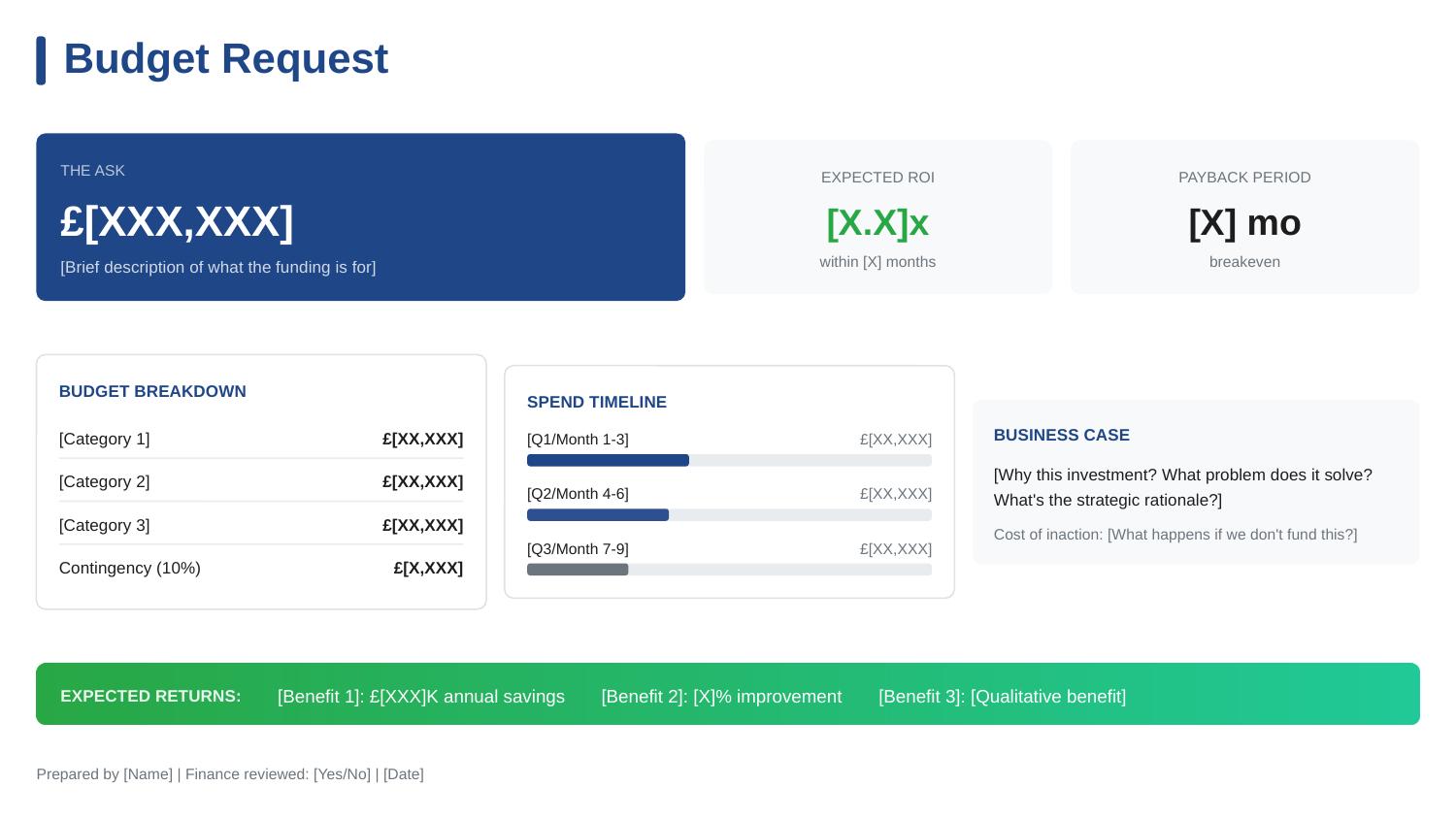
Budget request slide template - executive approval structure with ROI, cost breakdown, and payback timeline

How I Helped a Client Get a £2m Budget Approved (The Slide That Did It)

A single budget presentation slide secured £2M in funding for my client — in one 20-minute meeting.

No follow-up meetings. No “let me think about it.” No death by committee. The CFO reviewed the budget presentation, asked three questions, and approved on the spot.

This wasn’t luck. After 24 years in corporate banking at JPMorgan Chase, PwC, Royal Bank of Scotland, and Commerzbank, I’ve seen hundreds of budget presentations. Most fail — not because the request is unreasonable, but because the budget presentation makes it hard to say yes.

Here’s exactly how we structured the budget presentation that worked, and why most budget requests get stuck in approval limbo.

Budget request slide template - executive approval structure with ROI, cost breakdown, and payback timeline

The budget presentation structure that secured £2M approval

Why Most Budget Presentations Fail to Get Approved

Before I show you what worked, let me explain what doesn’t — because I see these mistakes in almost every budget presentation I review.

Mistake 1: Leading with the problem instead of the ask.

Most budget presentations spend 10 slides building up to the request. By the time the actual number appears, the executive has lost patience or checked out entirely. Your budget presentation should state the ask in the first 30 seconds.

Mistake 2: Hiding the total cost.

Some presenters break costs across multiple slides in their budget presentation, hoping the piecemeal approach makes the total less scary. It doesn’t. It makes executives suspicious. Your budget presentation needs one clear number, prominently displayed.

Mistake 3: Missing the “do nothing” cost.

Executives don’t just evaluate whether your budget presentation request is worth funding — they evaluate whether it’s worth funding compared to doing nothing. If your budget presentation doesn’t show what happens if they say no, you’ve made their decision easy: defer.

Mistake 4: No clear payback timeline.

CFOs think in terms of ROI and payback periods. A budget presentation that says “this will improve efficiency” without quantifying when and how much is asking for faith, not approval.

The Budget Presentation Structure That Got Approved

My client needed £2M for a platform modernisation project. She’d been trying to get this approved for 18 months. Previous budget presentations had been deferred three times.

Here’s what we changed in her budget presentation:

Budget Presentation Element 1: The Ask — Front and Centre

The budget presentation opened with one line:

“I’m requesting £2M for platform modernisation, with full payback in 8 months.”

That’s it. No preamble, no context-setting, no “as you may recall from previous discussions.” The CFO knew exactly what he was evaluating before she said another word.

Most budget presentations bury this on slide 8. We put it in the first sentence of her budget presentation.

Budget Presentation Element 2: The Cost of Inaction

Immediately after the ask, the budget presentation showed what happens if they don’t approve:

Cost of Doing Nothing:

  • 3 system failures per quarter at £200K each = £2.4M annual risk
  • Compliance audit finding in Q3 requires remediation by Q1 — estimated 3x cost if reactive
  • Two key engineers have cited system frustration in exit interviews

This reframed the budget presentation entirely. She wasn’t asking for £2M. She was offering to prevent £2.4M+ in annual losses. Saying no suddenly had a price tag.

Budget Presentation Element 3: The ROI Summary

The budget presentation included a simple ROI calculation — not buried in an appendix, but on the main slide:

Investment Year 1 Savings Payback
£2M £3.1M 8 months

The CFO didn’t need to do mental maths. The budget presentation did it for him. Eight-month payback is exceptional — and stating it plainly made approval easy.

Budget Presentation Element 4: The Breakdown

The budget presentation showed exactly where the money goes:

  • Platform licensing: £800K (40%)
  • Implementation partner: £600K (30%)
  • Internal resources: £400K (20%)
  • Contingency: £200K (10%)

Notice the contingency line. Most budget presentations try to appear precise by excluding contingency. Experienced CFOs know this is unrealistic. Including 10% contingency in the budget presentation actually increased credibility — it showed she understood projects don’t go perfectly.

Want the exact budget presentation template from this story?

The Budget Request template is one of 10 executive presentations in The Executive Slide System, with the budget presentation structure already built in. Just fill in your numbers.

Budget Presentation Element 5: The Decision Required

The budget presentation ended with an explicit ask:

“I’m requesting approval to proceed with vendor selection this week. The implementation timeline requires a decision by Friday to meet our Q1 compliance deadline.”

This created appropriate urgency without being pushy. The budget presentation connected the ask to an external deadline (compliance), not an internal preference. The CFO couldn’t defer without accepting compliance risk.

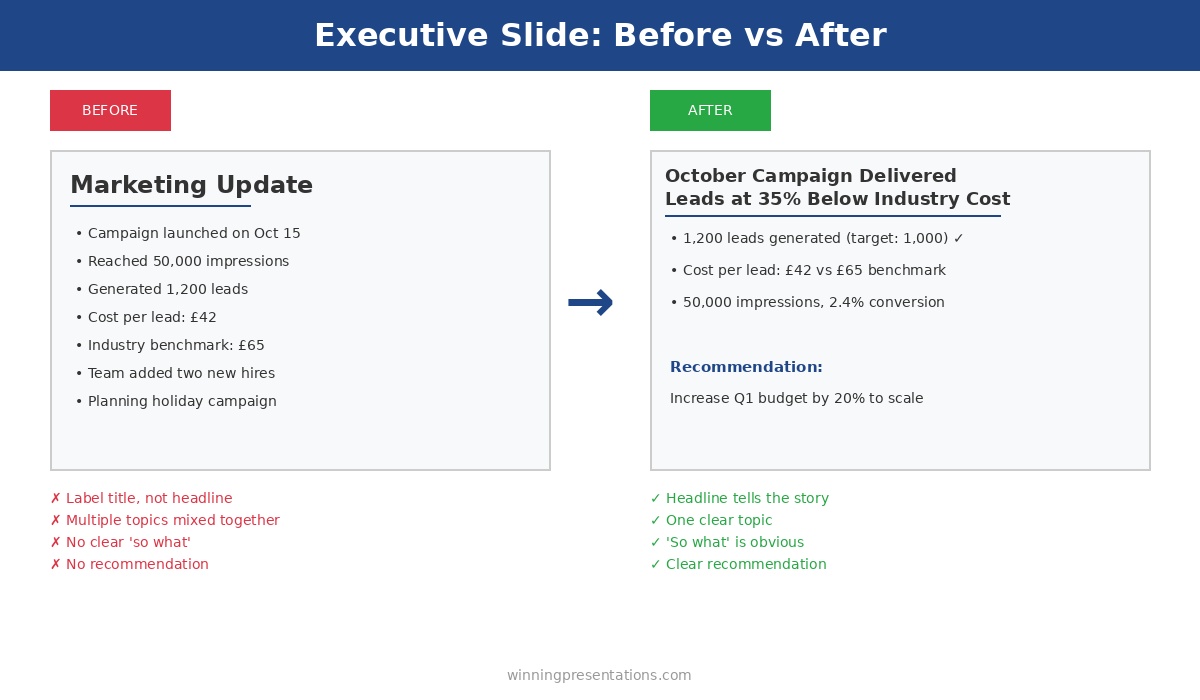
Executive slide before and after example - transforming a weak marketing update into a clear headline with recommendation

Most budget presentations bury the ask and miss the cost of inaction — the structure makes the difference

The Three Questions the CFO Asked About the Budget Presentation

After reviewing the budget presentation, the CFO asked exactly three questions:

Question 1: “What’s the confidence level on the £3.1M savings?”

She was ready for this. “Conservative estimate based on eliminating current incident costs only. Doesn’t include productivity gains or reduced technical debt — those would add another £500K-800K annually.”

Question 2: “Why 10% contingency?”

“Industry standard for projects of this complexity. If we don’t use it, it returns to the budget. But I’d rather ask for it now than come back in Q3 asking for more.”

Question 3: “Who’s the implementation partner?”

“We’ve shortlisted three. I’ll bring the recommendation to you next week — but I need budget presentation approval to proceed with final negotiations.”

Three questions. Twenty minutes total. Budget presentation approved.

The Budget Presentation Framework That Works Every Time

Here’s the framework for any budget presentation, based on what I’ve seen work across hundreds of requests:

Budget Presentation Framework

  1. The Ask: Total amount requested — first sentence of your budget presentation
  2. The ROI: Expected return with specific payback timeline
  3. The Cost of Inaction: What happens if they say no — make this concrete
  4. The Breakdown: Where the money goes — include contingency
  5. The Timeline: Key milestones and when returns materialise
  6. The Decision: Exactly what approval you need and by when

Every element of this budget presentation framework serves the same purpose: making it easy for the approver to say yes. A budget presentation isn’t about impressing people with analysis — it’s about removing obstacles to approval.

Building a budget presentation this quarter?

The Executive Slide System includes the Budget Request template with this exact budget presentation structure, plus AI prompts that help you calculate and present ROI clearly. Clients have used these frameworks to secure over £250 million in approved funding.

Common Budget Presentation Mistakes to Avoid

Don’t split the request across meetings. “Phase 1 is £500K, we’ll discuss Phase 2 later” invites approval for Phase 1 and indefinite deferral of everything else. If you need £2M, ask for £2M in one budget presentation.

Don’t undersell contingency. Asking for the bare minimum in your budget presentation signals either inexperience or sandbagging. Include 10-15% contingency and explain why.

Don’t assume they remember previous conversations. Your budget presentation should stand alone. Include all context needed to decide — don’t rely on “as we discussed.”

Don’t hide risks. If there’s implementation risk or dependency on other projects, address it in your budget presentation. Finding out later destroys trust.

FAQs About Budget Presentations

How long should a budget presentation be?

One slide for budget presentation requests under £500K. Two to three slides for larger requests. If your budget presentation is longer than 5 slides, you’re including too much detail — move supporting analysis to an appendix.

Should I present multiple options in a budget presentation?

Only if the options represent genuinely different approaches in your budget presentation. “Option A: £2M for full scope, Option B: £1M for reduced scope” can work. “Option A: £2M, Option B: £1.8M, Option C: £2.2M” just creates confusion.

What if my budget presentation gets deferred?

Ask specifically what’s needed to approve your budget presentation. “What additional information would help you decide?” is better than accepting “we need to think about it.” Get concrete next steps before leaving the room.

How do I present a budget presentation when ROI is hard to quantify?

Focus on risk reduction and cost avoidance in your budget presentation. “This prevents £X in potential losses” is often more compelling than “this generates £X in new revenue.” Executives understand downside protection.

Your Next Budget Presentation

You probably have a budget presentation coming up — next quarter if not sooner. Before you build another slide, apply this framework:

  • State the total ask in the first sentence of your budget presentation
  • Show the cost of doing nothing
  • Include a clear ROI with payback timeline
  • Break down where the money goes (with contingency)
  • End with the specific decision you need

This budget presentation structure won’t guarantee approval — bad ideas still fail. But it will ensure that good ideas don’t fail because of poor budget presentation structure.

My client’s £2M request had been deferred three times over 18 months. Same project, same numbers, same business case. The only thing that changed was how the budget presentation was structured.

Twenty minutes later, she had approval.

The Executive Slide System complete package - 10 PowerPoint templates, 30 AI prompts, and quick start guide for executive presentations

Get the Budget Presentation Template

The exact budget presentation structure from this story is built into The Executive Slide System — ready to fill in with your numbers. Plus 9 more executive presentation templates and 30 AI prompts.

Clients have used these budget presentation frameworks to secure over £250 million in approved funding.

GET INSTANT ACCESS → £39

10 templates • 30 AI prompts • Instant download • 30-day guarantee


Related: How to Create Executive Presentations That Get Approved in 2025 — the complete guide covering all 10 executive presentation types, including the budget presentation structure.

30 Nov 2025
The Executive Slide System - AI-powered templates for executive presentations that get approved

How to Create Executive Presentations That Get Results in 2026

📅 Updated: January 2026 | The complete framework for presentations that get approvals

Need a Faster Way to Build Executive Slides?

Most executives spend hours on slides that still miss the mark. The Executive Slide System gives you a structured framework for building slides that land with senior audiences — without starting from scratch every time.

Explore the System →

Quick Answer

Executive presentations that get results follow a specific structure: lead with your recommendation (not background), limit to 12 slides maximum, include only three supporting points per argument, and end with a clear ask. The difference between presentations that get approved and those that get “let’s revisit this” is almost never the content — it’s the structure and delivery.

I spent the first five years of my banking career getting it wrong.

At JPMorgan, I’d build comprehensive 40-slide decks. I’d walk executives through every detail of my analysis. I’d save my recommendation for the end — like a detective revealing the killer in the final scene.

The result? “Send us a summary.” “Let’s table this.” “Interesting analysis — what do you recommend?” (on slide 35).

Then I watched a senior Managing Director present a £50M investment decision. Eight slides. Four minutes of talking. Approved unanimously.

That’s when I understood: executive presentations aren’t about showing your work. They’re about enabling decisions.

After 25 years presenting to C-suite leaders at JPMorgan, PwC, Royal Bank of Scotland, and Commerzbank — and training senior professionals on their own presentations — I’ve codified what works into a repeatable system.

This guide gives you the complete framework.

Presenting to a board or senior leadership in the next 30 days?

The Executive Slide System gives you 10 board-ready slide templates and 30 AI prompt cards — built around the principles in this guide so your next presentation takes an afternoon, not a weekend.

Why Most Executive Presentations Fail

Before we get to what works, let’s understand why the typical approach fails.

Problem #1: Building Up to the Conclusion

Academic training teaches us to present evidence, then reach a conclusion. Executive presentations require the opposite: lead with your conclusion, then provide evidence for those who want it.

Executives are processing dozens of decisions daily. They don’t have time to follow your journey of discovery. They want to know: What do you recommend? Why? What do you need from me?

Problem #2: Too Much Content

Your 40-slide deck demonstrates how much work you’ve done. Executives don’t care about your effort — they care about the decision in front of them.

The appendix exists for a reason. Put supporting detail there. Keep your core presentation to 12 slides maximum.

Problem #3: Presenting Information Instead of Decisions

“Here’s an update on Project X” is information.

“Project X is on track. We need a decision on the vendor delay — I recommend accepting it. Here’s why.” is a decision.

Executives want the second one. Every time.

Problem #4: Weak Executive Summary

If your opening slide doesn’t tell them everything they need to know in 60 seconds, you’ve already lost momentum.

Related: The Executive Summary Slide: How to Write the Only Slide That Matters

Problem #5: No Clear Ask

If you don’t tell executives what you need, they’ll assume you don’t need anything — and move on to someone who does.

The 5 problems that cause executive presentations to fail: buried conclusions, too much content, information vs decisions, weak summary, no clear ask

Built for High-Stakes Presentations

Turn This Guide Into Your Next Executive Deck

The Executive Slide System (£39, instant access): 17 structured templates for every executive presentation scenario — board updates, budget requests, strategic recommendations, and stakeholder buy-in decks.

Designed for executives who present at board level, to investors, and to senior leadership teams.

Get the Executive Slide System →

The Executive Presentation Framework That Works

After hundreds of executive presentations — and watching thousands more — I’ve identified five principles that separate presentations that get approved from those that get deferred.

Principle #1: Lead With Your Recommendation

Your recommendation should be visible within 60 seconds. Ideally, it’s in your slide title or the first line of your executive summary.

Weak: “Technology Infrastructure Assessment”

Strong: “Recommendation: Approve £1.2M Platform Upgrade — 180% ROI”

The strong version tells executives instantly what this presentation is about and what you want them to do.

Principle #2: Structure for Scanning

Executives often flip through decks before meetings. Your presentation should be comprehensible even if they never hear you speak.

This means:

  • Slide titles that tell the story (not “Overview” or “Background”)
  • Key points visible without reading paragraphs
  • Visual hierarchy that guides the eye to what matters

Test: Can someone understand your argument by reading only the slide titles?

Principle #3: Three Supporting Points Maximum

The human brain struggles to hold more than three to four items in working memory. Give executives five reasons and they’ll remember none. Give them three and they’ll remember all of them.

Force yourself to identify the three strongest arguments. Put them in order of impact. Cut the rest.

Principle #4: Anticipate Objections

Executives will have concerns. Address the obvious ones before they’re raised — it demonstrates you’ve thought rigorously.

Include a risks slide that covers:

  • Top 3-5 risks (no more)
  • Likelihood and impact for each
  • Your mitigation strategy

When executives ask about risks and you already have a thoughtful answer, you build credibility. When they surprise you with an obvious risk you didn’t consider, you lose it.

Principle #5: End With a Clear Ask

Don’t end with “Questions?” End with exactly what you need from them.

Weak: “We’d appreciate your guidance on next steps.”

Strong: “I need budget approval today to hit the Q3 deadline. Implementation plan is ready to execute.”

Be specific about the decision, the deadline, and what happens after they approve.

Related: Executive Presentation Template: 12 Slides That Command the Room

Want ready-made templates with this framework built in? The Executive Slide System includes 10 executive templates with the structure already done — just add your content.

Build Your Next Executive Presentation in Under an Hour

These five principles are the foundation. The Executive Slide System gives you the structure to apply them — 10 slide templates for board updates, budget requests, investor pitches, and more.

Executive Slide System — £39, instant access.

  • 10 executive slide templates — board, budget, strategy, QBR, and more
  • 30 AI prompt cards — one per slide type, works with Copilot and ChatGPT
  • Narrative-first layouts so your recommendation is visible in 60 seconds

Designed for directors and senior managers who present to boards, leadership teams, and investors.

The 12-Slide Executive Presentation Structure

This structure works for board updates, strategic recommendations, budget requests, and major initiative proposals.

Slide 1: Executive Summary — Everything they need in 60 seconds

Slide 2: Situation — Current state, briefly

Slide 3: Problem/Opportunity — Why action is needed

Slide 4: Recommendation — What you want them to do

Slide 5: Options Considered — Shows rigorous thinking

Slide 6: Implementation Plan — How you’ll execute

Slide 7: Resource Requirements — What you need

Slide 8: Risk Assessment — What could go wrong

Slide 9: Timeline — Key milestones

Slide 10: Success Metrics — How you’ll measure

Slide 11: Governance — Who’s accountable

Slide 12: The Ask — Specific decision needed

Not every presentation needs all 12. Project updates might use 6. Board presentations might emphasise governance. Adapt the structure to your context — but keep the flow.

Related: Board Presentation Template: The Executive’s Complete Guide

Executive Presentation Examples: What Works vs. What Doesn’t

Let me show you the difference with real examples from my coaching practice.

Example 1: Budget Request

What doesn’t work:

  • Opens with market analysis and competitive landscape
  • Slides 2-15 cover research methodology and findings
  • Recommendation appears on slide 16
  • Budget ask buried in appendix
  • Result: “Interesting research — send us a summary”

What works:

  • Opens with: “Requesting £400K for customer platform upgrade — payback in 8 months”
  • Slide 2 shows the problem (capacity hitting limits Q3)
  • Slide 3 shows three options with recommendation highlighted
  • Slides 4-8 cover implementation, resources, risks, timeline
  • Final slide: “Need approval today to hit Q3 deadline”
  • Result: Approved in 20 minutes

Example 2: Strategic Initiative

What doesn’t work:

  • Title: “Digital Transformation Strategy Overview”
  • 45 slides covering every aspect of the transformation
  • Multiple asks scattered throughout
  • No clear prioritisation
  • Result: “Good thinking — let’s break this into smaller pieces”

What works:

  • Title: “Phase 1 Digital Transformation: £2M Investment, £8M Return”
  • Executive summary: Phase 1 scope, cost, timeline, expected ROI
  • Clear recommendation: Approve Phase 1 now, revisit Phase 2 in Q3
  • 12 slides covering essentials, 30-slide appendix for detail
  • One ask: “Approve Phase 1 budget today”
  • Result: Approved with request to accelerate timeline

Example 3: Project Status Update

What doesn’t work:

  • Comprehensive status on all 15 workstreams
  • Every milestone listed with percentage complete
  • Issues mentioned but minimised
  • No clear decision requested
  • Result: Executives tune out, miss the one thing that needed attention

What works:

  • Opens with: “Project Phoenix: On track overall, need decision on vendor issue”
  • Green/amber/red summary of all workstreams on one slide
  • Deep dive only on the issue requiring decision
  • Clear options presented with recommendation
  • Result: Decision made in 10 minutes, meeting ends early

How to Deliver Executive Presentations With Confidence

Structure gets you 80% of the way. Delivery gets you the rest.

Know Your First 30 Seconds

Memorise your opening. Not word-for-word — but know exactly what you’ll say for the first 30 seconds. This is when nerves are highest and first impressions form.

“I’m here to request approval for our platform upgrade. £1.2M investment, 180% ROI over three years. I’ll walk you through the business case, risks, and implementation plan. I need a decision today to hit our Q3 deadline.”

That’s 15 seconds. You’ve told them everything they need to know.

Don’t Read Your Slides

Your slides are evidence. Your voice provides insight, context, and conviction.

If you’re reading slides aloud, you’re wasting everyone’s time. They can read faster than you can speak.

Pause After Key Points

When you make an important statement, pause. Let it land. Rushing through signals you’re nervous or don’t believe what you’re saying.

Handle Questions Confidently

When challenged, don’t get defensive. Acknowledge the concern. Ask a clarifying question if needed. Then address it directly.

“That’s a fair point. The main risk is vendor delivery — we’ve mitigated it by building a 3-week buffer and identifying a backup vendor we can switch to if needed.”

End Decisively

Don’t trail off with “so, um, any questions?” End with your ask, clearly stated, then stop talking.

“I need your approval for the £1.2M budget to proceed. We’re ready to start Monday if approved.”

Then wait. Silence is uncomfortable, but it’s their turn to speak.

The executives who consistently get approvals follow a structured delivery approach. The Executive Slide System gives you that structure with before/after examples for every scenario.

Using AI to Create Executive Presentations Faster

For prompts structured around the 12-slide framework, the Executive Slide System includes slide-by-slide AI prompt cards for Copilot and ChatGPT.

AI tools like ChatGPT, Claude, and PowerPoint Copilot can accelerate your executive presentations — if you use them correctly.

What AI Does Well

  • Structuring your thoughts into the 12-slide format
  • Drafting executive summaries from your notes
  • Tightening wordy language
  • Generating consistent formatting
  • Creating first-draft risk assessments

What AI Can’t Do

  • Know your audience’s politics and priorities
  • Determine the right recommendation for your context
  • Anticipate the specific questions your executives will ask
  • Provide the conviction and presence that sells your idea

Use AI for speed. Use your judgment for substance.

Effective AI Prompts for Executive Presentations

For executive summary:

“Write an executive summary slide for [topic]. Include: one-sentence situation, specific recommendation, three supporting points (quantified), and clear ask. Keep under 75 words total.”

For risk assessment:

“Generate top 5 risks for [project/initiative]. For each risk, provide: description, likelihood (high/medium/low), impact (high/medium/low), and one-sentence mitigation strategy.”

For slide titles:

“Convert these descriptive slide titles into action-oriented titles that tell the story: [list your titles]”

Related: Best Copilot PowerPoint Prompts That Actually Work

Executive Presentation Checklist

Before you present, verify:

  • ☐ Recommendation visible within 60 seconds
  • ☐ Executive summary contains: situation, recommendation, 3 supporting points, ask
  • ☐ 12 slides or fewer (excluding appendix)
  • ☐ Slide titles tell the story when read in sequence
  • ☐ Three supporting points maximum per argument
  • ☐ Risks addressed with mitigation strategies
  • ☐ Clear ask on final slide
  • ☐ First 30 seconds memorised
  • ☐ Total presentation under 20 minutes
  • ☐ Appendix ready for detailed questions

Structure gets you 80% of the way. The Executive Slide System handles the structure.

Ten decision-ready templates — one for each executive scenario you’re most likely to face.

Executive Slide System — £39, instant access.

Designed for executives who present where decisions are made.

Structure That Commands Attention

From Guide to Deck in 30 Minutes

The Executive Slide System (£39) gives you the frameworks behind every technique in this guide — ready to apply to your next presentation without starting from scratch.

Get the Executive Slide System →

Frequently Asked Questions

How long should an executive presentation be?

12 slides maximum for a major decision. 6 slides for an update. If your meeting is 30 minutes, plan for 15 minutes of presentation and 15 minutes of discussion. The discussion is where decisions get made.

Should I send the presentation before the meeting?

Yes — 24-48 hours in advance when possible. This lets executives come with informed questions rather than processing raw information in the meeting. Some will read it; some won’t. Accommodate both.

How do I handle pushback from executives?

Don’t get defensive. Acknowledge the concern, ask a clarifying question if needed, then address it directly. If you don’t have an answer, say so: “I don’t have that data with me — I’ll follow up by end of day.”

What if I have more content than fits in 12 slides?

Put it in the appendix. Your core presentation should contain only what’s essential for the decision. Everything else is backup for questions that may or may not arise.

How do I present bad news to executives?

Lead with it. Don’t bury bad news on slide 15. Open with: “We have an issue that needs your attention” and then present the situation, impact, options, and your recommendation. Executives respect honesty; they don’t respect surprises.

What’s the biggest mistake in executive presentations?

Burying the recommendation. I’ve reviewed thousands of executive decks, and the most common failure is saving the conclusion for the end. Lead with what you want them to do. Everything else is supporting evidence.

📧 The Winning Edge Newsletter

Weekly insights on executive presentations, boardroom strategies, and what’s actually working in corporate communication.

Subscribe Free →

Related Resources

🎁 Free: Executive Presentation Checklist

The 12-point checklist I use before every executive presentation. One page. Covers structure, timing, and the mistakes that get decks rejected.

Download Free Checklist →

No email required. Instant download.

About the Author

Mary Beth Hazeldine spent 25 years in corporate banking at JPMorgan Chase, PwC, Royal Bank of Scotland, and Commerzbank — presenting to C-suite leaders on deals worth billions. She’s trained executives across industries on high-stakes presentations and She teaches at Winning Presentations. She now runs Winning Presentations, training senior professionals to communicate with impact.