Tag: budget presentation

12 Dec 2025
CFO Presentation Checklist - 10 questions finance leaders always ask about the ask, the return, the risk, and execution

CFO Presentation Checklist: 10 Questions Finance Leaders Always Ask

📅 Updated: December 2025

Quick Answer

Before any CFO presentation, prepare for these 10 questions: What exactly are you asking for? Why this amount? Why now? What’s the ROI? What assumptions are you making? How does this compare to alternatives? What could go wrong? What’s the exit strategy? Who else has done this? Can you actually deliver? Answer these confidently, and you’ll handle 90% of what comes your way.

CFO Presentation Checklist: 10 Questions Finance Leaders Always Ask

🎁 FREE DOWNLOAD

CFO Questions Cheat Sheet

All 10 questions with word-for-word scripts. One page. Print it before your meeting.

Download Free Checklist →

No spam. Unsubscribe anytime.


I’ve sat in hundreds of CFO presentations — on both sides of the table. The pattern is remarkably consistent: CFOs ask variations of the same 10 questions.

I once watched a marketing director nail every slide. Beautiful deck. Solid data. Clear ROI. Then the CFO asked, “What’s our exit strategy if this fails?”

She froze. Hadn’t prepared for it. The proposal got delayed three months.

Meanwhile, a junior analyst I coached the following week got his £180K request approved in one meeting. The difference? He’d rehearsed answers to all 10 questions the night before. When the CFO pushed back on assumptions, he had sensitivity analysis ready. When she asked about risks, he had mitigation plans.

Miss one question, and you look unprepared. Nail them all, and you’ll often walk out with approval.

Here’s your pre-meeting checklist.

The 10-Question CFO Presentation Checklist

Questions About the Ask

☐ 1. “What exactly are you asking for?”

Be specific: amount, timing, and what it funds. Not “around £400K” — say “£412,000, split between £285,000 software and £127,000 implementation.”

☐ 2. “Why this amount?”

Show your working. Break down the components. Have vendor quotes ready. Round numbers signal you haven’t done the homework.

☐ 3. “Why now?”

Quantify the cost of delay. “Each month we wait costs £38,000 in manual processing” is better than “We need to move quickly.”

Questions About the Return

☐ 4. “What’s the ROI?”

State your return and your confidence level. “200% ROI on conservative assumptions. Even at 50% of projected benefit, we break even in 14 months.”

☐ 5. “What assumptions are you making?”

List them explicitly. Better they challenge an assumption than dismiss the whole proposal as “not thought through.”

☐ 6. “How does this compare to other uses of this money?”

Know what else is competing for budget. Position your proposal against alternatives.

Questions About Risk

☐ 7. “What could go wrong?”

Have 3-4 risks ready with mitigation plans for each. CFOs trust people who’ve thought about failure.

☐ 8. “What’s our exit strategy?”

Define your kill switch. “If we’re not seeing 10% improvement by Month 4, we stop. Maximum downside is £95,000.”

☐ 9. “Who else has done this?”

Benchmarks and case studies. CFOs trust external validation over internal optimism.

Questions About Execution

☐ 10. “Can you actually deliver this?”

Show operational readiness: who owns it, timeline, dependencies, and what you need from other teams.

For the complete framework on structuring your CFO presentation, see: How to Present to a CFO: The Finance-First Framework

📄
Print This Before Your Meeting

Get all 10 questions with word-for-word scripts for how to answer each one. One page PDF.

Download Free Cheat Sheet →

The Question That Saves Stalled Proposals

When a CFO says “Let’s revisit next quarter,” most people accept the delay.

Instead, ask: “What would you need to see to make a decision today?”

Often there’s a specific concern you can address on the spot. Maybe they want sensitivity analysis. Maybe they need sign-off from another stakeholder. Maybe they just want you to acknowledge a risk you glossed over.

Ask the question. You might save yourself three months of waiting.

How to Use This Checklist

Before your presentation: Review each question. Write out your answer. Practice saying it out loud — not reading it, saying it.

During your presentation: You probably won’t get all 10 questions. But being prepared for all 10 means you’ll handle whatever comes with confidence.

After your presentation: Note which questions came up. Update your answers for next time.

Related: Budget Presentation Template: How to Get Your Budget Approved First Time

Beyond the Checklist

This checklist prepares you for the Q&A. But what about the presentation itself?

The structure, the opening, the ROI slide, the risk section — getting these right is what earns you the chance to answer questions in the first place.

That’s where templates help.

⭐ RECOMMENDED

The Executive Slide System (£39)

Ready-to-use templates for CFO presentations, budget requests, and executive updates — with the Finance-First structure built in.

  • CFO presentation template with pre-built ROI calculator
  • Budget request structure matching what finance leaders expect
  • 10 executive templates for board meetings, QBRs, strategy presentations
  • 30 AI prompts to customise each template fast

Get the Executive Slide System — £39 →

Got a CFO Meeting This Week?

Download the checklist now. Print it. Review it before you walk in.

Download Free Cheat Sheet →

Related Resources

About the Author

Mary Beth Hazeldine spent 24 years in corporate banking at JPMorgan Chase, PwC, Royal Bank of Scotland, and Commerzbank — presenting to CFOs and finance leaders on deals worth billions. She now trains executives at Winning Presentations.


12 Dec 2025
How to present to a CFO - the finance-first framework for getting budget approval

How to Present to a CFO: The Finance-First Framework [2026]

📅 Updated: December 2025 — Includes CFO presentation templates and AI prompts

Quick Answer: How Do You Present to a CFO?

To present to a CFO successfully, lead with the financial ask and expected ROI in your first 30 seconds. CFOs don’t want context first — they want to know: what do you need, how much, and what’s the return? Structure your presentation as: (1) The Ask, (2) The ROI, (3) The Risk, (4) The Timeline, then supporting detail. This “finance-first” approach respects their time and speaks their language.

🎁 FREE DOWNLOAD

Presenting to a CFO is a specialist application of senior executive presentation training — finance audiences read decks differently from operating committees, and the four-part structure above only lands when the underlying method is right.

CFO Presentation Cheat Sheet

The 10 questions every CFO asks — with scripts for how to answer each one.

Download Free Cheat Sheet →

No spam. Unsubscribe anytime.


I’ll never forget the silence in that JPMorgan conference room.

I was three years into my banking career, presenting a £2 million technology investment to our divisional CFO. I’d spent two weeks preparing. Every slide polished. Every data point triple-checked. I walked in confident.

Twelve minutes in, he held up his hand.

“Mary Beth, I’m sure this is all very interesting. But what do you actually want, and what’s the return?”

I’d buried my ask on slide 14. He’d stopped listening by slide 6.

That moment changed how I present forever. Over the next 21 years — through JPMorgan, PwC, Royal Bank of Scotland, and Commerzbank — I watched hundreds of brilliant people make the same mistake I’d made. Smart proposals. Strong business cases. No approval.

The problem was never the idea. It was the presentation.

They were presenting like marketers. CFOs think like investors.

Since then, I’ve helped clients secure over £250 million in funding by fixing this one fundamental shift. This guide shows you exactly how to present to a CFO in a way that gets decisions, not deferrals.

How to present to a CFO - the finance-first framework for getting budget approval

Why Most CFO Presentations Fail

CFOs reject good ideas every day. Not because the ideas are bad — because the presentations don’t answer the questions CFOs actually care about.

Here’s what’s frustrating: the advice you’ve probably heard is making things worse.

The 3 Fatal Mistakes (That “Best Practice” Taught You)

Mistake 1: “Set the context first”

Every presentation course tells you to establish context before making your ask. Build the narrative. Take them on a journey. Create understanding.

CFOs hate this.

They’re thinking about 47 other budget requests, a board meeting on Thursday, and why IT costs are up 12%. They don’t have mental bandwidth for your journey. They want to know: what do you need, and what do I get?

When you bury your ask on slide 18, you’ve lost them by slide 6.

Mistake 2: “Focus on benefits”

Marketing taught us to sell benefits, not features. “This will improve efficiency.” “This will enhance collaboration.” “This will drive innovation.”

CFOs don’t buy benefits. They buy returns.

“Improve efficiency” is meaningless. “Reduce processing costs by £180,000 annually against a £50,000 investment” is a decision. CFOs think in payback periods, IRR, and opportunity costs. If you can’t quantify it, they can’t justify it.

Mistake 3: “Keep it positive”

You’ve been told to project confidence. Don’t dwell on risks — it makes you look uncertain. Sell the upside.

This destroys your credibility.

CFOs have seen projects fail. They’ve inherited budget disasters from optimistic predecessors. They’re paid to be skeptical. When you downplay risks, they assume either you haven’t thought them through — or there are risks you don’t even know about.

The CFO who approved my first major proposal told me why: “You were the first person all week who told me what could go wrong. Everyone else was selling. You were thinking.”

Related: Budget Presentation Template: How to Get Your Budget Approved First Time

The Finance-First Framework

This framework flips the traditional presentation structure. Instead of building to your ask, you lead with it — then provide the supporting evidence CFOs need to say yes.

The Finance-First Framework: Ask, ROI, Risk, Timeline, Detail

Step 1: The Ask (First 30 Seconds)

State your request immediately. In your first sentence if possible.

“I’m requesting £400,000 for marketing automation. Expected return is £1.2 million over 24 months. That’s 3x ROI with a 6-month payback. I need a decision by January 15th to hit our Q1 implementation window.”

That’s 42 words. The CFO now knows exactly what’s at stake before you’ve shown a single slide.

Compare that to: “Thank you for making time today. I wanted to walk you through some exciting developments in our marketing technology landscape and share some research we’ve been doing on automation platforms…”

The first version respects the CFO’s time. The second wastes it.

Step 2: The ROI (Make It Scannable)

After your opening ask, show the financial case in a format CFOs can evaluate in seconds:

Metric Value
Investment Required £400,000
Expected Return (24 months) £1,200,000
ROI 200%
Payback Period 6 months
Break-Even Point Month 8

Critical: Show your assumptions.

CFOs don’t trust black-box numbers. Add a line under your ROI table: “Based on 15% conversion improvement (industry benchmark: 12-18%) and current lead volume of 2,400/month.”

This shows you’ve done the work. It also gives them something to test — if they disagree with an assumption, you can discuss it rather than having the whole proposal dismissed.

Step 3: The Risk (Address It Before They Ask)

Every CFO is thinking: “What happens if this fails?”

Answer that question proactively:

Key risks and mitigation:

Implementation delay: Vendor has guaranteed 90-day deployment with penalty clause

Adoption risk: Phased rollout with 3 pilot teams before full deployment

ROI underperformance: Kill switch at Month 4 if we’re not seeing 10% improvement

That last point — the kill switch — is powerful. It tells the CFO: “I’ve thought about failure, and I have a plan to limit downside.”

Suddenly your £400,000 request feels much less risky. It’s not “give me £400,000 and hope for the best.” It’s “give me £400,000 with built-in checkpoints.”

Step 4: The Timeline (Show You’re Ready)

CFOs want to know you can execute. A clear timeline demonstrates operational readiness:

  • January: Vendor selection finalised, contracts signed
  • February-March: Implementation and integration
  • April: Pilot with 3 teams (50 users)
  • May: Checkpoint — evaluate results, go/no-go decision
  • June: Full rollout (200 users)
  • July: First ROI measurement

Note the checkpoint in May. This reinforces the kill switch and shows you’re not asking for blind faith.

Step 5: Supporting Detail (Only If Asked)

Everything else — market research, competitive analysis, vendor comparisons, implementation details — goes in an appendix or backup slides.

Don’t present it unless the CFO asks. If they want to dive deeper, you’re prepared. If they don’t, you haven’t wasted their time.

📄
Get the CFO Question Scripts

Download the 10 questions every CFO asks — with word-for-word scripts for how to answer each one confidently.

Download Free Cheat Sheet →

The 10 Questions Every CFO Asks

After hundreds of CFO presentations, I’ve found they ask variations of the same 10 questions. Prepare for these, and you’ll handle 90% of what comes your way.

Questions About the Ask

1. “What exactly are you asking for?”

Be specific: amount, timing, and what it funds. “£400,000 in Q1, split between £280,000 for software licensing and £120,000 for implementation services.”

2. “Why this amount? How did you arrive at it?”

Show your work. Break down the components. CFOs respect rigorous cost estimation.

3. “Why now? What happens if we wait?”

Quantify the cost of delay. “Each month we delay costs £45,000 in manual processing. Q1 pricing expires March 31st.”

Questions About the Return

4. “What’s the ROI, and how confident are you in these numbers?”

State your ROI and your confidence level honestly. “200% ROI based on conservative assumptions. Even at 50% of projected benefit, we break even in 14 months.”

5. “What assumptions are you making?”

List them explicitly. Better they challenge an assumption than dismiss the whole proposal.

6. “How does this compare to other uses of this money?”

This is the opportunity cost question. Know what else is competing for budget and why your proposal ranks higher.

Questions About the Risk

7. “What could go wrong?”

Have 3-4 risks ready with mitigation plans for each. Don’t minimize — demonstrate you’ve thought it through.

8. “What’s our exit strategy if this doesn’t work?”

The kill switch. Define checkpoints, success criteria, and what happens if you don’t hit them.

9. “Who else has done this? What were their results?”

Benchmarks and case studies. CFOs trust external validation over internal optimism.

Questions About Execution

10. “Can you actually deliver this?”

Show operational readiness: team, timeline, dependencies, and what you need from other departments.

Related: How to Create Executive Presentations That Get Results

What I Learned Sitting Next to a CFO for Six Months

At RBS, I spent six months on a project that put me in every CFO review meeting for our division. I wasn’t presenting — I was supporting the presenters with financial analysis. But I had a front-row seat to what happened after they left the room.

Three things I never forgot:

First, CFOs talk to each other. After one presenter left, the CFO turned to the Finance Director and said, “That’s the third request this month where nobody could tell me the payback period.” They keep mental scorecards of who wastes their time.

Second, they decide faster than you think. Most CFOs told me they knew within 90 seconds whether they’d approve something. The rest of the meeting was either confirming that instinct or looking for reasons to say no. If you haven’t landed your ask by then, you’re playing defence.

Third, they want to say yes. This surprised me most. CFOs aren’t trying to block good investments. They’re trying to make good capital allocation decisions. When someone brings a clear ask, solid ROI, and honest risk assessment, the CFO relaxes. You’ve done the work. They can trust the numbers.

The presenters who got approved weren’t better speakers. They were better prepared.

Real Example: How One Request Went from “No” to “Yes”

A marketing director I worked with had her £400,000 automation request rejected twice. Same CFO, same request, same underlying business case.

The third time, we restructured everything using the Finance-First Framework.

Original approach (rejected):

  • 22 slides building up to the ask
  • 10 minutes of market context before any numbers
  • ROI buried on slide 18
  • Risks mentioned briefly, no mitigation
  • “We need this” energy instead of “Here’s the return” evidence

Revised approach (approved):

  • 6 slides total
  • Ask and ROI in first 30 seconds
  • Clear assumptions, visible for challenge
  • 3 risks with specific mitigation plans
  • Kill switch at Month 4
  • Backup slides ready but not presented

The result? Not only approved — she got £500,000. The CFO added budget for training because he trusted she’d thought it through.

“The kill switch is what did it,” she told me later. “He said it was the first time someone had shown him they were prepared to fail fast.”

CFO Presentation Slide Structure

If you’re presenting to a CFO, use this 6-slide structure:

6-slide CFO presentation structure: Ask, ROI, Problem, Solution, Timeline, Risk

Slide 1: The Ask
Amount, expected return, payback period, decision deadline. All in the first 30 seconds.

Slide 2: The ROI
Investment table with assumptions visible. Make it scannable in 5 seconds.

Slide 3: The Problem (Cost of Inaction)
What is the current situation costing? Quantify the pain.

Slide 4: The Solution
What you’re proposing and why this option. Keep it tight.

Slide 5: The Timeline
Key milestones with checkpoints. Show operational readiness.

Slide 6: The Risk
Top 3 risks, mitigation for each, kill switch criteria.

Everything else? Appendix. Don’t present unless asked.

Related: Budget Presentation Template: The Complete 6-Slide Structure

How to Use AI to Prepare Your CFO Presentation

Tools like PowerPoint Copilot can help you build CFO presentations faster — but only with the right prompts.

Try this prompt:

"Create a 6-slide CFO presentation requesting [amount] for [project]. 

Slide 1: Executive ask with specific amount, expected ROI, payback period, and decision deadline.
Slide 2: ROI table showing investment, return, and key assumptions.
Slide 3: Cost of current problem (quantified).
Slide 4: Proposed solution (one slide, focused).
Slide 5: Implementation timeline with checkpoints.
Slide 6: Top 3 risks with mitigation and kill switch criteria.

Audience: CFO who values brevity, data, and risk awareness.
Tone: Confident but realistic. Show you've done the work."

This gives Copilot the structure and audience context to generate something useful — not generic corporate slides.

Related: Best Copilot PowerPoint Prompts That Actually Work

Why This Framework Gets Approvals

The Finance-First Framework works because it aligns with how CFOs actually think:

CFOs are portfolio managers. They’re constantly comparing your request against every other demand on capital. You need to make the comparison easy — ROI, payback, risk-adjusted return.

CFOs are skeptics by training. They’ve seen optimistic projections fail. They’ve inherited messes from approved projects that went sideways. When you acknowledge risks upfront, you build credibility.

CFOs are time-poor. They have dozens of decisions to make. Respecting their time by leading with the ask — instead of burying it — signals that you understand their world.

CFOs want to say yes. Contrary to popular belief, CFOs don’t enjoy rejecting good ideas. They reject presentations that don’t give them what they need to justify the spend. Give them the ammunition, and they’ll often become your advocate.

Why a Framework Isn’t Enough

The Finance-First Framework will help you structure better CFO presentations. But if you’re presenting to executives regularly, you’ve probably noticed:

Every presentation type needs a different structure.

A CFO presentation is different from a board update. A budget request is different from a QBR. A strategy presentation is different from a project status update.

You could spend hours adapting frameworks for each situation. Or you could use templates that have already done the work — with the right structure, the right prompts, and the right flow built in.

That’s why I created the Executive Slide System.

⭐ RECOMMENDED FOR CFO PRESENTATIONS

The Executive Slide System (£39)

Ready-to-use templates for every executive presentation type — including CFO-ready budget requests with ROI calculators built in.

What’s inside:

  • Budget request template with pre-built ROI calculator slide
  • CFO presentation structure matching the Finance-First Framework
  • Board update, QBR, and strategy templates — 10 templates total
  • 30 AI prompts mapped to each template for quick customisation
  • Executive slide checklists to verify your deck before presenting

Get the Executive Slide System — £39 →

Used by professionals at investment banks, consultancies, and Fortune 500 companies.

Free Framework vs. Executive Slide System

What You Get This Article Executive Slide System (£39)
Finance-First Framework
Ready-to-use CFO presentation template ✓ Pre-built structure
ROI calculator slide ✓ Plug in your numbers
AI prompts for customisation 1 example 30 mapped prompts
Board, QBR, and strategy templates ✓ 10 template types
Best for Learning the approach Getting CFO approval fast

“Got my £180K budget approved in the first meeting. The ROI calculator slide made the CFO’s decision easy.”

— James T., Head of Operations, Manchester

Before Your Next CFO Meeting

Download the 10 Questions Every CFO Asks — with scripts for how to answer each one.

Download Free Cheat Sheet →

FAQ: How to Present to a CFO

How long should a CFO presentation be?

6 slides maximum for the core presentation. Have backup slides ready, but don’t present them unless asked. CFOs value brevity — 15 minutes is usually plenty.

Should I send materials in advance?

Yes. Send a 1-page executive summary 24-48 hours before. This lets the CFO come prepared with questions, which actually speeds up approval.

What if the CFO challenges my assumptions?

Good — that means they’re engaged. Have sensitivity analysis ready: “If we only achieve 50% of projected benefit, we still break even in 14 months.” Show you’ve stress-tested the numbers.

How do I handle “Let’s revisit next quarter”?

Ask directly: “What would you need to see to make a decision today?” Often there’s a specific concern you can address on the spot. If they genuinely need time, ask for a specific follow-up date.

What’s the biggest mistake people make?

Burying the ask. CFOs spend the first 5 minutes wondering “What do they want?” Instead of listening to your brilliant context. Lead with the number.

📧
Get Weekly Executive Presentation Tips

Join executives getting my best frameworks, templates, and presentation strategies every Thursday.

Subscribe to The Winning Edge →

Related Resources

About the Author

Mary Beth Hazeldine spent 24 years in corporate banking at JPMorgan Chase, PwC, Royal Bank of Scotland, and Commerzbank — presenting to CFOs, boards, and investors on deals worth billions. Her clients have raised over £250 million in funding using her proprietary “3Ps” methodology. She now trains executives at Winning Presentations.


11 Dec 2025
Budget request slides - the CFO-approved 6-slide format that gets yes

Budget Request Slides: The CFO-Approved Format That Gets Yes [2026]

📅 Updated: December 2025 — Includes AI prompts to build your slides in 20 minutes

Updated 27 March 2026 — Revised for the latest Microsoft Copilot and ChatGPT capabilities.

Quick Answer: What Should Budget Request Slides Include?

Effective budget request slides follow a 6-slide format: (1) The Ask — your specific request and expected ROI upfront, (2) The Problem — cost of inaction, (3) The Solution, (4) ROI calculation with visible assumptions, (5) Implementation timeline, (6) Risk mitigation. The key is leading with your number, not burying it after 20 slides of background research.

⭐ GET BUDGET REQUEST TEMPLATES

Executive Slide System

Pre-built budget slides + ROI calculator + AI prompts to customise

Download Templates — £39

Includes budget, board, QBR, and strategy templates


Stop Guessing What to Type. Start Building in 25 Minutes.

The Executive Prompt Pack gives you 71 tested prompts for ChatGPT and Copilot — structured by scenario so you know exactly what to type:

  • Build from scratch — scenario prompts for board reviews, budget requests, and investor decks
  • Rescue and rewrite — audit an existing deck, condense it, or fix one slide at a time
  • Industry-specific prompts for financial services, banking, consulting, and executive audiences
  • Power modifiers that transform any prompt into board-ready output
  • The 25-minute deck workflow that replaces 3–4 hours of manual building

Works with ChatGPT, Microsoft Copilot, and Edit with Copilot (formerly Agent Mode). Updated March 2026.

Get the Executive Prompt Pack → £19.99

Why Most Budget Slides Get Rejected

I’ve reviewed hundreds of budget presentations. The pattern is always the same: 20 slides of research, analysis, and justification — then finally, buried on slide 18, the actual request.

By then, the CFO has mentally checked out.

Here’s what CFOs are actually thinking during your presentation: “What do you want, how much, and why should I prioritise this over everything else competing for budget?”

If you don’t answer that in the first 30 seconds, you’re fighting uphill.

Related: Budget Presentation Template: Complete Guide

The 6-Slide Budget Format That Works

This format has helped my clients secure over £250 million in funding. It works because it mirrors how CFOs actually evaluate requests.

Budget request slides - the CFO-approved 6-slide format that gets yes

Slide 1: The Ask

State your request in the first 30 seconds. Example: “Requesting £400K for marketing automation. Expected return: £1.2M in 12 months. 3x ROI. Decision needed by January 15.”

Slide 2: The Problem

Quantify the cost of doing nothing. CFOs respond to loss more than gain. What is the current situation costing in money, time, or missed opportunity?

Slide 3: The Solution

What you’re proposing and why this option versus alternatives. Keep it tight — you’re not selling the product, you’re selling the outcome.

Slide 4: The ROI

This is the slide CFOs actually care about. Show investment, expected return, payback period, and — critically — your assumptions. CFOs don’t trust black-box numbers.

Slide 5: The Timeline

Key milestones with dates. Include a checkpoint where you’ll evaluate results. This reduces perceived risk.

Slide 6: The Risk

Address what could go wrong before they ask. Show your mitigation plan. CFOs trust presenters who acknowledge uncertainty.

📧
Get Weekly Presentation Tips

Join executives getting my best frameworks and AI prompts every Thursday.

Subscribe to The Winning Edge →

For 71 tested prompts covering every scenario — build from scratch, rescue an existing deck, or fix individual slides — the Executive Prompt Pack gives you exactly what to type, updated for the latest Copilot and ChatGPT capabilities.

The ROI Slide: Get This Right

Your ROI slide should be scannable in 5 seconds. Use this format:

Metric Amount
Total Investment £400,000
Expected Return (Year 1) £1,200,000
ROI 200%
Payback Period 4 months

Always show your assumptions. A footnote saying “Based on 15% conversion improvement (industry benchmark: 12-18%)” builds credibility instantly.

71 Prompts. Every Scenario Covered.

Build from scratch, rescue an existing deck, or perfect individual slides — the Executive Prompt Pack covers every scenario. Works with ChatGPT, Copilot, and Edit with Copilot. Updated March 2026.

Get the Prompts → £19.99

Use AI to Build Your Budget Slides

With Copilot, you can generate the first draft in 20 minutes.

Try this prompt:

"Create a 6-slide budget request presentation. Slide 1: Executive ask with amount, expected ROI, and deadline. Slide 2: Cost of current problem. Slide 3: Proposed solution. Slide 4: ROI table with assumptions. Slide 5: Implementation timeline. Slide 6: Risk mitigation. Context: [your details]. Professional tone for CFO audience."

Related: 50 Best Copilot Prompts for PowerPoint

Related Resources

About the Author

Mary Beth Hazeldine spent 24 years in corporate banking at JPMorgan Chase, PwC, Royal Bank of Scotland, and Commerzbank, helping clients secure over £250 million in funding. She now trains executives at Winning Presentations.

11 Dec 2025
Budget presentation template - the 6-slide structure that gets CFOs to say yes - free template and AI prompts from Winning Presentations

Budget Presentation Template: How to Get Your Budget Approved First Time [2026]

Quick Answer: What Makes a Budget Presentation Get Approved?

The most effective budget presentation template follows a 6-slide structure: (1) The Ask — lead with your specific request and expected ROI, (2) The Problem — cost of inaction, (3) The Solution, (4) ROI calculation with assumptions, (5) Timeline with milestones, (6) Risk mitigation. CFOs approve budgets that make the ROI obvious and the decision easy. Put your ask on slide 1, not slide 15.

📥
Want the Complete Budget Template Pack?

Stop building budget decks from scratch. Get ready-to-use templates with the exact 6-slide structure CFOs expect — plus AI prompts to customise them for your specific request.

Updated 27 March 2026 — Revised for the latest Microsoft Copilot and ChatGPT capabilities.

✓ 6-slide budget template
✓ ROI calculator slides
✓ CFO-ready formatting
✓ AI customisation prompts

Get the Executive Slide System — £39

Includes budget, board, QBR, and strategy templates • Instant download


Why Most Budget Presentations Get “Let’s Revisit Next Quarter”

In 2019, a marketing director asked me to review her budget presentation before a critical board meeting. She wanted £400K for a new platform. Her slides were thorough — market research, vendor comparisons, implementation timeline.

She didn’t get the budget. The CFO said it was “interesting” and suggested they “revisit it next quarter.”

Three months later, she came back with the same request — but a completely different presentation. Six slides instead of twenty-two. Numbers framed differently. One critical addition.

She got £500K. More than she’d originally asked for.

The difference wasn’t better data. It was better structure.

After 24 years in corporate banking at JPMorgan Chase, PwC, Royal Bank of Scotland, and Commerzbank — where I helped clients secure over £250 million in funding — I’ve learned that budget approvals follow predictable patterns. CFOs and boards don’t reject good ideas. They reject presentations that don’t speak their language.

This is the budget presentation template that gets approvals — the same structure I teach executives who need to secure resources without endless back-and-forth.

What You’ll Learn in This Guide

  • The 6-slide budget template that gets CFOs to say yes
  • Why most budget requests get “let’s revisit next quarter” (and how to avoid it)
  • The ROI framework that makes your numbers impossible to ignore
  • How to use AI tools like Copilot to build your budget deck in 20 minutes
  • The one question you must answer before slide 1

📧 Get Weekly Presentation Tips

Join 500+ executives getting my best insights on AI-powered presentations every Thursday.
Subscribe to The Winning Edge →


Stop Guessing What to Type. Start Building in 25 Minutes.

The Executive Prompt Pack gives you 71 tested prompts for ChatGPT and Copilot — structured by scenario so you know exactly what to type:

  • Build from scratch — scenario prompts for board reviews, budget requests, and investor decks
  • Rescue and rewrite — audit an existing deck, condense it, or fix one slide at a time
  • Industry-specific prompts for financial services, banking, consulting, and executive audiences
  • Power modifiers that transform any prompt into board-ready output
  • The 25-minute deck workflow that replaces 3–4 hours of manual building

Works with ChatGPT, Microsoft Copilot, and Edit with Copilot (formerly Agent Mode). Updated March 2026.

Get the Executive Prompt Pack → £19.99

Why Most Budget Presentations Fail

I’ve reviewed hundreds of budget presentations. The pattern is painfully consistent:

Twenty slides of justification. Charts showing market trends. Competitive analysis. Implementation timelines. Risk assessments. All the “homework” that proves you’ve done your research.

And then the CFO says: “This is thorough. Let’s discuss it offline.”

Translation: No.

Here’s what most people miss: CFOs don’t approve budgets because of research. They approve budgets because of ROI.

Every budget request is competing against every other budget request in the company. The marketing platform competes against the sales tool competes against the engineering hire competes against the office expansion. CFOs are playing portfolio allocation.

Your job isn’t to prove your idea is good. Your job is to prove it’s the best use of the company’s next pound.

That requires a completely different presentation structure.Budget presentation ROI framework showing investment, return, timeline, and risk

The Budget Presentation Template: 6 Slides That Get Approved

This template is designed around how CFOs actually think. Instead of building up to your request, you lead with it. Instead of hoping they see the ROI, you calculate it for them.

Slide 1: The Ask (Yes, First)

Most budget presentations bury the request on slide 15. By then, you’ve lost them.

Start with what you want. Be specific. Be bold.

What to include:

  • The exact amount you’re requesting
  • What it will fund (one sentence)
  • The expected return (quantified)
  • When you need the decision

Example: “Requesting £400K for marketing automation platform. Expected return: £1.2M additional revenue in 12 months (3x ROI). Decision needed by January 15 for Q1 implementation.”

That’s 32 words. A CFO can read it in 8 seconds and know exactly what’s at stake.

Why this works: CFOs are busy. They’re context-switching between meetings. If they don’t know what you want in the first 30 seconds, they spend the rest of your presentation wondering “where is this going?” instead of evaluating your case.

Slide 2: The Problem (Cost of Inaction)

This is the slide most people skip — and it’s often the most important one.

Before a CFO will spend money on your solution, they need to feel the pain of the current state. What is the problem costing the company right now?

What to include:

  • The current state (quantified pain)
  • What it’s costing in money, time, or opportunity
  • What happens if we do nothing

Example: “Current state: Manual lead processing takes 12 hours/week (£31K annual labour cost). We’re losing 23% of leads due to slow response time (£180K lost revenue). Competitors using automation are winning deals we should be closing.”

Pro tip: “Cost of inaction” is more powerful than “benefit of action.” Loss aversion is real. A CFO will work harder to avoid losing £180K than to gain £180K.

Slide 3: The Solution (What You’ll Do)

Now — and only now — explain what you want to buy and why.

What to include:

  • What you’re proposing (specific solution)
  • Why this solution vs. alternatives
  • What success looks like

Keep this slide tight. You’re not selling the product — you’re selling the outcome.

Example: “Solution: HubSpot Marketing Hub (Enterprise). Why HubSpot: Integrates with existing Salesforce CRM, 4.5/5 G2 rating, 3 competitors in our space already using it. Success metric: Lead response time under 5 minutes, 15% conversion rate improvement.”

Related: The Executive Summary Slide: How to Write the Only Slide That Matters

Slide 4: The ROI (The Only Slide CFOs Actually Care About)

This is your make-or-break slide. Get this right, and everything else is supporting detail.

What to include:

  • Investment: Total cost (including implementation, training, ongoing)
  • Return: Expected revenue or savings (be specific)
  • Timeline: When returns begin, when you break even
  • Confidence level: How certain are these numbers?

Format this as a simple table:

Metric Amount
Total Investment (Year 1) £400,000
Expected Return (Year 1) £1,200,000
Net Benefit £800,000
ROI 200%
Payback Period 4 months

Critical: Show your assumptions. CFOs don’t trust black-box numbers. A footnote saying “Based on 15% conversion improvement (industry benchmark: 12-18%)” builds credibility. Hiding your assumptions destroys it.

💡
Building Your Budget Deck Now?

The Executive Slide System includes a pre-built ROI calculator slide with the exact table format above — just plug in your numbers. Plus AI prompts to generate your cost-of-inaction analysis.

Get the Templates — £39
or keep reading for the full framework ↓

Slide 5: The Timeline (How You’ll Execute)

CFOs have seen too many approved budgets go nowhere. Show them you’ve thought through implementation.

What to include:

  • Key milestones with dates
  • Who’s responsible for each phase
  • When they’ll see first results
  • Decision points and checkpoints

Example timeline:

  • January: Vendor contract signed, kickoff meeting
  • February: Implementation and CRM integration
  • March: Team training, pilot with 2 campaigns
  • April: Full rollout, first performance review
  • July: 6-month ROI checkpoint

Pro tip: Include a “kill switch” — a checkpoint where you’ll evaluate whether to continue. This reduces perceived risk. “If we’re not seeing 10% improvement by Month 4, we’ll pause and reassess.”

Slide 6: The Risk Mitigation (Why This Won’t Fail)

Every CFO is thinking about what could go wrong. Address it before they ask.

What to include:

  • Top 2-3 risks to success
  • How you’ll mitigate each one
  • What you’ve already done to de-risk

Example:

  • Risk: Team adoption is slow → Mitigation: Vendor provides dedicated onboarding specialist, we’ve identified 3 internal champions
  • Risk: Integration issues with CRM → Mitigation: IT has reviewed architecture, vendor has certified Salesforce integration
  • Risk: ROI takes longer than projected → Mitigation: Month 4 checkpoint, conservative projections (used 12% not 18% benchmark)

Why this works: By raising risks yourself, you show maturity and thoroughness. CFOs trust presenters who acknowledge uncertainty more than those who pretend everything is guaranteed.

The 6-Slide Budget Presentation Template - 1. The Ask 2. The Problem 3. The Solution 4. The ROI T. The Timeline 5. The Risk

The One Question You Must Answer

Before you build a single slide, answer this question:

“Why should the company invest this money in my project instead of any other project?”

This is what CFOs are really evaluating. Your budget request isn’t judged in isolation — it’s judged against every other request on their desk.

If you can’t articulate why your project deserves priority, neither can they. And when CFOs can’t articulate priority, they default to “let’s revisit next quarter.”

The marketing director I mentioned at the start? The difference in her second presentation wasn’t more data. It was one slide showing that her £400K request had higher projected ROI than two other approved projects. She made the CFO’s decision easy by framing her budget in portfolio terms.

She got more than she asked for because she made her project impossible to deprioritise.

For 71 tested prompts covering every scenario — build from scratch, rescue an existing deck, or fix individual slides — the Executive Prompt Pack gives you exactly what to type, updated for the latest Copilot and ChatGPT capabilities.

How to Build Your Budget Presentation with AI

With Copilot’s new Agent Mode, you can build a solid first draft of your budget presentation in about 20 minutes.

Prompt for Slide 1 (The Ask):

"Create an executive summary slide for a budget request. Amount: [£X]. Purpose: [one sentence]. Expected ROI: [X%]. Decision deadline: [date]. Format as 4 bullet points, each under 15 words."

Prompt for Slide 2 (Cost of Inaction):

"Create a 'cost of inaction' slide showing the business impact of not investing. Current problem: [describe]. Quantify: labour costs, lost revenue, competitive disadvantage. Make CFOs feel the pain of the status quo."

Prompt for Slide 4 (ROI):

"Create an ROI summary table for a budget request. Investment: [£X]. Expected return: [£X]. Include: total cost, expected return, net benefit, ROI percentage, payback period. Add a row for key assumptions."

Related: 50 Best Copilot PowerPoint Prompts That Actually Work

Budget Presentation Mistakes to Avoid

After reviewing hundreds of budget decks, these are the patterns that get requests rejected:

Mistake 1: Burying the ask

If your budget amount doesn’t appear until slide 10, you’ve already lost. CFOs spend the first 9 slides wondering “where is this going?” instead of evaluating your case. Lead with the number.

Mistake 2: Focusing on features, not outcomes

“This platform has AI-powered analytics, automated workflows, and real-time dashboards” tells a CFO nothing. “This platform will reduce lead response time from 12 hours to 5 minutes, increasing conversion by 15%” tells them everything.

Mistake 3: Presenting one option

Sophisticated budget presenters offer choices: “Option A: £400K for full implementation. Option B: £200K for pilot phase with expansion in Q3.” This gives CFOs control and shows you’ve thought through alternatives.

Mistake 4: No clear ROI

If you can’t quantify the return, CFOs can’t justify the spend. “This will improve efficiency” isn’t ROI. “This will save 500 hours annually (£25K in labour costs)” is ROI.

Mistake 5: Ignoring risk

Every CFO is thinking “what if this fails?” If you don’t address it, they assume you haven’t thought about it. Acknowledge risks, then explain your mitigation plan.

Budget Season Timing: When to Present

Timing matters more than most people realise:

  • Best time: 4-6 weeks before budget finalisation. CFOs are actively allocating funds and open to new requests.
  • Good time: Mid-quarter, when there’s flexibility for “found money” from underspent budgets.
  • Worst time: Right after budget lock. You’ll hear “great idea, let’s put it in next year’s planning.”

If you’re reading this in December 2025, January budget requests are still in play at most companies. Move fast.

Free Guide vs. Executive Slide System — What’s the Difference?

What You Get This Article Executive Slide System (£39)
6-slide structure explanation
Ready-to-use PowerPoint templates ✓ 4 template types
Pre-built ROI calculator slide ✓ Plug in your numbers
AI prompts for customisation 3 basic prompts 25+ industry-specific
QBR, board, and strategy templates ✓ Full executive suite
Best for Learning the framework Getting approvals fast

“Got my £180K budget approved in the first meeting. The ROI slide template made the CFO’s decision easy.”

— James T., Head of Operations, Manchester

71 Prompts. Every Scenario Covered.

Build from scratch, rescue an existing deck, or perfect individual slides — the Executive Prompt Pack covers every scenario. Works with ChatGPT, Copilot, and Edit with Copilot. Updated March 2026.

Get the Prompts → £19.99

Frequently Asked Questions

How do you present a budget request to executives?

Lead with your ask, not your research. State the exact amount, expected ROI, and decision deadline in your first slide. Then walk through the problem (cost of inaction), solution, ROI calculation, timeline, and risk mitigation. Keep it to 6 slides maximum. Executives have seen enough 30-slide budget decks — they’ll appreciate the focus.

What should a budget presentation include?

An effective budget presentation needs six elements: (1) The specific ask with expected return, (2) The problem or cost of doing nothing, (3) Your proposed solution, (4) ROI calculation with clear assumptions, (5) Implementation timeline with milestones, (6) Risk mitigation plan. Everything else is appendix material.

How do you justify a budget increase?

Focus on ROI, not need. “We need more resources” gets rejected. “£50K investment will generate £200K in returns (4x ROI) within 12 months” gets approved. Quantify everything: time saved, revenue gained, costs avoided, risks reduced. Make the CFO’s decision mathematically obvious.

How long should a budget presentation be?

Six slides for the core presentation. Everything beyond that goes in the appendix for reference. CFOs don’t have time for 30-slide budget reviews, and long presentations signal fuzzy thinking. If you can’t make your case in 6 slides, you haven’t clarified your thinking yet.

Related Budget and Executive Presentation Resources

About the Author

Mary Beth Hazeldine spent 24 years in corporate banking at JPMorgan Chase, PwC, Royal Bank of Scotland, and Commerzbank, helping clients raise over £250 million in funding. She now trains executives to communicate with impact at Winning Presentations.
09 Dec 2025
Budget presentation template 2026 - 5-slide structure to get your budget approved first time with executive ask, ROI breakdown, and decision options.

Budget Presentation Template: Get Your Budget Approved First Time [2026]

📅 Updated: December 2025 — Includes AI prompts to build your budget deck from a budget presentation template in 30 minutes

Updated 27 March 2026 — Revised for the latest Microsoft Copilot and ChatGPT capabilities.

Budget season is brutal. You’ve done the analysis, justified every line item, and built a rock-solid case. Then finance sends it back with questions you already answered on slide 47.

The problem isn’t your numbers. It’s your structure.

After 24 years in corporate banking and helping clients secure over £250 million in approvals, I’ve learned that budget presentations fail for one reason: they’re built for accountants, not decision-makers.

Here’s the budget presentation template that actually gets approved.

The 5-Slide Budget Presentation Structure

5-slide budget presentation template showing executive ask, strategic justification, ROI breakdown, risk mitigation, and decision slide with approval options

Decision-makers don’t read 50-slide budget decks. They scan for answers to three questions:

  1. What do you need?
  2. What will we get?
  3. What happens if we don’t approve this?

Answer those in five slides:

Slide 1: The Executive Ask

State your request in one sentence. Include the amount, the purpose, and the expected return.

Example: “Requesting £340K for customer success platform, projecting 23% reduction in churn (£890K annual value) with 4-month payback.”

That’s 23 words. A CFO can read it in 5 seconds and know exactly what you want.

Slide 2: Strategic Justification

Connect your budget request to company priorities. If it doesn’t align with what leadership already approved, you’re fighting uphill.

  • Which strategic initiative does this support?
  • What happens to that initiative without this budget?

Slide 3: ROI Breakdown

Show your math simply. One table:

  • Investment required
  • Expected return (quantified)
  • Payback period
  • ROI percentage

Keep the detailed financial model in an appendix. If they want to interrogate your assumptions, they’ll ask.

Slide 4: Risk & Mitigation

Every budget request has risks. Acknowledge them before someone else raises them.

  • What could go wrong?
  • How will you mitigate it?
  • What’s your contingency?

Two to three risks is enough. More looks like you’re not confident.

Slide 5: The Decision Slide

Make approval easy. Present clear options:

  • Approve: Full budget, proceed as planned
  • Approve with conditions: Reduced scope or phased approach
  • Defer: What additional information would help?

Then stop talking and let them decide.

⭐ GET THE COMPLETE TEMPLATE

Executive Slide System

Budget templates + board decks + AI prompts to customise them instantly

Download Templates — £39

Includes budget, board, QBR, and strategy templates

Stop Guessing What to Type. Start Building in 25 Minutes.

The Executive Prompt Pack gives you 71 tested prompts for ChatGPT and Copilot — structured by scenario so you know exactly what to type:

  • Build from scratch — scenario prompts for board reviews, budget requests, and investor decks
  • Rescue and rewrite — audit an existing deck, condense it, or fix one slide at a time
  • Industry-specific prompts for financial services, banking, consulting, and executive audiences
  • Power modifiers that transform any prompt into board-ready output
  • The 25-minute deck workflow that replaces 3–4 hours of manual building

Works with ChatGPT, Microsoft Copilot, and Edit with Copilot (formerly Agent Mode). Updated March 2026.

Get the Executive Prompt Pack → £19.99

3 Budget Presentation Mistakes to Avoid

Mistake #1: Starting with background. Nobody needs three slides of context before you tell them what you want. Lead with the ask.

Mistake #2: Hiding the downside. If you don’t address risks, the CFO will. Better to control that narrative yourself.

Mistake #3: Presenting to the wrong audience. A budget deck for your direct manager is different from one for the executive committee. Adjust depth and detail accordingly.

For 71 tested prompts covering every scenario — build from scratch, rescue an existing deck, or fix individual slides — the Executive Prompt Pack gives you exactly what to type, updated for the latest Copilot and ChatGPT capabilities.

Use AI to Build Your Budget Deck Faster

With tools like PowerPoint Copilot, you can generate a solid first draft in 30 minutes.

Try this prompt:

“Create a 5-slide budget presentation requesting [amount] for [purpose]. Include executive summary with ROI, strategic alignment, financial breakdown, risk mitigation, and decision options. Use professional business formatting.”

Then refine with your specific numbers and context.

Related: Board Presentation Template: The Executive’s Complete Guide

71 Prompts. Every Scenario Covered.

Build from scratch, rescue an existing deck, or perfect individual slides — the Executive Prompt Pack covers every scenario. Works with ChatGPT, Copilot, and Edit with Copilot. Updated March 2026.

Get the Prompts → £19.99

Related Resources

About the Author

Mary Beth Hazeldine spent 24 years in corporate banking at JPMorgan Chase, PwC, Royal Bank of Scotland, and Commerzbank. She’s helped clients raise over £250 million through high-stakes presentations and now trains executives to communicate with impact at Winning Presentations.

03 Dec 2025
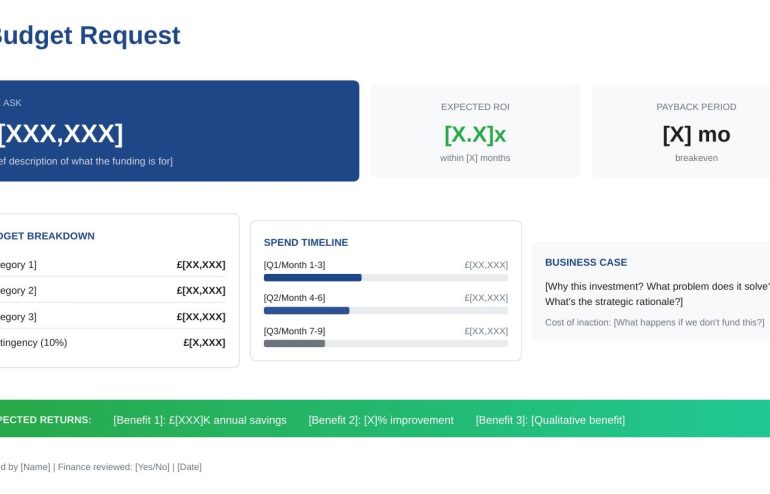
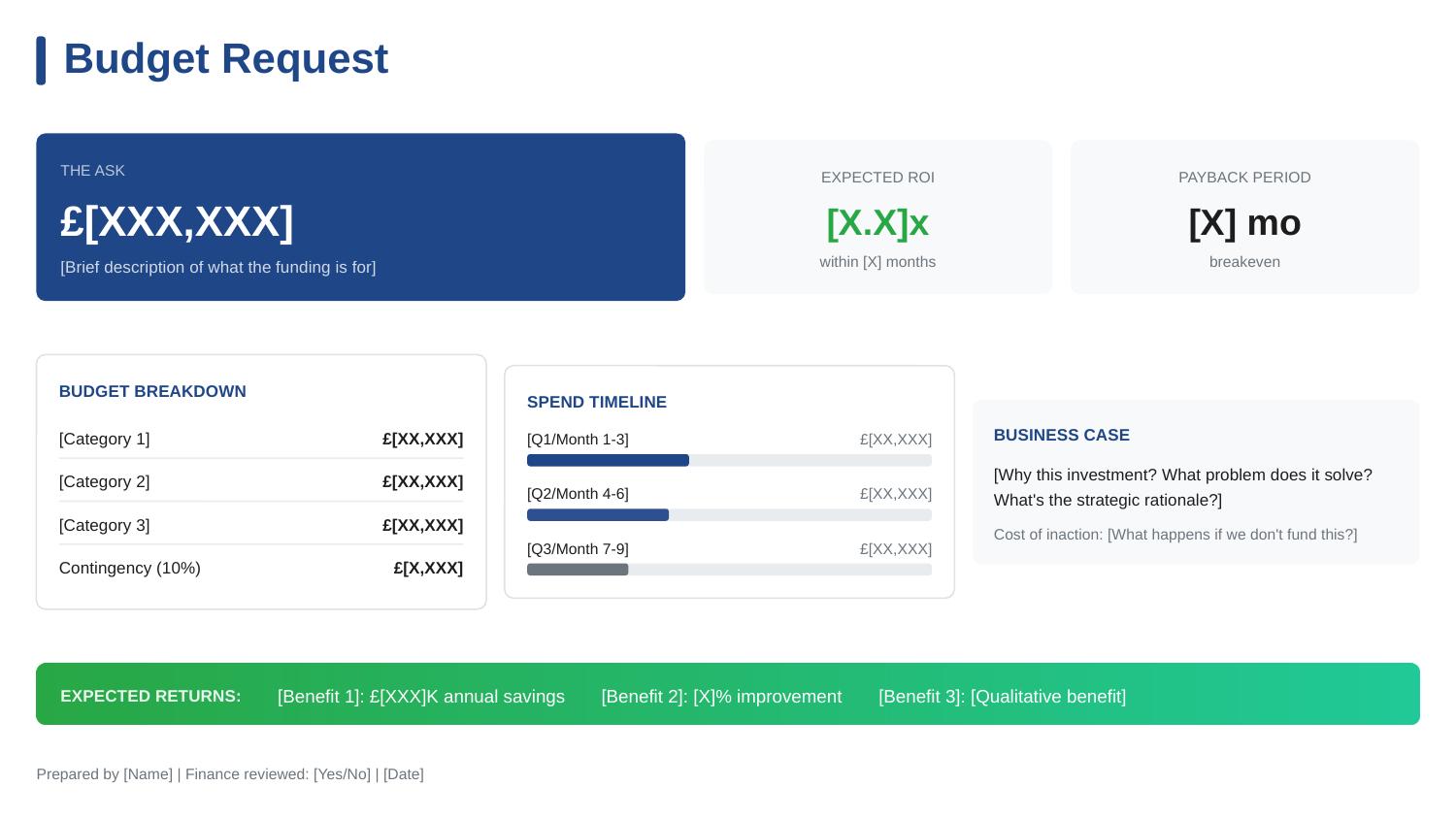
Budget request slide template - executive approval structure with ROI, cost breakdown, and payback timeline

How I Helped a Client Get a £2m Budget Approved (The Slide That Did It)

A single budget presentation slide secured £2M in funding for my client — in one 20-minute meeting.

No follow-up meetings. No “let me think about it.” No death by committee. The CFO reviewed the budget presentation, asked three questions, and approved on the spot.

This wasn’t luck. After 24 years in corporate banking at JPMorgan Chase, PwC, Royal Bank of Scotland, and Commerzbank, I’ve seen hundreds of budget presentations. Most fail — not because the request is unreasonable, but because the budget presentation makes it hard to say yes.

Here’s exactly how we structured the budget presentation that worked, and why most budget requests get stuck in approval limbo.

Budget request slide template - executive approval structure with ROI, cost breakdown, and payback timeline

The budget presentation structure that secured £2M approval

Why Most Budget Presentations Fail to Get Approved

Before I show you what worked, let me explain what doesn’t — because I see these mistakes in almost every budget presentation I review.

Mistake 1: Leading with the problem instead of the ask.

Most budget presentations spend 10 slides building up to the request. By the time the actual number appears, the executive has lost patience or checked out entirely. Your budget presentation should state the ask in the first 30 seconds.

Mistake 2: Hiding the total cost.

Some presenters break costs across multiple slides in their budget presentation, hoping the piecemeal approach makes the total less scary. It doesn’t. It makes executives suspicious. Your budget presentation needs one clear number, prominently displayed.

Mistake 3: Missing the “do nothing” cost.

Executives don’t just evaluate whether your budget presentation request is worth funding — they evaluate whether it’s worth funding compared to doing nothing. If your budget presentation doesn’t show what happens if they say no, you’ve made their decision easy: defer.

Mistake 4: No clear payback timeline.

CFOs think in terms of ROI and payback periods. A budget presentation that says “this will improve efficiency” without quantifying when and how much is asking for faith, not approval.

The Budget Presentation Structure That Got Approved

My client needed £2M for a platform modernisation project. She’d been trying to get this approved for 18 months. Previous budget presentations had been deferred three times.

Here’s what we changed in her budget presentation:

Budget Presentation Element 1: The Ask — Front and Centre

The budget presentation opened with one line:

“I’m requesting £2M for platform modernisation, with full payback in 8 months.”

That’s it. No preamble, no context-setting, no “as you may recall from previous discussions.” The CFO knew exactly what he was evaluating before she said another word.

Most budget presentations bury this on slide 8. We put it in the first sentence of her budget presentation.

Budget Presentation Element 2: The Cost of Inaction

Immediately after the ask, the budget presentation showed what happens if they don’t approve:

Cost of Doing Nothing:

  • 3 system failures per quarter at £200K each = £2.4M annual risk
  • Compliance audit finding in Q3 requires remediation by Q1 — estimated 3x cost if reactive
  • Two key engineers have cited system frustration in exit interviews

This reframed the budget presentation entirely. She wasn’t asking for £2M. She was offering to prevent £2.4M+ in annual losses. Saying no suddenly had a price tag.

Budget Presentation Element 3: The ROI Summary

The budget presentation included a simple ROI calculation — not buried in an appendix, but on the main slide:

Investment Year 1 Savings Payback
£2M £3.1M 8 months

The CFO didn’t need to do mental maths. The budget presentation did it for him. Eight-month payback is exceptional — and stating it plainly made approval easy.

Budget Presentation Element 4: The Breakdown

The budget presentation showed exactly where the money goes:

  • Platform licensing: £800K (40%)
  • Implementation partner: £600K (30%)
  • Internal resources: £400K (20%)
  • Contingency: £200K (10%)

Notice the contingency line. Most budget presentations try to appear precise by excluding contingency. Experienced CFOs know this is unrealistic. Including 10% contingency in the budget presentation actually increased credibility — it showed she understood projects don’t go perfectly.

Want the exact budget presentation template from this story?

The Budget Request template is one of 10 executive presentations in The Executive Slide System, with the budget presentation structure already built in. Just fill in your numbers.

Budget Presentation Element 5: The Decision Required

The budget presentation ended with an explicit ask:

“I’m requesting approval to proceed with vendor selection this week. The implementation timeline requires a decision by Friday to meet our Q1 compliance deadline.”

This created appropriate urgency without being pushy. The budget presentation connected the ask to an external deadline (compliance), not an internal preference. The CFO couldn’t defer without accepting compliance risk.

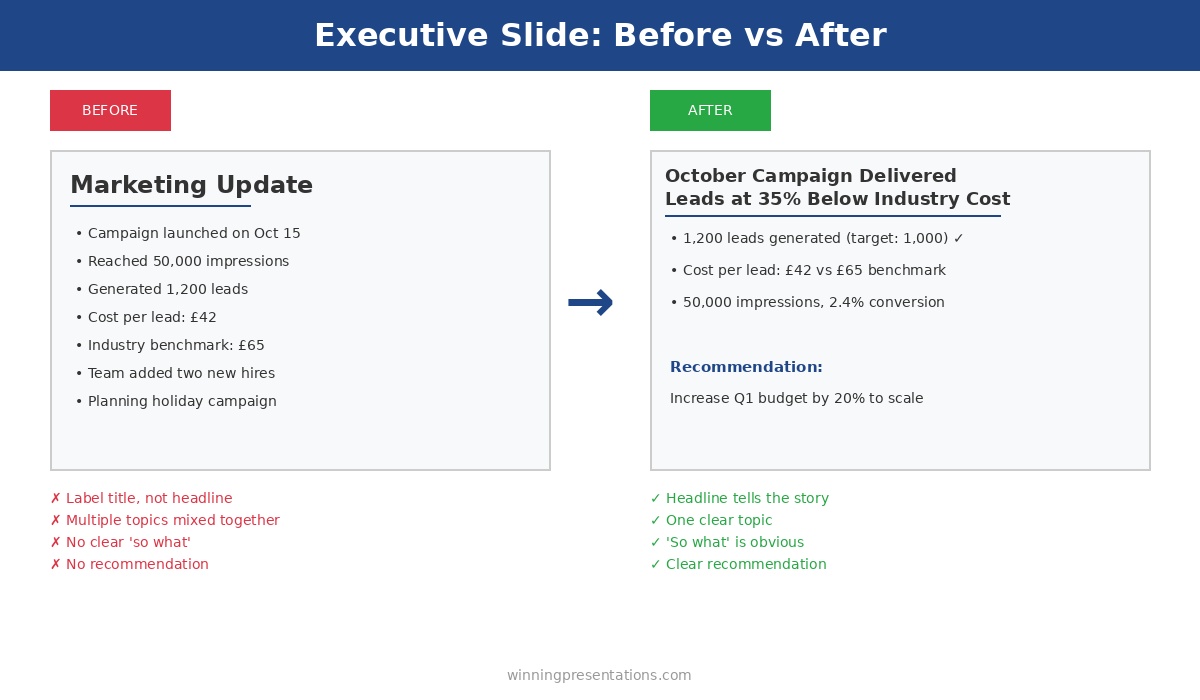
Executive slide before and after example - transforming a weak marketing update into a clear headline with recommendation

Most budget presentations bury the ask and miss the cost of inaction — the structure makes the difference

The Three Questions the CFO Asked About the Budget Presentation

After reviewing the budget presentation, the CFO asked exactly three questions:

Question 1: “What’s the confidence level on the £3.1M savings?”

She was ready for this. “Conservative estimate based on eliminating current incident costs only. Doesn’t include productivity gains or reduced technical debt — those would add another £500K-800K annually.”

Question 2: “Why 10% contingency?”

“Industry standard for projects of this complexity. If we don’t use it, it returns to the budget. But I’d rather ask for it now than come back in Q3 asking for more.”

Question 3: “Who’s the implementation partner?”

“We’ve shortlisted three. I’ll bring the recommendation to you next week — but I need budget presentation approval to proceed with final negotiations.”

Three questions. Twenty minutes total. Budget presentation approved.

The Budget Presentation Framework That Works Every Time

Here’s the framework for any budget presentation, based on what I’ve seen work across hundreds of requests:

Budget Presentation Framework

  1. The Ask: Total amount requested — first sentence of your budget presentation
  2. The ROI: Expected return with specific payback timeline
  3. The Cost of Inaction: What happens if they say no — make this concrete
  4. The Breakdown: Where the money goes — include contingency
  5. The Timeline: Key milestones and when returns materialise
  6. The Decision: Exactly what approval you need and by when

Every element of this budget presentation framework serves the same purpose: making it easy for the approver to say yes. A budget presentation isn’t about impressing people with analysis — it’s about removing obstacles to approval.

Building a budget presentation this quarter?

The Executive Slide System includes the Budget Request template with this exact budget presentation structure, plus AI prompts that help you calculate and present ROI clearly. Clients have used these frameworks to secure over £250 million in approved funding.

Common Budget Presentation Mistakes to Avoid

Don’t split the request across meetings. “Phase 1 is £500K, we’ll discuss Phase 2 later” invites approval for Phase 1 and indefinite deferral of everything else. If you need £2M, ask for £2M in one budget presentation.

Don’t undersell contingency. Asking for the bare minimum in your budget presentation signals either inexperience or sandbagging. Include 10-15% contingency and explain why.

Don’t assume they remember previous conversations. Your budget presentation should stand alone. Include all context needed to decide — don’t rely on “as we discussed.”

Don’t hide risks. If there’s implementation risk or dependency on other projects, address it in your budget presentation. Finding out later destroys trust.

FAQs About Budget Presentations

How long should a budget presentation be?

One slide for budget presentation requests under £500K. Two to three slides for larger requests. If your budget presentation is longer than 5 slides, you’re including too much detail — move supporting analysis to an appendix.

Should I present multiple options in a budget presentation?

Only if the options represent genuinely different approaches in your budget presentation. “Option A: £2M for full scope, Option B: £1M for reduced scope” can work. “Option A: £2M, Option B: £1.8M, Option C: £2.2M” just creates confusion.

What if my budget presentation gets deferred?

Ask specifically what’s needed to approve your budget presentation. “What additional information would help you decide?” is better than accepting “we need to think about it.” Get concrete next steps before leaving the room.

How do I present a budget presentation when ROI is hard to quantify?

Focus on risk reduction and cost avoidance in your budget presentation. “This prevents £X in potential losses” is often more compelling than “this generates £X in new revenue.” Executives understand downside protection.

Your Next Budget Presentation

You probably have a budget presentation coming up — next quarter if not sooner. Before you build another slide, apply this framework:

  • State the total ask in the first sentence of your budget presentation
  • Show the cost of doing nothing
  • Include a clear ROI with payback timeline
  • Break down where the money goes (with contingency)
  • End with the specific decision you need

This budget presentation structure won’t guarantee approval — bad ideas still fail. But it will ensure that good ideas don’t fail because of poor budget presentation structure.

My client’s £2M request had been deferred three times over 18 months. Same project, same numbers, same business case. The only thing that changed was how the budget presentation was structured.

Twenty minutes later, she had approval.

The Executive Slide System complete package - 10 PowerPoint templates, 30 AI prompts, and quick start guide for executive presentations

Get the Budget Presentation Template

The exact budget presentation structure from this story is built into The Executive Slide System — ready to fill in with your numbers. Plus 9 more executive presentation templates and 30 AI prompts.

Clients have used these budget presentation frameworks to secure over £250 million in approved funding.

GET INSTANT ACCESS → £39

10 templates • 30 AI prompts • Instant download • 30-day guarantee


Related: How to Create Executive Presentations That Get Approved in 2025 — the complete guide covering all 10 executive presentation types, including the budget presentation structure.